

Class v1.ChatServiceClient (0.22.0)
Enables developers to build Chat apps and integrations on Google Chat Platform. v1
Package
@google-apps/chatConstructors
(constructor)(opts, gaxInstance)
constructor(opts?:ClientOptions,gaxInstance?:typeofgax|typeofgax.fallback);Construct an instance of ChatServiceClient.
| Parameters | |
|---|---|
| Name | Description |
opts | ClientOptions |
gaxInstance | typeofgax | typeoffallback: loaded instance of |
Properties
apiEndpoint
getapiEndpoint():string;The DNS address for this API service.
apiEndpoint
staticgetapiEndpoint():string;The DNS address for this API service - same as servicePath.
auth
auth:gax.GoogleAuth;chatServiceStub
chatServiceStub?:Promise<{[name:string]:Function;}>;descriptors
descriptors:Descriptors;innerApiCalls
innerApiCalls:{[name:string]:Function;};pathTemplates
pathTemplates:{[name:string]:gax.PathTemplate;};port
staticgetport():number;The port for this API service.
scopes
staticgetscopes():string[];The scopes needed to make gRPC calls for every method defined in this service.
servicePath
staticgetservicePath():string;The DNS address for this API service.
universeDomain
getuniverseDomain():string;warn
warn:(code:string,message:string,warnType?:string)=>void;Methods
attachmentPath(space, message, attachment)
attachmentPath(space:string,message:string,attachment:string):string;Return a fully-qualified attachment resource name string.
| Parameters | |
|---|---|
| Name | Description |
space | string |
message | string |
attachment | string |
| Returns | |
|---|---|
| Type | Description |
string | {string} Resource name string. |
close()
close():Promise<void>;Terminate the gRPC channel and close the client.
The client will no longer be usable and all future behavior is undefined.
| Returns | |
|---|---|
| Type | Description |
Promise<void> | {Promise} A promise that resolves when the client is closed. |
completeImportSpace(request, options)
completeImportSpace(request?:protos.google.chat.v1.ICompleteImportSpaceRequest,options?:CallOptions):Promise<[protos.google.chat.v1.ICompleteImportSpaceResponse,protos.google.chat.v1.ICompleteImportSpaceRequest|undefined,{}|undefined]>;Completes the [import process](https://developers.google.com/workspace/chat/import-data) for the specified space and makes it visible to users.
Requires [user authentication](https://developers.google.com/workspace/chat/authenticate-authorize-chat-user) and domain-wide delegation with the [authorization scope](https://developers.google.com/workspace/chat/authenticate-authorize#chat-api-scopes):
https://www.googleapis.com/auth/chat.import
For more information, see [Authorize Google Chat apps to import data](https://developers.google.com/workspace/chat/authorize-import).
| Parameters | |
|---|---|
| Name | Description |
request | ICompleteImportSpaceRequestThe request object that will be sent. |
options | CallOptionsCall options. SeeCallOptions for more details. |
| Returns | |
|---|---|
| Type | Description |
Promise<[protos.google.chat.v1.ICompleteImportSpaceResponse,protos.google.chat.v1.ICompleteImportSpaceRequest | undefined, {} | undefined ]> | {Promise} - The promise which resolves to an array. The first element of the array is an object representingCompleteImportSpaceResponse. Please see thedocumentation for more details and examples. |
/** * This snippet has been automatically generated and should be regarded as a code template only. * It will require modifications to work. * It may require correct/in-range values for request initialization. * TODO(developer): Uncomment these variables before running the sample. *//** * Required. Resource name of the import mode space. * Format: `spaces/{space}` */// const name = 'abc123'// Imports the Chat libraryconst{ChatServiceClient}=require('@google-apps/chat').v1;// Instantiates a clientconstchatClient=newChatServiceClient();asyncfunctioncallCompleteImportSpace(){// Construct requestconstrequest={name,};// Run requestconstresponse=awaitchatClient.completeImportSpace(request);console.log(response);}callCompleteImportSpace();completeImportSpace(request, options, callback)
completeImportSpace(request:protos.google.chat.v1.ICompleteImportSpaceRequest,options:CallOptions,callback:Callback<protos.google.chat.v1.ICompleteImportSpaceResponse,protos.google.chat.v1.ICompleteImportSpaceRequest|null|undefined,{}|null|undefined>):void;| Parameters | |
|---|---|
| Name | Description |
request | ICompleteImportSpaceRequest |
options | CallOptions |
callback | Callback<protos.google.chat.v1.ICompleteImportSpaceResponse,protos.google.chat.v1.ICompleteImportSpaceRequest | null | undefined, {} | null | undefined> |
| Returns | |
|---|---|
| Type | Description |
void | |
completeImportSpace(request, callback)
completeImportSpace(request:protos.google.chat.v1.ICompleteImportSpaceRequest,callback:Callback<protos.google.chat.v1.ICompleteImportSpaceResponse,protos.google.chat.v1.ICompleteImportSpaceRequest|null|undefined,{}|null|undefined>):void;| Parameters | |
|---|---|
| Name | Description |
request | ICompleteImportSpaceRequest |
callback | Callback<protos.google.chat.v1.ICompleteImportSpaceResponse,protos.google.chat.v1.ICompleteImportSpaceRequest | null | undefined, {} | null | undefined> |
| Returns | |
|---|---|
| Type | Description |
void | |
createCustomEmoji(request, options)
createCustomEmoji(request?:protos.google.chat.v1.ICreateCustomEmojiRequest,options?:CallOptions):Promise<[protos.google.chat.v1.ICustomEmoji,protos.google.chat.v1.ICreateCustomEmojiRequest|undefined,{}|undefined]>;Creates a custom emoji.
Custom emojis are only available for Google Workspace accounts, and the administrator must turn custom emojis on for the organization. For more information, see [Learn about custom emojis in Google Chat](https://support.google.com/chat/answer/12800149) and [Manage custom emoji permissions](https://support.google.com/a/answer/12850085).
Requires [user authentication](https://developers.google.com/workspace/chat/authenticate-authorize-chat-user) with the [authorization scope](https://developers.google.com/workspace/chat/authenticate-authorize#chat-api-scopes):
https://www.googleapis.com/auth/chat.customemojis
| Parameters | |
|---|---|
| Name | Description |
request | ICreateCustomEmojiRequestThe request object that will be sent. |
options | CallOptionsCall options. SeeCallOptions for more details. |
| Returns | |
|---|---|
| Type | Description |
Promise<[protos.google.chat.v1.ICustomEmoji,protos.google.chat.v1.ICreateCustomEmojiRequest | undefined, {} | undefined ]> | {Promise} - The promise which resolves to an array. The first element of the array is an object representing . Please see thedocumentation for more details and examples. |
/** * This snippet has been automatically generated and should be regarded as a code template only. * It will require modifications to work. * It may require correct/in-range values for request initialization. * TODO(developer): Uncomment these variables before running the sample. *//** * Required. The custom emoji to create. */// const customEmoji = {}// Imports the Chat libraryconst{ChatServiceClient}=require('@google-apps/chat').v1;// Instantiates a clientconstchatClient=newChatServiceClient();asyncfunctioncallCreateCustomEmoji(){// Construct requestconstrequest={customEmoji,};// Run requestconstresponse=awaitchatClient.createCustomEmoji(request);console.log(response);}callCreateCustomEmoji();createCustomEmoji(request, options, callback)
createCustomEmoji(request:protos.google.chat.v1.ICreateCustomEmojiRequest,options:CallOptions,callback:Callback<protos.google.chat.v1.ICustomEmoji,protos.google.chat.v1.ICreateCustomEmojiRequest|null|undefined,{}|null|undefined>):void;| Parameters | |
|---|---|
| Name | Description |
request | ICreateCustomEmojiRequest |
options | CallOptions |
callback | Callback<protos.google.chat.v1.ICustomEmoji,protos.google.chat.v1.ICreateCustomEmojiRequest | null | undefined, {} | null | undefined> |
| Returns | |
|---|---|
| Type | Description |
void | |
createCustomEmoji(request, callback)
createCustomEmoji(request:protos.google.chat.v1.ICreateCustomEmojiRequest,callback:Callback<protos.google.chat.v1.ICustomEmoji,protos.google.chat.v1.ICreateCustomEmojiRequest|null|undefined,{}|null|undefined>):void;| Parameters | |
|---|---|
| Name | Description |
request | ICreateCustomEmojiRequest |
callback | Callback<protos.google.chat.v1.ICustomEmoji,protos.google.chat.v1.ICreateCustomEmojiRequest | null | undefined, {} | null | undefined> |
| Returns | |
|---|---|
| Type | Description |
void | |
createMembership(request, options)
createMembership(request?:protos.google.chat.v1.ICreateMembershipRequest,options?:CallOptions):Promise<[protos.google.chat.v1.IMembership,protos.google.chat.v1.ICreateMembershipRequest|undefined,{}|undefined]>;Creates a membership for the calling Chat app, a user, or a Google Group. Creating memberships for other Chat apps isn't supported. When creating a membership, if the specified member has their auto-accept policy turned off, then they're invited, and must accept the space invitation before joining. Otherwise, creating a membership adds the member directly to the specified space.
Supports the following types of [authentication](https://developers.google.com/workspace/chat/authenticate-authorize):
[App authentication](https://developers.google.com/workspace/chat/authenticate-authorize-chat-app) with [administrator approval](https://support.google.com/a?p=chat-app-auth) and the authorization scope: -
https://www.googleapis.com/auth/chat.app.memberships[User authentication](https://developers.google.com/workspace/chat/authenticate-authorize-chat-user) with one of the following authorization scopes: -
https://www.googleapis.com/auth/chat.memberships-https://www.googleapis.com/auth/chat.memberships.app(to add the calling app to the space) -https://www.googleapis.com/auth/chat.import(import mode spaces only) - User authentication grants administrator privileges when an administrator account authenticates,use_admin_accessistrue, and the following authorization scope is used: -https://www.googleapis.com/auth/chat.admin.memberships
App authentication is not supported for the following use cases:
- Inviting users external to the Workspace organization that owns the space. - Adding a Google Group to a space. - Adding a Chat app to a space.
For example usage, see:
- [Invite or add a user to a space](https://developers.google.com/workspace/chat/create-members#create-user-membership). - [Invite or add a Google Group to a space](https://developers.google.com/workspace/chat/create-members#create-group-membership). - [Add the Chat app to a space](https://developers.google.com/workspace/chat/create-members#create-membership-calling-api).
| Parameters | |
|---|---|
| Name | Description |
request | ICreateMembershipRequestThe request object that will be sent. |
options | CallOptionsCall options. SeeCallOptions for more details. |
| Returns | |
|---|---|
| Type | Description |
Promise<[protos.google.chat.v1.IMembership,protos.google.chat.v1.ICreateMembershipRequest | undefined, {} | undefined ]> | {Promise} - The promise which resolves to an array. The first element of the array is an object representing . Please see thedocumentation for more details and examples. |
/** * This snippet has been automatically generated and should be regarded as a code template only. * It will require modifications to work. * It may require correct/in-range values for request initialization. * TODO(developer): Uncomment these variables before running the sample. *//** * Required. The resource name of the space for which to create the * membership. * Format: spaces/{space} */// const parent = 'abc123'/** * Required. The membership relation to create. * The `memberType` field must contain a user with the `user.name` and * `user.type` fields populated. The server will assign a resource name * and overwrite anything specified. * When a Chat app creates a membership relation for a human user, it must use * certain authorization scopes and set specific values for certain fields: * - When authenticating as a * user (https://developers.google.com/workspace/chat/authenticate-authorize-chat-user), * the `chat.memberships` authorization scope is required. * - When authenticating as an * app (https://developers.google.com/workspace/chat/authenticate-authorize-chat-app), * the `chat.app.memberships` authorization scope is required. * - Set `user.type` to `HUMAN`, and set `user.name` with format * `users/{user}`, where `{user}` can be the email address for the user. For * users in the same Workspace organization `{user}` can also be the `id` of * the person (https://developers.google.com/people/api/rest/v1/people) from * the People API, or the `id` for the user in the Directory API. For example, * if the People API Person profile ID for `user@example.com` is `123456789`, * you can add the user to the space by setting the `membership.member.name` * to `users/user@example.com` or `users/123456789`. * Inviting users external to the Workspace organization that owns the space * requires user * authentication (https://developers.google.com/workspace/chat/authenticate-authorize-chat-user). * When a Chat app creates a membership relation for itself, it must * authenticate as a * user (https://developers.google.com/workspace/chat/authenticate-authorize-chat-user) * and use the `chat.memberships.app` scope, set `user.type` to `BOT`, and set * `user.name` to `users/app`. */// const membership = {}/** * Optional. When `true`, the method runs using the user's Google Workspace * administrator privileges. * The calling user must be a Google Workspace administrator with the * manage chat and spaces conversations * privilege (https://support.google.com/a/answer/13369245). * Requires the `chat.admin.memberships` OAuth 2.0 * scope (https://developers.google.com/workspace/chat/authenticate-authorize#chat-api-scopes). * Creating app memberships or creating memberships for users outside the * administrator's Google Workspace organization isn't supported using admin * access. */// const useAdminAccess = true// Imports the Chat libraryconst{ChatServiceClient}=require('@google-apps/chat').v1;// Instantiates a clientconstchatClient=newChatServiceClient();asyncfunctioncallCreateMembership(){// Construct requestconstrequest={parent,membership,};// Run requestconstresponse=awaitchatClient.createMembership(request);console.log(response);}callCreateMembership();createMembership(request, options, callback)
createMembership(request:protos.google.chat.v1.ICreateMembershipRequest,options:CallOptions,callback:Callback<protos.google.chat.v1.IMembership,protos.google.chat.v1.ICreateMembershipRequest|null|undefined,{}|null|undefined>):void;| Parameters | |
|---|---|
| Name | Description |
request | ICreateMembershipRequest |
options | CallOptions |
callback | Callback<protos.google.chat.v1.IMembership,protos.google.chat.v1.ICreateMembershipRequest | null | undefined, {} | null | undefined> |
| Returns | |
|---|---|
| Type | Description |
void | |
createMembership(request, callback)
createMembership(request:protos.google.chat.v1.ICreateMembershipRequest,callback:Callback<protos.google.chat.v1.IMembership,protos.google.chat.v1.ICreateMembershipRequest|null|undefined,{}|null|undefined>):void;| Parameters | |
|---|---|
| Name | Description |
request | ICreateMembershipRequest |
callback | Callback<protos.google.chat.v1.IMembership,protos.google.chat.v1.ICreateMembershipRequest | null | undefined, {} | null | undefined> |
| Returns | |
|---|---|
| Type | Description |
void | |
createMessage(request, options)
createMessage(request?:protos.google.chat.v1.ICreateMessageRequest,options?:CallOptions):Promise<[protos.google.chat.v1.IMessage,protos.google.chat.v1.ICreateMessageRequest|undefined,{}|undefined]>;Creates a message in a Google Chat space. For an example, see [Send a message](https://developers.google.com/workspace/chat/create-messages).
Supports the following types of [authentication](https://developers.google.com/workspace/chat/authenticate-authorize):
- [App authentication](https://developers.google.com/workspace/chat/authenticate-authorize-chat-app) with the authorization scope: -
https://www.googleapis.com/auth/chat.bot- [User authentication](https://developers.google.com/workspace/chat/authenticate-authorize-chat-user) with one of the following authorization scopes: -https://www.googleapis.com/auth/chat.messages.create-https://www.googleapis.com/auth/chat.messages-https://www.googleapis.com/auth/chat.import(import mode spaces only)
Chat attributes the message sender differently depending on the type of authentication that you use in your request.
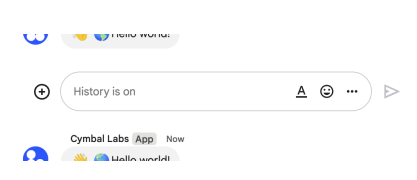
The following image shows how Chat attributes a message when you use app authentication. Chat displays the Chat app as the message sender. The content of the message can contain text (text), cards (cardsV2), and accessory widgets (accessoryWidgets).

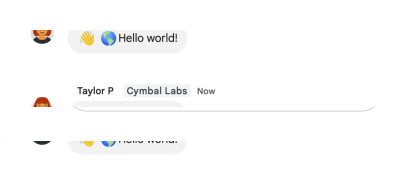
The following image shows how Chat attributes a message when you use user authentication. Chat displays the user as the message sender and attributes the Chat app to the message by displaying its name. The content of message can only contain text (text).

The maximum message size, including the message contents, is 32,000 bytes.
For [webhook](https://developers.google.com/workspace/chat/quickstart/webhooks) requests, the response doesn't contain the full message. The response only populates thename andthread.name fields in addition to the information that was in the request.
| Parameters | |
|---|---|
| Name | Description |
request | ICreateMessageRequestThe request object that will be sent. |
options | CallOptionsCall options. SeeCallOptions for more details. |
| Returns | |
|---|---|
| Type | Description |
Promise<[protos.google.chat.v1.IMessage,protos.google.chat.v1.ICreateMessageRequest | undefined, {} | undefined ]> | {Promise} - The promise which resolves to an array. The first element of the array is an object representingMessage. Please see thedocumentation for more details and examples. |
/** * This snippet has been automatically generated and should be regarded as a code template only. * It will require modifications to work. * It may require correct/in-range values for request initialization. * TODO(developer): Uncomment these variables before running the sample. *//** * Required. The resource name of the space in which to create a message. * Format: `spaces/{space}` */// const parent = 'abc123'/** * Required. Message body. */// const message = {}/** * Optional. A unique request ID for this message. Specifying an existing * request ID returns the message created with that ID instead of creating a * new message. */// const requestId = 'abc123'/** * Optional. Specifies whether a message starts a thread or replies to one. * Only supported in named spaces. * When responding to user * interactions (https://developers.google.com/workspace/chat/receive-respond-interactions), * this field is ignored. For interactions within a thread, the reply is * created in the same thread. Otherwise, the reply is created as a new * thread. */// const messageReplyOption = {}/** * Optional. A custom ID for a message. Lets Chat apps get, update, or delete * a message without needing to store the system-assigned ID in the message's * resource name (represented in the message `name` field). * The value for this field must meet the following requirements: * * Begins with `client-`. For example, `client-custom-name` is a valid * custom ID, but `custom-name` is not. * * Contains up to 63 characters and only lowercase letters, numbers, and * hyphens. * * Is unique within a space. A Chat app can't use the same custom ID for * different messages. * For details, see Name a * message (https://developers.google.com/workspace/chat/create-messages#name_a_created_message). */// const messageId = 'abc123'// Imports the Chat libraryconst{ChatServiceClient}=require('@google-apps/chat').v1;// Instantiates a clientconstchatClient=newChatServiceClient();asyncfunctioncallCreateMessage(){// Construct requestconstrequest={parent,message,};// Run requestconstresponse=awaitchatClient.createMessage(request);console.log(response);}callCreateMessage();createMessage(request, options, callback)
createMessage(request:protos.google.chat.v1.ICreateMessageRequest,options:CallOptions,callback:Callback<protos.google.chat.v1.IMessage,protos.google.chat.v1.ICreateMessageRequest|null|undefined,{}|null|undefined>):void;| Parameters | |
|---|---|
| Name | Description |
request | ICreateMessageRequest |
options | CallOptions |
callback | Callback<protos.google.chat.v1.IMessage,protos.google.chat.v1.ICreateMessageRequest | null | undefined, {} | null | undefined> |
| Returns | |
|---|---|
| Type | Description |
void | |
createMessage(request, callback)
createMessage(request:protos.google.chat.v1.ICreateMessageRequest,callback:Callback<protos.google.chat.v1.IMessage,protos.google.chat.v1.ICreateMessageRequest|null|undefined,{}|null|undefined>):void;| Parameters | |
|---|---|
| Name | Description |
request | ICreateMessageRequest |
callback | Callback<protos.google.chat.v1.IMessage,protos.google.chat.v1.ICreateMessageRequest | null | undefined, {} | null | undefined> |
| Returns | |
|---|---|
| Type | Description |
void | |
createReaction(request, options)
createReaction(request?:protos.google.chat.v1.ICreateReactionRequest,options?:CallOptions):Promise<[protos.google.chat.v1.IReaction,protos.google.chat.v1.ICreateReactionRequest|undefined,{}|undefined]>;Creates a reaction and adds it to a message. For an example, see [Add a reaction to a message](https://developers.google.com/workspace/chat/create-reactions).
Requires [user authentication](https://developers.google.com/workspace/chat/authenticate-authorize-chat-user) with one of the following [authorization scopes](https://developers.google.com/workspace/chat/authenticate-authorize#chat-api-scopes):
https://www.googleapis.com/auth/chat.messages.reactions.create-https://www.googleapis.com/auth/chat.messages.reactions-https://www.googleapis.com/auth/chat.messages-https://www.googleapis.com/auth/chat.import(import mode spaces only)
| Parameters | |
|---|---|
| Name | Description |
request | ICreateReactionRequestThe request object that will be sent. |
options | CallOptionsCall options. SeeCallOptions for more details. |
| Returns | |
|---|---|
| Type | Description |
Promise<[protos.google.chat.v1.IReaction,protos.google.chat.v1.ICreateReactionRequest | undefined, {} | undefined ]> | {Promise} - The promise which resolves to an array. The first element of the array is an object representingReaction. Please see thedocumentation for more details and examples. |
/** * This snippet has been automatically generated and should be regarded as a code template only. * It will require modifications to work. * It may require correct/in-range values for request initialization. * TODO(developer): Uncomment these variables before running the sample. *//** * Required. The message where the reaction is created. * Format: `spaces/{space}/messages/{message}` */// const parent = 'abc123'/** * Required. The reaction to create. */// const reaction = {}// Imports the Chat libraryconst{ChatServiceClient}=require('@google-apps/chat').v1;// Instantiates a clientconstchatClient=newChatServiceClient();asyncfunctioncallCreateReaction(){// Construct requestconstrequest={parent,reaction,};// Run requestconstresponse=awaitchatClient.createReaction(request);console.log(response);}callCreateReaction();createReaction(request, options, callback)
createReaction(request:protos.google.chat.v1.ICreateReactionRequest,options:CallOptions,callback:Callback<protos.google.chat.v1.IReaction,protos.google.chat.v1.ICreateReactionRequest|null|undefined,{}|null|undefined>):void;| Parameters | |
|---|---|
| Name | Description |
request | ICreateReactionRequest |
options | CallOptions |
callback | Callback<protos.google.chat.v1.IReaction,protos.google.chat.v1.ICreateReactionRequest | null | undefined, {} | null | undefined> |
| Returns | |
|---|---|
| Type | Description |
void | |
createReaction(request, callback)
createReaction(request:protos.google.chat.v1.ICreateReactionRequest,callback:Callback<protos.google.chat.v1.IReaction,protos.google.chat.v1.ICreateReactionRequest|null|undefined,{}|null|undefined>):void;| Parameters | |
|---|---|
| Name | Description |
request | ICreateReactionRequest |
callback | Callback<protos.google.chat.v1.IReaction,protos.google.chat.v1.ICreateReactionRequest | null | undefined, {} | null | undefined> |
| Returns | |
|---|---|
| Type | Description |
void | |
createSpace(request, options)
createSpace(request?:protos.google.chat.v1.ICreateSpaceRequest,options?:CallOptions):Promise<[protos.google.chat.v1.ISpace,protos.google.chat.v1.ICreateSpaceRequest|undefined,{}|undefined]>;Creates a space. Can be used to create a named space, or a group chat inImport mode. For an example, see [Create a space](https://developers.google.com/workspace/chat/create-spaces).
Supports the following types of [authentication](https://developers.google.com/workspace/chat/authenticate-authorize):
[App authentication](https://developers.google.com/workspace/chat/authenticate-authorize-chat-app) with [administrator approval](https://support.google.com/a?p=chat-app-auth) and one of the following authorization scopes: -
https://www.googleapis.com/auth/chat.app.spaces.create-https://www.googleapis.com/auth/chat.app.spaces[User authentication](https://developers.google.com/workspace/chat/authenticate-authorize-chat-user) with one of the following authorization scopes: -
https://www.googleapis.com/auth/chat.spaces.create-https://www.googleapis.com/auth/chat.spaces-https://www.googleapis.com/auth/chat.import(import mode spaces only)
When authenticating as an app, thespace.customer field must be set in the request.
When authenticating as an app, the Chat app is added as a member of the space. However, unlike human authentication, the Chat app is not added as a space manager. By default, the Chat app can be removed from the space by all space members. To allow only space managers to remove the app from a space, setspace.permission_settings.manage_apps tomanagers_allowed.
Space membership upon creation depends on whether the space is created inImport mode:
* **Import mode:** No members are created. * **All other modes:** The calling user is added as a member. This is: * The app itself when using app authentication. * The human user when using user authentication.
If you receive the error messageALREADY_EXISTS when creating a space, try a differentdisplayName. An existing space within the Google Workspace organization might already use this display name.
| Parameters | |
|---|---|
| Name | Description |
request | ICreateSpaceRequestThe request object that will be sent. |
options | CallOptionsCall options. SeeCallOptions for more details. |
| Returns | |
|---|---|
| Type | Description |
Promise<[protos.google.chat.v1.ISpace,protos.google.chat.v1.ICreateSpaceRequest | undefined, {} | undefined ]> | {Promise} - The promise which resolves to an array. The first element of the array is an object representing . Please see thedocumentation for more details and examples. |
/** * This snippet has been automatically generated and should be regarded as a code template only. * It will require modifications to work. * It may require correct/in-range values for request initialization. * TODO(developer): Uncomment these variables before running the sample. *//** * Required. The `displayName` and `spaceType` fields must be populated. Only * `SpaceType.SPACE` and `SpaceType.GROUP_CHAT` are supported. * `SpaceType.GROUP_CHAT` can only be used if `importMode` is set to true. * If you receive the error message `ALREADY_EXISTS`, * try a different `displayName`. An existing space within the Google * Workspace organization might already use this display name. * The space `name` is assigned on the server so anything specified in this * field will be ignored. */// const space = {}/** * Optional. A unique identifier for this request. * A random UUID is recommended. * Specifying an existing request ID returns the space created with that ID * instead of creating a new space. * Specifying an existing request ID from the same Chat app with a different * authenticated user returns an error. */// const requestId = 'abc123'// Imports the Chat libraryconst{ChatServiceClient}=require('@google-apps/chat').v1;// Instantiates a clientconstchatClient=newChatServiceClient();asyncfunctioncallCreateSpace(){// Construct requestconstrequest={space,};// Run requestconstresponse=awaitchatClient.createSpace(request);console.log(response);}callCreateSpace();createSpace(request, options, callback)
createSpace(request:protos.google.chat.v1.ICreateSpaceRequest,options:CallOptions,callback:Callback<protos.google.chat.v1.ISpace,protos.google.chat.v1.ICreateSpaceRequest|null|undefined,{}|null|undefined>):void;| Parameters | |
|---|---|
| Name | Description |
request | ICreateSpaceRequest |
options | CallOptions |
callback | Callback<protos.google.chat.v1.ISpace,protos.google.chat.v1.ICreateSpaceRequest | null | undefined, {} | null | undefined> |
| Returns | |
|---|---|
| Type | Description |
void | |
createSpace(request, callback)
createSpace(request:protos.google.chat.v1.ICreateSpaceRequest,callback:Callback<protos.google.chat.v1.ISpace,protos.google.chat.v1.ICreateSpaceRequest|null|undefined,{}|null|undefined>):void;| Parameters | |
|---|---|
| Name | Description |
request | ICreateSpaceRequest |
callback | Callback<protos.google.chat.v1.ISpace,protos.google.chat.v1.ICreateSpaceRequest | null | undefined, {} | null | undefined> |
| Returns | |
|---|---|
| Type | Description |
void | |
customEmojiPath(customEmoji)
customEmojiPath(customEmoji:string):string;Return a fully-qualified customEmoji resource name string.
| Parameter | |
|---|---|
| Name | Description |
customEmoji | string |
| Returns | |
|---|---|
| Type | Description |
string | {string} Resource name string. |
deleteCustomEmoji(request, options)
deleteCustomEmoji(request?:protos.google.chat.v1.IDeleteCustomEmojiRequest,options?:CallOptions):Promise<[protos.google.protobuf.IEmpty,protos.google.chat.v1.IDeleteCustomEmojiRequest|undefined,{}|undefined]>;Deletes a custom emoji. By default, users can only delete custom emoji they created. [Emoji managers](https://support.google.com/a/answer/12850085) assigned by the administrator can delete any custom emoji in the organization. See [Learn about custom emojis in Google Chat](https://support.google.com/chat/answer/12800149).
Custom emojis are only available for Google Workspace accounts, and the administrator must turn custom emojis on for the organization. For more information, see [Learn about custom emojis in Google Chat](https://support.google.com/chat/answer/12800149) and [Manage custom emoji permissions](https://support.google.com/a/answer/12850085).
Requires [user authentication](https://developers.google.com/workspace/chat/authenticate-authorize-chat-user) with the [authorization scope](https://developers.google.com/workspace/chat/authenticate-authorize#chat-api-scopes):
https://www.googleapis.com/auth/chat.customemojis
| Parameters | |
|---|---|
| Name | Description |
request | IDeleteCustomEmojiRequestThe request object that will be sent. |
options | CallOptionsCall options. SeeCallOptions for more details. |
| Returns | |
|---|---|
| Type | Description |
Promise<[protos.google.protobuf.IEmpty,protos.google.chat.v1.IDeleteCustomEmojiRequest | undefined, {} | undefined ]> | {Promise} - The promise which resolves to an array. The first element of the array is an object representingEmpty. Please see thedocumentation for more details and examples. |
/** * This snippet has been automatically generated and should be regarded as a code template only. * It will require modifications to work. * It may require correct/in-range values for request initialization. * TODO(developer): Uncomment these variables before running the sample. *//** * Required. Resource name of the custom emoji to delete. * Format: `customEmojis/{customEmoji}` * You can use the emoji name as an alias for `{customEmoji}`. For example, * `customEmojis/:example-emoji:` where `:example-emoji:` is the emoji name * for a custom emoji. */// const name = 'abc123'// Imports the Chat libraryconst{ChatServiceClient}=require('@google-apps/chat').v1;// Instantiates a clientconstchatClient=newChatServiceClient();asyncfunctioncallDeleteCustomEmoji(){// Construct requestconstrequest={name,};// Run requestconstresponse=awaitchatClient.deleteCustomEmoji(request);console.log(response);}callDeleteCustomEmoji();deleteCustomEmoji(request, options, callback)
deleteCustomEmoji(request:protos.google.chat.v1.IDeleteCustomEmojiRequest,options:CallOptions,callback:Callback<protos.google.protobuf.IEmpty,protos.google.chat.v1.IDeleteCustomEmojiRequest|null|undefined,{}|null|undefined>):void;| Parameters | |
|---|---|
| Name | Description |
request | IDeleteCustomEmojiRequest |
options | CallOptions |
callback | Callback<protos.google.protobuf.IEmpty,protos.google.chat.v1.IDeleteCustomEmojiRequest | null | undefined, {} | null | undefined> |
| Returns | |
|---|---|
| Type | Description |
void | |
deleteCustomEmoji(request, callback)
deleteCustomEmoji(request:protos.google.chat.v1.IDeleteCustomEmojiRequest,callback:Callback<protos.google.protobuf.IEmpty,protos.google.chat.v1.IDeleteCustomEmojiRequest|null|undefined,{}|null|undefined>):void;| Parameters | |
|---|---|
| Name | Description |
request | IDeleteCustomEmojiRequest |
callback | Callback<protos.google.protobuf.IEmpty,protos.google.chat.v1.IDeleteCustomEmojiRequest | null | undefined, {} | null | undefined> |
| Returns | |
|---|---|
| Type | Description |
void | |
deleteMembership(request, options)
deleteMembership(request?:protos.google.chat.v1.IDeleteMembershipRequest,options?:CallOptions):Promise<[protos.google.chat.v1.IMembership,protos.google.chat.v1.IDeleteMembershipRequest|undefined,{}|undefined]>;Deletes a membership. For an example, see [Remove a user or a Google Chat app from a space](https://developers.google.com/workspace/chat/delete-members).
Supports the following types of [authentication](https://developers.google.com/workspace/chat/authenticate-authorize):
[App authentication](https://developers.google.com/workspace/chat/authenticate-authorize-chat-app) with [administrator approval](https://support.google.com/a?p=chat-app-auth) and the authorization scope: -
https://www.googleapis.com/auth/chat.app.memberships[User authentication](https://developers.google.com/workspace/chat/authenticate-authorize-chat-user) with one of the following authorization scopes: -
https://www.googleapis.com/auth/chat.memberships-https://www.googleapis.com/auth/chat.memberships.app(to remove the calling app from the space) -https://www.googleapis.com/auth/chat.import(import mode spaces only) - User authentication grants administrator privileges when an administrator account authenticates,use_admin_accessistrue, and the following authorization scope is used: -https://www.googleapis.com/auth/chat.admin.memberships
App authentication is not supported for the following use cases:
- Removing a Google Group from a space. - Removing a Chat app from a space.
To delete memberships for space managers, the requester must be a space manager. If you're using [app authentication](https://developers.google.com/workspace/chat/authenticate-authorize-chat-app) the Chat app must be the space creator.
| Parameters | |
|---|---|
| Name | Description |
request | IDeleteMembershipRequestThe request object that will be sent. |
options | CallOptionsCall options. SeeCallOptions for more details. |
| Returns | |
|---|---|
| Type | Description |
Promise<[protos.google.chat.v1.IMembership,protos.google.chat.v1.IDeleteMembershipRequest | undefined, {} | undefined ]> | {Promise} - The promise which resolves to an array. The first element of the array is an object representing . Please see thedocumentation for more details and examples. |
/** * This snippet has been automatically generated and should be regarded as a code template only. * It will require modifications to work. * It may require correct/in-range values for request initialization. * TODO(developer): Uncomment these variables before running the sample. *//** * Required. Resource name of the membership to delete. Chat apps can delete * human users' or their own memberships. Chat apps can't delete other apps' * memberships. * When deleting a human membership, requires the `chat.memberships` scope * with user * authentication (https://developers.google.com/workspace/chat/authenticate-authorize-chat-user) * or the `chat.memberships.app` scope with app * authentication (https://developers.google.com/workspace/chat/authenticate-authorize-chat-app) * and the `spaces/{space}/members/{member}` format. * You can use the email as an alias for `{member}`. For example, * `spaces/{space}/members/example@gmail.com` where `example@gmail.com` is the * email of the Google Chat user. * When deleting an app membership, requires the `chat.memberships.app` scope * and `spaces/{space}/members/app` format. * Format: `spaces/{space}/members/{member}` or `spaces/{space}/members/app`. */// const name = 'abc123'/** * Optional. When `true`, the method runs using the user's Google Workspace * administrator privileges. * The calling user must be a Google Workspace administrator with the * manage chat and spaces conversations * privilege (https://support.google.com/a/answer/13369245). * Requires the `chat.admin.memberships` OAuth 2.0 * scope (https://developers.google.com/workspace/chat/authenticate-authorize#chat-api-scopes). * Deleting app memberships in a space isn't supported using admin access. */// const useAdminAccess = true// Imports the Chat libraryconst{ChatServiceClient}=require('@google-apps/chat').v1;// Instantiates a clientconstchatClient=newChatServiceClient();asyncfunctioncallDeleteMembership(){// Construct requestconstrequest={name,};// Run requestconstresponse=awaitchatClient.deleteMembership(request);console.log(response);}callDeleteMembership();deleteMembership(request, options, callback)
deleteMembership(request:protos.google.chat.v1.IDeleteMembershipRequest,options:CallOptions,callback:Callback<protos.google.chat.v1.IMembership,protos.google.chat.v1.IDeleteMembershipRequest|null|undefined,{}|null|undefined>):void;| Parameters | |
|---|---|
| Name | Description |
request | IDeleteMembershipRequest |
options | CallOptions |
callback | Callback<protos.google.chat.v1.IMembership,protos.google.chat.v1.IDeleteMembershipRequest | null | undefined, {} | null | undefined> |
| Returns | |
|---|---|
| Type | Description |
void | |
deleteMembership(request, callback)
deleteMembership(request:protos.google.chat.v1.IDeleteMembershipRequest,callback:Callback<protos.google.chat.v1.IMembership,protos.google.chat.v1.IDeleteMembershipRequest|null|undefined,{}|null|undefined>):void;| Parameters | |
|---|---|
| Name | Description |
request | IDeleteMembershipRequest |
callback | Callback<protos.google.chat.v1.IMembership,protos.google.chat.v1.IDeleteMembershipRequest | null | undefined, {} | null | undefined> |
| Returns | |
|---|---|
| Type | Description |
void | |
deleteMessage(request, options)
deleteMessage(request?:protos.google.chat.v1.IDeleteMessageRequest,options?:CallOptions):Promise<[protos.google.protobuf.IEmpty,protos.google.chat.v1.IDeleteMessageRequest|undefined,{}|undefined]>;Deletes a message. For an example, see [Delete a message](https://developers.google.com/workspace/chat/delete-messages).
Supports the following types of [authentication](https://developers.google.com/workspace/chat/authenticate-authorize):
[App authentication](https://developers.google.com/workspace/chat/authenticate-authorize-chat-app) with the authorization scope: -
https://www.googleapis.com/auth/chat.bot[User authentication](https://developers.google.com/workspace/chat/authenticate-authorize-chat-user) with one of the following authorization scopes: -
https://www.googleapis.com/auth/chat.messages-https://www.googleapis.com/auth/chat.import(import mode spaces only)
When using app authentication, requests can only delete messages created by the calling Chat app.
| Parameters | |
|---|---|
| Name | Description |
request | IDeleteMessageRequestThe request object that will be sent. |
options | CallOptionsCall options. SeeCallOptions for more details. |
| Returns | |
|---|---|
| Type | Description |
Promise<[protos.google.protobuf.IEmpty,protos.google.chat.v1.IDeleteMessageRequest | undefined, {} | undefined ]> | {Promise} - The promise which resolves to an array. The first element of the array is an object representingEmpty. Please see thedocumentation for more details and examples. |
/** * This snippet has been automatically generated and should be regarded as a code template only. * It will require modifications to work. * It may require correct/in-range values for request initialization. * TODO(developer): Uncomment these variables before running the sample. *//** * Required. Resource name of the message. * Format: `spaces/{space}/messages/{message}` * If you've set a custom ID for your message, you can use the value from the * `clientAssignedMessageId` field for `{message}`. For details, see Name a * message * (https://developers.google.com/workspace/chat/create-messages#name_a_created_message). */// const name = 'abc123'/** * Optional. When `true`, deleting a message also deletes its threaded * replies. When `false`, if a message has threaded replies, deletion fails. * Only applies when authenticating as a * user (https://developers.google.com/workspace/chat/authenticate-authorize-chat-user). * Has no effect when authenticating as a Chat app * (https://developers.google.com/workspace/chat/authenticate-authorize-chat-app). */// const force = true// Imports the Chat libraryconst{ChatServiceClient}=require('@google-apps/chat').v1;// Instantiates a clientconstchatClient=newChatServiceClient();asyncfunctioncallDeleteMessage(){// Construct requestconstrequest={name,};// Run requestconstresponse=awaitchatClient.deleteMessage(request);console.log(response);}callDeleteMessage();deleteMessage(request, options, callback)
deleteMessage(request:protos.google.chat.v1.IDeleteMessageRequest,options:CallOptions,callback:Callback<protos.google.protobuf.IEmpty,protos.google.chat.v1.IDeleteMessageRequest|null|undefined,{}|null|undefined>):void;| Parameters | |
|---|---|
| Name | Description |
request | IDeleteMessageRequest |
options | CallOptions |
callback | Callback<protos.google.protobuf.IEmpty,protos.google.chat.v1.IDeleteMessageRequest | null | undefined, {} | null | undefined> |
| Returns | |
|---|---|
| Type | Description |
void | |
deleteMessage(request, callback)
deleteMessage(request:protos.google.chat.v1.IDeleteMessageRequest,callback:Callback<protos.google.protobuf.IEmpty,protos.google.chat.v1.IDeleteMessageRequest|null|undefined,{}|null|undefined>):void;| Parameters | |
|---|---|
| Name | Description |
request | IDeleteMessageRequest |
callback | Callback<protos.google.protobuf.IEmpty,protos.google.chat.v1.IDeleteMessageRequest | null | undefined, {} | null | undefined> |
| Returns | |
|---|---|
| Type | Description |
void | |
deleteReaction(request, options)
deleteReaction(request?:protos.google.chat.v1.IDeleteReactionRequest,options?:CallOptions):Promise<[protos.google.protobuf.IEmpty,protos.google.chat.v1.IDeleteReactionRequest|undefined,{}|undefined]>;Deletes a reaction to a message. For an example, see [Delete a reaction](https://developers.google.com/workspace/chat/delete-reactions).
Requires [user authentication](https://developers.google.com/workspace/chat/authenticate-authorize-chat-user) with one of the following [authorization scopes](https://developers.google.com/workspace/chat/authenticate-authorize#chat-api-scopes):
https://www.googleapis.com/auth/chat.messages.reactions-https://www.googleapis.com/auth/chat.messages-https://www.googleapis.com/auth/chat.import(import mode spaces only)
| Parameters | |
|---|---|
| Name | Description |
request | IDeleteReactionRequestThe request object that will be sent. |
options | CallOptionsCall options. SeeCallOptions for more details. |
| Returns | |
|---|---|
| Type | Description |
Promise<[protos.google.protobuf.IEmpty,protos.google.chat.v1.IDeleteReactionRequest | undefined, {} | undefined ]> | {Promise} - The promise which resolves to an array. The first element of the array is an object representingEmpty. Please see thedocumentation for more details and examples. |
/** * This snippet has been automatically generated and should be regarded as a code template only. * It will require modifications to work. * It may require correct/in-range values for request initialization. * TODO(developer): Uncomment these variables before running the sample. *//** * Required. Name of the reaction to delete. * Format: `spaces/{space}/messages/{message}/reactions/{reaction}` */// const name = 'abc123'// Imports the Chat libraryconst{ChatServiceClient}=require('@google-apps/chat').v1;// Instantiates a clientconstchatClient=newChatServiceClient();asyncfunctioncallDeleteReaction(){// Construct requestconstrequest={name,};// Run requestconstresponse=awaitchatClient.deleteReaction(request);console.log(response);}callDeleteReaction();deleteReaction(request, options, callback)
deleteReaction(request:protos.google.chat.v1.IDeleteReactionRequest,options:CallOptions,callback:Callback<protos.google.protobuf.IEmpty,protos.google.chat.v1.IDeleteReactionRequest|null|undefined,{}|null|undefined>):void;| Parameters | |
|---|---|
| Name | Description |
request | IDeleteReactionRequest |
options | CallOptions |
callback | Callback<protos.google.protobuf.IEmpty,protos.google.chat.v1.IDeleteReactionRequest | null | undefined, {} | null | undefined> |
| Returns | |
|---|---|
| Type | Description |
void | |
deleteReaction(request, callback)
deleteReaction(request:protos.google.chat.v1.IDeleteReactionRequest,callback:Callback<protos.google.protobuf.IEmpty,protos.google.chat.v1.IDeleteReactionRequest|null|undefined,{}|null|undefined>):void;| Parameters | |
|---|---|
| Name | Description |
request | IDeleteReactionRequest |
callback | Callback<protos.google.protobuf.IEmpty,protos.google.chat.v1.IDeleteReactionRequest | null | undefined, {} | null | undefined> |
| Returns | |
|---|---|
| Type | Description |
void | |
deleteSpace(request, options)
deleteSpace(request?:protos.google.chat.v1.IDeleteSpaceRequest,options?:CallOptions):Promise<[protos.google.protobuf.IEmpty,protos.google.chat.v1.IDeleteSpaceRequest|undefined,{}|undefined]>;Deletes a named space. Always performs a cascading delete, which means that the space's child resources—like messages posted in the space and memberships in the space—are also deleted. For an example, see [Delete a space](https://developers.google.com/workspace/chat/delete-spaces).
Supports the following types of [authentication](https://developers.google.com/workspace/chat/authenticate-authorize):
[App authentication](https://developers.google.com/workspace/chat/authenticate-authorize-chat-app) with [administrator approval](https://support.google.com/a?p=chat-app-auth) and the authorization scope: -
https://www.googleapis.com/auth/chat.app.delete(only in spaces the app created)[User authentication](https://developers.google.com/workspace/chat/authenticate-authorize-chat-user) with one of the following authorization scopes: -
https://www.googleapis.com/auth/chat.delete-https://www.googleapis.com/auth/chat.import(import mode spaces only) - User authentication grants administrator privileges when an administrator account authenticates,use_admin_accessistrue, and the following authorization scope is used: -https://www.googleapis.com/auth/chat.admin.delete
| Parameters | |
|---|---|
| Name | Description |
request | IDeleteSpaceRequestThe request object that will be sent. |
options | CallOptionsCall options. SeeCallOptions for more details. |
| Returns | |
|---|---|
| Type | Description |
Promise<[protos.google.protobuf.IEmpty,protos.google.chat.v1.IDeleteSpaceRequest | undefined, {} | undefined ]> | {Promise} - The promise which resolves to an array. The first element of the array is an object representingEmpty. Please see thedocumentation for more details and examples. |
/** * This snippet has been automatically generated and should be regarded as a code template only. * It will require modifications to work. * It may require correct/in-range values for request initialization. * TODO(developer): Uncomment these variables before running the sample. *//** * Required. Resource name of the space to delete. * Format: `spaces/{space}` */// const name = 'abc123'/** * Optional. When `true`, the method runs using the user's Google Workspace * administrator privileges. * The calling user must be a Google Workspace administrator with the * manage chat and spaces conversations * privilege (https://support.google.com/a/answer/13369245). * Requires the `chat.admin.delete` OAuth 2.0 * scope (https://developers.google.com/workspace/chat/authenticate-authorize#chat-api-scopes). */// const useAdminAccess = true// Imports the Chat libraryconst{ChatServiceClient}=require('@google-apps/chat').v1;// Instantiates a clientconstchatClient=newChatServiceClient();asyncfunctioncallDeleteSpace(){// Construct requestconstrequest={name,};// Run requestconstresponse=awaitchatClient.deleteSpace(request);console.log(response);}callDeleteSpace();deleteSpace(request, options, callback)
deleteSpace(request:protos.google.chat.v1.IDeleteSpaceRequest,options:CallOptions,callback:Callback<protos.google.protobuf.IEmpty,protos.google.chat.v1.IDeleteSpaceRequest|null|undefined,{}|null|undefined>):void;| Parameters | |
|---|---|
| Name | Description |
request | IDeleteSpaceRequest |
options | CallOptions |
callback | Callback<protos.google.protobuf.IEmpty,protos.google.chat.v1.IDeleteSpaceRequest | null | undefined, {} | null | undefined> |
| Returns | |
|---|---|
| Type | Description |
void | |
deleteSpace(request, callback)
deleteSpace(request:protos.google.chat.v1.IDeleteSpaceRequest,callback:Callback<protos.google.protobuf.IEmpty,protos.google.chat.v1.IDeleteSpaceRequest|null|undefined,{}|null|undefined>):void;| Parameters | |
|---|---|
| Name | Description |
request | IDeleteSpaceRequest |
callback | Callback<protos.google.protobuf.IEmpty,protos.google.chat.v1.IDeleteSpaceRequest | null | undefined, {} | null | undefined> |
| Returns | |
|---|---|
| Type | Description |
void | |
findDirectMessage(request, options)
findDirectMessage(request?:protos.google.chat.v1.IFindDirectMessageRequest,options?:CallOptions):Promise<[protos.google.chat.v1.ISpace,protos.google.chat.v1.IFindDirectMessageRequest|undefined,{}|undefined]>;Returns the existing direct message with the specified user. If no direct message space is found, returns a404 NOT_FOUND error. For an example, see [Find a direct message](/chat/api/guides/v1/spaces/find-direct-message).
With [app authentication](https://developers.google.com/workspace/chat/authenticate-authorize-chat-app), returns the direct message space between the specified user and the calling Chat app.
With [user authentication](https://developers.google.com/workspace/chat/authenticate-authorize-chat-user), returns the direct message space between the specified user and the authenticated user.
Supports the following types of [authentication](https://developers.google.com/workspace/chat/authenticate-authorize):
[App authentication](https://developers.google.com/workspace/chat/authenticate-authorize-chat-app) with the authorization scope: -
https://www.googleapis.com/auth/chat.bot[User authentication](https://developers.google.com/workspace/chat/authenticate-authorize-chat-user) with one of the following authorization scopes: -
https://www.googleapis.com/auth/chat.spaces.readonly-https://www.googleapis.com/auth/chat.spaces
| Parameters | |
|---|---|
| Name | Description |
request | IFindDirectMessageRequestThe request object that will be sent. |
options | CallOptionsCall options. SeeCallOptions for more details. |
| Returns | |
|---|---|
| Type | Description |
Promise<[protos.google.chat.v1.ISpace,protos.google.chat.v1.IFindDirectMessageRequest | undefined, {} | undefined ]> | {Promise} - The promise which resolves to an array. The first element of the array is an object representing . Please see thedocumentation for more details and examples. |
/** * This snippet has been automatically generated and should be regarded as a code template only. * It will require modifications to work. * It may require correct/in-range values for request initialization. * TODO(developer): Uncomment these variables before running the sample. *//** * Required. Resource name of the user to find direct message with. * Format: `users/{user}`, where `{user}` is either the `id` for the * person (https://developers.google.com/people/api/rest/v1/people) from the * People API, or the `id` for the * user (https://developers.google.com/admin-sdk/directory/reference/rest/v1/users) * in the Directory API. For example, if the People API profile ID is * `123456789`, you can find a direct message with that person by using * `users/123456789` as the `name`. When authenticated as a * user (https://developers.google.com/workspace/chat/authenticate-authorize-chat-user), * you can use the email as an alias for `{user}`. For example, * `users/example@gmail.com` where `example@gmail.com` is the email of the * Google Chat user. */// const name = 'abc123'// Imports the Chat libraryconst{ChatServiceClient}=require('@google-apps/chat').v1;// Instantiates a clientconstchatClient=newChatServiceClient();asyncfunctioncallFindDirectMessage(){// Construct requestconstrequest={name,};// Run requestconstresponse=awaitchatClient.findDirectMessage(request);console.log(response);}callFindDirectMessage();findDirectMessage(request, options, callback)
findDirectMessage(request:protos.google.chat.v1.IFindDirectMessageRequest,options:CallOptions,callback:Callback<protos.google.chat.v1.ISpace,protos.google.chat.v1.IFindDirectMessageRequest|null|undefined,{}|null|undefined>):void;| Parameters | |
|---|---|
| Name | Description |
request | IFindDirectMessageRequest |
options | CallOptions |
callback | Callback<protos.google.chat.v1.ISpace,protos.google.chat.v1.IFindDirectMessageRequest | null | undefined, {} | null | undefined> |
| Returns | |
|---|---|
| Type | Description |
void | |
findDirectMessage(request, callback)
findDirectMessage(request:protos.google.chat.v1.IFindDirectMessageRequest,callback:Callback<protos.google.chat.v1.ISpace,protos.google.chat.v1.IFindDirectMessageRequest|null|undefined,{}|null|undefined>):void;| Parameters | |
|---|---|
| Name | Description |
request | IFindDirectMessageRequest |
callback | Callback<protos.google.chat.v1.ISpace,protos.google.chat.v1.IFindDirectMessageRequest | null | undefined, {} | null | undefined> |
| Returns | |
|---|---|
| Type | Description |
void | |
getAttachment(request, options)
getAttachment(request?:protos.google.chat.v1.IGetAttachmentRequest,options?:CallOptions):Promise<[protos.google.chat.v1.IAttachment,protos.google.chat.v1.IGetAttachmentRequest|undefined,{}|undefined]>;Gets the metadata of a message attachment. The attachment data is fetched using the [media API](https://developers.google.com/workspace/chat/api/reference/rest/v1/media/download). For an example, see [Get metadata about a message attachment](https://developers.google.com/workspace/chat/get-media-attachments).
Requires [app authentication](https://developers.google.com/workspace/chat/authenticate-authorize-chat-app) with the [authorization scope](https://developers.google.com/workspace/chat/authenticate-authorize#chat-api-scopes):
https://www.googleapis.com/auth/chat.bot
| Parameters | |
|---|---|
| Name | Description |
request | IGetAttachmentRequestThe request object that will be sent. |
options | CallOptionsCall options. SeeCallOptions for more details. |
| Returns | |
|---|---|
| Type | Description |
Promise<[protos.google.chat.v1.IAttachment,protos.google.chat.v1.IGetAttachmentRequest | undefined, {} | undefined ]> | {Promise} - The promise which resolves to an array. The first element of the array is an object representing . Please see thedocumentation for more details and examples. |
/** * This snippet has been automatically generated and should be regarded as a code template only. * It will require modifications to work. * It may require correct/in-range values for request initialization. * TODO(developer): Uncomment these variables before running the sample. *//** * Required. Resource name of the attachment, in the form * `spaces/{space}/messages/{message}/attachments/{attachment}`. */// const name = 'abc123'// Imports the Chat libraryconst{ChatServiceClient}=require('@google-apps/chat').v1;// Instantiates a clientconstchatClient=newChatServiceClient();asyncfunctioncallGetAttachment(){// Construct requestconstrequest={name,};// Run requestconstresponse=awaitchatClient.getAttachment(request);console.log(response);}callGetAttachment();getAttachment(request, options, callback)
getAttachment(request:protos.google.chat.v1.IGetAttachmentRequest,options:CallOptions,callback:Callback<protos.google.chat.v1.IAttachment,protos.google.chat.v1.IGetAttachmentRequest|null|undefined,{}|null|undefined>):void;| Parameters | |
|---|---|
| Name | Description |
request | IGetAttachmentRequest |
options | CallOptions |
callback | Callback<protos.google.chat.v1.IAttachment,protos.google.chat.v1.IGetAttachmentRequest | null | undefined, {} | null | undefined> |
| Returns | |
|---|---|
| Type | Description |
void | |
getAttachment(request, callback)
getAttachment(request:protos.google.chat.v1.IGetAttachmentRequest,callback:Callback<protos.google.chat.v1.IAttachment,protos.google.chat.v1.IGetAttachmentRequest|null|undefined,{}|null|undefined>):void;| Parameters | |
|---|---|
| Name | Description |
request | IGetAttachmentRequest |
callback | Callback<protos.google.chat.v1.IAttachment,protos.google.chat.v1.IGetAttachmentRequest | null | undefined, {} | null | undefined> |
| Returns | |
|---|---|
| Type | Description |
void | |
getCustomEmoji(request, options)
getCustomEmoji(request?:protos.google.chat.v1.IGetCustomEmojiRequest,options?:CallOptions):Promise<[protos.google.chat.v1.ICustomEmoji,protos.google.chat.v1.IGetCustomEmojiRequest|undefined,{}|undefined]>;Returns details about a custom emoji.
Custom emojis are only available for Google Workspace accounts, and the administrator must turn custom emojis on for the organization. For more information, see [Learn about custom emojis in Google Chat](https://support.google.com/chat/answer/12800149) and [Manage custom emoji permissions](https://support.google.com/a/answer/12850085).
Requires [user authentication](https://developers.google.com/workspace/chat/authenticate-authorize-chat-user) with one of the following [authorization scopes](https://developers.google.com/workspace/chat/authenticate-authorize#chat-api-scopes):
https://www.googleapis.com/auth/chat.customemojis.readonly-https://www.googleapis.com/auth/chat.customemojis
| Parameters | |
|---|---|
| Name | Description |
request | IGetCustomEmojiRequestThe request object that will be sent. |
options | CallOptionsCall options. SeeCallOptions for more details. |
| Returns | |
|---|---|
| Type | Description |
Promise<[protos.google.chat.v1.ICustomEmoji,protos.google.chat.v1.IGetCustomEmojiRequest | undefined, {} | undefined ]> | {Promise} - The promise which resolves to an array. The first element of the array is an object representing . Please see thedocumentation for more details and examples. |
/** * This snippet has been automatically generated and should be regarded as a code template only. * It will require modifications to work. * It may require correct/in-range values for request initialization. * TODO(developer): Uncomment these variables before running the sample. *//** * Required. Resource name of the custom emoji. * Format: `customEmojis/{customEmoji}` * You can use the emoji name as an alias for `{customEmoji}`. For example, * `customEmojis/:example-emoji:` where `:example-emoji:` is the emoji name * for a custom emoji. */// const name = 'abc123'// Imports the Chat libraryconst{ChatServiceClient}=require('@google-apps/chat').v1;// Instantiates a clientconstchatClient=newChatServiceClient();asyncfunctioncallGetCustomEmoji(){// Construct requestconstrequest={name,};// Run requestconstresponse=awaitchatClient.getCustomEmoji(request);console.log(response);}callGetCustomEmoji();getCustomEmoji(request, options, callback)
getCustomEmoji(request:protos.google.chat.v1.IGetCustomEmojiRequest,options:CallOptions,callback:Callback<protos.google.chat.v1.ICustomEmoji,protos.google.chat.v1.IGetCustomEmojiRequest|null|undefined,{}|null|undefined>):void;| Parameters | |
|---|---|
| Name | Description |
request | IGetCustomEmojiRequest |
options | CallOptions |
callback | Callback<protos.google.chat.v1.ICustomEmoji,protos.google.chat.v1.IGetCustomEmojiRequest | null | undefined, {} | null | undefined> |
| Returns | |
|---|---|
| Type | Description |
void | |
getCustomEmoji(request, callback)
getCustomEmoji(request:protos.google.chat.v1.IGetCustomEmojiRequest,callback:Callback<protos.google.chat.v1.ICustomEmoji,protos.google.chat.v1.IGetCustomEmojiRequest|null|undefined,{}|null|undefined>):void;| Parameters | |
|---|---|
| Name | Description |
request | IGetCustomEmojiRequest |
callback | Callback<protos.google.chat.v1.ICustomEmoji,protos.google.chat.v1.IGetCustomEmojiRequest | null | undefined, {} | null | undefined> |
| Returns | |
|---|---|
| Type | Description |
void | |
getMembership(request, options)
getMembership(request?:protos.google.chat.v1.IGetMembershipRequest,options?:CallOptions):Promise<[protos.google.chat.v1.IMembership,protos.google.chat.v1.IGetMembershipRequest|undefined,{}|undefined]>;Returns details about a membership. For an example, see [Get details about a user's or Google Chat app's membership](https://developers.google.com/workspace/chat/get-members).
Supports the following types of [authentication](https://developers.google.com/workspace/chat/authenticate-authorize):
[App authentication](https://developers.google.com/workspace/chat/authenticate-authorize-chat-app) with one of the following authorization scopes: -
https://www.googleapis.com/auth/chat.bot-https://www.googleapis.com/auth/chat.app.memberships(requires [administrator approval](https://support.google.com/a?p=chat-app-auth))[User authentication](https://developers.google.com/workspace/chat/authenticate-authorize-chat-user) with one of the following authorization scopes: -
https://www.googleapis.com/auth/chat.memberships.readonly-https://www.googleapis.com/auth/chat.memberships- User authentication grants administrator privileges when an administrator account authenticates,use_admin_accessistrue, and one of the following authorization scopes is used: -https://www.googleapis.com/auth/chat.admin.memberships.readonly-https://www.googleapis.com/auth/chat.admin.memberships
| Parameters | |
|---|---|
| Name | Description |
request | IGetMembershipRequestThe request object that will be sent. |
options | CallOptionsCall options. SeeCallOptions for more details. |
| Returns | |
|---|---|
| Type | Description |
Promise<[protos.google.chat.v1.IMembership,protos.google.chat.v1.IGetMembershipRequest | undefined, {} | undefined ]> | {Promise} - The promise which resolves to an array. The first element of the array is an object representing . Please see thedocumentation for more details and examples. |
/** * This snippet has been automatically generated and should be regarded as a code template only. * It will require modifications to work. * It may require correct/in-range values for request initialization. * TODO(developer): Uncomment these variables before running the sample. *//** * Required. Resource name of the membership to retrieve. * To get the app's own membership by using user * authentication (https://developers.google.com/workspace/chat/authenticate-authorize-chat-user), * you can optionally use `spaces/{space}/members/app`. * Format: `spaces/{space}/members/{member}` or `spaces/{space}/members/app` * You can use the user's email as an alias for `{member}`. For example, * `spaces/{space}/members/example@gmail.com` where `example@gmail.com` is the * email of the Google Chat user. */// const name = 'abc123'/** * Optional. When `true`, the method runs using the user's Google Workspace * administrator privileges. * The calling user must be a Google Workspace administrator with the * manage chat and spaces conversations * privilege (https://support.google.com/a/answer/13369245). * Requires the `chat.admin.memberships` or `chat.admin.memberships.readonly` * OAuth 2.0 * scopes (https://developers.google.com/workspace/chat/authenticate-authorize#chat-api-scopes). * Getting app memberships in a space isn't supported when using admin access. */// const useAdminAccess = true// Imports the Chat libraryconst{ChatServiceClient}=require('@google-apps/chat').v1;// Instantiates a clientconstchatClient=newChatServiceClient();asyncfunctioncallGetMembership(){// Construct requestconstrequest={name,};// Run requestconstresponse=awaitchatClient.getMembership(request);console.log(response);}callGetMembership();getMembership(request, options, callback)
getMembership(request:protos.google.chat.v1.IGetMembershipRequest,options:CallOptions,callback:Callback<protos.google.chat.v1.IMembership,protos.google.chat.v1.IGetMembershipRequest|null|undefined,{}|null|undefined>):void;| Parameters | |
|---|---|
| Name | Description |
request | IGetMembershipRequest |
options | CallOptions |
callback | Callback<protos.google.chat.v1.IMembership,protos.google.chat.v1.IGetMembershipRequest | null | undefined, {} | null | undefined> |
| Returns | |
|---|---|
| Type | Description |
void | |
getMembership(request, callback)
getMembership(request:protos.google.chat.v1.IGetMembershipRequest,callback:Callback<protos.google.chat.v1.IMembership,protos.google.chat.v1.IGetMembershipRequest|null|undefined,{}|null|undefined>):void;| Parameters | |
|---|---|
| Name | Description |
request | IGetMembershipRequest |
callback | Callback<protos.google.chat.v1.IMembership,protos.google.chat.v1.IGetMembershipRequest | null | undefined, {} | null | undefined> |
| Returns | |
|---|---|
| Type | Description |
void | |
getMessage(request, options)
getMessage(request?:protos.google.chat.v1.IGetMessageRequest,options?:CallOptions):Promise<[protos.google.chat.v1.IMessage,protos.google.chat.v1.IGetMessageRequest|undefined,{}|undefined]>;Returns details about a message. For an example, see [Get details about a message](https://developers.google.com/workspace/chat/get-messages).
Supports the following types of [authentication](https://developers.google.com/workspace/chat/authenticate-authorize):
[App authentication](https://developers.google.com/workspace/chat/authenticate-authorize-chat-app) with one of the following authorization scopes: -
https://www.googleapis.com/auth/chat.bot: When using this authorization scope, this method returns details about a message the Chat app has access to, like direct messages and [slash commands](https://developers.google.com/workspace/chat/slash-commands) that invoke the Chat app. -https://www.googleapis.com/auth/chat.app.messages.readonlywith [administrator approval](https://support.google.com/a?p=chat-app-auth) (available in [Developer Preview](https://developers.google.com/workspace/preview)). When using this authentication scope, this method returns details about a public message in a space.[User authentication](https://developers.google.com/workspace/chat/authenticate-authorize-chat-user) with one of the following authorization scopes: -
https://www.googleapis.com/auth/chat.messages.readonly-https://www.googleapis.com/auth/chat.messages
Note: Might return a message from a blocked member or space.
| Parameters | |
|---|---|
| Name | Description |
request | IGetMessageRequestThe request object that will be sent. |
options | CallOptionsCall options. SeeCallOptions for more details. |
| Returns | |
|---|---|
| Type | Description |
Promise<[protos.google.chat.v1.IMessage,protos.google.chat.v1.IGetMessageRequest | undefined, {} | undefined ]> | {Promise} - The promise which resolves to an array. The first element of the array is an object representingMessage. Please see thedocumentation for more details and examples. |
/** * This snippet has been automatically generated and should be regarded as a code template only. * It will require modifications to work. * It may require correct/in-range values for request initialization. * TODO(developer): Uncomment these variables before running the sample. *//** * Required. Resource name of the message. * Format: `spaces/{space}/messages/{message}` * If you've set a custom ID for your message, you can use the value from the * `clientAssignedMessageId` field for `{message}`. For details, see Name a * message * (https://developers.google.com/workspace/chat/create-messages#name_a_created_message). */// const name = 'abc123'// Imports the Chat libraryconst{ChatServiceClient}=require('@google-apps/chat').v1;// Instantiates a clientconstchatClient=newChatServiceClient();asyncfunctioncallGetMessage(){// Construct requestconstrequest={name,};// Run requestconstresponse=awaitchatClient.getMessage(request);console.log(response);}callGetMessage();getMessage(request, options, callback)
getMessage(request:protos.google.chat.v1.IGetMessageRequest,options:CallOptions,callback:Callback<protos.google.chat.v1.IMessage,protos.google.chat.v1.IGetMessageRequest|null|undefined,{}|null|undefined>):void;| Parameters | |
|---|---|
| Name | Description |
request | IGetMessageRequest |
options | CallOptions |
callback | Callback<protos.google.chat.v1.IMessage,protos.google.chat.v1.IGetMessageRequest | null | undefined, {} | null | undefined> |
| Returns | |
|---|---|
| Type | Description |
void | |
getMessage(request, callback)
getMessage(request:protos.google.chat.v1.IGetMessageRequest,callback:Callback<protos.google.chat.v1.IMessage,protos.google.chat.v1.IGetMessageRequest|null|undefined,{}|null|undefined>):void;| Parameters | |
|---|---|
| Name | Description |
request | IGetMessageRequest |
callback | Callback<protos.google.chat.v1.IMessage,protos.google.chat.v1.IGetMessageRequest | null | undefined, {} | null | undefined> |
| Returns | |
|---|---|
| Type | Description |
void | |
getProjectId()
getProjectId():Promise<string>;| Returns | |
|---|---|
| Type | Description |
Promise<string> | |
getProjectId(callback)
getProjectId(callback:Callback<string,undefined,undefined>):void;| Parameter | |
|---|---|
| Name | Description |
callback | Callback<string, undefined, undefined> |
| Returns | |
|---|---|
| Type | Description |
void | |
getSpace(request, options)
getSpace(request?:protos.google.chat.v1.IGetSpaceRequest,options?:CallOptions):Promise<[protos.google.chat.v1.ISpace,protos.google.chat.v1.IGetSpaceRequest|undefined,{}|undefined]>;Returns details about a space. For an example, see [Get details about a space](https://developers.google.com/workspace/chat/get-spaces).
Supports the following types of [authentication](https://developers.google.com/workspace/chat/authenticate-authorize):
[App authentication](https://developers.google.com/workspace/chat/authenticate-authorize-chat-app) with one of the following authorization scopes: -
https://www.googleapis.com/auth/chat.bot-https://www.googleapis.com/auth/chat.app.spaceswith [administrator approval](https://support.google.com/a?p=chat-app-auth)[User authentication](https://developers.google.com/workspace/chat/authenticate-authorize-chat-user) with one of the following authorization scopes: -
https://www.googleapis.com/auth/chat.spaces.readonly-https://www.googleapis.com/auth/chat.spaces- User authentication grants administrator privileges when an administrator account authenticates,use_admin_accessistrue, and one of the following authorization scopes is used: -https://www.googleapis.com/auth/chat.admin.spaces.readonly-https://www.googleapis.com/auth/chat.admin.spaces
App authentication has the following limitations:
space.access_settingsis only populated when using thechat.app.spacesscope. -space.predefind_permission_settingsandspace.permission_settingsare only populated when using thechat.app.spacesscope, and only for spaces the app created.
| Parameters | |
|---|---|
| Name | Description |
request | IGetSpaceRequestThe request object that will be sent. |
options | CallOptionsCall options. SeeCallOptions for more details. |
| Returns | |
|---|---|
| Type | Description |
Promise<[protos.google.chat.v1.ISpace,protos.google.chat.v1.IGetSpaceRequest | undefined, {} | undefined ]> | {Promise} - The promise which resolves to an array. The first element of the array is an object representing . Please see thedocumentation for more details and examples. |
/** * This snippet has been automatically generated and should be regarded as a code template only. * It will require modifications to work. * It may require correct/in-range values for request initialization. * TODO(developer): Uncomment these variables before running the sample. *//** * Required. Resource name of the space, in the form `spaces/{space}`. * Format: `spaces/{space}` */// const name = 'abc123'/** * Optional. When `true`, the method runs using the user's Google Workspace * administrator privileges. * The calling user must be a Google Workspace administrator with the * manage chat and spaces conversations * privilege (https://support.google.com/a/answer/13369245). * Requires the `chat.admin.spaces` or `chat.admin.spaces.readonly` OAuth 2.0 * scopes (https://developers.google.com/workspace/chat/authenticate-authorize#chat-api-scopes). */// const useAdminAccess = true// Imports the Chat libraryconst{ChatServiceClient}=require('@google-apps/chat').v1;// Instantiates a clientconstchatClient=newChatServiceClient();asyncfunctioncallGetSpace(){// Construct requestconstrequest={name,};// Run requestconstresponse=awaitchatClient.getSpace(request);console.log(response);}callGetSpace();getSpace(request, options, callback)
getSpace(request:protos.google.chat.v1.IGetSpaceRequest,options:CallOptions,callback:Callback<protos.google.chat.v1.ISpace,protos.google.chat.v1.IGetSpaceRequest|null|undefined,{}|null|undefined>):void;| Parameters | |
|---|---|
| Name | Description |
request | IGetSpaceRequest |
options | CallOptions |
callback | Callback<protos.google.chat.v1.ISpace,protos.google.chat.v1.IGetSpaceRequest | null | undefined, {} | null | undefined> |
| Returns | |
|---|---|
| Type | Description |
void | |
getSpace(request, callback)
getSpace(request:protos.google.chat.v1.IGetSpaceRequest,callback:Callback<protos.google.chat.v1.ISpace,protos.google.chat.v1.IGetSpaceRequest|null|undefined,{}|null|undefined>):void;| Parameters | |
|---|---|
| Name | Description |
request | IGetSpaceRequest |
callback | Callback<protos.google.chat.v1.ISpace,protos.google.chat.v1.IGetSpaceRequest | null | undefined, {} | null | undefined> |
| Returns | |
|---|---|
| Type | Description |
void | |
getSpaceEvent(request, options)
getSpaceEvent(request?:protos.google.chat.v1.IGetSpaceEventRequest,options?:CallOptions):Promise<[protos.google.chat.v1.ISpaceEvent,protos.google.chat.v1.IGetSpaceEventRequest|undefined,{}|undefined]>;Returns an event from a Google Chat space. The [event payload](https://developers.google.com/workspace/chat/api/reference/rest/v1/spaces.spaceEvents#SpaceEvent.FIELDS.oneof_payload) contains the most recent version of the resource that changed. For example, if you request an event about a new message but the message was later updated, the server returns the updatedMessage resource in the event payload.
Note: ThepermissionSettings field is not returned in the Space object of the Space event data for this request.
Supports the following types of [authentication](https://developers.google.com/workspace/chat/authenticate-authorize) with an [authorization scope](https://developers.google.com/workspace/chat/authenticate-authorize#chat-api-scopes) appropriate for reading the requested data:
[App authentication](https://developers.google.com/workspace/chat/authenticate-authorize-chat-app) with [administrator approval](https://support.google.com/a?p=chat-app-auth) in [Developer Preview](https://developers.google.com/workspace/preview) with one of the following authorization scopes: -
https://www.googleapis.com/auth/chat.app.spaces-https://www.googleapis.com/auth/chat.app.messages.readonly-https://www.googleapis.com/auth/chat.app.memberships[User authentication](https://developers.google.com/workspace/chat/authenticate-authorize-chat-user) with one of the following authorization scopes: -
https://www.googleapis.com/auth/chat.spaces.readonly-https://www.googleapis.com/auth/chat.spaces-https://www.googleapis.com/auth/chat.messages.readonly-https://www.googleapis.com/auth/chat.messages-https://www.googleapis.com/auth/chat.messages.reactions.readonly-https://www.googleapis.com/auth/chat.messages.reactions-https://www.googleapis.com/auth/chat.memberships.readonly-https://www.googleapis.com/auth/chat.memberships
To get an event, the authenticated caller must be a member of the space.
For an example, see [Get details about an event from a Google Chat space](https://developers.google.com/workspace/chat/get-space-event).
| Parameters | |
|---|---|
| Name | Description |
request | IGetSpaceEventRequestThe request object that will be sent. |
options | CallOptionsCall options. SeeCallOptions for more details. |
| Returns | |
|---|---|
| Type | Description |
Promise<[protos.google.chat.v1.ISpaceEvent,protos.google.chat.v1.IGetSpaceEventRequest | undefined, {} | undefined ]> | {Promise} - The promise which resolves to an array. The first element of the array is an object representingSpaceEvent. Please see thedocumentation for more details and examples. |
/** * This snippet has been automatically generated and should be regarded as a code template only. * It will require modifications to work. * It may require correct/in-range values for request initialization. * TODO(developer): Uncomment these variables before running the sample. *//** * Required. The resource name of the space event. * Format: `spaces/{space}/spaceEvents/{spaceEvent}` */// const name = 'abc123'// Imports the Chat libraryconst{ChatServiceClient}=require('@google-apps/chat').v1;// Instantiates a clientconstchatClient=newChatServiceClient();asyncfunctioncallGetSpaceEvent(){// Construct requestconstrequest={name,};// Run requestconstresponse=awaitchatClient.getSpaceEvent(request);console.log(response);}callGetSpaceEvent();getSpaceEvent(request, options, callback)
getSpaceEvent(request:protos.google.chat.v1.IGetSpaceEventRequest,options:CallOptions,callback:Callback<protos.google.chat.v1.ISpaceEvent,protos.google.chat.v1.IGetSpaceEventRequest|null|undefined,{}|null|undefined>):void;| Parameters | |
|---|---|
| Name | Description |
request | IGetSpaceEventRequest |
options | CallOptions |
callback | Callback<protos.google.chat.v1.ISpaceEvent,protos.google.chat.v1.IGetSpaceEventRequest | null | undefined, {} | null | undefined> |
| Returns | |
|---|---|
| Type | Description |
void | |
getSpaceEvent(request, callback)
getSpaceEvent(request:protos.google.chat.v1.IGetSpaceEventRequest,callback:Callback<protos.google.chat.v1.ISpaceEvent,protos.google.chat.v1.IGetSpaceEventRequest|null|undefined,{}|null|undefined>):void;| Parameters | |
|---|---|
| Name | Description |
request | IGetSpaceEventRequest |
callback | Callback<protos.google.chat.v1.ISpaceEvent,protos.google.chat.v1.IGetSpaceEventRequest | null | undefined, {} | null | undefined> |
| Returns | |
|---|---|
| Type | Description |
void | |
getSpaceNotificationSetting(request, options)
getSpaceNotificationSetting(request?:protos.google.chat.v1.IGetSpaceNotificationSettingRequest,options?:CallOptions):Promise<[protos.google.chat.v1.ISpaceNotificationSetting,protos.google.chat.v1.IGetSpaceNotificationSettingRequest|undefined,{}|undefined]>;Gets the space notification setting. For an example, see [Get the caller's space notification setting](https://developers.google.com/workspace/chat/get-space-notification-setting).
Requires [user authentication](https://developers.google.com/workspace/chat/authenticate-authorize-chat-user) with the [authorization scope](https://developers.google.com/workspace/chat/authenticate-authorize#chat-api-scopes):
https://www.googleapis.com/auth/chat.users.spacesettings
| Parameters | |
|---|---|
| Name | Description |
request | IGetSpaceNotificationSettingRequestThe request object that will be sent. |
options | CallOptionsCall options. SeeCallOptions for more details. |
| Returns | |
|---|---|
| Type | Description |
Promise<[protos.google.chat.v1.ISpaceNotificationSetting,protos.google.chat.v1.IGetSpaceNotificationSettingRequest | undefined, {} | undefined ]> | {Promise} - The promise which resolves to an array. The first element of the array is an object representing . Please see thedocumentation for more details and examples. |
/** * This snippet has been automatically generated and should be regarded as a code template only. * It will require modifications to work. * It may require correct/in-range values for request initialization. * TODO(developer): Uncomment these variables before running the sample. *//** * Required. Format: users/{user}/spaces/{space}/spaceNotificationSetting * - `users/me/spaces/{space}/spaceNotificationSetting`, OR * - `users/user@example.com/spaces/{space}/spaceNotificationSetting`, OR * - `users/123456789/spaces/{space}/spaceNotificationSetting`. * Note: Only the caller's user id or email is allowed in the path. */// const name = 'abc123'// Imports the Chat libraryconst{ChatServiceClient}=require('@google-apps/chat').v1;// Instantiates a clientconstchatClient=newChatServiceClient();asyncfunctioncallGetSpaceNotificationSetting(){// Construct requestconstrequest={name,};// Run requestconstresponse=awaitchatClient.getSpaceNotificationSetting(request);console.log(response);}callGetSpaceNotificationSetting();getSpaceNotificationSetting(request, options, callback)
getSpaceNotificationSetting(request:protos.google.chat.v1.IGetSpaceNotificationSettingRequest,options:CallOptions,callback:Callback<protos.google.chat.v1.ISpaceNotificationSetting,protos.google.chat.v1.IGetSpaceNotificationSettingRequest|null|undefined,{}|null|undefined>):void;| Parameters | |
|---|---|
| Name | Description |
request | IGetSpaceNotificationSettingRequest |
options | CallOptions |
callback | Callback<protos.google.chat.v1.ISpaceNotificationSetting,protos.google.chat.v1.IGetSpaceNotificationSettingRequest | null | undefined, {} | null | undefined> |
| Returns | |
|---|---|
| Type | Description |
void | |
getSpaceNotificationSetting(request, callback)
getSpaceNotificationSetting(request:protos.google.chat.v1.IGetSpaceNotificationSettingRequest,callback:Callback<protos.google.chat.v1.ISpaceNotificationSetting,protos.google.chat.v1.IGetSpaceNotificationSettingRequest|null|undefined,{}|null|undefined>):void;| Parameters | |
|---|---|
| Name | Description |
request | IGetSpaceNotificationSettingRequest |
callback | Callback<protos.google.chat.v1.ISpaceNotificationSetting,protos.google.chat.v1.IGetSpaceNotificationSettingRequest | null | undefined, {} | null | undefined> |
| Returns | |
|---|---|
| Type | Description |
void | |
getSpaceReadState(request, options)
getSpaceReadState(request?:protos.google.chat.v1.IGetSpaceReadStateRequest,options?:CallOptions):Promise<[protos.google.chat.v1.ISpaceReadState,protos.google.chat.v1.IGetSpaceReadStateRequest|undefined,{}|undefined]>;Returns details about a user's read state within a space, used to identify read and unread messages. For an example, see [Get details about a user's space read state](https://developers.google.com/workspace/chat/get-space-read-state).
Requires [user authentication](https://developers.google.com/workspace/chat/authenticate-authorize-chat-user) with one of the following [authorization scopes](https://developers.google.com/workspace/chat/authenticate-authorize#chat-api-scopes):
https://www.googleapis.com/auth/chat.users.readstate.readonly-https://www.googleapis.com/auth/chat.users.readstate
| Parameters | |
|---|---|
| Name | Description |
request | IGetSpaceReadStateRequestThe request object that will be sent. |
options | CallOptionsCall options. SeeCallOptions for more details. |
| Returns | |
|---|---|
| Type | Description |
Promise<[protos.google.chat.v1.ISpaceReadState,protos.google.chat.v1.IGetSpaceReadStateRequest | undefined, {} | undefined ]> | {Promise} - The promise which resolves to an array. The first element of the array is an object representingSpaceReadState. Please see thedocumentation for more details and examples. |
/** * This snippet has been automatically generated and should be regarded as a code template only. * It will require modifications to work. * It may require correct/in-range values for request initialization. * TODO(developer): Uncomment these variables before running the sample. *//** * Required. Resource name of the space read state to retrieve. * Only supports getting read state for the calling user. * To refer to the calling user, set one of the following: * - The `me` alias. For example, `users/me/spaces/{space}/spaceReadState`. * - Their Workspace email address. For example, * `users/user@example.com/spaces/{space}/spaceReadState`. * - Their user id. For example, * `users/123456789/spaces/{space}/spaceReadState`. * Format: users/{user}/spaces/{space}/spaceReadState */// const name = 'abc123'// Imports the Chat libraryconst{ChatServiceClient}=require('@google-apps/chat').v1;// Instantiates a clientconstchatClient=newChatServiceClient();asyncfunctioncallGetSpaceReadState(){// Construct requestconstrequest={name,};// Run requestconstresponse=awaitchatClient.getSpaceReadState(request);console.log(response);}callGetSpaceReadState();getSpaceReadState(request, options, callback)
getSpaceReadState(request:protos.google.chat.v1.IGetSpaceReadStateRequest,options:CallOptions,callback:Callback<protos.google.chat.v1.ISpaceReadState,protos.google.chat.v1.IGetSpaceReadStateRequest|null|undefined,{}|null|undefined>):void;| Parameters | |
|---|---|
| Name | Description |
request | IGetSpaceReadStateRequest |
options | CallOptions |
callback | Callback<protos.google.chat.v1.ISpaceReadState,protos.google.chat.v1.IGetSpaceReadStateRequest | null | undefined, {} | null | undefined> |
| Returns | |
|---|---|
| Type | Description |
void | |
getSpaceReadState(request, callback)
getSpaceReadState(request:protos.google.chat.v1.IGetSpaceReadStateRequest,callback:Callback<protos.google.chat.v1.ISpaceReadState,protos.google.chat.v1.IGetSpaceReadStateRequest|null|undefined,{}|null|undefined>):void;| Parameters | |
|---|---|
| Name | Description |
request | IGetSpaceReadStateRequest |
callback | Callback<protos.google.chat.v1.ISpaceReadState,protos.google.chat.v1.IGetSpaceReadStateRequest | null | undefined, {} | null | undefined> |
| Returns | |
|---|---|
| Type | Description |
void | |
getThreadReadState(request, options)
getThreadReadState(request?:protos.google.chat.v1.IGetThreadReadStateRequest,options?:CallOptions):Promise<[protos.google.chat.v1.IThreadReadState,protos.google.chat.v1.IGetThreadReadStateRequest|undefined,{}|undefined]>;Returns details about a user's read state within a thread, used to identify read and unread messages. For an example, see [Get details about a user's thread read state](https://developers.google.com/workspace/chat/get-thread-read-state).
Requires [user authentication](https://developers.google.com/workspace/chat/authenticate-authorize-chat-user) with one of the following [authorization scopes](https://developers.google.com/workspace/chat/authenticate-authorize#chat-api-scopes):
https://www.googleapis.com/auth/chat.users.readstate.readonly-https://www.googleapis.com/auth/chat.users.readstate
| Parameters | |
|---|---|
| Name | Description |
request | IGetThreadReadStateRequestThe request object that will be sent. |
options | CallOptionsCall options. SeeCallOptions for more details. |
| Returns | |
|---|---|
| Type | Description |
Promise<[protos.google.chat.v1.IThreadReadState,protos.google.chat.v1.IGetThreadReadStateRequest | undefined, {} | undefined ]> | {Promise} - The promise which resolves to an array. The first element of the array is an object representingThreadReadState. Please see thedocumentation for more details and examples. |
/** * This snippet has been automatically generated and should be regarded as a code template only. * It will require modifications to work. * It may require correct/in-range values for request initialization. * TODO(developer): Uncomment these variables before running the sample. *//** * Required. Resource name of the thread read state to retrieve. * Only supports getting read state for the calling user. * To refer to the calling user, set one of the following: * - The `me` alias. For example, * `users/me/spaces/{space}/threads/{thread}/threadReadState`. * - Their Workspace email address. For example, * `users/user@example.com/spaces/{space}/threads/{thread}/threadReadState`. * - Their user id. For example, * `users/123456789/spaces/{space}/threads/{thread}/threadReadState`. * Format: users/{user}/spaces/{space}/threads/{thread}/threadReadState */// const name = 'abc123'// Imports the Chat libraryconst{ChatServiceClient}=require('@google-apps/chat').v1;// Instantiates a clientconstchatClient=newChatServiceClient();asyncfunctioncallGetThreadReadState(){// Construct requestconstrequest={name,};// Run requestconstresponse=awaitchatClient.getThreadReadState(request);console.log(response);}callGetThreadReadState();getThreadReadState(request, options, callback)
getThreadReadState(request:protos.google.chat.v1.IGetThreadReadStateRequest,options:CallOptions,callback:Callback<protos.google.chat.v1.IThreadReadState,protos.google.chat.v1.IGetThreadReadStateRequest|null|undefined,{}|null|undefined>):void;| Parameters | |
|---|---|
| Name | Description |
request | IGetThreadReadStateRequest |
options | CallOptions |
callback | Callback<protos.google.chat.v1.IThreadReadState,protos.google.chat.v1.IGetThreadReadStateRequest | null | undefined, {} | null | undefined> |
| Returns | |
|---|---|
| Type | Description |
void | |
getThreadReadState(request, callback)
getThreadReadState(request:protos.google.chat.v1.IGetThreadReadStateRequest,callback:Callback<protos.google.chat.v1.IThreadReadState,protos.google.chat.v1.IGetThreadReadStateRequest|null|undefined,{}|null|undefined>):void;| Parameters | |
|---|---|
| Name | Description |
request | IGetThreadReadStateRequest |
callback | Callback<protos.google.chat.v1.IThreadReadState,protos.google.chat.v1.IGetThreadReadStateRequest | null | undefined, {} | null | undefined> |
| Returns | |
|---|---|
| Type | Description |
void | |
initialize()
initialize():Promise<{[name:string]:Function;}>;Initialize the client. Performs asynchronous operations (such as authentication) and prepares the client. This function will be called automatically when any class method is called for the first time, but if you need to initialize it before calling an actual method, feel free to call initialize() directly.
You can await on this method if you want to make sure the client is initialized.
| Returns | |
|---|---|
| Type | Description |
Promise<{ [name: string]:Function; }> | {Promise} A promise that resolves to an authenticated service stub. |
listCustomEmojis(request, options)
listCustomEmojis(request?:protos.google.chat.v1.IListCustomEmojisRequest,options?:CallOptions):Promise<[protos.google.chat.v1.ICustomEmoji[],protos.google.chat.v1.IListCustomEmojisRequest|null,protos.google.chat.v1.IListCustomEmojisResponse]>;Lists custom emojis visible to the authenticated user.
Custom emojis are only available for Google Workspace accounts, and the administrator must turn custom emojis on for the organization. For more information, see [Learn about custom emojis in Google Chat](https://support.google.com/chat/answer/12800149) and [Manage custom emoji permissions](https://support.google.com/a/answer/12850085).
Requires [user authentication](https://developers.google.com/workspace/chat/authenticate-authorize-chat-user) with one of the following [authorization scopes](https://developers.google.com/workspace/chat/authenticate-authorize#chat-api-scopes):
https://www.googleapis.com/auth/chat.customemojis.readonly-https://www.googleapis.com/auth/chat.customemojis
| Parameters | |
|---|---|
| Name | Description |
request | IListCustomEmojisRequestThe request object that will be sent. |
options | CallOptionsCall options. SeeCallOptions for more details. |
| Returns | |
|---|---|
| Type | Description |
Promise<[protos.google.chat.v1.ICustomEmoji[],protos.google.chat.v1.IListCustomEmojisRequest | null,protos.google.chat.v1.IListCustomEmojisResponse ]> | {Promise} - The promise which resolves to an array. The first element of the array is Array of . The client library will perform auto-pagination by default: it will call the API as many times as needed and will merge results from all the pages into this array. Note that it can affect your quota. We recommend using |
listCustomEmojis(request, options, callback)
listCustomEmojis(request:protos.google.chat.v1.IListCustomEmojisRequest,options:CallOptions,callback:PaginationCallback<protos.google.chat.v1.IListCustomEmojisRequest,protos.google.chat.v1.IListCustomEmojisResponse|null|undefined,protos.google.chat.v1.ICustomEmoji>):void;| Parameters | |
|---|---|
| Name | Description |
request | IListCustomEmojisRequest |
options | CallOptions |
callback | PaginationCallback<protos.google.chat.v1.IListCustomEmojisRequest,protos.google.chat.v1.IListCustomEmojisResponse | null | undefined,protos.google.chat.v1.ICustomEmoji> |
| Returns | |
|---|---|
| Type | Description |
void | |
listCustomEmojis(request, callback)
listCustomEmojis(request:protos.google.chat.v1.IListCustomEmojisRequest,callback:PaginationCallback<protos.google.chat.v1.IListCustomEmojisRequest,protos.google.chat.v1.IListCustomEmojisResponse|null|undefined,protos.google.chat.v1.ICustomEmoji>):void;| Parameters | |
|---|---|
| Name | Description |
request | IListCustomEmojisRequest |
callback | PaginationCallback<protos.google.chat.v1.IListCustomEmojisRequest,protos.google.chat.v1.IListCustomEmojisResponse | null | undefined,protos.google.chat.v1.ICustomEmoji> |
| Returns | |
|---|---|
| Type | Description |
void | |
listCustomEmojisAsync(request, options)
listCustomEmojisAsync(request?:protos.google.chat.v1.IListCustomEmojisRequest,options?:CallOptions):AsyncIterable<protos.google.chat.v1.ICustomEmoji>;Equivalent tolistCustomEmojis, but returns an iterable object.
for-await-of syntax is used with the iterable to get response elements on-demand.
| Parameters | |
|---|---|
| Name | Description |
request | IListCustomEmojisRequestThe request object that will be sent. |
options | CallOptionsCall options. SeeCallOptions for more details. |
| Returns | |
|---|---|
| Type | Description |
AsyncIterable<protos.google.chat.v1.ICustomEmoji> | {Object} An iterable Object that allowsasync iteration. When you iterate the returned iterable, each element will be an object representing . The API will be called under the hood as needed, once per the page, so you can stop the iteration when you don't need more results. Please see thedocumentation for more details and examples. |
/** * This snippet has been automatically generated and should be regarded as a code template only. * It will require modifications to work. * It may require correct/in-range values for request initialization. * TODO(developer): Uncomment these variables before running the sample. *//** * Optional. The maximum number of custom emojis returned. The service can * return fewer custom emojis than this value. If unspecified, the default * value is 25. The maximum value is 200; values above 200 are changed to 200. */// const pageSize = 1234/** * Optional. (If resuming from a previous query.) * A page token received from a previous list custom emoji call. Provide this * to retrieve the subsequent page. * When paginating, the filter value should match the call that provided the * page token. Passing a different value might lead to unexpected results. */// const pageToken = 'abc123'/***Optional.Aqueryfilter.*Supportsfilteringbycreator.*Tofilterbycreator,youmustspecifyavalidvalue.Currentlyonly*`creator("users/me")`and`NOT creator("users/me")`areacceptedtofilter*customemojisbywhethertheywerecreatedbythecallinguserornot.*Forexample,thefollowingqueryreturnscustomemojiscreatedbythe*caller:**creator("users/me")*
Invalid queries are rejected with an
INVALID_ARGUMENTerror.*/// const filter = 'abc123'// Imports the Chat libraryconst {ChatServiceClient} = require('@google-apps/chat').v1;
// Instantiates a clientconst chatClient = new ChatServiceClient();
async function callListCustomEmojis() {// Construct requestconst request = {};
// Run requestconst iterable = chatClient.listCustomEmojisAsync(request);for await (const response of iterable) { console.log(response);}}
callListCustomEmojis();
listCustomEmojisStream(request, options)
listCustomEmojisStream(request?:protos.google.chat.v1.IListCustomEmojisRequest,options?:CallOptions):Transform;Equivalent tolistCustomEmojis, but returns a NodeJS Stream object.
| Parameters | |
|---|---|
| Name | Description |
request | IListCustomEmojisRequestThe request object that will be sent. |
options | CallOptionsCall options. SeeCallOptions for more details. |
| Returns | |
|---|---|
| Type | Description |
Transform | {Stream} An object stream which emits an object representing on 'data' event. The client library will perform auto-pagination by default: it will call the API as many times as needed. Note that it can affect your quota. We recommend using |
listMemberships(request, options)
listMemberships(request?:protos.google.chat.v1.IListMembershipsRequest,options?:CallOptions):Promise<[protos.google.chat.v1.IMembership[],protos.google.chat.v1.IListMembershipsRequest|null,protos.google.chat.v1.IListMembershipsResponse]>;Lists memberships in a space. For an example, see [List users and Google Chat apps in a space](https://developers.google.com/workspace/chat/list-members). Listing memberships with [app authentication](https://developers.google.com/workspace/chat/authenticate-authorize-chat-app) lists memberships in spaces that the Chat app has access to, but excludes Chat app memberships, including its own. Listing memberships with [User authentication](https://developers.google.com/workspace/chat/authenticate-authorize-chat-user) lists memberships in spaces that the authenticated user has access to.
Supports the following types of [authentication](https://developers.google.com/workspace/chat/authenticate-authorize):
[App authentication](https://developers.google.com/workspace/chat/authenticate-authorize-chat-app) with one of the following authorization scopes: -
https://www.googleapis.com/auth/chat.bot-https://www.googleapis.com/auth/chat.app.memberships(requires [administrator approval](https://support.google.com/a?p=chat-app-auth))[User authentication](https://developers.google.com/workspace/chat/authenticate-authorize-chat-user) with one of the following authorization scopes: -
https://www.googleapis.com/auth/chat.memberships.readonly-https://www.googleapis.com/auth/chat.memberships-https://www.googleapis.com/auth/chat.import(import mode spaces only) - User authentication grants administrator privileges when an administrator account authenticates,use_admin_accessistrue, and one of the following authorization scopes is used: -https://www.googleapis.com/auth/chat.admin.memberships.readonly-https://www.googleapis.com/auth/chat.admin.memberships
| Parameters | |
|---|---|
| Name | Description |
request | IListMembershipsRequestThe request object that will be sent. |
options | CallOptionsCall options. SeeCallOptions for more details. |
| Returns | |
|---|---|
| Type | Description |
Promise<[protos.google.chat.v1.IMembership[],protos.google.chat.v1.IListMembershipsRequest | null,protos.google.chat.v1.IListMembershipsResponse ]> | {Promise} - The promise which resolves to an array. The first element of the array is Array of . The client library will perform auto-pagination by default: it will call the API as many times as needed and will merge results from all the pages into this array. Note that it can affect your quota. We recommend using |
listMemberships(request, options, callback)
listMemberships(request:protos.google.chat.v1.IListMembershipsRequest,options:CallOptions,callback:PaginationCallback<protos.google.chat.v1.IListMembershipsRequest,protos.google.chat.v1.IListMembershipsResponse|null|undefined,protos.google.chat.v1.IMembership>):void;| Parameters | |
|---|---|
| Name | Description |
request | IListMembershipsRequest |
options | CallOptions |
callback | PaginationCallback<protos.google.chat.v1.IListMembershipsRequest,protos.google.chat.v1.IListMembershipsResponse | null | undefined,protos.google.chat.v1.IMembership> |
| Returns | |
|---|---|
| Type | Description |
void | |
listMemberships(request, callback)
listMemberships(request:protos.google.chat.v1.IListMembershipsRequest,callback:PaginationCallback<protos.google.chat.v1.IListMembershipsRequest,protos.google.chat.v1.IListMembershipsResponse|null|undefined,protos.google.chat.v1.IMembership>):void;| Parameters | |
|---|---|
| Name | Description |
request | IListMembershipsRequest |
callback | PaginationCallback<protos.google.chat.v1.IListMembershipsRequest,protos.google.chat.v1.IListMembershipsResponse | null | undefined,protos.google.chat.v1.IMembership> |
| Returns | |
|---|---|
| Type | Description |
void | |
listMembershipsAsync(request, options)
listMembershipsAsync(request?:protos.google.chat.v1.IListMembershipsRequest,options?:CallOptions):AsyncIterable<protos.google.chat.v1.IMembership>;Equivalent tolistMemberships, but returns an iterable object.
for-await-of syntax is used with the iterable to get response elements on-demand.
| Parameters | |
|---|---|
| Name | Description |
request | IListMembershipsRequestThe request object that will be sent. |
options | CallOptionsCall options. SeeCallOptions for more details. |
| Returns | |
|---|---|
| Type | Description |
AsyncIterable<protos.google.chat.v1.IMembership> | {Object} An iterable Object that allowsasync iteration. When you iterate the returned iterable, each element will be an object representing . The API will be called under the hood as needed, once per the page, so you can stop the iteration when you don't need more results. Please see thedocumentation for more details and examples. |
/** * This snippet has been automatically generated and should be regarded as a code template only. * It will require modifications to work. * It may require correct/in-range values for request initialization. * TODO(developer): Uncomment these variables before running the sample. *//** * Required. The resource name of the space for which to fetch a membership * list. * Format: spaces/{space} */// const parent = 'abc123'/** * Optional. The maximum number of memberships to return. The service might * return fewer than this value. * If unspecified, at most 100 memberships are returned. * The maximum value is 1000. If you use a value more than 1000, it's * automatically changed to 1000. * Negative values return an `INVALID_ARGUMENT` error. */// const pageSize = 1234/** * Optional. A page token, received from a previous call to list memberships. * Provide this parameter to retrieve the subsequent page. * When paginating, all other parameters provided should match the call that * provided the page token. Passing different values to the other parameters * might lead to unexpected results. */// const pageToken = 'abc123'/***Optional.Aqueryfilter.*Youcanfiltermembershipsbyamember'srole*(`role`(https://developers.google.com/workspace/chat/api/reference/rest/v1/spaces.members#membershiprole))*andtype*(`member.type`(https://developers.google.com/workspace/chat/api/reference/rest/v1/User#type)).*Tofilterbyrole,set`role`to`ROLE_MEMBER`or`ROLE_MANAGER`.*Tofilterbytype,set`member.type`to`HUMAN`or`BOT`.Youcanalso*filterfor`member.type`usingthe`!=`operator.*Tofilterbybothroleandtype,usethe`AND`operator.Tofilterby*eitherroleortype,usethe`OR`operator.*Either`member.type = "HUMAN"`or`member.type != "BOT"`isrequired*when`use_admin_access`issettotrue.Othermembertypefilterswillbe*rejected.*Forexample,thefollowingqueriesarevalid:**role="ROLE_MANAGER"ORrole="ROLE_MEMBER"*member.type="HUMAN"ANDrole="ROLE_MANAGER"*member.type!="BOT"*
- The following queries are invalid:
- member.type = "HUMAN" AND member.type = "BOT"
- role = "ROLE_MANAGER" AND role = "ROLE_MEMBER"
- Invalid queries are rejected by the server with an
INVALID_ARGUMENT - error./// const filter = 'abc123'/*
- Optional. When
true, also returns memberships associated with a - Google Group google.chat.v1.Membership.group_member, in
- addition to other types of memberships. If a
- filter google.chat.v1.ListMembershipsRequest.filter is set,
- Google Group google.chat.v1.Membership.group_member
- memberships that don't match the filter criteria aren't returned./// const showGroups = true/*
- Optional. When
true, also returns memberships associated with - invited google.chat.v1.Membership.MembershipState.INVITED members, in
- addition to other types of memberships. If a
- filter is set,
- invited google.chat.v1.Membership.MembershipState.INVITED memberships
- that don't match the filter criteria aren't returned.
- Currently requires user
- authentication (https://developers.google.com/workspace/chat/authenticate-authorize-chat-user)./// const showInvited = true/*
- Optional. When
true, the method runs using the user's Google Workspace - administrator privileges.
- The calling user must be a Google Workspace administrator with the
- manage chat and spaces conversations
- privilege (https://support.google.com/a/answer/13369245).
- Requires either the
chat.admin.memberships.readonlyor chat.admin.membershipsOAuth 2.0- scope (https://developers.google.com/workspace/chat/authenticate-authorize#chat-api-scopes).
Listing app memberships in a space isn't supported when using admin access.*/// const useAdminAccess = true
// Imports the Chat libraryconst {ChatServiceClient} = require('@google-apps/chat').v1;
// Instantiates a clientconst chatClient = new ChatServiceClient();
async function callListMemberships() {// Construct requestconst request = {parent,};
// Run requestconst iterable = chatClient.listMembershipsAsync(request);for await (const response of iterable) { console.log(response);}}
callListMemberships();
listMembershipsStream(request, options)
listMembershipsStream(request?:protos.google.chat.v1.IListMembershipsRequest,options?:CallOptions):Transform;Equivalent tolistMemberships, but returns a NodeJS Stream object.
| Parameters | |
|---|---|
| Name | Description |
request | IListMembershipsRequestThe request object that will be sent. |
options | CallOptionsCall options. SeeCallOptions for more details. |
| Returns | |
|---|---|
| Type | Description |
Transform | {Stream} An object stream which emits an object representing on 'data' event. The client library will perform auto-pagination by default: it will call the API as many times as needed. Note that it can affect your quota. We recommend using |
listMessages(request, options)
listMessages(request?:protos.google.chat.v1.IListMessagesRequest,options?:CallOptions):Promise<[protos.google.chat.v1.IMessage[],protos.google.chat.v1.IListMessagesRequest|null,protos.google.chat.v1.IListMessagesResponse]>;Lists messages in a space that the caller is a member of, including messages from blocked members and spaces. System messages, like those announcing new space members, aren't included. If you list messages from a space with no messages, the response is an empty object. When using a REST/HTTP interface, the response contains an empty JSON object,{}. For an example, see [List messages](https://developers.google.com/workspace/chat/api/guides/v1/messages/list).
Supports the following types of [authentication](https://developers.google.com/workspace/chat/authenticate-authorize):
[App authentication](https://developers.google.com/workspace/chat/authenticate-authorize-chat-app) with [administrator approval](https://support.google.com/a?p=chat-app-auth) in [Developer Preview](https://developers.google.com/workspace/preview) with the authorization scope: -
https://www.googleapis.com/auth/chat.app.messages.readonly. When using this authentication scope, this method only returns public messages in a space. It doesn't include private messages.[User authentication](https://developers.google.com/workspace/chat/authenticate-authorize-chat-user) with one of the following authorization scopes: -
https://www.googleapis.com/auth/chat.messages.readonly-https://www.googleapis.com/auth/chat.messages-https://www.googleapis.com/auth/chat.import(import mode spaces only)
| Parameters | |
|---|---|
| Name | Description |
request | IListMessagesRequestThe request object that will be sent. |
options | CallOptionsCall options. SeeCallOptions for more details. |
| Returns | |
|---|---|
| Type | Description |
Promise<[protos.google.chat.v1.IMessage[],protos.google.chat.v1.IListMessagesRequest | null,protos.google.chat.v1.IListMessagesResponse ]> | {Promise} - The promise which resolves to an array. The first element of the array is Array ofMessage. The client library will perform auto-pagination by default: it will call the API as many times as needed and will merge results from all the pages into this array. Note that it can affect your quota. We recommend using |
listMessages(request, options, callback)
listMessages(request:protos.google.chat.v1.IListMessagesRequest,options:CallOptions,callback:PaginationCallback<protos.google.chat.v1.IListMessagesRequest,protos.google.chat.v1.IListMessagesResponse|null|undefined,protos.google.chat.v1.IMessage>):void;| Parameters | |
|---|---|
| Name | Description |
request | IListMessagesRequest |
options | CallOptions |
callback | PaginationCallback<protos.google.chat.v1.IListMessagesRequest,protos.google.chat.v1.IListMessagesResponse | null | undefined,protos.google.chat.v1.IMessage> |
| Returns | |
|---|---|
| Type | Description |
void | |
listMessages(request, callback)
listMessages(request:protos.google.chat.v1.IListMessagesRequest,callback:PaginationCallback<protos.google.chat.v1.IListMessagesRequest,protos.google.chat.v1.IListMessagesResponse|null|undefined,protos.google.chat.v1.IMessage>):void;| Parameters | |
|---|---|
| Name | Description |
request | IListMessagesRequest |
callback | PaginationCallback<protos.google.chat.v1.IListMessagesRequest,protos.google.chat.v1.IListMessagesResponse | null | undefined,protos.google.chat.v1.IMessage> |
| Returns | |
|---|---|
| Type | Description |
void | |
listMessagesAsync(request, options)
listMessagesAsync(request?:protos.google.chat.v1.IListMessagesRequest,options?:CallOptions):AsyncIterable<protos.google.chat.v1.IMessage>;Equivalent tolistMessages, but returns an iterable object.
for-await-of syntax is used with the iterable to get response elements on-demand.
| Parameters | |
|---|---|
| Name | Description |
request | IListMessagesRequestThe request object that will be sent. |
options | CallOptionsCall options. SeeCallOptions for more details. |
| Returns | |
|---|---|
| Type | Description |
AsyncIterable<protos.google.chat.v1.IMessage> | {Object} An iterable Object that allowsasync iteration. When you iterate the returned iterable, each element will be an object representingMessage. The API will be called under the hood as needed, once per the page, so you can stop the iteration when you don't need more results. Please see thedocumentation for more details and examples. |
/** * This snippet has been automatically generated and should be regarded as a code template only. * It will require modifications to work. * It may require correct/in-range values for request initialization. * TODO(developer): Uncomment these variables before running the sample. *//** * Required. The resource name of the space to list messages from. * Format: `spaces/{space}` */// const parent = 'abc123'/** * Optional. The maximum number of messages returned. The service might return * fewer messages than this value. * If unspecified, at most 25 are returned. * The maximum value is 1000. If you use a value more than 1000, it's * automatically changed to 1000. * Negative values return an `INVALID_ARGUMENT` error. */// const pageSize = 1234/** * Optional. A page token received from a previous list messages call. Provide * this parameter to retrieve the subsequent page. * When paginating, all other parameters provided should match the call that * provided the page token. Passing different values to the other parameters * might lead to unexpected results. */// const pageToken = 'abc123'/***Optional.Aqueryfilter.*Youcanfiltermessagesbydate(`create_time`)andthread(`thread.name`).*Tofiltermessagesbythedatetheywerecreated,specifythe`create_time`*withatimestampinRFC-3339(https://www.rfc-editor.org/rfc/rfc3339)*formatanddoublequotationmarks.Forexample,*`"2023-04-21T11:30:00-04:00"`.Youcanusethegreaterthanoperator`>`to*listmessagesthatwerecreatedafteratimestamp,orthelessthan*operator`<`to=""list=""messages=""that=""were=""created=""before=""a=""timestamp.=""to=""*=""filter=""messages=""within=""a=""time=""interval,=""use=""the=""`and`=""operator=""between=""two=""*=""timestamps.=""*=""to=""filter=""by=""thread,=""specify=""the=""`thread.name`,=""formatted=""as=""*=""`spaces/{space}/threads/{thread}`.=""you=""can=""only=""specify=""one=""*=""`thread.name`=""per=""query.=""*=""to=""filter=""by=""both=""thread=""and=""date,=""use=""the=""`and`=""operator=""in=""your=""query.=""*=""for=""example,=""the=""following=""queries=""are=""valid:=""*="">*create_time >"2012-04-21T11:30:00-04:00"*create_time >"2012-04-21T11:30:00-04:00"AND*thread.name=spaces/AAAAAAAAAAA/threads/123*create_time >"2012-04-21T11:30:00+00:00"AND*create_time <"2013-01-01t00:00:00+00:00"=""and=""*=""thread.name="spaces/AAAAAAAAAAA/threads/123"*=""thread.name="spaces/AAAAAAAAAAA/threads/123"*="">
- Invalid queries are rejected by the server with an
INVALID_ARGUMENT - error./// const filter = 'abc123'/*
- Optional. How the list of messages is ordered. Specify a value to order by
- an ordering operation. Valid ordering operation values are as follows:
ASCfor ascending.
DESCfor descending.
- The default ordering is
create_time ASC./// const orderBy = 'abc123'/* - Optional. Whether to include deleted messages. Deleted messages include
- deleted time and metadata about their deletion, but message content is
unavailable.*/// const showDeleted = true
// Imports the Chat libraryconst {ChatServiceClient} = require('@google-apps/chat').v1;
// Instantiates a clientconst chatClient = new ChatServiceClient();
async function callListMessages() {// Construct requestconst request = {parent,};
// Run requestconst iterable = chatClient.listMessagesAsync(request);for await (const response of iterable) { console.log(response);}}
callListMessages();
listMessagesStream(request, options)
listMessagesStream(request?:protos.google.chat.v1.IListMessagesRequest,options?:CallOptions):Transform;Equivalent tolistMessages, but returns a NodeJS Stream object.
| Parameters | |
|---|---|
| Name | Description |
request | IListMessagesRequestThe request object that will be sent. |
options | CallOptionsCall options. SeeCallOptions for more details. |
| Returns | |
|---|---|
| Type | Description |
Transform | {Stream} An object stream which emits an object representingMessage on 'data' event. The client library will perform auto-pagination by default: it will call the API as many times as needed. Note that it can affect your quota. We recommend using |
listReactions(request, options)
listReactions(request?:protos.google.chat.v1.IListReactionsRequest,options?:CallOptions):Promise<[protos.google.chat.v1.IReaction[],protos.google.chat.v1.IListReactionsRequest|null,protos.google.chat.v1.IListReactionsResponse]>;Lists reactions to a message. For an example, see [List reactions for a message](https://developers.google.com/workspace/chat/list-reactions).
Requires [user authentication](https://developers.google.com/workspace/chat/authenticate-authorize-chat-user) with one of the following [authorization scopes](https://developers.google.com/workspace/chat/authenticate-authorize#chat-api-scopes):
https://www.googleapis.com/auth/chat.messages.reactions.readonly-https://www.googleapis.com/auth/chat.messages.reactions-https://www.googleapis.com/auth/chat.messages.readonly-https://www.googleapis.com/auth/chat.messages
| Parameters | |
|---|---|
| Name | Description |
request | IListReactionsRequestThe request object that will be sent. |
options | CallOptionsCall options. SeeCallOptions for more details. |
| Returns | |
|---|---|
| Type | Description |
Promise<[protos.google.chat.v1.IReaction[],protos.google.chat.v1.IListReactionsRequest | null,protos.google.chat.v1.IListReactionsResponse ]> | {Promise} - The promise which resolves to an array. The first element of the array is Array ofReaction. The client library will perform auto-pagination by default: it will call the API as many times as needed and will merge results from all the pages into this array. Note that it can affect your quota. We recommend using |
listReactions(request, options, callback)
listReactions(request:protos.google.chat.v1.IListReactionsRequest,options:CallOptions,callback:PaginationCallback<protos.google.chat.v1.IListReactionsRequest,protos.google.chat.v1.IListReactionsResponse|null|undefined,protos.google.chat.v1.IReaction>):void;| Parameters | |
|---|---|
| Name | Description |
request | IListReactionsRequest |
options | CallOptions |
callback | PaginationCallback<protos.google.chat.v1.IListReactionsRequest,protos.google.chat.v1.IListReactionsResponse | null | undefined,protos.google.chat.v1.IReaction> |
| Returns | |
|---|---|
| Type | Description |
void | |
listReactions(request, callback)
listReactions(request:protos.google.chat.v1.IListReactionsRequest,callback:PaginationCallback<protos.google.chat.v1.IListReactionsRequest,protos.google.chat.v1.IListReactionsResponse|null|undefined,protos.google.chat.v1.IReaction>):void;| Parameters | |
|---|---|
| Name | Description |
request | IListReactionsRequest |
callback | PaginationCallback<protos.google.chat.v1.IListReactionsRequest,protos.google.chat.v1.IListReactionsResponse | null | undefined,protos.google.chat.v1.IReaction> |
| Returns | |
|---|---|
| Type | Description |
void | |
listReactionsAsync(request, options)
listReactionsAsync(request?:protos.google.chat.v1.IListReactionsRequest,options?:CallOptions):AsyncIterable<protos.google.chat.v1.IReaction>;Equivalent tolistReactions, but returns an iterable object.
for-await-of syntax is used with the iterable to get response elements on-demand.
| Parameters | |
|---|---|
| Name | Description |
request | IListReactionsRequestThe request object that will be sent. |
options | CallOptionsCall options. SeeCallOptions for more details. |
| Returns | |
|---|---|
| Type | Description |
AsyncIterable<protos.google.chat.v1.IReaction> | {Object} An iterable Object that allowsasync iteration. When you iterate the returned iterable, each element will be an object representingReaction. The API will be called under the hood as needed, once per the page, so you can stop the iteration when you don't need more results. Please see thedocumentation for more details and examples. |
/** * This snippet has been automatically generated and should be regarded as a code template only. * It will require modifications to work. * It may require correct/in-range values for request initialization. * TODO(developer): Uncomment these variables before running the sample. *//** * Required. The message users reacted to. * Format: `spaces/{space}/messages/{message}` */// const parent = 'abc123'/** * Optional. The maximum number of reactions returned. The service can return * fewer reactions than this value. If unspecified, the default value is 25. * The maximum value is 200; values above 200 are changed to 200. */// const pageSize = 1234/** * Optional. (If resuming from a previous query.) * A page token received from a previous list reactions call. Provide this * to retrieve the subsequent page. * When paginating, the filter value should match the call that provided the * page token. Passing a different value might lead to unexpected results. */// const pageToken = 'abc123'/***Optional.Aqueryfilter.*Youcanfilterreactionsby*emoji(https://developers.google.com/workspace/chat/api/reference/rest/v1/Emoji)*(either`emoji.unicode`or`emoji.custom_emoji.uid`)and*user(https://developers.google.com/workspace/chat/api/reference/rest/v1/User)*(`user.name`).*Tofilterreactionsformultipleemojisorusers,joinsimilarfields*withthe`OR`operator,suchas`emoji.unicode = "🙂" OR emoji.unicode = * "👍"`and`user.name = "users/AAAAAA" OR user.name = "users/BBBBBB"`.*Tofilterreactionsbyemojianduser,usethe`AND`operator,suchas*`emoji.unicode = "🙂" AND user.name = "users/AAAAAA"`.*Ifyourqueryusesboth`AND`and`OR`,groupthemwithparentheses.*Forexample,thefollowingqueriesarevalid:**user.name="users/{user}"*emoji.unicode="🙂"*emoji.custom_emoji.uid="{uid}"*emoji.unicode="🙂"ORemoji.unicode="👍"*emoji.unicode="🙂"ORemoji.custom_emoji.uid="{uid}"*emoji.unicode="🙂"ANDuser.name="users/{user}"*(emoji.unicode="🙂"ORemoji.custom_emoji.uid="{uid}")*ANDuser.name="users/{user}"*
- The following queries are invalid:
- emoji.unicode = "🙂" AND emoji.unicode = "👍"
- emoji.unicode = "🙂" AND emoji.custom_emoji.uid = "{uid}"
- emoji.unicode = "🙂" OR user.name = "users/{user}"
- emoji.unicode = "🙂" OR emoji.custom_emoji.uid = "{uid}" OR
- user.name = "users/{user}"
- emoji.unicode = "🙂" OR emoji.custom_emoji.uid = "{uid}"
- AND user.name = "users/{user}"
Invalid queries are rejected with an
INVALID_ARGUMENTerror.*/// const filter = 'abc123'// Imports the Chat libraryconst {ChatServiceClient} = require('@google-apps/chat').v1;
// Instantiates a clientconst chatClient = new ChatServiceClient();
async function callListReactions() {// Construct requestconst request = {parent,};
// Run requestconst iterable = chatClient.listReactionsAsync(request);for await (const response of iterable) { console.log(response);}}
callListReactions();
listReactionsStream(request, options)
listReactionsStream(request?:protos.google.chat.v1.IListReactionsRequest,options?:CallOptions):Transform;Equivalent tolistReactions, but returns a NodeJS Stream object.
| Parameters | |
|---|---|
| Name | Description |
request | IListReactionsRequestThe request object that will be sent. |
options | CallOptionsCall options. SeeCallOptions for more details. |
| Returns | |
|---|---|
| Type | Description |
Transform | {Stream} An object stream which emits an object representingReaction on 'data' event. The client library will perform auto-pagination by default: it will call the API as many times as needed. Note that it can affect your quota. We recommend using |
listSpaceEvents(request, options)
listSpaceEvents(request?:protos.google.chat.v1.IListSpaceEventsRequest,options?:CallOptions):Promise<[protos.google.chat.v1.ISpaceEvent[],protos.google.chat.v1.IListSpaceEventsRequest|null,protos.google.chat.v1.IListSpaceEventsResponse]>;Lists events from a Google Chat space. For each event, the [payload](https://developers.google.com/workspace/chat/api/reference/rest/v1/spaces.spaceEvents#SpaceEvent.FIELDS.oneof_payload) contains the most recent version of the Chat resource. For example, if you list events about new space members, the server returnsMembership resources that contain the latest membership details. If new members were removed during the requested period, the event payload contains an emptyMembership resource.
Supports the following types of [authentication](https://developers.google.com/workspace/chat/authenticate-authorize) with an [authorization scope](https://developers.google.com/workspace/chat/authenticate-authorize#chat-api-scopes) appropriate for reading the requested data:
[App authentication](https://developers.google.com/workspace/chat/authenticate-authorize-chat-app) with [administrator approval](https://support.google.com/a?p=chat-app-auth) in [Developer Preview](https://developers.google.com/workspace/preview) with one of the following authorization scopes: -
https://www.googleapis.com/auth/chat.app.spaces-https://www.googleapis.com/auth/chat.app.messages.readonly-https://www.googleapis.com/auth/chat.app.memberships[User authentication](https://developers.google.com/workspace/chat/authenticate-authorize-chat-user) with one of the following authorization scopes: -
https://www.googleapis.com/auth/chat.spaces.readonly-https://www.googleapis.com/auth/chat.spaces-https://www.googleapis.com/auth/chat.messages.readonly-https://www.googleapis.com/auth/chat.messages-https://www.googleapis.com/auth/chat.messages.reactions.readonly-https://www.googleapis.com/auth/chat.messages.reactions-https://www.googleapis.com/auth/chat.memberships.readonly-https://www.googleapis.com/auth/chat.memberships
To list events, the authenticated caller must be a member of the space.
For an example, see [List events from a Google Chat space](https://developers.google.com/workspace/chat/list-space-events).
| Parameters | |
|---|---|
| Name | Description |
request | IListSpaceEventsRequestThe request object that will be sent. |
options | CallOptionsCall options. SeeCallOptions for more details. |
| Returns | |
|---|---|
| Type | Description |
Promise<[protos.google.chat.v1.ISpaceEvent[],protos.google.chat.v1.IListSpaceEventsRequest | null,protos.google.chat.v1.IListSpaceEventsResponse ]> | {Promise} - The promise which resolves to an array. The first element of the array is Array ofSpaceEvent. The client library will perform auto-pagination by default: it will call the API as many times as needed and will merge results from all the pages into this array. Note that it can affect your quota. We recommend using |
listSpaceEvents(request, options, callback)
listSpaceEvents(request:protos.google.chat.v1.IListSpaceEventsRequest,options:CallOptions,callback:PaginationCallback<protos.google.chat.v1.IListSpaceEventsRequest,protos.google.chat.v1.IListSpaceEventsResponse|null|undefined,protos.google.chat.v1.ISpaceEvent>):void;| Parameters | |
|---|---|
| Name | Description |
request | IListSpaceEventsRequest |
options | CallOptions |
callback | PaginationCallback<protos.google.chat.v1.IListSpaceEventsRequest,protos.google.chat.v1.IListSpaceEventsResponse | null | undefined,protos.google.chat.v1.ISpaceEvent> |
| Returns | |
|---|---|
| Type | Description |
void | |
listSpaceEvents(request, callback)
listSpaceEvents(request:protos.google.chat.v1.IListSpaceEventsRequest,callback:PaginationCallback<protos.google.chat.v1.IListSpaceEventsRequest,protos.google.chat.v1.IListSpaceEventsResponse|null|undefined,protos.google.chat.v1.ISpaceEvent>):void;| Parameters | |
|---|---|
| Name | Description |
request | IListSpaceEventsRequest |
callback | PaginationCallback<protos.google.chat.v1.IListSpaceEventsRequest,protos.google.chat.v1.IListSpaceEventsResponse | null | undefined,protos.google.chat.v1.ISpaceEvent> |
| Returns | |
|---|---|
| Type | Description |
void | |
listSpaceEventsAsync(request, options)
listSpaceEventsAsync(request?:protos.google.chat.v1.IListSpaceEventsRequest,options?:CallOptions):AsyncIterable<protos.google.chat.v1.ISpaceEvent>;Equivalent tolistSpaceEvents, but returns an iterable object.
for-await-of syntax is used with the iterable to get response elements on-demand.
| Parameters | |
|---|---|
| Name | Description |
request | IListSpaceEventsRequestThe request object that will be sent. |
options | CallOptionsCall options. SeeCallOptions for more details. |
| Returns | |
|---|---|
| Type | Description |
AsyncIterable<protos.google.chat.v1.ISpaceEvent> | {Object} An iterable Object that allowsasync iteration. When you iterate the returned iterable, each element will be an object representingSpaceEvent. The API will be called under the hood as needed, once per the page, so you can stop the iteration when you don't need more results. Please see thedocumentation for more details and examples. |
/** * This snippet has been automatically generated and should be regarded as a code template only. * It will require modifications to work. * It may require correct/in-range values for request initialization. * TODO(developer): Uncomment these variables before running the sample. *//** * Required. Resource name of the Google Chat * space (https://developers.google.com/workspace/chat/api/reference/rest/v1/spaces) * where the events occurred. * Format: `spaces/{space}`. */// const parent = 'abc123'/** * Optional. The maximum number of space events returned. The service might * return fewer than this value. * Negative values return an `INVALID_ARGUMENT` error. */// const pageSize = 1234/** * Optional. A page token, received from a previous list space events call. * Provide this to retrieve the subsequent page. * When paginating, all other parameters provided to list space events must * match the call that provided the page token. Passing different values to * the other parameters might lead to unexpected results. */// const pageToken = 'abc123'/***Required.Aqueryfilter.*Youmustspecifyatleastoneeventtype(`event_type`)*usingthehas`:`operator.Tofilterbymultipleeventtypes,usethe`OR`*operator.Omitbatcheventtypesinyourfilter.Therequestautomatically*returnsanyrelatedbatchevents.Forexample,ifyoufilterbynew*reactions*(`google.workspace.chat.reaction.v1.created`),theserveralsoreturns*batchnewreactionsevents*(`google.workspace.chat.reaction.v1.batchCreated`).Foralistofsupported*eventtypes,seethe`SpaceEvents`reference*documentation(https://developers.google.com/workspace/chat/api/reference/rest/v1/spaces.spaceEvents#SpaceEvent.FIELDS.event_type).*Optionally,youcanalsofilterbystarttime(`start_time`)and*endtime(`end_time`):**`start_time`:Exclusivetimestampfromwhichtostartlistingspace*events.*Youcanlisteventsthatoccurredupto28daysago.Ifunspecified,lists*spaceeventsfromthepast28days.**`end_time`:Inclusivetimestampuntilwhichspaceeventsarelisted.*Ifunspecified,listseventsuptothetimeoftherequest.*Tospecifyastartorendtime,usetheequals`=`operatorandformatin*RFC-3339(https://www.rfc-editor.org/rfc/rfc3339). To filter by both*`start_time`and`end_time`,usethe`AND`operator.*Forexample,thefollowingqueriesarevalid:**start_time="2023-08-23T19:20:33+00:00"AND*end_time="2023-08-23T19:21:54+00:00"*
- start_time="2023-08-23T19:20:33+00:00" AND
- (event_types:"google.workspace.chat.space.v1.updated" OR
- event_types:"google.workspace.chat.message.v1.created")
- The following queries are invalid:
- start_time="2023-08-23T19:20:33+00:00" OR
- end_time="2023-08-23T19:21:54+00:00"
- event_types:"google.workspace.chat.space.v1.updated" AND
- event_types:"google.workspace.chat.message.v1.created"
- Invalid queries are rejected by the server with an
INVALID_ARGUMENT error.*/// const filter = 'abc123'
// Imports the Chat libraryconst {ChatServiceClient} = require('@google-apps/chat').v1;
// Instantiates a clientconst chatClient = new ChatServiceClient();
async function callListSpaceEvents() {// Construct requestconst request = {parent,filter,};
// Run requestconst iterable = chatClient.listSpaceEventsAsync(request);for await (const response of iterable) { console.log(response);}}
callListSpaceEvents();
listSpaceEventsStream(request, options)
listSpaceEventsStream(request?:protos.google.chat.v1.IListSpaceEventsRequest,options?:CallOptions):Transform;Equivalent tolistSpaceEvents, but returns a NodeJS Stream object.
| Parameters | |
|---|---|
| Name | Description |
request | IListSpaceEventsRequestThe request object that will be sent. |
options | CallOptionsCall options. SeeCallOptions for more details. |
| Returns | |
|---|---|
| Type | Description |
Transform | {Stream} An object stream which emits an object representingSpaceEvent on 'data' event. The client library will perform auto-pagination by default: it will call the API as many times as needed. Note that it can affect your quota. We recommend using |
listSpaces(request, options)
listSpaces(request?:protos.google.chat.v1.IListSpacesRequest,options?:CallOptions):Promise<[protos.google.chat.v1.ISpace[],protos.google.chat.v1.IListSpacesRequest|null,protos.google.chat.v1.IListSpacesResponse]>;Lists spaces the caller is a member of. Group chats and DMs aren't listed until the first message is sent. For an example, see [List spaces](https://developers.google.com/workspace/chat/list-spaces).
Supports the following types of [authentication](https://developers.google.com/workspace/chat/authenticate-authorize):
[App authentication](https://developers.google.com/workspace/chat/authenticate-authorize-chat-app) with the authorization scope: -
https://www.googleapis.com/auth/chat.bot[User authentication](https://developers.google.com/workspace/chat/authenticate-authorize-chat-user) with one of the following authorization scopes: -
https://www.googleapis.com/auth/chat.spaces.readonly-https://www.googleapis.com/auth/chat.spaces
To list all named spaces by Google Workspace organization, use the [spaces.search()](https://developers.google.com/workspace/chat/api/reference/rest/v1/spaces/search) method using Workspace administrator privileges instead.
| Parameters | |
|---|---|
| Name | Description |
request | IListSpacesRequestThe request object that will be sent. |
options | CallOptionsCall options. SeeCallOptions for more details. |
| Returns | |
|---|---|
| Type | Description |
Promise<[protos.google.chat.v1.ISpace[],protos.google.chat.v1.IListSpacesRequest | null,protos.google.chat.v1.IListSpacesResponse ]> | {Promise} - The promise which resolves to an array. The first element of the array is Array of . The client library will perform auto-pagination by default: it will call the API as many times as needed and will merge results from all the pages into this array. Note that it can affect your quota. We recommend using |
listSpaces(request, options, callback)
listSpaces(request:protos.google.chat.v1.IListSpacesRequest,options:CallOptions,callback:PaginationCallback<protos.google.chat.v1.IListSpacesRequest,protos.google.chat.v1.IListSpacesResponse|null|undefined,protos.google.chat.v1.ISpace>):void;| Parameters | |
|---|---|
| Name | Description |
request | IListSpacesRequest |
options | CallOptions |
callback | PaginationCallback<protos.google.chat.v1.IListSpacesRequest,protos.google.chat.v1.IListSpacesResponse | null | undefined,protos.google.chat.v1.ISpace> |
| Returns | |
|---|---|
| Type | Description |
void | |
listSpaces(request, callback)
listSpaces(request:protos.google.chat.v1.IListSpacesRequest,callback:PaginationCallback<protos.google.chat.v1.IListSpacesRequest,protos.google.chat.v1.IListSpacesResponse|null|undefined,protos.google.chat.v1.ISpace>):void;| Parameters | |
|---|---|
| Name | Description |
request | IListSpacesRequest |
callback | PaginationCallback<protos.google.chat.v1.IListSpacesRequest,protos.google.chat.v1.IListSpacesResponse | null | undefined,protos.google.chat.v1.ISpace> |
| Returns | |
|---|---|
| Type | Description |
void | |
listSpacesAsync(request, options)
listSpacesAsync(request?:protos.google.chat.v1.IListSpacesRequest,options?:CallOptions):AsyncIterable<protos.google.chat.v1.ISpace>;Equivalent tolistSpaces, but returns an iterable object.
for-await-of syntax is used with the iterable to get response elements on-demand.
| Parameters | |
|---|---|
| Name | Description |
request | IListSpacesRequestThe request object that will be sent. |
options | CallOptionsCall options. SeeCallOptions for more details. |
| Returns | |
|---|---|
| Type | Description |
AsyncIterable<protos.google.chat.v1.ISpace> | {Object} An iterable Object that allowsasync iteration. When you iterate the returned iterable, each element will be an object representing . The API will be called under the hood as needed, once per the page, so you can stop the iteration when you don't need more results. Please see thedocumentation for more details and examples. |
/** * This snippet has been automatically generated and should be regarded as a code template only. * It will require modifications to work. * It may require correct/in-range values for request initialization. * TODO(developer): Uncomment these variables before running the sample. *//** * Optional. The maximum number of spaces to return. The service might return * fewer than this value. * If unspecified, at most 100 spaces are returned. * The maximum value is 1000. If you use a value more than 1000, it's * automatically changed to 1000. * Negative values return an `INVALID_ARGUMENT` error. */// const pageSize = 1234/** * Optional. A page token, received from a previous list spaces call. * Provide this parameter to retrieve the subsequent page. * When paginating, the filter value should match the call that provided the * page token. Passing a different value may lead to unexpected results. */// const pageToken = 'abc123'/***Optional.Aqueryfilter.*Youcanfilterspacesbythespacetype*(`space_type`(https://developers.google.com/workspace/chat/api/reference/rest/v1/spaces#spacetype)).*Tofilterbyspacetype,youmustspecifyvalidenumvalue,suchas*`SPACE`or`GROUP_CHAT`(the`space_type`can'tbe*`SPACE_TYPE_UNSPECIFIED`).Toqueryformultiplespacetypes,usethe`OR`*operator.*Forexample,thefollowingqueriesarevalid:**space_type="SPACE"*spaceType="GROUP_CHAT"ORspaceType="DIRECT_MESSAGE"*
- Invalid queries are rejected by the server with an
INVALID_ARGUMENT error.*/// const filter = 'abc123'
// Imports the Chat libraryconst {ChatServiceClient} = require('@google-apps/chat').v1;
// Instantiates a clientconst chatClient = new ChatServiceClient();
async function callListSpaces() {// Construct requestconst request = {};
// Run requestconst iterable = chatClient.listSpacesAsync(request);for await (const response of iterable) { console.log(response);}}
callListSpaces();
listSpacesStream(request, options)
listSpacesStream(request?:protos.google.chat.v1.IListSpacesRequest,options?:CallOptions):Transform;Equivalent tolistSpaces, but returns a NodeJS Stream object.
| Parameters | |
|---|---|
| Name | Description |
request | IListSpacesRequestThe request object that will be sent. |
options | CallOptionsCall options. SeeCallOptions for more details. |
| Returns | |
|---|---|
| Type | Description |
Transform | {Stream} An object stream which emits an object representing on 'data' event. The client library will perform auto-pagination by default: it will call the API as many times as needed. Note that it can affect your quota. We recommend using |
matchAttachmentFromAttachmentName(attachmentName)
matchAttachmentFromAttachmentName(attachmentName:string):string|number;Parse the attachment from Attachment resource.
| Parameter | |
|---|---|
| Name | Description |
attachmentName | stringA fully-qualified path representing Attachment resource. |
| Returns | |
|---|---|
| Type | Description |
string | number | {string} A string representing the attachment. |
matchCustomEmojiFromCustomEmojiName(customEmojiName)
matchCustomEmojiFromCustomEmojiName(customEmojiName:string):string|number;Parse the custom_emoji from CustomEmoji resource.
| Parameter | |
|---|---|
| Name | Description |
customEmojiName | stringA fully-qualified path representing CustomEmoji resource. |
| Returns | |
|---|---|
| Type | Description |
string | number | {string} A string representing the custom_emoji. |
matchMemberFromMembershipName(membershipName)
matchMemberFromMembershipName(membershipName:string):string|number;Parse the member from Membership resource.
| Parameter | |
|---|---|
| Name | Description |
membershipName | stringA fully-qualified path representing Membership resource. |
| Returns | |
|---|---|
| Type | Description |
string | number | {string} A string representing the member. |
matchMessageFromAttachmentName(attachmentName)
matchMessageFromAttachmentName(attachmentName:string):string|number;Parse the message from Attachment resource.
| Parameter | |
|---|---|
| Name | Description |
attachmentName | stringA fully-qualified path representing Attachment resource. |
| Returns | |
|---|---|
| Type | Description |
string | number | {string} A string representing the message. |
matchMessageFromMessageName(messageName)
matchMessageFromMessageName(messageName:string):string|number;Parse the message from Message resource.
| Parameter | |
|---|---|
| Name | Description |
messageName | stringA fully-qualified path representing Message resource. |
| Returns | |
|---|---|
| Type | Description |
string | number | {string} A string representing the message. |
matchMessageFromQuotedMessageMetadataName(quotedMessageMetadataName)
matchMessageFromQuotedMessageMetadataName(quotedMessageMetadataName:string):string|number;Parse the message from QuotedMessageMetadata resource.
| Parameter | |
|---|---|
| Name | Description |
quotedMessageMetadataName | stringA fully-qualified path representing QuotedMessageMetadata resource. |
| Returns | |
|---|---|
| Type | Description |
string | number | {string} A string representing the message. |
matchMessageFromReactionName(reactionName)
matchMessageFromReactionName(reactionName:string):string|number;Parse the message from Reaction resource.
| Parameter | |
|---|---|
| Name | Description |
reactionName | stringA fully-qualified path representing Reaction resource. |
| Returns | |
|---|---|
| Type | Description |
string | number | {string} A string representing the message. |
matchQuotedMessageMetadataFromQuotedMessageMetadataName(quotedMessageMetadataName)
matchQuotedMessageMetadataFromQuotedMessageMetadataName(quotedMessageMetadataName:string):string|number;Parse the quoted_message_metadata from QuotedMessageMetadata resource.
| Parameter | |
|---|---|
| Name | Description |
quotedMessageMetadataName | stringA fully-qualified path representing QuotedMessageMetadata resource. |
| Returns | |
|---|---|
| Type | Description |
string | number | {string} A string representing the quoted_message_metadata. |
matchReactionFromReactionName(reactionName)
matchReactionFromReactionName(reactionName:string):string|number;Parse the reaction from Reaction resource.
| Parameter | |
|---|---|
| Name | Description |
reactionName | stringA fully-qualified path representing Reaction resource. |
| Returns | |
|---|---|
| Type | Description |
string | number | {string} A string representing the reaction. |
matchSpaceEventFromSpaceEventName(spaceEventName)
matchSpaceEventFromSpaceEventName(spaceEventName:string):string|number;Parse the space_event from SpaceEvent resource.
| Parameter | |
|---|---|
| Name | Description |
spaceEventName | stringA fully-qualified path representing SpaceEvent resource. |
| Returns | |
|---|---|
| Type | Description |
string | number | {string} A string representing the space_event. |
matchSpaceFromAttachmentName(attachmentName)
matchSpaceFromAttachmentName(attachmentName:string):string|number;Parse the space from Attachment resource.
| Parameter | |
|---|---|
| Name | Description |
attachmentName | stringA fully-qualified path representing Attachment resource. |
| Returns | |
|---|---|
| Type | Description |
string | number | {string} A string representing the space. |
matchSpaceFromMembershipName(membershipName)
matchSpaceFromMembershipName(membershipName:string):string|number;Parse the space from Membership resource.
| Parameter | |
|---|---|
| Name | Description |
membershipName | stringA fully-qualified path representing Membership resource. |
| Returns | |
|---|---|
| Type | Description |
string | number | {string} A string representing the space. |
matchSpaceFromMessageName(messageName)
matchSpaceFromMessageName(messageName:string):string|number;Parse the space from Message resource.
| Parameter | |
|---|---|
| Name | Description |
messageName | stringA fully-qualified path representing Message resource. |
| Returns | |
|---|---|
| Type | Description |
string | number | {string} A string representing the space. |
matchSpaceFromQuotedMessageMetadataName(quotedMessageMetadataName)
matchSpaceFromQuotedMessageMetadataName(quotedMessageMetadataName:string):string|number;Parse the space from QuotedMessageMetadata resource.
| Parameter | |
|---|---|
| Name | Description |
quotedMessageMetadataName | stringA fully-qualified path representing QuotedMessageMetadata resource. |
| Returns | |
|---|---|
| Type | Description |
string | number | {string} A string representing the space. |
matchSpaceFromReactionName(reactionName)
matchSpaceFromReactionName(reactionName:string):string|number;Parse the space from Reaction resource.
| Parameter | |
|---|---|
| Name | Description |
reactionName | stringA fully-qualified path representing Reaction resource. |
| Returns | |
|---|---|
| Type | Description |
string | number | {string} A string representing the space. |
matchSpaceFromSpaceEventName(spaceEventName)
matchSpaceFromSpaceEventName(spaceEventName:string):string|number;Parse the space from SpaceEvent resource.
| Parameter | |
|---|---|
| Name | Description |
spaceEventName | stringA fully-qualified path representing SpaceEvent resource. |
| Returns | |
|---|---|
| Type | Description |
string | number | {string} A string representing the space. |
matchSpaceFromSpaceName(spaceName)
matchSpaceFromSpaceName(spaceName:string):string|number;Parse the space from Space resource.
| Parameter | |
|---|---|
| Name | Description |
spaceName | stringA fully-qualified path representing Space resource. |
| Returns | |
|---|---|
| Type | Description |
string | number | {string} A string representing the space. |
matchSpaceFromSpaceNotificationSettingName(spaceNotificationSettingName)
matchSpaceFromSpaceNotificationSettingName(spaceNotificationSettingName:string):string|number;Parse the space from SpaceNotificationSetting resource.
| Parameter | |
|---|---|
| Name | Description |
spaceNotificationSettingName | stringA fully-qualified path representing SpaceNotificationSetting resource. |
| Returns | |
|---|---|
| Type | Description |
string | number | {string} A string representing the space. |
matchSpaceFromSpaceReadStateName(spaceReadStateName)
matchSpaceFromSpaceReadStateName(spaceReadStateName:string):string|number;Parse the space from SpaceReadState resource.
| Parameter | |
|---|---|
| Name | Description |
spaceReadStateName | stringA fully-qualified path representing SpaceReadState resource. |
| Returns | |
|---|---|
| Type | Description |
string | number | {string} A string representing the space. |
matchSpaceFromThreadName(threadName)
matchSpaceFromThreadName(threadName:string):string|number;Parse the space from Thread resource.
| Parameter | |
|---|---|
| Name | Description |
threadName | stringA fully-qualified path representing Thread resource. |
| Returns | |
|---|---|
| Type | Description |
string | number | {string} A string representing the space. |
matchSpaceFromThreadReadStateName(threadReadStateName)
matchSpaceFromThreadReadStateName(threadReadStateName:string):string|number;Parse the space from ThreadReadState resource.
| Parameter | |
|---|---|
| Name | Description |
threadReadStateName | stringA fully-qualified path representing ThreadReadState resource. |
| Returns | |
|---|---|
| Type | Description |
string | number | {string} A string representing the space. |
matchThreadFromThreadName(threadName)
matchThreadFromThreadName(threadName:string):string|number;Parse the thread from Thread resource.
| Parameter | |
|---|---|
| Name | Description |
threadName | stringA fully-qualified path representing Thread resource. |
| Returns | |
|---|---|
| Type | Description |
string | number | {string} A string representing the thread. |
matchThreadFromThreadReadStateName(threadReadStateName)
matchThreadFromThreadReadStateName(threadReadStateName:string):string|number;Parse the thread from ThreadReadState resource.
| Parameter | |
|---|---|
| Name | Description |
threadReadStateName | stringA fully-qualified path representing ThreadReadState resource. |
| Returns | |
|---|---|
| Type | Description |
string | number | {string} A string representing the thread. |
matchUserFromSpaceNotificationSettingName(spaceNotificationSettingName)
matchUserFromSpaceNotificationSettingName(spaceNotificationSettingName:string):string|number;Parse the user from SpaceNotificationSetting resource.
| Parameter | |
|---|---|
| Name | Description |
spaceNotificationSettingName | stringA fully-qualified path representing SpaceNotificationSetting resource. |
| Returns | |
|---|---|
| Type | Description |
string | number | {string} A string representing the user. |
matchUserFromSpaceReadStateName(spaceReadStateName)
matchUserFromSpaceReadStateName(spaceReadStateName:string):string|number;Parse the user from SpaceReadState resource.
| Parameter | |
|---|---|
| Name | Description |
spaceReadStateName | stringA fully-qualified path representing SpaceReadState resource. |
| Returns | |
|---|---|
| Type | Description |
string | number | {string} A string representing the user. |
matchUserFromThreadReadStateName(threadReadStateName)
matchUserFromThreadReadStateName(threadReadStateName:string):string|number;Parse the user from ThreadReadState resource.
| Parameter | |
|---|---|
| Name | Description |
threadReadStateName | stringA fully-qualified path representing ThreadReadState resource. |
| Returns | |
|---|---|
| Type | Description |
string | number | {string} A string representing the user. |
membershipPath(space, member)
membershipPath(space:string,member:string):string;Return a fully-qualified membership resource name string.
| Parameters | |
|---|---|
| Name | Description |
space | string |
member | string |
| Returns | |
|---|---|
| Type | Description |
string | {string} Resource name string. |
messagePath(space, message)
messagePath(space:string,message:string):string;Return a fully-qualified message resource name string.
| Parameters | |
|---|---|
| Name | Description |
space | string |
message | string |
| Returns | |
|---|---|
| Type | Description |
string | {string} Resource name string. |
quotedMessageMetadataPath(space, message, quotedMessageMetadata)
quotedMessageMetadataPath(space:string,message:string,quotedMessageMetadata:string):string;Return a fully-qualified quotedMessageMetadata resource name string.
| Parameters | |
|---|---|
| Name | Description |
space | string |
message | string |
quotedMessageMetadata | string |
| Returns | |
|---|---|
| Type | Description |
string | {string} Resource name string. |
reactionPath(space, message, reaction)
reactionPath(space:string,message:string,reaction:string):string;Return a fully-qualified reaction resource name string.
| Parameters | |
|---|---|
| Name | Description |
space | string |
message | string |
reaction | string |
| Returns | |
|---|---|
| Type | Description |
string | {string} Resource name string. |
searchSpaces(request, options)
searchSpaces(request?:protos.google.chat.v1.ISearchSpacesRequest,options?:CallOptions):Promise<[protos.google.chat.v1.ISpace[],protos.google.chat.v1.ISearchSpacesRequest|null,protos.google.chat.v1.ISearchSpacesResponse]>;Returns a list of spaces in a Google Workspace organization based on an administrator's search. In the request, setuse_admin_access totrue. For an example, see [Search for and manage spaces](https://developers.google.com/workspace/chat/search-manage-admin).
Requires [user authentication with administrator privileges](https://developers.google.com/workspace/chat/authenticate-authorize-chat-user#admin-privileges) and one of the following [authorization scopes](https://developers.google.com/workspace/chat/authenticate-authorize#chat-api-scopes):
https://www.googleapis.com/auth/chat.admin.spaces.readonly-https://www.googleapis.com/auth/chat.admin.spaces
| Parameters | |
|---|---|
| Name | Description |
request | ISearchSpacesRequestThe request object that will be sent. |
options | CallOptionsCall options. SeeCallOptions for more details. |
| Returns | |
|---|---|
| Type | Description |
Promise<[protos.google.chat.v1.ISpace[],protos.google.chat.v1.ISearchSpacesRequest | null,protos.google.chat.v1.ISearchSpacesResponse ]> | {Promise} - The promise which resolves to an array. The first element of the array is Array of . The client library will perform auto-pagination by default: it will call the API as many times as needed and will merge results from all the pages into this array. Note that it can affect your quota. We recommend using |
searchSpaces(request, options, callback)
searchSpaces(request:protos.google.chat.v1.ISearchSpacesRequest,options:CallOptions,callback:PaginationCallback<protos.google.chat.v1.ISearchSpacesRequest,protos.google.chat.v1.ISearchSpacesResponse|null|undefined,protos.google.chat.v1.ISpace>):void;| Parameters | |
|---|---|
| Name | Description |
request | ISearchSpacesRequest |
options | CallOptions |
callback | PaginationCallback<protos.google.chat.v1.ISearchSpacesRequest,protos.google.chat.v1.ISearchSpacesResponse | null | undefined,protos.google.chat.v1.ISpace> |
| Returns | |
|---|---|
| Type | Description |
void | |
searchSpaces(request, callback)
searchSpaces(request:protos.google.chat.v1.ISearchSpacesRequest,callback:PaginationCallback<protos.google.chat.v1.ISearchSpacesRequest,protos.google.chat.v1.ISearchSpacesResponse|null|undefined,protos.google.chat.v1.ISpace>):void;| Parameters | |
|---|---|
| Name | Description |
request | ISearchSpacesRequest |
callback | PaginationCallback<protos.google.chat.v1.ISearchSpacesRequest,protos.google.chat.v1.ISearchSpacesResponse | null | undefined,protos.google.chat.v1.ISpace> |
| Returns | |
|---|---|
| Type | Description |
void | |
searchSpacesAsync(request, options)
searchSpacesAsync(request?:protos.google.chat.v1.ISearchSpacesRequest,options?:CallOptions):AsyncIterable<protos.google.chat.v1.ISpace>;Equivalent tosearchSpaces, but returns an iterable object.
for-await-of syntax is used with the iterable to get response elements on-demand.
| Parameters | |
|---|---|
| Name | Description |
request | ISearchSpacesRequestThe request object that will be sent. |
options | CallOptionsCall options. SeeCallOptions for more details. |
| Returns | |
|---|---|
| Type | Description |
AsyncIterable<protos.google.chat.v1.ISpace> | {Object} An iterable Object that allowsasync iteration. When you iterate the returned iterable, each element will be an object representing . The API will be called under the hood as needed, once per the page, so you can stop the iteration when you don't need more results. Please see thedocumentation for more details and examples. |
/** * This snippet has been automatically generated and should be regarded as a code template only. * It will require modifications to work. * It may require correct/in-range values for request initialization. * TODO(developer): Uncomment these variables before running the sample. *//** * When `true`, the method runs using the user's Google Workspace * administrator privileges. * The calling user must be a Google Workspace administrator with the * manage chat and spaces conversations * privilege (https://support.google.com/a/answer/13369245). * Requires either the `chat.admin.spaces.readonly` or `chat.admin.spaces` * OAuth 2.0 * scope (https://developers.google.com/workspace/chat/authenticate-authorize#chat-api-scopes). * This method currently only supports admin access, thus only `true` is * accepted for this field. */// const useAdminAccess = true/** * The maximum number of spaces to return. The service may return fewer than * this value. * If unspecified, at most 100 spaces are returned. * The maximum value is 1000. If you use a value more than 1000, it's * automatically changed to 1000. */// const pageSize = 1234/** * A token, received from the previous search spaces call. Provide this * parameter to retrieve the subsequent page. * When paginating, all other parameters provided should match the call that * provided the page token. Passing different values to the other parameters * might lead to unexpected results. */// const pageToken = 'abc123'/***Required.Asearchquery.*Youcansearchbyusingthefollowingparameters:*-`create_time`*-`customer`*-`display_name`*-`external_user_allowed`*-`last_active_time`*-`space_history_state`*-`space_type`*`create_time`and`last_active_time`acceptatimestampin*RFC-3339(https://www.rfc-editor.org/rfc/rfc3339) format and the supported*comparisonoperatorsare:`=`,`<`,`="">`,`<=`,`="">=`.*`customer`isrequiredandisusedtoindicatewhichcustomer*tofetchspacesfrom.`customers/my_customer`istheonlysupportedvalue.*`display_name`onlyacceptsthe`HAS`(`:`)operator.Thetextto*matchisfirsttokenizedintotokensandeachtokenisprefix-matched*case-insensitivelyandindependentlyasasubstringanywhereinthespace's * `display_name`. For example, `Fun Eve` matches `Fun event` or `The * evening was fun`, but not `notFun event` or `even`. * `external_user_allowed` accepts either `true` or `false`. * `space_history_state` only accepts values from the `historyState` * (https://developers.google.com/workspace/chat/api/reference/rest/v1/spaces#Space.HistoryState) * field of a `space` resource. * `space_type` is required and the only valid value is `SPACE`. * Across different fields, only `AND` operators are supported. A valid * example is `space_type = "SPACE" AND display_name:"Hello"` and an invalid * example is `space_type = "SPACE" OR display_name:"Hello"`. * Among the same field, * `space_type` doesn'tsupport`AND`or`OR`operators.*`display_name`,'space_history_state',and'external_user_allowed'only*support`OR`operators.*`last_active_time`and`create_time`supportboth`AND`and`OR`operators.*`AND`canonlybeusedtorepresentaninterval,suchas`last_active_time * < "2022-01-01t00:00:00+00:00"="" and="" last_active_time=""> * "2023-01-01T00:00:00+00:00"`.*Thefollowingexamplequeriesarevalid:**customer="customers/my_customer"ANDspace_type="SPACE"*customer="customers/my_customer"ANDspace_type="SPACE"AND*display_name:"Hello World"*customer="customers/my_customer"ANDspace_type="SPACE"AND*(last_active_time <"2020-01-01t00:00:00+00:00"=""or=""last_active_time="">*"2022-01-01T00:00:00+00:00")*customer="customers/my_customer"ANDspace_type="SPACE"AND*(display_name:"Hello World"ORdisplay_name:"Fun event")AND*(last_active_time >"2020-01-01T00:00:00+00:00"ANDlast_active_time <*="""2022-01-01t00:00:00+00:00")=""*=""customer="customers/my_customer"and=""space_type="SPACE"and=""*=""(create_time="">"2019-01-01T00:00:00+00:00"ANDcreate_time <*="""2020-01-01t00:00:00+00:00")=""and=""(external_user_allowed="true")=""and=""*=""(space_history_state="HISTORY_ON"or=""space_history_state="HISTORY_OFF")=""*="">
/ // const query = 'abc123' /*
- Optional. How the list of spaces is ordered.
- Supported attributes to order by are:
membership_count.joined_direct_human_user_count— Denotes the count of
- human users that have directly joined a space.
last_active_time— Denotes the time when last eligible item is added to
- any topic of this space.
create_time— Denotes the time of the space creation.
- Valid ordering operation values are:
ASCfor ascending. Default value.
DESCfor descending.
- The supported syntax are:
membership_count.joined_direct_human_user_count DESC
membership_count.joined_direct_human_user_count ASC
last_active_time DESC
last_active_time ASC
create_time DESC
create_time ASC*/// const orderBy = 'abc123'
// Imports the Chat libraryconst {ChatServiceClient} = require('@google-apps/chat').v1;
// Instantiates a clientconst chatClient = new ChatServiceClient();
async function callSearchSpaces() {// Construct requestconst request = {query,};
// Run requestconst iterable = chatClient.searchSpacesAsync(request);for await (const response of iterable) { console.log(response);}}
callSearchSpaces();
searchSpacesStream(request, options)
searchSpacesStream(request?:protos.google.chat.v1.ISearchSpacesRequest,options?:CallOptions):Transform;Equivalent tosearchSpaces, but returns a NodeJS Stream object.
| Parameters | |
|---|---|
| Name | Description |
request | ISearchSpacesRequestThe request object that will be sent. |
options | CallOptionsCall options. SeeCallOptions for more details. |
| Returns | |
|---|---|
| Type | Description |
Transform | {Stream} An object stream which emits an object representing on 'data' event. The client library will perform auto-pagination by default: it will call the API as many times as needed. Note that it can affect your quota. We recommend using |
setUpSpace(request, options)
setUpSpace(request?:protos.google.chat.v1.ISetUpSpaceRequest,options?:CallOptions):Promise<[protos.google.chat.v1.ISpace,protos.google.chat.v1.ISetUpSpaceRequest|undefined,{}|undefined]>;Creates a space and adds specified users to it. The calling user is automatically added to the space, and shouldn't be specified as a membership in the request. For an example, see [Set up a space with initial members](https://developers.google.com/workspace/chat/set-up-spaces).
To specify the human members to add, add memberships with the appropriatemembership.member.name. To add a human user, useusers/{user}, where{user} can be the email address for the user. For users in the same Workspace organization{user} can also be theid for the person from the People API, or theid for the user in the Directory API. For example, if the People API Person profile ID foruser@example.com is123456789, you can add the user to the space by setting themembership.member.name tousers/user@example.com orusers/123456789.
To specify the Google groups to add, add memberships with the appropriatemembership.group_member.name. To add or invite a Google group, usegroups/{group}, where{group} is theid for the group from the Cloud Identity Groups API. For example, you can use [Cloud Identity Groups lookup API](https://cloud.google.com/identity/docs/reference/rest/v1/groups/lookup) to retrieve the ID123456789 for group emailgroup@example.com, then you can add the group to the space by setting themembership.group_member.name togroups/123456789. Group email is not supported, and Google groups can only be added as members in named spaces.
For a named space or group chat, if the caller blocks, or is blocked by some members, or doesn't have permission to add some members, then those members aren't added to the created space.
To create a direct message (DM) between the calling user and another human user, specify exactly one membership to represent the human user. If one user blocks the other, the request fails and the DM isn't created.
To create a DM between the calling user and the calling app, setSpace.singleUserBotDm totrue and don't specify any memberships. You can only use this method to set up a DM with the calling app. To add the calling app as a member of a space or an existing DM between two human users, see [Invite or add a user or app to a space](https://developers.google.com/workspace/chat/create-members).
If a DM already exists between two users, even when one user blocks the other at the time a request is made, then the existing DM is returned.
Spaces with threaded replies aren't supported. If you receive the error messageALREADY_EXISTS when setting up a space, try a differentdisplayName. An existing space within the Google Workspace organization might already use this display name.
Requires [user authentication](https://developers.google.com/workspace/chat/authenticate-authorize-chat-user) with one of the following [authorization scopes](https://developers.google.com/workspace/chat/authenticate-authorize#chat-api-scopes):
https://www.googleapis.com/auth/chat.spaces.create-https://www.googleapis.com/auth/chat.spaces
| Parameters | |
|---|---|
| Name | Description |
request | ISetUpSpaceRequestThe request object that will be sent. |
options | CallOptionsCall options. SeeCallOptions for more details. |
| Returns | |
|---|---|
| Type | Description |
Promise<[protos.google.chat.v1.ISpace,protos.google.chat.v1.ISetUpSpaceRequest | undefined, {} | undefined ]> | {Promise} - The promise which resolves to an array. The first element of the array is an object representing . Please see thedocumentation for more details and examples. |
/** * This snippet has been automatically generated and should be regarded as a code template only. * It will require modifications to work. * It may require correct/in-range values for request initialization. * TODO(developer): Uncomment these variables before running the sample. *//** * Required. The `Space.spaceType` field is required. * To create a space, set `Space.spaceType` to `SPACE` and set * `Space.displayName`. If you receive the error message `ALREADY_EXISTS` when * setting up a space, try a different `displayName`. An existing space * within the Google Workspace organization might already use this display * name. * To create a group chat, set `Space.spaceType` to * `GROUP_CHAT`. Don't set `Space.displayName`. * To create a 1:1 conversation between humans, * set `Space.spaceType` to `DIRECT_MESSAGE` and set * `Space.singleUserBotDm` to `false`. Don't set `Space.displayName` or * `Space.spaceDetails`. * To create an 1:1 conversation between a human and the calling Chat app, set * `Space.spaceType` to `DIRECT_MESSAGE` and * `Space.singleUserBotDm` to `true`. Don't set `Space.displayName` or * `Space.spaceDetails`. * If a `DIRECT_MESSAGE` space already exists, that space is returned instead * of creating a new space. */// const space = {}/** * Optional. A unique identifier for this request. * A random UUID is recommended. * Specifying an existing request ID returns the space created with that ID * instead of creating a new space. * Specifying an existing request ID from the same Chat app with a different * authenticated user returns an error. */// const requestId = 'abc123'/** * Optional. The Google Chat users or groups to invite to join the space. Omit * the calling user, as they are added automatically. * The set currently allows up to 49 memberships (in addition to the caller). * For human membership, the `Membership.member` field must contain a `user` * with `name` populated (format: `users/{user}`) and `type` set to * `User.Type.HUMAN`. You can only add human users when setting up a space * (adding Chat apps is only supported for direct message setup with the * calling app). You can also add members using the user's email as an alias * for {user}. For example, the `user.name` can be `users/example@gmail.com`. * To invite Gmail users or users from external Google Workspace domains, * user's email must be used for `{user}`. * For Google group membership, the `Membership.group_member` field must * contain a `group` with `name` populated (format `groups/{group}`). You * can only add Google groups when setting `Space.spaceType` to `SPACE`. * Optional when setting `Space.spaceType` to `SPACE`. * Required when setting `Space.spaceType` to `GROUP_CHAT`, along with at * least two memberships. * Required when setting `Space.spaceType` to `DIRECT_MESSAGE` with a human * user, along with exactly one membership. * Must be empty when creating a 1:1 conversation between a human and the * calling Chat app (when setting `Space.spaceType` to * `DIRECT_MESSAGE` and `Space.singleUserBotDm` to `true`). */// const memberships = [1,2,3,4]// Imports the Chat libraryconst{ChatServiceClient}=require('@google-apps/chat').v1;// Instantiates a clientconstchatClient=newChatServiceClient();asyncfunctioncallSetUpSpace(){// Construct requestconstrequest={space,};// Run requestconstresponse=awaitchatClient.setUpSpace(request);console.log(response);}callSetUpSpace();setUpSpace(request, options, callback)
setUpSpace(request:protos.google.chat.v1.ISetUpSpaceRequest,options:CallOptions,callback:Callback<protos.google.chat.v1.ISpace,protos.google.chat.v1.ISetUpSpaceRequest|null|undefined,{}|null|undefined>):void;| Parameters | |
|---|---|
| Name | Description |
request | ISetUpSpaceRequest |
options | CallOptions |
callback | Callback<protos.google.chat.v1.ISpace,protos.google.chat.v1.ISetUpSpaceRequest | null | undefined, {} | null | undefined> |
| Returns | |
|---|---|
| Type | Description |
void | |
setUpSpace(request, callback)
setUpSpace(request:protos.google.chat.v1.ISetUpSpaceRequest,callback:Callback<protos.google.chat.v1.ISpace,protos.google.chat.v1.ISetUpSpaceRequest|null|undefined,{}|null|undefined>):void;| Parameters | |
|---|---|
| Name | Description |
request | ISetUpSpaceRequest |
callback | Callback<protos.google.chat.v1.ISpace,protos.google.chat.v1.ISetUpSpaceRequest | null | undefined, {} | null | undefined> |
| Returns | |
|---|---|
| Type | Description |
void | |
spaceEventPath(space, spaceEvent)
spaceEventPath(space:string,spaceEvent:string):string;Return a fully-qualified spaceEvent resource name string.
| Parameters | |
|---|---|
| Name | Description |
space | string |
spaceEvent | string |
| Returns | |
|---|---|
| Type | Description |
string | {string} Resource name string. |
spaceNotificationSettingPath(user, space)
spaceNotificationSettingPath(user:string,space:string):string;Return a fully-qualified spaceNotificationSetting resource name string.
| Parameters | |
|---|---|
| Name | Description |
user | string |
space | string |
| Returns | |
|---|---|
| Type | Description |
string | {string} Resource name string. |
spacePath(space)
spacePath(space:string):string;Return a fully-qualified space resource name string.
| Parameter | |
|---|---|
| Name | Description |
space | string |
| Returns | |
|---|---|
| Type | Description |
string | {string} Resource name string. |
spaceReadStatePath(user, space)
spaceReadStatePath(user:string,space:string):string;Return a fully-qualified spaceReadState resource name string.
| Parameters | |
|---|---|
| Name | Description |
user | string |
space | string |
| Returns | |
|---|---|
| Type | Description |
string | {string} Resource name string. |
threadPath(space, thread)
threadPath(space:string,thread:string):string;Return a fully-qualified thread resource name string.
| Parameters | |
|---|---|
| Name | Description |
space | string |
thread | string |
| Returns | |
|---|---|
| Type | Description |
string | {string} Resource name string. |
threadReadStatePath(user, space, thread)
threadReadStatePath(user:string,space:string,thread:string):string;Return a fully-qualified threadReadState resource name string.
| Parameters | |
|---|---|
| Name | Description |
user | string |
space | string |
thread | string |
| Returns | |
|---|---|
| Type | Description |
string | {string} Resource name string. |
updateMembership(request, options)
updateMembership(request?:protos.google.chat.v1.IUpdateMembershipRequest,options?:CallOptions):Promise<[protos.google.chat.v1.IMembership,protos.google.chat.v1.IUpdateMembershipRequest|undefined,{}|undefined]>;Updates a membership. For an example, see [Update a user's membership in a space](https://developers.google.com/workspace/chat/update-members).
Supports the following types of [authentication](https://developers.google.com/workspace/chat/authenticate-authorize):
[App authentication](https://developers.google.com/workspace/chat/authenticate-authorize-chat-app) with [administrator approval](https://support.google.com/a?p=chat-app-auth) and the authorization scope: -
https://www.googleapis.com/auth/chat.app.memberships(only in spaces the app created)[User authentication](https://developers.google.com/workspace/chat/authenticate-authorize-chat-user) with one of the following authorization scopes: -
https://www.googleapis.com/auth/chat.memberships-https://www.googleapis.com/auth/chat.import(import mode spaces only) - User authentication grants administrator privileges when an administrator account authenticates,use_admin_accessistrue, and the following authorization scope is used: -https://www.googleapis.com/auth/chat.admin.memberships
| Parameters | |
|---|---|
| Name | Description |
request | IUpdateMembershipRequestThe request object that will be sent. |
options | CallOptionsCall options. SeeCallOptions for more details. |
| Returns | |
|---|---|
| Type | Description |
Promise<[protos.google.chat.v1.IMembership,protos.google.chat.v1.IUpdateMembershipRequest | undefined, {} | undefined ]> | {Promise} - The promise which resolves to an array. The first element of the array is an object representing . Please see thedocumentation for more details and examples. |
/** * This snippet has been automatically generated and should be regarded as a code template only. * It will require modifications to work. * It may require correct/in-range values for request initialization. * TODO(developer): Uncomment these variables before running the sample. *//** * Required. The membership to update. Only fields specified by `update_mask` * are updated. */// const membership = {}/** * Required. The field paths to update. Separate multiple values with commas * or use `*` to update all field paths. * Currently supported field paths: * - `role` */// const updateMask = {}/** * Optional. When `true`, the method runs using the user's Google Workspace * administrator privileges. * The calling user must be a Google Workspace administrator with the * manage chat and spaces conversations * privilege (https://support.google.com/a/answer/13369245). * Requires the `chat.admin.memberships` OAuth 2.0 * scope (https://developers.google.com/workspace/chat/authenticate-authorize#chat-api-scopes). */// const useAdminAccess = true// Imports the Chat libraryconst{ChatServiceClient}=require('@google-apps/chat').v1;// Instantiates a clientconstchatClient=newChatServiceClient();asyncfunctioncallUpdateMembership(){// Construct requestconstrequest={membership,updateMask,};// Run requestconstresponse=awaitchatClient.updateMembership(request);console.log(response);}callUpdateMembership();updateMembership(request, options, callback)
updateMembership(request:protos.google.chat.v1.IUpdateMembershipRequest,options:CallOptions,callback:Callback<protos.google.chat.v1.IMembership,protos.google.chat.v1.IUpdateMembershipRequest|null|undefined,{}|null|undefined>):void;| Parameters | |
|---|---|
| Name | Description |
request | IUpdateMembershipRequest |
options | CallOptions |
callback | Callback<protos.google.chat.v1.IMembership,protos.google.chat.v1.IUpdateMembershipRequest | null | undefined, {} | null | undefined> |
| Returns | |
|---|---|
| Type | Description |
void | |
updateMembership(request, callback)
updateMembership(request:protos.google.chat.v1.IUpdateMembershipRequest,callback:Callback<protos.google.chat.v1.IMembership,protos.google.chat.v1.IUpdateMembershipRequest|null|undefined,{}|null|undefined>):void;| Parameters | |
|---|---|
| Name | Description |
request | IUpdateMembershipRequest |
callback | Callback<protos.google.chat.v1.IMembership,protos.google.chat.v1.IUpdateMembershipRequest | null | undefined, {} | null | undefined> |
| Returns | |
|---|---|
| Type | Description |
void | |
updateMessage(request, options)
updateMessage(request?:protos.google.chat.v1.IUpdateMessageRequest,options?:CallOptions):Promise<[protos.google.chat.v1.IMessage,protos.google.chat.v1.IUpdateMessageRequest|undefined,{}|undefined]>;Updates a message. There's a difference between thepatch andupdate methods. Thepatch method uses apatch request while theupdate method uses aput request. We recommend using thepatch method. For an example, see [Update a message](https://developers.google.com/workspace/chat/update-messages).
Supports the following types of [authentication](https://developers.google.com/workspace/chat/authenticate-authorize):
[App authentication](https://developers.google.com/workspace/chat/authenticate-authorize-chat-app) with the authorization scope: -
https://www.googleapis.com/auth/chat.bot[User authentication](https://developers.google.com/workspace/chat/authenticate-authorize-chat-user) with one of the following authorization scopes: -
https://www.googleapis.com/auth/chat.messages-https://www.googleapis.com/auth/chat.import(import mode spaces only)
When using app authentication, requests can only update messages created by the calling Chat app.
| Parameters | |
|---|---|
| Name | Description |
request | IUpdateMessageRequestThe request object that will be sent. |
options | CallOptionsCall options. SeeCallOptions for more details. |
| Returns | |
|---|---|
| Type | Description |
Promise<[protos.google.chat.v1.IMessage,protos.google.chat.v1.IUpdateMessageRequest | undefined, {} | undefined ]> | {Promise} - The promise which resolves to an array. The first element of the array is an object representingMessage. Please see thedocumentation for more details and examples. |
/** * This snippet has been automatically generated and should be regarded as a code template only. * It will require modifications to work. * It may require correct/in-range values for request initialization. * TODO(developer): Uncomment these variables before running the sample. *//** * Required. Message with fields updated. */// const message = {}/** * Required. The field paths to update. Separate multiple values with commas * or use `*` to update all field paths. * Currently supported field paths: * - `text` * - `attachment` * - `cards` (Requires app * authentication (/chat/api/guides/auth/service-accounts).) * - `cards_v2` (Requires app * authentication (/chat/api/guides/auth/service-accounts).) * - `accessory_widgets` (Requires app * authentication (/chat/api/guides/auth/service-accounts).) * - `quoted_message_metadata` (Only allows removal of the quoted message.) */// const updateMask = {}/** * Optional. If `true` and the message isn't found, a new message is created * and `updateMask` is ignored. The specified message ID must be * client-assigned (https://developers.google.com/workspace/chat/create-messages#name_a_created_message) * or the request fails. */// const allowMissing = true// Imports the Chat libraryconst{ChatServiceClient}=require('@google-apps/chat').v1;// Instantiates a clientconstchatClient=newChatServiceClient();asyncfunctioncallUpdateMessage(){// Construct requestconstrequest={message,updateMask,};// Run requestconstresponse=awaitchatClient.updateMessage(request);console.log(response);}callUpdateMessage();updateMessage(request, options, callback)
updateMessage(request:protos.google.chat.v1.IUpdateMessageRequest,options:CallOptions,callback:Callback<protos.google.chat.v1.IMessage,protos.google.chat.v1.IUpdateMessageRequest|null|undefined,{}|null|undefined>):void;| Parameters | |
|---|---|
| Name | Description |
request | IUpdateMessageRequest |
options | CallOptions |
callback | Callback<protos.google.chat.v1.IMessage,protos.google.chat.v1.IUpdateMessageRequest | null | undefined, {} | null | undefined> |
| Returns | |
|---|---|
| Type | Description |
void | |
updateMessage(request, callback)
updateMessage(request:protos.google.chat.v1.IUpdateMessageRequest,callback:Callback<protos.google.chat.v1.IMessage,protos.google.chat.v1.IUpdateMessageRequest|null|undefined,{}|null|undefined>):void;| Parameters | |
|---|---|
| Name | Description |
request | IUpdateMessageRequest |
callback | Callback<protos.google.chat.v1.IMessage,protos.google.chat.v1.IUpdateMessageRequest | null | undefined, {} | null | undefined> |
| Returns | |
|---|---|
| Type | Description |
void | |
updateSpace(request, options)
updateSpace(request?:protos.google.chat.v1.IUpdateSpaceRequest,options?:CallOptions):Promise<[protos.google.chat.v1.ISpace,protos.google.chat.v1.IUpdateSpaceRequest|undefined,{}|undefined]>;Updates a space. For an example, see [Update a space](https://developers.google.com/workspace/chat/update-spaces).
If you're updating thedisplayName field and receive the error messageALREADY_EXISTS, try a different display name.. An existing space within the Google Workspace organization might already use this display name.
Supports the following types of [authentication](https://developers.google.com/workspace/chat/authenticate-authorize):
[App authentication](https://developers.google.com/workspace/chat/authenticate-authorize-chat-app) with [administrator approval](https://support.google.com/a?p=chat-app-auth) and one of the following authorization scopes: -
https://www.googleapis.com/auth/chat.app.spaces[User authentication](https://developers.google.com/workspace/chat/authenticate-authorize-chat-user) with one of the following authorization scopes: -
https://www.googleapis.com/auth/chat.spaces-https://www.googleapis.com/auth/chat.import(import mode spaces only) - User authentication grants administrator privileges when an administrator account authenticates,use_admin_accessistrue, and the following authorization scopes is used: -https://www.googleapis.com/auth/chat.admin.spaces
App authentication has the following limitations:
- To update either
space.predefined_permission_settingsorspace.permission_settings, the app must be the space creator. - Updating thespace.access_settings.audienceis not supported for app authentication.
| Parameters | |
|---|---|
| Name | Description |
request | IUpdateSpaceRequestThe request object that will be sent. |
options | CallOptionsCall options. SeeCallOptions for more details. |
| Returns | |
|---|---|
| Type | Description |
Promise<[protos.google.chat.v1.ISpace,protos.google.chat.v1.IUpdateSpaceRequest | undefined, {} | undefined ]> | {Promise} - The promise which resolves to an array. The first element of the array is an object representing . Please see thedocumentation for more details and examples. |
/** * This snippet has been automatically generated and should be regarded as a code template only. * It will require modifications to work. * It may require correct/in-range values for request initialization. * TODO(developer): Uncomment these variables before running the sample. *//** * Required. Space with fields to be updated. `Space.name` must be * populated in the form of `spaces/{space}`. Only fields * specified by `update_mask` are updated. */// const space = {}/** * Required. The updated field paths, comma separated if there are * multiple. * You can update the following fields for a space: * `space_details`: Updates the space's description and guidelines. You must * pass both description and guidelines in the update request as * `SpaceDetails` google.chat.v1.Space.SpaceDetails. If you only want to * update one of the fields, pass the existing value for the other field. * `display_name`: Only supports updating the display name for spaces where * `spaceType` field is `SPACE`. * If you receive the error message `ALREADY_EXISTS`, try a different * value. An existing space within the * Google Workspace organization might already use this display name. * `space_type`: Only supports changing a `GROUP_CHAT` space type to * `SPACE`. Include `display_name` together * with `space_type` in the update mask and ensure that the specified space * has a non-empty display name and the `SPACE` space type. Including the * `space_type` mask and the `SPACE` type in the specified space when updating * the display name is optional if the existing space already has the `SPACE` * type. Trying to update the space type in other ways results in an invalid * argument error. * `space_type` is not supported with `useAdminAccess`. * `space_history_state`: Updates space history * settings (https://support.google.com/chat/answer/7664687) by turning * history on or off for the space. Only supported if history settings are * enabled for the Google Workspace organization. To update the * space history state, you must omit all other field masks in your request. * `space_history_state` is not supported with `useAdminAccess`. * `access_settings.audience`: Updates the access * setting (https://support.google.com/chat/answer/11971020) of who can * discover the space, join the space, and preview the messages in named space * where `spaceType` field is `SPACE`. If the existing space has a * target audience, you can remove the audience and restrict space access by * omitting a value for this field mask. To update access settings for a * space, the authenticating user must be a space manager and omit all other * field masks in your request. You can't update this field if the space is in * import * mode (https://developers.google.com/workspace/chat/import-data-overview). * To learn more, see Make a space discoverable to specific * users (https://developers.google.com/workspace/chat/space-target-audience). * `access_settings.audience` is not supported with `useAdminAccess`. * `permission_settings`: Supports changing the * permission settings (https://support.google.com/chat/answer/13340792) * of a space. * When updating permission settings, you can only specify * `permissionSettings` field masks; you cannot update other field masks * at the same time. * The supported field masks include: * - `permission_settings.manageMembersAndGroups` * - `permission_settings.modifySpaceDetails` * - `permission_settings.toggleHistory` * - `permission_settings.useAtMentionAll` * - `permission_settings.manageApps` * - `permission_settings.manageWebhooks` * - `permission_settings.replyMessages` */// const updateMask = {}/** * Optional. When `true`, the method runs using the user's Google Workspace * administrator privileges. * The calling user must be a Google Workspace administrator with the * manage chat and spaces conversations * privilege (https://support.google.com/a/answer/13369245). * Requires the `chat.admin.spaces` OAuth 2.0 * scope (https://developers.google.com/workspace/chat/authenticate-authorize#chat-api-scopes). * Some `FieldMask` values are not supported using admin access. For details, * see the description of `update_mask`. */// const useAdminAccess = true// Imports the Chat libraryconst{ChatServiceClient}=require('@google-apps/chat').v1;// Instantiates a clientconstchatClient=newChatServiceClient();asyncfunctioncallUpdateSpace(){// Construct requestconstrequest={space,updateMask,};// Run requestconstresponse=awaitchatClient.updateSpace(request);console.log(response);}callUpdateSpace();updateSpace(request, options, callback)
updateSpace(request:protos.google.chat.v1.IUpdateSpaceRequest,options:CallOptions,callback:Callback<protos.google.chat.v1.ISpace,protos.google.chat.v1.IUpdateSpaceRequest|null|undefined,{}|null|undefined>):void;| Parameters | |
|---|---|
| Name | Description |
request | IUpdateSpaceRequest |
options | CallOptions |
callback | Callback<protos.google.chat.v1.ISpace,protos.google.chat.v1.IUpdateSpaceRequest | null | undefined, {} | null | undefined> |
| Returns | |
|---|---|
| Type | Description |
void | |
updateSpace(request, callback)
updateSpace(request:protos.google.chat.v1.IUpdateSpaceRequest,callback:Callback<protos.google.chat.v1.ISpace,protos.google.chat.v1.IUpdateSpaceRequest|null|undefined,{}|null|undefined>):void;| Parameters | |
|---|---|
| Name | Description |
request | IUpdateSpaceRequest |
callback | Callback<protos.google.chat.v1.ISpace,protos.google.chat.v1.IUpdateSpaceRequest | null | undefined, {} | null | undefined> |
| Returns | |
|---|---|
| Type | Description |
void | |
updateSpaceNotificationSetting(request, options)
updateSpaceNotificationSetting(request?:protos.google.chat.v1.IUpdateSpaceNotificationSettingRequest,options?:CallOptions):Promise<[protos.google.chat.v1.ISpaceNotificationSetting,protos.google.chat.v1.IUpdateSpaceNotificationSettingRequest|undefined,{}|undefined]>;Updates the space notification setting. For an example, see [Update the caller's space notification setting](https://developers.google.com/workspace/chat/update-space-notification-setting).
Requires [user authentication](https://developers.google.com/workspace/chat/authenticate-authorize-chat-user) with the [authorization scope](https://developers.google.com/workspace/chat/authenticate-authorize#chat-api-scopes):
https://www.googleapis.com/auth/chat.users.spacesettings
| Parameters | |
|---|---|
| Name | Description |
request | IUpdateSpaceNotificationSettingRequestThe request object that will be sent. |
options | CallOptionsCall options. SeeCallOptions for more details. |
| Returns | |
|---|---|
| Type | Description |
Promise<[protos.google.chat.v1.ISpaceNotificationSetting,protos.google.chat.v1.IUpdateSpaceNotificationSettingRequest | undefined, {} | undefined ]> | {Promise} - The promise which resolves to an array. The first element of the array is an object representing . Please see thedocumentation for more details and examples. |
/** * This snippet has been automatically generated and should be regarded as a code template only. * It will require modifications to work. * It may require correct/in-range values for request initialization. * TODO(developer): Uncomment these variables before running the sample. *//** * Required. The resource name for the space notification settings must be * populated in the form of * `users/{user}/spaces/{space}/spaceNotificationSetting`. Only fields * specified by `update_mask` are updated. */// const spaceNotificationSetting = {}/** * Required. Supported field paths: * - `notification_setting` * - `mute_setting` */// const updateMask = {}// Imports the Chat libraryconst{ChatServiceClient}=require('@google-apps/chat').v1;// Instantiates a clientconstchatClient=newChatServiceClient();asyncfunctioncallUpdateSpaceNotificationSetting(){// Construct requestconstrequest={spaceNotificationSetting,updateMask,};// Run requestconstresponse=awaitchatClient.updateSpaceNotificationSetting(request);console.log(response);}callUpdateSpaceNotificationSetting();updateSpaceNotificationSetting(request, options, callback)
updateSpaceNotificationSetting(request:protos.google.chat.v1.IUpdateSpaceNotificationSettingRequest,options:CallOptions,callback:Callback<protos.google.chat.v1.ISpaceNotificationSetting,protos.google.chat.v1.IUpdateSpaceNotificationSettingRequest|null|undefined,{}|null|undefined>):void;| Parameters | |
|---|---|
| Name | Description |
request | IUpdateSpaceNotificationSettingRequest |
options | CallOptions |
callback | Callback<protos.google.chat.v1.ISpaceNotificationSetting,protos.google.chat.v1.IUpdateSpaceNotificationSettingRequest | null | undefined, {} | null | undefined> |
| Returns | |
|---|---|
| Type | Description |
void | |
updateSpaceNotificationSetting(request, callback)
updateSpaceNotificationSetting(request:protos.google.chat.v1.IUpdateSpaceNotificationSettingRequest,callback:Callback<protos.google.chat.v1.ISpaceNotificationSetting,protos.google.chat.v1.IUpdateSpaceNotificationSettingRequest|null|undefined,{}|null|undefined>):void;| Parameters | |
|---|---|
| Name | Description |
request | IUpdateSpaceNotificationSettingRequest |
callback | Callback<protos.google.chat.v1.ISpaceNotificationSetting,protos.google.chat.v1.IUpdateSpaceNotificationSettingRequest | null | undefined, {} | null | undefined> |
| Returns | |
|---|---|
| Type | Description |
void | |
updateSpaceReadState(request, options)
updateSpaceReadState(request?:protos.google.chat.v1.IUpdateSpaceReadStateRequest,options?:CallOptions):Promise<[protos.google.chat.v1.ISpaceReadState,protos.google.chat.v1.IUpdateSpaceReadStateRequest|undefined,{}|undefined]>;Updates a user's read state within a space, used to identify read and unread messages. For an example, see [Update a user's space read state](https://developers.google.com/workspace/chat/update-space-read-state).
Requires [user authentication](https://developers.google.com/workspace/chat/authenticate-authorize-chat-user) with the [authorization scope](https://developers.google.com/workspace/chat/authenticate-authorize#chat-api-scopes):
https://www.googleapis.com/auth/chat.users.readstate
| Parameters | |
|---|---|
| Name | Description |
request | IUpdateSpaceReadStateRequestThe request object that will be sent. |
options | CallOptionsCall options. SeeCallOptions for more details. |
| Returns | |
|---|---|
| Type | Description |
Promise<[protos.google.chat.v1.ISpaceReadState,protos.google.chat.v1.IUpdateSpaceReadStateRequest | undefined, {} | undefined ]> | {Promise} - The promise which resolves to an array. The first element of the array is an object representingSpaceReadState. Please see thedocumentation for more details and examples. |
/** * This snippet has been automatically generated and should be regarded as a code template only. * It will require modifications to work. * It may require correct/in-range values for request initialization. * TODO(developer): Uncomment these variables before running the sample. *//** * Required. The space read state and fields to update. * Only supports updating read state for the calling user. * To refer to the calling user, set one of the following: * - The `me` alias. For example, `users/me/spaces/{space}/spaceReadState`. * - Their Workspace email address. For example, * `users/user@example.com/spaces/{space}/spaceReadState`. * - Their user id. For example, * `users/123456789/spaces/{space}/spaceReadState`. * Format: users/{user}/spaces/{space}/spaceReadState */// const spaceReadState = {}/** * Required. The field paths to update. Currently supported field paths: * - `last_read_time` * When the `last_read_time` is before the latest message create time, the * space appears as unread in the UI. * To mark the space as read, set `last_read_time` to any value later (larger) * than the latest message create time. The `last_read_time` is coerced to * match the latest message create time. Note that the space read state only * affects the read state of messages that are visible in the space's * top-level conversation. Replies in threads are unaffected by this * timestamp, and instead rely on the thread read state. */// const updateMask = {}// Imports the Chat libraryconst{ChatServiceClient}=require('@google-apps/chat').v1;// Instantiates a clientconstchatClient=newChatServiceClient();asyncfunctioncallUpdateSpaceReadState(){// Construct requestconstrequest={spaceReadState,updateMask,};// Run requestconstresponse=awaitchatClient.updateSpaceReadState(request);console.log(response);}callUpdateSpaceReadState();updateSpaceReadState(request, options, callback)
updateSpaceReadState(request:protos.google.chat.v1.IUpdateSpaceReadStateRequest,options:CallOptions,callback:Callback<protos.google.chat.v1.ISpaceReadState,protos.google.chat.v1.IUpdateSpaceReadStateRequest|null|undefined,{}|null|undefined>):void;| Parameters | |
|---|---|
| Name | Description |
request | IUpdateSpaceReadStateRequest |
options | CallOptions |
callback | Callback<protos.google.chat.v1.ISpaceReadState,protos.google.chat.v1.IUpdateSpaceReadStateRequest | null | undefined, {} | null | undefined> |
| Returns | |
|---|---|
| Type | Description |
void | |
updateSpaceReadState(request, callback)
updateSpaceReadState(request:protos.google.chat.v1.IUpdateSpaceReadStateRequest,callback:Callback<protos.google.chat.v1.ISpaceReadState,protos.google.chat.v1.IUpdateSpaceReadStateRequest|null|undefined,{}|null|undefined>):void;| Parameters | |
|---|---|
| Name | Description |
request | IUpdateSpaceReadStateRequest |
callback | Callback<protos.google.chat.v1.ISpaceReadState,protos.google.chat.v1.IUpdateSpaceReadStateRequest | null | undefined, {} | null | undefined> |
| Returns | |
|---|---|
| Type | Description |
void | |
uploadAttachment(request, options)
uploadAttachment(request?:protos.google.chat.v1.IUploadAttachmentRequest,options?:CallOptions):Promise<[protos.google.chat.v1.IUploadAttachmentResponse,protos.google.chat.v1.IUploadAttachmentRequest|undefined,{}|undefined]>;Uploads an attachment. For an example, see [Upload media as a file attachment](https://developers.google.com/workspace/chat/upload-media-attachments).
Requires user [authentication](https://developers.google.com/workspace/chat/authenticate-authorize-chat-user) with one of the following [authorization scopes](https://developers.google.com/workspace/chat/authenticate-authorize#chat-api-scopes):
https://www.googleapis.com/auth/chat.messages.create-https://www.googleapis.com/auth/chat.messages-https://www.googleapis.com/auth/chat.import(import mode spaces only)
You can upload attachments up to 200 MB. Certain file types aren't supported. For details, see [File types blocked by Google Chat](https://support.google.com/chat/answer/7651457?&co=GENIE.Platform%3DDesktop#File%20types%20blocked%20in%20Google%20Chat).
| Parameters | |
|---|---|
| Name | Description |
request | IUploadAttachmentRequestThe request object that will be sent. |
options | CallOptionsCall options. SeeCallOptions for more details. |
| Returns | |
|---|---|
| Type | Description |
Promise<[protos.google.chat.v1.IUploadAttachmentResponse,protos.google.chat.v1.IUploadAttachmentRequest | undefined, {} | undefined ]> | {Promise} - The promise which resolves to an array. The first element of the array is an object representingUploadAttachmentResponse. Please see thedocumentation for more details and examples. |
/** * This snippet has been automatically generated and should be regarded as a code template only. * It will require modifications to work. * It may require correct/in-range values for request initialization. * TODO(developer): Uncomment these variables before running the sample. *//** * Required. Resource name of the Chat space in which the attachment is * uploaded. Format "spaces/{space}". */// const parent = 'abc123'/** * Required. The filename of the attachment, including the file extension. */// const filename = 'abc123'// Imports the Chat libraryconst{ChatServiceClient}=require('@google-apps/chat').v1;// Instantiates a clientconstchatClient=newChatServiceClient();asyncfunctioncallUploadAttachment(){// Construct requestconstrequest={parent,filename,};// Run requestconstresponse=awaitchatClient.uploadAttachment(request);console.log(response);}callUploadAttachment();uploadAttachment(request, options, callback)
uploadAttachment(request:protos.google.chat.v1.IUploadAttachmentRequest,options:CallOptions,callback:Callback<protos.google.chat.v1.IUploadAttachmentResponse,protos.google.chat.v1.IUploadAttachmentRequest|null|undefined,{}|null|undefined>):void;| Parameters | |
|---|---|
| Name | Description |
request | IUploadAttachmentRequest |
options | CallOptions |
callback | Callback<protos.google.chat.v1.IUploadAttachmentResponse,protos.google.chat.v1.IUploadAttachmentRequest | null | undefined, {} | null | undefined> |
| Returns | |
|---|---|
| Type | Description |
void | |
uploadAttachment(request, callback)
uploadAttachment(request:protos.google.chat.v1.IUploadAttachmentRequest,callback:Callback<protos.google.chat.v1.IUploadAttachmentResponse,protos.google.chat.v1.IUploadAttachmentRequest|null|undefined,{}|null|undefined>):void;| Parameters | |
|---|---|
| Name | Description |
request | IUploadAttachmentRequest |
callback | Callback<protos.google.chat.v1.IUploadAttachmentResponse,protos.google.chat.v1.IUploadAttachmentRequest | null | undefined, {} | null | undefined> |
| Returns | |
|---|---|
| Type | Description |
void | |
Except as otherwise noted, the content of this page is licensed under theCreative Commons Attribution 4.0 License, and code samples are licensed under theApache 2.0 License. For details, see theGoogle Developers Site Policies. Java is a registered trademark of Oracle and/or its affiliates.
Last updated 2026-01-30 UTC.