

Event types
This document describes the event types that can be shown as annotationson charts. Anevent is an activity, such as a reboot or a crash, that affectsthe operation of a system. Showing events can help you correlatedata from different sources when you're troubleshootingan issue.
For each event, links to references or troubleshooting documentation areprovided along with information about how to query for the event.For example, when events are identified by analyzing your logs,a query suitable for use with the Logs Explorer or with a log-basedalerting policy is provided.
To add annotations to your charts, you configure the dashboard or the tabthat displays the chart. For example, you can configure most dashboardslisted on theDashboards page of the Google Cloud console to show events.Similarly, you can configure some service-specificObservability tabs,such as those for Compute Engine and Google Kubernetes Engine, to show events.For configuration information, seeShow events on a dashboard.
The following screenshot illustrates a chart that is showing severalevents that were identified by analyzing log entries, and oneService Health event:
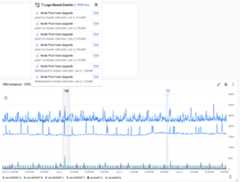
Each annotation can list multiple events. In the previous screenshot,an event for a GKE deployment is listed.
Note: This remainder of this page lists the event types that are supportedby dashboards. Service-specificObservability tabs typically support only asubset of these event types.Alert event types
This section describes the alert event types that can be shown on adashboard.
Alert opened
Alert opened events help you correlate your charted data to whenincidents opened.An alert opened event is shown when the following are true:
- The corresponding incident was opened during the time range specifiedby the dashboard.
- The corresponding incident isn't closed.
There are no annotations made for incidents that were opened outside thetime range specified by the dashboard aren't shown. Similarly, analert opened event isn't shown when the corresponding incident was openedand then closed within the time range specified by the dashboard.
The tooltip for an alert opened event includes the following:
- Name of the alerting policy.
- Summary information, when this information is available. For example, thisinformation might include the threshold and the measured value.
- The duration of the incident, and the date and timewhen the incident was opened.
- Metric and resource labels. The tooltip might not show all labels.
- AView button, which opens theDetails page for the incident.
Google Kubernetes Engine event types
This section describes the Google Kubernetes Engine event types that can beshown on a dashboard.
Patched or updated GKE workload
This event type helps you troubleshoot GKEworkload deployment or statefulset changes, as these events can correlate withperformance regressions or other performance issues. This event type is shownwhen a workload is created, updated, or deleted.
If you want tocreate a log-based alerting policy for thisevent type, then use the following query:
log_id(cloudaudit.googleapis.com%2Factivity)resource.type=k8s_cluster protoPayload.methodName=( io.k8s.apps.v1.deployments.create OR io.k8s.apps.v1.deployments.patch OR io.k8s.apps.v1.deployments.update OR io.k8s.apps.v1.deployments.delete OR io.k8s.apps.v1.statefulsets.create OR io.k8s.apps.v1.statefulsets.patch OR io.k8s.apps.v1.statefulsets.update OR io.k8s.apps.v1.statefulsets.delete OR io.k8s.apps.v1.daemonsets.create OR io.k8s.apps.v1.daemonsets.patch OR io.k8s.apps.v1.daemonsets.update OR io.k8s.apps.v1.daemonsets.delete)-protoPayload.authenticationInfo.principalEmail=("system:addon-manager" OR "system:serviceaccount:kube-system:namespace-controller")-protoPayload.request.metadata.namespace=(kube-system OR gmp-system OR gmp-public OR gke-gmp-system OR istio-system)-protoPayload.response.metadata.namespace=(kube-system OR gmp-system OR gmp-public OR gke-gmp-system OR istio-system)-protoPayload.resourceName=~"namespaces/(kube-system|gmp-system|gmp-public|gke-gmp-system|istio-system)"For additional information, seeOverview of deploying workloadsandView observability metrics.
Crash of a GKE pod
This event type helps you identify and troubleshootGKE pod crashes.Pod crashes can be caused by memory exhaustion or an application error.This event type is shown when any of the following occur:
- Pod status is
CrashLoopBackoff - Pod terminates with a non-zero exit code.
- Pod terminates with an out-of-memory condition.
- Pod is evicted.
- Readiness/Liveliness probe fails.
If you want tocreate a log-based alerting policy for thisevent type, then use the following query:
( log_id(events) ( (resource.type=k8s_pod jsonPayload.reason=(BackOff OR Unhealthy OR Killing OR Evicted)) OR (resource.type=k8s_node jsonPayload.reason=OOMKilling) ) severity=WARNING) OR ( log_id(cloudaudit.googleapis.com%2Factivity) resource.type=k8s_cluster (protoPayload.methodName=io.k8s.core.v1.pods.eviction.create OR (protoPayload.methodName=io.k8s.core.v1.pods.delete protoPayload.response.status.containerStatuses.state.terminated.exitCode:* -protoPayload.response.status.containerStatuses.state.terminated.exitCode=0 ) ))
For troubleshooting information, seeTroubleshoot: CrashLoopBackOff.
Failure to schedule a GKE pod
This event type helps you identify and troubleshoot when pods that can't bescheduled on a node. This event type is shown when pod scheduling failsfor any of the following reasons:
- Insufficient node CPU.
- Insufficient node memory.
- No nodes for taints or tolerations.
- Nodes at the maximum pod limit.
- Node pool at maximum size.
If you want tocreate a log-based alerting policy for thisevent type, then use the following query:
( log_id(events) resource.type=k8s_pod jsonPayload.reason=(NotTriggerScaleUp OR FailedScheduling)) OR ( log_id(container.googleapis.com/cluster-autoscaler-visibility) resource.type=k8s_cluster jsonPayload.noDecisionStatus.noScaleUp:*)
For troubleshooting information, seeTroubleshoot: Pod unschedulable.
Failure to create a GKE container
This event type helps you identify and troubleshoot failures to create aGKE container. Container creation might fail due toreasons such as failed volume mounts or failed image pulls.
If you want tocreate a log-based alerting policy for thisevent type, then use the following query:
log_id(events) resource.type=k8s_pod jsonPayload.reason=(Failed OR FailedMount) severity=WARNING
For troubleshooting information about image pulls, seeTroubleshoot image pulls.
Pod autoscaler scale up and down
This event gives you visibility into Horizontal Pod Autoscaler rescales, whichincrease or decrease the number of running pods for a workload.For more information, seeHorizontal Pod autoscaling.
If you want tocreate a log-based alerting policy for thisevent type, then use the following query:
resource.type=k8s_cluster log_id(events)jsonPayload.involvedObject.kind=HorizontalPodAutoscaler jsonPayload.reason=SuccessfulRescale
Cluster autoscaler scale up and down
This event gives you visibility into when the cluster autoscaler scales up ordown the number of nodes in a node pool of your cluster. For more information,seeAbout cluster autoscalingandViewing cluster autoscaler events.
If you want tocreate a log-based alerting policy for thisevent type, then use the following query:
(resource.type=k8s_cluster log_id(container.googleapis.com%2Fcluster-autoscaler-visibility)jsonPayload.decision:*)
Cluster create and delete
This event tracks GKE cluster create and deletionactions. For more information, seeCreate an Autopilot cluster,Creating a zonal cluster, andDeleting a cluster.
If you want tocreate a log-based alerting policy for thisevent type, then use the following query:
resource.type=gke_cluster log_id(cloudaudit.googleapis.com%2Factivity)protoPayload.methodName=( google.container.v1alpha1.ClusterManager.CreateCluster OR google.container.v1beta1.ClusterManager.CreateCluster OR google.container.v1.ClusterManager.CreateCluster OR google.container.v1alpha1.ClusterManager.DeleteCluster OR google.container.v1beta1.ClusterManager.DeleteCluster OR google.container.v1.ClusterManager.DeleteCluster)operation.first=true
Cluster update
This event tracks GKE cluster updates. Updates includeautomatic control plane version upgrades as well as manual upgrades andcluster configuration changes. For more information, seeManually upgrading a cluster or node poolandStandard cluster upgrades.
If you want tocreate a log-based alerting policy for thisevent type, then use the following query:
resource.type=gke_cluster log_id(cloudaudit.googleapis.com%2Factivity)( protoPayload.methodName=( google.container.internal.ClusterManagerInternal.PatchCluster OR google.container.internal.ClusterManagerInternal.UpdateClusterInternal OR google.container.internal.ClusterManagerInternal.UpdateCluster )) OR ( protoPayload.methodName=( google.container.v1beta1.ClusterManager.UpdateCluster OR google.container.v1.ClusterManager.UpdateCluster ) operation.first=true)protoPayload.metadata.operationType=(UPGRADE_MASTER OR REPAIR_CLUSTER OR UPDATE_CLUSTER)
Node pool update
This event tracks GKE node pool updates. Updates include automatic node poolversion upgrades as well as manual upgrades, configuration changes, and resizes.For more information, seeManually upgrading a cluster or node poolandStandard cluster upgrades.
If you want tocreate a log-based alerting policy for thisevent type, then use the following query:
resource.type=gke_nodepool log_id(cloudaudit.googleapis.com%2Factivity)( protoPayload.methodName=( google.container.internal.ClusterManagerInternal.UpdateClusterInternal OR google.container.internal.ClusterManagerInternal.RepairNodePool )) OR ( protoPayload.methodName=( google.container.v1beta1.ClusterManager.UpdateNodePool OR google.container.v1.ClusterManager.UpdateNodePool OR google.container.v1beta1.ClusterManager.SetNodePoolSize OR google.container.v1.ClusterManager.SetNodePoolSize OR google.container.v1beta1.ClusterManager.SetNodePoolManagement OR google.container.v1.ClusterManager.SetNodePoolManagement OR google.container.v1beta1.ClusterManager.SetNodePoolAutoscaling OR google.container.v1.ClusterManager.SetNodePoolAutoscaling ) operation.first=true)
Cloud Run event types
This section describes the Cloud Run event types that can beshown on a dashboard.
Cloud Run deployment
This event type helps you identify and troubleshootCloud Run deployment failures. Deployment might fail due to reasonssuch as deleted service account, incorrect permissions, the import of acontainer failed, or a container failed to start.
If you want tocreate a log-based alerting policy for thisevent type, then use the following query:
log_id(cloudaudit.googleapis.com%2Factivity) resource.type=cloud_run_revisionprotoPayload.methodName=google.cloud.run.v1.Services.ReplaceService
For troubleshooting information, seeTroubleshoot: Cloud Run issues.
Cloud SQL event types
This section describes the Cloud SQL event types that can beshown on a dashboard.
Cloud SQL failover
This event type helps you identify when manual or automatic failovers occur.Afailover occurs when there is an instance or zone failure andthe standby instance becomes the new primary instance. During a failover,Cloud SQL automatically switches to serving data from the standby instance.
If you want tocreate a log-based alerting policy for thisevent type, then use the following query:
resource.type=cloudsql_database( ( log_id(cloudaudit.googleapis.com%2Factivity) protoPayload.methodName=cloudsql.instances.failover operation.last=true ) OR ( log_id(cloudaudit.googleapis.com%2Fsystem_event) protoPayload.methodName=cloudsql.instances.autoFailover ))
For additional information, seeAbout high availability.
Cloud SQL start or stop
This event type helps you identify a Cloud SQL instance has been manuallystarted, stopped, or restarted. When an instance is stopped, all connections,open files, and running operations are also stopped.
If you want tocreate a log-based alerting policy for thisevent type, then use the following query:
log_id(cloudaudit.googleapis.com%2Factivity) resource.type=cloudsql_databaseprotoPayload.methodName=cloudsql.instances.update operation.last=trueprotoPayload.metadata.intents.intent=(START_INSTANCE OR STOP_INSTANCE)
For additional information, seeAbout high availability andStart, stop, and restart instances.
Cloud SQL storage
This event type helps you identify events related to Cloud SQL storage,including when database storage is full, and when a database is shut down dueto reaching storage capacity. Databases at storage capacity and withoutautomatic storage enabled might be shut down to prevent data corruption.
If you want tocreate a log-based alerting policy for thisevent type, then use the following query:
resource.type=cloudsql_database( ( (log_id(cloudsql.googleapis.com%2Fpostgres.log) OR log_id(cloudsql.googleapis.com%2Fmysql.err)) textPayload=~"No space left on device" severity=(ERROR OR EMERGENCY) ) OR ( log_id(cloudaudit.googleapis.com%2Fsystem_event) protoPayload.methodName=cloudsql.instances.databaseShutdownOutOfStorage ))
Compute Engine event types
This section describes the Compute Engine event types that can beshown on a dashboard.
Virtual machine terminations
This event type helps you identify virtual machine (VM) terminations,including manually triggered resets and stops, guest OS terminations,maintenance terminations, and host errors.
If you want tocreate a log-based alerting policy for thisevent type, then use the following query:
resource.type=gce_instance( ( log_id(cloudaudit.googleapis.com%2Factivity) protoPayload.methodName=( beta.compute.instances.reset OR v1.compute.instances.reset OR beta.compute.instances.stop OR v1.compute.instances.stop ) operation.first=true ) OR ( log_id(cloudaudit.googleapis.com%2Fsystem_event) protoPayload.methodName=( compute.instances.hostError OR compute.instances.guestTerminate OR compute.instances.terminateOnHostMaintenance ) ))
For additional information, seeStop and start a VM andTroubleshooting VM shutdowns and reboots.
VM instance start failure
This event tracks Compute Engine VM instance start failures. The eventshows start failures due to stockouts, IP space exhaustion, quota exceeded,or shielded-VM integrity errors.
If you want tocreate a log-based alerting policy for thisevent type, then use the following query:
resource.type=gce_instance( ( log_id(cloudaudit.googleapis.com%2Factivity) protoPayload.methodName=(beta.compute.instances.insert OR v1.compute.instances.insert) protoPayload.status.message=(ZONE_RESOURCE_POOL_EXHAUSTED OR IP_SPACE_EXHAUSTED OR QUOTA_EXCEEDED) ) OR ( log_id(compute.googleapis.com%2Fshielded_vm_integrity) severity="ERROR" ))
VM instance guest OS error
This event tracks specific Compute Engine VM instance Guest OS errors asrecorded by the serial console logs. The errors tracked are disk full, filesystem mount failed and boot failures that activate Linux emergency mode.
For these events to be visible, you must enable serial port output logging toCloud Logging by settingserial-port-logging-enable=true in the VM or inthe project metadata. For more information, seeEnabling and disabling serial port output logging.
If you want tocreate a log-based alerting policy for thisevent type, then use the following query:
resource.type=gce_instancelog_id(serialconsole.googleapis.com%2Fserial_port_1_output)textPayload=~("No space left on device" OR "Failed to mount" OR "You are in emergency mode")Managed instance group update
This event type helps you identify when your Managed Instance Group (MIG) hasbeen updated. For example, VMs have been added or removed,or the size limit has been updated. For more information, seeAutomatically apply VM configuration updates in a MIG.
If you want tocreate a log-based alerting policy for thisevent type, then use the following query:
resource.type=gce_instance_group_managerlog_id(cloudaudit.googleapis.com%2Factivity) operation.first=trueprotoPayload.methodName=(beta.compute.instanceGroupManagers.patch OR v1.compute.instanceGroupManagers.patch)
For additional information, seeWork with managed instances andTroubleshooting managed instance groups.
Managed instance group autoscaler
This event tracks scaling decisions made by the autoscaler of a MIG.These decisions could include changes in the recommended size for a MIG,or a change in the status of the autoscaler itself. For more information, seeAutoscaling groups of instances.
If you want tocreate a log-based alerting policy for thisevent type, then use the following query:
resource.type=autoscaler log_id(cloudaudit.googleapis.com%2Fsystem_event)protoPayload.methodName=(compute.autoscalers.resize OR compute.autoscalers.changeStatus)
Personalized Service Health event types
This section describes the Personalized Service Health types that can be displayedon a dashboard.
Note: To display Personalized Service Health events,you must enable the Service Health API. For information about how toenable this API, seeShow events: Before you begin.Google Cloud incident
When you are troubleshooting, you might want to differentiate betweenfailures caused by a service that you own and one caused by aGoogle Cloud service that you use. When you enablePersonalized Service Health annotations on a dashboard,you can view disruptions, or service health events,for Google Cloud services. For a list of services that are integrated withService Health, seeSupported Google products.
Unlike other event types, Google Cloud incidents aren't identified by analyzingyour log entries. If you want to get notified when these events occurs, thencreate an alerting policy. You can select a preconfigured alerting policyby using options on theService Health Dashboard page. For more information,seeQuickstart: Set up an alert.
Monitoring identifies Google Cloud incidentsby issuing a request to the Service Health API, and then filtering theresponse to those incidents that are relevant to the data you are viewing.The request has the following configuration:
The
Relevanceenumeration is set toRELATED,IMPACTED, orPARTIALLY_RELATED.This restriction ensures that your dashboard onlydisplays events for the Google Cloud services that yourGoogle Cloud project is using.The
DetailedStateenumeration isn't set toFALSE_POSITIVE.
Service Health annotations are displayed with a start timeand a duration. The duration is displayed by changing the background colorof the chart. The tooltip for a Google Cloud incidentidentifies the following:
- The Google Cloud service.
- Whether the incident is open or resolved.
- Date and start time of the event.
- Chips that display the number of affected products and locations.To list the affected products or locations, place your pointer on thecorresponding chip.
- AView button, which when selected opens the details page for theincident.
For information about how to issue a request to theService Health API, seeCheck for disruptions with Service Health.
For troubleshooting information, seeTroubleshoot common issues in Service Health.
Uptime check event types
This section describes the uptime check event types that can be shown on adashboard.
Note: For these event types to be available, the uptime check must be ableto log failures. You can enable logging by configuring the responsevalidation fields when you create or modify an uptime check.For more information on creating uptimechecks, seeCreate public uptime checks.Uptime check failure
This event type helps you identify uptime check failures from configuredregions.
If you want tocreate a log-based alerting policy for thisevent type, then use the following query:
log_id(monitoring.googleapis.com%2Fuptime_checks)( resource.type=uptime_url OR resource.type=gce_instance OR resource.type=gae_app OR resource.type=k8s_service OR resource.type=servicedirectory_service OR resource.type=cloud_run_revision OR resource.type=aws_ec2_instance OR resource.type=aws_elb_load_balancer)labels.uptime_result_type=UptimeCheckResultseverity=NOTICE
For troubleshooting information, seeTroubleshoot synthetic monitors and uptime checks.
Agent for SAP event types
This section describes the Agent for SAP event types that can beshown on a dashboard.
Note: For these event types to be visible, you must redirect the agent's logs toCloud Logging. This setting is enabled by default. For more details,seeConfigure the Agent for SAP.SAP Availability
This event type helps you identify events related to Agent for SAPavailability. These events are triggered when SAP HANA, SAP NetWeaver, orPacemaker Cluster availability changes.
If you want tocreate a log-based alerting policy for thisevent type, then use the following query:
log_id(google-cloud-sap-agent)( resource.type=generic_node OR resource.type=gce_instance OR resource.type=aws_ec2_instance OR resource.type=baremetalsolution.googleapis.com/Instance)jsonPayload.metricEvent=truejsonPayload.metric=(workload.googleapis.com/sap/hana/service OR workload.googleapis.com/sap/hana/availability OR workload.googleapis.com/sap/nw/service OR workload.googleapis.com/sap/nw/availability OR workload.googleapis.com/sap/cluster/nodes OR workload.googleapis.com/sap/cluster/resources)
SAP Backint
This event type helps you identify events related to Agent for SAPBackint. Any Backint backup or recovery writes an event detailing success orfailure along with the transfer statistics. Log backups and recoveries are onlyshown on failure, while data backups and recoveries are shown on both successand failure.
log_id(google-cloud-sap-agent-backint)( resource.type=generic_node OR resource.type=gce_instance OR resource.type=aws_ec2_instance OR resource.type=baremetalsolution.googleapis.com/Instance)(jsonPayload.fileType=data OR (jsonPayload.fileType=log AND jsonPayload.success=false))jsonPayload.message=SAP_BACKINT_FILE_TRANSFER
SAP Operations
This event type helps you identify events related to Agent for SAPoperations. These events are triggered when SAP HANA replication status changes.
If you want tocreate a log-based alerting policy for thisevent type, then use the following query:
log_id(google-cloud-sap-agent)( resource.type=generic_node OR resource.type=gce_instance OR resource.type=aws_ec2_instance OR resource.type=baremetalsolution.googleapis.com/Instance)jsonPayload.metricEvent=truejsonPayload.metric=workload.googleapis.com/sap/hana/ha/replication
What's next
To learn how to show events on your dashboards, seeShow events on a dashboard.
Except as otherwise noted, the content of this page is licensed under theCreative Commons Attribution 4.0 License, and code samples are licensed under theApache 2.0 License. For details, see theGoogle Developers Site Policies. Java is a registered trademark of Oracle and/or its affiliates.
Last updated 2026-02-06 UTC.