

Create user-defined metrics with the API
This document describes how to create user-defined metrics and how to write thismetric data by using the Cloud Monitoring API.User-defined metrics use the same elements that the built-in Cloud Monitoringmetrics use:
- A set of data points.
- Metric-type information, which tells you what the data points represent.
- Monitored-resource information, which tells you where the data pointsoriginated.
User-defined metrics, sometimes called custom metrics,can be used in the same way as built-in metrics. That is,you can create charts and alerts for this metric data.
Log-based metrics are a class of user-defined metrics, but you can'tcreate them by using the Cloud Monitoring API. Log-based metrics derivemetric data from log entries, but the Monitoring APIprovides no way to specify how to extract metric data from log entries.Instead, use Cloud Logging to create log-based metrics. When you createa log-based metric, Logging creates the structures describedin this document and sends the metric data to Cloud Monitoring for you.For information about creating log-based metrics, see the following documents:
To instrument your application, we recommend that you use avendor-neutral instrumentation framework that is open source, such asOpenTelemetry, instead ofvendor- and product-specific APIs or client libraries.For information about instrumenting your application, see Instrumentation and observability.
Note: User-defined metrics are a chargeable feature of Cloud Monitoring andthere could be costs for these metrics. For pricing information, see theCloud Monitoring sections of theGoogle Cloud Observability pricing page.Before you begin
To learn about the structures that underlie all metrics,seeMetrics, time series, and resources.
To use Cloud Monitoring, you must have a Google Cloud project withbilling enabled. When necessary, do the following:
In the Google Cloud console, on the project selector page, select or create a Google Cloud project.
Roles required to select or create a project
- Select a project: Selecting a project doesn't require a specific IAM role—you can select any project that you've been granted a role on.
- Create a project: To create a project, you need the Project Creator role (
roles/resourcemanager.projectCreator), which contains theresourcemanager.projects.createpermission.Learn how to grant roles.
Verify that billing is enabled for your Google Cloud project.
- Ensure the Monitoring API is enabled. For details, seeEnabling the Monitoring API.
- For applications running outside of Google Cloud, your Google Cloud project must authenticate your application using local Application Default Credentials (ADC). For more information, seeSet up ADC for on-premises or another cloud provider.
Create a user-defined metric type
To create a user-defined metric, you either define aMetricDescriptor objectthat specifies various information about the metric,or you write metric data. When you write metric data,Monitoring creates the metric descriptor for you basedon the structure of the data you provide.For information about designing a metric descriptor, seeMetric descriptors for user-defined metrics.
Auto-creation of metric descriptors
If you write metric data when a metric descriptor for that user-defined metricdoesn't yet exist, then a metric descriptor is created automatically.However, this new metric descriptor might not be exactly what you want;auto-creation of metric descriptors involves some assumptions and defaults.
Cloud Monitoring creates a newMetricDescriptor whentheTimeSeries object included in a call totimeSeries.create references aMetric object that specifies a nonexistentmetric-type name.Cloud Monitoring uses the following rules to populate theMetricDescriptor:
type: The type is copied from theMetricobject'stypefield.name: The name is created from the project ID in the method call and thevalue of thetypein theMetricobject.labels: The labels that appear in theMetricobject. Eachlabel descriptor in the new metric descriptor has the following fields:key: the label key in theMetricobject.valueType:STRINGdescription: not set
metricKind: The metric kind is set toGAUGEunless you specifythemetricKindparameter of theTimeSeriesobject.When you specify themetricKind,the new metric has that kind. You can specify onlyGAUGEandCUMULATIVEkinds.valueType: The value type is taken from the typed value of thePointbeing written. The value type must beBOOL,INT64,DOUBLE, orDISTRIBUTION. When you specify a value type in thevalueTypefield of theTimeSeries,that type must match the type of thePoint.unit: not setdescription:"Auto created custom metric.".displayName: not set
In a singletimeSeries.create call, you caninclude multipleTimeSeriesobjects that refer to the same nonexistent metric type. In that case,the labels in the new metric descriptor consist of the union of all the labelsin theMetric objects in all the time series in this call tocreate.
Next step: SeeWrite user-defined metrics.
Manual creation of metric descriptors
To create a metric descriptor, do the following:
Determine the structure of your metric descriptor. For help in making thesechoices, you canbrowse the built-in metricsandlook at their time series data:
Choose ametric name for youruser-defined metric.
Choose a display name and description for your metric. The display nameis used in the Google Cloud console.
Choose a project or projects in which to define your user-defined metricand write its time series data.When you need the same metric in several projects, make identicaldefinitions of the metric in each project.
Determine the metric's kind, value type, and (optionally) units.Not all value types and metric kinds are supported foruser-defined metrics. For more information on these fields, seeValue types and metric kinds.
Choose the metric's labels—their names, value types, anddescriptions.
Determine the monitored resources against which the metric data iswritten. Choose from the following list:
aws_ec2_instance: Amazon EC2 instance.dataflow_job: Dataflow job.gae_instance: App Engine instance.gce_instance: Compute Engine instance.generic_node: User-specified computing node.generic_task: User-defined task.gke_container: GKE container instance.global: Use this resource when no other resource type is suitable. For most use cases,generic_nodeorgeneric_taskare better choices thanglobal.k8s_cluster: Kubernetes cluster.k8s_container: Kubernetes container.k8s_node: Kubernetes node.k8s_pod: Kubernetes pod.
Create a
MetricDescriptorobject, and then pass it asan argument to a call to themetricDescriptors.createmethod.
It is usually an error to callmetricDescriptors.create using the same typename as an existing metric descriptor. However, if all the fields of thenewMetricDescriptor object match the fields of theexisting descriptor exactly, then it isn't an error but it has no effect.
In the following example, you create a gauge metric.
Protocol
To create a metric descriptor, use themetricDescriptors.create method.You can execute this method by using the APIs Explorer widget on themethod's reference page. SeeAPIs Explorer formore information.
The following are the sample parameters tometricDescriptors.create:
- name (URL):
projects/[PROJECT_ID] Request body: supply a
MetricDescriptorobject such as the following:{"name":"","description":"Daily sales records from all branch stores.","displayName":"Sales","type":"custom.googleapis.com/stores/sales","metricKind":"GAUGE","valueType":"DOUBLE","unit":"{USD}","labels":[{"key":"store_id","valueType":"STRING","description":"The ID of the store."},],}
Supply these values to the fields in the widget, using your project's IDin place of[PROJECT_ID]:
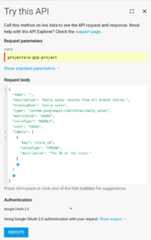
Click theExecute button to run the method.
Note: To view the request as a curl command, as an HTTP request, or inJavaScript, clickfullscreenFull screen in APIs Explorer.When creating a new metric, thename field in theMetricDescriptor is ignored and can be omitted. Thecreate method returnsthe new metric descriptor with thename field filled in, which in thisexample would be the following:
"name":"projects/[PROJECT_ID]/metricDescriptors/custom.googleapis.com/stores/daily_sales"If, for example, you want toget a metric's descriptor, you use this name.
C#
To authenticate to Monitoring, set up Application Default Credentials. For more information, seeSet up authentication for a local development environment.
publicstaticobjectCreateMetric(stringprojectId,stringmetricType="custom.googleapis.com/stores/daily_sales"){// Create client.MetricServiceClientmetricServiceClient=MetricServiceClient.Create();// Prepare custom metric descriptor.MetricDescriptormetricDescriptor=newMetricDescriptor();metricDescriptor.DisplayName="Daily Sales";metricDescriptor.Description="Daily sales records from all branch stores.";metricDescriptor.MetricKind=MetricKind.Gauge;metricDescriptor.ValueType=MetricDescriptor.Types.ValueType.Double;metricDescriptor.Type=metricType;metricDescriptor.Unit="{USD}";LabelDescriptorlabels=newLabelDescriptor();labels.Key="store_id";labels.ValueType=LabelDescriptor.Types.ValueType.String;labels.Description="The ID of the store.";metricDescriptor.Labels.Add(labels);CreateMetricDescriptorRequestrequest=newCreateMetricDescriptorRequest{ProjectName=newProjectName(projectId),};request.MetricDescriptor=metricDescriptor;// Make the request.MetricDescriptorresponse=metricServiceClient.CreateMetricDescriptor(request);Console.WriteLine("Done creating metric descriptor:");Console.WriteLine(JObject.Parse($"{response}").ToString());return0;}Go
To authenticate to Monitoring, set up Application Default Credentials. For more information, seeSet up authentication for a local development environment.
import("context""fmt""io"monitoring"cloud.google.com/go/monitoring/apiv3""cloud.google.com/go/monitoring/apiv3/v2/monitoringpb""google.golang.org/genproto/googleapis/api/label""google.golang.org/genproto/googleapis/api/metric"metricpb"google.golang.org/genproto/googleapis/api/metric")// createCustomMetric creates a custom metric specified by the metric type.funccreateCustomMetric(wio.Writer,projectID,metricTypestring)(*metricpb.MetricDescriptor,error){ctx:=context.Background()c,err:=monitoring.NewMetricClient(ctx)iferr!=nil{returnnil,err}deferc.Close()md:=&metric.MetricDescriptor{Name:"Custom Metric",Type:metricType,Labels:[]*label.LabelDescriptor{{Key: "environment",ValueType: label.LabelDescriptor_STRING,Description: "An arbitrary measurement",}},MetricKind:metric.MetricDescriptor_GAUGE,ValueType:metric.MetricDescriptor_INT64,Unit:"s",Description:"An arbitrary measurement",DisplayName:"Custom Metric",}req:=&monitoringpb.CreateMetricDescriptorRequest{Name:"projects/"+projectID,MetricDescriptor:md,}m,err:=c.CreateMetricDescriptor(ctx,req)iferr!=nil{returnnil,fmt.Errorf("could not create custom metric: %w",err)}fmt.Fprintf(w,"Created %s\n",m.GetName())returnm,nil}Java
To authenticate to Monitoring, set up Application Default Credentials. For more information, seeSet up authentication for a local development environment.
// Your Google Cloud Platform project IDfinalStringprojectId=System.getProperty("projectId");try(finalMetricServiceClientclient=MetricServiceClient.create();){ProjectNameprojectName=ProjectName.of(projectId);MetricDescriptordescriptor=MetricDescriptor.newBuilder().setType(type).addLabels(LabelDescriptor.newBuilder().setKey("store_id").setValueType(LabelDescriptor.ValueType.STRING)).setDescription("This is a simple example of a custom metric.").setMetricKind(MetricDescriptor.MetricKind.GAUGE).setValueType(MetricDescriptor.ValueType.DOUBLE).build();CreateMetricDescriptorRequestrequest=CreateMetricDescriptorRequest.newBuilder().setName(projectName.toString()).setMetricDescriptor(descriptor).build();descriptor=client.createMetricDescriptor(request);System.out.println("Created descriptor "+descriptor.getName());}Node.js
To authenticate to Monitoring, set up Application Default Credentials. For more information, seeSet up authentication for a local development environment.
// Imports the Google Cloud client libraryconstmonitoring=require('@google-cloud/monitoring');// Creates a clientconstclient=newmonitoring.MetricServiceClient();/** * TODO(developer): Uncomment and edit the following lines of code. */// const projectId = 'YOUR_PROJECT_ID';asyncfunctioncreateMetricDescriptor(){constrequest={name:client.projectPath(projectId),metricDescriptor:{description:'Daily sales records from all branch stores.',displayName:'Daily Sales',type:'custom.googleapis.com/stores/daily_sales',metricKind:'GAUGE',valueType:'DOUBLE',unit:'{USD}',labels:[{key:'store_id',valueType:'STRING',description:'The ID of the store.',},],},};// Creates a custom metric descriptorconst[descriptor]=awaitclient.createMetricDescriptor(request);console.log('Created custom Metric:\n');console.log(`Name:${descriptor.displayName}`);console.log(`Description:${descriptor.description}`);console.log(`Type:${descriptor.type}`);console.log(`Kind:${descriptor.metricKind}`);console.log(`Value Type:${descriptor.valueType}`);console.log(`Unit:${descriptor.unit}`);console.log('Labels:');descriptor.labels.forEach(label=>{console.log(`${label.key} (${label.valueType}) -${label.description}`);});}createMetricDescriptor();PHP
To authenticate to Monitoring, set up Application Default Credentials. For more information, seeSet up authentication for a local development environment.
use Google\Api\LabelDescriptor;use Google\Api\MetricDescriptor;use Google\Cloud\Monitoring\V3\Client\MetricServiceClient;use Google\Cloud\Monitoring\V3\CreateMetricDescriptorRequest;/** * Create a new metric in Stackdriver Monitoring. * Example: * ``` * create_metric($projectId); * ``` * * @param string $projectId Your project ID */function create_metric($projectId){ $metrics = new MetricServiceClient([ 'projectId' => $projectId, ]); $projectName = 'projects/' . $projectId; $descriptor = new MetricDescriptor(); $descriptor->setDescription('Daily sales records from all branch stores.'); $descriptor->setDisplayName('Daily Sales'); $descriptor->setType('custom.googleapis.com/stores/daily_sales'); $descriptor->setMetricKind(MetricDescriptor\MetricKind::GAUGE); $descriptor->setValueType(MetricDescriptor\ValueType::DOUBLE); $descriptor->setUnit('{USD}'); $label = new LabelDescriptor(); $label->setKey('store_id'); $label->setValueType(LabelDescriptor\ValueType::STRING); $label->setDescription('The ID of the store.'); $labels = [$label]; $descriptor->setLabels($labels); $createMetricDescriptorRequest = (new CreateMetricDescriptorRequest()) ->setName($projectName) ->setMetricDescriptor($descriptor); $descriptor = $metrics->createMetricDescriptor($createMetricDescriptorRequest); printf('Created a metric: ' . $descriptor->getName() . PHP_EOL);}Python
To authenticate to Monitoring, set up Application Default Credentials. For more information, seeSet up authentication for a local development environment.
fromgoogle.apiimportlabel_pb2asga_labelfromgoogle.apiimportmetric_pb2asga_metricfromgoogle.cloudimportmonitoring_v3client=monitoring_v3.MetricServiceClient()project_name=f"projects/{project_id}"descriptor=ga_metric.MetricDescriptor()descriptor.type="custom.googleapis.com/my_metric"+str(uuid.uuid4())descriptor.metric_kind=ga_metric.MetricDescriptor.MetricKind.GAUGEdescriptor.value_type=ga_metric.MetricDescriptor.ValueType.DOUBLEdescriptor.description="This is a simple example of a custom metric."labels=ga_label.LabelDescriptor()labels.key="TestLabel"labels.value_type=ga_label.LabelDescriptor.ValueType.STRINGlabels.description="This is a test label"descriptor.labels.append(labels)descriptor=client.create_metric_descriptor(name=project_name,metric_descriptor=descriptor)print("Created{}.".format(descriptor.name))Ruby
To authenticate to Monitoring, set up Application Default Credentials. For more information, seeSet up authentication for a local development environment.
gem"google-cloud-monitoring"require"google/cloud/monitoring"# Your Google Cloud Platform project ID# project_id = "YOUR_PROJECT_ID"# Example metric type# metric_type = "custom.googleapis.com/my_metric"client=Google::Cloud::Monitoring.metric_serviceproject_name=client.project_pathproject:project_iddescriptor=Google::Api::MetricDescriptor.new(type:metric_type,metric_kind:Google::Api::MetricDescriptor::MetricKind::GAUGE,value_type:Google::Api::MetricDescriptor::ValueType::DOUBLE,description:"This is a simple example of a custom metric.")result=client.create_metric_descriptorname:project_name,metric_descriptor:descriptorp"Created#{result.name}"presultSeeTroubleshoot API calls if you havedifficulty.
Next step: SeeWrite user-defined metrics.
Write user-defined metrics
You can write data only to metric types for user-defined metrics. To write your data,use thetimeSeries.create method.When the time series exists, thismethod appends a new data point to the existing time series. When thetime series doesn't exist, this method creates it and appends the data.
You write data points by passing a list ofTimeSeries objects totimeSeries.create.The maximum list size is 200and each object in the list must specify a different time series:
- The values of
metricandresourcefields identify a specificTimeSeriesobject. These fields representthe metric type of the data and the monitored resource from which thedata was collected. - Omit the fields
metricKindandvalueType; they are ignored when writingdata points. Each
TimeSeriesobject must contain only a singlePointobject:- The point's value and time interval must be consistent with the metrictype's definition. For information on time intervals for differentmetric kinds, see
TimeInterval. - The point's time interval must be later than any point already in thetime series.
- The end time of the interval must not be more than 25 hours in the pastor more than five minutes in the future.
- The point's value and time interval must be consistent with the metrictype's definition. For information on time intervals for differentmetric kinds, see
To write more than one point to the same time series, use aseparate call to the
timeSeries.createmethod for each point. Don't write data to a single time series faster thanone point each 5 seconds. When you add datapoints to different time series, there is no rate limitation.
Protocol
To write metric data, use thetimeSeries.createmethod.You can execute this method by using the APIs Explorer widget on themethod's reference page. SeeAPIs Explorerfor more information.
To write a point to thestores/daily_sales metric created in theManual creation of metric descriptors:
- Go to thereference page for
timeSeries.create. - Supply the parameters below to the APIs Explorer widget.
- Click theExecute button.
Use the following sample parameters:
- name:
projects/[PROJECT_ID] request body: include a list of
Note: Youmust change theTimeSeriesobjects. The following sample has only one time series in the list.project_idandendTimevalues in thefollowing request body. Use the ID of your project. TheendTimemust be close to the current time;date -Isecondsreturns thecurrent time in a usable format.{"timeSeries":[ { "metric": { "type": "custom.googleapis.com/my_metric", "labels": { "my_label": "my_value" } }, "resource": { "type": "gce_instance", "labels": { "project_id": "[PROJECT_ID]", "instance_id": "1234567890123456789", "zone": "us-central1-f" } }, "points": [ { "interval": { "endTime": "2018-06-01T10:00:00-04:00" }, "value": { "doubleValue":123.45}}]}]}
C#
To authenticate to Monitoring, set up Application Default Credentials. For more information, seeSet up authentication for a local development environment.
publicstaticobjectWriteTimeSeriesData(stringprojectId){// Create client.MetricServiceClientmetricServiceClient=MetricServiceClient.Create();// Initialize request argument(s).ProjectNamename=newProjectName(projectId);// Prepare a data point.PointdataPoint=newPoint();TypedValuesalesTotal=newTypedValue();salesTotal.DoubleValue=123.45;dataPoint.Value=salesTotal;TimestamptimeStamp=newTimestamp();timeStamp.Seconds=(long)(DateTime.UtcNow-s_unixEpoch).TotalSeconds;TimeIntervalinterval=newTimeInterval();interval.EndTime=timeStamp;dataPoint.Interval=interval;// Prepare custom metric.Metricmetric=newMetric();metric.Type="custom.googleapis.com/stores/daily_sales";metric.Labels.Add("store_id","Pittsburgh");// Prepare monitored resource.MonitoredResourceresource=newMonitoredResource();resource.Type="global";resource.Labels.Add("project_id",projectId);// Create a new time series using inputs.TimeSeriestimeSeriesData=newTimeSeries();timeSeriesData.Metric=metric;timeSeriesData.Resource=resource;timeSeriesData.Points.Add(dataPoint);// Add newly created time series to list of time series to be written.IEnumerable<TimeSeries>timeSeries=newList<TimeSeries>{timeSeriesData};// Write time series data.metricServiceClient.CreateTimeSeries(name,timeSeries);Console.WriteLine("Done writing time series data:");Console.WriteLine(JObject.Parse($"{timeSeriesData}").ToString());return0;}Go
To authenticate to Monitoring, set up Application Default Credentials. For more information, seeSet up authentication for a local development environment.
// writeTimeSeriesValue writes a value for the custom metric createdfuncwriteTimeSeriesValue(projectID,metricTypestring)error{ctx:=context.Background()c,err:=monitoring.NewMetricClient(ctx)iferr!=nil{returnerr}deferc.Close()now:=×tamp.Timestamp{Seconds:time.Now().Unix(),}req:=&monitoringpb.CreateTimeSeriesRequest{Name:"projects/"+projectID,TimeSeries:[]*monitoringpb.TimeSeries{{Metric: &metricpb.Metric{Type: metricType,Labels: map[string]string{"environment": "STAGING",},},Resource: &monitoredres.MonitoredResource{Type: "gce_instance",Labels: map[string]string{"instance_id": "test-instance","zone": "us-central1-f",},},Points: []*monitoringpb.Point{{Interval: &monitoringpb.TimeInterval{StartTime: now,EndTime: now,},Value: &monitoringpb.TypedValue{Value: &monitoringpb.TypedValue_Int64Value{Int64Value: rand.Int63n(10),},},}},}},}log.Printf("writeTimeseriesRequest: %+v\n",req)err=c.CreateTimeSeries(ctx,req)iferr!=nil{returnfmt.Errorf("could not write time series value, %w ",err)}returnnil}Java
To authenticate to Monitoring, set up Application Default Credentials. For more information, seeSet up authentication for a local development environment.
StringprojectId=System.getProperty("projectId");// Prepares an individual data pointTimeIntervalinterval=TimeInterval.newBuilder().setEndTime(Timestamps.fromMillis(System.currentTimeMillis())).build();TypedValuevalue=TypedValue.newBuilder().setDoubleValue(123.45).build();Pointpoint=Point.newBuilder().setInterval(interval).setValue(value).build();List<Point>pointList=newArrayList<>();pointList.add(point);ProjectNamename=ProjectName.of(projectId);// Prepares the metric descriptorMap<String,String>metricLabels=newHashMap<>();Metricmetric=Metric.newBuilder().setType("custom.googleapis.com/my_metric").putAllLabels(metricLabels).build();// Prepares the monitored resource descriptorMap<String,String>resourceLabels=newHashMap<>();resourceLabels.put("instance_id","1234567890123456789");resourceLabels.put("zone","us-central1-f");MonitoredResourceresource=MonitoredResource.newBuilder().setType("gce_instance").putAllLabels(resourceLabels).build();// Prepares the time series requestTimeSeriestimeSeries=TimeSeries.newBuilder().setMetric(metric).setResource(resource).addAllPoints(pointList).build();List<TimeSeries>timeSeriesList=newArrayList<>();timeSeriesList.add(timeSeries);CreateTimeSeriesRequestrequest=CreateTimeSeriesRequest.newBuilder().setName(name.toString()).addAllTimeSeries(timeSeriesList).build();// Writes time series datatry(finalMetricServiceClientclient=MetricServiceClient.create();){client.createTimeSeries(request);}System.out.println("Done writing time series value.");Node.js
To authenticate to Monitoring, set up Application Default Credentials. For more information, seeSet up authentication for a local development environment.
// Imports the Google Cloud client libraryconstmonitoring=require('@google-cloud/monitoring');// Creates a clientconstclient=newmonitoring.MetricServiceClient();asyncfunctionwriteTimeSeriesData(){/** * TODO(developer): Uncomment and edit the following lines of code. */// const projectId = 'YOUR_PROJECT_ID';constdataPoint={interval:{endTime:{seconds:Date.now()/1000,},},value:{doubleValue:123.45,},};consttimeSeriesData={metric:{type:'custom.googleapis.com/stores/daily_sales',labels:{store_id:'Pittsburgh',},},resource:{type:'global',labels:{project_id:projectId,},},points:[dataPoint],};constrequest={name:client.projectPath(projectId),timeSeries:[timeSeriesData],};// Writes time series dataconstresult=awaitclient.createTimeSeries(request);console.log('Done writing time series data.',result);}writeTimeSeriesData();PHP
To authenticate to Monitoring, set up Application Default Credentials. For more information, seeSet up authentication for a local development environment.
use Google\Api\Metric;use Google\Api\MonitoredResource;use Google\Cloud\Monitoring\V3\Client\MetricServiceClient;use Google\Cloud\Monitoring\V3\CreateTimeSeriesRequest;use Google\Cloud\Monitoring\V3\Point;use Google\Cloud\Monitoring\V3\TimeInterval;use Google\Cloud\Monitoring\V3\TimeSeries;use Google\Cloud\Monitoring\V3\TypedValue;use Google\Protobuf\Timestamp;/** * Example: * ``` * write_timeseries($projectId); * ``` * * @param string $projectId Your project ID */function write_timeseries($projectId){ $metrics = new MetricServiceClient([ 'projectId' => $projectId, ]); $projectName = 'projects/' . $projectId; $endTime = new Timestamp(); $endTime->setSeconds(time()); $interval = new TimeInterval(); $interval->setEndTime($endTime); $value = new TypedValue(); $value->setDoubleValue(123.45); $point = new Point(); $point->setValue($value); $point->setInterval($interval); $points = [$point]; $metric = new Metric(); $metric->setType('custom.googleapis.com/stores/daily_sales'); $labels = ['store_id' => 'Pittsburg']; $metric->setLabels($labels); $resource = new MonitoredResource(); $resource->setType('global'); $labels = ['project_id' => $projectId]; $resource->setLabels($labels); $timeSeries = new TimeSeries(); $timeSeries->setMetric($metric); $timeSeries->setResource($resource); $timeSeries->setPoints($points); $createTimeSeriesRequest = (new CreateTimeSeriesRequest()) ->setName($projectName) ->setTimeSeries([$timeSeries]); $metrics->createTimeSeries($createTimeSeriesRequest); printf('Done writing time series data.' . PHP_EOL);}Python
To authenticate to Monitoring, set up Application Default Credentials. For more information, seeSet up authentication for a local development environment.
fromgoogle.cloudimportmonitoring_v3client=monitoring_v3.MetricServiceClient()project_name=f"projects/{project_id}"series=monitoring_v3.TimeSeries()series.metric.type="custom.googleapis.com/my_metric"+str(uuid.uuid4())series.resource.type="gce_instance"series.resource.labels["instance_id"]="1234567890123456789"series.resource.labels["zone"]="us-central1-c"series.metric.labels["TestLabel"]="My Label Data"now=time.time()seconds=int(now)nanos=int((now-seconds)*10**9)interval=monitoring_v3.TimeInterval({"end_time":{"seconds":seconds,"nanos":nanos}})point=monitoring_v3.Point({"interval":interval,"value":{"double_value":3.14}})series.points=[point]client.create_time_series(name=project_name,time_series=[series])Ruby
To authenticate to Monitoring, set up Application Default Credentials. For more information, seeSet up authentication for a local development environment.
gem"google-cloud-monitoring"require"google/cloud/monitoring"# Your Google Cloud Platform project ID# project_id = "YOUR_PROJECT_ID"# Example metric type# metric_type = "custom.googleapis.com/my_metric"client=Google::Cloud::Monitoring.metric_serviceproject_name=client.project_pathproject:project_idseries=Google::Cloud::Monitoring::V3::TimeSeries.newseries.metric=Google::Api::Metric.newtype:metric_typeresource=Google::Api::MonitoredResource.newtype:"global"resource.labels["project_id"]=project_idseries.resource=resourcepoint=Google::Cloud::Monitoring::V3::Point.newpoint.value=Google::Cloud::Monitoring::V3::TypedValue.newdouble_value:3.14now=Time.nowend_time=Google::Protobuf::Timestamp.newseconds:now.to_i,nanos:now.nsecpoint.interval=Google::Cloud::Monitoring::V3::TimeInterval.newend_time:end_timeseries.points <<pointclient.create_time_seriesname:project_name,time_series:[series]p"Time series created."SeeTroubleshoot API calls if you havedifficulty.
Delete user-defined metrics
To delete a user-defined metric, delete its metric descriptor.You can't delete the time-series data stored in your Google Cloud project; however,deleting the metric descriptor renders the data inaccessible. The dataexpires and is deleted according to thedata retention policy.
You can't delete the metric descriptor for a built-in metric.
Note: Deleting a metric descriptor makes its existing time seriesdata inaccessible. If you recreate a deleted metric descriptor,exactly as it was before deletion, then you might regain access to the data.Don't depend on this behavior.To delete your metric descriptor, call themetricDescriptors.delete method.
Protocol
To delete a metric descriptor, use themetricDescriptors.delete method.You can execute this method by using the APIs Explorer widget on themethod's reference page. SeeAPIs Explorerfor more information.
To delete thestores/daily_sales metric created inManual creation of metric descriptors:
- Go to thereference page for
metricDescriptors.delete: Supply the name of the metric descriptor to the APIs Explorer widget:
name:
projects/[PROJECT_ID]/metricDescriptors/custom.googleapis.com/stores/daily_salesClick theExecute button.
C#
To authenticate to Monitoring, set up Application Default Credentials. For more information, seeSet up authentication for a local development environment.
publicstaticobjectDeleteMetric(stringprojectId,stringmetricType){// Create client.MetricServiceClientmetricServiceClient=MetricServiceClient.Create();// Initialize request argument(s).MetricDescriptorNamename=newMetricDescriptorName(projectId,metricType);// Make the request.metricServiceClient.DeleteMetricDescriptor(name);Console.WriteLine($"Done deleting metric descriptor: {name}");return0;}Go
To authenticate to Monitoring, set up Application Default Credentials. For more information, seeSet up authentication for a local development environment.
import("context""fmt""io"monitoring"cloud.google.com/go/monitoring/apiv3""cloud.google.com/go/monitoring/apiv3/v2/monitoringpb")// deleteMetric deletes the given metric. name should be of the form// "projects/PROJECT_ID/metricDescriptors/METRIC_TYPE".funcdeleteMetric(wio.Writer,namestring)error{ctx:=context.Background()c,err:=monitoring.NewMetricClient(ctx)iferr!=nil{returnerr}deferc.Close()req:=&monitoringpb.DeleteMetricDescriptorRequest{Name:name,}iferr:=c.DeleteMetricDescriptor(ctx,req);err!=nil{returnfmt.Errorf("could not delete metric: %w",err)}fmt.Fprintf(w,"Deleted metric: %q\n",name)returnnil}Java
To authenticate to Monitoring, set up Application Default Credentials. For more information, seeSet up authentication for a local development environment.
finalStringprojectId=System.getProperty("projectId");try(finalMetricServiceClientclient=MetricServiceClient.create();){MetricDescriptorNamemetricName=MetricDescriptorName.of(projectId,type);client.deleteMetricDescriptor(metricName);System.out.println("Deleted descriptor "+type);}Node.js
To authenticate to Monitoring, set up Application Default Credentials. For more information, seeSet up authentication for a local development environment.
// Imports the Google Cloud client libraryconstmonitoring=require('@google-cloud/monitoring');// Creates a clientconstclient=newmonitoring.MetricServiceClient();asyncfunctiondeleteMetricDescriptor(){/** * TODO(developer): Uncomment and edit the following lines of code. */// const projectId = 'YOUR_PROJECT_ID';// const metricId = 'custom.googleapis.com/stores/daily_sales';constrequest={name:client.projectMetricDescriptorPath(projectId,metricId),};// Deletes a metric descriptorconst[result]=awaitclient.deleteMetricDescriptor(request);console.log(`Deleted${metricId}`,result);}deleteMetricDescriptor();PHP
To authenticate to Monitoring, set up Application Default Credentials. For more information, seeSet up authentication for a local development environment.
use Google\Cloud\Monitoring\V3\Client\MetricServiceClient;use Google\Cloud\Monitoring\V3\DeleteMetricDescriptorRequest;/** * Example: * ``` * delete_metric($projectId, $databaseId); * ``` * * @param string $projectId Your project ID * @param string $metricId The ID of the Metric Descriptor to delete */function delete_metric($projectId, $metricId){ $metrics = new MetricServiceClient([ 'projectId' => $projectId, ]); $metricPath = $metrics->metricDescriptorName($projectId, $metricId); $deleteMetricDescriptorRequest = (new DeleteMetricDescriptorRequest()) ->setName($metricPath); $metrics->deleteMetricDescriptor($deleteMetricDescriptorRequest); printf('Deleted a metric: ' . $metricPath . PHP_EOL);}Python
To authenticate to Monitoring, set up Application Default Credentials. For more information, seeSet up authentication for a local development environment.
fromgoogle.cloudimportmonitoring_v3client=monitoring_v3.MetricServiceClient()client.delete_metric_descriptor(name=descriptor_name)print("Deleted metric descriptor{}.".format(descriptor_name))Ruby
To authenticate to Monitoring, set up Application Default Credentials. For more information, seeSet up authentication for a local development environment.
gem"google-cloud-monitoring"require"google/cloud/monitoring"# Your Google Cloud Platform project ID# project_id = "YOUR_PROJECT_ID"# Example metric type# metric_type = "custom.googleapis.com/my_metric"client=Google::Cloud::Monitoring.metric_servicemetric_name=client.metric_descriptor_pathproject:project_id,metric_descriptor:metric_typeclient.delete_metric_descriptorname:metric_namep"Deleted metric descriptor#{metric_name}."SeeTroubleshoot API calls if you havedifficulty.
Modify a user-defined metric
To modify a user-defined metric, you must update theMetricDescriptor object that defines the metric.The only supported modification is to add labels.
To add labels to an existing user-defined metric, use thetimeSeries.create method and include the newlabels with the time-series data. The labels are added to the metricdescriptor when the labels you attempt to write are valid and the total numberof labels is less than 30.
The time series data is then written as though the label had beenthere from the beginning.
If you want to do more than add new labels, then you must delete and recreatethe metric descriptor. In this case, you lose all the time series datapreviously collected for the old metric descriptor. SeeDelete user-defined metrics for more information.
You can't rename a metric.
What's next
Except as otherwise noted, the content of this page is licensed under theCreative Commons Attribution 4.0 License, and code samples are licensed under theApache 2.0 License. For details, see theGoogle Developers Site Policies. Java is a registered trademark of Oracle and/or its affiliates.
Last updated 2025-12-15 UTC.