

Example: Detect Log4Shell security exploits
Security vulnerabilitiesCVE-2021-44228 andCVE-2021-45046 have been disclosed in theApache Log4j library versions 2.0 to 2.15. The Apache Log4j utility is a commonly usedcomponent for logging requests.This vulnerability, also calledLog4Shell, can allow a system runningApache Log4j versions 2.0 through 2.15 to be compromised and let anattacker execute arbitrary code.
This vulnerability doesn't affect Cloud Logging or the agents it providesto collect logs from third-party applications, but if you use Log4j 2, thenyour services might be affected.
You can use Logging to identify possible attacks. This documentdescribes how to do the following:
- Query your logs using Logs Explorer for existing attempts to exploitthe Log4j 2 vulnerability.
- Confirm that your enabled mitigation techniques likeCloud Armor security policies andIdentity-Aware Proxyaccess control are configured correctly and operating as expected by blockingthese Log4j 2 exploit attempts.
- Create an alerting policy to notify you when a possible exploitmessage is written to your logs.
Review Google Cloud'sLog4j 2 Security Advisory for ourcurrent Google Cloud product and services assessment. You canassess your exposure by reading the vulnerability report from the NationalInstitute of Standards and Technology (NIST) forCVE-2021-44228.
Logging detection
Logging query results include only logs that have already beenstored in log buckets and are also within the user-specifiedretention limits. While most Google Cloud services have logsenabled by default, logs that were disabled orexcluded aren'tincluded in your queries. We recommend turning on logs across yourenvironment to expand your visibility into the environment.
If you are using an HTTP(S) Load Balancer, then you must haveloggingenabled for the request logs to be available inLogging. Similarly, if you have web servers like Apache or NGINXrunning on a VM but have not installed theOps Agent or theLogging agent, then those logs won't be accessible withinLogging.
Query your logs
You can use theLogs Explorer to help detect potential attackson your service exploiting the Log4j 2 vulnerability. If you are usingLogging to log requests to your service, then you can checkhttpRequest fields with user-generated content for potential exploits.
The values in thehttpRequest fields might have string tokens like${jndi:ldap://,but there are many variations in how this vulnerability is being exploited.For example, there are many ways to use escaping or Unicode to avoid detection.The following strings show some common examples that indicate exploitationattempts against your system, but this is not an exhaustive set of variants:
${jndi:$%7Bjndi:%24%7Bjndi:${jNdI:ldAp${jndi:${lower:l}${lower:d}${lower:a}${lower:p}:${${lower:j}${lower:n}${lower:d}i:${${::-j}${::-n}${::-d}${::-i}:${::-l}${::-d}${::-a}${::-p}:${${env:BARFOO:-j}ndi${env:BARFOO:-:}${env:BARFOO:-l}dap${env:BARFOO:-:}You can create queries in the Logs Explorer that scan for someof the possible exploit strings. For example, the following query tries tomatch various obfuscated variations of the string${jndi: inhttpRequestfields in HTTP(S) Load Balancer request logs. Note that theregularexpressions used in the query do not detect all variations, and theymight lead to false positives:
resource.type="http_load_balancer"httpRequest.requestUrl=~"(?i)(\$|\%24)(\{|\%7b).*j.*n.*d.*i.*(\:|\%3a)" ORhttpRequest.userAgent=~"(?i)(\$|\%24)(\{|\%7b).*j.*n.*d.*i.*(\:|\%3a)" ORhttpRequest.referer=~"(?i)(\$|\%24)(\{|\%7b).*j.*n.*d.*i.*(\:|\%3a)"You can use the previous query to scan request logs in other services bychanging the value ofresource.type.
The previous query can take a long time to complete when you are scanninga large volume of logs. To make your queries run faster, you canmake use ofindexed fields likeresource.type,resource.labels, orlogName to narrow your query to a set of specificservices or log streams.
Detecting matching log entriesdoes not mean there has been a successfulcompromise. If something is detected, then we recommend that you followyour organization's incident-response process. A match might indicate thatsomeone is probing to exploit the vulnerability within your project orworkload. Or it might be a false positive, if your application usespatterns like${jndi: in the HTTP request fields. Look back through yourlogs to ensure that this pattern isn't part of normal application behavior.Refine the query so that it makes sense for your environment.
Search for offending IP addresses
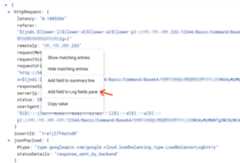
If you find matching results, and if you want to aggregate on the remote IPaddresses sending such requests, then add theremoteIp field totheLog fields pane in the Logs Explorer. To add theremoteIp field,click the field value in a matching log entry and selectAdd field to Logs fields pane, as shown in the following screenshot:
You can now see the top remote IP addresses sending matching requestsin theLog fields pane:
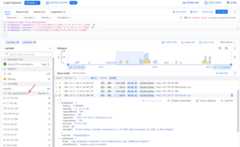
This gives you a breakdown of where these Log4j 2 vulnerability exploit scansare coming from. Some of these may be legitimate scans from an applicationvulnerability scanning tool you may have configured, such asWeb Security Scanner. If you are using Web Security Scanner fromSecurity Command Center, take note ofstatic IP address ranges used byWeb Security Scanner.
Search for targeted applications and verify mitigation techniques
You may also want to aggregate on the targeted applications, and identifywhether malicious requests have actually reached your applications. If you haveenabled mitigation techniques using security policies by Cloud Armor oraccess control by Identity-Aware Proxy (IAP), you can also verify thatthey work as expected from information logged in HTTP(S) Load Balancer logs.
First, to add the targeted application to theLog fields pane, pick one oflog entry results, expandresource.labels, click theresource.labels.backend_service_name field value, and then selectAdd field to Logs fields pane.
You can now see your top applications or backend services being targeted byLog4j 2 exploit scans. To determine if these exploit attempts even reached yourbackend service, use thejsonPayload.statusDetails field populated by HTTP(S)Load Balancer to learn whether the request was proxied to the backend, orsuccessfully blocked by services like IAP orCloud Armor. Click thejsonPayload.statusDetails field value from thelog entry result, and selectAdd field to Logs fields pane.
You can now see a breakdown of how the requests were handled, in theLog fields pane:
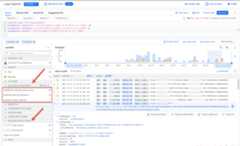
In this example, the majority of requests were blocked by IAPwhich, when enabled on a backend service, verifies the user's identity and usecontext before allowing access. Those IAP-blocked requests havestatusDetails set ashandled_by_identity_aware_proxy. In addition(or alternatively), if using Cloud Armor with the correct securitypolicy attached on a backend service, all Cloud Armor-blocked requestshavestatusDetails set asdenied_by_security_policy. For details on how toapply the new preconfiguredcve-canary WAF rule to your Cloud Armorsecurity policies, seeGoogle Cloud Armor WAF rule to help mitigate Apache Log4j vulnerability.
To filter for any allowed requests that actually reach a backend service, selectresponse_sent_by_backend understatusDetails in theLog fields pane.Consider enabling IAP for these backend services and applyinga Cloud Armor security policy with the preconfiguredcve-canary WAFrule to help block these exploit attempts.
Create a log-based alerting policy
After you have designed a query that finds affected logs in your service,you can use that query to create a log-based alerting policy that will notifyyou when new log entries match the query. Incidents created by thealerting policy can be forwarded to your organization's security operationcenter (SOC) or appropriate incident-response team.
For information about creating a log-based alerting policy, seeCreate a log-based alerting policy (Logs Explorer). When youcreate the alerting policy, be sure to use your query for the exploit stringinstead of the query specified in the example.
Create an alerting policy for a log-based metric
To monitor which endpoints or services are logging possible exploitattempts, create an alerting policy on a log-based metric:
Create a log-based metric to count occurrences of possibleexploit strings in your logs. For example, you can use theGoogle Cloud CLI to create a such a metric:
gcloud logging metrics create log4j_exploits \--description="Detect log4j exploits" \--log-filter='httpRequest.requestUrl=~"(?i)(\$|\%24)(\{|\%7b).*j.*n.*d.*i.*(\:|\%3a)" OR httpRequest.userAgent=~"(?i)(\$|\%24)(\{|\%7b).*j.*n.*d.*i.*(\:|\%3a)" OR httpRequest.referer=~"(?i)(\$|\%24)(\{|\%7b).*j.*n.*d.*i.*(\:|\%3a)"'For more information about creating log-based metrics, seeConfigure counter metrics.
Create an alerting policy to notify you when a selected number ofoccurrences is reached. For information about setting up an alertingpolicy, seeCreate an alerting policy on a counter metric.
What's next
Check this document for updates as new information becomes available.
For more information about the Log4j 2 vulnerability and yourGoogle Cloud services, see the following:
Except as otherwise noted, the content of this page is licensed under theCreative Commons Attribution 4.0 License, and code samples are licensed under theApache 2.0 License. For details, see theGoogle Developers Site Policies. Java is a registered trademark of Oracle and/or its affiliates.
Last updated 2025-12-15 UTC.