

Query and view log entries
This document describes how you query, view, and analyze log entries by usingthe Google Cloud console. There are two interfaces available to you, theLogs Explorer and Log Analytics. You can query, view, and analyzelogs with both interfaces; however, they use different query languages and theyhave different capabilities.For troubleshooting and exploration of log data, we recommend using theLogs Explorer. To generate insights and trends, we recommend that youuse Log Analytics.You can query your logs and save your queries by issuingLogging API commands.You can also query your logs by usingGoogle Cloud CLI.
Logs Explorer
The Logs Explorer is designed to help you troubleshoot and analyze theperformance of your services and applications. For example, a histogramdisplays the rate of errors. If you see a spike in errors or something thatis interesting, you can locate and view thecorresponding log entries. When a log entry is associated with anerror group, the log entry isannotated with amenu of options that let you access more information about the error group.
The samequery language issupported by the Cloud Logging API, the Google Cloud CLI,and the Logs Explorer.To simplify query construction when you are using the Logs Explorer, you canbuild queries by using menus, byentering text, and, in some cases, by using options included with the displayof an individual log entry.
The Logs Explorer doesn't support aggregate operations,like counting the number of log entries that contain a specific pattern.To perform aggregate operations, enable analytics on the log bucket and then useLog Analytics.
For details about searching and viewing logs with the Logs Explorer, seeView logs by using the Logs Explorer.
Log Analytics
Using Log Analytics, you can run queries that analyze your log data, andthen you can view orchart the query results. Charts letyou identify patterns and trends in your logs over time. The followingscreenshot illustrates the charting capabilities in Log Analytics:
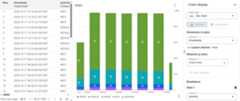
For example, suppose that you are troubleshooting a problem and you want toknow the average latency for HTTP requests issued to a specific URL over time.When a log bucket is upgraded to use Log Analytics, you can write aSQL query or use the query builder to query logs stored in your logbucket.
These SQL queries can also includepipe syntax.By grouping and aggregating your logs, you can gain insights into your logdata which can help you reduce time spent troubleshooting.
Log Analytics lets you querylog views or ananalytics view. Log views have a fixed schema whichcorresponds to theLogEntry data structure.Because the creator of an analytics view determines the schema, one usecase for analytics views is to transform log data from theLogEntry format into a format that is more suitable for you.
You can also useBigQueryto query your data. For example, suppose that you want to useBigQuery to compare URLs in your logs with a public dataset ofknown malicious URLs. To make your log data visible toBigQuery, upgrade your bucket to use Log Analytics and thencreate a linked dataset.
You can continue to troubleshoot issues and view individual log entries inupgraded log buckets by using the Logs Explorer.
Restrictions
To upgrade an existing log bucket to use Log Analytics, the followingrestrictions apply:
- The log bucket was created at the Google Cloud project level.
- The log bucket isunlocked unless it is the
_Requiredbucket. - There aren't pending updates to the bucket.
Log entries written before a bucket is upgraded aren't immediately available.However, when the backfill operation completes, you can analyze these logentries. The backfill process might take several days.
You can't use theLog Analytics page to query log views when the log buckethasfield-level access controls configured.However, you can issue queriesthrough theLogs Explorer page, and you can query alinked BigQuery dataset.Because BigQuery doesn't honor field-level access controls, if youquery a linked dataset, then you can query all fields in the log entries.
If you query multiple log views, then they must be stored in the samelocation. For example, if two views are located in the
us-east1location,then one query can query both views. You can also query two views that arelocated intheusmulti-region. However, if a view's location isglobal, then thatview can reside in any physical location. Therefore, joins between two viewsthat have the location ofglobalmight fail.If you query multiple log views and their underlying log buckets areconfigured with different Cloud KMS keys, then the query failsunless the following constraints are met:
- A folder or organization that is a parent resource of the log bucketsisconfigured with a default key.
- The default key is in the same location as the log buckets.
When the previous constraints are satisfied, the parent's Cloud KMSkey encrypts any temporary data generated by a Log Analytics query.
Duplicate log entries aren't removed before a query is run. This behavioris different than when you query log entries by using the Logs Explorer,which removes duplicate entries by comparing the log names, timestamps, andinsert ID fields. For more information, seeTroubleshoot: There are duplicate log entries in my Log Analytics results.
Pricing
For pricing information, seeGoogle Cloud Observability pricing page. If you route log data toother Google Cloud services, then see the following documents:
There are no BigQuery ingestion or storage costs whenyou upgrade a bucket to use Log Analytics and thencreate alinked dataset.When you create a linked dataset for a log bucket, you don't ingest yourlog data into BigQuery. Instead, you get read accessto the log data stored in your log bucket through the linked dataset.
BigQuery analysis charges apply when you run SQL queries onBigQuery linked datasets, which includes using theBigQuery Studio page, the BigQuery API, and theBigQuery command-line tool.
Blogs
For more information about Log Analytics, see the following blog posts:
- For an overview of Log Analytics, seeLog Analytics in Cloud Logging is now GA.
- To learn about creating charts generated by Log Analytics queries andsaving those charts to custom dashboards, seeAnnouncing Log Analytics charts and dashboards in Cloud Logging inpublic preview.
- To learn about analyzing audit logs by using Log Analytics, seeGleaning security insights from audit logs with Log Analytics.
- If you route logs to BigQuery and want to understand thedifference between that solution and using Log Analytics,then seeMoving to Log Analytics for BigQuery export users.
What's next
- Create a log bucket and upgrade it to use Log Analytics
- Upgrade an existing bucket to use Log Analytics
Query and view logs:
Sample queries:
Except as otherwise noted, the content of this page is licensed under theCreative Commons Attribution 4.0 License, and code samples are licensed under theApache 2.0 License. For details, see theGoogle Developers Site Policies. Java is a registered trademark of Oracle and/or its affiliates.
Last updated 2025-12-15 UTC.