

Troubleshoot Google Workspace audit logs
If you encounter issues with your audit logs for Google Workspace, see thefollowing information.
If these steps don't resolve the problem,open a support request.
I don't see audit logs for Google Workspace in Cloud Logging
When I go to the Logs Explorer, I don't see any audit logs.
Try the following steps:
Confirm the sharing and permissions are configured correctly and you're usingthe Logs Explorer.
Verify thatGoogle Cloud sharing is enabled.
Verify that the user has permission to view the logs in Google Cloud.Set the IAM roleLogging Private Logs Viewer at theorganization level.
Make sure you're searching for logs at the organization level, and not atthe Google Cloud project level. For more information, see theGoogle Workspace audit logging information page.
I've verified sharing and permissions are correct, but I still can't seeany audit logs for Google Workspace in the Logs Explorer.
Try the following steps:
Confirm that these log entries exist in the Google Admin console.
Search for logs at the organization level, not at the project level.
Use theResource drop-down menu in the Logs Explorer to selectAudited Resource. The Google Workspace audit logs field
resource.typeis equal toaudited_resource.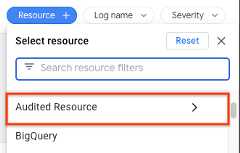
Expand the time range of the query.
I can see audit logs for Google Workspace in the Logs Explorer, but the gcloud CLI commands aren't returning them.
Try the following steps:
- Verify that the correct
logNameis used. Supply a validORGANIZATION_ID in each of the log names. Here are the auditlog names for Google Workspace:
organizations/ORGANIZATION_ID/logs/cloudaudit.googleapis.com%2Factivity organizations/ORGANIZATION_ID/logs/cloudaudit.googleapis.com%2Fdata_access
- Verify there are no errors in yourORGANIZATION_ID or
logName.
I can see audit logs for Google Workspace, but logs are delayed
Your log data might be delayed or missing due to latency. For more information about latency, seeData retention and lag times.
I can see log entries, but a field is missing or incorrect
For issues of missing or incorrect fields,open a support request with Google Workspace Support.
The following are examples of missing fields:
The same log record exists in both the Google Admin console andLogs Explorer, but a field is missing from both. For example,the IP address is missing in both.
The same log record exists in both the Google Admin console andthe Logs Explorer. However, a field exists in the Google Admin consoleand is either missing or incorrect in the Logs Explorer.
I can't create log-based metrics for Google Workspace logs
Log-based metrics apply only at theGoogle Cloud project level. Google Workspace logs are organization-level logs.
Contact Support
You can contact the proper support team if the troubleshooting steps don'tresolve your issue.
Contact Google Workspace support
For questions about logs in the Google Admin console, contactGoogle Workspace support.
Contact Google Cloud Support
For questions about Logging, such as viewing, exporting, orcreating sinks and metrics, please contact Google Cloud support:
Premium, Role-Based, and Enterprise Support plans let youmanage supportcases in the Google Cloud console.
Except as otherwise noted, the content of this page is licensed under theCreative Commons Attribution 4.0 License, and code samples are licensed under theApache 2.0 License. For details, see theGoogle Developers Site Policies. Java is a registered trademark of Oracle and/or its affiliates.
Last updated 2025-12-15 UTC.