

Monitor your logs
This document describes how you can use Cloud Monitoring to observe trendsin your log data and to notify you when conditions that you specify occur.To provide Cloud Monitoring with data from your log data,Logging supports the following features:
You can generate custom metrics from your log entries. These metrics arecalledlog-based-metrics. You can also createmetric-based alertingpolicies to notify you when a log-based metric meets a condition.For more information, seeVisualize log entry data with log-based metrics.
You can use alerting policies to monitor, in near real time, when a messageappears in your log entries. These alerting policies are calledlog-based alerting policies. For more information, seeMonitor individual log entries for messages.
You can write a SQL query in Log Analytics and create an alerting policy thatmonitors the results of the query. These alerting policies are calledSQL-based alerting policies. For more information, seeMonitor SQL query results.
SQL-based alerting policies is in Public Preview.
The rest of this document describes the differences between these threealerting policies, and provides information about authorization, costs, andlimits.
Visualize log entry data with log-based metrics
When you want to monitor recurring events in your log data over time, uselog-based metrics. Log-based metrics generate numeric data from your log dataand they are suitable when you want to do any of the following:
- Count the occurrences of a message, like a warning or error, in yourlog data and receive a notification when the number of occurrences crossesa threshold.
- Observe trends in your data, like latency values in yourlog data, and receive a notification when the values change in an unacceptableway.
- Create charts to display the extracted numeric data.
Because log-based metrics generate numeric data from your log data, you can usethese metrics in alerting policies and display them in charts.For information about creating alerting policies and charts for log-basedmetrics, seeConfigure notifications for log-based metrics.
Cloud Monitoring provides a set of predefined log-based metrics, and youcan define your own. To see a list of the system-defined log-based metrics,click the followingadd_circle button:
System-defined log-based metrics
The "metric type" strings in this table must be prefixed withlogging.googleapis.com/. That prefix has been omitted from the entries in the table. When querying a label, use themetric.labels. prefix; for example,metric.labels.LABEL="VALUE".
| Metric type Launch stage (Resource hierarchy levels) Display name | |
|---|---|
| Kind, Type, Unit Monitored resources | Description Labels |
billing/bytes_ingestedGA (project)Bytes streamed into log buckets | |
DELTA, INT64, Byglobal | Number of bytes streamed into log buckets for indexing, querying, and analysis; includes up to 30 days of storage. Sampled every 60 seconds. After sampling, data is not visible for up to 300 seconds.resource_type: Monitored resource type for the log entry. |
billing/bytes_storedBETA (project)Logging Retention | |
GAUGE, INT64, Byglobal | Volume of logs that are retained past the default 30 days. No data exists when the retention period of a log bucket is never larger than 30 days. This metric might have a value of zero when the retention period of a log bucket is shortened to 30 days. Sampled every 60 seconds. After sampling, data is not visible for up to 300 seconds.data_type: This field indicates that log volume reported here is charged for retention past the default 30 days. The data_type for all reported retention is set to `CHARGED`.log_bucket_location: The location where the log bucket resides.log_bucket_id: The id of the log bucket. |
billing/log_bucket_bytes_ingestedBETA (project)Bytes streamed into log buckets | |
DELTA, INT64, Byglobal | Number of bytes streamed into log buckets for indexing, querying, and analysis; includes up to 30 days of storage. Sampled every 60 seconds. After sampling, data is not visible for up to 300 seconds.log_source: The resource container where the log comes from.resource_type: Monitored resource type for the logs streamed into log buckets.log_bucket_location: The location where the log bucket resides.log_bucket_id: The id of the log bucket. |
billing/log_bucket_monthly_bytes_ingestedBETA (project)Bytes streamed into log buckets monthly | |
GAUGE, INT64, Byglobal | Number of bytes streamed into log buckets for indexing, querying, and analysis for this month-to-date; include up to 30 days of storage. Sampled every 1800 seconds. After sampling, data is not visible for up to 6000 seconds.log_source: The resource container where the log comes from.resource_type: Monitored resource type for the logs streamed into log buckets.log_bucket_location: The location where the log bucket resides.log_bucket_id: The id of the log bucket. |
billing/monthly_bytes_ingestedGA (project)Monthly bytes streamed into log buckets | |
GAUGE, INT64, Byglobal | Month-to-date number of bytes streamed into log buckets for indexing, querying, and analysis; includes up to 30 days of storage. Sampled every 1800 seconds. After sampling, data is not visible for up to 6000 seconds.resource_type: Monitored resource type for the log entry. |
byte_countGA (project)Log bytes | |
DELTA, INT64, By | Total bytes of log entries, either written directly or routed to this project via project-sink, that are stored in at least one log bucket. Sampled every 60 seconds.log: Name of the log.severity: Severity of the log entry. |
dropped_log_entry_countDEPRECATED (project)Logs-based metric errors (Deprecated) | |
DELTA, INT64, 1 | Use "logging.googleapis.com/logs_based_metrics_error_count" instead. Sampled every 60 seconds.log: Name of the log. |
exports/byte_countGA (project)Exported log bytes | |
DELTA, INT64, Bylogging_sink | Number of bytes in log entries that were exported. Sampled every 60 seconds. After sampling, data is not visible for up to 420 seconds. |
exports/error_countGA (project)Exported log entries failures | |
DELTA, INT64, 1logging_sink | Number of log entries that failed to be exported. Sampled every 60 seconds. After sampling, data is not visible for up to 420 seconds. |
exports/log_entry_countGA (project)Exported log entries | |
DELTA, INT64, 1logging_sink | Number of log entries that were exported. Sampled every 60 seconds. After sampling, data is not visible for up to 420 seconds. |
log_entry_countGA (project)Log entries | |
DELTA, INT64, 1 | Number of log entries, either written directly or routed to this project via project-sink, that are stored in at least one log bucket. By default, log entries are stored for 30 days. Excluded logs are not counted. Sampled every 60 seconds.log: Name of the log.severity: Severity of the log entry. |
logs_based_metrics_error_countGA (project)Logs-based metric errors | |
DELTA, INT64, 1 | Number of log entries, either written directly or routed to this project via project-sink, and are stored in a log bucket but excluded from any system or user-defined logs-based metrics. This condition can occur if the timestamp of a log entry is more than 24 hours older, or 10 minutes newer, than the actual receive time. Sampled every 60 seconds.log: Name of the log. |
metric_label_cardinalityBETA (project)Logs-based metric active cardinality count by label | |
GAUGE, INT64, 1metric | Cardinality estimate for each metric label of a logs-based metric. The estimate is computed over approximately 25 hours. Sampled every 60 seconds. After sampling, data is not visible for up to 270 seconds.label: Name of the metric label. |
metric_label_throttledBETA (project)Logs-based metric label throttled status | |
GAUGE, BOOL, metric | Indicates if metric labels are being dropped for logs-based metrics due to exceeding cardinality limits. Sampled every 60 seconds. After sampling, data is not visible for up to 270 seconds.label: Name of the metric label. |
metric_throttledGA (project)Logs-based metric throttled status | |
GAUGE, BOOL, metric | Indicates if labels or points are being dropped for logs-based metrics due to exceeding active time series (cardinality) limits. Sampled every 60 seconds. After sampling, data is not visible for up to 270 seconds. |
time_series_countBETA (project)Logs-based metric active time series (cardinality) count | |
GAUGE, INT64, 1metric | Active time series (cardinality) estimates for logs-based metrics. Only metric labels are counted and the estimate is computed over approximately 25 hours. Sampled every 60 seconds. After sampling, data is not visible for up to 270 seconds. |
Table generated at 2026-02-20 00:02:33 UTC.
User-defined log-based metrics
You can create log-based metrics to extract numeric data from yourlog data. User-defined log-based metrics calculate values from both includedand excluded log entries.
By default, user-defined log-based metrics collect data from all log entriesreceived by the Log Router in your Google Cloud project, but you candefine log-based metrics that collect data from log entries routed to a specificlog bucket.
- For information about defining and using project-level log-based metrics, seeUsing log-based metrics.
- For information about defining and using bucket-level log-based metrics, seeLog-based metrics on log buckets.
If you define your own log-based metrics,you might incur charges. For more information about costs associated withmetric ingestion, seeGoogle Cloud Observability pricing.
Monitor individual log entries for messages
When you want to be notified anytime a specific message occurs in a log entry,use log-based alerting policies. Log-based alerting policiesare useful for catching security-related events in log entries,like the following:
- You want to be notified when an event appears in an audit log; for example,a human user accesses the security key of a service account.
- Your application writes deployment messages to logs, and you want to benotified when a deployment change is logged.
Log-based alerting policies are useful for events that you expect to beboth rare and important. You don't want to know about a trend or pattern;you want to know that something occurred.
Log-based alerting policies are defined in a project, and they scan a log entrywhen the following conditions are true:
- Billing is enabled.
- The log entry originates in a project.
Sinks in the project where the log entry originates, or in a projectto which the log entry is routed, route the log entry to a log bucket.
For example, assume a log entry originates in project
A. If a log sinkin projectAroutes the log entry to a log bucket, thenlog-based alerting policies defined in projectAscan the log entry.As a second example, assume a log entry originates in project
Xand thata log sink in projectXroutes the log entry to projectY. If a sink inprojectYroutes the log entry to a log bucket, thenlog-based alerting policies defined in projectXand in projectYscan the log entry.
You can't use log-based alerting policies to monitor log entries that originatein folders, billing accounts, or organizations, or to monitor log entries thataren't stored in log buckets. If you create aggregated sinks, then these sinksmight intercept a log entry and prevent it from being routed by thesinks in the project where the log entry originates.
For information about creating log-based alerting policies, seeConfigure log-based alerting policies.
Monitor SQL query results
You can configure alerting policies that use Log Analytics to run SQLqueries on your log entry data. These types of alerting policiesare effective when you want to get notifiedbased on patterns that can't be evaluated by log-based alerting policies,such as complex patterns in log entriesor aggregations of log data. For more information, seeMonitor your SQL query results with an alerting policy.
Comparison of alerting options
This section compares alerting policies built on log-based metrics,log-based alerting policies, and SQL-based alerting policies.
Summary table
The following table summarizes the alerting techniques and provideslinks to additional information:
| Metric-based alerting policies | Log-based alerting policies | SQL-based alerting policies | More information |
|---|---|---|---|
| Based on metrics derived from log entries | Based on strings in individual log entries | Based on tables returned by SQL queries over log entries | Log-based metrics Log-based alerting SQL-based alerting |
| Used to notify you of trends over time | Used to notify you when a specific message appears in a log | Used to notify you of a pattern in a window of log entries | Log-based metrics Log-based alerting SQL-based alerting |
Calculated from
| Match only included log entries | Calculated from log entries in a sliding window | Available log entries SQL-based alerting |
| Operate on metrics from all projects in the metrics scope of the scoping project | Operate on log entries that satisfy the following conditions:
| Operate on log views which are accessible through linked datasets. The linked datasets can be in any project. | Metrics scope Linked datasets |
| Incident is created when the value of a metric meets a condition for a specified period | Incident is created each time a specific log entry matches a filter | Incident is created when the table of query results meets a condition | Incidents and notifications |
| Created and managed in Monitoring | Created in Logging; managed in Monitoring | Created in Log Analytics; managed in Monitoring | Creating and managing alerting policies SQL-based alerting |
| Viewed in Monitoring | Viewed in Monitoring | Viewed in Monitoring | Viewing alerting policies |
| Can use any notification channel supported in Monitoring | Can use any notification channel supported in Monitoring | Can use any notification channel supported in Monitoring | Notification channels |
Available log entries
User-defined log-based metrics are calculated from all log entriesreceivedby the Logging API for the Google Cloud project, regardless of anyinclusion filters orexclusion filters that may apply tothe Google Cloud project. If you create an alerting policy based on auser-defined log-based metric, then the policy monitors data from alllog entries.
System-defined log-based metrics are calculated only fromlog entries that have been stored in log buckets in theGoogle Cloud project. If a log has been explicitlyexcluded, then it isn't included in these metrics.If you createan alerting policy based on a system-defined log-based metric, then the policymonitors data only from included log entries.
Log-based alerting policies are defined in a project, and they scan a log entrywhen the following conditions are true:
- Billing is enabled.
- The log entry originates in a project.
Sinks in the project where the log entry originates, or in a projectto which the log entry is routed, route the log entry to a log bucket.
For example, assume a log entry originates in project
A. If a log sinkin projectAroutes the log entry to a log bucket, thenlog-based alerting policies defined in projectAscan the log entry.As a second example, assume a log entry originates in project
Xand thata log sink in projectXroutes the log entry to projectY. If a sink inprojectYroutes the log entry to a log bucket, thenlog-based alerting policies defined in projectXand in projectYscan the log entry.
You can't use log-based alerting policies to monitor log entries that originatein folders, billing accounts, or organizations, or to monitor log entries thataren't stored in log buckets. If you create aggregated sinks, then these sinksmight intercept a log entry and prevent it from being routed by thesinks in the project where the log entry originates.
SQL-based alerting policies query log views on log buckets.These log buckets must beupgraded to use Log Analyticsand thenlinked to a BigQuery dataset.For more information about SQL-based alerting policies, seeMonitor your SQL query results with an alerting policy.
Monitor metrics across multiple projects
You can monitor metrics from several projects by configuring ametrics scope. Ametrics scope lists all the projects andaccounts that it monitors. Ascoping project hosts the metrics scope.The scoping project stores the alerting policies and other configurationsthat you create for the metrics scope. The scoping project for ametrics scope is the project selected by the Google Cloud console project picker.
Alerting policies based on log-based metrics, like alerting policies basedon other metrics, work across all projectsin the metrics scope of the scoping project.
The metrics scope isn't relevant to alerting policies based on log entries,like log-based and SQL-based policies.
For more information about metrics scopes, including multi-projectmetrics scopes, and about scoping projects, see the following:
Incidents and notifications
When the condition of an alerting policy is met, Monitoringopens an incident and sends notifications to the notification channels ofthe alerting policy. To see the details of the incident, clickView incident in the notification message, or navigate directly totheIncidents page in Monitoring.
Incidents for metric-based alerting policies
Alerting policies based on log-based metrics create incident andnotifications like all other metric-based alerting policies inMonitoring, as described inAlerting behavior. For more informationabout managing incidents for metric-based alerting policies,seeIncidents for metric-based alerting policies.
Incidents for log-based alerting policies
Log-based alerting policies aren't metric-based alerting policies.When a log entry meets the condition of a log-based alerting policy,Monitoring creates incidents and notifications as follows:
The first time Cloud Logging writes a log entry that matches your alertingpolicy's query on a log bucket, an incident is created and anotification is sent. If another matching log entry is then written, then anew incident is created only if the previous incident has beenclosed. However, it might take up to three minutes for a closedincident to be purged. When a matching log entry is received in thethree minutes after you closed an incident, the systemmight reopen that incident rather than creating a new incident.
When you create a log-based alerting policy, you can specify the minimum timebetween notifications. For example, youselect 10 minutes as the time between notifications. If the condition of yourlog-based alerting policy is met twice within that period,then you receive only one notification.
The maximum rate of incidents for log-based alerting policies is1 incident every 5 minutes.If the query of your log-based alerting policy extracts label values,then each combination of extracted valuesrepresents its own incident timeline. For example, assume a log-basedalerting policy extracts the values of a label and that the label can have twovalues. With this configuration, two incidents can be opened, one foreach label value, in the same 5 minutes.
There is a limit of 20 incidents a day for each log-based alerting policy. If you reach thislimit, then your notification includes a message that you have reached thelimit for the day.
Incidents automatically close when the auto-close duration expires.By default, the auto-close duration is 7 days.
The auto-close duration specifies the time that must elapse, without a repeatof the cause of the incident, before the incident closes. For thisreason, when an incident is open and its cause reoccurs, theincident can stay open longer than the auto-close duration.
For more information about managing incidents for log-based alertingpolicies, seeManage incidents for log-based alerting policies.
Incidents for SQL-based alerting policies
For SQL-based alerting policies, Cloud Monitoringcreates an incident the first time the result ofthe SQL query meets the condition specified in the policy. Eachalerting policy has only one open incident. While the incident isopen, if the condition is met again, Monitoring doesn't createfurther incidents or send additional notifications.Monitoring closes SQL-based incidents after seven days,unless you configure a shorter incident closure period or close theincident on your own.
For more information about managing incidents for SQL-based alertingpolicies, seeManage incidents for SQL-based alerting policies.
Creating and managing alerting policies
You create, modify, and delete alerting policies based on log-based metricsin Cloud Monitoring, like any other metric-based alerting policy.For more information, seeManaging policies.
You can create log-based alerting policies by using the Logs Explorer or theCloud Monitoring API. You modify and delete log-based alerting policies inMonitoring or with the Cloud Monitoring API.For more information, seeManaging log-based alerting policies.
You can create SQL-based alerting policies by usingLog Analytics or the Cloud Monitoring API. You modify and delete SQL-based alertingpolicies in Monitoring or byusing the Cloud Monitoring API. For more information, seeMonitor your SQL query results with an alerting policy.
Viewing alerting policies
ThePolicies page in Monitoring lists all thealerting policies in your Google Cloud project. This list includes policies thatuse log-based metrics and log-based alerting policies.
In the Google Cloud console, go to thenotifications Alerting page:
If you use the search bar to find this page, then select the result whose subheading isMonitoring.
- SelectSee all policies.
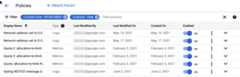
Log-based alerting policies appear in the list with the valueLogs in theType column. Alerting policies based on metrics, including log-basedmetrics, appear in the list with the valueMetrics in theType column.SQL-based alerting policies appear in thelist with the valueSQL in theTypes column.The following screenshot shows an excerpt of a policy list:
Notification channels
You can send notifications from any type of alerting policy toany of the notification channels supported by Monitoring. Youmust configure these channels before you can use them in alerting policies.
For more information, seeManaging notificationchannels.
Authorization requirements
Using log-based metrics or log-based alerting policies requires authorizationfor both Cloud Logging and Cloud Monitoring.
For user-defined log-based metrics, seePermissions for log-based metrics.
For log-based alerting policies, seePermissions for log-based alerting policies.
For SQL-based alerting policies, seePermissions for SQL-based alerting policies.
Costs and limits
If you define your own log-based metrics, then the following apply:
- There are limits on the number and structure of user-defined log-basedmetrics. For more information about these limits, seelimits forlog-based metrics.
- You might incur charges for user-defined log-based metrics.For more information about costs associated with metric ingestion, seeGoogle Cloud Observability pricing.
- SQL-based alerting policies run in a BigQueryreservation in your Google Cloud project. You might incur charges for having aBigQuery reservation. For more information about costsassociated with BigQuery reservations, seeBigQuery pricing.
There are no charges associated with using alerting policies based onlog-based metrics.
The following Monitoring limits related to alerting policiesapply:
| Category | Value | Policy type1 |
|---|---|---|
| Alerting policies (sum of metric and log)per metrics scope2 | 2,000 | Metric, Log |
| Conditions per metric-based alerting policy | 6 | Metric |
| Conditions perSQL-based alerting policy (Public Preview) | 1 | SQL |
| Maximum query execution time for a SQL-based alerting policy (Public Preview) | 5 minutes | SQL |
| Maximum time period that a metric-absence condition evaluates3 | 1 day | Metric |
| Maximum time period that a metric-threshold condition evaluates3 | 23 hours 30 minutes | Metric |
| Maximum length of the filter used in a metric-threshold condition | 2,048 Unicode characters | Metric |
| Maximum number of time series monitored by a forecast condition | 64 | Metric |
| Minimum forecast window | 1 hour (3,600 seconds) | Metric |
| Maximum forecast window | 2.5 days (216,000 seconds) | Metric |
| Notification channels per alerting policy | 16 | All |
| Maximum rate of incidents4 for log-based alerts | 1 incident every 5 minutes | Log |
| Maximum number of incidents for log-based alerts | 20 incidents a day for each log-based alerting policy | Log |
| Maximum number of notifications per incident5 for log-based alerts | 20 notifications per day per incident | Log |
| Maximum number of simultaneously triggering alerting policies per project | 80,000 | All |
| Maximum number of simultaneously open incidents per alerting policy | 1,000 | All |
| Period after which an incident with no new data is automatically closed | 7 days | Metric, SQL |
| Maximum duration of an incident if not manually closed | 7 days | Log |
| Retention of closed incidents | 13 months | Not applicable |
| Retention of open incidents | Indefinite | Not applicable |
| Notification channelsper metrics scope | 4,000 | Not applicable |
| Maximum number of alerting policies per snooze | 16 | All |
| Retention of a snooze | 13 months | Not applicable |
2You can request to increase this limit from the default of2,000 policies per metrics scope up to10,000 policies per metrics scope.
3The maximum time period that a condition evaluates is the sum of thealignment period and the duration window values. For example, if the alignment period isset to 15 hours, and the duration window is set 15 hours, then 30 hours of data is required toevaluate the condition.
4If the query of your log-based alerting policy extracts label values,then each combination of extracted valuesrepresents its own incident timeline. For example, assume a log-basedalerting policy extracts the values of a label and that the label can have two values.With this configuration, two incidents can be created, one for each label value, in the same5 minutes.
5If a log entry that matches the filter of a log-based alert is receivedand if at least 5 minutes have elapsed since the most recent notificationwas generated, then Monitoring generates a new notification for an openincident. If a log-based alert policy is snoozed when a notification is generated, then thenotification is discarded and isn't sent to the policy's notification channels. Otherwise, thenotification is sent to all configured notification channels for the alerting policy. Allnotifications that are generated count towards the limit of20 notifications per day per incident.
Except as otherwise noted, the content of this page is licensed under theCreative Commons Attribution 4.0 License, and code samples are licensed under theApache 2.0 License. For details, see theGoogle Developers Site Policies. Java is a registered trademark of Oracle and/or its affiliates.
Last updated 2026-02-20 UTC.