

About Gateway API
This page describes the Google Kubernetes Engine (GKE) implementation of theKubernetes Gateway API usingtheGKE Gateway controller.
This page is for Cloud architects and Networking specialists whodesign and architect their organization's network. To learn more aboutcommon roles and example tasks that we reference in Google Cloud content, seeCommon GKE user roles and tasks.
Gateway API is an open source standard for service networking. GatewayAPI evolves the Ingress resource and improves upon it in the following ways:
Role-oriented: Gateway API is composed of API resources that correspond to theorganizational roles of cluster operator, developer, and infrastructureprovider. This lets cluster operators define how shared infrastructurecan be used by many different and non-coordinating developer teams.
Portable: Gateway API is an open source standard with manyimplementations, enabling the concepts and core resources to be consistentacross implementations and environments, reducing complexity, and increasinguser familiarity. Its design uses the flexible conformance concept, using ahighly portable core API (like Ingress) that still has the flexibility andextensibility to support native capabilities of the environment andimplementation.
Expressive: Gateway API resources provide built-in capabilities forheader-based matching, traffic weighting, and other capabilities that areonly possible in Ingress through custom annotations.
Gateway API resources
Gateway API is a role-oriented resource model, designed forCloud architects and Networking specialists whointeract with Kubernetes networking. As shown by the following diagram, thismodel enables different non-coordinating service owners to share the sameunderlying network infrastructure safely in a way that centralizes policy andcontrol for the platform administrator.
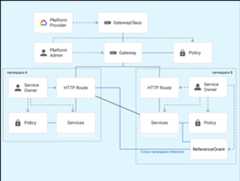
Gateway API contains the following resource types:
- GatewayClass: Defines a cluster-scoped resourcethat's a template for creating load balancers in a cluster. GKEprovides GatewayClasses that can be used in GKE clusters.
- Gateway: Defines where and how the load balancers listenfor traffic. Cluster operators create Gateways in their clusters basedon a GatewayClass. GKE creates load balancers that implementthe configuration defined in the Gateway resource.
- HTTPRoute: Defines protocol-specific rules for routingrequests from a Gateway to Kubernetes services. GKE supportsHTTPRoutes for HTTP(S)-based traffic routing. Application developers createHTTPRoutes to expose their HTTP applications using Gateways.
- Policy: Defines a set of implementation-specificcharacteristics of a Gateway resource. You can attach a policy to a Gateway,a Route, or a Kubernetes Service.
- ReferenceGrant: Enables cross-namespacereferences within Gateway API. To refer to an object outside its namespace,you must create a ReferenceGrant resource.
GatewayClass
A GatewayClass is a resource that defines a template for HTTP(S) (Layer 7) loadbalancers in a Kubernetes cluster.GKE provides GatewayClasses as cluster-scoped resources. Clusteroperators specify a GatewayClass when creating Gateways in their clusters.
The different GatewayClasses correspond to differentGoogle Cloud loadbalancers. When you create aGateway based on a GatewayClass, a corresponding load balancer is created toimplement the specified configuration.
Some GatewayClasses support multi-cluster load balancing.
The following table lists the GatewayClasses available in GKEclusters and their underlying load balancer type. For complete details on theGatewayClasses, see theGatewayClass capabilities andspecifications.
| GatewayClass name | Description |
|---|---|
gke-l7-global-external-managed | Global external Application Load Balancer(s) built on theglobal external Application Load Balancer |
gke-l7-regional-external-managed | Regional external Application Load Balancer(s) built on theregional external Application Load Balancer |
gke-l7-rilb | Internal Application Load Balancer(s) built on theinternal Application Load Balancer |
gke-l7-gxlb | Global external Application Load Balancer(s) built on theclassic Application Load Balancer |
gke-l7-cross-regional-internal-managed-mc | Multi-cluster Cross-region internal Application Load Balancer(s) built on thecross-region internal Application Load Balancer |
gke-l7-global-external-managed-mc | Multi-cluster Global external Application Load Balancer(s) built on theglobal external Application Load Balancer |
gke-l7-regional-external-managed-mc | Multi-cluster Regional external Application Load Balancer(s) built on theregional external Application Load Balancer |
gke-l7-rilb-mc | Multi-cluster Internal Application Load Balancer(s) built on theinternal Application Load Balancer |
gke-l7-gxlb-mc | Multi-cluster Global external Application Load Balancer(s) built on theclassic Application Load Balancer |
gke-td | Multi-clusterCloud Service Mesh service mesh |
asm-l7-gxlb | Global external Application Load Balancer(s) built onCloud Service Mesh |
Each GatewayClass is subject to the limitations of the underlying load balancer.
Note: When considering the deployment of a Global external Application Load Balancer, we dorecommend to use thegke-l7-global-external-managed(-mc) GatewayClasses over thegke-l7-gxlb(-mc) GatewayClasses to benefit from the advanced security andtrafficmanagementcapabilities. To learn more about the different features supported with eachGatewayClass, seeGatewayClass capabilities.Gateway
Cluster operators create Gateways to define where and how the load balancerslisten for traffic. Gateways take their behavior (that is, how they areimplemented) from their associated GatewayClass.
The Gateway specification includes the GatewayClass for the Gateway, whichports and protocols to listen on, and which Routes can bind to the Gateway. AGateway selects routes based on the Route metadata; specifically the kind,namespace, and labels of Route resources.
For an example of deploying a Gateway, seeDeployingGateways.
For an exampleof deploying a multi-cluster Gateway, seeDeploying multi-clusterGateways.
HTTPRoute
An HTTPRoute defines how HTTP and HTTPS requests received by a Gateway aredirected to Services. Application developers create HTTPRoutes to expose theirapplications through Gateways.
An HTTPRoute defines which Gateways it can route traffic from, which Servicesto route to, and rules that define what traffic the HTTPRoute matches. Gatewayand Route binding is bidirectional, which means that both resources must selecteach other for them to bind. HTTPRoutes can match requests based on details inthe request header.
Note: When multiple HTTPRoute resources reference the same Gateway, they are all compiled into a single URL map on the underlying Google Cloud infrastructure. As a result, all HTTPRoutes attached to a single Gateway are subject to the same URL mapquotas and limits.Policy
A Policy defines characteristics of a Gateway resource, typicallyimplementation-specific, that cluster operators can attach to a Gateway, aRoute, or a Kubernetes Service. A Policy defines how the underlyingGoogle Cloud infrastructure should function.
A Policy is typically attached to a namespace and can reference a resource inthe same namespace and access is granted using RBAC. The hierarchical nature ofthe Gateway API lets you attach a Policy to a top resource (Gateway) in anamespace, and have all the resources underneath in different namespaces receivethe characteristics of that policy.
The GKE Gateway controller supports the following Policies:
HealthCheckPolicy: defines the parameters and behavior of the health checkused to check the health status of the backend Pods.GCPGatewayPolicy: defines specific parameters of the frontend of theGoogle Cloud load balancer. This policy is similar to aFrontendConfigfor an Ingress resource.GCPBackendPolicy: defines how the backend services of the load balancershould distribute the traffic to the endpoints. This policy is similar to aBackendConfigfor an Ingress resource.GCPBackendPolicy: defines how the backend services of the load balancerdistribute traffic to backends. TheGCPBackendPolicypolicy supports theCUSTOM_METRICSbalancing mode, which enables routing decisions based onuser-defined application metrics that are reported through the ORCA load reports.GCPTrafficDistributionPolicy: defines how traffic is distributed acrossendpoints within a backend. This policy is similar to how you would configurespecific traffic balancing algorithms for the backend service that are referenced byan Ingress resource.
LbPolicy policy with theGCPBackendPolicy policy. TheLbPolicy is still supported, but withoutadditional attributes.ReferenceGrant
ReferenceGrant enables resources like HTTPRoute or Gateway to reference backendservices or secrets located in different namespaces through cross-namespacereferencing. ReferenceGrant acts as a permission provider, specifying whichresources (from) are allowed to reference other resources (to). To enablecross-namespace references, you need a ReferenceGrant in the namespace of theresource being referenced.
In the following example, the HTTPRoute in thefrontend namespace needs toroute traffic to a Service in thebackend namespace. You create aReferenceGrant in thebackend namespace where:
- The
fromfield lists the source namespace and resource type allowed to makereferences, that is, HTTPRoute in thefrontendnamespace. - The
tofield specifies the target resource type that can be referenced,that is, Services in thebackendnamespace.
apiVersion:gateway.networking.k8s.io/v1beta1kind:ReferenceGrantmetadata:name:allow-frontend-to-access-backendnamespace:backendspec:from:-group:gateway.networking.k8s.iokind:HTTPRoutenamespace:frontendto:-group:""kind:ServiceIf you receive error message "No valid reference grant found" in your gateway status, verify that thegroup,kind,namespace andname values defined in thefrom andto sections are valid.
Gateway ownership and usage patterns
Gateway and Route resources provide flexibility in how they are owned anddeployed within an organization. This means that a single load balancer can bedeployed and managed by an infrastructure team, but routing under a particulardomain or path can be delegated to another team in another Kubernetes Namespace.The GKE Gateway controller supports multi-tenant usage of a load balancer,shared across Namespaces, clusters, and regions. Gateways also don't have to beshared if more distributed ownership is required. The following are some of the mostcommon usage patterns for Gateways in GKE.
Self-managed Gateway
A single owner can deploy a Gateway and Route just for their applicationsand use them exclusively. Gateways and Routes deployed in this manner aresimilar to Ingress. The following diagram shows two different service owners whodeploy and manage their own Gateways. Similar to Ingress, each Gateway correspondsto its own unique IP address and load balancer. TLS, routing, and otherpolicies are fully controlled by the service owner.

This usage pattern is common for Ingress but is challenging to scale across manyteams because of the lack of shared resources. The Gateway API resourcemodel enables the following usage patterns which provide a spectrum of options fordistributed control and ownership.
Platform-managed Gateway per Namespace
Separation between Gateway and Route resources lets platform administratorscontrol Gateways on behalf of service owners. Platform admins can deploy aGateway per Namespace or team, giving that Namespace exclusive access to use theGateway. This gives the service owner full control over the routing ruleswithout any risk of conflict from other teams. This lets the platformadministrator control aspects such as IP allocation, port exposure, protocols,domains, and TLS. Platform admins can also decide which kinds of Gateways areavailable to teams, such as internal or external Gateways. This usagepattern creates a clean separation of responsibilities between different roles.
Cross-Namespace routingis what lets Routes to attach toGateways across Namespace boundaries. Gateways can restrict from whichNamespaces Routes can attach. Similarly, Routes specify the Gateways that theyattach to, but they can only attach to a Gateway that has permitted the Route'sNamespace. Thisbi-directional attachmentprovides each side with flexible controls that enable this diversity of usage patterns.
In the following diagram, the platform administrator has deployed a Gateway for exclusiveaccess for each Namespace. For example, thestore Gateway is configured sothat only Routes from thestore Namespace can attach to it. Each Gatewayrepresents a unique, load balanced IP address and so it lets each team deployany number of Routes against the Gateway for any domains or routes it chooses.

Shared Gateway per cluster
Sharing Gateways across Namespaces offers an even more centralized form ofownership to platform administrators. This lets different service owners,running in different Namespaces, share the same IP address, DNS domain,certificates, or paths for fine grained routing between services. Gatewaysprovide control to platform administrators over which Namespaces can route for aspecific domain. This is similar to the previous example except Gateways permitRoute attachment from multiple Namespaces.
In the following diagram, the platform administrator has deployed two Gateways into theinfra Namespace. Theexternal Gateway permits Routes from theweb andmobile Namespaces to attach to the Gateway. Routes from theaccountsNamespace cannot use theexternal Gateway because theaccounts Namespace is only forinternal services. Theinternal Gateway lets internal clients communicate privatelywithin the VPC using private IP addresses.

Them.example.com domain is delegated to themobile Namespace which letsmobile service owners configure any routing rules they need under them.example.com domain. This gives the service owners a greater degree ofcontrol for introducing new API endpoints and controlling traffic withoutrequesting a change from administrators.
Shared Gateway per Fleet
Usingmulti-cluster Gateways,a Gateway can be shared across both Namespaces, clusters, andregions. Large organizations with geographically distributed apps might benefitfrom multi-cluster Gateways because they can granularly control global trafficwhile also delegating routing ownership. Similar to the previous examples, aplatform administrator manages the Gateway and delegates routing. The majoraddition to this use case is that Routes reference multi-cluster Services, whichare deployed across clusters. Traffic can be routed in an explicitmanner, traffic tostore.example.com/us goes togke-us Pods, or in animplicit manner, traffic toexample.com/* gets routed to the closest clusterto the client. This flexibility lets service owners define the optimal routingstrategy for their application.

GKE Gateway controller
The GKE Gateway controller is Google's implementation of theGateway API for Cloud Load Balancing. Similar to the GKEIngress controller, the Gateway controller watches a Kubernetes API for GatewayAPI resources and reconciles Cloud Load Balancing resources to implement thenetworking behavior specified by the Gateway resources.
There are two versions of the GKE Gateway controller:
- Single-cluster: manages single-cluster Gateways for a singleGKE cluster.
- Multi-cluster: manages multi-cluster Gateways for one or moreGKE clusters.
Both Gateway controllers are Google-hosted controllers that watch theKubernetes API for GKE clusters. Unlike the GKEIngress controller, the Gateway controllers are not hosted onGKE control planes or in the user project, enabling them to bemore scalable and robust. Both Gateway controllers are Generally Available (GA).
The Gateway controllers themselves are not a networking data plane and they donot process any traffic. They sit out of band from traffic andmanage various data planes that process traffic. The following diagramshows the architecture of the single-cluster and multi-clusterGKE Gateway controllers. The underlying controller that is useddepends on the GatewayClass of the deployed Gateway.

| Controller | Single-cluster Gateway controller | Multi-cluster Gateway controller |
|---|---|---|
| Managed by | Google Cloud | Google Cloud |
| Cluster scope | Single cluster Gateways | Multi-cluster Gateways |
| Deployment location | Deployed regionally in the same region as its GKE cluster. | Deployed globally across multiple Google Cloud regions. |
| How to enable | Enabled by default in GKE. | Enabled through the Multi Cluster Ingress API and registration into a fleet. SeeEnabling multi-cluster Gateways. |
| Supported GatewayClasses |
You can use multiple Gateway controllers, including controllers not provided byGoogle, in a GKE cluster simultaneously. Every GatewayClass issupported by one and only one Gateway controller, which enables single andmulti-cluster load balancing to be used simultaneously.
Service Extensions
The GKE Gateway controller supports Service Extensions, whichlet you add custom logic into Cloud Load Balancing.
Note: Support for Service Extensions is in the (Preview) stage.The GKE Gateway controller supports two types of extensions:
- GCPTrafficExtension: this extension provides a way to add custom logic intoCloud Load Balancing. The extension service can modify the headers andpayloads of both requests and responses without impacting the choice ofbackend services, or any other security policies that are associated withthe backend service.
- GCPRoutingExtension: this extension provides a way to add custom logic intoCloud Load Balancing to control where traffic is routed to for a givenrequest.
For more information about how to configure GKE Gateway controllers,seeCustomize GKE Gateway traffic using Service Extensions.
Ingress and Gateway
Ingress and Gateway are both open source standards for routing traffic, butthey have key differences.
Comparison of Ingress and Gateway
Gateway and Ingress are both open source standards for routing traffic and canbe used simultaneously without conflict. Over time, we recommend transitioningto using Gateway and Route resources due to their increased capabilities.Gateway was designed by the Kubernetes community, drawing on lessons learnedfrom the Ingress and the service mesh ecosystems. Gateway is an evolution ofIngress that serves the same function, delivered as a superset of the Ingresscapabilities.
In GKE all Ingress resources are directly convertible to Gatewayand HTTPRoute resources. A single Ingress corresponds to both a Gateway (forfrontend configuration) and an HTTPRoute (for routing configuration). Thefollowing example shows what the corresponding Gateway and HTTPRoute configurationlooks like. Note that the Gateway and HTTPRoute resources can be createdseparately, also by different users. Gateways can have many Routes and a Routecan also attach to more than one Gateway. The relationships between Gateways andRoutes is discussed inGateway usage patterns.
Ingress
apiVersion:networking.k8s.io/v1kind:Ingressmetadata:name:my-ingressannotations:kubernetes.io/ingress.class:"gce-internal"spec:rules:-host:"example.com"http:paths:-pathType:Prefixpath:/backend:service:name:siteport:number:80-pathType:Prefixpath:/shopbackend:service:name:storeport:number:80Gateway
apiVersion:gateway.networking.k8s.io/v1kind:Gatewaymetadata:name:my-gatewayspec:gatewayClassName:gke-l7-rilblisteners:-name:httpprotocol:HTTPport:80allowedRoutes:kinds:-kind:HTTPRouteRoute
apiVersion:gateway.networking.k8s.io/v1kind:HTTPRoutemetadata:name:my-routespec:parentRefs:-name:my-gatewayhostnames:-"example.com"rules:-matches:-path:value:/backendRefs:-name:siteport:80-matches:-path:value:/shopbackendRefs:-name:storeport:80Integrating Gateway API with Service Meshes
You can configure a Cloud Service Mesh using Gateway API. This enablesservice-to-service communications, traffic management, global load balancing,and security policy enforcement for service mesh use cases. For completeinformation about using Cloud Service Mesh with Gateway API, includingdeployment setup guides, seeCloud Service Mesh Overview.
Pricing
All Compute Engine resources deployed through the Gateway controllers are chargedagainst the project in which your GKE clusters reside. Thesingle-cluster Gateway controller is offered at no additional charge as a part ofGKE Standard and Autopilot pricing. Pricing formulti-cluster Gateways is described in theMulti Cluster Gateway and Multi Cluster Ingress pricing page.
What's next
- Learn how toConfigure Gateway resources using Policies
- Learn aboutDeploying Gateways.
- Learn aboutDeploying multi-cluster Gateways.
- For complete information about using Cloud Service Mesh with Gateway API, seeCloud Service Mesh Overview.
Except as otherwise noted, the content of this page is licensed under theCreative Commons Attribution 4.0 License, and code samples are licensed under theApache 2.0 License. For details, see theGoogle Developers Site Policies. Java is a registered trademark of Oracle and/or its affiliates.
Last updated 2025-12-17 UTC.