

Use the BigQuery connector with Google Cloud Serverless for Apache Spark
Use thespark-bigquery-connector withApache Spark to read and write data from and toBigQuery.This tutorial demonstrates a PySpark application that uses thespark-bigquery-connector.
Use the BigQuery connector with your workload
SeeServerless for Apache Spark runtime releasesto determine the BigQuery connector version that is installed inyour batch workload runtime version. If the connector is not listed,see the next section for instructions on how to make the connector available toapplications.
Note: You can update the installed BigQuery connector version using thedataproc.sparkBqConnector.version property (seeOther Spark properties).How to use the connector with Spark runtime version 2.0
The BigQuery connector is not installed in Spark runtime version 2.0. When usingSpark runtime version 2.0, you can make the connector available to your applicationin one of the following ways:
- Use the
jarsparameter to point to a connector jar file when you submit your Google Cloud Serverless for Apache Spark batch workload The following example specifies a connector jar file (see theGoogleCloudDataproc/spark-bigquery-connector repository on GitHub for a list of available connector jar files).- Google Cloud CLI example:
gcloud dataproc batches submit pyspark \ --region=region \ --jars=gs://spark-lib/bigquery/spark-bigquery-with-dependencies_2.13-version.jar \ ... other args
- Google Cloud CLI example:
- Include the connector jar file in your Spark application as a dependency (seeCompiling against the connector)
ClassNotFoundException is thrown.Calculate costs
This tutorial uses billable components of Google Cloud, including:
- Serverless for Apache Spark
- BigQuery
- Cloud Storage
Use thePricing Calculator to generate a costestimate based on your projected usage.
BigQuery I/O
This example reads data fromBigQueryinto a Spark DataFrame to perform a word count using thestandard data sourceAPI.
The connector writes the wordcount output to BigQuery as follows:
Buffering the data into temporary files in your Cloud Storage bucket
Copying the data in one operation from your Cloud Storage bucket intoBigQuery
Deleting the temporary files in Cloud Storage after the BigQueryload operation completes (temporary files are also deleted afterthe Spark application terminates). If deletion fails, you will need to deleteany unwanted temporary Cloud Storage files, which typically are placedin
gs://YOUR_BUCKET/.spark-bigquery-JOB_ID-UUID.
Configure billing
By default, the project associated with the credentials or service account isbilled for API usage. To bill a different project, set the followingconfiguration:spark.conf.set("parentProject", "<BILLED-GCP-PROJECT>").
You can also add to a read or write operation, as follows:.option("parentProject", "<BILLED-GCP-PROJECT>").
Submit a PySpark wordcount batch workload
Run a Spark batch workload that counts the number of words in a public dataset.
- Open a local terminal orCloud Shell
- Create the
wordcount_datasetwith thebq command-line tool in a local terminal or inCloud Shell.bq mk wordcount_dataset
- Create a Cloud Storage bucket with theGoogle Cloud CLI.
gcloud storage buckets create gs://YOUR_BUCKET
YOUR_BUCKETwith the name of the Cloud Storage bucket you created. - Create the file
wordcount.pylocally in a text editor by copying the following PySpark code.#!/usr/bin/python"""BigQuery I/O PySpark example."""frompyspark.sqlimportSparkSessionspark=SparkSession \.builder \.appName('spark-bigquery-demo') \.getOrCreate()# Use the Cloud Storage bucket for temporary BigQuery export data used# by the connector.bucket="YOUR_BUCKET"spark.conf.set('temporaryGcsBucket',bucket)# Load data from BigQuery.words=spark.read.format('bigquery') \.option('table','bigquery-public-data:samples.shakespeare') \.load()words.createOrReplaceTempView('words')# Perform word count.word_count=spark.sql('SELECT word, SUM(word_count) AS word_count FROM words GROUP BY word')word_count.show()word_count.printSchema()# Saving the data to BigQueryword_count.write.format('bigquery') \.option('table','wordcount_dataset.wordcount_output') \.save()
- Submit the PySpark batch workload:
gcloud dataproc batches submit pyspark wordcount.py \ --region=REGION \ --deps-bucket=YOUR_BUCKET
...+---------+----------+| word|word_count|+---------+----------+| XVII| 2|| spoil| 28|| Drink| 7||forgetful| 5|| Cannot| 46|| cures| 10|| harder| 13|| tresses| 3|| few| 62|| steel'd| 5|| tripping| 7|| travel| 35|| ransom| 55|| hope| 366|| By| 816|| some| 1169|| those| 508|| still| 567|| art| 893|| feign| 10|+---------+----------+only showing top 20 rowsroot |-- word: string (nullable = false) |-- word_count: long (nullable = true)
To preview the output table in the Google Cloud console, open your project'sBigQuerypage, select thewordcount_outputtable, and then clickPreview.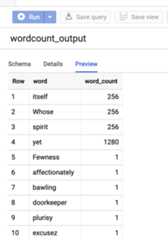
For more information
- BigQuery Storage & Spark SQL - Python
- Creating a table definition file for an external data source
- Use externally partitioned data
Except as otherwise noted, the content of this page is licensed under theCreative Commons Attribution 4.0 License, and code samples are licensed under theApache 2.0 License. For details, see theGoogle Developers Site Policies. Java is a registered trademark of Oracle and/or its affiliates.
Last updated 2025-12-15 UTC.