

Choose an endpoint protocol for Dataproc Metastore
This page explains how to choose an endpoint protocol forDataproc Metastore.
You first choose your endpoint protocol when you create aDataproc Metastore service. This choice affects the features thatyou can integrate and use with your service. It's important to note that onceyou choose an endpoint protocol, there are some restrictions if you want tochange it. Make sure you choose the appropriate protocol for your needs.
To understand the differences between endpoint protocols, seeAbout endpoint protocols.
Before you begin
- Enable Dataproc Metastorein your project.
- Understand networking requirementsspecific to your project.
Required Roles
To get the permission that you need to create a Dataproc Metastore, ask your administrator to grant you the following IAM roles on your project, based on the principle of least privilege:
- Grant full control of Dataproc Metastore resources (
roles/metastore.editor) - Grant full access to all Dataproc Metastore resources, including IAM policy administration (
roles/metastore.admin)
For more information about granting roles, seeManage access to projects, folders, and organizations.
This predefined role contains the metastore.services.create permission, which is required to create a Dataproc Metastore.
You might also be able to get this permission withcustom roles or otherpredefined roles.
For more information about specific Dataproc Metastore roles and permissions, seeManage Dataproc access with IAM.Choose an endpoint protocol
The following examples show an abbreviated version of the steps that you followto choose an endpoint protocol. For complete step-by-step instructions on theentire process you must follow, seeCreate a Dataproc Metastore.
For a new Dataproc Metastore service
To create a Dataproc Metastore service and choose theendpoint protocol for the first time, follow these instructions:
Console
In the Google Cloud console, open the Dataproc Metastore page:
In theDataproc Metastore Navigation menu, clickCreate.
TheCreate service page opens.
In theEndpoint protocol section, selectThrift orgRPC.
Thrift is the default preselected endpoint protocol.
You can only update an existing endpoint protocol from Thrift to gRPC.If you want to move from gRPC to Thrift, create a newDataproc Metastore service.
Tip: We recommend that you use the gRPC protocol. gRPC provides additionalsecurity through Identity and Access Management (IAM). It also supports federationintegrations with other Google Cloud products. For more informationabout choosing an endpoint protocol, seeAbout endpoint protocols.Choose theremaining configurationsfor your service, as needed.
To create and start the service, clickSubmit.
If you selected a gRPC endpoint, you must grant additional IAM permissionsto your service. For more information, seeAccess gRPC endpoints.
gcloud CLI
To choose an endpoint protocol, run the following
gcloud metastore services createcommand:gcloud metastore services createSERVICE \ --endpoint-protocol=ENDPOINT_PROTOCOL ; default="thrift"
Replace the following:
SERVICE_ID: The name or ID for yourDataproc Metastore service.ENDPOINT_PROTOCOL: The endpoint protocol that youwant to use for your Dataproc Metastore. You can specify eitherthriftorgrpc.Thrift is the default preselected endpoint protocol.
You can only update an existing endpoint protocol from Thrift to gRPC.If you want to move from gRPC to Thrift, you must create a new service.
Tip: We recommend that you use the gRPC protocol. gRPC providesadditional security through Identity and Access Management (IAM). It also supportsfederation integrations with other Google Cloud products. For moreinformation about choosing an endpoint protocol, seeAbout endpoints.
Verify that your service was successfully created.
If you selected a gRPC endpoint protocol, you must add additionalIAM permissions to your account. For more information, seeAccess gRPC endpoints.
For an existing Dataproc Metastore service
To update the endpoint protocol of an existing Dataproc Metastoreservice, follow these instructions:
Note: You can only update an existing endpoint protocol from Thrift to gRPC.If you want to move from gRPC to Thrift, you must create a new service.Console
In the Google Cloud console, open the Dataproc Metastore page:
On theDataproc Metastore page, click the service to update.
TheService detail page opens.
On theConfiguration tab, clickEdit.
TheEdit service page opens.
In theEndpoint protocol section, selectgRPC.
To update the service, clickSubmit.
After updating to the gRPC endpoint protocol, you must add additional IAM permissionsto your account. For more information, seeAccess gRPC endpoints.
gcloud CLI
To update an endpoint protocol, run the following
gcloud metastore services updatecommand:gcloud metastore services updateSERVICE \ --endpoint-protocol=ENDPOINT_PROTOCOL
Replace the following:
SERVICE: The name of your Dataproc Metastoreservice.ENDPOINT_PROTOCOL: The endpoint protocol that youwant update for your Dataproc Metastore service. You canonly specifygrpc.
Verify that your update was successful.
After updating to a gRPC endpoint, you must grant additional IAMpermissions to your service. For more information, seeAccess gRPC endpoints.
Find your endpoint URI value
Console
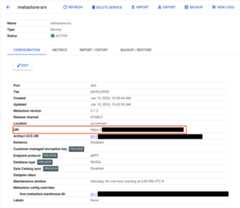
You can view your endpoint URI on theDataproc Metastore page.
- For Thrift endpoints, theURL value starts with
thrift:// - For gRPC endpoints, theURL value starts with
https://
The following image shows an example of a Dataproc Metastore serviceconfigured with a gRPC endpoint protocol.
gcloud CLI
To view your endpoint URI, run the followinggcloud metastore services describe command:
gcloud metastore services describeSERVICE --format="get(endpointUri)"
Replace the following:
SERVICE: The name of your Dataproc Metastoreservice.
What's next
Except as otherwise noted, the content of this page is licensed under theCreative Commons Attribution 4.0 License, and code samples are licensed under theApache 2.0 License. For details, see theGoogle Developers Site Policies. Java is a registered trademark of Oracle and/or its affiliates.
Last updated 2025-12-15 UTC.