

Use the Spark BigQuery connector
Thespark-bigquery-connectoris used withApache Sparkto read and write data from and toBigQuery.The connector takes advantage of theBigQuery Storage APIwhen reading data from BigQuery.
This tutorial provides information on the availability of the pre-installed connector,and shows you how make a specific connector version available to Sparkjobs. Example code shows you how to use the Spark BigQuery connectorwithin a Spark application.
Use the pre-installed connector
The Spark BigQuery connector is pre-installed on and is available toSpark jobs run on Dataproc clusters created with image versions2.1 and later. The pre-installed connector version is listed on each imageversion release page. For example, theBigQuery Connector row on the2.2.x image release versionspage shows the connector version that is installed on the latest2.2 image releases.
Make a specific connector version available to Spark jobs
If you want to use a connector version that is different from a pre-installedversion on a2.1 or later image version cluster, or if you want to installthe connector on a pre-2.1 image version cluster, follow the instructions inthis section.
Important: Thespark-bigquery-connector version must be compatible withthe Dataproc cluster image version. See theConnector to Dataproc Image Compatibility Matrix.
2.1 and later image version clusters
When youcreate a Dataproc clusterwith a2.1 or later image version, specify theconnector version ascluster metadata.
gcloud CLI example:
gcloud dataproc clusters createCLUSTER_NAME \ --region=REGION \ --image-version=2.2 \ --metadata=SPARK_BQ_CONNECTOR_VERSION orSPARK_BQ_CONNECTOR_URL\ other flags
Notes:
SPARK_BQ_CONNECTOR_VERSION: Specify a connector version.Spark BigQuery connector versions are listed on thespark-bigquery-connector/releasespage in GitHub.
Example:
--metadata=SPARK_BQ_CONNECTOR_VERSION=0.42.1
SPARK_BQ_CONNECTOR_URL: Specify a URL that points to the jar in Cloud Storage.You can specify the URL of a connector listed in thelink column in theDownloading and Using the Connectorin GitHub or the path to a Cloud Storage location where you haveplaced a custom connector jar.
Examples:
--metadata=SPARK_BQ_CONNECTOR_URL=gs://spark-lib/bigquery/spark-3.5-bigquery-0.42.1.jar--metadata=SPARK_BQ_CONNECTOR_URL=gs://PATH_TO_CUSTOM_JAR
2.0 and earlier image version clusters
You can make the Spark BigQuery connector available to your applicationin one of the following ways:
Install the spark-bigquery-connector in the Spark jars directory of everynode by using theDataproc connectors initialization action when you create your cluster.
Provide the connector jar URL when you submit your job to the cluster usingthe Google Cloud console, gcloud CLI, or the DataprocAPI.
Console
Use the Spark jobJars files item on the DataprocSubmit a job page.
gcloud
API
Use the
SparkJob.jarFileUrisfield.How to specify the connector jar when running Spark jobs on pre-2.0 image version clusters
Spark-BigQuery connector versions are listed in the GitHubGoogleCloudDataproc/spark-bigquery-connector repository.- Specify the connector jar by substituting the Scala and connector versioninformation in the following URI string:
gs://spark-lib/bigquery/spark-bigquery-with-dependencies_SCALA_VERSION-CONNECTOR_VERSION.jar
- Use Scala
2.12with Dataproc image versions1.5+gs://spark-lib/bigquery/spark-bigquery-with-dependencies_2.12-CONNECTOR_VERSION.jar
gcloud dataproc jobs submit spark \ --jars=gs://spark-lib/bigquery/spark-bigquery-with-dependencies_2.12-0.23.2.jar \ --job args
- Use Scala
2.11with Dataproc image versions1.4and earlier:gs://spark-lib/bigquery/spark-bigquery-with-dependencies_2.11-CONNECTOR_VERSION.jar
gcloud dataproc jobs submit spark \ --jars=gs://spark-lib/bigquery/spark-bigquery-with-dependencies_2.11-0.23.2.jar \ --job-args
latestjars, as follows:- Dataproc image version
1.5+:--jars=gs://spark-lib/bigquery/spark-bigquery-latest_2.12.jar - Dataproc image versions 1.4 and earlier:
--jars=gs://spark-lib/bigquery/spark-bigquery-latest.jar
- Dataproc image version
- Specify the connector jar by substituting the Scala and connector versioninformation in the following URI string:
Include the connector jar in your Scala or Java Spark application as a dependency (seeCompiling against the connector).
ClassNotFoundException is thrown.Calculate costs
In this document, you use the following billable components of Google Cloud:
- Dataproc
- BigQuery
- Cloud Storage
To generate a cost estimate based on your projected usage, use thepricing calculator.
Read and write data from and to BigQuery
This example reads data fromBigQueryinto a Spark DataFrame to perform a word count using thestandard data sourceAPI.
The connector writes the data to BigQuery byfirst buffering all the data into a Cloud Storage temporary table. Then itcopies all data from into BigQuery in one operation. Theconnector attempts to delete the temporary files once the BigQueryload operation has succeeded and once again when the Spark application terminates.If the job fails, remove any remaining temporaryCloud Storage files. Typically, temporary BigQueryfiles are located ings://[bucket]/.spark-bigquery-[jobid]-[UUID].
Configure billing
By default, the project associated with the credentials or service account isbilled for API usage. To bill a different project, set the followingconfiguration:spark.conf.set("parentProject", "<BILLED-GCP-PROJECT>").
It can also be added to a read or write operation, as follows:.option("parentProject", "<BILLED-GCP-PROJECT>").
Run the code
Before running this example, create a dataset named "wordcount_dataset" orchange the output dataset in the code to an existing BigQuery dataset in yourGoogle Cloud project.
Use thebq command to createthewordcount_dataset:
bqmkwordcount_datasetUse theGoogle Cloud CLI commandto create a Cloud Storage bucket, which will be used to export toBigQuery:
gcloudstoragebucketscreategs://[bucket]Scala
- Examine the code and replace the[bucket] placeholder with the Cloud Storage bucket you created earlier.
/* * Remove comment if you are not running in spark-shell. *import org.apache.spark.sql.SparkSessionval spark = SparkSession.builder() .appName("spark-bigquery-demo") .getOrCreate()*/// Use the Cloud Storage bucket for temporary BigQuery export data used// by the connector.valbucket="[bucket]"spark.conf.set("temporaryGcsBucket",bucket)// Load data in from BigQuery. See// https://github.com/GoogleCloudDataproc/spark-bigquery-connector/tree/0.17.3#properties// for option information.valwordsDF=spark.read.bigquery("bigquery-public-data:samples.shakespeare").cache()wordsDF.createOrReplaceTempView("words")// Perform word count.valwordCountDF=spark.sql("SELECT word, SUM(word_count) AS word_count FROM words GROUP BY word")wordCountDF.show()wordCountDF.printSchema()// Saving the data to BigQuery.(wordCountDF.write.format("bigquery").save("wordcount_dataset.wordcount_output"))
- Run the code on your cluster
- Use SSH to connect to the Dataproc cluster master node
- Go to theDataprocClusters page in the Google Cloud console, then click the name of your cluster
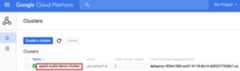
- On the>Cluster details page, select the VM Instances tab. Then, click
SSHto the right of the name of the cluster master node>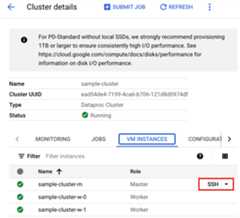
A browser window opens at your home directory on the master nodeConnected, host fingerprint: ssh-rsa 2048 ... ... user@clusterName-m:~$
- Go to theDataprocClusters page in the Google Cloud console, then click the name of your cluster
- Create
wordcount.scalawith the pre-installedvi,vim, ornanotext editor, then paste in the Scala code from theScala code listingnano wordcount.scala
- Launch the
spark-shellREPL.$ spark-shell --jars=gs://spark-lib/bigquery/spark-bigquery-latest.jar...Using Scala version ...Type in expressions to have them evaluated.Type :help for more information....Spark context available as sc....SQL context available as sqlContext.scala>
- Run wordcount.scala with the
:load wordcount.scalacommand to create the BigQuerywordcount_outputtable. The output listing displays 20 lines from the wordcount output.:load wordcount.scala...+---------+----------+| word|word_count|+---------+----------+| XVII| 2|| spoil| 28|| Drink| 7||forgetful| 5|| Cannot| 46|| cures| 10|| harder| 13|| tresses| 3|| few| 62|| steel'd| 5|| tripping| 7|| travel| 35|| ransom| 55|| hope| 366|| By| 816|| some| 1169|| those| 508|| still| 567|| art| 893|| feign| 10|+---------+----------+only showing top 20 rowsroot |-- word: string (nullable = false) |-- word_count: long (nullable = true)
To preview the output table, open theBigQuerypage, select thewordcount_outputtable, and then clickPreview.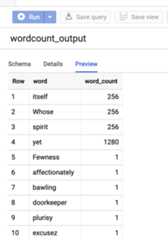
- Use SSH to connect to the Dataproc cluster master node
PySpark
- Examine the code and replace the[bucket] placeholder with the Cloud Storage bucket you created earlier.
#!/usr/bin/env python"""BigQuery I/O PySpark example."""frompyspark.sqlimportSparkSessionspark=SparkSession \.builder \.master('yarn') \.appName('spark-bigquery-demo') \.getOrCreate()# Use the Cloud Storage bucket for temporary BigQuery export data used# by the connector.bucket="[bucket]"spark.conf.set('temporaryGcsBucket',bucket)# Load data from BigQuery.words=spark.read.format('bigquery') \.load('bigquery-public-data:samples.shakespeare') \words.createOrReplaceTempView('words')# Perform word count.word_count=spark.sql('SELECT word, SUM(word_count) AS word_count FROM words GROUP BY word')word_count.show()word_count.printSchema()# Save the data to BigQueryword_count.write.format('bigquery') \.save('wordcount_dataset.wordcount_output')
- Run the code on your clusterUse Dataproc to submit the PySpark code:Instead of running the PySpark code manually from the cluster master instance, you can submit the PySpark file directly to your cluster (see theDataproc Quickstarts).Here are the steps using the Google Cloud CLI:
- Create
wordcount.pylocally in a text editor by copying the PySpark code from thePySpark code listing - Run the PySpark code by submitting the job to your cluster with the
gcloud dataproc jobs submitcommand:gcloud dataproc jobs submit pyspark wordcount.py \ --cluster=cluster-name \ --region=region \ --jars=gs://spark-lib/bigquery/spark-bigquery-latest.jar
- Use SSH to connect to the Dataproc cluster master node
- Go to theDataprocClusters page in the Google Cloud console, then click the name of your cluster
- On theCluster details page, select the VM Instances tab. Then, click
SSHto the right of the name of the cluster master node
A browser window opens at your home directory on the master nodeConnected, host fingerprint: ssh-rsa 2048 ... ... user@clusterName-m:~$
- Go to theDataprocClusters page in the Google Cloud console, then click the name of your cluster
- Create
wordcount.pywith the pre-installedvi,vim, ornanotext editor, then paste in the PySpark code from thePySpark code listingnano wordcount.py
- Run wordcount with
spark-submitto create the BigQuerywordcount_outputtable. The output listing displays 20 lines from the wordcount output.spark-submit --jars gs://spark-lib/bigquery/spark-bigquery-latest.jar wordcount.py...+---------+----------+| word|word_count|+---------+----------+| XVII| 2|| spoil| 28|| Drink| 7||forgetful| 5|| Cannot| 46|| cures| 10|| harder| 13|| tresses| 3|| few| 62|| steel'd| 5|| tripping| 7|| travel| 35|| ransom| 55|| hope| 366|| By| 816|| some| 1169|| those| 508|| still| 567|| art| 893|| feign| 10|+---------+----------+only showing top 20 rowsroot |-- word: string (nullable = false) |-- word_count: long (nullable = true)
To preview the output table, open theBigQuerypage, select thewordcount_outputtable, and then clickPreview.
- Create
Troubleshooting tips
You can examine job logs in Cloud Logging and in the BigQueryJobs Explorer to troubleshoot Spark jobs that use the BigQueryconnector.
Dataproc driver logs contain a
BigQueryCliententry withBigQuery metadata that includes thejobId:ClassNotFoundException
INFO BigQueryClient:.. jobId: JobId{project=PROJECT_ID, job=JOB_ID, location=LOCATION} BigQuery jobs contain
Dataproc_job_idandDataproc_job_uuidlabels:- Logging:
protoPayload.serviceData.jobCompletedEvent.job.jobConfiguration.labels.dataproc_job_id="JOB_ID"protoPayload.serviceData.jobCompletedEvent.job.jobConfiguration.labels.dataproc_job_uuid="JOB_UUID"protoPayload.serviceData.jobCompletedEvent.job.jobName.jobId="JOB_NAME"
- BigQuery Jobs Explorer: Click a job ID to view job detailsunderLabels inJob information.
- Logging:
What's next
- SeeBigQuery Storage & Spark SQL - Python.
- Learn how tocreate a table definition file for an external data source.
- Learn how toquery externally partitioned data.
- SeeSpark job tuning tips.
Except as otherwise noted, the content of this page is licensed under theCreative Commons Attribution 4.0 License, and code samples are licensed under theApache 2.0 License. For details, see theGoogle Developers Site Policies. Java is a registered trademark of Oracle and/or its affiliates.
Last updated 2025-12-15 UTC.