

Dataproc driver node groups
A DataprocNodeGroup resource is a group of Dataproccluster nodes that execute an assigned role. This page describes thedriver node group, which is a group of Compute Engine VMS that areassigned theDriver role for the purpose of running job drivers on theDataproc cluster.
When to use driver node groups
- Use driver node groups only when you need to run many concurrent jobson a shared cluster.
- Increase master node resources before usingdriver node groups to avoiddriver node group limitations.
How driver nodes help you run concurrents job
Dataproc starts a job driver process on a Dataproccluster master node for each job. The driver process, in turn,runs an application driver, such asspark-submit, as its child process.However, the number of concurrent jobs running on the master is limited by theresources available on master node, and since Dataproc masternodes can't be scaled, a job can fail or get throttled when master node resourcesare insufficient to run a job.
Driver node groups are special node groups managed by YARN, so job concurrencyis not limited by master node resources. In clusters with a driver node group,application drivers run on driver nodes. Each driver node can run multipleapplication drivers if the node has sufficient resources.
Benefits
Using a Dataproc cluster with a driver nodegroup lets you:
- Horizontally scale job driver resources to run more concurrent jobs
- Scale driver resources separately from worker resources
- Obtain faster scaledown on Dataproc 2.0+ and later imageclusters. On these clusters, the app master runs within a Spark driver in adriver node group (the
spark.yarn.unmanagedAM.enabledis settotrueby default). - Customize driver node start-up. You can add
{ROLE} == 'Driver'in aninitialization scriptto have the script perform actions for a driver node groupinnode selection.
Limitations
- Node groups are not supported inDataproc workflow templates.
- Node group clusters cannot be stopped, restarted, or autoscaled.
- The MapReduce app master runs on worker nodes. A scale down of worker nodes canbe slow if you enablegraceful decommissioning.
- Job concurrency is affected by the
dataproc:agent.process.threads.job.maxcluster property.For example, with three masters and this property set to the defaultvalue of100, maximum cluster-level job concurrency is300.
Driver node group compared to Spark cluster mode
| Feature | Spark cluster mode | Driver node group |
|---|---|---|
| Worker node scale down | Long-lived drivers run on the same worker nodes as short-lived containers, making scale down of workers using graceful decommission slow. | Worker nodes scale down more quickly when drivers run on node groups. |
| Streamed driver output | Requires searching in YARN logs to find the node where the driver was scheduled. | Driver output is streamed to Cloud Storage, and is viewable in the Google Cloud console and in thegcloud dataproc jobs wait command output after a job completes. |
Driver node group IAM permissions
The following IAM permissions are associated with theDataproc node group related actions.
| Permission | Action |
|---|---|
dataproc.nodeGroups.create | Create Dataproc node groups. If a user hasdataproc.clusters.create in the project, this permission is granted. |
dataproc.nodeGroups.get | Get the details of a Dataproc node group. |
dataproc.nodeGroups.update | Resize a Dataproc node group. |
Driver node group operations
You can use the gcloud CLI and Dataproc API to create,get, resize, delete, and submit a job to a Dataproc driver node group.
Create a driver node group cluster
A driver node group is associated with one Dataproc cluster.You create a node group as part ofcreating a Dataproc cluster.You can use the gcloud CLI or Dataproc REST API tocreate a Dataproc cluster with a driver node group.
Note: Dataproc driver node groups are supported in clusters created with2.0.52 and laterimage versions.gcloud
gcloud dataproc clusters createCLUSTER_NAME \ --region=REGION \ --driver-pool-size=SIZE \ --driver-pool-id=NODE_GROUP_ID
Required flags:
- CLUSTER_NAME: The cluster name, which must be unique within a project.The name must start with a lowercase letter, and can contain up to 51 lowercaseletters, numbers, and hyphens. It cannot end with a hyphen. The name of adeleted cluster can be reused.
- REGION: Theregionwhere the cluster will be located.
- SIZE: The number of driver nodes in the node group. The number of nodesneeded depend on job load and driver pool machine type. The number ofminimumdriver group nodes is equal to total memory or vCPUs required by job driversdivided by each driver pool's machine memory or vCPUs.
- NODE_GROUP_ID: Optional and recommended. The ID must be uniquewithin the cluster. Use this ID to identify the driver group in futureoperations, such as resizing the node group. If not specified,Dataproc generates the node group ID.
Recommended flag:
--enable-component-gateway: Add this flag to enable theDataproc Component Gateway, which provides access to the YARN web interface.The YARN UI Application and Scheduler pages display cluster and job status,application queue memory, core capacity, and other metrics.
Additional flags: The following optionaldriver-pool flags can be addedto thegcloud dataproc clusters create command to customize the node group.
| Flag | Default value |
|---|---|
--driver-pool-id | A string identifier, generated by the service if not set by the flag. This ID can be used to identify the node group when performing future node pool operations, such as resizing the node group. |
--driver-pool-machine-type | n1-standard-4 |
--driver-pool-accelerator | No default. When specifying an accelerator, the GPU type is required; the number of GPUs is optional. |
--num-driver-pool-local-ssds | No default |
--driver-pool-local-ssd-interface | No default |
--driver-pool-boot-disk-type | pd-standard |
--driver-pool-boot-disk-size | 1000 GB |
--driver-pool-min-cpu-platform | AUTOMATIC |
REST
Complete aAuxiliaryNodeGroupas part of a Dataproc APIcluster.createrequest.
Before using any of the request data, make the following replacements:
- PROJECT_ID: Required. Google Cloud project ID.
- REGION: Required. Dataproc clusterregion.
- CLUSTER_NAME: Required. The cluster name, which must be unique within a project. The name must start with a lowercase letter, and can contain up to 51 lowercase letters, numbers, and hyphens. It cannot end with a hyphen. The name of a deleted cluster can be reused.
- SIZE: Required. Number of nodes in the node group.
- NODE_GROUP_ID: Optional and recommended. The ID must be unique within the cluster. Use this ID to identify the driver group in future operations, such as resizing the node group. If not specified, Dataproc generates the node group ID.
Additional options: SeeNodeGroup.
Set theEndpointConfig.enableHttpPortAccessproperty totrue to enable theDataproc Component Gateway,which provides access to the YARN web interface.The YARN UI Application and Scheduler pages display cluster and job status,application queue memory, core capacity, and other metrics.HTTP method and URL:
POST https://dataproc.googleapis.com/v1/projects/PROJECT_ID/regions/REGION/clusters
Request JSON body:
{ "clusterName":"CLUSTER_NAME", "config": { "softwareConfig": { "imageVersion":"" }, "endpointConfig": { "enableHttpPortAccess": true }, "auxiliaryNodeGroups": [{ "nodeGroup":{ "roles":["DRIVER"], "nodeGroupConfig": { "numInstances":SIZE } }, "nodeGroupId": "NODE_GROUP_ID" }] }}To send your request, expand one of these options:
curl (Linux, macOS, or Cloud Shell)
Note: The following command assumes that you have logged in to thegcloud CLI with your user account by runninggcloud init orgcloud auth login , or by usingCloud Shell, which automatically logs you into thegcloud CLI . You can check the currently active account by runninggcloud auth list. Save the request body in a file namedrequest.json, and execute the following command:
curl -X POST \
     -H "Authorization: Bearer $(gcloud auth print-access-token)" \
     -H "Content-Type: application/json; charset=utf-8" \
     -d @request.json \
     "https://dataproc.googleapis.com/v1/projects/PROJECT_ID/regions/REGION/clusters"
PowerShell (Windows)
Note: The following command assumes that you have logged in to thegcloud CLI with your user account by runninggcloud init orgcloud auth login . You can check the currently active account by runninggcloud auth list. Save the request body in a file namedrequest.json, and execute the following command:
$cred = gcloud auth print-access-token
$headers = @{ "Authorization" = "Bearer $cred" }

Invoke-WebRequest `
    -Method POST `
    -Headers $headers `
    -ContentType: "application/json; charset=utf-8" `
    -InFile request.json `
    -Uri "https://dataproc.googleapis.com/v1/projects/PROJECT_ID/regions/REGION/clusters" | Select-Object -Expand Content
You should receive a JSON response similar to the following:
{ "projectId": "PROJECT_ID", "clusterName": "CLUSTER_NAME", "config": { ... "auxiliaryNodeGroups": [ { "nodeGroup": {"name": "projects/PROJECT_ID/regions/REGION/clusters/CLUSTER_NAME/nodeGroups/NODE_GROUP_ID", "roles": [ "DRIVER" ], "nodeGroupConfig": { "numInstances":SIZE, "instanceNames": [ "CLUSTER_NAME-np-q1gp", "CLUSTER_NAME-np-xfc0" ], "imageUri": "https://www.googleapis.com/compute/v1/projects/cloud-dataproc-ci/global/images/dataproc-2-0-deb10-...-rc01", "machineTypeUri": "https://www.googleapis.com/compute/v1/projects/PROJECT_ID/zones/REGION-a/machineTypes/n1-standard-4", "diskConfig": { "bootDiskSizeGb": 1000, "bootDiskType": "pd-standard" }, "managedGroupConfig": { "instanceTemplateName": "dataproc-2a8224d2-...", "instanceGroupManagerName": "dataproc-2a8224d2-..." }, "minCpuPlatform": "AUTOMATIC", "preemptibility": "NON_PREEMPTIBLE" } }, "nodeGroupId": "NODE_GROUP_ID" } ] },}Get driver node group cluster metadata
You can use thegcloud dataproc node-groups describecommand or theDataproc API toget driver node group metadata.
gcloud
gcloud dataproc node-groups describeNODE_GROUP_ID \ --cluster=CLUSTER_NAME \ --region=REGION
Required flags:
- NODE_GROUP_ID: You can run
gcloud dataproc clustersdescribeCLUSTER_NAMEto list the node group ID. - CLUSTER_NAME: The cluster name.
- REGION: The cluster region.
REST
Before using any of the request data, make the following replacements:
- PROJECT_ID: Required. Google Cloud project ID.
- REGION: Required. The cluster region.
- CLUSTER_NAME: Required. The cluster name.
- NODE_GROUP_ID: Required. You can run
gcloud dataproc clusters describeCLUSTER_NAMEto list the node group ID.
HTTP method and URL:
GET https://dataproc.googleapis.com/v1/projects/PROJECT_ID/regions/REGION/clusters/CLUSTER_NAMEnodeGroups/Node_GROUP_ID
To send your request, expand one of these options:
curl (Linux, macOS, or Cloud Shell)
Note: The following command assumes that you have logged in to thegcloud CLI with your user account by runninggcloud init orgcloud auth login , or by usingCloud Shell, which automatically logs you into thegcloud CLI . You can check the currently active account by runninggcloud auth list.Execute the following command:
curl -X GET \
     -H "Authorization: Bearer $(gcloud auth print-access-token)" \
     "https://dataproc.googleapis.com/v1/projects/PROJECT_ID/regions/REGION/clusters/CLUSTER_NAMEnodeGroups/Node_GROUP_ID"
PowerShell (Windows)
Note: The following command assumes that you have logged in to thegcloud CLI with your user account by runninggcloud init orgcloud auth login . You can check the currently active account by runninggcloud auth list.Execute the following command:
$cred = gcloud auth print-access-token
$headers = @{ "Authorization" = "Bearer $cred" }

Invoke-WebRequest `
    -Method GET `
    -Headers $headers `
    -Uri "https://dataproc.googleapis.com/v1/projects/PROJECT_ID/regions/REGION/clusters/CLUSTER_NAMEnodeGroups/Node_GROUP_ID" | Select-Object -Expand Content
You should receive a JSON response similar to the following:
{ "name": "projects/PROJECT_ID/regions/REGION/clusters/CLUSTER_NAME/nodeGroups/NODE_GROUP_ID", "roles": [ "DRIVER" ], "nodeGroupConfig": { "numInstances": 5, "imageUri": "https://www.googleapis.com/compute/v1/projects/cloud-dataproc-ci/global/images/dataproc-2-0-deb10-...-rc01", "machineTypeUri": "https://www.googleapis.com/compute/v1/projects/PROJECT_ID/zones/REGION-a/machineTypes/n1-standard-4", "diskConfig": { "bootDiskSizeGb": 1000, "bootDiskType": "pd-standard" }, "managedGroupConfig": { "instanceTemplateName": "dataproc-driver-pool-mcia3j656h2fy", "instanceGroupManagerName": "dataproc-driver-pool-mcia3j656h2fy" }, "minCpuPlatform": "AUTOMATIC", "preemptibility": "NON_PREEMPTIBLE" }}Resize a driver node group
You can use thegcloud dataproc node-groups resizecommand or theDataproc APIto add or remove driver nodes from a cluster driver node group.
gcloud
gcloud dataproc node-groups resizeNODE_GROUP_ID \ --cluster=CLUSTER_NAME \ --region=REGION \ --size=SIZE
Required flags:
- NODE_GROUP_ID: You can run
gcloud dataproc clustersdescribeCLUSTER_NAMEto list the node group ID. - CLUSTER_NAME: The cluster name.
- REGION: The cluster region.
- SIZE: Specify the new number of driver nodes in the node group.
Optional flag:
--graceful-decommission-timeout=TIMEOUT_DURATION:When scaling down a node group, you can add this flag to specify agraceful decommissioningTIMEOUT_DURATION to avoid the immediate termination of job drivers.Recommendation: Set a timeout duration that is at least equal tothe duration of longest job running on the node group (recoveryof failed drivers is not supported).
Example: gcloud CLINodeGroup scale up command:
gcloud dataproc node-groups resizeNODE_GROUP_ID \ --cluster=CLUSTER_NAME \ --region=REGION \ --size=4
Example: gcloud CLINodeGroup scale down command:
gcloud dataproc node-groups resizeNODE_GROUP_ID \ --cluster=CLUSTER_NAME \ --region=REGION \ --size=1 \ --graceful-decommission-timeout="100s"
REST
Before using any of the request data, make the following replacements:
- PROJECT_ID: Required. Google Cloud project ID.
- REGION: Required. The cluster region.
- NODE_GROUP_ID: Required. You can run
gcloud dataproc clusters describeCLUSTER_NAMEto list the node group ID. - SIZE: Required. New number of nodes in the node group.
- TIMEOUT_DURATION: Optional. When scaling down a node group, you can add a
gracefulDecommissionTimeoutto the request body to avoid the immediate termination of job drivers.Recommendation: Set a timeout duration that is at least equal to the duration of longest job running on the node group (recovery of failed drivers is not supported).Example:
{ "size":SIZE, "gracefulDecommissionTimeout": "TIMEOUT_DURATION"}
HTTP method and URL:
POST https://dataproc.googleapis.com/v1/projects/PROJECT_ID/regions/REGION/clusters/CLUSTER_NAME/nodeGroups/Node_GROUP_ID:resize
Request JSON body:
{ "size":SIZE,}To send your request, expand one of these options:
curl (Linux, macOS, or Cloud Shell)
Note: The following command assumes that you have logged in to thegcloud CLI with your user account by runninggcloud init orgcloud auth login , or by usingCloud Shell, which automatically logs you into thegcloud CLI . You can check the currently active account by runninggcloud auth list. Save the request body in a file namedrequest.json, and execute the following command:
curl -X POST \
     -H "Authorization: Bearer $(gcloud auth print-access-token)" \
     -H "Content-Type: application/json; charset=utf-8" \
     -d @request.json \
     "https://dataproc.googleapis.com/v1/projects/PROJECT_ID/regions/REGION/clusters/CLUSTER_NAME/nodeGroups/Node_GROUP_ID:resize"
PowerShell (Windows)
Note: The following command assumes that you have logged in to thegcloud CLI with your user account by runninggcloud init orgcloud auth login . You can check the currently active account by runninggcloud auth list. Save the request body in a file namedrequest.json, and execute the following command:
$cred = gcloud auth print-access-token
$headers = @{ "Authorization" = "Bearer $cred" }

Invoke-WebRequest `
    -Method POST `
    -Headers $headers `
    -ContentType: "application/json; charset=utf-8" `
    -InFile request.json `
    -Uri "https://dataproc.googleapis.com/v1/projects/PROJECT_ID/regions/REGION/clusters/CLUSTER_NAME/nodeGroups/Node_GROUP_ID:resize" | Select-Object -Expand Content
You should receive a JSON response similar to the following:
{ "name": "projects/PROJECT_ID/regions/REGION/operations/OPERATION_ID", "metadata": { "@type": "type.googleapis.com/google.cloud.dataproc.v1.NodeGroupOperationMetadata", "nodeGroupId": "NODE_GROUP_ID", "clusterUuid": "CLUSTER_UUID", "status": { "state": "PENDING", "innerState": "PENDING", "stateStartTime": "2022-12-01T23:34:53.064308Z" }, "operationType": "RESIZE", "description": "Scale"up or "down" a GCE node pool toSIZE nodes." }}Delete a driver node group cluster
When youdelete a Dataproc cluster, node groups associated with the cluster are deleted.
Submit a job
You can use thegcloud dataproc jobs submitcommand or theDataproc API tosubmit a job to a clusterwith a driver node group.
gcloud
gcloud dataproc jobs submitJOB_COMMAND \ --cluster=CLUSTER_NAME \ --region=REGION \ --driver-required-memory-mb=DRIVER_MEMORY \ --driver-required-vcores=DRIVER_VCORES \ DATAPROC_FLAGS \ --JOB_ARGS
Required flags:
- JOB_COMMAND: Specify thejob command.
- CLUSTER_NAME: The cluster name.
- DRIVER_MEMORY: Amount of job drivers memory in MB needed to run a job (seeYarn Memory Controls).
- DRIVER_VCORES: The number of vCPUs needed to run a job.
Additional flags:
- DATAPROC_FLAGS: Add any additionalgcloud dataproc jobs submitflags related to the job type.
- JOB_ARGS: Add any arguments (after the
--to passto the job.
Examples: You can run the following examples from anSSH terminal session on a Dataproc driver node group cluster.
Spark job to estimate value of
pi:gcloud dataproc jobs submit spark \ --cluster=CLUSTER_NAME \ --region=REGION \ --driver-required-memory-mb=2048 \ --driver-required-vcores=2 \ --class=org.apache.spark.examples.SparkPi \ --jars=file:///usr/lib/spark/examples/jars/spark-examples.jar \ -- 1000
Spark wordcount job:
gcloud dataproc jobs submit spark \ --cluster=CLUSTER_NAME \ --region=REGION \ --driver-required-memory-mb=2048 \ --driver-required-vcores=2 \ --class=org.apache.spark.examples.JavaWordCount \ --jars=file:///usr/lib/spark/examples/jars/spark-examples.jar \ -- 'gs://apache-beam-samples/shakespeare/macbeth.txt'
PySpark job to estimate value of
pi:gcloud dataproc jobs submit pyspark \ file:///usr/lib/spark/examples/src/main/python/pi.py \ --cluster=CLUSTER_NAME \ --region=REGION \ --driver-required-memory-mb=2048 \ --driver-required-vcores=2 \ -- 1000
HadoopTeraGen MapReduce job:
gcloud dataproc jobs submit hadoop \ --cluster=CLUSTER_NAME \ --region=REGION \ --driver-required-memory-mb=2048 \ --driver-required-vcores=2 \ --jar file:///usr/lib/hadoop-mapreduce/hadoop-mapreduce-examples.jar \ -- teragen 1000 \ hdfs:///gen1/test
REST
Before using any of the request data, make the following replacements:
- PROJECT_ID: Required. Google Cloud project ID.
- REGION: Required. Dataproc clusterregion
- CLUSTER_NAME: Required. The cluster name, which must be unique within a project. The name must start with a lowercase letter, and can contain up to 51 lowercase letters, numbers, and hyphens. It cannot end with a hyphen. The name of a deleted cluster can be reused.
- DRIVER_MEMORY: Required. Amount of job drivers memory in MB needed to run a job (seeYarn Memory Controls).
- DRIVER_VCORES: Required. The number of vCPUs needed to run a job.
pi).HTTP method and URL:
POST https://dataproc.googleapis.com/v1/projects/PROJECT_ID/regions/REGION/jobs:submit
Request JSON body:
{ "job": { "placement": { "clusterName": "CLUSTER_NAME", }, "driverSchedulingConfig": { "memoryMb]":DRIVER_MEMORY, "vcores":DRIVER_VCORES }, "sparkJob": { "jarFileUris": "file:///usr/lib/spark/examples/jars/spark-examples.jar", "args": [ "10000" ], "mainClass": "org.apache.spark.examples.SparkPi" } }}To send your request, expand one of these options:
curl (Linux, macOS, or Cloud Shell)
Note: The following command assumes that you have logged in to thegcloud CLI with your user account by runninggcloud init orgcloud auth login , or by usingCloud Shell, which automatically logs you into thegcloud CLI . You can check the currently active account by runninggcloud auth list. Save the request body in a file namedrequest.json, and execute the following command:
curl -X POST \
     -H "Authorization: Bearer $(gcloud auth print-access-token)" \
     -H "Content-Type: application/json; charset=utf-8" \
     -d @request.json \
     "https://dataproc.googleapis.com/v1/projects/PROJECT_ID/regions/REGION/jobs:submit"
PowerShell (Windows)
Note: The following command assumes that you have logged in to thegcloud CLI with your user account by runninggcloud init orgcloud auth login . You can check the currently active account by runninggcloud auth list. Save the request body in a file namedrequest.json, and execute the following command:
$cred = gcloud auth print-access-token
$headers = @{ "Authorization" = "Bearer $cred" }

Invoke-WebRequest `
    -Method POST `
    -Headers $headers `
    -ContentType: "application/json; charset=utf-8" `
    -InFile request.json `
    -Uri "https://dataproc.googleapis.com/v1/projects/PROJECT_ID/regions/REGION/jobs:submit" | Select-Object -Expand Content
You should receive a JSON response similar to the following:
{ "reference": { "projectId": "PROJECT_ID", "jobId": "job-id" }, "placement": { "clusterName": "CLUSTER_NAME", "clusterUuid": "cluster-Uuid" }, "sparkJob": { "mainClass": "org.apache.spark.examples.SparkPi", "args": [ "1000" ], "jarFileUris": [ "file:///usr/lib/spark/examples/jars/spark-examples.jar" ] }, "status": { "state": "PENDING", "stateStartTime": "start-time" }, "jobUuid": "job-Uuid"}Python
- Install the client library
- Set up application default credentials
- Run the codeSeeSetting Up a Python Development Environment.
- Spark job to estimate value of pi:
importrefromgoogle.cloudimportdataproc_v1asdataprocfromgoogle.cloudimportstoragedefsubmit_job(project_id:str,region:str,cluster_name:str)->None:"""Submits a Spark job to the specified Dataproc cluster with a driver node group and prints the output. Args: project_id: The Google Cloud project ID. region: The Dataproc region where the cluster is located. cluster_name: The name of the Dataproc cluster. """# Create the job client.withdataproc.JobControllerClient(client_options={"api_endpoint":f"{region}-dataproc.googleapis.com:443"})asjob_client:driver_scheduling_config=dataproc.DriverSchedulingConfig(memory_mb=2048,# Example memory in MBvcores=2,# Example number of vcores)# Create the job config. 'main_jar_file_uri' can also be a# Google Cloud Storage URL.job={"placement":{"cluster_name":cluster_name},"spark_job":{"main_class":"org.apache.spark.examples.SparkPi","jar_file_uris":["file:///usr/lib/spark/examples/jars/spark-examples.jar"],"args":["1000"],},"driver_scheduling_config":driver_scheduling_config}operation=job_client.submit_job_as_operation(request={"project_id":project_id,"region":region,"job":job})response=operation.result()# Dataproc job output gets saved to the Cloud Storage bucket# allocated to the job. Use a regex to obtain the bucket and blob info.matches=re.match("gs://(.*?)/(.*)",response.driver_output_resource_uri)ifnotmatches:print(f"Error: Could not parse driver output URI:{response.driver_output_resource_uri}")raiseValueErroroutput=(storage.Client().get_bucket(matches.group(1)).blob(f"{matches.group(2)}.000000000").download_as_bytes().decode("utf-8"))print(f"Job finished successfully:{output}") - PySpark job to print 'hello world':
importrefromgoogle.cloudimportdataproc_v1asdataprocfromgoogle.cloudimportstoragedefsubmit_job(project_id,region,cluster_name):"""Submits a PySpark job to a Dataproc cluster with a driver node group. Args: project_id (str): The ID of the Google Cloud project. region (str): The region where the Dataproc cluster is located. cluster_name (str): The name of the Dataproc cluster. """# Create the job client.job_client=dataproc.JobControllerClient(client_options={"api_endpoint":f"{region}-dataproc.googleapis.com:443"})driver_scheduling_config=dataproc.DriverSchedulingConfig(memory_mb=2048,# Example memory in MBvcores=2,# Example number of vcores)# Create the job config. The main Python file URI points to the script in# a Google Cloud Storage bucket.job={"placement":{"cluster_name":cluster_name},"pyspark_job":{"main_python_file_uri":"gs://dataproc-examples/pyspark/hello-world/hello-world.py"},"driver_scheduling_config":driver_scheduling_config,}operation=job_client.submit_job_as_operation(request={"project_id":project_id,"region":region,"job":job})response=operation.result()# Dataproc job output gets saved to the Google Cloud Storage bucket# allocated to the job. Use a regex to obtain the bucket and blob info.matches=re.match("gs://(.*?)/(.*)",response.driver_output_resource_uri)ifnotmatches:raiseValueError(f"Unexpected driver output URI:{response.driver_output_resource_uri}")output=(storage.Client().get_bucket(matches.group(1)).blob(f"{matches.group(2)}.000000000").download_as_bytes().decode("utf-8"))print(f"Job finished successfully:{output}")
- Spark job to estimate value of pi:
View job logs
To view job status and help debug job issues, you can view driver logs usingthe gcloud CLI or the Google Cloud console.
gcloud
Job driver logs are streamed to the gcloud CLI output orGoogle Cloud console during job execution. Driver logs persist ina the Dataproc clusterstaging bucketin Cloud Storage.
Run the following gcloud CLI command to list the location of driverlogs in Cloud Storage:
gcloud dataproc jobs describeJOB_ID \ --region=REGION
The Cloud Storage location of driver logs is listed as thedriverOutputResourceUri in the command output in the following format:
driverOutputResourceUri: gs://CLUSTER_STAGING_BUCKET/google-cloud-dataproc-metainfo/CLUSTER_UUID/jobs/JOB_ID
Console
To view node group cluster logs:
You can use the followingLogs Explorer queryformat to find logs:
resource.type="cloud_dataproc_cluster"resource.labels.project_id="PROJECT_ID"resource.labels.cluster_name="CLUSTER_NAME"log_name="projects/PROJECT_ID/logs/LOG_TYPE>"
- PROJECT_ID: Google Cloud project ID.
- CLUSTER_NAME: The cluster name.
- LOG_TYPE:
- Yarn user logs:
yarn-userlogs - Yarn resource manager logs:
hadoop-yarn-resourcemanager - Yarn node manager logs:
hadoop-yarn-nodemanager
- Yarn user logs:
Monitor metrics
Dataproc node group job drivers run in adataproc-driverpool-driver-queue child queue under adataproc-driverpoolpartition.
Driver node group metrics
The following table lists the associated node group driver metrics,which are collected by default for driver node groups.
| Driver node group metric | Description |
|---|---|
yarn:ResourceManager:DriverPoolsQueueMetrics:AvailableMB | The amount available memory in Mebibytes indataproc-driverpool-driver-queue under thedataproc-driverpool partition. |
yarn:ResourceManager:DriverPoolsQueueMetrics:PendingContainers | The number of pending (queued) containers indataproc-driverpool-driver-queue under thedataproc-driverpool partition. |
Child queue metrics
The following table lists the child queue metrics. The metrics are collectedby default for driver node groups, and can be enabled for collectionon any Dataproc clusters.
| Child queue metric | Description |
|---|---|
yarn:ResourceManager:ChildQueueMetrics:AvailableMB | The amount of the available memory in Mebibytes in this queue under the default partition. |
yarn:ResourceManager:ChildQueueMetrics:PendingContainers | Number of pending (queued) containers in this queue under the default partition. |
yarn:ResourceManager:ChildQueueMetrics:running_0 | The number of jobs with a runtime between0 and60 minutes in this queue under all partitions. |
yarn:ResourceManager:ChildQueueMetrics:running_60 | The number of jobs with a runtime between60 and300 minutes in this queue under all partitions. |
yarn:ResourceManager:ChildQueueMetrics:running_300 | The number of jobs with a runtime between300 and1440 minutes in this queue under all partitions. |
yarn:ResourceManager:ChildQueueMetrics:running_1440 | The number of jobs with a runtime greater than1440 minutes in this queue under all partitions. |
yarn:ResourceManager:ChildQueueMetrics:AppsSubmitted | Number of applications submitted to this queue under all partitions. |
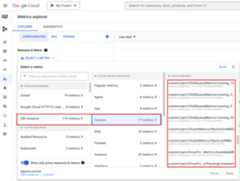
To viewYARN ChildQueueMetrics andDriverPoolsQueueMetrics in theGoogle Cloud console:
SelectVM Instance → Custom resources in theMetrics Explorer.
Debug node group job driver
This section provides driver node group conditions and errors withrecommendations to fix the condition or error.
Conditions
Condition:
yarn:ResourceManager:DriverPoolsQueueMetrics:AvailableMBis nearing0. This indicates that cluster driver pools queue arerunning out of memory.Recommendation:: Scale up the size of the driver pool.
Condition:
yarn:ResourceManager:DriverPoolsQueueMetrics:PendingContainersis larger than 0. This can indicate that cluster driver pools queue are runningout of memory and YARN is queuing jobs.Recommendation:: Scale up the size of the driver pool.
Errors
Error:
Cluster <var>CLUSTER_NAME</var> requires driver scheduling config to runSPARK job because it contains a node pool with role DRIVER.Positive values are required for all driver scheduling config values.Recommendation: Set
driver-required-memory-mbanddriver-required-vcoreswith positive numbers.Error:
Container exited with a non-zero exit code 137.Recommendation: Increase
driver-required-memory-mbto job memory usage.
Except as otherwise noted, the content of this page is licensed under theCreative Commons Attribution 4.0 License, and code samples are licensed under theApache 2.0 License. For details, see theGoogle Developers Site Policies. Java is a registered trademark of Oracle and/or its affiliates.
Last updated 2025-12-15 UTC.