

Create and manage Labels
You can apply user labels to Dataproc clusters and jobsin order to group these resources for laterfiltering and listing. You associate labels with resources when the resource iscreated, at cluster creation or job submission. Once a resourceis associated with a label, the label is propagated to operations performed onthe resource—cluster create, update, patch, or delete; job submit, update,cancel, or delete—allowing you to filter and list clusters, jobs, andoperations by label.
You can also add labels to Compute Engine resources associated with clusterresources, such as Virtual Machine instances and disks.
What are labels?
A label is a key-value pair that you can assign to Dataproc clusters and jobs.They help you organize these resources and manage your costs at scale, with thegranularity you need. You can attach a label to each resource, then filter theresources based on their labels. Information about labels is forwarded to the billing system thatlets you break down your billed charges by label. With built-inbilling reports,you can filter and group costs by resource labels. You can also use labels toquerybilling data exports.
Requirements for labels
The labels applied to a resource must meet the followingrequirements:
- Each cluster or job can have up to 32 labels.
- Each label must be a key-value pair.
- Keys have a minimum length of 1 character and a maximum length of 63characters, and cannot be empty. Values can be empty, and have a maximum lengthof 63 characters.
- Keys and values can contain only lowercase letters, numeric characters,underscores, and dashes. All characters must use UTF-8 encoding, andinternational characters are allowed. Keys must start with a lowercase letter orinternational character.
- The key portion of a label must be unique within a single resource.However, you can use the same key with multiple resources.
These limits apply to the key and value for each label, and to theindividual Dataproc cluster or job that have labels. Thereis no limit on how many labels you can apply across all resourceswithin a project.
Common uses of labels
Here are some common use cases for labels:
Team or cost center labels: Add labels based on team orcost center to distinguish Dataproc clusters and jobs owned by differentteams (for example,
team:researchandteam:analytics). You can use thistype of label for cost accounting or budgeting.Component labels: For example,
component:redis,component:frontend,component:ingest, andcomponent:dashboard.Environment or stage labels: For example,
environment:productionandenvironment:test.State labels: For example,
state:active,state:readytodelete, andstate:archive.Ownership labels: Used to identify the teams that areresponsible for operations, for example:
team:shopping-cart.
We don't recommend creating large numbers of unique labels, such asfor timestamps or individual values for every API call.The problem with this approach is that when the values change frequently or withkeys that clutter the catalog, this makes it difficult to effectively filter andreport on resources.
Labels and tags
Labels can be used as queryable annotations for resources, but can't be usedto set conditions on policies. Tags provide a way to conditionally allow ordeny policies based on whether a resource has a specific tag, by providing fine-grainedcontrol over policies. For more information, see theTags overview.
Create and use Dataproc labels
Updating labels on clusters with secondary workers. A cluster can contain eitherpreemptible workers or non-preemptible secondaryworkers, but not both. Label updates propagate to all preemptible secondary workers within 24 hours. Label updates don't propagate to existing non-preemptible secondary workers. Label updates also propagate to workers added to a cluster after the label update. For example, if you scale up the cluster,all new primary and secondary workers will have the new labels.gcloud Command
You can specify one or more labels to be applied to a Dataproc cluster or jobat creation or submit time using the Google Cloud CLI.
gcloud dataproc clusters createargs --labels environment=production,customer=acmegcloud dataproc jobs submitargs --labels environment=production,customer=acme
Once a Dataproc cluster or job has been created, you can update the labelsassociated with that resource using the Google Cloud CLI.
gcloud dataproc clusters updateargs --update-labels environment=production,customer=acmegcloud dataproc jobs updateargs --update-labels environment=production,customer=acme
Similarly, you can use the Google Cloud CLI to filter Dataproc resources by label usinga filter expression of the following format:labels.<key=value>.
gcloud dataproc clusters list \ --region=region \ --filter="status.state=ACTIVE AND labels.environment=production"gcloud dataproc jobs list \ --region=region \ --filter="status.state=ACTIVE AND labels.customer=acme"
See theclusters.listandjobs.listDataproc API documentation for more information on writing a filter expression.
REST API
Labels can be attached to Dataproc clusters or jobs through theDataproc REST API. Theclusters.create,jobs.submitAPIs can be used to attach labels to a cluster or job at creation or submit time.Theclusters.patch,jobs.patch APIscan be used to edit labels after a cluster has been created. Here is the JSON body of a cluster.create request that includes attaches akey1:value label to the cluster.
{ "clusterName":"cluster-1", "projectId":"my-project", "config":{ "configBucket":"", "gceClusterConfig":{ "networkUri":".../networks/default", "zoneUri":".../zones/us-central1-f" }, "masterConfig":{ "numInstances":1, "machineTypeUri":"..../machineTypes/n1-standard-4", "diskConfig":{ "bootDiskSizeGb":500, "numLocalSsds":0 } }, "workerConfig":{ "numInstances":2, "machineTypeUri":"...machineTypes/n1-standard-4", "diskConfig":{ "bootDiskSizeGb":500, "numLocalSsds":0 } } }, "labels":{ "key1":"value1" }}Theclusters.listandjobs.listAPIs can be used to list clusters or jobs that match a specified filter, usingthe following format:labels.<key=value>.
Here is a sample Dataproc APIclusters.listHTTPS GET request that specifies akey=value label filter. The caller insertsproject,region, a filterlabel-key andlabel-value, and anapi-key.Note that this sample request is broken into two lines for readability.
GET https://dataproc.googleapis.com/v1/projects/project/regions/region/clusters?filter=labels.label-key=label-value&key=api-key
See theclusters.listandjobs.listDataproc API documentation for more information on writing a filter expression.
If you want to examine the JSON body of a Dataproc APIcluster create or job submit request, you can construct the request on the appropriate Dataproc page of theGoogle Cloud console, then click theEquivalent REST button at the bottomof the page.Console
You can specify a set of labels to add to a Dataproc cluster or jobat creation or submit time using the Google Cloud console.
- Add labels to a cluster from the Labels section of the Customize cluster panelof the DataprocCreate a cluster page.
- Add labels to a job from the DataprocSubmit a job page.
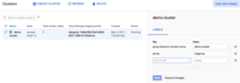
Once a Dataproc cluster or job has been created or submitted,you can update the labels associated with the cluster or job. To update labels,click the selection box for a listed cluster or job, then clickSHOW INFO PANEL. This is an example from theDataproc→List clusters page.

Once the info panel is displayed, you can update the labels for yourDataproc cluster or job. The following is an example of updatinglabels for a Dataproc cluster.
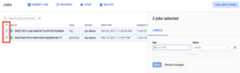
It is also possible to update labels for multiple items in one operation. Inthis example, labels are being updated for multiple Dataproc jobs at thesame time.
Labels allow you to filter the Dataproc resources shown on the [Dataproc→List clusters](https://console.cloud.google.com/dataproc/clusters) and [Dataproc→List jobs](https://console.cloud.google.com/dataproc/jobs) pages. In the top of the page, you can use the search pattern `labels.

Automatically applied labels
When creating or updating a cluster, Dataproc automaticallyapplies several labels to the cluster and cluster resources. For example,Dataproc applies labels to virtual machines, persistent disks,and accelerators when a cluster is created. Automatically applied labels have a specialgoog-dataproc prefix.
The followinggoog-dataproc labels are automatically applied toDataproc resources. Any values you supply for the reservedgoog-dataproc labels at cluster creation will overrideautomatically supplied values. For this reason, supplying your own values forthese labels is not recommended.
| Label | Description |
|---|---|
goog-dataproc-cluster-name | User-specified cluster name |
goog-dataproc-cluster-uuid | Unique cluster ID |
goog-dataproc-location | Dataprocregional cluster endpoint |
You can use these automatically applied labels in many ways, including:
- Searching and filtering for Dataproc resources
- Filtering billing data to calculate Dataproc costs
What's next
Learn how tocreate and update labels for projects using the Resource Manager.
Learn how toorganize resources using labels.
Except as otherwise noted, the content of this page is licensed under theCreative Commons Attribution 4.0 License, and code samples are licensed under theApache 2.0 License. For details, see theGoogle Developers Site Policies. Java is a registered trademark of Oracle and/or its affiliates.
Last updated 2025-12-15 UTC.