

Ranger Cloud Storage plugin
The Dataproc Ranger Cloud Storage plugin, available withDataproc image versions 1.5 and 2.0, activates an authorization serviceon each Dataproc cluster VM. The authorization service evaluatesrequests from theCloud Storage connectoragainst Ranger policies and, if the request is allowed, returns an access tokenfor the clusterVM service account.
The Ranger Cloud Storage plugin relies onKerberos for authentication,and integrates with Cloud Storage connector support for delegation tokens.Delegation tokens are stored in aMySQL database on the cluster master node. The root password for the database isspecified through cluster properties when youcreate the Dataproc cluster.
Use the defaultKMS symmetric encryption, which includes message authentication. Don't use asymmetric keys.Before you begin
Grant theService Account Token Creatorrole and theIAM Role Admin role on theDataproc VM service accountin your project.
Install the Ranger Cloud Storage plugin
Run the following commands in a local terminal window or inCloud Shell to install the RangerCloud Storage plugin when you create a Dataproc cluster.
Set environment variables
export CLUSTER_NAME=new-cluster-name \ export REGION=region \ export KERBEROS_KMS_KEY_URI=Kerberos-KMS-key-URI \ export KERBEROS_PASSWORD_URI=Kerberos-password-URI \ export RANGER_ADMIN_PASSWORD_KMS_KEY_URI=Ranger-admin-password-KMS-key-URI \ export RANGER_ADMIN_PASSWORD_GCS_URI=Ranger-admin-password-GCS-URI \ export RANGER_GCS_PLUGIN_MYSQL_KMS_KEY_URI=MySQL-root-password-KMS-key-URI \ export RANGER_GCS_PLUGIN_MYSQL_PASSWORD_URI=MySQL-root-password-GCS-URI
Notes:
- CLUSTER_NAME: The name of the new cluster.
- REGION: Theregion where thecluster will be created, for example,
us-west1. - KERBEROS_KMS_KEY_URI and KERBEROS_PASSWORD_URI: SeeSet up your Kerberos root principal password.
- RANGER_ADMIN_PASSWORD_KMS_KEY_URI and RANGER_ADMIN_PASSWORD_GCS_URI: SeeSet up your Ranger admin password.
- RANGER_GCS_PLUGIN_MYSQL_KMS_KEY_URI and RANGER_GCS_PLUGIN_MYSQL_PASSWORD_URI: Setup a MySQL password following the same procedure that you used toSet up a Ranger admin password.
Create a Dataproc cluster
Run the following command to create a Dataproc cluster and install the RangerCloud Storage plugin on the cluster.
gcloud dataproc clusters create ${CLUSTER_NAME} \ --region=${REGION} \ --scopes cloud-platform \ --enable-component-gateway \ --optional-components=SOLR,RANGER \ --kerberos-kms-key=${KERBEROS_KMS_KEY_URI} \ --kerberos-root-principal-password-uri=${KERBEROS_PASSWORD_URI} \ --properties="dataproc:ranger.gcs.plugin.enable=true, \ dataproc:ranger.kms.key.uri=${RANGER_ADMIN_PASSWORD_KMS_KEY_URI}, \ dataproc:ranger.admin.password.uri=${RANGER_ADMIN_PASSWORD_GCS_URI}, \ dataproc:ranger.gcs.plugin.mysql.kms.key.uri=${RANGER_GCS_PLUGIN_MYSQL_KMS_KEY_URI}, \ dataproc:ranger.gcs.plugin.mysql.password.uri=${RANGER_GCS_PLUGIN_MYSQL_PASSWORD_URI}"Notes:
- 1.5 image version: If you are creating a 1.5 image version cluster (seeSelecting versions),add the
--metadata=GCS_CONNECTOR_VERSION="2.2.6" or higherflagto install the required connector version.
Verify Ranger Cloud Storage plugin installation
After the cluster creation completes, aGCS service type, namedgcs-dataproc,appears in theRanger admin web interface.
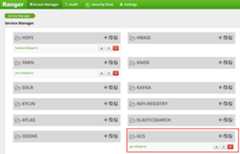
Ranger Cloud Storage plugin default policies
The defaultgcs-dataproc service has the following policies:
Policies to read from and write to the Dataprocclusterstaging and temp buckets
An
all - bucket, object-pathpolicy, which allows all users to access metadata forall objects. This access is required to allow the Cloud Storage connectorto perform HCFS(Hadoop Compatible Filesystem)operations.
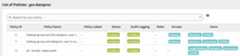
Usage tips
App access to bucket folders
To accommodate apps that create intermediate files in Cloud Storage bucket,you can grantModify Objects,List Objects, andDelete Objectspermissions on the Cloud Storage bucket path, then selectrecursive mode to extend the permissions to sub-paths on the specified path.
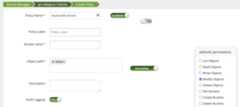
Protective measures
To help prevent circumvention of the plugin:
Grant theVM service accountaccess to the resources in your Cloud Storagebuckets to allow it grant access to those resources with down-scoped access tokens(seeIAM permissions for Cloud Storage). Also,remove access by users to bucket resources to avoid direct bucket access by users.
Disable
sudoand other means of root access on cluster VMs, including updatingthesudoerfile, to prevent impersonation or changes to authenticationand authorization settings. For more information, see the Linux instructionsfor adding/removingsudouser privileges.Use
iptableto block direct access requests to Cloud Storagefrom cluster VMs. For example, you can block access to the VM metadata serverto prevent access to the VM service account credential or access token used toauthenticate and authorize access to Cloud Storage (seeblock_vm_metadata_server.sh, aninitialization scriptthat usesiptablerules to block access to VM metadata server).
Spark, Hive-on-MapReduce, and Hive-on-Tez jobs
To protect sensitive user authentication details and to reduce load on theKey Distribution Center (KDC), the Spark driver does not distribute Kerberoscredentials to executors. Instead, the Spark driver obtains a delegationtoken from the Ranger Cloud Storage plugin, and then distributes the delegationtoken to executors. Executors use the delegation token to authenticate to theRanger Cloud Storage plugin, trading it for a Google access token thatallows access to Cloud Storage.
Hive-on-MapReduce and Hive-on-Tez jobs also use tokens to accessCloud Storage. Use the following properties to obtain tokensto access specified Cloud Storage buckets when you submit the followingjob types:
Spark jobs:
--conf spark.yarn.access.hadoopFileSystems=gs://bucket-name,gs://bucket-name,...
Hive-on-MapReduce jobs:
--hiveconf "mapreduce.job.hdfs-servers=gs://bucket-name,gs://bucket-name,..."
Hive-on-Tez jobs:
--hiveconf "tez.job.fs-servers=gs://bucket-name,gs://bucket-name,..."
Spark job scenario
A Spark wordcount job fails when run froma terminal window on a Dataproc cluster VM that hasthe Ranger Cloud Storage plugin installed.
spark-submit \ --conf spark.yarn.access.hadoopFileSystems=gs://${FILE_BUCKET} \ --class org.apache.spark.examples.JavaWordCount \ /usr/lib/spark/examples/jars/spark-examples.jar \ gs://bucket-name/wordcount.txtNotes:
- FILE_BUCKET: Cloud Storage bucket for Spark access.
Error output:
Caused by: com.google.gcs.ranger.client.shaded.io.grpc.StatusRuntimeException: PERMISSION_DENIED:Access denied by Ranger policy: User: '<USER>', Bucket: '<dataproc_temp_bucket>',Object Path: 'a97127cf-f543-40c3-9851-32f172acc53b/spark-job-history/', Action: 'LIST_OBJECTS'
Notes:
spark.yarn.access.hadoopFileSystems=gs://${FILE_BUCKET}is required in a Kerberosenabled environment.
Error output:
Caused by: java.lang.RuntimeException: Failed creating a SPNEGO token.Make sure that you have run `kinit` and that your Kerberos configuration is correct.See the full Kerberos error message: No valid credentials provided(Mechanism level: No valid credentials provided)
A policy is edited using theAccess Manager in theRanger admin web interfaceto addusername to list of users who haveList Objects and othertemp bucketpermissions.
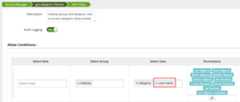
Running the job generates a new error.
Error output:
com.google.gcs.ranger.client.shaded.io.grpc.StatusRuntimeException: PERMISSION_DENIED:Access denied by Ranger policy: User: <USER>, Bucket: '<file-bucket>',Object Path: 'wordcount.txt', Action: 'READ_OBJECTS'
A policy is added to grant the user read access to thewordcount.textCloud Storage path.
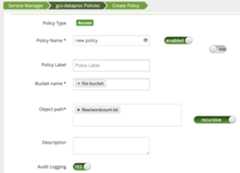
The job runs and completes successfully.
INFO com.google.cloud.hadoop.fs.gcs.auth.GcsDelegationTokens:Using delegation token RangerGCSAuthorizationServerSessionTokenowner=<USER>, renewer=yarn, realUser=, issueDate=1654116824281,maxDate=0, sequenceNumber=0, masterKeyId=0this: 1is: 1a: 1text: 1file: 122/06/01 20:54:13 INFO org.sparkproject.jetty.server.AbstractConnector: Stopped
Except as otherwise noted, the content of this page is licensed under theCreative Commons Attribution 4.0 License, and code samples are licensed under theApache 2.0 License. For details, see theGoogle Developers Site Policies. Java is a registered trademark of Oracle and/or its affiliates.
Last updated 2026-02-19 UTC.