

Supported machine types
Dataproc clusters are built onCompute Engineinstances.Machine types define the virtualized hardwareresources available to an instance. Compute Engine offers bothpredefinedmachine types andcustom machine types.Dataproc clusters can use both predefined and custom types forboth master and worker nodes.
Dataproc clusters support the following Compute Engine predefinedmachine types (machine type availability varies byregion):
- General purpose machine types,which include N1, N2, N2D, E2, C3, C4, and N4 machine types (Dataprocalso supports N1, N2, N2D, E2, C3, C4, and N4custom machine types).
Limitations:
- the n1-standard-1 machine type isnot supported for 2.0+ images(the n1-standard-1 machine type isnot recommended for pre-2.0images—instead, use a machine type with higher memory).
- Shared-core machine types arenot supported, whichinclude the following unsupported machine types:
- E2: e2-micro, e2-small, and e2-medium shared-core machine types, and
- N1: f1-micro and g1-small shared-core machine types.
- Dataproc selects
hyperdisk-balancedas the boot-disk type if machine type is C4 or N4.
- Compute-optimized machine types,which includeC2andC2D machine types.
- Memory-optimized machine types,which include M1 and M2 machine types.
- ARM machine types, which includeC4A machine types.
Custom machine types
Dataproc supportsN1 seriescustom machine types.
Custom machine types are ideal for the following workloads:
- Workloads that are not a good fit for the predefined machine types.
- Workloads that require more processing power or more memory, but don't needall of the upgrades that are provided by the next machine type level.
For example, if you have a workload that needs more processing power thanthat provided by ann1-standard-4 instance, but the next step up, ann1-standard-8instance, provides too much capacity. With custom machine types, you can create Dataproc clusters with master and/or worker nodes in the middlerange, with 6 virtual CPUs and 25 GB of memory.
Specify a custom machine type
Custom machine types use a specialmachine type specification and are subjecttolimitations. For example,the custom machine type specification for a custom VM with 6 virtual CPUs and22.5 GB of memory iscustom-6-23040.
The numbers in the machine type specification correspond to the number of virtual CPUs(vCPUs)in the machine (6) and the amount of memory (23040).The amount of memory is calculated by multiplying the amount of memory ingigabytes by1024 (seeExpressing memory in GB or MB). In this example, 22.5 (GB) is multiplied by 1024:22.5 * 1024 = 23040.
You use the above syntax to specify the custom machine type with your clusters.You can set the machine type for either master or worker nodes or both when youcreate a cluster. If you set both, the master node can use a custom machine typethat is different from the custom machine type used by workers. The machine typeused by any secondary workers follow the settings for primary workers andcannot be separately set (seeSecondary workers - preemptible and non-preemptible VMs).
SeeCreate a Dataproc clusterwith custom machine type with extended memoryto increase CPU memory above the standard limits.Custom machine type pricing
Custom machine type pricingis based on the resources used in a custom machine.Dataproc pricing is added to the cost of compute resources, and is based on thetotal number of virtual CPUs (vCPUs) used in a cluster.
Create a Dataproc cluster with a specified machine type
Console
From theConfigure nodes panel of the DataprocCreate a cluster pagein the Google Cloud console, select machine family, series and type for thecluster's master and worker nodes.
gcloud command
Run thegcloud dataproc clusters createcommand with the following flags to create a Dataproc cluster with masterand/or worker machine types:
- The
--master-machine-typemachine-typeflag lets you set the predefined or custom machine type used by the masterVM instance in your cluster (or master instances if you create aHA cluster) - The
--worker-machine-typecustom-machine-typeflag lets you set the predefined or custom machine type used by the workerVM instances in your cluster
Example:
gcloud dataproc clusters create test-cluster / --master-machine-type custom-6-23040 / --worker-machine-type custom-6-23040 / other args
gcloud cluster create command is to open theDataprocCreate a clusterpage in the Google Cloud console, fill in the applicable fields on the page,then clickEquivalent command lineat the bottom of the left pane of the Create a cluster page to view, copy, andpaste the completedgcloud command.Once the Dataproc cluster starts, cluster details are displayed in theterminal window. The following is a partial sample listing of cluster propertiesdisplayed in the terminal window:...properties: distcp:mapreduce.map.java.opts: -Xmx1638m distcp:mapreduce.map.memory.mb: '2048' distcp:mapreduce.reduce.java.opts: -Xmx4915m distcp:mapreduce.reduce.memory.mb: '6144' mapred:mapreduce.map.cpu.vcores: '1' mapred:mapreduce.map.java.opts: -Xmx1638m...
REST API
To create a cluster with custom machine types, set themachineTypeUri in themasterConfig and/orworkerConfigInstanceGroupConfigin thecluster.createAPI request.
Example:
POST /v1/projects/my-project-id/regions/is-central1/clusters/{ "projectId": "my-project-id", "clusterName": "test-cluster", "config": { "configBucket": "", "gceClusterConfig": { "subnetworkUri": "default", "zoneUri": "us-central1-a" }, "masterConfig": { "numInstances": 1,"machineTypeUri": "n1-highmem-4", "diskConfig": { "bootDiskSizeGb": 500, "numLocalSsds": 0 } }, "workerConfig": { "numInstances": 2,"machineTypeUri": "n1-highmem-4", "diskConfig": { "bootDiskSizeGb": 500, "numLocalSsds": 0 } } }}Create a Dataproc cluster with custom machine type with extended memory
Dataproc supports custom machine types withextended memorybeyond the6.5GB per vCPU limit(seeExtended Memory Pricing).
Although there is no limit on the amount of extended memory per CPU,there is a limit on the totalextended memory per VM instance.Console
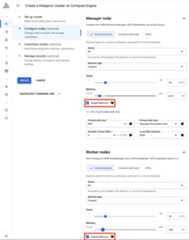
ClickExtend memory when customizing Machine type memory in theMaster node and/or Worker nodes section from theConfigure nodes panelon the DataprocCreate a clusterpage in the Google Cloud console.
gcloud Command
To create a cluster from the gcloud command line with custom CPUs with extended memory, add a-ext suffix to the‑‑master-machine-type and/or‑‑worker-machine-type flags.
Example
The following gcloud command-line sample creates aDataproc cluster with 1 CPU and 50 GB memory (50 * 1024 = 51200) in eachnode:
gcloud dataproc clusters create test-cluster / --master-machine-type custom-1-51200-ext / --worker-machine-type custom-1-51200-ext / other args
API
The following sample
... "masterConfig": { "numInstances": 1, "machineTypeUri": "custom-1-51200-ext", ... }, "workerConfig": { "numInstances": 2, "machineTypeUri": "custom-1-51200-ext", ......ARM machine types
Dataproc supports creating a cluster with nodes that useARM machine types,such as theC4A machine type.
Requirements and limitations:
- The Dataproc image must be compatible with ARM chipset.The Dataproc
2.1-ubuntu20-arm,2.2-ubuntu22-arm,and2.3-ubuntu22-arm(and later-armsuffix) images are compatible with the ARM chipset. ARM-compatibleimages don't support many optional and initialization-actioncomponents as noted on theimage release version pages. - Since one image must be specified for a cluster, the master,worker, and secondary-worker nodes must use an ARM machine type thatis compatible with the selected Dataproc ARM image.
- Dataproc features that are not compatible with ARM machine typesaren't available (for example,local SSDsaren't supported by C4A machine types).
- ARM images only support pre-installed components and a limited set ofoptional components. Other optional components and all initializationactions are unsupported.
Create a Dataproc cluster with an ARM machine type
Console
Currently, the Google Cloud console does not support the creationof a Dataproc ARM machine type cluster.
gcloud
To create a Dataproc cluster that uses the ARMc4a-standard-4machine type, run the followinggcloud command locally in a terminal window or inCloud Shell.
gcloud dataproc clusters createcluster-name \ --region=REGION \ --image-version=2.1-ubuntu20-arm \ --master-machine-type=c4a-standard-4 \ --worker-machine-type=c4a-standard-4
Notes:
REGION: Theregionwhere the cluster will be located.
ARM images are available starting with
2.1.18-ubuntu20-arm,2.2.61-ubuntu22-arm, and2.3.7-ubuntu22-arm.See thegcloud dataproc clusters createreference documentation for information on additional command-line flags youcan use to customize your cluster.
*-armimages support only the pre-installed components and the followingoptional components listed in2.1.x release versions,2.2.x release versions,and2.3.x release versions.The other 2.1, 2.2, and 2.3 optional components, along with allinitialization actions listed aren't supported:- Apache Hive WebHCat
- Docker
- Zeppelin
- Zookeeper (installed inHA clusters;optional component in non-HA clusters)
API
The following sample Dataproc REST APIclusters.createrequest creates an ARM machine type cluster.
POST /v1/projects/my-project-id/regions/is-central1/clusters/{ "projectId": "my-project-id", "clusterName": "sample-cluster", "config": { "configBucket": "", "gceClusterConfig": { "subnetworkUri": "default", "zoneUri": "us-central1-a" }, "masterConfig": { "numInstances": 1,"machineTypeUri": "c4a-standard-4", "diskConfig": { "bootDiskSizeGb": 500, } }, "workerConfig": { "numInstances": 2,"machineTypeUri": "c4a-standard-4", "diskConfig": { "bootDiskSizeGb": 500, "numLocalSsds": 0 } }, "softwareConfig": {"imageVersion": "2.1-ubuntu20-arm" } }}What's next
- Learn more aboutArm VMs on Compute.
- Learn how tocreate a VM with a custom machine type.
- Learn how tocreate and start a Compute Engine instance.
Except as otherwise noted, the content of this page is licensed under theCreative Commons Attribution 4.0 License, and code samples are licensed under theApache 2.0 License. For details, see theGoogle Developers Site Policies. Java is a registered trademark of Oracle and/or its affiliates.
Last updated 2025-12-15 UTC.