

Dataproc optional Ranger component
You can install additional components like Ranger when you create a Dataproccluster using theOptional componentsfeature. This page describes the Ranger component.
TheApache Ranger component is an open source framework to manage permission and auditing for theHadoop ecosystem. The Rangeradmin server and Web UI are available on port6080 on the cluster's first master node.
Also see:
Install the component
Note: Before running the gcloud CLI commands on this page, either:- set the gcloud CLI project ID or
- add the
--projectPROJECT_IDflag to each gcloud command
Install the component when you create a Dataproc cluster.Components can be added to clusters created withDataprocversion 1.3and later. The Ranger component requires the installation of theSolr component.
SeeSupported Dataproc versionsfor the component version included in each Dataproc image release.
Installation steps:
Set up your Ranger
adminpassword:- Grant theCloud Key Management Service CryptoKey Encrypter/Decrypter roleto the clusterservice account. By default, the cluster serviceaccount is set as theCompute Engine default service account, which has following form:
project-number-compute@developer.gserviceaccount.com
- Example:Grant the Cloud KMS CryptoKey Encrypter/Decrypter roleto the Compute Engine default service account:
gcloud projects add-iam-policy-bindingproject-id \ --member=serviceAccount:project-number-compute@developer.gserviceaccount.com \ --role=roles/cloudkms.cryptoKeyDecrypter
- Example:Grant the Cloud KMS CryptoKey Encrypter/Decrypter roleto the Compute Engine default service account:
- Encrypt your Ranger
adminpassword using aKey Management Service (KMS) key.For pre-2.2 image version clusters, the password must consist of at least8 characters, with at least one alphabetic and one numeric character. For2.2 and later image version clusters, the password must consist of at least8 characters, with at least one uppercase letter, one lowercase letter,and one numeric character.- Example:
- Create the key ring:
gcloud kms keyrings createmy-keyring --location=global
- Create the key:
gcloud kms keys createmy-key \ --location=global \ --keyring=my-keyring \ --purpose=encryption
- Encrypt your Ranger
adminuser password:echo 'my-ranger-admin-password' | \ gcloud kms encrypt \ --location=global \ --keyring=my-keyring \ --key=my-key \ --plaintext-file=- \ --ciphertext-file=admin-password.encrypted
- Create the key ring:
- Example:
- Upload the encrypted password to aCloud Storage bucket in your project.
- Example:
gcloud storage cp admin-password.encrypted gs://my-bucket
- Example:
- Grant theCloud Key Management Service CryptoKey Encrypter/Decrypter roleto the clusterservice account. By default, the cluster serviceaccount is set as theCompute Engine default service account, which has following form:
Create your cluster:
- When installing the Ranger component, theSolr component must also beinstalled.
- The Ranger component relies on the Solr component to store and queryits audit logs, which by default uses HDFS as storage. This HDFSdata is deleted when the cluster is deleted. To configurethe Solr component to store data, including the Ranger audit logs,on Cloud Storage, use the
dataproc:solr.gcs.path=gs://<bucket>cluster propertywhen you create your cluster. Cloud Storage data persistsafter the cluster is deleted.
- The Ranger component relies on the Solr component to store and queryits audit logs, which by default uses HDFS as storage. This HDFSdata is deleted when the cluster is deleted. To configurethe Solr component to store data, including the Ranger audit logs,on Cloud Storage, use the
- Pass the KMS key and password Cloud Storage URIs to thecluster creation command by setting the
dataproc:ranger.kms.key.urianddataproc:ranger.admin.password.uricluster properties. - Optionally, you can pass in the Ranger database's
adminuser passwordthrough an encrypted Cloud Storage file URIby setting thedataproc:ranger.db.admin.password.uricluster property. - By default, the Ranger component uses the MySql database instance runningon the cluster's first master node. In the MySQL instance,enable the
log_bin_trust_function_creatorsflag by setting the variabletoON. Setting this flag controls whether stored function creators canbe trusted. After successfulcluster creation and Ranger configuration, you can reset thelog_bin_trust_function_creatorstoOFF. To persist the Ranger database aftercluster deletion, use aCloud SQL instance as theexternal MySql Database.
- Set the
dataproc:ranger.cloud-sql.instance.connection.namecluster propertyto the Cloud SQL instance. - Set the
dataproc:ranger.cloud-sql.root.password.uricluster propertyto the Cloud Storage URI of the KMS-key encrypted rootpassword of the Cloud SQL instance. - Set the
dataproc:ranger.cloud-sql.use-private-ipcluster propertyto indicate whether the connection to the Cloud SQL instance isover private IP.
The Ranger component usesCloud SQL Auth Proxyto connect to the Cloud SQL instance. To use the proxy:
- Set the
sqlservice.adminAPI scope when you create the cluster (seeAuthorizing requests with OAuth 2.0).If using thegcloud dataproc cluster createcommand,add the--scopes=default,sql-adminparameter. - Enablethe SQL Admin APIin your project.
- Make sure the cluster service account has theCloud SQL Editor role.
- Since the Cloud SQL Auth Proxy on the master node createsegress connections to the Cloud SQL instanceover port3307, make sure that egress TCP connections from themaster node to the Cloud SQL instance over port3307 areallowed. For more information, seeHow the Cloud SQL Auth Proxy works.
gcloud CLI
To create a Dataproc cluster that includes the Ranger component, use thegcloud dataproc clusters createcluster-name command with the
When creating the cluster, usegcloud dataproc clusters create command with the--optional-componentsflag.--enable-component-gatewayflag, as shown in the following example,to enable connecting to the Ranger Admin Web UI using theComponent Gateway.gcloud dataproc clusters createcluster-name \ --optional-components=SOLR,RANGER \ --region=region \ --enable-component-gateway \ --properties="dataproc:ranger.kms.key.uri=projects/project-id/locations/global/keyRings/my-keyring/cryptoKeys/my-key,dataproc:ranger.admin.password.uri=gs://my-bucket/admin-password.encrypted" \ ... other flags
REST API
Specify the Ranger and Solr components in theSoftwareConfig.Component field as part of a Dataproc APIclusters.create request. You must also set the followingcluster properties in theSoftwareConfig.Component.properties field:
dataproc:ranger.kms.key.uri: "projects/project-id/locations/global/keyRings/my-keyring/cryptoKeys/my-key"dataproc:ranger.admin.password.uri: "gs://my-bucket/admin-password.encrypted"
v1API,set theEndpointConfig.enableHttpPortAccessproperty totrueas part of the clusters.createrequest to enable connecting to the Jupyter notebook Web UI using theComponent Gateway.Console
- Enable the component and component gateway.
- In the Google Cloud console, open the DataprocCreate a cluster page. The Set up cluster panel is selected.
- In the Components section:
- Under Optional components, select Ranger, Solr, and other optional components to install on your cluster.
- Under Component Gateway, select Enable component gateway (seeViewing and Accessing Component Gateway URLs).
- Set the
- When installing the Ranger component, theSolr component must also beinstalled.
Click theWeb interfaces tab. UnderComponent gateway, clickRangerto open the Ranger web interface. Login with the Ranger admin username(for example, "admin") and password.
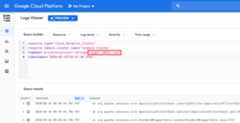
Ranger Admin logs
Rangeradmin logs are available inLogging asranger-admin-root logs.
Except as otherwise noted, the content of this page is licensed under theCreative Commons Attribution 4.0 License, and code samples are licensed under theApache 2.0 License. For details, see theGoogle Developers Site Policies. Java is a registered trademark of Oracle and/or its affiliates.
Last updated 2025-12-15 UTC.