

Dataproc optional HBase component
Installation of the optional HBase component is limited toDataproc clusters created with image version1.5 or2.0.
While Google Cloud provides many services that let you deploy self-managed ApacheHBase,Bigtable isoften the best option as it provides an open API with HBase and workload portability.HBase database tables can be migrated to Bigtable for management of theunderlying data, while applications that previously interoperated with HBase,such as Spark, may remain on Dataproc and securely connect with Bigtable.In this guide, we provide the high-level steps for getting started with Bigtableand provide references for migrating data to Bigtable from Dataproc HBasedeployments.
Get started with Bigtable
Cloud Bigtable is a highly scalable and performant NoSQL platform that providesApache HBase API client compatibilityand portability for HBase workloads. The client is compatible with HBase APIversions 1.x and 2.x and may be included with the existing application to readand write to Bigtable. Existing HBase applications may add the Bigtable HBaseclient library to read and write data stored in Bigtable.
SeeBigtable and the HBase APIfor more information on configuring your HBase application with Bigtable.
Create a Bigtable cluster
You can get started using Bigtable by creating a cluster and tables forstoring data that was previously stored in HBase. Follow the steps in the Bigtable documentation forcreating an instance, a cluster, andtables withthe same schema as the HBase tables. For automated creation of tables from HBasetable DDLs, refer to theschema translator tool.
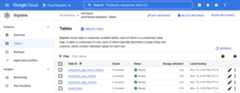
Open the Bigtable instance in Google Cloud console to view the table andserver-side monitoring charts, including rows per second, latency, and throughput, to managethe newly provisioned table. For additional information, seeMonitoring.
Migrate data from Dataproc to Bigtable
After you create the tables in Bigtable, you can import and validateyour data by following the guidance atMigrate HBase on Google Cloud to Bigtable.After you migrate the data, you can update applications to send reads and writesto Bigtable.
What's next
- SeeWordcount Spark examplesfor running Spark with the Bigtable.
- Review online migration options withlive replication from HBase to Bigtable.
- WatchHow Box modernized their NoSQL databasesto understand other benefits.
Except as otherwise noted, the content of this page is licensed under theCreative Commons Attribution 4.0 License, and code samples are licensed under theApache 2.0 License. For details, see theGoogle Developers Site Policies. Java is a registered trademark of Oracle and/or its affiliates.
Last updated 2025-12-15 UTC.