

Dataproc optional Flink component
You can activate additional components like Flink when you create a Dataproccluster using theOptional componentsfeature. This page shows you how to create a Dataproc clusterwith theApache Flink optional component activated (a Flink cluster), and then run Flink jobs on the cluster.
You can use your Flink cluster to:
Run Flink jobs using the Dataproc
Jobsresourcefrom the Google Cloud console, Google Cloud CLI, or the Dataproc API.Run Flink jobs using the
flinkCLIrunning on the Flink cluster master node.
Create a Dataproc Flink cluster
You can use the Google Cloud console, Google Cloud CLI, or the DataprocAPI to create a Dataproc cluster that has the Flink componentactivated on the cluster.
Recommendation: Use a standard 1-master VM cluster with the Flink component.Dataproc High Availability mode clusters(with 3 master VMs) do not supportFlink high-availability mode.
Console
To create a Dataproc Flink cluster using the Google Cloud console,perform the following steps:
Open the DataprocCreate a Dataproc cluster on Compute Engine page.
- TheSet up cluster panel is selected.
- In theVersioning section, confirm or change theImage Type and Version. The cluster image version determines theversion of the Flink component installed on the cluster.
- The image version must be 1.5 or higher to activate the Flink component on the cluster(SeeSupported Dataproc versionsto view listings of the component versions included in eachDataproc image release).
- The image version must be [TBD] or higher to run Flink jobsthrough the Dataproc Jobs API (seeRun Dataproc Flink jobs).
- In theVersioning section, confirm or change theImage Type and Version. The cluster image version determines theversion of the Flink component installed on the cluster.
- In theComponents section:
- UnderComponent Gateway, selectEnable component gateway. You must enable theComponent Gatewayto activate the Component Gateway link to the Flink History Server UI.Enabling the Component Gateway also enablesaccess to theFlink Job Manager web interfacerunning on the Flink cluster.
- UnderOptional components, selectFlink and other optionalcomponents to activate on your cluster.
- TheSet up cluster panel is selected.
Click theCustomize cluster (optional) panel.
In theCluster properties section, clickAdd Properties foreach optionalcluster propertyto add to your cluster. You can add
flinkprefixed propertiesto configure Flink properties in/etc/flink/conf/flink-conf.yamlthatwill act as defaults for Flink applications that you run on the cluster.Examples:
- Set
flink:historyserver.archive.fs.dirto specify the Cloud Storage location to write Flink job historyfiles (this location will be used by the Flink History Server runningon the Flink cluster). - Set Flink task slots with
flink:taskmanager.numberOfTaskSlots=n.
- Set
In theCustom cluster metadata section, clickAdd Metadata to addoptional metadata. For example, add
flink-start-yarn-sessiontrueto run the Flink YARN daemon(/usr/bin/flink-yarn-daemon) in the background on the cluster masternode to start a Flink YARN session (seeFlink session mode).
If you are using Dataproc image version 2.0 or earlier,click theManage security (optional) panel, then, underProject access,select
Enables the cloud-platform scope for this cluster.cloud-platformscope is enabled by default when you create a clusterthat uses Dataproc image version 2.1 or later.
ClickCreate to create the cluster.
gcloud
To create a Dataproc Flink cluster using the gcloud CLI, run the followinggcloud dataproc clusters createcommand locally in a terminal window or inCloud Shell:
gclouddataprocclusterscreateCLUSTER_NAME\--region=REGION\--image-version=DATAPROC_IMAGE_VERSION\--optional-components=FLINK\--enable-component-gateway\--properties=PROPERTIES...otherflags
Notes:
- CLUSTER_NAME: Specify the name of the cluster.
- REGION: Specify aCompute Engine regionwhere the cluster will be located.
DATAPROC_IMAGE_VERSION: Optionally specify the image versionto use on the cluster. The cluster image version determines theversion of the Flink component installed on the cluster.
The image version must be 1.5 or higher to activate the Flink component on the cluster(SeeSupported Dataproc versionsto view listings of the component versions included in eachDataproc image release).
The image version must be [TBD] or higher to run Flink jobsthrough the Dataproc Jobs API (seeRun Dataproc Flink jobs).
--optional-components: You must specify theFLINKcomponent to run Flinkjobs and the Flink HistoryServer Web Service on the cluster.--enable-component-gateway: You must enable theComponent Gateway toactivate the Component Gateway link to Flink History Server UI.Enabling the Component Gateway also enables access to theFlink Job Manager web interface running on theFlink cluster.PROPERTIES. Optionally specify one or morecluster properties.
When creating Dataproc clusters withimage versions
2.0.67+ and2.1.15+, you can use the--propertiesflag toto configure Flink properties in/etc/flink/conf/flink-conf.yamlthat willact as defaults for Flink applications that you run on the cluster.You can set
flink:historyserver.archive.fs.dirto specify the Cloud Storage location to write Flink job historyfiles (this location will be used by the Flink History Server runningon the Flink cluster).Multiple properties example:
--properties=flink:historyserver.archive.fs.dir=gs://my-bucket/my-flink-cluster/completed-jobs,flink:taskmanager.numberOfTaskSlots=2Other flags:
- You can add the optional
--metadata flink-start-yarn-session=trueflag to run the Flink YARN daemon (/usr/bin/flink-yarn-daemon)in the background on the cluster master node to start a Flink YARN session(seeFlink session mode).
- You can add the optional
When using 2.0 or earlier image versions, you can add the
--scopes=https://www.googleapis.com/auth/cloud-platformflag toenable access to Google Cloud APIs by your cluster(seeScopes best practice).cloud-platformscope is enabled by default when you create a clusterthat uses Dataproc image version 2.1 or later.
API
To create a Dataproc Flink cluster using the Dataproc API, submit aclusters.createrequest, as follows:
Notes:
Set theSoftwareConfig.Componentto
FLINK.You can optionally set
SoftwareConfig.imageVersionto specify the image version to use on the cluster. The cluster image version determines theversion of the Flink component installed on the cluster.The image version must be 1.5 or higher to activate the Flink component on the cluster(SeeSupported Dataproc versionsto view listings of the component versions included in eachDataproc image release).
The image version must be [TBD] or higher to run Flink jobsthrough the Dataproc Jobs API (seeRun Dataproc Flink jobs).
SetEndpointConfig.enableHttpPortAccessto
truetoenable the Component Gatewaylink to Flink History Server UI.Enabling the Component Gateway also enables access to theFlink Job Manager web interface running on theFlink cluster.You can optionally set
SoftwareConfig.propertiesto specify one or morecluster properties.- You can specify Flink properties that will act asdefaults for Flink applications that you run on the cluster. For example,you can set the
flink:historyserver.archive.fs.dirto specify the Cloud Storage location to write Flink job historyfiles (this location will be used by the Flink History Server runningon the Flink cluster).
- You can specify Flink properties that will act asdefaults for Flink applications that you run on the cluster. For example,you can set the
You can optionally set:
GceClusterConfig.metadata.for example, to specifyflink-start-yarn-sessiontrueto run the Flink YARN daemon(/usr/bin/flink-yarn-daemon) in the background on the cluster masternode to start a Flink YARN session (seeFlink session mode).- GceClusterConfig.serviceAccountScopesto
https://www.googleapis.com/auth/cloud-platform(cloud-platformscope)when using 2.0 or earlier image versions to enable access to Google CloudAPIs by your cluster (seeScopes best practice).cloud-platformscope is enabled by default when you create a clusterthat uses Dataproc image version 2.1 or later.
After you create a Flink cluster
- Use the
Flink History Serverlink in theComponent Gatewayto view the Flink History Server running on the Flink cluster. - Use the
YARN ResourceManager linkin the Component Gatewayto view theFlink Job Manager web interfacerunning on the Flink cluster . - Create aDataproc Persistent History Serverto view Flink job history files written by existing and deleted Flink clusters.
Run Flink jobs using the DataprocJobs resource
You can run Flink jobs using the DataprocJobs resource from theGoogle Cloud console, Google Cloud CLI, or Dataproc API.
Private Preview
This product or feature is subject to the "Pre-GA Offerings Terms" in the General Service Terms section of theService Specific Terms. Pre-GA products and features are available "as is" and might have limited support. For more information, see thelaunch stage descriptions.
For information about access to this release, see the access request page.
Console
To submit a sample Flink wordcount job from the console:
Open the DataprocSubmit a job page in theGoogle Cloud console in your browser.
Fill in the fields on theSubmit a job page:
- Select yourCluster name from the cluster list.
- SetJob type to
Flink. - SetMain class or jar to
org.apache.flink.examples.java.wordcount.WordCount. - SetJar files to
file:///usr/lib/flink/examples/batch/WordCount.jar.file:///denotes a file located on the cluster. Dataprocinstalled theWordCount.jarwhen it created the Flink cluster.- This field also accepts a Cloud Storage path(
gs://BUCKET/JARFILE) or aHadoop Distributed File System (HDFS) path(hdfs://PATH_TO_JAR).
ClickSubmit.
- Job driver output is displayed on theJob details page.
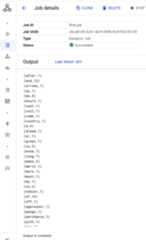
- Flink jobs are listed on theDataprocJobs pagein the Google Cloud console.
- ClickStop orDelete from theJobs orJob details pageto stop or delete a job.
gcloud
To submit a Flink job to a Dataproc Flink cluster, run the gcloud CLIgcloud dataproc jobs submitcommand locally in a terminal window or inCloud Shell.
gclouddataprocjobssubmitflink\ --cluster=CLUSTER_NAME\ --region=REGION\ --class=MAIN_CLASS\ --jar=JAR_FILE\ --JOB_ARGS
Notes:
- CLUSTER_NAME: Specify the name of the Dataproc Flinkcluster to submit the job to.
- REGION: Specify aCompute Engine regionwhere the cluster is located.
- MAIN_CLASS: Specify the
mainclass of yourFlink application, such as:org.apache.flink.examples.java.wordcount.WordCount
- JAR_FILE: Specify the Flink application jar file. You can specify:
- A jar file installed on the cluster, using the
file:///`prefix:file:///usr/lib/flink/examples/streaming/TopSpeedWindowing.jarfile:///usr/lib/flink/examples/batch/WordCount.jar
- A jar file in Cloud Storage:
gs://BUCKET/JARFILE - A jar file in HDFS:
hdfs://PATH_TO_JAR
- A jar file installed on the cluster, using the
JOB_ARGS: Optionally, add job arguments after the double dash (
--).After submitting the job, job driver output is displayed in thelocal or Cloud Shell terminal.
ProgramexecutionfinishedJobwithJobID829d48df4ebef2817f4000dfba126e0fhasfinished.JobRuntime:13610ms...(after,1)(and,12)(arrows,1)(ay,1)(be,4)(bourn,1)(cast,1)(coil,1)(come,1)
gcloud dataproc jobs killJOB_ID command, and delete a job with thegcloud dataproc jobs deleteJOB_IDcommand.REST
This section shows how to submit a Flink job to a Dataproc Flinkcluster using the Dataprocjobs.submit API.
You can add theclusterLabels field to the API requestshown below to specify one or more cluster labels. Dataproc will submit the job to a clusterthat matches a specified cluster label (see thejobs.submitAPI for more information).Before using any of the request data, make the following replacements:
- PROJECT_ID: Google Cloud project ID
- REGION:cluster region
- CLUSTER_NAME: Specify the name of the Dataproc Flink cluster to submit the job to
HTTP method and URL:
POST https://dataproc.googleapis.com/v1/projects/PROJECT_ID/regions/REGION/jobs:submit
Request JSON body:
{ "job": { "placement": { "clusterName": "CLUSTER_NAME" }, "flinkJob": { "mainClass": "org.apache.flink.examples.java.wordcount.WordCount", "jarFileUris": [ "file:///usr/lib/flink/examples/batch/WordCount.jar" ] } }}To send your request, expand one of these options:
curl (Linux, macOS, or Cloud Shell)
Note: The following command assumes that you have logged in to thegcloud CLI with your user account by runninggcloud init orgcloud auth login , or by usingCloud Shell, which automatically logs you into thegcloud CLI . You can check the currently active account by runninggcloud auth list. Save the request body in a file namedrequest.json, and execute the following command:
curl -X POST \
     -H "Authorization: Bearer $(gcloud auth print-access-token)" \
     -H "Content-Type: application/json; charset=utf-8" \
     -d @request.json \
     "https://dataproc.googleapis.com/v1/projects/PROJECT_ID/regions/REGION/jobs:submit"
PowerShell (Windows)
Note: The following command assumes that you have logged in to thegcloud CLI with your user account by runninggcloud init orgcloud auth login . You can check the currently active account by runninggcloud auth list. Save the request body in a file namedrequest.json, and execute the following command:
$cred = gcloud auth print-access-token
$headers = @{ "Authorization" = "Bearer $cred" }

Invoke-WebRequest `
    -Method POST `
    -Headers $headers `
    -ContentType: "application/json; charset=utf-8" `
    -InFile request.json `
    -Uri "https://dataproc.googleapis.com/v1/projects/PROJECT_ID/regions/REGION/jobs:submit" | Select-Object -Expand Content
You should receive a JSON response similar to the following:
{ "reference": { "projectId": "PROJECT_ID", "jobId": "JOB_ID" }, "placement": { "clusterName": "CLUSTER_NAME", "clusterUuid": "CLUSTER_UUID" }, "flinkJob": { "mainClass": "org.apache.flink.examples.java.wordcount.WordCount", "args": [ "1000" ], "jarFileUris": [ "file:///usr/lib/flink/examples/batch/WordCount.jar" ] }, "status": { "state": "PENDING", "stateStartTime": "2020-10-07T20:16:21.759Z" }, "jobUuid": "JOB_UUID"}- Flink jobs are listed on theDataprocJobs pagein the Google Cloud console.
- You can clickStop orDelete from theJobs orJob details pagein the Google Cloud console to stop or delete a job.
Run Flink jobs using theflink CLI
Instead ofrunning Flink jobs using the DataprocJobs resource,you can run Flink jobs on the master node of your Flink cluster using theflink CLI.
flink cli on your cluster,you must have activated the Flink optional componentwhen you created your cluster—seeCreate a Dataproc Flink cluster).The following sections describe different ways you can run aflink CLI job onyour Dataproc Flink cluster.
SSH into the master node: Use theSSHutility to open a terminal window on the cluster master VM.
Set the classpath: Initialize the Hadoop classpath from the SSH terminal window on theFlink cluster master VM:
export HADOOP_CLASSPATH=$(hadoop classpath)flink --versionon your cluster to check the Flink component version installedon your Flink cluster. Runflinkcommand help for additional flag information.Run Flink jobs: You can run Flink jobs in differentdeployment modes on YARN: application, per-job, and session mode.
Application mode: Flink Application mode is supported by Dataproc image version 2.0 and later.This mode executes the job's
main()method on the YARN Job Manager. The cluster shutsdown after the job finishes.Job submission example:
flink run-application \ -t yarn-application \ -Djobmanager.memory.process.size=1024m \ -Dtaskmanager.memory.process.size=2048m \ -Djobmanager.heap.mb=820 \ -Dtaskmanager.heap.mb=1640 \ -Dtaskmanager.numberOfTaskSlots=2 \ -Dparallelism.default=4 \ /usr/lib/flink/examples/batch/WordCount.jarList running jobs:
./bin/flink list -t yarn-application -Dyarn.application.id=application_XXXX_YYCancel a running job:
./bin/flink cancel -t yarn-application -Dyarn.application.id=application_XXXX_YY <jobId>Per-job mode: This Flink mode executes the job's
main()method on theclient side.Job submission example:
flink run \ -m yarn-cluster \ -p 4 \ -ys 2 \ -yjm 1024m \ -ytm 2048m \ /usr/lib/flink/examples/batch/WordCount.jarSession mode: Start a long-running Flink YARN session, then submitone or more jobs to the session.
Start a session: You can start a Flink session in one of thefollowing ways:
Create a Flink cluster, adding the
--metadata flink-start-yarn-session=trueflag to thegcloud dataproc clusters createcommand (SeeCreate a Dataproc Flink cluster).With this flagenabled, after the cluster is created, Dataproc runs/usr/bin/flink-yarn-daemonto start a Flink session on the cluster.The session's YARN application ID is saved in
/tmp/.yarn-properties-${USER}.You can list the ID with theyarn application -listcommand.Run the Flink
yarn-session.shscript, which is pre-installed on the cluster master VM, with custom settings:Example with custom settings:
/usr/lib/flink/bin/yarn-session.sh \ -s 1 \ -jm 1024m \ -tm 2048m \ -nm flink-dataproc \ --detachedRun the Flink the
/usr/bin/flink-yarn-daemonwrapper script withdefault settings:. /usr/bin/flink-yarn-daemon
Submit a job to a session: Run the following command to submit aFlink job to the session.
flink run -m <var>FLINK_MASTER_URL</var>/usr/lib/flink/examples/batch/WordCount.jar- FLINK_MASTER_URL: the URL, including hostand port, of the Flink master VM where jobs are executed.Remove the
http:// prefixfromthe URL. This URL is listed in the command output when you start aFlink session. You can run the following command to list this URLin theTracking-URLfield:
yarn application -list -appId=<yarn-app-id> | sed 's#http://##' ```- FLINK_MASTER_URL: the URL, including hostand port, of the Flink master VM where jobs are executed.Remove the
List jobs in a session: To list Flink jobs in a session, do one ofthe following:
Run
flink listwithout arguments. The command looks for thethe session's YARN application ID in/tmp/.yarn-properties-${USER}.Obtain the YARN application ID of the session from
/tmp/.yarn-properties-${USER}or the output ofyarn application -list,and then run<code>flink list -yidYARN_APPLICATION_ID.Run
flink list -mFLINK_MASTER_URL.
Stop a session: To stop the session, obtain the YARN application IDof the session from
/tmp/.yarn-properties-${USER}or the output ofyarn application -list, then run either of the following commands:echo "stop" | /usr/lib/flink/bin/yarn-session.sh -idYARN_APPLICATION_IDyarn application -killYARN_APPLICATION_ID
Run Apache Beam jobs on Flink
You can runApache Beam jobs onDataproc using theFlinkRunner.
You can run Beam jobs on Flink in the following ways:
- Java Beam jobs
- Portable Beam jobs
Java Beam jobs
Package your Beam jobs into a JAR file. Supply the bundled JAR file with the dependencies needed to run the job.
The following example runs a Java Beam job from the Dataproccluster's master node.
Note: This example executes successfully with Dataproc 1.5, Flink 1.9 and thecompatible Beam versions.However, with Dataproc 2.0, Flink 1.12, and Beam >=2.30, see thisJIRA issueBEAM-10430.Create a Dataproc cluster with theFlink component enabled.
gcloud dataproc clusters createCLUSTER_NAME \ --optional-components=FLINK \ --image-version=DATAPROC_IMAGE_VERSION \ --region=REGION \ --enable-component-gateway \ --scopes=https://www.googleapis.com/auth/cloud-platform--optional-components: Flink.--image-version: thecluster's image version,which determines the Flink version installed on the cluster (for example,see the Apache Flink component versions listed for the latest and previousfour2.0.x image release versions).--region: a supported Dataprocregion.--enable-component-gateway: enable access to the Flink Job Manager UI.--scopes: enable access to Google Cloud APIs by your cluster(seeScopes best practice).cloud-platformscope is enabled by default (you do not need to includethis flag setting) when you create a clusterthat uses Dataproc image version 2.1 or later.
Use theSSH utilityto open a terminal window on the Flink cluster master node.
Start a Flink YARN session on the Dataproc cluster masternode.
. /usr/bin/flink-yarn-daemonTake note of the Flink version on your Dataproc cluster.
flink --versionOn your local machine,generate the canonical Beam word count example in Java.
Choose a Beam version that is compatible with the Flink version on yourDataproc cluster. See theFlink Version Compatibility table that lists Beam-Flink version compatibility.
Open the generated POM file. Check the Beam Flink runner version specified bythe tag
<flink.artifact.name>. If the Beam Flink runner version in theFlink artifact name does not match the Flink version on your cluster, updatethe version number to match.mvn archetype:generate \ -DarchetypeGroupId=org.apache.beam \ -DarchetypeArtifactId=beam-sdks-java-maven-archetypes-examples \ -DarchetypeVersion=BEAM_VERSION \ -DgroupId=org.example \ -DartifactId=word-count-beam \ -Dversion="0.1" \ -Dpackage=org.apache.beam.examples \ -DinteractiveMode=falsePackage the word count example.
mvn package -Pflink-runnerUpload the packaged uber JAR file,
word-count-beam-bundled-0.1.jar(~135 MB)to your Dataproc cluster's master node. You can usegcloud storage cpfor faster file transfers to your Dataproc cluster fromCloud Storage.On your local terminal, create a Cloud Storage bucket, and uploadthe uber JAR.
gcloud storage buckets createBUCKET_NAMEgcloud storage cp target/word-count-beam-bundled-0.1.jar gs://BUCKET_NAME/On your Dataproc's master node, download the uber JAR.
gcloud storage cp gs://BUCKET_NAME/word-count-beam-bundled-0.1.jar .
Run the Java Beam job on the Dataproc cluster's master node.
flink run -c org.apache.beam.examples.WordCount word-count-beam-bundled-0.1.jar \ --runner=FlinkRunner \ --output=gs://BUCKET_NAME/java-wordcount-outCheck that the results were written to your Cloud Storage bucket.
gcloud storage cat gs://BUCKET_NAME/java-wordcount-out-SHARD_IDStop the Flink YARN session.
yarn application -listyarn application -killYARN_APPLICATION_ID
Portable Beam Jobs
To run Beam jobs written in Python, Go, and other supported languages, you canuse theFlinkRunner andPortableRunner as described on the Beam'sFlink Runner page (also seePortability Framework Roadmap).
The following example runs a portable Beam job in Python from theDataproc cluster's master node.
Note: This example executes successfully with Dataproc 1.5, Flink 1.9 and thecompatible Beam versions.However, with Dataproc 2.0, Flink 1.12, and Beam >=2.30, see thisJIRA issueBEAM-10430.Create a Dataproc cluster with both theFlinkandDocker components enabled.
gcloud dataproc clusters createCLUSTER_NAME \ --optional-components=FLINK,DOCKER \ --image-version=DATAPROC_IMAGE_VERSION \ --region=REGION \ --enable-component-gateway \ --scopes=https://www.googleapis.com/auth/cloud-platformNotes:
--optional-components: Flink and Docker.--image-version: Thecluster's image version,which determines the Flink version installed on the cluster (for example,see the Apache Flink component versions listed for the latest and previousfour2.0.x image release versions).--region: An available Dataprocregion.--enable-component-gateway: Enable access to the Flink Job Manager UI.--scopes: Enable access to Google Cloud APIs by your cluster(seeScopes best practice).cloud-platformscope is enabled by default (you do not need to includethis flag setting) when you create a clusterthat uses Dataproc image version 2.1 or later.
Use the gcloud CLI locally or inCloud Shell to create aCloud Storage bucket. You will specify theBUCKET_NAMEwhen you run a sample wordcount program.
gcloud storage buckets createBUCKET_NAMEIn a terminal window on the cluster VM, start a Flink YARN session.Note the Flink master URL, the address of the Flink masterwhere jobs are executed.. You will specify theFLINK_MASTER_URL when yourun a sample wordcount program.
. /usr/bin/flink-yarn-daemonDisplay andnote the Flink version running the Dataproccluster. You will specify theFLINK_VERSION when yourun a sample wordcount program.
flink --versionInstall Python libraries needed for the job on thecluster master node.
Install aBeam version that is compatible with the Flink version on the cluster.
python -m pip install apache-beam[gcp]==BEAM_VERSIONRun the word count example on the cluster masternode.
python -m apache_beam.examples.wordcount \ --runner=FlinkRunner \ --flink_version=FLINK_VERSION \ --flink_master=FLINK_MASTER_URL --flink_submit_uber_jar \ --output=gs://BUCKET_NAME/python-wordcount-outNotes:
--runner:FlinkRunner.--flink_version:FLINK_VERSION, noted earlier.--flink_master:FLINK_MASTER_URL, noted earlier.--flink_submit_uber_jar: Use the uber JAR to execute the Beam job.--output:BUCKET_NAME, created earlier.
Verify that results were written to your bucket.
gcloud storage cat gs://BUCKET_NAME/python-wordcount-out-SHARD_IDStop the Flink YARN session.
- Get the application ID.
yarn application -list1. Insert the <var>YARN_APPLICATION_ID</var>, then stop the session.yarn application -kill
Run Flink on a Kerberized cluster
The Dataproc Flink component supportsKerberized clusters.A valid Kerberos ticket is needed to submit and persist a Flink job or to starta Flink cluster. By default, a Kerberos ticket remains valid for seven days.
Access the Flink Job Manager UI
The Flink Job Manager web interface is available while a Flink job or Flinksession cluster is running. To use the web interface:
- Create a Dataproc Flink cluster.
- After cluster creation, click theComponent GatewayYARN ResourceManager link on the Web Interface tab on theCluster details pagein the Google Cloud console.
- On theYARN Resource Manager UI, identify the Flink cluster applicationentry. Depending on a job's completion status, anApplicationMasterorHistory link will be listed.
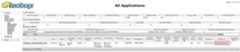
- For a long-running streaming job, click theApplicationManager link toopen the Flink dashboard; for a completed job, click theHistory linkto view job details.

Except as otherwise noted, the content of this page is licensed under theCreative Commons Attribution 4.0 License, and code samples are licensed under theApache 2.0 License. For details, see theGoogle Developers Site Policies. Java is a registered trademark of Oracle and/or its affiliates.
Last updated 2025-12-15 UTC.