

Connect using SSH to a Dataproc cluster
You can open an SSH session on a Dataproc cluster nodeusing the Google Cloud console or Google Cloud CLI.
SeeCluster web interfacesto establish a connection to a web interface running on a cluster master node.Console
- In the Google Cloud console, go to theVM Instances page.
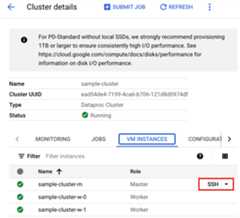
- In the list of virtual machine instances, clickSSH in the row of the Dataproc VM instance that you want to connect to.
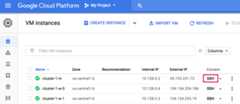
A browser window opens in your home directory on the node.
Connected, host fingerprint: ssh-rsa ...Linux cluster-1-m 3.16.0-0.bpo.4-amd64 ......user@cluster-1-m:~$
Google Cloud CLI
Run thegcloud compute sshcommand in a local terminal window or fromCloud Shellto connect using SSH to a cluster VM node.
gcloud compute sshcluster-VM-name\ --zone=zone \ --project=project-id
Example (the default name for the master node is the cluster name followedby an-m suffix):
gcloud compute ssh cluster-1-m \ --zone=us-central-1-a \ --project=my-project-id...Linux cluster-1-m 4.9.0-8-amd64 #1 SMP Debian 4.9.110-3+deb9u6......user@cluster-1-m:~$
Except as otherwise noted, the content of this page is licensed under theCreative Commons Attribution 4.0 License, and code samples are licensed under theApache 2.0 License. For details, see theGoogle Developers Site Policies. Java is a registered trademark of Oracle and/or its affiliates.
Last updated 2025-12-15 UTC.