Create an SSH tunnel to establish a secure connection to your cluster's master instance.
Apache Hadoop YARN provides REST APIs that share the sameports as the YARN web interfaces (default port 8088). By default, users who can reach the YARN webinterface can create applications, submit jobs, and may be able to performCloud Storage operations.SeeAllowed YARN Resource Manager REST APIsfor information on setting allowed YARN Resource Manager REST API methods.
Some of the core open source components included with Dataprocclusters, such asApache Hadoop andApache Spark, provide web interfaces. Theseinterfaces can be used to manage and monitor cluster resources andfacilities, such as the YARN resource manager, the Hadoop Distributed FileSystem (HDFS), MapReduce, and Spark. Other componentsor applications that you install on your cluster may also provide web interfaces(see, for example,Install and run a Jupyter notebook on a Dataproc cluster).
1On Kerberos enabled clusters, the YARNResourceManager web UI port is 8090, and it runs on HTTPS.
2On Kerberos enabled clusters, the HDFSNamenode web UI port is 9871, and it runs on HTTPS.
3In earlier Dataprocreleases (pre-1.2), the HDFS Namenode web UI port was 50070.
The YARN ResourceManager has links for all currently running and completedMapReduce and Spark Applications web interfaces under the "Tracking UI" column.
Allowed YARN ResourceManager REST APIs
When you create a cluster, Dataprocsets the yarn-site.xmlyarn.resourcemanager.webapp.methods-allowedpropertyto "GET,HEAD". which restricts the HTTP methods that can be called on theYARN Resource Manager web UI andREST APIsto theGET andHEAD methods. This default setting alsodisables job submission and modifications via the YARN REST API.
You can override the default values to enable specific HTTP methodson port 8088 by setting this property to one or more comma-separated HTTP methodnames. AnALL value will allow all HTTP methods on the port.
Recommendation: If you set this property to allownon-default HTTP methods, make sure to configure firewall rules and othersecurity settings to restrict access to port 8088.
Connecting to web interfaces
You can connect to web interfaces running on a Dataproc clusterusing theDataproc Component Gateway,your project'sCloud Shell, or the Google Cloud CLIgcloudcommand-line tool:
Component Gateway: Connect with one click to Hadoop, Spark, and other componentWeb UI interfaces from the Google Cloud console. You enable theComponent Gatewaywhen you create your cluster.
Cloud Shell: The Cloud Shell in the Google Cloud console has thegcloud CLI commands and utilities pre-installed, and it provides aWeb Preview feature thatallows you to quickly connect through an SSH tunnel to a web interface port ona cluster. However, a connection to the cluster from Cloud Shelluses local port forwarding, which opens a connection to only one port on acluster web interface—multiple commands are needed to connect to multipleports. Also, Cloud Shell sessions automatically exit after aperiod of inactivity (30 minutes).
Google Cloud CLI: Thegcloud compute ssh command withdynamic port forwardingallows you to establish an SSH tunnel and run aSOCKSproxy server on top of the tunnel. After issuing this command, you mustconfigure your local browser to use the SOCKS proxy. This connection methodallows you to connect to multiple ports on a cluster web interface. SeeCan I use local port forwarding instead of a SOCKS proxy?for more information.
Set commonly used command variables
To make copying and running command-line examples on your local machineor inCloud Shell easier,setgcloud dataproc command variables. Additional variables mayneed to be set for some of the command examples shown on this page.
SetHOSTNAME to the name ofmaster node in yourDataproc cluster (the master name ends with a-m suffix)
SetZONE to thezoneof the VMs in your Dataproc cluster (for example, "us-central1-b")
Create an SSH tunnel
gcloud Command
Run the followinggcloudcommand on your local machine to set up an SSH tunnel from an open port on your local machine to the master instance of your cluster, and run a local SOCKS proxy server listening on the port.
Before running the command, on your local machine:
The-- separator allows you to addSSH arguments to thegcloud compute ssh command, as follows:
-Dspecifies dynamic application-level port forwarding.
-N instructsgcloud not to open a remote shell.
Thisgcloud command creates an SSH tunnel that operates independently from other SSH shell sessions, keeps tunnel-related errors out of the shell output, and helps prevent inadvertent closures of the tunnel.
If the ssh command fails with the error messagebind: Cannot assign requested address, a likely cause is that the requested port is in use. Try running the command with a differentPORT variable value.
The above command runs in the foreground, and must continue running to keep the tunnel active. The command should exit automatically if and when the you delete the cluster.
Run thegcloud command, below, in Cloud Shell to set up an SSH tunnel from a Cloud Shell preview port to a web interface port on the master node on your cluster. Before running the command, in Cloud Shell :
Set aPORT1 variable to a Cloud Shell port in the port range 8080 - 8084, and set aPORT2 variable to the web interface port on the master node on your Dataproc cluster.
The-- separator allows you to addSSH arguments to thegcloud compute ssh command, as follows:
-4 instructs ssh to only use IPv4.
-N instructsgcloud not to open a remote shell.
-L ${PORT1}:${HOSTNAME}:${PORT2} specifies local port forwarding from the specified Cloud ShellPORT1 to clusterHOSTNAME:PORT2.
Thisgcloud command creates an SSH tunnel that operates independently from other SSH shell sessions, keeps tunnel-related errors out of the shell output, and helps prevent inadvertent closures of the tunnel.
Configure your browser
gcloud Command
Your SSH tunnel supports traffic proxying using the SOCKS protocol. To configure your browser to use the proxy, start a new browser session with proxy server parameters. Here's an example that uses the Google Chrome browser.HOSTNAME is the name of the cluster's master node (seeSet commonly used command variables).
This command uses the following Chrome browser flags:
-proxy-server="socks5://localhost:1080" tells Chrome to send allhttp:// andhttps:// URL requests through the SOCKS proxy serverlocalhost:${PORT}, using version 5 of the SOCKS protocol.${PORT} is the port variable you set inCreate an SSH tunnel. Hostnames for URLs are resolved by the proxy server, not locally by Chrome.
--user-data-dir=/tmp/${HOSTNAME} forces Chrome to open a new window that is not tied to an existing Chrome session. Without this flag, Chrome may open a new window attached to an existing Chrome session, ignoring your--proxy-server setting. The value set for--user-data-dir can be any non-existent path.
Once your local browser is configured to use the proxy, you can navigate to theweb interface URL on your Dataproc cluster (seeAvailable interfaces).The browser URL has the following format and content:http://cluster-name-m:port (cluster interface port)
Cloud Shell
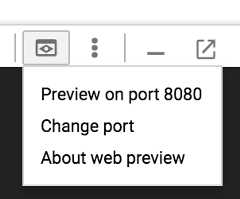
Click the Cloud ShellWeb Preview button, and then select either:
"Preview on port 8080", or
"Change port" and insert the port number in the dialog
according to the Cloud ShellPORT1 number (port 8080 - 8084) you passed to thegcloud compute ssh command inCreate an SSH tunnel.
A browser window opens that connects to the web interface port on the cluster master node.
channel 15: open failed: administratively prohibited: open failedchannel 16: open failed: administratively prohibited: open failedchannel 17: open failed: administratively prohibited: open failed
These are not fatal error messages. The Chrome browser issues thesemessages when it is unable to load a page, and you maysee these messages even when you can successfully connect to theapplication interface on your cluster.
FAQ And debugging tips
What if I don't see the UI in my browser?
If you don't see the UIs in your browser, the two most common reasons are:
You have a network connectivity issue, possibly due to a firewall.Run the following command (aftersetting local variables)to see if you can SSH to the master instance.If you can't, it signals a connectivity issue.
If you see an HTTP response, the proxy is working, so it's possiblethat the SOCKS proxy is being interrupted by another proxy or browser extension.
Can I use local port forwarding instead of a SOCKS proxy?
Instead of the SOCKS proxy, it's possible to access web application UIs runningon your master instance with SSH local port forwarding, whichforwards the master's port to a local port. For example, the following command letsyou accesslocalhost:1080 to reachcluster-name-m:8088 without SOCKS(seeSet commonly used command variables):
[[["Easy to understand","easyToUnderstand","thumb-up"],["Solved my problem","solvedMyProblem","thumb-up"],["Other","otherUp","thumb-up"]],[["Hard to understand","hardToUnderstand","thumb-down"],["Incorrect information or sample code","incorrectInformationOrSampleCode","thumb-down"],["Missing the information/samples I need","missingTheInformationSamplesINeed","thumb-down"],["Other","otherDown","thumb-down"]],["Last updated 2025-12-15 UTC."],[],[]]



 , and then select either: