

Restrict remote repositories
Before you begin
Before you set or edit thedataform.restrictGitRemotes policy, find full URLsof the remote Git repositories that you want to add to the allowlist.
To find the full URL of a remote Git repository that is already connected to aDataform repository, follow these steps:
In the Google Cloud console, go to theDataform page.
Select a repository, and then clickSettings.
Keep in mind that URLs of remote repositories displayed on theDataform page are shortened and cannot be used in the
dataform.restrictGitRemotespolicy.On theSettings page, underGit connection settings,copy theRepository source value.
TheRepository source value is the full URL of the remote repository. You can use this URL in the
dataform.restrictGitRemotespolicy.
Required roles
To get the permissions that you need to manage organization policies, ask your administrator to grant you theOrganization policy administrator (roles/orgpolicy.policyAdmin) IAM role on the organization. For more information about granting roles, seeManage access to projects, folders, and organizations.
This predefined role contains the permissions required to manage organization policies. To see the exact permissions that are required, expand theRequired permissions section:
Required permissions
The following permissions are required to manage organization policies:
orgpolicy.constraints.listorgpolicy.policies.createorgpolicy.policies.deleteorgpolicy.policies.listorgpolicy.policies.updateorgpolicy.policy.getorgpolicy.policy.set
You might also be able to get these permissions withcustom roles or otherpredefined roles.
About restricting remote Git repositories
You canconnect a Dataform repositoryto a GitHub or a GitLab repository.
You might want to restrict the pool of remote repositories thatDataform repositories can connect to in order to prevent maliciousactors from accessing your Dataform codebase and access tokens throughunprotected copies of your repository.
You can useOrganization Policy Serviceto create an organization policy thatrestricts which Git repository URLs Dataform can connect to.
The constraint for restricting remote Git repositories in Dataform is:
constraints/dataform.restrictGitRemotes
To use the constraint, you create an organization policy with anallowedValues list of URLsof remote Git repositories that can connect to a Dataform repository.Remote Git repositories are identified by their full URL address.
Thedataform.restrictGitRemotes policy has a retroactive effect, whichmeans that the constraint impacts pre-existing Dataform repositories.
dataform.restrictGitRemotes policy can blockcommunication and version control actions between pre-existing Dataform repositories and their remote Git repositories that are not included in theallowedValues list.When the organization policy is in place, Dataform repository canconnect to only the remote Git repositories that are listed in theallowedValues list. Remote Git repositories that are not explicitly definedin the organization policy are prohibitedfrom connecting to a Dataform repository.
dataform.restrictGitRemotespolicy, first add the remote Git repository to theallowedValues list in theorganization policy, and thencreate a new Dataform repositoryandconnect it to the remote repository.If you do not set thedataform.restrictGitRemotes policy,communication between Dataform repositories and remote Git repositoriesare not restricted.
You can use thedataform.restrictGitRemotes policyin the following ways:
Allow all- Dataform repositories are allowed to connect to all remote repositoryURLs. Select this option if your organization does not want to blockany communication with remote repositories. Alternatively, to allow all remoterepository URLs, you can leave the organization policy unset.
allowedValueslist of URLs- Dataform repositories are allowed to connect to only the allow-listedremote repositories. Select this option to prevent data exfiltration.
Deny all- Dataform repositories are not allowed to connect to any remote URLs.Select this option if your organization wants to block all communication and useDataform repositories.
Specifications for allow-listing remote Git repositories
You can apply thislist constraintonly to GitHub and GitLab repositories.
The organization policy is applied retroactively and affects existingDataform repositories.
This constraint accepts
allowedValues, blocking connection to all otherremote Git repositories, orDeny all. The default isAllow all- an unsetorganization policy allows communication with all remote Git repositories.We recommend setting the organization policy toallowedValues.It is up to you or an administrator with the required permissions to manageand maintain the policy. Ensure communication about the policy administratorwithin your organization.
Set the organization policy constraint at the organization level
Console
- Go to the/Organizational Policies/Organization Policies page.
- If necessary, select the required organization from the projectdrop-down menu.
- ClickRestrict git remotes for repositories in Dataform.
- ClickManage policy. If you can't click theManage policy button, you do not have the correctpermissions.
SelectCustomize to set the organization policy for specific remote Git repositories.
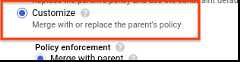
Select the requiredPolicy enforcement andPolicy type.
ForPolicy values, selectCustom.
Enter the full URL of a remote Git repository.
ClickNew policy value and enter full URLs of remote Git repositoriesas needed.
ClickSave to apply the constraint.
gcloud
To set a constraint for remote Git repositories, you first need yourorganization ID. You can find the organization ID by running theorganizations list command andlooking for the numeric ID in the response:
gcloud organizations list
The gcloud CLI returns a list of organizations in the followingformat:
DISPLAY_NAME IDexample-organization1 29252605212example-organization2 1234567890
Use thegcloud resource-manager org-policies set-policy commandto set the organization policy. You need to provide your policy as a JSON or YAML file.Create a JSON file in the following format:
{ "name": "organizations/ORGANIZATION_ID/policies/dataform.restrictGitRemotes", "spec": { "rules": [ { "values": { "allowedValues": ["https://github.com/example/allowed-repository.git"] } } ] }}ReplaceORGANIZATION_ID with the numeric ID of theorganization.
If you do not want Dataform repositories to be able to connect toany remote Git repositories, you can set an organization policy withdenyAllset totrue:
{ "name": "organizations/ORGANIZATION_ID/policies/dataform.restrictGitRemotes", "spec": { "rules": [ { "denyAll": true } ] }}ReplaceORGANIZATION_ID with the numeric ID of theorganization.
API
Use thesetOrgPolicy() APIto define your constraint. Dataform is allowed to connect to theremote Git repository URLs in theallowedValue list you specify.
For example, the following is a request to apply thedataform.restrictGitRemotes constraint to an organization where selectedremote Git repositories Dataform repositories can connect to:
POST https://orgpolicy.googleapis.com/v2/organizations/ORGANIZATION_ID/policies
whereORGANIZATION_ID is the numeric ID of theorganization.
Now, in your request body, provide the desired organization policy forthis constraint:
{ "name": "organizations/ORGANIZATION_ID/policies/dataform.restrictGitRemotes", "spec": { "rules": [ { "values": { "allowedValues": ["https://github.com/example/allowed-repository.git"] } } ] }}Replace<code><var>ORGANIZATION_ID</var></code>withthenumericIDoftheorganization.If you do not want Dataform repositories to be able to connect toany remote Git repositories, you can set an organization policy withdenyAll set totrue:
{ "name": "organizations/ORGANIZATION_ID/policies/dataform.restrictGitRemotes", "spec": { "rules": [ { "denyAll": true } ] }}Replace<code><var>ORGANIZATION_ID</var></code>withthenumericIDoftheorganization.If the organization policy is already set, you need to execute the followingrequest with the organization policy definition as request body:
PATCH https://orgpolicy.googleapis.com/v2/organizations/ORGANIZATION_ID/policies/dataform.restrictGitRemotes
Set the organization policy at the project level
Setting an organization policy at the project level overrides or merges withthe organization policy atthe organization level. In case of a merge,denyAll take precedence overallowedValues. For example, if the organization policy at the organizationlevel is set todenyAll, and the merged policy at the project level lists aremote repository URL on theallowedValues list, Dataform is not allowed to connect tothe remote repository. In such case, the organization policy at the project level mustoverride the policy at the organization level, so that Dataform canconnect to the remote repository. To learn more about Organization Policyhierarchy, seeUnderstanding hierarchy evaluation.
Console
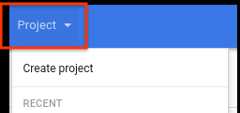
Follow the same process documented underSet the organization policy constraint at the organization level butchoose your desired project from the project selector instead of theorganization.
gcloud
Use thegcloud resource-manager org-policies set-policy commandto set the organization policy. You need to provide your policy as a JSON or YAML file.
Create a JSON file in the following format:
{ "name": "projects/PROJECT_ID_OR_NUMBER/policies/dataform.restrictGitRemotes", "spec": { "rules": [ { "values": { "allowedValues": ["https://github.com/example/allowed-repository.git"] } } ] }}ReplacePROJECT_ID_OR_NUMBER with the project ID orproject number for this organization policy.
Then, pass in the file with your request:
gcloud resource-manager org-policies set-policyMY_POLICY.JSON --project=PROJECT_ID
API
Use thesetOrgPolicy() APIto define your constraint. Dataform is allowed to connect to theremote Git repository URLs in theallowedValue list you specify.
For example, the following is a request to apply thedataform.restrictGitRemotes constraint to an organization whereDataform repositories can connect only to the selectedremote Git repositories, and theconstraints/dataform.restrictGitRemotespolicy is not set yet:
POST https://orgpolicy.googleapis.com/v2/projects/PROJECT_ID_OR_NUMBER/policies
The request body contains the desired organization policy for this constraint:
{ "name": "projects/PROJECT_ID_OR_NUMBER/policies/dataform.restrictGitRemotes", "spec": { "rules": [ { "values": { "allowedValues": ["https://github.com/example/allowed-repository.git"] } } ] }}ReplacePROJECT_ID_OR_NUMBER with the project ID orproject number for this request.
The following is a request to apply thedataform.restrictGitRemotes constraint to an organization whereDataform repositories can connect to only the selectedremote Git repositories, andtheconstraints/dataform.restrictGitRemotes policy is already set:
PATCH https://orgpolicy.googleapis.com/v2/projects/PROJECT_ID_OR_NUMBER/policies/dataform.restrictGitRemotes
The request body contains the desired organization policy for this constraint:
{ "name": "projects/PROJECT_ID_OR_NUMBER/policies/dataform.restrictGitRemotes", "spec": { "rules": [ { "values": { "allowedValues": ["https://github.com/example/allowed-repository.git"] } } ] }}ReplacePROJECT_ID_OR_NUMBER with the project ID orproject number for this request.
Best practices for allow-listing Git remotes
To mitigate data exfiltration risk, explicitly set the
dataform.restrictGitRemotesconstraint to allow-list a selection of trustedremote Git repositories.If you only use Dataform repositories that are not connected toremote Git repositories, set the
dataform.restrictGitRemotesconstraint toDeny All.Avoid using the
deniedValueslist with thisconstraint. If you define values in thedeniedValueslist, it means thatonly the remote Git repositories in thedeniedValueslist are restrictedfrom connection. This could be a securityconcern if you want control over exactly which remote Git repositoriesDataform can connect to. If you want to removecertain remote Git repositories from theallowedValueslist, update theexisting organization policy to remove them from theallowedValueslistrather than putting the remote into thedeniedValueslist at a lower hierarchy.If you want to set an organization policy over a large part of the resource hierarchy butexempt certain projects, restore the default organization policy by usingthe
setOrgPolicymethod by specifying therestoreDefaultobject to allow all Dataform repositories in the projects to beconnected to remote Git repositories. The policies currently in place forprojects are not affected by the default setting.UseOrganization Policytogether withIAM roles to better controlaccess to your Dataform codebase.
Any Dataform repositorieswithin the organization or project with the organization policy enabled aresubject to this policy. If this is an issue,we recommend that you set up other services and products in a differentproject that does not have the organization policy applied, and useShared VPC, if needed.
Before setting the
dataform.restrictGitRemotespolicy, ensure communicationabout the organization policy and its administrator within your organization.It is up to you or an administrator with the required permissions to manageand maintain the policy.
What's next
- To learn more about the Organization Policy, seeIntroduction to the Organization Policy Service.
- To learn more about Organization Policy constraints, seeOrganization Policy constraints.
- To learn how to manage Google Cloud resources with Resource Manager, seeManage your Google Cloud resources.
Except as otherwise noted, the content of this page is licensed under theCreative Commons Attribution 4.0 License, and code samples are licensed under theApache 2.0 License. For details, see theGoogle Developers Site Policies. Java is a registered trademark of Oracle and/or its affiliates.
Last updated 2025-12-15 UTC.