

Grant service account roles for Dataproc
This page describes how to grant theService Account Userrole on Dataproc Service Account to Cloud Data Fusion ServiceAgent to allow it to provision and run pipelines on Dataprocclusters.
For service accounts that are used by Dataproc, you also need tograntdatafusion.instances.runtime permission to accessCloud Data Fusion runtime resources.
To get the permissions that you need to create a Cloud Data Fusion instance,ask your administrator to grant you theService Account Admin(
roles/iam.serviceAccountAdmin) IAM roleon the Dataproc service account.Whether you use a user-managed service account, or the default Compute Engineservice account on the virtual machines in a cluster, you must grant theService Account User role to Cloud Data Fusion. Otherwise,Cloud Data Fusion cannot provision a Dataproc clusterand the following error appears when you execute a data pipeline:
PROVISION task failed in REQUESTING_CREATE state for program run [pipeline-name] due to Dataproc operation failure: INVALID_ARGUMENT: User not authorized to act as service account '[service-account-name]'
Get the service account name
- In the Google Cloud console, go to the Identity and Access Management page.
Go to the IAM page - From the project selector at the top of the page, choose the project, folder, or organization to which the Cloud Data Fusion instancebelongs.
- Find and copy theCloud Data Fusion service account name. Use the following format:
service-[project-number]@gcp-sa-datafusion.iam.gserviceaccount.com.
Give service account user permission
- In the Google Cloud console, go to theService Accounts page.
Go to the Service Accounts page - ClickSelect a project, choose a project where the service account youwant to use for the Dataproc cluster is located, and then clickOpen.
Click the email address of theDataproc service account.
When Cloud Data Fusion provisionsa Dataproc cluster, you can specify which user-managedservice account to use for the Dataproc virtual machines in that cluster. If a service account is not specified, the default Compute Engine service account is used, which is in the format of[project-number]-compute@developer.gserviceaccount.com.Click thePrincipals with access tab. The page displays a list ofprincipals that have been granted roles on the service account.
ClickGrant access.
In theNew principals field, paste the Cloud Data Fusion service account name that you previously copied.
Select theService Account User role.
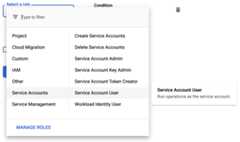
ClickSave.
Grant roles to Dataproc service accounts
Grant runner role permission
Grant theCloud Data Fusion runner role(roles/datafusion.runner) to service accounts that are used byDataproc. This authorizes the Dataproc service account to run Cloud Data Fusion pipelines in yourproject.For more information, seeRequiring permission to attach service accounts to resources.
Grant Cloud Storage admin permission
In Cloud Data Fusion versions 6.2.0 and above, grant theCloud Storage admin role(roles/storage.admin) to service accounts that are used byDataproc in yourproject.
What's next
- Learn more aboutAccess control in Cloud Data Fusion.
- Learn more about Cloud Data Fusionservice accounts.
Except as otherwise noted, the content of this page is licensed under theCreative Commons Attribution 4.0 License, and code samples are licensed under theApache 2.0 License. For details, see theGoogle Developers Site Policies. Java is a registered trademark of Oracle and/or its affiliates.
Last updated 2025-12-15 UTC.