

Create a data pipeline
This quickstart shows you how to do the following:
- Create a Cloud Data Fusion instance.
- Deploy a sample pipeline that's provided with your Cloud Data Fusioninstance. The pipeline does the following:
- Reads a JSON file containing NYT bestseller data fromCloud Storage.
- Runs transformations on the file to parse and clean the data.
- Loads the top-rated books added in the last week that cost less than $25into BigQuery.
Before you begin
- Sign in to your Google Cloud account. If you're new to Google Cloud, create an account to evaluate how our products perform in real-world scenarios. New customers also get $300 in free credits to run, test, and deploy workloads.
In the Google Cloud console, on the project selector page, select or create a Google Cloud project.
Roles required to select or create a project
- Select a project: Selecting a project doesn't require a specific IAM role—you can select any project that you've been granted a role on.
- Create a project: To create a project, you need the Project Creator role (
roles/resourcemanager.projectCreator), which contains theresourcemanager.projects.createpermission.Learn how to grant roles.
Enable the Cloud Data Fusion API.
Roles required to enable APIs
To enable APIs, you need the Service Usage Admin IAM role (
roles/serviceusage.serviceUsageAdmin), which contains theserviceusage.services.enablepermission.Learn how to grant roles.In the Google Cloud console, on the project selector page, select or create a Google Cloud project.
Roles required to select or create a project
- Select a project: Selecting a project doesn't require a specific IAM role—you can select any project that you've been granted a role on.
- Create a project: To create a project, you need the Project Creator role (
roles/resourcemanager.projectCreator), which contains theresourcemanager.projects.createpermission.Learn how to grant roles.
Enable the Cloud Data Fusion API.
Roles required to enable APIs
To enable APIs, you need the Service Usage Admin IAM role (
roles/serviceusage.serviceUsageAdmin), which contains theserviceusage.services.enablepermission.Learn how to grant roles.
Create a Cloud Data Fusion instance
- ClickCreate an instance.
- Enter anInstance name.
- Enter aDescription for your instance.
- Enter theRegion in which to create the instance.
- Choose the Cloud Data FusionVersion to use.
- Choose the Cloud Data FusionEdition.
- For Cloud Data Fusion versions 6.2.3 and later, in theAuthorization field, choose theDataproc service account to use for running your Cloud Data Fusion pipeline in Dataproc. The default value, Compute Engine account, is pre-selected.
- ClickCreate. It takes up to 30 minutes for the instance creation process to complete. While Cloud Data Fusion creates your instance, a progress wheel displays next to the instance name on theInstances page. After completion, it turns into a green check mark and indicates that you can start using the instance.
Navigate the Cloud Data Fusion web interface
When using Cloud Data Fusion, you use both the Google Cloud consoleand the separate Cloud Data Fusion web interface.
In the Google Cloud console, you can do the following:
- Create a Google Cloud console project
- Create and delete Cloud Data Fusion instances
- View the Cloud Data Fusion instance details
In the Cloud Data Fusion web interface, you can use various pages, suchasStudio orWrangler, to use Cloud Data Fusion functionality.
To navigate the Cloud Data Fusion interface, follow these steps:
- In the Google Cloud console, open theInstances page.
- In the instanceActions column, click theView Instance link.
- In the Cloud Data Fusion web interface, use the left navigation panel tonavigate to the page you need.
Deploy a sample pipeline
Sample pipelines are available through the Cloud Data FusionHub,which lets you share reusable Cloud Data Fusion pipelines, plugins,and solutions.
- In the Cloud Data Fusion web interface, clickHub.
- In the left panel, clickPipelines.
- Click theCloud Data Fusion Quickstart pipeline.
- ClickCreate.
- In the Cloud Data Fusion Quickstart configuration panel, clickFinish.
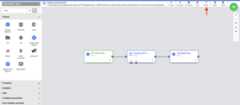
ClickCustomize Pipeline.
A visual representation of your pipeline appears on theStudio page,which is a graphical interface for developing data integration pipelines.Available pipeline plugins are listed on the left, and your pipeline isdisplayed on the main canvas area. You can explore your pipeline by holdingthe pointer over each pipelinenode and clickingProperties. Theproperties menu for each node lets you view the objects and operationsassociated with the node.
In the top-right menu, clickDeploy. This step submits the pipeline toCloud Data Fusion. You will execute the pipeline in the next section ofthis quickstart.
View your pipeline
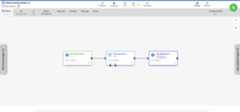
The deployed pipeline appears in the pipeline details view, where you can dothe following:
- View the structure and configuration of the pipeline.
- Run the pipeline manually or set up a schedule or a trigger.
- View a summary of historical runs of the pipeline, including executiontimes, logs, and metrics.
Execute your pipeline
In the pipeline details view, clickRun to execute your pipeline.
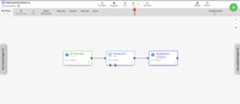
When executing a pipeline, Cloud Data Fusion does the following:
- Provisions an ephemeral Dataproc cluster
- Executes the pipeline on the cluster using Apache Spark
- Deletes the cluster
View the results
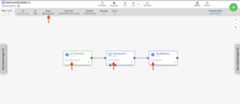
After a few minutes, the pipeline finishes. The pipeline status changes toSucceeded and the number of records processed by each node is displayed.
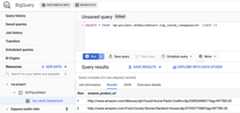
- Go to theBigQuery web interface.
To view a sample of the results, go to the
DataFusionQuickstartdatasetin your project, click thetop_rated_inexpensivetable, then run a simple query. For example:SELECT * FROMPROJECT_ID.GCPQuickStart.top_rated_inexpensive LIMIT 10ReplacePROJECT_ID with your project ID.
Clean up
To avoid incurring charges to your Google Cloud account for the resources used on this page, follow these steps.
- Delete the BigQuery dataset that your pipeline wrote to in this quickstart.
Delete the Cloud Data Fusion instance.
Note: Deleting your instance does not delete any of your data inthe project.Optional: Delete the project.
What's next
Except as otherwise noted, the content of this page is licensed under theCreative Commons Attribution 4.0 License, and code samples are licensed under theApache 2.0 License. For details, see theGoogle Developers Site Policies. Java is a registered trademark of Oracle and/or its affiliates.
Last updated 2025-12-15 UTC.