

Troubleshoot Linux VM boot issues due to kernel panic
Before you begin
- If you want to log serial port output in Cloud Logging, familiarize yourself withCloud Logging.
- If you haven't already, set upauthentication. Authentication verifies your identity for access to Google Cloud services and APIs. To run code or samples from a local development environment, you can authenticate to Compute Engine by selecting one of the following options:
Select the tab for how you plan to use the samples on this page:
Console
When you use the Google Cloud console to access Google Cloud services and APIs, you don't need to set up authentication.
gcloud
Install the Google Cloud CLI. After installation,initialize the Google Cloud CLI by running the following command:
gcloudinit
If you're using an external identity provider (IdP), you must first sign in to the gcloud CLI with your federated identity.
Note: If you installed the gcloud CLI previously, make sure you have the latest version by runninggcloud components update.- Set a default region and zone.
REST
To use the REST API samples on this page in a local development environment, you use the credentials you provide to the gcloud CLI.
Install the Google Cloud CLI. After installation,initialize the Google Cloud CLI by running the following command:
gcloudinit
If you're using an external identity provider (IdP), you must first sign in to the gcloud CLI with your federated identity.
Note: If you installed the gcloud CLI previously, make sure you have the latest version by runninggcloud components update.For more information, seeAuthenticate for using REST in the Google Cloud authentication documentation.
Kernel panic
A kernel panic can happen when the kernel is unable to load properlyinitramfsmodules, which are required for the guest OS to boot.
Another form of kernel panic can occur in a situation where the kernel doesn'tknow how to handle a certain request and protects itself by stopping.Kernel panic can happen on a Compute Engine VM running RedHat, SUSE, CentOS,or Ubuntu.
Common error messages
Below are some of the most common kernel panic events for reference:
Kernel panic - not syncing: hung_task: blocked tasks
Kernel Panic - not syncing: VFS: Unable to mount root fs on unknown-block(0,0)
Kernel panic - not syncing: NMI: Not continuing
Kernel panic - not syncing: out of memory. panic_on_oom is selected
Kernel panic - not syncing: Fatal Machine check
Common causes
The kernel panic error can occur due to multiple reasons. Some of thecommon reasons are:
- The entry related to the
initramfsfile that corresponds to the kerneldoesn't exist in thegrub.cfgfile. - The
initramfsfile doesn't get generated in the/bootdirectory duringkernel installation. - The
initramfsfile gets only partially generated or is corrupted.
Symptoms
When you experience kernel panic on a VM instance, a common symptom is that thekernel does not allow you to connect to the VM, even when using the serialconsole.
You should check the serial console logs to identify the kernel that was loadedby the guest OS, for example:
[ 0.000000] Initializing cgroup subsys cpu[ 0.000000] Initializing cgroup subsys cpuacct[ 0.000000] Linux version 3.10.0-1160.95.1.el7.x86_64 (mockbuild@x86-vm-42.build.eng.bos.redhat.com) (gcc version 4.8.5 20150623 (Red Hat 4.8.5-44) (GCC) ) #1 SMP Thu Aug 10 10:46:21 EDT 2023
The following example shows a kernel panic event due toinitramfs issues:
[ 1.520840] No filesystem could mount root, tried:[ 1.520840][ 1.521964] Kernel panic - not syncing: VFS: Unable to mount root fs on unknown-block(0,0)[ 1.523495] CPU: 1 PID: 1 Comm: swapper/0 Not tainted 3.10.0-1160.95.1.el7.x86_64 #1[ 1.524932] Hardware name: Google Google Compute Engine/Google Compute Engine, BIOS Google 10/11/2022[ 1.526901] Call Trace:[ 1.527421] dump_stack+0x41/0x60[ 1.527978] panic+0xe7/0x2ac[ 1.528578] mount_block_root+0x2be/0x2e6[ 1.529693] ? do_early_param+0x95/0x95[ 1.530441] prepare_namespace+0x135/0x16b[ 1.531237] kernel_init_freeable+0x203/0x22d[ 1.532081] ? rest_init+0xaa/0xaa[ 1.532808] kernel_init+0xa/0x103[ 1.533395] ret_from_fork+0x35/0x40[ 1.535229] Kernel Offset: 0x23a00000 from 0xffffffff81000000
Resolve the kernel panic error
To resolve the kernel panic error, perform the following steps:
Connect to theserial consoleand log in to the VM from the Google Cloud console.
ClickReset for VM in the Google Cloud console.
After the GRUB splash screen appears, select the previously workingkernel or rescue kernel, and then boot the system. This causes the VMto start with the selected kernel.
Note: Booting the VM by selecting the previous kernel from the GRUB splashscreen doesn't make changes to GRUB configuration file, so this is not apersistent change.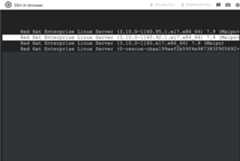
When the VM is accessible, you can initiate an SSH connection to the VM.
Identify the cause of the issue and take further action accordingly.
For example, if the
initramfsfile is missing or corrupted,complete the following steps:Generate the
initramfsfile corresponding to original kernel by usingthedracutcommand:dracut -f /boot/initramfs-KERNEL_VERSION.imgKERNEL_VERSION
Replace
KERNEL_VERSIONwith the VM's currentkernel version. For example,3.10.0-1160.95.1.el7.x86_64.Update the
grub2.cfgfile using thegrub2-mkconfigcommand, forexample:grub2-mkconfig -o /boot/grub2/grub.cfg
After the
initramfsfile is generated, you can restart the VM withoutany errors.
Except as otherwise noted, the content of this page is licensed under theCreative Commons Attribution 4.0 License, and code samples are licensed under theApache 2.0 License. For details, see theGoogle Developers Site Policies. Java is a registered trademark of Oracle and/or its affiliates.
Last updated 2026-02-19 UTC.