

Choose a reservation type
This document describes the different reservation types that you can use toreserve capacity for Compute Engine instances. To learn more about theresources that you use to create instances, seeCompute Engine instances.
Reservations help ensure that you have the available resources to createinstances with the same hardware (memory and vCPUs) and optional resources(GPUs, H4D HPC clusters, TPUs, or Local SSD disks) whenever you need them.Reservations offer the following benefits:
High assurance of capacity: you reserve resources to accommodate forfuture increases in demand, such as the following:
Growth
Planned or unplanned spikes in usage
Large migrations
Backup and disaster recovery
Exclusive access: reservations prevent others from using your reservedresources.
Inherited properties: reservations inherit the same properties as yourchosen machine family.
After you reserve capacity, you can use it to create instances that match thereservation. You don't incur any additional charges when you create theseinstances. You only pay for resources that aren't part of the reservation, suchas disks or IP addresses.
Limitations
All reservation types have the following limitations:
Reservations arezone-specific resources.
You can't use your reserved capacity to create the followingCompute Engine resources:
Flex-start VMs
Spot VMs or preemptible instances
Sole-tenant nodes
Choose a reservation type
The following diagram helps you choose the Compute Engine reservationtype that best fits your workload's needs:
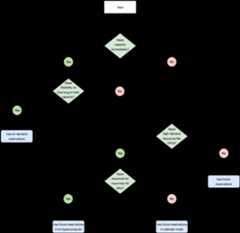
The questions in the preceding diagram are as follows:
Do you need capacity right away?
Yes: Go to the next question.
No: Go to question 3.
Do you need flexibility on how long to hold capacity?
Yes: SeeUse on-demand reservations.
No: Go to the next question.
Do you need high-demand resources like GPUs?
Yes: Go to the next question.
No: SeeUse future reservations.
Do you need resources for more than 90 days?
Yes: SeeUse future reservations in AI Hypercomputer orfor H4D, seeReserve capacity through your account team.
Use on-demand reservations
With on-demand reservations, you can reserve capacity for compute instances andget it as soon as you reserve it. After you create an on-demand reservation, youcan consume, modify, or delete it whenever you need to.
For more information, seeAbout reservations.
Use future reservations
To reserve instances for a set period, you can use future reservations. Afteryou create a reservation request, you must submit it to Google Cloud for review.Google Cloud typically takes five days to review your request. If yourrequest is approved, then Compute Engine creates on-demand reservationswith your requested capacity on your chosen date and time. To consume thesereservations, you create compute instances that use the reservations. After thereservation period ends, you can modify or delete the reservations.
For more information, seeAbout future reservation requests.
Use future reservations in calendar mode
To reserve GPU instances, H4D instances, or TPUs for up to 90 days, you can usefuture reservations in calendar mode. To create this type of reservation, firstview when your chosen number and type of resources are available in a region.Then, create and submit a reservation request with the properties that youconfirmed as available. If you can successfully create the request, thenGoogle Cloud approves it within a minute. After the request is approved,Compute Engine does the following:
Compute Engine creates an on-demand reservation.
Compute Engine reserves your requested resources as close to eachother as possible to minimize network latency.
At the start of your reservation period, you can consume the reservation bycreating GPU, H4D, or TPU instances. At the end of the reservation period,Compute Engine deletes the reservation, and stops or deletes anyinstances that consume the reservation based on the termination action that youspecified for the instances.
For more information, seeAbout future reservation requests in calendar mode.
Use future reservations with AI Hypercomputer or H4D HPC clusters
Contact your account team and request to reserve GPU instances for large-scaleartificial intelligence (AI) and machine learning (ML) workloads, or forcreating a cluster of H4D HPC instances withenhanced cluster management capabilities.After Google creates a draft reservation request for you, submit it for reviewif everything looks correct. Google Cloud immediately approves therequest, and then Compute Engine does the following:
Compute Engine creates on-demand reservations.
Compute Engine reserves your requested resources as close to eachother as possible to minimize network latency.
Compute Engine reserves resources with topology-aware scheduling, aswell as enhanced monitoring and maintenance.
At the start of your reservation period, you can consume the reservation bycreating GPU or H4D instances. At the end of the reservation period,Compute Engine deletes the reservation, and stops or deletes anyinstances that consume the reservation based on the termination action that youspecified for the instances.
For more information, see either of the following:
- For GPU instances:Reserve capacity through your account teamin the AI Hypercomputer documentation
- For H4D instances:Reserve capacity through your account teamin the Compute Engine documentation
Except as otherwise noted, the content of this page is licensed under theCreative Commons Attribution 4.0 License, and code samples are licensed under theApache 2.0 License. For details, see theGoogle Developers Site Policies. Java is a registered trademark of Oracle and/or its affiliates.
Last updated 2025-12-17 UTC.