

How some operations affect preserved state of managed instances
Read the following sections to learn how various configurations,managed instance group (MIG)actions, or instance lifecycle events affect thepreserved stateof amanaged instance,in astateful MIG:
- Autohealing
- Updating instances
- Group resizing
- Deleting an instance
- Abandoning an instance
- Regional groups
How autohealing handles preserved state
When a virtual machine (VM) instance stops running or becomesunhealthy,autohealing recreates the VM and keeps the preserved state for items that you haveconfigured:
- The MIG preserves stateful disks and IP addresses and reattaches them on VMrecreation.
- The MIG preserves stateful metadata, configured in per-instanceconfigurations, and sets it on VM recreation.
To avoid VM instance recreation failures due to a corrupt stateful boot disk,keep the boot disk stateless so that autohealing can recreate that disk fromscratch by using the original image.
How updating instances handles preserved state
When you update an instance, the MIG maintains the instance's preserved state(disks, IP addresses, metadata):
- The MIG preserves stateful disks and IP addresses and reattaches them, ifthe VM instance is recreated or restarted during the update.
- The MIG preserves stateful metadata, configured in a per-instanceconfiguration, and sets it on the instance during the update.
When setting a new instance template, you must define all disks that youspecified in your stateful policy. Setting a new instance template that omits adisk that is defined in a stateful policy is not allowed. This helps preventaccidental deletion of stateful disks.
To remove stateful disks from a MIG when those disks are defined in a statefulpolicy, use the following procedure:
- Remove the disk configuration from your stateful policy.
- (Optional.) Detach the disks from the VM instances if you still want to keepthem.
- Rollout a new instance template that no longer defines the disks.
You cannot update stateful disks to a new image because these disks must bepreserved during the update, and updating to a new image requires recreation ofa disk.
Google recommends that you keep boot disks and any disks with binaries ortemporary files stateless, while keeping your data on stateful disks. Sucha configuration supports the following behavior:
- You can easily and automatically update the boot disk and the diskswith binaries to newer images that contain new versions and securitypatches. You can use auto-updating, or you can manually update the instancesto recreate such stateless disks, while keeping your data intact on separatestateful disks.
- You can preserve the data on stateful disks when rolling out other updatesto your instances.
You can configure a boot disk to be stateful, for example, to host a legacyapplication that keeps binaries and data on the same disk. This lets you movean application to a MIG to benefit from autohealing. But, in this scenario, youmust perform software and operating system updates yourself, for example, byupdating individual packages using a package manager such as apt on Debiansystems, or by using configuration management tools.
If you only configured custom instance names and did not configure statefuldisks or metadata, then you can use automated rolling updates. For automatedrolling updates, you must set the Updater's replacement policy toRECREATE.You cannot use theSUBSTITUTE replacement method for auto-updating instancesin stateful MIGs because this method substitutes each existing VM with a newone that has a different name and preserved state.
How group resizing affects preserved state
Decreasing group size
Google does not recommenddecreasing the size of a stateful MIG because the MIG picks the VM instances fordeletion and might pick VMs that you need to preserve. You can remove MIGVM instances in a controlled way bydeleting specific instances that you no longer need.
If you do decrease MIG size, the MIG deletes all extra VM instances, togetherwith their associated preserved states. To prevent this, you can configure theMIG to detach and preserve stateful disks and IP addresses on permanent VMinstance deletion. Stateful metadata is deleted together with preserved state.For more information, seehow deleting an instance affects preserved state.
Increasing group size
When you increase the size of a stateful MIG, the group creates VMs from thecurrent instance template with auto-generated names(base instance name + suffix). You can see the applied stateful configuration in the correspondingmanaged instance'spreservedStateFromPolicy. After the MIG creates theinstances, you can define stateful metadata and additional stateful disks or IPaddresses in the per-instance configurations for these instances.
You can pick custom instance names and increase group size bycreating instances manually, with the option to bootstrap their state by providing per-instanceconfigurations with stateful metadata, IP addresses, and disks for eachinstance.
Note: You cannot use autoscaling with stateful MIGs.How deleting an instance affects preserved state
A VM in a MIG is permanently deleted when:
- You reduce the size of the group, and the MIG picks this VM instance fordeletion, or
- You delete the whole group, or
- You specificallydelete the instance from the MIG.
When a VM is permanently deleted, the MIG also deletes the correspondingper-instance configuration and managed instance, including its preserved stateconfiguration.
Permanent VM deletion results in the loss of all stateful metadatakey-value pairs.
You can configure whether to keep or delete stateful disks and IP addresses onpermanent instance deletion by setting theautoDelete flag for each resourceeither in the stateful policy or in a per-instance configuration. The flagsupports two options:
NEVER: (Default.) The MIG never deletes the disk.ON_PERMANENT_INSTANCE_DELETION: The MIG deletes the disk when the instanceis permanently deleted.
The MIG does not delete stateful resources when autohealing, updating, orrecreating instances.
Note: You can also disable diskauto-deletionin the instance template. Although this configuration preserves disk onpermanent instance deletion, it is intended for configuring standaloneinstances either created directly orcreatedfrom an instance template but outside of a MIG. We do not recommenddisabling disk auto-deletion in an instance template for use with MIGsbecause a MIG might fail to reattach the detached disk on instancerecreation, autohealing, or auto-update. Instead, you can configure whetherto preserve disks on permanent instance deletion in a stateful policy or inper-instance configurations.The
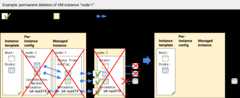
autoDelete flag for a disk set in a stateful policy or ina per-instance configuration has priority over an equivalentautoDelete flag in the instance template.In the following example, the MIG has a single VMnode-1 with apreserved state defined by a per-instance configuration. The preserved state includestwo disks (blue & green) andid:xyz273 metadata. If you resize the MIG tozero, the MIG triggers permanent deletion of the instance,node-1, whichcauses the following effects:
- The MIG deletes the managed instance and its preserved state configuration.
- The MIG deletes the per-instance configuration for the instance.
- The MIG deletes the actual VM instance resource.
- Metadata
id:xyz273is lost because the VM instance and itspreserved state configuration are deleted. - The stateful blue disk is deleted because, for this disk, theper-instance configuration has
autoDelete: ON_PERMANENT_INSTANCE_DELETION. - The stateful green disk is detached because, for this disk, theper-instance configuration has
autoDelete:NEVER.
How abandoning an instance affects preserved state
When youabandon a VM instance from a MIG, the state of the VM, including statefulmetadata, IP addresses, and disks, remains on the instance outside of the MIG.Because the VM is no longer managed by the MIG, the MIG deletes thecorresponding per-instance configuration andmanaged instance,including the instance's preserved state configuration.
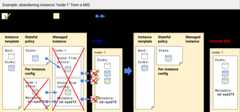
Note: If you set stateful configuration for a disk (either in a stateful policyor in a per-instance configuration), the disk is kept even if you delete thestandalone VM instance after abandoning the instance from the MIG. This isbecause the VM instance preserves itsautoDeletesettingfor the disk (instances.disks[].autoDelete = FALSE) throughthe abandon operation.In the following example, the VMnode-1 has preserved state, defined bya stateful policy (blue disk) and a per-instance configuration (green disk andmetadataid:xyz273). If you abandon the instance,node-1, from the MIG,here is what happens to its preserved state:
- The standalone VM instance,
node-1, preserves its state: all its disksremain attached and metadata,id:xyz273, remains set on the VM. - The MIG deletes the managed instance and its preserved state configuration.
- The MIG deletes the per-instance configuration for the instance.
- The stateful policy remains unchanged because it is applicable to allinstances in the MIG.
How regional groups handle preserved state
Stateful regional MIGs handle the preserved states of their instances in thesame way as zonal MIGs except that regional MIGs create VM instances in multiplezones:
- When creating instances, a regional MIG evenly distributes VMsacross zones in the region to maximize the availability of yourapp in the event of a zone-level failure.
- For existing instances, a stateful regional MIG cannot redistribute ormove existing VMs across zones automatically because the preservedstate is stored in a specific zone and cannot be moved. For that reason,stateful regional MIGs only support aninstance redistribution type setting of
NONE.
Feedback
We want to learn about your use cases, challenges, and feedback about statefulMIGs. Please share your feedback with our team atmig-discuss@google.com.
What's next
- ReadHow stateful MIGs work.
- ReadConfiguring stateful MIGsto learn how to support stateful workloads by preserving instance names,persistent disks, and metadata in managed instances.
- Learn more aboutmanaged instance groups.
- Work withmanaged instances.
Except as otherwise noted, the content of this page is licensed under theCreative Commons Attribution 4.0 License, and code samples are licensed under theApache 2.0 License. For details, see theGoogle Developers Site Policies. Java is a registered trademark of Oracle and/or its affiliates.
Last updated 2026-02-19 UTC.