

About archive and standard disk snapshots
The lifecycle of a snapshot created from a disk attached to a running VMinstance is independent of the lifecycle of the VM instance.
Snapshot types
You can backup a disk with snapshots.The 3 types of snapshots—standard, instant, and archive—allcapture the contents of a disk at a specific point-in-time.
The following are the key differences between the snapshot types:
- Retention after source disk deletion
- Data recovery time (RTO)
- Storage location
Retention after source disk deletion
An instant snapshot of a diskonly exists until the source disk is deleted.Standard and archive snapshots aren't deleted with the source disk. Therefore,if you want to retain a backup of a disk after you delete the disk itself, usearchive or standard snapshots.
Data recovery time
The data recovery time is the length of time needed tocreate a new disk from a snapshot and varies by snapshot type.
- Instant snapshots offer the lowest and best recovery times.
- Standard snapshots have faster data recovery times than archive snapshots.
- Archive snapshots have the longest data recovery times, but offer the most cost efficient storage.
Storage location by snapshot type
The storage location is the zone or region where Compute Engine storesthe snapshot.
- Instant snapshots are local disk backups that are stored in the same zone or regionas the source disk.
- Archive and standard snapshots are remote backups of disk data storedseparately from the source disk.
Compute Engine stores archive and standard snapshots in the same manner. Copies of archive and standard snapshots are stored acrossmultiple locations with automatic checksums to ensure the integrity of yourdata.
Unless otherwise specified, references to standard snapshots include archive snapshots.
The information in this document applies to archive and standard snapshots.Learn moreAbout instant snapshots.
Snapshot type comparison
The following table compares the differences between the types of snapshots:
| Snapshot type | Best for | Storage redundancy | Support for Hyperdisk | Can be created with snapshot schedules | Deleted on source disk deletion |
|---|---|---|---|---|---|
| Standard snapshots | Geo-redundant data backup to safeguard against local, zonal, and regional outages. | Redundant. Stored in one or more regions. Not restricted to the same zone or region as the source disk. | Yes | Yes | No |
| Archive snapshots | Same as standard snapshots, but for data that is rarely accessed and must be retained for several months or years. Lower cost geo-redundant storage that is better suited for data related to compliance, audits, and cold-storage. | Redundant. Stored in one or more regions. Not restricted to the same zone or region as the source disk. | Yes | No | No |
| Instant snapshots | In-place data backup to enable quick restore to a new disk in case of user error or application corruption. | Not redundant. Stored in the same zone or region as source disk only. | Yes, for certain Hyperdisk types* | No | Yes |
*You can't create instant snapshots of Hyperdisk ML or Hyperdisk Throughput volumes.
In addition to snapshots, Compute Engine offers other data backup options.Review the chart describingdata backup options.
Archive snapshots
Standard and archive snapshots differ primarily instorage location and cost.
Archive snapshots have the same benefits as standard snapshots includingincremental chains, compression, and encryption.
However, archive snapshots arelower-cost and are better suited for use cases related to compliance, audit, andlong-term cold storage. If you require snapshot retention for many months oryears and rarely need to access snapshots, consider using archive snapshotsinstead of standard snapshots. Each snapshot type is stored in separateincremental snapshot chains, and archive snapshots are listed separately in theGoogle Cloud console.
Snapshot scopes
Preview
This product or feature is subject to the "Pre-GA Offerings Terms" in the General Service Terms section of theService Specific Terms. Pre-GA products and features are available "as is" and might have limited support. For more information, see thelaunch stage descriptions.
When you create a snapshot, you can create a globally scoped snapshot (default)or a regionally scoped snapshot. To set a regional scope, complete the steps tocreate a regionally scoped snapshot.
Setting aregional scope ensures that all snapshot data and the metadata necessary to usethe snapshot are co-located within the scoped region. Regionally scopedsnapshots support additional location control by letting you restrictallowed snapshot creation and restore locations.In contrast, globally scoped snapshots can be created and restored in any regionwithout restriction.This helps you controlsnapshot network costs,enhances your resiliency to global outages, and offers additionalprotection for your snapshot data.
To decide if regionally scoped or globally scoped snapshots are the best fit foryour project, reference the following table:
| Regionally scoped snapshots | Globally scoped snapshots (default) |
|---|---|
| Restrict allowed snapshot creation and restore locations. | Minimal control over snapshot creation and restore locations. |
| All snapshot metadata and data are co-located in the same scoped region. | Snapshot snapshot metadata and data aren't always stored in the same region. |
| Improve data security by limiting the locations where a potential attacker can create and restore snapshot data. | Users with the necessary IAM permissions can create and restore data in any region. |
Work with standard snapshots
To learn how to back up disks with snapshots, seeCreating snapshots.You can create a snapshot of your disk before you attempt a potentiallydangerous operation, so that you can revert the change in case your resultsare unexpected.
To learn how to restore the contents of a snapshot to a new disk, seeRestoring snapshots.
If you no longer need a specific snapshot, you can reduce storage costs bydeleting the snapshot.
To reduce the risk of unexpected data loss, consider the best practice ofsetting up asnapshot scheduleto ensure your data is regularly backed up.
Access standard snapshots
By default, snapshots areglobal resources.This means that when you use a snapshot to create a new disk, the new disk canbe in any region, regardless of where the source snapshot is stored. Torestrict access locations,set the regions the snapshot can be created and restored in.
When you restore a snapshot, you create a new disk from the snapshot.Restoring a snapshot doesn't override the source disk.
You can alsoshare snapshots across projects.
Limitations
You can't change the storage location of an existing standard snapshot. SeeSelecting the storage location for a snapshot.
You can snapshot a specific disk at most 6 times every 60 minutes. For moreinformation, seeSnapshot frequencylimits.
You can't edit the data stored in a snapshot.
You can't recover deleted snapshots.
You can create an unlimited number of standard snapshots of a given disk.
(Preview) You can store regionally scopedsnapshots only inCloud Storage regional locations,such as
asia-south1orus-central1. You can't store regionally scopedsnapshots inmulti-regional locations,such asasia.You can't convert a globally scoped snapshot to a regionally scoped snapshot.You must create a new snapshot with the appropriate scope.
You can't create regionally scoped snapshots with source disks that areprotected by a customer-supplied encryption key (CSEK).
Regionally scoped snapshot names are unique only within a region. You canhave regionally scoped snapshots with the same name in different regions.
How incremental standard snapshots work
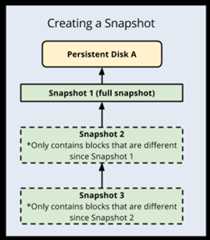
Snapshots are incremental, so you can createregular snapshots on a Persistent Disk or Hyperdisk faster and at alower costcompared to regularly creating a full image of the disk.
Important: Snapshots are incremental by default to avoid billing you forredundant data and to minimize use of storage space. However, to ensurethe reliability of snapshot history, a snapshot might occasionally capture afull image of the disk. This happens automatically to maximize storage space andminimize storage costs. You don't need to choose between creating incrementalor full snapshots. When a snapshot captures a full image of the disk,previous incremental snapshots of that disk are unchanged.Incremental snapshots work as follows:
- The first successful snapshot of a disk is a full snapshotthat contains all the data on the disk.
- The second snapshot only contains any new data or modified data since thefirst snapshot. Data that hasn't changed since Snapshot 1 isn't included.Instead, Snapshot 2 contains references to Snapshot 1 for any unchangeddata.
- Snapshot 3 contains any new or changed data since Snapshot 2 but won'tcontain any unchanged data from Snapshot 1 or 2. Instead, Snapshot 3 containsreferences to blocks in Snapshot 1 and Snapshot 2 for any unchanged data.
This repeats for all subsequent snapshots of the disk. Snapshotsare always created based on the last successful snapshot taken.
Snapshot deletion
Warning: Deleting a snapshot is irreversible. You can't recover a deleted snapshot.Compute Engine uses incremental snapshots so that each snapshotcontains only the data that has changed since the previous snapshot. Forunchanged data, snapshots reference the data in previous snapshots.Storage costs for Persistent Disk and Hyperdisk snapshotscharge only for the total size of the snapshot.
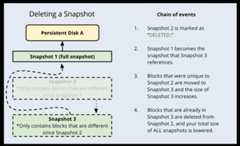
When you delete a standard snapshot, it's deleted outright if the snapshot hasno dependent snapshots.
However, if you delete a snapshot that has dependent snapshots, the followingoccurs:
- Any data that is required for restoring other snapshots is moved into thenext snapshot, increasing its size.
- Any data that is not required for restoring other snapshots is deleted. Thislowers the total size of all your snapshots.
- The next snapshot no longer references the snapshot marked for deletion,and instead references the snapshot before it.
Because subsequent snapshots might require information stored in a previoussnapshot, keep in mind that deleting a snapshot does not necessarily deleteall the data on the snapshot. To definitively delete data from your snapshots,you should delete all snapshots.
If your disk has a snapshot schedule, you mustdetach the snapshot schedulefrom the disk before you can delete the schedule. Removing the snapshot schedulefrom the disk prevents further snapshot activity from occurring.You cannot delete a schedule that is attached to a disk. You have the optionto manually delete snapshots at any time.
The following diagram shows this process:
Snapshot size and deleted blocks
Snapshots capture parts of the disk that were written to and not discarded.Depending on the disk file system configuration, sometimes deleted files are notdiscarded. If this happens, you might see that the size of your snapshot islarger than the used space on the disk reported by the file system. To avoidthis, it is a best practice toenable thediscard option or runfstrim onyour disk.
Snapshot chains
You can create standard snapshots in distinct snapshot chains by specifying asnapshot chain name at the time of the snapshot creation. When you createmultiple standard snapshots of a Persistent Disk using a chain name, each newsnapshot is based incrementally on the last successful snapshot created withthat chain name. Use snapshot chains only if you are an advanced service ownerand you need to create separate snapshot chains, for example, for chargebacktracking.
You can specify a snapshot chain name during standard snapshot creation by usingthegcloud CLI,REST, orTerraform.
When youcreate a snapshot,you have the option of creating astandard snapshot or anarchive snapshot.Archive snapshots have the same benefits as standard snapshots includingincremental chains, compression, and encryption. However, archive snapshots arelower-cost and are better suited for use cases related to compliance, audit, andlong-term cold storage. If you require snapshot retention for many months oryears and rarely need to access snapshots, consider using archive snapshotsinstead of standard snapshots. Each snapshot type is stored in separateincremental snapshot chains, and archive snapshots are listed separately in theGoogle Cloud console.
Snapshot storage and access locations
When you create a snapshot of a disk, Google Cloud stores yoursnapshot in a specific storage location. For globally scoped snapshots,regardless of a snapshot's storagelocation, you can use the snapshot to create a new disk in anyregion and zone. However, thelocation of a snapshot affects itsavailability and you canincurnetworking costs when you create thesnapshot or restore it to a new disk. For regionally scoped snapshots, you canset allowed locations to control theregions that you can restore snapshots in.
Types of storage locations
You can store globally scoped snapshots in either of the following location types:
- Cloud Storage multi-regional locations,such as
asiaorus. - Cloud Storage regional locations,such as
asia-south1orus-central1.
(Preview) You can store regionally scopedsnapshots inCloud Storage regional locations,such asasia-south1 orus-central1.
A multi-regional storage location provides the highest availability andresilience. A regional storage location gives you more control over the physicallocation of your data because you specify a single region.
If you need to comply with corporate or government data-placement policies,store your snapshot in the nearest regional location that complies withthese policies.
If your app is not deployed in part of a multi-region and you wantto prioritize low networking costs over high snapshot availability, storeyour snapshot in the region where your source disk is located. Storing yoursnapshot in the region where your source disk is located minimizes networkingcosts for restoring and creating snapshots from that source disk.
However, unlike a multi-regional storage location, a regional storage locationstores your data across multiple zones in a single region, and your data mightnot be accessible if a regional disruption occurs. To ensure the availabilityof your data, you might also want to store a redundant snapshot in a secondlocation.
If you have anorganization policythat includes the resource locationsconstraint,then any snapshot storage location that you specify must be in the set oflocations defined by the constraint. SeeCompute Engine resource locationsfor more information.
Configure a storage location
Configure the storage location based on whether you are creating globally scopedor regionally scoped snapshots.
Globally scoped snapshots
Use the predefined or customized default storage location configured insnapshot settings. The storage location policy ofsnapshot settingsdefines the default location where Google Cloud stores all yourproject's snapshots. Although Google Cloud maintains a predefineddefault storage location policy, snapshot settings allow you to customizethis policy and configure your own default storage location:
- Use the Google Cloud predefined default location.Until you update snapshot settings for the first time, Google Cloudmaintains a predefined value for the storage location policy. Thispredefined default location is the multi-region that is closest to thesource disk. For more information, seeGoogle Cloud predefined storage location policy
- Set your own customized default location.To customize the default storage location for your project's snapshots,you must update the storage location policy of your snapshot settings.After you update snapshot settings and configure your own default,Google Cloud starts using this newly configured location to storeall your future snapshots. For more information, seeUpdate snapshot settings for your project.
Override snapshot settings and manually specify the location duringsnapshot creation.Alternatively, you can override your snapshot settings and manually specifya location of your choice when you create a snapshot. You can use thisoption to choose a different location for specific snapshots on anoperational basis. To learn how to specify location during snapshot creation,seeCreate a snapshot of Persistent Disk volume.
When to choose the Google Cloud predefined default location
Some example use cases for using the multi-region, that is predefined in yoursnapshot settings, as your storage location include the following:
- The default multi-region location meets corporate or governmentdata-placement policies.
- Your disk is stored in a regional location (like
us-central1) that is partof a multi-region location (us), and you prefer higher snapshot availability at the riskof slower snapshot restoration performance. - You don't expect your snapshots to be frequently restored to disks that arelocated outside of the default snapshot storage location.
When to choose your own storage location
Some example use cases for using a custom storage location, either by updatingor overriding your snapshot settings, include the following:
- The custom multi-region location meets corporate or governmentdata-placement policies.
- Your app is deployed in a region that is not included in one of theCloud Storage multi-regional locations and you want to prioritizesnapshot restoration performance over snapshot availability.
- You restore your snapshots multiple times from a disk located outside of thedefault snapshot storage location.
You can't modify the storage location of existing snapshots. If you wantto store your disk snapshot in a new location, create a new snapshot in yourchosen location and then delete the snapshot in the older location. If you needto store a snapshot in more than one location, you must create a snapshot ineach location. When you create a new snapshot in a new location, a full snapshotgets created with all the data on the disk.
Regionally scoped snapshots
Preview
This product or feature is subject to the "Pre-GA Offerings Terms" in the General Service Terms section of theService Specific Terms. Pre-GA products and features are available "as is" and might have limited support. For more information, see thelaunch stage descriptions.
To choose the storage location for regionally scoped snapshots, you mustmanually specify the region during snapshot creation. When you set a regionalscope, you override any default storage locations you have set. If you don't seta regional scope, your snapshot is created as a globally scoped snapshot. Tolearn how to specify a region during snapshot creation, seeSet snapshot creation and restore locations for regionally scoped snapshots.
Network costs
For globally scoped snapshots, network charges apply for the creation orrestoration of all multi-regionalstandard snapshots when a disk is in a member region of the multi-region. If youdon't require the additional replication and resilience of multi-regionalsnapshots, we recommend using regional snapshots by specifying a regionallocation when snapshots are created.
Selecting your snapshot storage location is vital to minimizingnetworkcosts. If you store your snapshot in the sameregion as your source disk, there is no network charge when you access thatsnapshot from the same region. If you access the snapshot from a differentregion, there is a network cost. Network costs are incurred when a snapshot iscreated in a different region from the source disk, and when a snapshot isrestored to a disk in a different region from the snapshot.
There is a network charge for cross-region access. For example, if your sourcedisk is inasia-east1 and you store your snapshots inasia-east2, you willincur a network cost when you access your snapshot between those two regions.
Two regions,australia-southeast1 andsouthamerica-east1, have a defaultmulti-region snapshot storage location that will incur network costs unless youchange the storage location. You can modify the storage location using snapshotsettings or manually override the default location during snapshot creation:
- If your source disk is in
australia-southeast1, the default snapshotstorage location is in theasiamulti-region. To reduce costs, store yoursnapshots in theaustralia-southeast1region instead. - If your source disk is in
southamerica-east1, the default snapshotstorage location is in theusmulti-region. To reduce costs, store yoursnapshots in thesouthamerica-east1region instead.
If you restore a snapshot to a disk in a region that isn't included in thesnapshot's storage location you will incur a network cost. For example, if youcreate a new regional Persistent Disk inaustralia-southeast1 from a snapshotstored inasia, a multi-regional location, you will incur network costs.
What's next
- Learn how tocreate standard disk snapshots.
- Learn how to back up your disks regularly usingscheduled snapshots.
- Learn aboutmanaging snapshot schedules.
- Learn aboutsnapshot settings.
- Learn aboutinstant snapshots.
- Learn aboutbest practices for working with snapshots.
Except as otherwise noted, the content of this page is licensed under theCreative Commons Attribution 4.0 License, and code samples are licensed under theApache 2.0 License. For details, see theGoogle Developers Site Policies. Java is a registered trademark of Oracle and/or its affiliates.
Last updated 2025-12-15 UTC.