

Migrate API quotas from global metrics to regional metrics
This document describes the quota metrics for regional APIs and the limitfor each metric. It also describes how to update your Cloud Monitoringdashboards, alerting policies and queries to use the regional metrics.
Regional API quota metrics
Compute Engine regional APIs that used the global quota metrics aremigrated to use the regional metrics. Global APIs continue to use the globalmetrics and quota limits. SeeAPI rate limits for global metrics.
For more information about the methods that use the regional metrics and thelimits, seeAPI rate limits for regional metrics.
The following table lists all metrics that are migrated from the global API quotametrics to regional metrics:
| Global API quota metric | Regional API quota metric |
|---|---|
compute.googleapis.com/default | compute.googleapis.com/default_per_region |
compute.googleapis.com/read_requests | compute.googleapis.com/read_requests_per_region |
compute.googleapis.com/list_requests | compute.googleapis.com/list_requests_per_region |
compute.googleapis.com/operation_read_requests | compute.googleapis.com/operation_read_requests_per_region |
compute.googleapis.com/heavy_weight_read_requests | compute.googleapis.com/heavy_weight_read_requests_per_region |
compute.googleapis.com/heavy_weight_write_requests | compute.googleapis.com/heavy_weight_write_requests_per_region |
compute.googleapis.com/global_resource_write_requests | compute.googleapis.com/global_resource_write_requests_per_region |
The following metrics don't have any global APIs. If you are referencing thesemetrics in the Cloud Monitoring dashboards, alerts, or queries, youmustmigrate these metrics to the corresponding regional metrics.
| Global API quota metric | Regional API quota metric |
|---|---|
compute.googleapis.com/simulate_maintenance_event_requests | compute.googleapis.com/simulate_maintenance_event_requests_per_region |
compute.googleapis.com/instance_list_referrers_requests | compute.googleapis.com/instance_list_referrers_requests_per_region |
compute.googleapis.com/get_serial_port_output_requests | compute.googleapis.com/get_serial_port_output_requests_per_region |
compute.googleapis.com/network_endpoint_write_requests | compute.googleapis.com/network_endpoint_write_requests_per_region |
compute.googleapis.com/network_endpoint_list_requests | compute.googleapis.com/network_endpoint_list_requests_per_region |
The following metrics don't have any regional or zonal APIs. Therefore, nochanges are required for regional API quota migration.
compute.googleapis.com/project_set_common_instance_metadata_requestscompute.googleapis.com/license_insert_requests
Migrate Cloud Monitoring metrics
When you migrate from the existing API quota metrics to the regional API quotametrics, you must manually update the Cloud Monitoring dashboards, alerts, andqueries to use regional metrics.
Update Cloud Monitoring dashboard to use the regional metrics
To update a Cloud Monitoring dashboard that monitors a global API quotametric to a regional metric, do the following:
- In the Google Cloud console, selectMonitoring.
- In the navigation pane, selectDashboards.
- Select the dashboard that you want to edit to use a regional metric.
- ClickEdit dashboard.
Edit the filter that corresponds to the metric that you want to migrate:
- In theFilter field, select
quota_metric. - In theComparator field, select
=~. In theValue field, specify the metric name for the regional API quota.For example, the filter
quota_metric =~ compute.googleapis.com/read_requests.*uses a regular expression to match all time-series data that uses the quotametriccompute.googleapis.com/read_requests.*.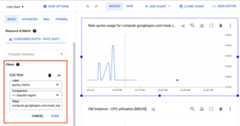
For more information about the metrics, seeAPI rate limits for regional metrics.
ClickDone to save changes.
Optional: If you want to view the usage of quota per region,expand theGrouped header and select
locationin theGroup by field.
- In theFilter field, select
ClickClose editor.
Update Cloud Monitoring alerting policies to use the regional API quota metrics
To change an alerting policy that monitors a global API quota metric to aregional metric, do the following:
- In the Google Cloud console, selectMonitoring.
- In the navigation pane, selectAlerting.The Alerting page displays panes that list summary information, incidents,and alerting policies.
- Click the alerting policy that you want to edit to use a regional metric.
- ClickEdit to modify the policy.
Edit the filter that corresponds to the metric that you want to migrate:
- In theFilter field, select
quota_metric. - In theComparator field, select
=~. In theValue field, specify the metric name for the regional API quota.For example, the filter
quota_metric =~ compute.googleapis.com/read_requests.*uses a regular expression to match all time-series data that uses the quotametriccompute.googleapis.com/read_requests.*.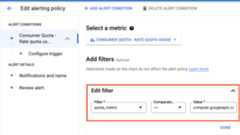
For more information about the metrics, seeAPI rate limits for regional metrics.
ClickDone to save changes in the filter.
Optional: If you want a per-region alert for the regional metric,expand theAcross time series header and select
locationin theTime series group by field.
- In theFilter field, select
ClickSave policy.
Update Cloud Monitoring queries to use the regional quota metrics
To change the quota metric in a PromQL-based alerting policy or a chart ina dashboard, use the code editor and edit the query filter. SeeUsing the code editor for PromQL.
Open the code editor and edit the query as shown in the following example:
rate({ "__name__"="serviceruntime.googleapis.com/quota/rate/net_usage", "monitored_resource"="consumer_quota", "quota_metric"=~"compute.googleapis.com/read_requests.*"}[${__interval}])Optionally, you can group the results based on a location by using thesum by operation:
sum by (location) ( rate({ "__name__"="serviceruntime.googleapis.com/quota/rate/net_usage", "monitored_resource"="consumer_quota", "quota_metric"=~"compute.googleapis.com/read_requests.*" }[${__interval}]))Except as otherwise noted, the content of this page is licensed under theCreative Commons Attribution 4.0 License, and code samples are licensed under theApache 2.0 License. For details, see theGoogle Developers Site Policies. Java is a registered trademark of Oracle and/or its affiliates.
Last updated 2025-12-15 UTC.