
Skaffold modules in Cloud Code for Cloud Shell
Skaffold is a command-line tool that facilitates continuous development for Kubernetes-native applications. Skaffold handles the workflow for building, pushing, and deploying your application, and provides building blocks for creating CI/CD pipelines. Skaffold is the engine that powers Cloud Code.
Skaffold projects usually start using a singleskaffold.yaml configuration to describe how to build and deploy the application. As a project grows, it can be useful to break the application pipeline into separate parts.
Skaffold supports defining multipleconfiguration dependencies, either placed together in the sameskaffold.yaml file and separated using YAML document separators (---), or placed in separateskaffold.yaml files that are referenced from a higher-levelskaffold.yaml file. A configuration can be made into amodule by giving it a name using the.metadata.name field.
Using modules allows you to develop and debug parts of the application independently. Dependencies can be defined between configuration files and to specific modules. For steps to use this feature, seeDeveloping portions of an application independently.
Debugging applications with Skaffold modules
You can iteratively develop and debug the entire application or a set of the defined modules. Skaffold manages the module dependencies and their order of deployment.
Getting started with a Skaffold modules sample
To select modules for your application, seeBuilding select Skaffold modules and their dependencies.
If you haven't used Skaffold modules and want to test the featurewith a sample, see theGuestbook sample, which is modularized intofrontend andbackend.
For a large enterprise application sample, developed using various technologies and languages, and using Skaffold modules, see theBank of Anthos sample.
Common use cases
This section outlines some common use case examples that demonstratedifferent scenarios of when and how you can use modules in your IDE.
Microservice development
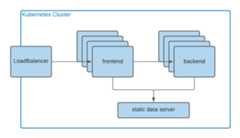
You're a frontend developer mostly working on thefrontendmodule. As a microservice,frontend doesn't have an explicit code or librarydependency on thebackend repo, but requiresbackend to be deployed and runningin the cluster.
You use your Skaffold-based project that contains afrontend module definition to deploy and debug from a Cloud Code IDE to a shared development cluster where the backend team also deploys their service. The DevOps team maintains this shared cluster.
You don't work with or debugbackend code or update Kubernetes configs most of the time. Skaffold builds and deploys other configurations thatfrontend requires. You configure Cloud Code deployment configuration to only iterate on thefrontend module.
You can also deploy both thefrontend andbackend to a local cluster to get a faster iterative experience.
Cross-boundary microservice development and debugging
When multiple microservices need to be debugged together, you could:
- Open the parent directory where all sub-directories with modules source code are located relative to each other
- Select the root
skaffold.yamlfile for deployment (configs) - Configure Cloud Code deployment configuration to only iterate on
frontendandbackendmodules that are available locally (and their respective Kubernetes configuration module when there are changes there).
You could also have a separate rootskaffold.yaml file for localdevelopment that includes a static data server.
Smart module YAML editing
You're a DevOps engineer building a template repository for the team of microservice developers which uses Skaffold modules. You want to ensure there are no errors in module definitions without running Skaffold manually (such as cyclic dependencies or non-unique module names). You use Cloud Code IDEs to edit Skaffold YAML configuration files.
What's next
- Developing portions of an application independently
- Debugging a Kubernetes application
- Running a Kubernetes application
Except as otherwise noted, the content of this page is licensed under theCreative Commons Attribution 4.0 License, and code samples are licensed under theApache 2.0 License. For details, see theGoogle Developers Site Policies. Java is a registered trademark of Oracle and/or its affiliates.
Last updated 2025-12-15 UTC.