

Writing query results
This document describes how to write query results to temporary or permanenttables.
Temporary and permanent tables
BigQuery saves all query results to a table, which can be eitherpermanent or temporary.
BigQuery uses temporary tables tocache query results that aren't written to apermanent table. The tables are created in a special dataset and namedrandomly. You can also create temporary tables for your own use withinmulti-statement queriesandsessions.You aren't charged fortemporary cached query result tables.You are charged for temporary tables that aren't cached query results.
After a query finishes, the temporary table exists for up to 24hours. To view table structure and data, do the following:
Go to theBigQuery page.
In the left pane, clickExplorer:

If you don't see the left pane, clickExpand left pane to open the pane.
In theExplorer pane, clickJob history.
ClickPersonal history.
Choose the query that created the temporary table. Then, in theDestination table row, clickTemporary table.
Access to the temporary table data is restricted to the user or serviceaccount that created the query job.
You cannot share temporary tables, and they are notvisible using any of the standard list or other table manipulation methods.If you need to share your query results, write the results to a permanenttable, download them, or share them though Google Sheets or Google Drive.
Temporary tables are created in the same region as the table or tables beingqueried.
A permanent table can be a new or existing table in any dataset to which youhave access. If you write query results to a new table, you are chargedforstoring the data. When you write queryresults to a permanent table, the tables you're querying must be in the samelocation as the dataset that contains the destination table.
You can't save query results in a temporary table when thedomain-restricted organization policyis enabled. As a workaround, temporarily disable the domain-restrictedorganization policy, run the query, and then again enable the policy.Alternatively, you can save query results in a destination table.
Required permissions
At a minimum, to write query results to a table, you must be granted thefollowing permissions:
bigquery.tables.createpermissions to create a new tablebigquery.tables.updateDatato write data to a new table, overwrite a table,or append data to a tablebigquery.jobs.createto run a query job
Additional permissions such asbigquery.tables.getData may be required toaccess the data you're querying.
The following predefined IAM roles include bothbigquery.tables.create andbigquery.tables.updateData permissions:
bigquery.dataEditorbigquery.dataOwnerbigquery.admin
The following predefined IAM roles includebigquery.jobs.createpermissions:
bigquery.userbigquery.jobUserbigquery.admin
In addition, if a user hasbigquery.datasets.create permissions, when thatuser creates a dataset, they are grantedbigquery.dataOwner access to it.bigquery.dataOwner access gives the user the ability to create andupdate tables in the dataset.
For more information on IAM roles and permissions inBigQuery, seePredefined roles and permissions.
Write query results to a permanent table
When you write query results to a permanent table, you can create a new table,append the results to an existing table, or overwrite an existing table.
Writing query results
Use the following procedure to write your query results to a permanent table.To help control costs, you canpreview databefore running the query.
Console
Open the BigQuery page in the Google Cloud console.
In the left pane, clickExplorer:
If you don't see the left pane, clickExpand left pane to open the pane.
In theExplorer pane, expand your project, clickDatasets, andthen select a dataset.
In the query editor, enter a valid SQL query.
ClickMore and then selectQuery settings.
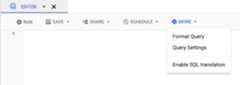
Select theSet a destination table for query results option.
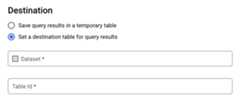
In theDestination section, select theDataset in which you wantto create the table, and then choose aTable Id.
In theDestination table write preference section, choose one ofthe following:
- Write if empty — Writes the query results to the table onlyif the table is empty.
- Append to table — Appends the query results to an existingtable.
- Overwrite table — Overwrites an existing table with the samename using the query results.
Optional: ForData location, chooseyourlocation.
To update the query settings, clickSave.
ClickRun. This creates a query job that writes thequery results to the table you specified.
Alternatively, if you forget to specify a destination table before runningyour query, you can copy the cached results table to a permanent table byclicking theSave Resultsbutton above the editor.
SQL
The following example uses theCREATE TABLE statementto create thetrips table from data in the publicbikeshare_trips table:
In the Google Cloud console, go to theBigQuery page.
In the query editor, enter the following statement:
CREATETABLEmydataset.tripsAS(SELECTbike_id,start_time,duration_minutesFROMbigquery-public-data.austin_bikeshare.bikeshare_trips);
ClickRun.
For more information about how to run queries, seeRun an interactive query.
For more information, seeCreating a new table from an existing table.
bq
In the Google Cloud console, activate Cloud Shell.
At the bottom of the Google Cloud console, aCloud Shell session starts and displays a command-line prompt. Cloud Shell is a shell environment with the Google Cloud CLI already installed and with values already set for your current project. It can take a few seconds for the session to initialize.
Enter the
bq querycommand and specify the--destination_tableflag tocreate a permanent table based on the query results. Specify theuse_legacy_sql=falseflag to use GoogleSQL syntax. To write the queryresults to a table that is not in your default project, add the project IDto the dataset name in the following format:project_id:dataset.Optional: Supply the
--locationflag and set the value to yourlocation.To control the write disposition for an existing destination table, specify one of the following optional flags:
--append_table: If the destination table exists, the query results areappended to it.--replace: If the destination table exists, it is overwritten with thequery results.bq--location=locationquery\--destination_tableproject_id:dataset.table\--use_legacy_sql=false'query'
Replace the following:
locationis the name of the location used toprocess the query. The--locationflag is optional. For example, if youare using BigQuery in the Tokyo region, you can set the flag'svalue toasia-northeast1. You can set a default value for the location byusing the.bigqueryrcfile.project_idis your project ID.datasetis the name of the dataset that containsthe table to which you are writing the query results.tableis the name of the table to which you'rewriting the query results.queryis a query in GoogleSQL syntax.If no write disposition flag is specified, the default behavior is towrite the results to the table only if it is empty. If the table existsand it is not empty, the following error is returned:
BigQuery error in query operation: Error processing jobproject_id:bqjob_123abc456789_00000e1234f_1: AlreadyExists: Tableproject_id:dataset.table.Examples:
Note: These examples query a US-based public dataset. Because the publicdataset is stored in the US multi-region location, the dataset that containsyour destination table must also be in the US. You cannot query a datasetin one location and write the results to a destination table in anotherlocation.Enter the following command to write query results to a destination tablenamed
mytableinmydataset. The dataset is in your default project.Since no write disposition flag is specified in the command, the table mustbe new or empty. Otherwise, anAlready existserror is returned. The queryretrieves data from theUSA Name Data public dataset.bqquery\--destination_tablemydataset.mytable\--use_legacy_sql=false\'SELECTname,numberFROM`bigquery-public-data`.usa_names.usa_1910_currentWHEREgender = "M"ORDER BYnumber DESC'
Enter the following command to use query results to overwrite a destinationtable named
mytableinmydataset. The dataset is in your defaultproject. The command uses the--replaceflag to overwrite the destinationtable.bqquery\--destination_tablemydataset.mytable\--replace\--use_legacy_sql=false\'SELECTname,numberFROM`bigquery-public-data`.usa_names.usa_1910_currentWHEREgender = "M"ORDER BYnumber DESC'
Enter the following command to append query results to a destination tablenamed
mytableinmydataset. The dataset is inmy-other-project, notyour default project. The command uses the--append_tableflag to appendthe query results to the destination table.bqquery\--append_table\--use_legacy_sql=false\--destination_tablemy-other-project:mydataset.mytable\'SELECTname,numberFROM`bigquery-public-data`.usa_names.usa_1910_currentWHEREgender = "M"ORDER BYnumber DESC'
The output for each of these examples looks like the following. Forreadability, some output is truncated.
Waiting on bqjob_r123abc456_000001234567_1 ... (2s) Current status: DONE+---------+--------+| name | number |+---------+--------+| Robert | 10021 || John | 9636 || Robert | 9297 || ... |+---------+--------+
API
To save query results to a permanent table, call thejobs.insert method,configure aquery job, and include a value for thedestinationTableproperty. To control the write disposition for an existing destinationtable, configure thewriteDisposition property.
To control the processing location for the query job, specify thelocationproperty in thejobReference section of thejob resource.
Go
Before trying this sample, follow theGo setup instructions in theBigQuery quickstart using client libraries. For more information, see theBigQueryGo API reference documentation.
To authenticate to BigQuery, set up Application Default Credentials. For more information, seeSet up authentication for client libraries.
import("context""fmt""io""cloud.google.com/go/bigquery""google.golang.org/api/iterator")// queryWithDestination demonstrates saving the results of a query to a specific table by setting the destination// via the API properties.funcqueryWithDestination(wio.Writer,projectID,destDatasetID,destTableIDstring)error{// projectID := "my-project-id"// datasetID := "mydataset"// tableID := "mytable"ctx:=context.Background()client,err:=bigquery.NewClient(ctx,projectID)iferr!=nil{returnfmt.Errorf("bigquery.NewClient: %v",err)}deferclient.Close()q:=client.Query("SELECT 17 as my_col")q.Location="US"// Location must match the dataset(s) referenced in query.q.QueryConfig.Dst=client.Dataset(destDatasetID).Table(destTableID)// Run the query and print results when the query job is completed.job,err:=q.Run(ctx)iferr!=nil{returnerr}status,err:=job.Wait(ctx)iferr!=nil{returnerr}iferr:=status.Err();err!=nil{returnerr}it,err:=job.Read(ctx)for{varrow[]bigquery.Valueerr:=it.Next(&row)iferr==iterator.Done{break}iferr!=nil{returnerr}fmt.Fprintln(w,row)}returnnil}Java
Before trying this sample, follow theJava setup instructions in theBigQuery quickstart using client libraries. For more information, see theBigQueryJava API reference documentation.
To authenticate to BigQuery, set up Application Default Credentials. For more information, seeSet up authentication for client libraries.
To save query results to a permanent table, set thedestinationtableto the desiredTableIdin aQueryJobConfiguration.
importcom.google.cloud.bigquery.BigQuery;importcom.google.cloud.bigquery.BigQueryException;importcom.google.cloud.bigquery.BigQueryOptions;importcom.google.cloud.bigquery.QueryJobConfiguration;importcom.google.cloud.bigquery.TableId;publicclassSaveQueryToTable{publicstaticvoidrunSaveQueryToTable(){// TODO(developer): Replace these variables before running the sample.Stringquery="SELECT corpus FROM `bigquery-public-data.samples.shakespeare` GROUP BY corpus;";StringdestinationTable="MY_TABLE";StringdestinationDataset="MY_DATASET";saveQueryToTable(destinationDataset,destinationTable,query);}publicstaticvoidsaveQueryToTable(StringdestinationDataset,StringdestinationTableId,Stringquery){try{// Initialize client that will be used to send requests. This client only needs to be created// once, and can be reused for multiple requests.BigQuerybigquery=BigQueryOptions.getDefaultInstance().getService();// Identify the destination tableTableIddestinationTable=TableId.of(destinationDataset,destinationTableId);// Build the query jobQueryJobConfigurationqueryConfig=QueryJobConfiguration.newBuilder(query).setDestinationTable(destinationTable).build();// Execute the query.bigquery.query(queryConfig);// The results are now saved in the destination table.System.out.println("Saved query ran successfully");}catch(BigQueryException|InterruptedExceptione){System.out.println("Saved query did not run \n"+e.toString());}}}Node.js
Before trying this sample, follow theNode.js setup instructions in theBigQuery quickstart using client libraries. For more information, see theBigQueryNode.js API reference documentation.
To authenticate to BigQuery, set up Application Default Credentials. For more information, seeSet up authentication for client libraries.
// Import the Google Cloud client libraryconst{BigQuery}=require('@google-cloud/bigquery');constbigquery=newBigQuery();asyncfunctionqueryDestinationTable(){// Queries the U.S. given names dataset for the state of Texas// and saves results to permanent table./** * TODO(developer): Uncomment the following lines before running the sample. */// const datasetId = 'my_dataset';// const tableId = 'my_table';// Create destination table referenceconstdataset=bigquery.dataset(datasetId);constdestinationTable=dataset.table(tableId);constquery=`SELECT name FROM \`bigquery-public-data.usa_names.usa_1910_2013\` WHERE state = 'TX' LIMIT 100`;// For all options, see https://cloud.google.com/bigquery/docs/reference/v2/tables#resourceconstoptions={query:query,// Location must match that of the dataset(s) referenced in the query.location:'US',destination:destinationTable,};// Run the query as a jobconst[job]=awaitbigquery.createQueryJob(options);console.log(`Job${job.id} started.`);console.log(`Query results loaded to table${destinationTable.id}`);}Python
Before trying this sample, follow thePython setup instructions in theBigQuery quickstart using client libraries. For more information, see theBigQueryPython API reference documentation. To authenticate to BigQuery, set up Application Default Credentials. For more information, seeSet up authentication for client libraries.fromgoogle.cloudimportbigquery# Construct a BigQuery client object.client=bigquery.Client()# TODO(developer): Set table_id to the ID of the destination table.# table_id = "your-project.your_dataset.your_table_name"job_config=bigquery.QueryJobConfig(destination=table_id)sql=""" SELECT corpus FROM `bigquery-public-data.samples.shakespeare` GROUP BY corpus;"""# Start the query, passing in the extra configuration.query_job=client.query(sql,job_config=job_config)# Make an API request.query_job.result()# Wait for the job to complete.print("Query results loaded to the table{}".format(table_id))
Write large query results
Normally, queries have amaximum response size.If you plan to run a query that might return larger results, you can do one ofthe following:
- In GoogleSQL, specify a destination table for the query results.
- In legacy SQL, specify a destination table and set the
allowLargeResultsoption.
When you specify a destination table for large query results, you are chargedforstoring the data.
Limitations
In legacy SQL, writing large results is subject to these limitations:
- You must specify a destination table.
- You cannot specify a top-level
ORDER BY,TOPorLIMITclause. Doing sonegates the benefit of usingallowLargeResults, because the query outputcan no longer be computed in parallel. - Window functions can returnlarge query results only if used in conjunction with a
PARTITION BYclause.
Writing large results using legacy SQL
To write large result sets using legacy SQL:
Console
In the Google Cloud console, open the BigQuery page.
ClickCompose new query.
Enter a valid SQL query in theQuery editor text area. Usethe
#legacySQLprefix or be sure you haveUse Legacy SQL checked inthe query settings.ClickMore then selectQuery settings.
ForDestination, checkSet a destination table for query results.
ForDataset, choose the dataset that will store the table.
In theTable Id field, enter a table name.
If you are writing a large results set to an existing table, you can usetheDestination table write preference options to control the writedisposition of the destination table:
- Write if empty: Writes the query results to the table onlyif the table is empty.
- Append to table: Appends the query results to an existingtable.
- Overwrite table: Overwrites an existing table with the samename using the query results.
ForResults Size, checkAllow large results (no size limit).
Optional: ForData location, choosethelocation of your data.
ClickSave to update the query settings.
ClickRun. This creates a query job that writes the large resultsset to the table you specified.
bq
Use the--allow_large_results flag with the--destination_table flag tocreate a destination table to hold the large results set. Because the--allow_large_results option only applies to legacy SQL, you must alsospecify the--use_legacy_sql=true flag. To write the query results to atable that is not in your default project, add the project ID to the datasetname in the following format:PROJECT_ID:DATASET.Supply the--location flag and set the value to yourlocation.
To control the write disposition for an existing destination table, specifyone of the following optional flags:
--append_table: If the destination table exists, the query results areappended to it.--replace: If the destination table exists, it is overwritten with thequery results.
bq--location=locationquery\--destination_tablePROJECT_ID:DATASET.TABLE\--use_legacy_sql=true\--allow_large_results"QUERY"
Replace the following:
LOCATIONis the name of the location used toprocess the query. The--locationflag is optional. For example, if youare using BigQuery in the Tokyo region, you can set the flag'svalue toasia-northeast1. You can set a default value for the locationusing the.bigqueryrcfile.PROJECT_IDis your project ID.DATASETis the name of the dataset that containsthe table to which you are writing the query results.TABLEis the name of the table to which you'rewriting the query results.QUERYis a query in legacy SQL syntax.
Examples:
Note: These examples query a public dataset. Because the dataset is storedin theUS multi-region location, your destination dataset must also be inthe US. You cannot write public data query results to a table in anotherregion.Enter the following command to write large query results to a destinationtable namedmytable inmydataset. The dataset is in your defaultproject. Since no write disposition flag is specified in the command, thetable must be new or empty. Otherwise, anAlready exists error isreturned. The query retrieves data from theUSA Name Data public dataset.This query is used for example purposes only. The results set returned doesnot exceed the maximum response size.
bq query \--destination_table mydataset.mytable \--use_legacy_sql=true \--allow_large_results \"SELECT name, numberFROM [bigquery-public-data:usa_names.usa_1910_current]WHERE gender = 'M'ORDER BY number DESC"Enter the following command to use large query results to overwrite adestination table namedmytable inmydataset. The dataset is inmyotherproject, not your default project. The command uses the--replaceflag to overwrite the destination table.
bq query \--destination_table mydataset.mytable \--replace \--use_legacy_sql=true \--allow_large_results \"SELECT name, numberFROM [bigquery-public-data:usa_names.usa_1910_current]WHERE gender = 'M'ORDER BY number DESC"Enter the following command to append large query results to a destinationtable namedmytable inmydataset. The dataset is inmyotherproject,not your default project. The command uses the--append_table flag toappend the query results to the destination table.
bq query \--destination_table myotherproject:mydataset.mytable \--append_table \--use_legacy_sql=true \--allow_large_results \"SELECT name, numberFROM [bigquery-public-data:usa_names.usa_1910_current]WHERE gender = 'M'ORDER BY number DESC"API
To write large results to a destination table, call thejobs.insert method,configure aquery job, and set theallowLargeResults property totrue.Specify the destination table using thedestinationTable property. Tocontrol the write disposition for an existing destination table, configurethewriteDisposition property.
Specify your location in thelocation property in thejobReference section of thejob resource.
Go
Before trying this sample, follow theGo setup instructions in theBigQuery quickstart using client libraries. For more information, see theBigQueryGo API reference documentation.
To authenticate to BigQuery, set up Application Default Credentials. For more information, seeSet up authentication for client libraries.
import("context""fmt""io""cloud.google.com/go/bigquery""google.golang.org/api/iterator")// queryLegacyLargeResults demonstrates issuing a legacy SQL query and writing a large result set// into a destination table.funcqueryLegacyLargeResults(wio.Writer,projectID,datasetID,tableIDstring)error{// projectID := "my-project-id"// datasetID := "destinationdataset"// tableID := "destinationtable"ctx:=context.Background()client,err:=bigquery.NewClient(ctx,projectID)iferr!=nil{returnfmt.Errorf("bigquery.NewClient: %v",err)}deferclient.Close()q:=client.Query("SELECT corpus FROM [bigquery-public-data:samples.shakespeare] GROUP BY corpus;")q.UseLegacySQL=trueq.AllowLargeResults=trueq.QueryConfig.Dst=client.Dataset(datasetID).Table(tableID)// Run the query and print results when the query job is completed.job,err:=q.Run(ctx)iferr!=nil{returnerr}status,err:=job.Wait(ctx)iferr!=nil{returnerr}iferr:=status.Err();err!=nil{returnerr}it,err:=job.Read(ctx)for{varrow[]bigquery.Valueerr:=it.Next(&row)iferr==iterator.Done{break}iferr!=nil{returnerr}fmt.Fprintln(w,row)}returnnil}Java
To enable large results, setallow largeresultstotrue and set thedestinationtableto the desiredTableIdin aQueryJobConfiguration.
Before trying this sample, follow theJava setup instructions in theBigQuery quickstart using client libraries. For more information, see theBigQueryJava API reference documentation.
To authenticate to BigQuery, set up Application Default Credentials. For more information, seeSet up authentication for client libraries.
importcom.google.cloud.bigquery.BigQuery;importcom.google.cloud.bigquery.BigQueryException;importcom.google.cloud.bigquery.BigQueryOptions;importcom.google.cloud.bigquery.QueryJobConfiguration;importcom.google.cloud.bigquery.TableId;importcom.google.cloud.bigquery.TableResult;// Sample to run query with large results and save the results to a table.publicclassQueryLargeResults{publicstaticvoidrunQueryLargeResults(){// TODO(developer): Replace these variables before running the sample.StringdestinationDataset="MY_DESTINATION_DATASET_NAME";StringdestinationTable="MY_DESTINATION_TABLE_NAME";Stringquery="SELECT corpus FROM [bigquery-public-data:samples.shakespeare] GROUP BY corpus;";queryLargeResults(destinationDataset,destinationTable,query);}publicstaticvoidqueryLargeResults(StringdestinationDataset,StringdestinationTable,Stringquery){try{// Initialize client that will be used to send requests. This client only needs to be created// once, and can be reused for multiple requests.BigQuerybigquery=BigQueryOptions.getDefaultInstance().getService();QueryJobConfigurationqueryConfig=// To use legacy SQL syntax, set useLegacySql to true.QueryJobConfiguration.newBuilder(query).setUseLegacySql(true)// Save the results of the query to a permanent table..setDestinationTable(TableId.of(destinationDataset,destinationTable))// Allow results larger than the maximum response size.// If true, a destination table must be set..setAllowLargeResults(true).build();TableResultresults=bigquery.query(queryConfig);results.iterateAll().forEach(row->row.forEach(val->System.out.printf("%s,",val.toString())));System.out.println("Query large results performed successfully.");}catch(BigQueryException|InterruptedExceptione){System.out.println("Query not performed \n"+e.toString());}}}Node.js
Before trying this sample, follow theNode.js setup instructions in theBigQuery quickstart using client libraries. For more information, see theBigQueryNode.js API reference documentation.
To authenticate to BigQuery, set up Application Default Credentials. For more information, seeSet up authentication for client libraries.
// Import the Google Cloud client libraryconst{BigQuery}=require('@google-cloud/bigquery');constbigquery=newBigQuery();asyncfunctionqueryLegacyLargeResults(){// Query enables large result sets./** * TODO(developer): Uncomment the following lines before running the sample */// const projectId = "my_project"// const datasetId = "my_dataset";// const tableId = "my_table";constquery=`SELECT word FROM [bigquery-public-data:samples.shakespeare] LIMIT 10;`;// For all options, see https://cloud.google.com/bigquery/docs/reference/rest/v2/jobs/queryconstoptions={query:query,// Location must match that of the dataset(s) referenced// in the query and of the destination table.useLegacySql:true,allowLargeResult:true,destinationTable:{projectId:projectId,datasetId:datasetId,tableId:tableId,},};const[job]=awaitbigquery.createQueryJob(options);console.log(`Job${job.id} started.`);// Wait for the query to finishconst[rows]=awaitjob.getQueryResults();// Print the resultsconsole.log('Rows:');rows.forEach(row=>console.log(row));}Python
Before trying this sample, follow thePython setup instructions in theBigQuery quickstart using client libraries. For more information, see theBigQueryPython API reference documentation.
To authenticate to BigQuery, set up Application Default Credentials. For more information, seeSet up authentication for client libraries.
fromgoogle.cloudimportbigquery# Construct a BigQuery client object.client=bigquery.Client()# TODO(developer): Set table_id to the ID of the destination table.# table_id = "your-project.your_dataset.your_table_name"# Set the destination table and use_legacy_sql to True to use# legacy SQL syntax.job_config=bigquery.QueryJobConfig(allow_large_results=True,destination=table_id,use_legacy_sql=True)sql=""" SELECT corpus FROM [bigquery-public-data:samples.shakespeare] GROUP BY corpus;"""# Start the query, passing in the extra configuration.query_job=client.query(sql,job_config=job_config)# Make an API request.query_job.result()# Wait for the job to complete.print("Query results loaded to the table{}".format(table_id))Downloading and saving query results from the Google Cloud console
After you run a SQL query by using the Google Cloud console, you can save theresults to another location. You can use the Google Cloud console to downloadquery results to a local file, Google Sheets, or Google Drive. If you firstsort the query results by column, then the order is preserved in the downloadeddata. Saving results to a local file, Google Sheets, or Google Drive is notsupported by the bq command-line tool or the API.
Limitations
Downloading and saving query results are subject to the following limitations:
- You can download query results locally only in CSV or newline-delimited JSONformat.
- You cannot save query results containing nested and repeated data toGoogle Sheets.
- To save query results to Google Drive using the Google Cloud console, theresults set must be 1 GB or less. If your results are larger, you can savethem to a table instead.
- When saving query results to a local CSV file, the maximum download size is10 MB.The maximum download size is based on the size of each row returned in the
tabledata.listmethodresponse, and can vary based on the schema of the query results. As a result,the size of the downloaded CSV file can vary, and might be less than themaximum download size limit. - You can save query results to Google Drive only in CSV or newline-delimitedJSON format.
What's next
- Learn how to programmaticallyexport a table to a JSON file.
- Learn aboutquotas for query jobs.
- Learn aboutBigQuery storage pricing.
Except as otherwise noted, the content of this page is licensed under theCreative Commons Attribution 4.0 License, and code samples are licensed under theApache 2.0 License. For details, see theGoogle Developers Site Policies. Java is a registered trademark of Oracle and/or its affiliates.
Last updated 2025-12-15 UTC.