

Introduction to the BigQuery Storage Write API
The BigQuery Storage Write API is a unified data-ingestion API forBigQuery. It combines streaming ingestion and batch loading intoa single high-performance API. You can use the Storage Write API tostream records into BigQuery in real time or to batch process anarbitrarily large number of records and commit them in a single atomicoperation.
Advantages of using the Storage Write API
Exactly-once delivery semantics. The Storage Write API supportsexactly-once semantics through the use of stream offsets. Unlike thetabledata.insertAll method, the Storage Write API never writes twomessages that have the same offset within a stream, if the client providesstream offsets when appending records.
Stream-level transactions. You can write data to a stream and commit thedata as a single transaction. If the commit operation fails, you can safelyretry the operation.
Transactions across streams. Multiple workers can create their own streamsto process data independently. When all the workers have finished, you cancommit all of the streams as a transaction.
Efficient protocol. The Storage Write API is more efficient thanthe legacyinsertAll method because it uses gRPC streaming rather than RESTover HTTP. The Storage Write API also supports theprotocol bufferbinary format and theApache Arrow columnar format,which are a more efficient wire format than JSON. Write requests are asynchronouswith guaranteed ordering.
Schema update detection. If the underlying table schema changes while theclient is streaming, then the Storage Write API notifies the client.The client can decide whether to reconnect using the updated schema, or continueto write to the existing connection.
Lower cost. The Storage Write API has a significantly lower costthan the olderinsertAll streaming API. In addition, you can ingest up to2 TiB per month for free.
Required permissions
To use the Storage Write API, you must havebigquery.tables.updateData permissions.
The following predefined Identity and Access Management (IAM) roles includebigquery.tables.updateData permissions:
bigquery.dataEditorbigquery.dataOwnerbigquery.admin
For more information about IAM roles and permissions inBigQuery, seePredefined roles and permissions.
Authentication scopes
Using the Storage Write API requires one of the following OAuth scopes:
https://www.googleapis.com/auth/bigqueryhttps://www.googleapis.com/auth/cloud-platformhttps://www.googleapis.com/auth/bigquery.insertdata
For more information, see theAuthentication Overview.
Overview of the Storage Write API
The core abstraction in the Storage Write API is astream. Astream writes data to a BigQuery table. More than one stream canwrite concurrently to the same table.
Default stream
The Storage Write API provides adefault stream, designed forstreaming scenarios where you have continuously arriving data. It has thefollowing characteristics:
- Data written to the default stream is available immediately for query.
- The default stream supports at-least-once semantics.
- You don't need to explicitly create the default stream.
If you are migrating from the legacytabledata.insertall API, considerusing the default stream. It has similar write semantics, with greater dataresiliency and fewer scaling restrictions.
API flow:
AppendRows(loop)
For more information and example code, seeUse the default stream for at-least-once semantics.
Application-created streams
You can explicitly create a stream if you need either of the followingbehaviors:
- Exactly-once write semantics through the use of stream offsets.
- Support for additional ACID properties.
In general, application-created streams give more control over functionality atthe cost of additional complexity.
When you create a stream, you specify atype. The type controls when datawritten to the stream becomes visible in BigQuery for reading.
Pending type
Inpending type, records are buffered in a pending state until youcommitthe stream. When you commit a stream, all of the pending data becomesavailable for reading. The commit is an atomic operation. Use this type forbatch workloads, as an alternative toBigQuery load jobs. Formore information, seeBatch load data using the Storage Write API.
API flow:
Committed type
Incommitted type, records are available for reading immediately as you writethem to the stream. Use this type for streaming workloads that need minimal readlatency. The default stream uses an at-least-once form of the committed type.For more information, seeUse committed type for exactly-once semantics.
API flow:
CreateWriteStreamAppendRows(loop)FinalizeWriteStream(optional)
Buffered type
Buffered type is an advanced type that should generally notbe used, except with theApache Beam BigQuery I/O connector.If you have small batches that you want to guarantee appear together, usecommitted type and send each batch in one request. In this type, row-levelcommits are provided, and records are buffered until the rows are committed byflushing the stream.
API flow:
CreateWriteStreamAppendRows⇒FlushRows(loop)FinalizeWriteStream(optional)
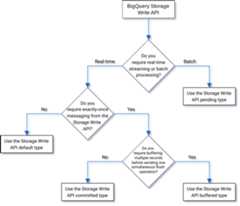
Selecting a type
Use the following flow chart to help you decide which type is best for yourworkload:
API details
Consider the following when you use the Storage Write API:
AppendRows
TheAppendRows method appends one or more records to the stream. The firstcall toAppendRows must contain a stream name along with the data schema,specified as aDescriptorProto. Alternatively,you can add a serialized arrow schema in the first call toAppendRows if youare ingesting data in the Apache Arrow format. As a best practice, send a batch ofrows in eachAppendRows call. Don't send one row at a time.
Proto Buffer Handling
Protocol buffers provide a language-neutral, platform-neutral, extensiblemechanism for serializing structured data in a forward-compatible andbackward-compatible way. They are advantageous in that they provide compact datastorage with fast and efficient parsing. To learn more about protocol buffers,seeProtocol Buffer Overview.
If you are going to consume the API directly with a pre-defined protocol buffermessage, the protocol buffer message cannot use apackage specifier, and allnested or enumeration types must be defined within the top-level root message.References to external messages are not allowed. For an example, seesample_data.proto.
The Java and Go clients support arbitrary protocol buffers, because the clientlibrary normalizes the protocol buffer schema.
Apache Arrow Handling
Apache Arrow is a universalcolumnar format and multi-language toolbox for data processing. ApacheArrow provides a language-independent, column-oriented memory format for flatand hierarchical data, organized for efficient analytic operations on modernhardware. The Storage Write API supports Arrow ingestion usingserialized arrow schema and data in theAppendRowsRequest class.The Python and Java client libraries include built-in support forApache Arrow ingestion.
FinalizeWriteStream
TheFinalizeWriteStream method finalizes the stream so that no new data can beappended to it. This method is required inPending type and optional inCommitted andBuffered types. The default stream does notsupport this method.
Error handling
If an error occurs, the returnedgoogle.rpc.Status can include aStorageError in theerror details. Review theStorageErrorCode for find the specific error type. Formore information about the Google API error model, seeErrors.
US multiregion, you must include the following header in yourrequests:x-goog-request-params: write_stream=<stream_name>, where<stream_name> is the name of the write stream. You don't need to add thisheader when using the client libraries.Connections
The Storage Write API is a gRPC API that uses bidirectionalconnections. TheAppendRows method creates a connection to a stream. You canopen multiple connections on the default stream. These appends are asynchronous,which lets you send a series of writes simultaneously. Responsemessages on each bidirectional connection arrive in the same order as therequests were sent.
Application-created streams can only have a single activeconnection. As a best practice,limit the number of active connections,and use one connection for as many data writes as possible. When using thedefault stream in Java or Go, you can useStorage Write API multiplexingto write to multiple destination tables with shared connections.
Generally, a single connection supports at least 1 MBps of throughput. The upperbound depends on several factors, such as network bandwidth, the schema of thedata, and server load. When a connection reaches the throughput limit, incomingrequests might be rejected or queued until the number of inflight requests goesdown. If you require more throughput, create more connections.
BigQuery closes the gRPC connection if the connection remainsidle for too long. If this happens, the response code isHTTP 409. The gRPCconnection can also be closed in the event of a server restart or for otherreasons. If a connection error occurs, create a new connection. The Java and Goclient libraries automatically reconnect if the connection is closed.
Client library support
Client libraries for the Storage Write API existin multiple programming languages, and expose the underlying gRPC-based APIconstructs. This API leverages advanced features like bidirectional streaming,which may necessitate additional development work to support. To that end, anumber of higher level abstractions are available for this API which simplifythose interactions and reduce developer concerns. We recommend leveraging theseother library abstractions when possible.
This section provides additional details about languages and libraries whereadditional capabilities beyond the generated API has been provided todevelopers.
To see code samples related to the Storage Write API, seeAllBigQuery code samples.
Java client
The Java client library provides two writer objects:
StreamWriter: Accepts data in protocol buffer format.JsonStreamWriter: Accepts data in JSON format and converts it to protocolbuffers before sending it over the wire. TheJsonStreamWriteralso supportsautomatic schema updates. If the table schema changes, the writerautomatically reconnects with the new schema, allowing the client to send datausing the new schema.
The programming model is similar for both writers. The main difference is howyou format the payload.
The writer object manages a Storage Write API connection. The writerobject automatically cleans up requests, adds the regional routing headers torequests, and reconnects after connection errors. If you use the gRPC APIdirectly, you must handle these details.
You can also use the Apache Arrow ingestion format as an alternativeprotocol to ingest data using the Storage Write API. For moreinformation, seeUse the Apache Arrow format to ingest data.
Go client
The Go client uses a client-server architecture to encode messages withinprotocol buffer format usingproto2.See theGo documentation for details on how to use the Go client, with example code.
Python client
The Python client is a lower-level client that wraps the gRPC API. To use thisclient, you must send the data as protocol buffers, following the API flow foryour specified type.
Avoid usingdynamic proto message generationin Python as the performance of that library is substandard.
To learn more about using protocol buffers with Python, read theProtocol buffer basics in Python tutorial.
You can also use the Apache Arrow ingestion format as an alternative protocol toingest data using the Storage Write API. For more information, seeUse the Apache Arrow format to ingest data.
NodeJS client
The NodeJS client library accepts JSON input and provides automatic reconnectsupport. See thedocumentationfor details on how to use the client.
Handle unavailability
Retrying with exponential backoff can mitigate random errors and brief periodsof service unavailability, but to avoid dropping rows during extendedunavailability requires more thought. In particular, if a client is persistentlyunable to insert a row, what should it do?
The answer depends on your requirements. For example, if BigQueryis being used for operational analytics where some missing rows are acceptable,then the client can give up after a few retries and discard the data. If,instead, every row is crucial to the business, such as with financial data, thenyou need to have a strategy to persist the data until it can be inserted later.
One common way to deal with persistent errors is to publish the rows to aPub/Sub topic for later evaluation and possible insertion. Anothercommon method is to temporarily persist the data on the client. Both methods cankeep clients unblocked while at the same time ensuring that all rows can beinserted once availability is restored.
Stream into partitioned tables
The Storage Write API supports streaming data intopartitioned tables.
When the data is streamed, it is initially placed in the__UNPARTITIONED__partition. After enough unpartitioned data is collected, BigQueryrepartitions the data, placing it into the appropriate partition.However, there is no service level agreement (SLA) that defines how long itmight take for that data to move out of the__UNPARTITIONED__ partition.
Foringestion-time partitioned andtime-unit column partitioned tables,unpartitioned data can be excluded from a query by filtering out theNULLvalues from the__UNPARTITIONED__ partition by using one of the pseudocolumns(_PARTITIONTIME or_PARTITIONDATEdepending on your preferred data type).
Ingestion-time partitioning
When you stream to aningestion-time partitioned table,the Storage Write API infers the destination partition from thecurrent system UTC time.
If you're streaming data into a daily partitioned table, then you can overridethe date inference by supplying a partition decorator as part of the request.Include the decorator in thetableID parameter. For example, you can stream tothe partition corresponding to 2025-06-01 for tabletable1 using thetable1$20250601 partition decorator.
When streaming with a partition decorator, you can stream to partitions from 31days in the past to 16 days in the future. To write to partitions for datesoutside these bounds, use a load or query job instead, as described inWrite data to a specific partition.
Streaming using a partition decorator is only supported for daily partitionedtables, not for hourly, monthly, or yearly partitioned tables.
Time-unit column partitioning
When you stream to atime-unit column partitioned table,BigQuery automatically puts the data into the correct partitionbased on the values of the table's predefinedDATE,DATETIME, orTIMESTAMPpartitioning column. You can stream data into a time-unit column partitionedtable if the data referenced by the partitioning column is between 10 years inthe past and 1 year in the future.
Integer-range partitioning
When you stream to aninteger-range partitionedtable, BigQuery automatically puts the data into the correctpartition based on the values of the table's predefinedINTEGER partitioningcolumn.
Fluent Bit Storage Write API output plugin
TheFluent Bit Storage Write API output pluginautomates the process of ingesting JSON records into BigQuery,eliminating the need for you to write code. With this plugin, you only needto configure a compatible input plugin and set up a configuration file to beginstreaming data.Fluent Bit is an open-source andcross-platform log processor and forwarder that uses input and output plugins tohandle different types of data sources and sinks.
This plugin supports the following:
- At-least-once semantics using the default type.
- Exactly-once semantics using the committed type.
- Dynamic scaling for default streams, when backpressure is indicated.
Storage Write API project metrics
For metrics to monitor your data ingestion with theStorage Write API, use theINFORMATION_SCHEMA.WRITE_API_TIMELINE viewor seeGoogle Cloud metrics.
AppendRows method in theGoogle Cloud console doesn't reflect bi-directional streaming request levellatency, it reflects the length of the bi-directional streaming connection.Also, the errors dashboard forAppendRows reflects the bi-directionalstreaming connection level error instead of the request level error. For requestlevel metrics, you should useGoogle Cloud metrics.Use data manipulation language (DML) with recently streamed data
You can use data manipulation language (DML), such as theUPDATE,DELETE, orMERGE statements, to modify rows that were recently written to a BigQuerytable by the BigQuery Storage Write API. Recent writes are those that occurredwithin the last 30 minutes.
For more information about using DML to modify your streamed data, seeUsing data manipulation language.
Limitations
- Support for running mutating DML statements against recently streamed datadoes not extend to data streamed using theinsertAll streaming API.
- Running mutating DML statements within amulti-statement transactionagainst recently streamed data is unsupported.
Storage Write API quotas
For information about Storage Write API quotas and limits, seeBigQuery Storage Write API quotas and limits.
You can monitor your concurrent connections and throughput quota usage in theGoogle Cloud console Quotas page.
Calculate throughput
Suppose your goal is to collect logs from 100 million endpointscreating a 1,500 log record per minute. Then, you can estimate the throughput as100 million * 1,500 / 60 seconds = 2.5 GB per second.You must ensure in advance that you have adequate quota to serve this throughput.
Storage Write API pricing
For pricing, seeData ingestion pricing.
Example use case
Suppose that there is a pipeline processing event data from endpoint logs.Events are generated continuously and need to be available for querying inBigQuery as soon as possible. As data freshness is paramount forthis use case, theStorage Write API is the best choice to ingest data into BigQuery. Arecommended architecture to keep these endpoints lean is sending events to Pub/Sub, fromwhere they are consumed by a streaming Dataflow pipeline whichdirectly streams to BigQuery.
A primary reliability concern for this architecture is how to deal with failingto insert a record into BigQuery. If each record is important andcannot be lost, data needs to be buffered before attempting to insert. In therecommended architecture above, Pub/Sub can play the role of abuffer with its message retention capabilities. The Dataflowpipeline should be configured to retry BigQuery streaming insertswithtruncated exponential backoff.After the capacity of Pub/Subas a buffer is exhausted, for example in the case of prolonged unavailability ofBigQuery or a network failure, data needs to be persisted on theclient and the client needs a mechanism to resume inserting persisted recordsonce availability is restored. For more information about how to handle thissituation, see theGoogle Pub/Sub Reliability Guideblog post.
Another failure case to handle is that of apoison record. A poison record iseither a record rejected by BigQuery because the record fails toinsert with a non-retryable error or a record that has not been successfullyinserted after the maximum number of retries. Both types of records should bestored in a"dead letter queue"by the Dataflow pipeline for further investigation.
If exactly-once semantics are required, create a write stream incommitted type,with record offsets provided by the client. This avoids duplicates, as the writeoperation is only performed if the offset value matches the next append offset.Not providing an offset means records are appended to the current end of thestream and retrying a failed append could result in the record appearing morethan once in the stream.
If exactly-once guarantees are not required,writing to the default stream allows for a higher throughput and also does not count against thequota limit on creating write streams.
Estimate the throughput of your networkand ensure in advance that you have an adequate quota to serve the throughput.
If your workload is generating or processing data at a very uneven rate, thentry to smooth out any load spikes on the client and stream intoBigQuery with a constant throughput. This can simplify yourcapacity planning. If that is not possible, ensure you are prepared to handle429 (resource exhausted) errors if and when your throughput goes over quotaduring short spikes.
For a detailed example of how to use the Storage Write API, seeStream data using the Storage Write API.
What's next
- Stream data using the Storage Write API
- Batch load data using the Storage Write API
- Supported protocol buffer and Arrow data types
- Storage Write API best practices
Except as otherwise noted, the content of this page is licensed under theCreative Commons Attribution 4.0 License, and code samples are licensed under theApache 2.0 License. For details, see theGoogle Developers Site Policies. Java is a registered trademark of Oracle and/or its affiliates.
Last updated 2026-02-19 UTC.