

Manage transfers
This document shows how to manage existing data transfer configurations.
You can alsomanually trigger an existing transfer, also known as starting abackfill run.
View your transfers
View your existing transfer configurations by viewing informationabout each transfer, listing all existing transfers, and viewing transfer runhistory or log messages.
Required roles
To get the permissions that you need to view transfer details, ask your administrator to grant you theBigQuery User (roles/bigquery.user) IAM role on the project. For more information about granting roles, seeManage access to projects, folders, and organizations.
You might also be able to get the required permissions throughcustom roles or otherpredefined roles.
Additionally, to view log messages through Google Cloud console, you musthave permissions to view Cloud Logging data. The Logs Viewer role(roles/logging.viewer) gives you read-only access to all features ofLogging. For more information about the Identity and Access Management (IAM)permissions and rolesthat apply to cloud logs data, see the Cloud Loggingaccess control guide.
For more information about IAM roles in BigQuery Data Transfer Service, seeAccess control.
Get transfer details
After you create a transfer, you can get information about the transfer'sconfiguration. The configuration includes the values you supplied when youcreated the transfer, as well as other important information such as resourcenames.
To get information about a transfer configuration:
Console
Go to theData transfers page.
Select the transfer for which you want to get the details.
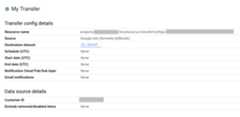
To see the transfer configuration and the data source details, clickConfiguration on theTransfer details page. Thefollowing example shows the configuration properties for a Google Adstransfer:
bq
Enter thebq show command and provide the transfer configuration'sresource name. The--format flag can be used to control the output format.
bq show \--format=prettyjson \--transfer_configresource_nameReplaceresource_name with the transfer's resourcename (also referred to as the transfer configuration). If you do not knowthe transfer's resource name, find the resource name with:bq ls --transfer_config --transfer_location=location.
For example, enter the following command to display transfer configurationforprojects/myproject/locations/us/transferConfigs/1234a123-1234-1a23-1be9-12ab3c456de7.
bq show \--format=prettyjson \--transfer_config projects/myproject/locations/us/transferConfigs/1234a123-1234-1a23-1be9-12ab3c456de7API
Use theprojects.locations.transferConfigs.getmethod and supply the transfer configuration using thename parameter.
Java
Before trying this sample, follow theJava setup instructions in theBigQuery quickstart using client libraries. For more information, see theBigQueryJava API reference documentation.
To authenticate to BigQuery, set up Application Default Credentials. For more information, seeSet up authentication for client libraries.
importcom.google.api.gax.rpc.ApiException;importcom.google.cloud.bigquery.datatransfer.v1.DataTransferServiceClient;importcom.google.cloud.bigquery.datatransfer.v1.GetTransferConfigRequest;importcom.google.cloud.bigquery.datatransfer.v1.TransferConfig;importjava.io.IOException;// Sample to get config info.publicclassGetTransferConfigInfo{publicstaticvoidmain(String[]args)throwsIOException{// TODO(developer): Replace these variables before running the sample.StringconfigId="MY_CONFIG_ID";// i.e projects/{project_id}/transferConfigs/{config_id}` or// `projects/{project_id}/locations/{location_id}/transferConfigs/{config_id}`getTransferConfigInfo(configId);}publicstaticvoidgetTransferConfigInfo(StringconfigId)throwsIOException{try(DataTransferServiceClientdataTransferServiceClient=DataTransferServiceClient.create()){GetTransferConfigRequestrequest=GetTransferConfigRequest.newBuilder().setName(configId).build();TransferConfiginfo=dataTransferServiceClient.getTransferConfig(request);System.out.print("Config info retrieved successfully."+info.getName()+"\n");}catch(ApiExceptionex){System.out.print("config not found."+ex.toString());}}}List transfer configurations
To list all existing transfer configurations in a project:
Console
In the Google Cloud console, go to the Data transfers page.
If there are any transfer configurations in the project, a list of thetransfer configurations appears on the data transfers list.
bq
To list all transfer configurations for a project by location, enter thebq ls command and supply the--transfer_location and--transfer_configflags. You can also supply the--project_id flag to specify a particularproject. If--project_id isn't specified, the default project is used.The--format flag can be used to control the output format.
To list transfer configurations for particular data sources, supply the--filter flag.
To view a particular number of transfer configurations inpaginated format, supply the--max_results flag to specify the number oftransfers. The command returns a page token you supply using the--page_token flag to see the next n configurations. There is a limit of1000 configurations that will be returned if--max_results is omitted, and--max_results will not accept values greater than 1000. If your projecthas more than 1000 configurations, use--max_results and--page_token toiterate through them all.
bqls\--transfer_config\--transfer_location=location\--project_id=project_id\--max_results=integer\--filter=dataSourceIds:data_sources
Replace the following:
locationis the location of the transferconfigurations. Thelocationis specified when you create a transfer.project_idis your project ID.integeris the number of results to show per page.data_sourcesis one or more of the following:amazon_s3-Amazon S3 data transferazure_blob_storage-Azure Blob Storage data transferdcm_dt-Campaign Manager data transfergoogle_cloud_storage-Cloud Storage data transfercross_region_copy-Dataset Copydfp_dt-Google Ad Manager data transferdisplayvideo-Display & Video 360 data transfergoogle_ads-Google Ads data transfermerchant_center-Google Merchant Center data transfermysql-MySQL data transferplay-Google Play data transferscheduled_query-Scheduled queries data transfersearch_ads-Search Ads 360 data transferyoutube_channel-YouTube Channel data transferyoutube_content_owner-YouTube Content Owner data transferredshift-Amazon Redshift migrationon_premises-Teradata migration
Examples:
Enter the following command to display all transfer configurations in theUS for your default project. The output is controlled using the--formatflag.
bq ls \--format=prettyjson \--transfer_config \--transfer_location=usEnter the following command to display all transferconfigurations in the US for project IDmyproject.
bq ls \--transfer_config \--transfer_location=us \--project_id=myprojectEnter the following command to list the 3 most recent transferconfigurations.
bq ls \--transfer_config \--transfer_location=us \--project_id=myproject \--max_results=3The command returns a next page token. Copy the page token and supply it inthebq ls command to see the next 3 results.
bq ls \--transfer_config \--transfer_location=us \--project_id=myproject \--max_results=3 \--page_token=AB1CdEfg_hIJKLEnter the following command to list Ads and Campaign Manager transferconfigurations for project IDmyproject.
bq ls \--transfer_config \--transfer_location=us \--project_id=myproject \--filter=dataSourceIds:dcm_dt,google_adsAPI
Use theprojects.locations.transferConfigs.listmethod and supply the project ID using theparent parameter.
Java
Before trying this sample, follow theJava setup instructions in theBigQuery quickstart using client libraries. For more information, see theBigQueryJava API reference documentation.
To authenticate to BigQuery, set up Application Default Credentials. For more information, seeSet up authentication for client libraries.
importcom.google.api.gax.rpc.ApiException;importcom.google.cloud.bigquery.datatransfer.v1.DataTransferServiceClient;importcom.google.cloud.bigquery.datatransfer.v1.ListTransferConfigsRequest;importcom.google.cloud.bigquery.datatransfer.v1.ProjectName;importjava.io.IOException;// Sample to get list of transfer configpublicclassListTransferConfigs{publicstaticvoidmain(String[]args)throwsIOException{// TODO(developer): Replace these variables before running the sample.finalStringprojectId="MY_PROJECT_ID";listTransferConfigs(projectId);}publicstaticvoidlistTransferConfigs(StringprojectId)throwsIOException{try(DataTransferServiceClientdataTransferServiceClient=DataTransferServiceClient.create()){ProjectNameparent=ProjectName.of(projectId);ListTransferConfigsRequestrequest=ListTransferConfigsRequest.newBuilder().setParent(parent.toString()).build();dataTransferServiceClient.listTransferConfigs(request).iterateAll().forEach(config->System.out.print("Success! Config ID :"+config.getName()+"\n"));}catch(ApiExceptionex){System.out.println("Config list not found due to error."+ex.toString());}}}Python
Before trying this sample, follow thePython setup instructions in theBigQuery quickstart using client libraries. For more information, see theBigQueryPython API reference documentation.
To authenticate to BigQuery, set up Application Default Credentials. For more information, seeSet up authentication for client libraries.
fromgoogle.cloudimportbigquery_datatransfertransfer_client=bigquery_datatransfer.DataTransferServiceClient()project_id="my-project"parent=transfer_client.common_project_path(project_id)configs=transfer_client.list_transfer_configs(parent=parent)print("Got the following configs:")forconfiginconfigs:print(f"\tID:{config.name}, Schedule:{config.schedule}")View transfer run history
As your scheduled transfers are run, a run history is kept for each transferconfiguration that includes successful transfer runs and transfer runs thatfail. Transfer runs more than 90 days old are automatically deleted from therun history.
To view the run history for a transfer configuration:
Console
In the Google Cloud console, go to the Data transfers page.
Click on the transfer in the data transfers list.
You will be on theRUN HISTORY page for the selected transfer.
bq
To list transfer runs for a particular transfer configuration, enter thebqls command and supply the--transfer_run flag. You can also supply the--project_id flag to specify a particular project. Ifresource_namedoesn't contain project information, the--project_id value is used. If--project_id isn't specified, the default project is used. The--formatflag can be used to control the output format.
To view a particular number of transfer runs, supply the--max_resultsflag. The command returns a page token you supply using the--page_token flag to see the next n configurations.
To list transfer runs based on run state, supply the--filter flag.
bqls\--transfer_run\--max_results=integer\--transfer_location=location\--project_id=project_id\--filter=states:state,...\resource_name
Replace the following:
integeris the number of results to return.locationis the location of the transferconfigurations. Thelocationis specified when you create a transfer.project_idis your project ID.state, ...is one of the following or acomma-separated list:SUCCEEDEDFAILEDPENDINGRUNNINGCANCELLED
resource_nameis the transfer's resource name(also referred to as thetransfer configuration). If you do not know the transfer's resource name,find the resource name with:bq ls --transfer_config --transfer_location=location.
Examples:
Enter the following command to display the 3 latest runs fortransfer configurationprojects/myproject/locations/us/transferConfigs/1234a123-1234-1a23-1be9-12ab3c456de7.The output is controlled using the--format flag.
bq ls \--format=prettyjson \--transfer_run \--max_results=3 \--transfer_location=us \projects/myproject/locations/us/transferConfigs/1234a123-1234-1a23-1be9-12ab3c456de7The command returns a next page token. Copy the page token and supply it inthebq ls command to see the next 3 results.
bq ls \--format=prettyjson \--transfer_run \--max_results=3 \--page_token=AB1CdEfg_hIJKL \--transfer_location=us \projects/myproject/locations/us/transferConfigs/1234a123-1234-1a23-1be9-12ab3c456de7Enter the following command to display all failed runs fortransfer configurationprojects/myproject/locations/us/transferConfigs/1234a123-1234-1a23-1be9-12ab3c456de7.
bq ls \--format=prettyjson \--transfer_run \--filter=states:FAILED \--transfer_location=us \projects/myproject/locations/us/transferConfigs/1234a123-1234-1a23-1be9-12ab3c456de7API
Use theprojects.locations.transferConfigs.runs.listmethod and specify the project ID using theparent parameter.
Java
Before trying this sample, follow theJava setup instructions in theBigQuery quickstart using client libraries. For more information, see theBigQueryJava API reference documentation.
To authenticate to BigQuery, set up Application Default Credentials. For more information, seeSet up authentication for client libraries.
importcom.google.api.gax.rpc.ApiException;importcom.google.cloud.bigquery.datatransfer.v1.DataTransferServiceClient;importcom.google.cloud.bigquery.datatransfer.v1.ListTransferRunsRequest;importjava.io.IOException;// Sample to get run history from transfer config.publicclassRunHistory{publicstaticvoidmain(String[]args)throwsIOException{// TODO(developer): Replace these variables before running the sample.StringconfigId="MY_CONFIG_ID";// i.e projects/{project_id}/transferConfigs/{config_id}` or// `projects/{project_id}/locations/{location_id}/transferConfigs/{config_id}`runHistory(configId);}publicstaticvoidrunHistory(StringconfigId)throwsIOException{try(DataTransferServiceClientdataTransferServiceClient=DataTransferServiceClient.create()){ListTransferRunsRequestrequest=ListTransferRunsRequest.newBuilder().setParent(configId).build();dataTransferServiceClient.listTransferRuns(request).iterateAll().forEach(run->System.out.print("Success! Run ID :"+run.getName()+"\n"));}catch(ApiExceptionex){System.out.println("Run history not found due to error."+ex.toString());}}}View transfer run details and log messages
When a transfer run appears in the run history, you can view the run detailsincluding log messages, warnings and errors, the run name, and the start andend time.
To view transfer run details:
Console
In the Google Cloud console, go to the Data transfers page.
Click on the transfer in the data transfers list.
You will be on theRUN HISTORY page for the selected transfer.
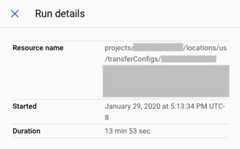
Click on an individual run of the transfer, and theRun details panelwill open for that run of the transfer.
In theRun details, note any error messages. This information isneeded if you contact Cloud Customer Care. The run details also includelog messages and warnings.
bq
To view transfer run details, enter thebq show command and provide thetransfer run's Run Name using the--transfer_run flag. The--format flagcan be used to control the output format.
bqshow\--format=prettyjson\--transfer_runrun_name
Replacerun_name with the transfer run's Run Name.You can retrieve the Run Name by using thebq lscommand.
Example:
Enter the following command to display details for transfer runprojects/myproject/locations/us/transferConfigs/1234a123-1234-1a23-1be9-12ab3c456de7/runs/1a2b345c-0000-1234-5a67-89de1f12345g.
bq show \--format=prettyjson \--transfer_run \projects/myproject/locations/us/transferConfigs/1234a123-1234-1a23-1be9-12ab3c456de7/runs/1a2b345c-0000-1234-5a67-89de1f12345gTo view transfer log messages for a transfer run, enter thebq ls commandwith the--transfer_log flag. You can filter log messages by type usingthe--message_type flag.
To view a particular number of log messages, supply the--max_resultsflag. The command returns a page token you supply using the--page_token flag to see the next n messages.
bqls\--transfer_log\--max_results=integer\--message_type=messageTypes:message_type\run_name
Replace the following:
integeris the number of log messages to return.message_typeis the type of log message to view(a single value or a comma-separated list):INFOWARNINGERROR
run_nameis the transfer run's Run Name. You canretrieve the Run Name using thebq lscommand.
Examples:
Enter the following command to view the first 2 log messages for transferrunprojects/myproject/locations/us/transferConfigs/1234a123-1234-1a23-1be9-12ab3c456de7/runs/1a2b345c-0000-1234-5a67-89de1f12345g.
bq ls \--transfer_log \--max_results=2 \projects/myproject/locations/us/transferConfigs/1234a123-1234-1a23-1be9-12ab3c456de7/runs/1a2b345c-0000-1234-5a67-89de1f12345gThe command returns a next page token. Copy the page token and supply it inthebq ls command to see the next 2 results.
bq ls \--transfer_log \--max_results=2 \--page_token=AB1CdEfg_hIJKL \projects/myproject/locations/us/transferConfigs/1234a123-1234-1a23-1be9-12ab3c456de7/runs/1a2b345c-0000-1234-5a67-89de1f12345gEnter the following command to view only error messages for transfer runprojects/myproject/locations/us/transferConfigs/1234a123-1234-1a23-1be9-12ab3c456de7/runs/1a2b345c-0000-1234-5a67-89de1f12345g.
bqls\--transfer_log\--message_type=messageTypes:ERROR\projects/myproject/locations/us/transferConfigs/1234a123-1234-1a23-1be9-12ab3c456de7/runs/1a2b345c-0000-1234-5a67-89de1f12345gAPI
Use theprojects.transferConfigs.runs.transferLogs.listmethod and supply the transfer run's Run Name using theparent parameter.
Java
Before trying this sample, follow theJava setup instructions in theBigQuery quickstart using client libraries. For more information, see theBigQueryJava API reference documentation.
To authenticate to BigQuery, set up Application Default Credentials. For more information, seeSet up authentication for client libraries.
importcom.google.api.gax.rpc.ApiException;importcom.google.cloud.bigquery.datatransfer.v1.DataTransferServiceClient;importcom.google.cloud.bigquery.datatransfer.v1.GetTransferRunRequest;importcom.google.cloud.bigquery.datatransfer.v1.TransferRun;importjava.io.IOException;// Sample to get run details from transfer config.publicclassRunDetails{publicstaticvoidmain(String[]args)throwsIOException{// TODO(developer): Replace these variables before running the sample.// runId examples:// `projects/{project_id}/transferConfigs/{config_id}/runs/{run_id}` or// `projects/{project_id}/locations/{location_id}/transferConfigs/{config_id}/runs/{run_id}`StringrunId="MY_RUN_ID";runDetails(runId);}publicstaticvoidrunDetails(StringrunId)throwsIOException{try(DataTransferServiceClientdataTransferServiceClient=DataTransferServiceClient.create()){GetTransferRunRequestrequest=GetTransferRunRequest.newBuilder().setName(runId).build();TransferRunrun=dataTransferServiceClient.getTransferRun(request);System.out.print("Run details retrieved successfully :"+run.getName()+"\n");}catch(ApiExceptionex){System.out.print("Run details not found."+ex.toString());}}}Modify your transfers
You can modify existing transfers by editing information on the transferconfiguration, updating a user's credentials attached to a transferconfiguration, and disabling or deleting a transfer.
Required roles
To get the permissions that you need to modify transfers, ask your administrator to grant you theBigQuery Admin (roles/bigquery.admin) IAM role on the project. For more information about granting roles, seeManage access to projects, folders, and organizations.
You might also be able to get the required permissions throughcustom roles or otherpredefined roles.
Update a transfer
After you create a transfer configuration, you can edit the following fields:
- Destination dataset
- Display name
- Any of the parameters specified for the specific transfer type
- Run notification settings
- Service account
You cannot edit the source of a transfer once a transfer is created.
To update a transfer:
Console
In the Google Cloud console, go to the Data transfers page.
Click on the transfer in the data transfers list.
ClickEDIT to update the transfer configuration.
bq
Enter thebq update command,provide the transfer configuration's resource name using the--transfer_config flag, and supply the--display_name,--params,--refresh_window_days,--schedule, or--target_dataset flags. You canoptionally supply a--destination_kms_key flag forscheduled queriesorCloud Storagetransfers.
bqupdate\--display_name='NAME'\--params='PARAMETERS'\--refresh_window_days=INTEGER\--schedule='SCHEDULE'--target_dataset=DATASET_ID\--destination_kms_key="DESTINATION_KEY"\--transfer_config\--service_account_name=SERVICE_ACCOUNT\RESOURCE_NAME
Replace the following:
NAME: the display name for the transferconfiguration.PARAMETERS: the parameters for the transfer configurationin JSON format. For example:--params='{"param1":"param_value1"}'. For information about supported parameters, see the transfer guide for your data source.INTEGER: a value from 0 to 30. For information onsetting the refresh window, see the documentation for your transfer type.SCHEDULE: a recurring schedule, such as--schedule="every 3 hours". For a description of theschedulesyntax,seeFormatting theschedule.- DATASET_ID: the target dataset for the transfer configuration.
- DESTINATION_KEY: theCloud KMS key resource ID—for example,
projects/project_name/locations/us/keyRings/key_ring_name/cryptoKeys/key_name.CMEK is only available forscheduled queriesorCloud Storagetransfers. - SERVICE_ACCOUNT: specify a service account to use with thistransfer.
- RESOURCE_NAME: the transfer's resource name (also referred toas the transfer configuration). If you don't know the transfer's resourcename, find the resource name with:
bq ls --transfer_config --transfer_location=location.
Examples:
The following command updates the display name, target dataset,refresh window, and parameters for Google Ads transferprojects/myproject/locations/us/transferConfigs/1234a123-1234-1a23-1be9-12ab3c456de7:
bqupdate\--display_name='My changed transfer'\--params='{"customer_id":"123-123-5678"}'\--refresh_window_days=3\--target_dataset=mydataset2\--transfer_config\projects/myproject/locations/us/transferConfigs/1234a123-1234-1a23-1be9-12ab3c456de7
The following command updates the parameters and schedule for ScheduledQuery transferprojects/myproject/locations/us/transferConfigs/5678z567-5678-5z67-5yx9-56zy3c866vw9:
bqupdate\--params='{"destination_table_name_template":"test", "write_disposition":"APPEND"}'\--schedule="every 24 hours"\--transfer_config\projects/myproject/locations/us/transferConfigs/5678z567-5678-5z67-5yx9-56zy3c866vw9
API
Use theprojects.transferConfigs.patchmethod and supply the transfer's resource name using thetransferConfig.name parameter. If you do not know the transfer's resourcename, find the resource name with:bq ls --transfer_config --transfer_location=location.You can also call the following method and supply the project ID using theparent parameter to list all transfers:projects.locations.transferConfigs.list.
Java
Before trying this sample, follow theJava setup instructions in theBigQuery quickstart using client libraries. For more information, see theBigQueryJava API reference documentation.
To authenticate to BigQuery, set up Application Default Credentials. For more information, seeSet up authentication for client libraries.
importcom.google.api.gax.rpc.ApiException;importcom.google.cloud.bigquery.datatransfer.v1.DataTransferServiceClient;importcom.google.cloud.bigquery.datatransfer.v1.TransferConfig;importcom.google.cloud.bigquery.datatransfer.v1.UpdateTransferConfigRequest;importcom.google.protobuf.FieldMask;importcom.google.protobuf.util.FieldMaskUtil;importjava.io.IOException;// Sample to update transfer config.publicclassUpdateTransferConfig{publicstaticvoidmain(String[]args)throwsIOException{// TODO(developer): Replace these variables before running the sample.StringconfigId="MY_CONFIG_ID";TransferConfigtransferConfig=TransferConfig.newBuilder().setName(configId).setDisplayName("UPDATED_DISPLAY_NAME").build();FieldMaskupdateMask=FieldMaskUtil.fromString("display_name");updateTransferConfig(transferConfig,updateMask);}publicstaticvoidupdateTransferConfig(TransferConfigtransferConfig,FieldMaskupdateMask)throwsIOException{try(DataTransferServiceClientdataTransferServiceClient=DataTransferServiceClient.create()){UpdateTransferConfigRequestrequest=UpdateTransferConfigRequest.newBuilder().setTransferConfig(transferConfig).setUpdateMask(updateMask).build();TransferConfigupdateConfig=dataTransferServiceClient.updateTransferConfig(request);System.out.println("Transfer config updated successfully :"+updateConfig.getDisplayName());}catch(ApiExceptionex){System.out.print("Transfer config was not updated."+ex.toString());}}}Python
Before trying this sample, follow thePython setup instructions in theBigQuery quickstart using client libraries. For more information, see theBigQueryPython API reference documentation.
To authenticate to BigQuery, set up Application Default Credentials. For more information, seeSet up authentication for client libraries.
fromgoogle.cloudimportbigquery_datatransferfromgoogle.protobufimportfield_mask_pb2transfer_client=bigquery_datatransfer.DataTransferServiceClient()transfer_config_name="projects/1234/locations/us/transferConfigs/abcd"new_display_name="My Transfer Config"transfer_config=bigquery_datatransfer.TransferConfig(name=transfer_config_name)transfer_config.display_name=new_display_nametransfer_config=transfer_client.update_transfer_config({"transfer_config":transfer_config,"update_mask":field_mask_pb2.FieldMask(paths=["display_name"]),})print(f"Updated config: '{transfer_config.name}'")print(f"New display name: '{transfer_config.display_name}'")Update credentials
A transfer uses the credentials of the user that created it. If you need tochange the user attached to a transfer configuration, you can update thetransfer's credentials. This is useful if the user who created the transfer isno longer with your organization.
To update the credentials for a transfer:
Console
In the Google Cloud console, sign in as the user you want to transferownership to.
Navigate to the Data transfers page.
Click the transfer in the data transfers list.
ClickMORE menu, and then selectRefresh credentials.
ClickAllow to givethe BigQuery Data Transfer Service permission to view your reporting data and to accessand manage the data in BigQuery.
bq
Enter thebq update command, provide the transfer configuration'sresource name using the--transfer_config flag, and supply the--update_credentials flag.
bqupdate\--update_credentials=boolean\--transfer_config\resource_name
Replace the following:
booleanis a boolean value indicating whether thecredentials should be updated for the transfer configuration.resource_nameis the transfer's resource name(also referred to as the transfer configuration). If you do not know thetransfer's resource name, find the resource name with:bq ls --transfer_config --transfer_location=location.
Examples:
Enter the following command to update the credentials for Google Adstransferprojects/myproject/locations/us/transferConfigs/1234a123-1234-1a23-1be9-12ab3c456de7.
bq update \--update_credentials=true \--transfer_config \projects/myproject/locations/us/transferConfigs/1234a123-1234-1a23-1be9-12ab3c456de7API
Use theprojects.transferConfigs.patchmethod and supply theauthorizationCode andupdateMask parameters.
Java
Before trying this sample, follow theJava setup instructions in theBigQuery quickstart using client libraries. For more information, see theBigQueryJava API reference documentation.
To authenticate to BigQuery, set up Application Default Credentials. For more information, seeSet up authentication for client libraries.
importcom.google.api.gax.rpc.ApiException;importcom.google.cloud.bigquery.datatransfer.v1.DataTransferServiceClient;importcom.google.cloud.bigquery.datatransfer.v1.TransferConfig;importcom.google.cloud.bigquery.datatransfer.v1.UpdateTransferConfigRequest;importcom.google.protobuf.FieldMask;importcom.google.protobuf.util.FieldMaskUtil;importjava.io.IOException;// Sample to update credentials in transfer config.publicclassUpdateCredentials{publicstaticvoidmain(String[]args)throwsIOException{// TODO(developer): Replace these variables before running the sample.StringconfigId="MY_CONFIG_ID";StringserviceAccount="MY_SERVICE_ACCOUNT";TransferConfigtransferConfig=TransferConfig.newBuilder().setName(configId).build();FieldMaskupdateMask=FieldMaskUtil.fromString("service_account_name");updateCredentials(transferConfig,serviceAccount,updateMask);}publicstaticvoidupdateCredentials(TransferConfigtransferConfig,StringserviceAccount,FieldMaskupdateMask)throwsIOException{try(DataTransferServiceClientdataTransferServiceClient=DataTransferServiceClient.create()){UpdateTransferConfigRequestrequest=UpdateTransferConfigRequest.newBuilder().setTransferConfig(transferConfig).setUpdateMask(updateMask).setServiceAccountName(serviceAccount).build();dataTransferServiceClient.updateTransferConfig(request);System.out.println("Credentials updated successfully");}catch(ApiExceptionex){System.out.print("Credentials was not updated."+ex.toString());}}}Python
Before trying this sample, follow thePython setup instructions in theBigQuery quickstart using client libraries. For more information, see theBigQueryPython API reference documentation.
To authenticate to BigQuery, set up Application Default Credentials. For more information, seeSet up authentication for client libraries.
fromgoogle.cloudimportbigquery_datatransferfromgoogle.protobufimportfield_mask_pb2transfer_client=bigquery_datatransfer.DataTransferServiceClient()service_account_name="abcdef-test-sa@abcdef-test.iam.gserviceaccount.com"transfer_config_name="projects/1234/locations/us/transferConfigs/abcd"transfer_config=bigquery_datatransfer.TransferConfig(name=transfer_config_name)transfer_config=transfer_client.update_transfer_config({"transfer_config":transfer_config,"update_mask":field_mask_pb2.FieldMask(paths=["service_account_name"]),"service_account_name":service_account_name,})print("Updated config: '{}'".format(transfer_config.name))Disable a transfer
When you disable a transfer,disabled is added to the transfer name.When the transfer is disabled, no new transfer runs are scheduled, and no newbackfills are allowed. Any transfer runs in progress are completed.
Disabling a transfer doesnot remove any data already transferred toBigQuery. Data previously transferred incurs standardBigQuerystorage costsuntil youdelete the datasetordelete the tables.
To disable a transfer:
Console
In the Google Cloud console, go to the BigQuery page.
ClickTransfers.
On theTransfers page, click on the transfer in the list that youwant to disable.
Click onDISABLE. To re-enable the transfer, click onENABLE.
bq
Disabling a transfer is not supported by the CLI.
API
Use theprojects.locations.transferConfigs.patchmethod and setdisabled totrue in theprojects.locations.transferConfig resource.
Java
Before trying this sample, follow theJava setup instructions in theBigQuery quickstart using client libraries. For more information, see theBigQueryJava API reference documentation.
To authenticate to BigQuery, set up Application Default Credentials. For more information, seeSet up authentication for client libraries.
importcom.google.api.gax.rpc.ApiException;importcom.google.cloud.bigquery.datatransfer.v1.DataTransferServiceClient;importcom.google.cloud.bigquery.datatransfer.v1.TransferConfig;importcom.google.cloud.bigquery.datatransfer.v1.UpdateTransferConfigRequest;importcom.google.protobuf.FieldMask;importcom.google.protobuf.util.FieldMaskUtil;importjava.io.IOException;// Sample to disable transfer config.publicclassDisableTransferConfig{publicstaticvoidmain(String[]args)throwsIOException{// TODO(developer): Replace these variables before running the sample.StringconfigId="MY_CONFIG_ID";TransferConfigtransferConfig=TransferConfig.newBuilder().setName(configId).setDisabled(true).build();FieldMaskupdateMask=FieldMaskUtil.fromString("disabled");disableTransferConfig(transferConfig,updateMask);}publicstaticvoiddisableTransferConfig(TransferConfigtransferConfig,FieldMaskupdateMask)throwsIOException{try(DataTransferServiceClientdataTransferServiceClient=DataTransferServiceClient.create()){UpdateTransferConfigRequestrequest=UpdateTransferConfigRequest.newBuilder().setTransferConfig(transferConfig).setUpdateMask(updateMask).build();TransferConfigupdateConfig=dataTransferServiceClient.updateTransferConfig(request);System.out.println("Transfer config disabled successfully :"+updateConfig.getDisplayName());}catch(ApiExceptionex){System.out.print("Transfer config was not disabled."+ex.toString());}}}To re-enable the transfer:
Before trying this sample, follow theJava setup instructions in theBigQuery quickstart using client libraries. For more information, see theBigQueryJava API reference documentation.
To authenticate to BigQuery, set up Application Default Credentials. For more information, seeSet up authentication for client libraries.
/* * Copyright 2020 Google LLC * * Licensed under the Apache License, Version 2.0 (the "License"); * you may not use this file except in compliance with the License. * You may obtain a copy of the License at * * http://www.apache.org/licenses/LICENSE-2.0 * * Unless required by applicable law or agreed to in writing, software * distributed under the License is distributed on an "AS IS" BASIS, * WITHOUT WARRANTIES OR CONDITIONS OF ANY KIND, either express or implied. * See the License for the specific language governing permissions and * limitations under the License. */packagecom.example.bigquerydatatransfer;importcom.google.api.gax.rpc.ApiException;importcom.google.cloud.bigquery.datatransfer.v1.DataTransferServiceClient;importcom.google.cloud.bigquery.datatransfer.v1.TransferConfig;importcom.google.cloud.bigquery.datatransfer.v1.UpdateTransferConfigRequest;importcom.google.protobuf.FieldMask;importcom.google.protobuf.util.FieldMaskUtil;importjava.io.IOException;// Sample to disable transfer config.publicclassDisableTransferConfig{publicstaticvoidmain(String[]args)throwsIOException{// TODO(developer): Replace these variables before running the sample.StringconfigId="MY_CONFIG_ID";TransferConfigtransferConfig=TransferConfig.newBuilder().setName(configId).setDisabled(true).build();FieldMaskupdateMask=FieldMaskUtil.fromString("disabled");disableTransferConfig(transferConfig,updateMask);}publicstaticvoiddisableTransferConfig(TransferConfigtransferConfig,FieldMaskupdateMask)throwsIOException{try(DataTransferServiceClientdataTransferServiceClient=DataTransferServiceClient.create()){UpdateTransferConfigRequestrequest=UpdateTransferConfigRequest.newBuilder().setTransferConfig(transferConfig).setUpdateMask(updateMask).build();TransferConfigupdateConfig=dataTransferServiceClient.updateTransferConfig(request);System.out.println("Transfer config disabled successfully :"+updateConfig.getDisplayName());}catch(ApiExceptionex){System.out.print("Transfer config was not disabled."+ex.toString());}}}Delete a transfer
When a transfer is deleted, no new transfer runs are scheduled. Anytransfer runs in progress are stopped.
Deleting a transfer doesnot remove any data already transferred toBigQuery. Data previously transferred incurs standardBigQuerystorage costsuntil youdelete the datasetordelete the tables.
To delete a transfer:
Console
In the Google Cloud console, go to the BigQuery page.
ClickTransfers.
On theTransfers page, click on the transfer in the list that youwant to delete.
Click onDELETE. As a safety measure you will need to type the word"delete" into a box to confirm your intention.
Caution: The delete operation cannot be undone.
bq
Enter thebq rm command and provide the transfer configuration's resourcename. You can use the-f flag to delete a transfer config withoutconfirmation.
bq rm \-f \--transfer_config \resource_nameWhere:
- resource_name is the transfer's Resource Name which is alsoreferred to as the transfer configuration). If you do not know thetransfer's Resource Name, issue the
bq ls --transfer_config --transfer_location=locationcommand to list all transfers.
For example, enter the following command to delete transfer configurationprojects/myproject/locations/us/transferConfigs/1234a123-1234-1a23-1be9-12ab3c456de7.
bq rm \--transfer_config \projects/myproject/locations/us/transferConfigs/1234a123-1234-1a23-1be9-12ab3c456de7API
Use theprojects.locations.transferConfigs.deletemethod and supply the resource you're deleting using thename parameter.
Java
Before trying this sample, follow theJava setup instructions in theBigQuery quickstart using client libraries. For more information, see theBigQueryJava API reference documentation.
To authenticate to BigQuery, set up Application Default Credentials. For more information, seeSet up authentication for client libraries.
importcom.google.api.gax.rpc.ApiException;importcom.google.cloud.bigquery.datatransfer.v1.DataTransferServiceClient;importcom.google.cloud.bigquery.datatransfer.v1.DeleteTransferConfigRequest;importjava.io.IOException;// Sample to delete a transfer configpublicclassDeleteTransferConfig{publicstaticvoidmain(String[]args)throwsIOException{// TODO(developer): Replace these variables before running the sample.// i.e projects/{project_id}/transferConfigs/{config_id}` or// `projects/{project_id}/locations/{location_id}/transferConfigs/{config_id}`StringconfigId="MY_CONFIG_ID";deleteTransferConfig(configId);}publicstaticvoiddeleteTransferConfig(StringconfigId)throwsIOException{try(DataTransferServiceClientdataTransferServiceClient=DataTransferServiceClient.create()){DeleteTransferConfigRequestrequest=DeleteTransferConfigRequest.newBuilder().setName(configId).build();dataTransferServiceClient.deleteTransferConfig(request);System.out.println("Transfer config deleted successfully");}catch(ApiExceptionex){System.out.println("Transfer config was not deleted."+ex.toString());}}}Python
Before trying this sample, follow thePython setup instructions in theBigQuery quickstart using client libraries. For more information, see theBigQueryPython API reference documentation.
To authenticate to BigQuery, set up Application Default Credentials. For more information, seeSet up authentication for client libraries.
importgoogle.api_core.exceptionsfromgoogle.cloudimportbigquery_datatransfertransfer_client=bigquery_datatransfer.DataTransferServiceClient()transfer_config_name="projects/1234/locations/us/transferConfigs/abcd"try:transfer_client.delete_transfer_config(name=transfer_config_name)exceptgoogle.api_core.exceptions.NotFound:print("Transfer config not found.")else:print(f"Deleted transfer config:{transfer_config_name}")When you delete a data transfer with network attachments, it can take a few daysbefore you can delete the network attachments associated with that datatransfer. For more information, seeGeneral issues.
Manually trigger a transfer
You can manually trigger a transfer, also called abackfill run, to loadadditional data files outside of your automatically scheduled transfers.With data sources that support runtime parameters, you can also manually triggera transfer by specifying a date or a time range to load past data from.
You can manually initiate data backfills at any time. In addition to sourcelimits, the BigQuery Data Transfer Service supports a maximum of 180 days perbackfill request. Simultaneous backfill requests are not supported.
Caution: When backfilling large date ranges, break your backfill requests into180 day chunks, and wait for the previous backfill request to finish beforecreating another one.For information on how much data is available for backfill, see the transferguide for your data source.
Required roles
To get the permissions that you need to modify transfers, ask your administrator to grant you theBigQuery Admin (roles/bigquery.admin) IAM role on the project. For more information about granting roles, seeManage access to projects, folders, and organizations.
You might also be able to get the required permissions throughcustom roles or otherpredefined roles.
Manually trigger a transfer or backfill
You can manually trigger a transfer or backfill run with the following methods:
- Select your transfer run using the Google Cloud console, then clickingRun transfer now orSchedule backfill.
- Use the
bq mk –transfer runcommand using thebqcommand-line tool - Call the
projects.locations.transferConfigs.startManualRuns methodAPI method
For detailed instructions about each method, select the corresponding tab:
Console
In the Google Cloud console, go to the Data transfers page.
Select your transfer from the list.
ClickRun transfer now orSchedule backfill. Only one option isavailable depending on the type of transfer configuration.
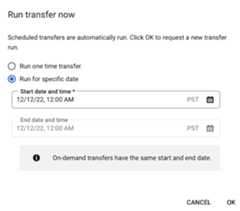
If you clickedRun transfer now, selectRun one time transferorRun for specific date as applicable. If you selectedRun for specific date, select a specific date and time:
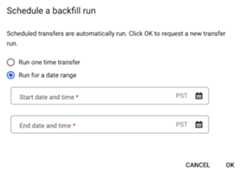
If you clickedSchedule backfill, selectRun one time transferorRun for a date range as applicable. If you selectedRun for a date range, select a start and end date and time:
ClickOK.
bq
To manually start a transfer run, enter thebq mk command with the--transfer_run flag:
bqmk\--transfer_run\--run_time='RUN_TIME'\RESOURCE_NAME
Replace the following:
RUN_TIMEis a timestamp that specifies the date ofa past transfer. Use timestamps that end in Z or contain a valid time zoneoffset—for example,2022-08-19T12:11:35.00Zor2022-05-25T00:00:00+00:00.- If your transfer does not have a runtime parameter, or you just want totrigger a transfer now without specifying a past transfer, inputyour current time in this field.
RESOURCE_NAMEis the resource name listed on your transferconfiguration—for example,projects/myproject/locations/us/transferConfigs/1234a123-1234-1a23-1be9-12ab3c456de7.- To find the resource name of a transfer configuration, seeGet transfer details.
- The resource name uses theRelative resource nameformat.
To manually start a transfer run for a range of dates, enter thebq mk command with the--transfer_run flag along with a date range:
bqmk\--transfer_run\--start_time='START_TIME'\--end_time='END_TIME'\RESOURCE_NAME
Replace the following:
START_TIMEandEND_TIMEare timestamps that end in Zor contain a valid time zone offset. These values specifies the time rangecontaining the previous transfer runs that you want to backfillfrom—for example,2022-08-19T12:11:35.00Zor2022-05-25T00:00:00+00:00RESOURCE_NAMEis the resource name listed on your transferconfiguration—for example,projects/myproject/locations/us/transferConfigs/1234a123-1234-1a23-1be9-12ab3c456de7- To find the resource name of a transfer configuration, seeGet transfer details.
- The resource name uses theRelative resource nameformat.
API
To manually start a transfer run, use theprojects.locations.transferConfigs.startManualRunsmethod and provide the transfer configuration resource name using the parentparameter. To find the resource name of a transfer configuration, seeGet transfer details
"requestedRunTime":"RUN_TIME"
Replace the following:
RUN_TIMEis a timestamp that specifies the date ofa past transfer. Use timestamps that end in Z or contain a valid time zoneoffset—for example,2022-08-19T12:11:35.00Zor2022-05-25T00:00:00+00:00.- If your transfer does not have a runtime parameter, or you just want totrigger a transfer now without specifying a past transfer, inputyour current time in this field.
To manually start a transfer run for a range of dates, provide a date range:
"requestedTimeRange":{"startTime":"START_TIME","endTime":"END_TIME"}
Replace the following:
START_TIMEandEND_TIMEare timestamps that end in Z or contain a valid time zone offset.These values specifies the time rangecontaining the previous transfer runs that you want to backfillfrom—for example,2022-08-19T12:11:35.00Zor2022-05-25T00:00:00+00:00
Java
Before trying this sample, follow theJava setup instructions in theBigQuery quickstart using client libraries. For more information, see theBigQueryJava API reference documentation.
To authenticate to BigQuery, set up Application Default Credentials. For more information, seeSet up authentication for client libraries.
importcom.google.api.gax.rpc.ApiException;importcom.google.cloud.bigquery.datatransfer.v1.DataTransferServiceClient;importcom.google.cloud.bigquery.datatransfer.v1.ScheduleTransferRunsRequest;importcom.google.cloud.bigquery.datatransfer.v1.ScheduleTransferRunsResponse;importcom.google.protobuf.Timestamp;importjava.io.IOException;importorg.threeten.bp.Clock;importorg.threeten.bp.Instant;importorg.threeten.bp.temporal.ChronoUnit;// Sample to run schedule back fill for transfer configpublicclassScheduleBackFill{publicstaticvoidmain(String[]args)throwsIOException{// TODO(developer): Replace these variables before running the sample.StringconfigId="MY_CONFIG_ID";Clockclock=Clock.systemDefaultZone();Instantinstant=clock.instant();TimestampstartTime=Timestamp.newBuilder().setSeconds(instant.minus(5,ChronoUnit.DAYS).getEpochSecond()).setNanos(instant.minus(5,ChronoUnit.DAYS).getNano()).build();TimestampendTime=Timestamp.newBuilder().setSeconds(instant.minus(2,ChronoUnit.DAYS).getEpochSecond()).setNanos(instant.minus(2,ChronoUnit.DAYS).getNano()).build();scheduleBackFill(configId,startTime,endTime);}publicstaticvoidscheduleBackFill(StringconfigId,TimestampstartTime,TimestampendTime)throwsIOException{try(DataTransferServiceClientclient=DataTransferServiceClient.create()){ScheduleTransferRunsRequestrequest=ScheduleTransferRunsRequest.newBuilder().setParent(configId).setStartTime(startTime).setEndTime(endTime).build();ScheduleTransferRunsResponseresponse=client.scheduleTransferRuns(request);System.out.println("Schedule backfill run successfully :"+response.getRunsCount());}catch(ApiExceptionex){System.out.print("Schedule backfill was not run."+ex.toString());}}}Python
Before trying this sample, follow thePython setup instructions in theBigQuery quickstart using client libraries. For more information, see theBigQueryPython API reference documentation.
To authenticate to BigQuery, set up Application Default Credentials. For more information, seeSet up authentication for client libraries.
importdatetimefromgoogle.cloud.bigquery_datatransfer_v1import(DataTransferServiceClient,StartManualTransferRunsRequest,)# Create a client objectclient=DataTransferServiceClient()# Replace with your transfer configuration nametransfer_config_name="projects/1234/locations/us/transferConfigs/abcd"now=datetime.datetime.now(datetime.timezone.utc)start_time=now-datetime.timedelta(days=5)end_time=now-datetime.timedelta(days=2)# Some data sources, such as scheduled_query only support daily run.# Truncate start_time and end_time to midnight time (00:00AM UTC).start_time=datetime.datetime(start_time.year,start_time.month,start_time.day,tzinfo=datetime.timezone.utc)end_time=datetime.datetime(end_time.year,end_time.month,end_time.day,tzinfo=datetime.timezone.utc)requested_time_range=StartManualTransferRunsRequest.TimeRange(start_time=start_time,end_time=end_time,)# Initialize request argument(s)request=StartManualTransferRunsRequest(parent=transfer_config_name,requested_time_range=requested_time_range,)# Make the requestresponse=client.start_manual_transfer_runs(request=request)# Handle the responseprint("Started manual transfer runs:")forruninresponse.runs:print(f"backfill:{run.run_time} run:{run.name}")Logging and monitoring
The BigQuery Data Transfer Service exports logs and metrics to Cloud Monitoring andCloud Logging that provide observability into your transfers. You canuse Monitoring to set up dashboardsto monitor transfers, evaluate transfer run performance, and view error messagesto troubleshoot transfer failures. You canuse Loggingto view logs related to a transfer run or a transfer configuration.
You can alsoview audit logs that are availableto the BigQuery Data Transfer Service for transfer activity and data access logs.
Except as otherwise noted, the content of this page is licensed under theCreative Commons Attribution 4.0 License, and code samples are licensed under theApache 2.0 License. For details, see theGoogle Developers Site Policies. Java is a registered trademark of Oracle and/or its affiliates.
Last updated 2025-12-15 UTC.