

Work with time series data
This document describes how to use SQL functions to support time seriesanalysis.
Introduction
A time series is a sequence of data points, each consisting of a time and avalue associated with that time. Usually, a time series also has an identifier,which uniquely names the time series.
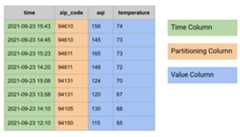
In relational databases, a time series is modeled as a table with the followinggroups of columns:
- Time column
- Might have partitioning columns, for example, zip code
- One or more value columns, or a
STRUCTtype combining multiple values, forexample, temperature and AQI
The following is an example of time series data modeled as a table:
Aggregate a time series
In time series analysis, time aggregation is an aggregation performed along thetime axis.
You can perform time aggregation in BigQuery with the help of timebucketing functions (TIMESTAMP_BUCKET,DATE_BUCKET,andDATETIME_BUCKET).Time bucketing functions map input time values to the bucket they belong to.
Typically, time aggregation is performed to combine multiple data points in atime window into a single data point, using an aggregation function, such asAVG,MIN,MAX,COUNT, orSUM. For example, 15-minute averagerequest latency, daily minimum and maximum temperatures, and daily number oftaxi trips.
For the queries in this section, create a table calledmydataset.environmental_data_hourly:
CREATEORREPLACETABLEmydataset.environmental_data_hourlyASSELECT*FROMUNNEST(ARRAY<STRUCT<zip_codeINT64,timeTIMESTAMP,aqiINT64,temperatureINT64>>[STRUCT(60606,TIMESTAMP'2020-09-08 00:30:51',22,66),STRUCT(60606,TIMESTAMP'2020-09-08 01:32:10',23,63),STRUCT(60606,TIMESTAMP'2020-09-08 02:30:35',22,60),STRUCT(60606,TIMESTAMP'2020-09-08 03:29:39',21,58),STRUCT(60606,TIMESTAMP'2020-09-08 04:33:05',21,59),STRUCT(60606,TIMESTAMP'2020-09-08 05:32:01',21,57),STRUCT(60606,TIMESTAMP'2020-09-08 06:31:14',22,56),STRUCT(60606,TIMESTAMP'2020-09-08 07:31:06',28,55),STRUCT(60606,TIMESTAMP'2020-09-08 08:29:59',30,55),STRUCT(60606,TIMESTAMP'2020-09-08 09:29:34',31,55),STRUCT(60606,TIMESTAMP'2020-09-08 10:31:24',38,56),STRUCT(60606,TIMESTAMP'2020-09-08 11:31:24',38,56),STRUCT(60606,TIMESTAMP'2020-09-08 12:32:38',38,57),STRUCT(60606,TIMESTAMP'2020-09-08 13:29:59',38,56),STRUCT(60606,TIMESTAMP'2020-09-08 14:31:22',43,59),STRUCT(60606,TIMESTAMP'2020-09-08 15:31:38',42,63),STRUCT(60606,TIMESTAMP'2020-09-08 16:34:22',43,65),STRUCT(60606,TIMESTAMP'2020-09-08 17:33:23',42,68),STRUCT(60606,TIMESTAMP'2020-09-08 18:28:47',36,69),STRUCT(60606,TIMESTAMP'2020-09-08 19:30:28',34,67),STRUCT(60606,TIMESTAMP'2020-09-08 20:30:53',29,67),STRUCT(60606,TIMESTAMP'2020-09-08 21:32:28',27,67),STRUCT(60606,TIMESTAMP'2020-09-08 22:31:45',25,65),STRUCT(60606,TIMESTAMP'2020-09-08 23:31:02',22,63),STRUCT(94105,TIMESTAMP'2020-09-08 00:07:11',60,74),STRUCT(94105,TIMESTAMP'2020-09-08 01:07:24',61,73),STRUCT(94105,TIMESTAMP'2020-09-08 02:08:07',60,71),STRUCT(94105,TIMESTAMP'2020-09-08 03:11:05',69,69),STRUCT(94105,TIMESTAMP'2020-09-08 04:07:26',72,67),STRUCT(94105,TIMESTAMP'2020-09-08 05:08:11',70,66),STRUCT(94105,TIMESTAMP'2020-09-08 06:07:30',68,65),STRUCT(94105,TIMESTAMP'2020-09-08 07:07:10',77,64),STRUCT(94105,TIMESTAMP'2020-09-08 08:06:35',81,64),STRUCT(94105,TIMESTAMP'2020-09-08 09:10:18',82,63),STRUCT(94105,TIMESTAMP'2020-09-08 10:08:10',107,62),STRUCT(94105,TIMESTAMP'2020-09-08 11:08:01',115,62),STRUCT(94105,TIMESTAMP'2020-09-08 12:07:39',120,62),STRUCT(94105,TIMESTAMP'2020-09-08 13:06:03',125,61),STRUCT(94105,TIMESTAMP'2020-09-08 14:08:37',129,62),STRUCT(94105,TIMESTAMP'2020-09-08 15:09:19',150,62),STRUCT(94105,TIMESTAMP'2020-09-08 16:06:39',151,62),STRUCT(94105,TIMESTAMP'2020-09-08 17:08:01',155,63),STRUCT(94105,TIMESTAMP'2020-09-08 18:09:23',154,64),STRUCT(94105,TIMESTAMP'2020-09-08 19:08:43',151,67),STRUCT(94105,TIMESTAMP'2020-09-08 20:07:19',150,69),STRUCT(94105,TIMESTAMP'2020-09-08 21:07:37',148,72),STRUCT(94105,TIMESTAMP'2020-09-08 22:08:01',143,76),STRUCT(94105,TIMESTAMP'2020-09-08 23:08:41',137,75)]);One interesting observation about the preceding data is that measurements aretaken at arbitrary time periods, known asunaligned time series. Aggregationis one of the ways by which a time series can be aligned.
Get a 3-hour average
The following query computes a 3-hour average air quality index (AQI) andtemperature for each zip code. TheTIMESTAMP_BUCKET function performs timeaggregation by assigning each time value to a particular day.
SELECTTIMESTAMP_BUCKET(time,INTERVAL3HOUR)AStime,zip_code,CAST(AVG(aqi)ASINT64)ASaqi,CAST(AVG(temperature)ASINT64)AStemperatureFROMmydataset.environmental_data_hourlyGROUPBYzip_code,timeORDERBYzip_code,time;/*---------------------+----------+-----+-------------+ | time | zip_code | aqi | temperature | +---------------------+----------+-----+-------------+ | 2020-09-08 00:00:00 | 60606 | 22 | 63 | | 2020-09-08 03:00:00 | 60606 | 21 | 58 | | 2020-09-08 06:00:00 | 60606 | 27 | 55 | | 2020-09-08 09:00:00 | 60606 | 36 | 56 | | 2020-09-08 12:00:00 | 60606 | 40 | 57 | | 2020-09-08 15:00:00 | 60606 | 42 | 65 | | 2020-09-08 18:00:00 | 60606 | 33 | 68 | | 2020-09-08 21:00:00 | 60606 | 25 | 65 | | 2020-09-08 00:00:00 | 94105 | 60 | 73 | | 2020-09-08 03:00:00 | 94105 | 70 | 67 | | 2020-09-08 06:00:00 | 94105 | 75 | 64 | | 2020-09-08 09:00:00 | 94105 | 101 | 62 | | 2020-09-08 12:00:00 | 94105 | 125 | 62 | | 2020-09-08 15:00:00 | 94105 | 152 | 62 | | 2020-09-08 18:00:00 | 94105 | 152 | 67 | | 2020-09-08 21:00:00 | 94105 | 143 | 74 | +---------------------+----------+-----+-------------*/Get a 3-hour minimum and maximum value
In the following query, you compute 3-hour minimum and maximum temperatures foreach zip code:
SELECTTIMESTAMP_BUCKET(time,INTERVAL3HOUR)AStime,zip_code,MIN(temperature)AStemperature_min,MAX(temperature)AStemperature_max,FROMmydataset.environmental_data_hourlyGROUPBYzip_code,timeORDERBYzip_code,time;/*---------------------+----------+-----------------+-----------------+ | time | zip_code | temperature_min | temperature_max | +---------------------+----------+-----------------+-----------------+ | 2020-09-08 00:00:00 | 60606 | 60 | 66 | | 2020-09-08 03:00:00 | 60606 | 57 | 59 | | 2020-09-08 06:00:00 | 60606 | 55 | 56 | | 2020-09-08 09:00:00 | 60606 | 55 | 56 | | 2020-09-08 12:00:00 | 60606 | 56 | 59 | | 2020-09-08 15:00:00 | 60606 | 63 | 68 | | 2020-09-08 18:00:00 | 60606 | 67 | 69 | | 2020-09-08 21:00:00 | 60606 | 63 | 67 | | 2020-09-08 00:00:00 | 94105 | 71 | 74 | | 2020-09-08 03:00:00 | 94105 | 66 | 69 | | 2020-09-08 06:00:00 | 94105 | 64 | 65 | | 2020-09-08 09:00:00 | 94105 | 62 | 63 | | 2020-09-08 12:00:00 | 94105 | 61 | 62 | | 2020-09-08 15:00:00 | 94105 | 62 | 63 | | 2020-09-08 18:00:00 | 94105 | 64 | 69 | | 2020-09-08 21:00:00 | 94105 | 72 | 76 | +---------------------+----------+-----------------+-----------------*/Get a 3-hour average with custom alignment
When you perform time series aggregation, you use a specific alignment for timeseries windows, either implicitly or explicitly. The preceding queries usedimplicit alignment, which produced buckets that started at times like00:00:00,03:00:00, and06:00:00. To explicitly set this alignment intheTIMESTAMP_BUCKET function, pass an optional argument that specifies theorigin.
In the following query, the origin is set as2020-01-01 02:00:00. This changesthe alignment and produces buckets that start at times like02:00:00,05:00:00, and08:00:00:
SELECTTIMESTAMP_BUCKET(time,INTERVAL3HOUR,TIMESTAMP'2020-01-01 02:00:00')AStime,zip_code,CAST(AVG(aqi)ASINT64)ASaqi,CAST(AVG(temperature)ASINT64)AStemperatureFROMmydataset.environmental_data_hourlyGROUPBYzip_code,timeORDERBYzip_code,time;/*---------------------+----------+-----+-------------+ | time | zip_code | aqi | temperature | +---------------------+----------+-----+-------------+ | 2020-09-07 23:00:00 | 60606 | 23 | 65 | | 2020-09-08 02:00:00 | 60606 | 21 | 59 | | 2020-09-08 05:00:00 | 60606 | 24 | 56 | | 2020-09-08 08:00:00 | 60606 | 33 | 55 | | 2020-09-08 11:00:00 | 60606 | 38 | 56 | | 2020-09-08 14:00:00 | 60606 | 43 | 62 | | 2020-09-08 17:00:00 | 60606 | 37 | 68 | | 2020-09-08 20:00:00 | 60606 | 27 | 66 | | 2020-09-08 23:00:00 | 60606 | 22 | 63 | | 2020-09-07 23:00:00 | 94105 | 61 | 74 | | 2020-09-08 02:00:00 | 94105 | 67 | 69 | | 2020-09-08 05:00:00 | 94105 | 72 | 65 | | 2020-09-08 08:00:00 | 94105 | 90 | 63 | | 2020-09-08 11:00:00 | 94105 | 120 | 62 | | 2020-09-08 14:00:00 | 94105 | 143 | 62 | | 2020-09-08 17:00:00 | 94105 | 153 | 65 | | 2020-09-08 20:00:00 | 94105 | 147 | 72 | | 2020-09-08 23:00:00 | 94105 | 137 | 75 | +---------------------+----------+-----+-------------*/Aggregate a time series with gap filling
Sometimes after you aggregate a time series, the data might have gaps that need tobe filled with some values for further analysis or presentation of the data.The technique used to fill in those gaps is calledgap filling. InBigQuery, you can use theGAP_FILLtable function for filling gaps in time series data, using one of the providedgap-filling methods:
- NULL, also known as constant
- LOCF, last observation carried forward
- Linear, linear interpolation between the two neighboring data points
For the queries in this section, create a table calledmydataset.environmental_data_hourly_with_gaps, which is based on the data usedin the preceding section, but with gaps in it. In the real world scenarios, datacould have missing data points due to a short-term weather station malfunction.
CREATEORREPLACETABLEmydataset.environmental_data_hourly_with_gapsASSELECT*FROMUNNEST(ARRAY<STRUCT<zip_codeINT64,timeTIMESTAMP,aqiINT64,temperatureINT64>>[STRUCT(60606,TIMESTAMP'2020-09-08 00:30:51',22,66),STRUCT(60606,TIMESTAMP'2020-09-08 01:32:10',23,63),STRUCT(60606,TIMESTAMP'2020-09-08 02:30:35',22,60),STRUCT(60606,TIMESTAMP'2020-09-08 03:29:39',21,58),STRUCT(60606,TIMESTAMP'2020-09-08 04:33:05',21,59),STRUCT(60606,TIMESTAMP'2020-09-08 05:32:01',21,57),STRUCT(60606,TIMESTAMP'2020-09-08 06:31:14',22,56),STRUCT(60606,TIMESTAMP'2020-09-08 07:31:06',28,55),STRUCT(60606,TIMESTAMP'2020-09-08 08:29:59',30,55),STRUCT(60606,TIMESTAMP'2020-09-08 09:29:34',31,55),STRUCT(60606,TIMESTAMP'2020-09-08 10:31:24',38,56),STRUCT(60606,TIMESTAMP'2020-09-08 11:31:24',38,56),-- No data points between hours 12 and 15.STRUCT(60606,TIMESTAMP'2020-09-08 16:34:22',43,65),STRUCT(60606,TIMESTAMP'2020-09-08 17:33:23',42,68),STRUCT(60606,TIMESTAMP'2020-09-08 18:28:47',36,69),STRUCT(60606,TIMESTAMP'2020-09-08 19:30:28',34,67),STRUCT(60606,TIMESTAMP'2020-09-08 20:30:53',29,67),STRUCT(60606,TIMESTAMP'2020-09-08 21:32:28',27,67),STRUCT(60606,TIMESTAMP'2020-09-08 22:31:45',25,65),STRUCT(60606,TIMESTAMP'2020-09-08 23:31:02',22,63),STRUCT(94105,TIMESTAMP'2020-09-08 00:07:11',60,74),STRUCT(94105,TIMESTAMP'2020-09-08 01:07:24',61,73),STRUCT(94105,TIMESTAMP'2020-09-08 02:08:07',60,71),STRUCT(94105,TIMESTAMP'2020-09-08 03:11:05',69,69),STRUCT(94105,TIMESTAMP'2020-09-08 04:07:26',72,67),STRUCT(94105,TIMESTAMP'2020-09-08 05:08:11',70,66),STRUCT(94105,TIMESTAMP'2020-09-08 06:07:30',68,65),STRUCT(94105,TIMESTAMP'2020-09-08 07:07:10',77,64),STRUCT(94105,TIMESTAMP'2020-09-08 08:06:35',81,64),STRUCT(94105,TIMESTAMP'2020-09-08 09:10:18',82,63),STRUCT(94105,TIMESTAMP'2020-09-08 10:08:10',107,62),STRUCT(94105,TIMESTAMP'2020-09-08 11:08:01',115,62),STRUCT(94105,TIMESTAMP'2020-09-08 12:07:39',120,62),STRUCT(94105,TIMESTAMP'2020-09-08 13:06:03',125,61),STRUCT(94105,TIMESTAMP'2020-09-08 14:08:37',129,62),-- No data points between hours 15 and 18.STRUCT(94105,TIMESTAMP'2020-09-08 19:08:43',151,67),STRUCT(94105,TIMESTAMP'2020-09-08 20:07:19',150,69),STRUCT(94105,TIMESTAMP'2020-09-08 21:07:37',148,72),STRUCT(94105,TIMESTAMP'2020-09-08 22:08:01',143,76),STRUCT(94105,TIMESTAMP'2020-09-08 23:08:41',137,75)]);Get a 3-hour average (include gaps)
The following query computes 3-hour average AQI and temperature for each zipcode:
SELECTTIMESTAMP_BUCKET(time,INTERVAL3HOUR)AStime,zip_code,CAST(AVG(aqi)ASINT64)ASaqi,CAST(AVG(temperature)ASINT64)AStemperatureFROMmydataset.environmental_data_hourly_with_gapsGROUPBYzip_code,timeORDERBYzip_code,time;/*---------------------+----------+-----+-------------+ | time | zip_code | aqi | temperature | +---------------------+----------+-----+-------------+ | 2020-09-08 00:00:00 | 60606 | 22 | 63 | | 2020-09-08 03:00:00 | 60606 | 21 | 58 | | 2020-09-08 06:00:00 | 60606 | 27 | 55 | | 2020-09-08 09:00:00 | 60606 | 36 | 56 | | 2020-09-08 15:00:00 | 60606 | 43 | 67 | | 2020-09-08 18:00:00 | 60606 | 33 | 68 | | 2020-09-08 21:00:00 | 60606 | 25 | 65 | | 2020-09-08 00:00:00 | 94105 | 60 | 73 | | 2020-09-08 03:00:00 | 94105 | 70 | 67 | | 2020-09-08 06:00:00 | 94105 | 75 | 64 | | 2020-09-08 09:00:00 | 94105 | 101 | 62 | | 2020-09-08 12:00:00 | 94105 | 125 | 62 | | 2020-09-08 18:00:00 | 94105 | 151 | 68 | | 2020-09-08 21:00:00 | 94105 | 143 | 74 | +---------------------+----------+-----+-------------*/Note how the output has gaps at certain time intervals. For example, the timeseries for zip code60606 doesn't have a data point at2020-09-08 12:00:00,and the time series for zip code94105 doesn't have a data point at2020-09-08 15:00:00.
Get a 3-hour average (fill gaps)
Use the query from the previous section and add theGAP_FILL function to fillthe gaps:
WITHaggregated_3_hrAS(SELECTTIMESTAMP_BUCKET(time,INTERVAL3HOUR)AStime,zip_code,CAST(AVG(aqi)ASINT64)ASaqi,CAST(AVG(temperature)ASINT64)AStemperatureFROMmydataset.environmental_data_hourly_with_gapsGROUPBYzip_code,time)SELECT*FROMGAP_FILL(TABLEaggregated_3_hr,ts_column=>'time',bucket_width=>INTERVAL3HOUR,partitioning_columns=>['zip_code'])ORDERBYzip_code,time;/*---------------------+----------+------+-------------+ | time | zip_code | aqi | temperature | +---------------------+----------+------+-------------+ | 2020-09-08 00:00:00 | 60606 | 22 | 63 | | 2020-09-08 03:00:00 | 60606 | 21 | 58 | | 2020-09-08 06:00:00 | 60606 | 27 | 55 | | 2020-09-08 09:00:00 | 60606 | 36 | 56 | | 2020-09-08 12:00:00 | 60606 | NULL | NULL | | 2020-09-08 15:00:00 | 60606 | 43 | 67 | | 2020-09-08 18:00:00 | 60606 | 33 | 68 | | 2020-09-08 21:00:00 | 60606 | 25 | 65 | | 2020-09-08 00:00:00 | 94105 | 60 | 73 | | 2020-09-08 03:00:00 | 94105 | 70 | 67 | | 2020-09-08 06:00:00 | 94105 | 75 | 64 | | 2020-09-08 09:00:00 | 94105 | 101 | 62 | | 2020-09-08 12:00:00 | 94105 | 125 | 62 | | 2020-09-08 15:00:00 | 94105 | NULL | NULL | | 2020-09-08 18:00:00 | 94105 | 151 | 68 | | 2020-09-08 21:00:00 | 94105 | 143 | 74 | +---------------------+----------+------+-------------*/The output table now contains a missing row at2020-09-08 12:00:00 for zipcode60606 and at2020-09-08 15:00:00 for zip code94105, withNULLvalues in the corresponding metric columns. Since you didn't specify anygap-filling method,GAP_FILL used the default gap-filling method, NULL.
Fill gaps with linear and LOCF gap filling
In the following query, theGAP_FILL function is used with the LOCFgap-filling method for theaqi column and linear interpolation for thetemperature column:
WITHaggregated_3_hrAS(SELECTTIMESTAMP_BUCKET(time,INTERVAL3HOUR)AStime,zip_code,CAST(AVG(aqi)ASINT64)ASaqi,CAST(AVG(temperature)ASINT64)AStemperatureFROMmydataset.environmental_data_hourly_with_gapsGROUPBYzip_code,time)SELECT*FROMGAP_FILL(TABLEaggregated_3_hr,ts_column=>'time',bucket_width=>INTERVAL3HOUR,partitioning_columns=>['zip_code'],value_columns=>[('aqi','locf'),('temperature','linear')])ORDERBYzip_code,time;/*---------------------+----------+-----+-------------+ | time | zip_code | aqi | temperature | +---------------------+----------+-----+-------------+ | 2020-09-08 00:00:00 | 60606 | 22 | 63 | | 2020-09-08 03:00:00 | 60606 | 21 | 58 | | 2020-09-08 06:00:00 | 60606 | 27 | 55 | | 2020-09-08 09:00:00 | 60606 | 36 | 56 | | 2020-09-08 12:00:00 | 60606 | 36 | 62 | | 2020-09-08 15:00:00 | 60606 | 43 | 67 | | 2020-09-08 18:00:00 | 60606 | 33 | 68 | | 2020-09-08 21:00:00 | 60606 | 25 | 65 | | 2020-09-08 00:00:00 | 94105 | 60 | 73 | | 2020-09-08 03:00:00 | 94105 | 70 | 67 | | 2020-09-08 06:00:00 | 94105 | 75 | 64 | | 2020-09-08 09:00:00 | 94105 | 101 | 62 | | 2020-09-08 12:00:00 | 94105 | 125 | 62 | | 2020-09-08 15:00:00 | 94105 | 125 | 65 | | 2020-09-08 18:00:00 | 94105 | 151 | 68 | | 2020-09-08 21:00:00 | 94105 | 143 | 74 | +---------------------+----------+-----+-------------*/In this query, the first gap-filled row hasaqi value36, which is takenfrom the previous data point of this time series (zip code60606) at2020-09-08 09:00:00. Thetemperature value62 is a result of linearinterpolation between data points2020-09-08 09:00:00 and2020-09-08 15:00:00. The other missing row was created in a similar way -aqivalue125 was carried over from the previous data point of this time series(zip code94105), and the temperature value65 is a result of linearinterpolation between the previous and the next available data points.
Align a time series with gap filling
Time series can be aligned or unaligned. A time series is aligned when datapoints only occur at regular intervals.
In the real world, at the time of collection, time series are rarely alignedand usually require some further processing to align them.
For example, consider IoT devices that send their metrics to a centralizedcollector every minute. It would be unreasonable to expect the devices to sendtheir metrics at exactly the same instants of time. Usually, each device sendsits metrics with the same frequency (period) but with different time offset(alignment). The following diagram illustrates this example. You can see eachdevice sending its data with a one-minute interval with some instances ofmissing data (Device 3 at9:36:39 ) and delayed data (Device 1 at9:37:28).

You can performtime series alignment on unaligned data, usingtime aggregation. This is helpful if youwant to change the sampling period of the time series, such as changing fromthe original 1-minute sampling period to a 15-minute period. You can align datafor further time series processing, such as joining the time series data, or fordisplay purposes (such as graphing).
You can use theGAP_FILL table function with LOCF or linear gap-fillingmethods to perform time series alignment. The idea is to useGAP_FILL with theselected output period and alignment(controlled by the optional origin argument). The result of the operation is atable with aligned time series, where values for each data point are derivedfrom the input time series with the gap-filling method used for that particularvalue column (LOCF of linear).
Create a tablemydataset.device_data, which resembles the previous illustration:
CREATEORREPLACETABLEmydataset.device_dataASSELECT*FROMUNNEST(ARRAY<STRUCT<device_idINT64,timeTIMESTAMP,signalINT64,stateSTRING>>[STRUCT(2,TIMESTAMP'2023-11-01 09:35:07',87,'ACTIVE'),STRUCT(1,TIMESTAMP'2023-11-01 09:35:26',82,'ACTIVE'),STRUCT(3,TIMESTAMP'2023-11-01 09:35:39',74,'INACTIVE'),STRUCT(2,TIMESTAMP'2023-11-01 09:36:07',88,'ACTIVE'),STRUCT(1,TIMESTAMP'2023-11-01 09:36:26',82,'ACTIVE'),STRUCT(2,TIMESTAMP'2023-11-01 09:37:07',88,'ACTIVE'),STRUCT(1,TIMESTAMP'2023-11-01 09:37:28',80,'ACTIVE'),STRUCT(3,TIMESTAMP'2023-11-01 09:37:39',77,'ACTIVE'),STRUCT(2,TIMESTAMP'2023-11-01 09:38:07',86,'ACTIVE'),STRUCT(1,TIMESTAMP'2023-11-01 09:38:26',81,'ACTIVE'),STRUCT(3,TIMESTAMP'2023-11-01 09:38:39',77,'ACTIVE')]);The following is the actual data ordered bytime anddevice_id columns:
SELECT*FROMmydataset.device_dataORDERBYtime,device_id;/*-----------+---------------------+--------+----------+ | device_id | time | signal | state | +-----------+---------------------+--------+----------+ | 2 | 2023-11-01 09:35:07 | 87 | ACTIVE | | 1 | 2023-11-01 09:35:26 | 82 | ACTIVE | | 3 | 2023-11-01 09:35:39 | 74 | INACTIVE | | 2 | 2023-11-01 09:36:07 | 88 | ACTIVE | | 1 | 2023-11-01 09:36:26 | 82 | ACTIVE | | 2 | 2023-11-01 09:37:07 | 88 | ACTIVE | | 1 | 2023-11-01 09:37:28 | 80 | ACTIVE | | 3 | 2023-11-01 09:37:39 | 77 | ACTIVE | | 2 | 2023-11-01 09:38:07 | 86 | ACTIVE | | 1 | 2023-11-01 09:38:26 | 81 | ACTIVE | | 3 | 2023-11-01 09:38:39 | 77 | ACTIVE | +-----------+---------------------+--------+----------*/The table contains the time series for each device with two metric columns:
signal- signal level as observed by the device at the time of sampling,represented as an integer value between0and100.state- state of the device at the time of sampling, represented as a freeform string.
In the following query, theGAP_FILL function is used to align the timeseries at 1-minute intervals. Note how linear interpolation is used to computevalues for thesignal column and LOCF for thestate column. For this exampledata, linear interpolation is a suitable choice to compute the output values.
SELECT*FROMGAP_FILL(TABLEmydataset.device_data,ts_column=>'time',bucket_width=>INTERVAL1MINUTE,partitioning_columns=>['device_id'],value_columns=>[('signal','linear'),('state','locf')])ORDERBYtime,device_id;/*---------------------+-----------+--------+----------+ | time | device_id | signal | state | +---------------------+-----------+--------+----------+ | 2023-11-01 09:36:00 | 1 | 82 | ACTIVE | | 2023-11-01 09:36:00 | 2 | 88 | ACTIVE | | 2023-11-01 09:36:00 | 3 | 75 | INACTIVE | | 2023-11-01 09:37:00 | 1 | 81 | ACTIVE | | 2023-11-01 09:37:00 | 2 | 88 | ACTIVE | | 2023-11-01 09:37:00 | 3 | 76 | INACTIVE | | 2023-11-01 09:38:00 | 1 | 81 | ACTIVE | | 2023-11-01 09:38:00 | 2 | 86 | ACTIVE | | 2023-11-01 09:38:00 | 3 | 77 | ACTIVE | +---------------------+-----------+--------+----------*/The output table contains an aligned time series for each device and valuecolumns (signal andstate), computed using the gap-filling methods specifiedin the function call.
Join time series data
You can join time series data using a windowed join orAS OF join.
Windowed join
Sometimes you need to join two or more tables with time series data. Considerthe following two tables:
mydataset.sensor_temperatures, contains temperature data reported by eachsensor every 15 seconds.mydataset.sensor_fuel_rates, contains the fuel consumption rate measuredby each sensor every 15 seconds.
To create these tables, run the following queries:
CREATEORREPLACETABLEmydataset.sensor_temperaturesASSELECT*FROMUNNEST(ARRAY<STRUCT<sensor_idINT64,tsTIMESTAMP,tempFLOAT64>>[(1,TIMESTAMP'2020-01-01 12:00:00.063',37.1),(1,TIMESTAMP'2020-01-01 12:00:15.024',37.2),(1,TIMESTAMP'2020-01-01 12:00:30.032',37.3),(2,TIMESTAMP'2020-01-01 12:00:01.001',38.1),(2,TIMESTAMP'2020-01-01 12:00:15.082',38.2),(2,TIMESTAMP'2020-01-01 12:00:31.009',38.3)]);CREATEORREPLACETABLEmydataset.sensor_fuel_ratesASSELECT*FROMUNNEST(ARRAY<STRUCT<sensor_idINT64,tsTIMESTAMP,rateFLOAT64>>[(1,TIMESTAMP'2020-01-01 12:00:11.016',10.1),(1,TIMESTAMP'2020-01-01 12:00:26.015',10.2),(1,TIMESTAMP'2020-01-01 12:00:41.014',10.3),(2,TIMESTAMP'2020-01-01 12:00:08.099',11.1),(2,TIMESTAMP'2020-01-01 12:00:23.087',11.2),(2,TIMESTAMP'2020-01-01 12:00:38.077',11.3)]);The following is the actual data from the tables:
SELECT*FROMmydataset.sensor_temperaturesORDERBYsensor_id,ts;/*-----------+---------------------+------+ | sensor_id | ts | temp | +-----------+---------------------+------+ | 1 | 2020-01-01 12:00:00 | 37.1 | | 1 | 2020-01-01 12:00:15 | 37.2 | | 1 | 2020-01-01 12:00:30 | 37.3 | | 2 | 2020-01-01 12:00:01 | 38.1 | | 2 | 2020-01-01 12:00:15 | 38.2 | | 2 | 2020-01-01 12:00:31 | 38.3 | +-----------+---------------------+------*/SELECT*FROMmydataset.sensor_fuel_ratesORDERBYsensor_id,ts;/*-----------+---------------------+------+ | sensor_id | ts | rate | +-----------+---------------------+------+ | 1 | 2020-01-01 12:00:11 | 10.1 | | 1 | 2020-01-01 12:00:26 | 10.2 | | 1 | 2020-01-01 12:00:41 | 10.3 | | 2 | 2020-01-01 12:00:08 | 11.1 | | 2 | 2020-01-01 12:00:23 | 11.2 | | 2 | 2020-01-01 12:00:38 | 11.3 | +-----------+---------------------+------*/To check the fuel consumption rate at the temperature reported by each sensor,you can join the two time series.
Although the data in the two time series is unaligned, it is sampled at the sameinterval (15 seconds), therefore such data is a good candidate for windowedjoin. Use thetime bucketing functionsto align timestamps used as join keys.
The following queries illustrate how each timestamp can be assigned to 15-secondwindows using theTIMESTAMP_BUCKETfunction:
SELECT*,TIMESTAMP_BUCKET(ts,INTERVAL15SECOND)ts_windowFROMmydataset.sensor_temperaturesORDERBYsensor_id,ts;/*-----------+---------------------+------+---------------------+ | sensor_id | ts | temp | ts_window | +-----------+---------------------+------+---------------------+ | 1 | 2020-01-01 12:00:00 | 37.1 | 2020-01-01 12:00:00 | | 1 | 2020-01-01 12:00:15 | 37.2 | 2020-01-01 12:00:15 | | 1 | 2020-01-01 12:00:30 | 37.3 | 2020-01-01 12:00:30 | | 2 | 2020-01-01 12:00:01 | 38.1 | 2020-01-01 12:00:00 | | 2 | 2020-01-01 12:00:15 | 38.2 | 2020-01-01 12:00:15 | | 2 | 2020-01-01 12:00:31 | 38.3 | 2020-01-01 12:00:30 | +-----------+---------------------+------+---------------------*/SELECT*,TIMESTAMP_BUCKET(ts,INTERVAL15SECOND)ts_windowFROMmydataset.sensor_fuel_ratesORDERBYsensor_id,ts;/*-----------+---------------------+------+---------------------+ | sensor_id | ts | rate | ts_window | +-----------+---------------------+------+---------------------+ | 1 | 2020-01-01 12:00:11 | 10.1 | 2020-01-01 12:00:00 | | 1 | 2020-01-01 12:00:26 | 10.2 | 2020-01-01 12:00:15 | | 1 | 2020-01-01 12:00:41 | 10.3 | 2020-01-01 12:00:30 | | 2 | 2020-01-01 12:00:08 | 11.1 | 2020-01-01 12:00:00 | | 2 | 2020-01-01 12:00:23 | 11.2 | 2020-01-01 12:00:15 | | 2 | 2020-01-01 12:00:38 | 11.3 | 2020-01-01 12:00:30 | +-----------+---------------------+------+---------------------*/You can use this concept to join the fuel consumption rate data with thetemperature reported by each sensor:
SELECTt1.sensor_idASsensor_id,t1.tsAStemp_ts,t1.tempAStemp,t2.tsASrate_ts,t2.rateASrateFROMmydataset.sensor_temperaturest1LEFTJOINmydataset.sensor_fuel_ratest2ONTIMESTAMP_BUCKET(t1.ts,INTERVAL15SECOND)=TIMESTAMP_BUCKET(t2.ts,INTERVAL15SECOND)ANDt1.sensor_id=t2.sensor_idORDERBYsensor_id,temp_ts;/*-----------+---------------------+------+---------------------+------+ | sensor_id | temp_ts | temp | rate_ts | rate | +-----------+---------------------+------+---------------------+------+ | 1 | 2020-01-01 12:00:00 | 37.1 | 2020-01-01 12:00:11 | 10.1 | | 1 | 2020-01-01 12:00:15 | 37.2 | 2020-01-01 12:00:26 | 10.2 | | 1 | 2020-01-01 12:00:30 | 37.3 | 2020-01-01 12:00:41 | 10.3 | | 2 | 2020-01-01 12:00:01 | 38.1 | 2020-01-01 12:00:08 | 11.1 | | 2 | 2020-01-01 12:00:15 | 38.2 | 2020-01-01 12:00:23 | 11.2 | | 2 | 2020-01-01 12:00:31 | 38.3 | 2020-01-01 12:00:38 | 11.3 | +-----------+---------------------+------+---------------------+------*/AS OF join
For this section, use themydataset.sensor_temperatures table and create a newtable,mydataset.sensor_location.
Themydataset.sensor_temperatures table contains temperature data fromdifferent sensors, reported every 15 seconds:
SELECT*FROMmydataset.sensor_temperaturesORDERBYsensor_id,ts;/*-----------+---------------------+------+ | sensor_id | ts | temp | +-----------+---------------------+------+ | 1 | 2020-01-01 12:00:00 | 37.1 | | 1 | 2020-01-01 12:00:15 | 37.2 | | 1 | 2020-01-01 12:00:30 | 37.3 | | 2 | 2020-01-01 12:00:45 | 38.1 | | 2 | 2020-01-01 12:01:01 | 38.2 | | 2 | 2020-01-01 12:01:15 | 38.3 | +-----------+---------------------+------*/To createmydataset.sensor_location, run the following query:
CREATEORREPLACETABLEmydataset.sensor_locationsASSELECT*FROMUNNEST(ARRAY<STRUCT<sensor_idINT64,tsTIMESTAMP,locationGEOGRAPHY>>[(1,TIMESTAMP'2020-01-01 11:59:47.063',ST_GEOGPOINT(-122.022,37.406)),(1,TIMESTAMP'2020-01-01 12:00:08.185',ST_GEOGPOINT(-122.021,37.407)),(1,TIMESTAMP'2020-01-01 12:00:28.032',ST_GEOGPOINT(-122.020,37.405)),(2,TIMESTAMP'2020-01-01 07:28:41.239',ST_GEOGPOINT(-122.390,37.790))]);/*-----------+---------------------+------------------------+ | sensor_id | ts | location | +-----------+---------------------+------------------------+ | 1 | 2020-01-01 11:59:47 | POINT(-122.022 37.406) | | 1 | 2020-01-01 12:00:08 | POINT(-122.021 37.407) | | 1 | 2020-01-01 12:00:28 | POINT(-122.02 37.405) | | 2 | 2020-01-01 07:28:41 | POINT(-122.39 37.79) | +-----------+---------------------+------------------------*/Now join data frommydataset.sensor_temperatures with data frommydataset.sensor_location.
In this scenario, you can't use a windowed join, since the temperature dataand location date are not reported at the same interval.
One way to do this in BigQuery is to transform the timestamp datainto a range, using theRANGEdata type. The range represents the temporal validity of a row, providing thestart and end time for which the row is valid.
Use theLEADwindow function to find the next data point in the time series, relative to thecurrent data point, which is also the end-boundary of the temporal validity ofthe current row. The following queries demonstrate this, converting locationdata to validity ranges:
WITHlocations_rangesAS(SELECTsensor_id,RANGE(ts,LEAD(ts)OVER(PARTITIONBYsensor_idORDERBYtsASC))ASts_range,locationFROMmydataset.sensor_locations)SELECT*FROMlocations_rangesORDERBYsensor_id,ts_range;/*-----------+--------------------------------------------+------------------------+ | sensor_id | ts_range | location | +-----------+--------------------------------------------+------------------------+ | 1 | [2020-01-01 11:59:47, 2020-01-01 12:00:08) | POINT(-122.022 37.406) | | 1 | [2020-01-01 12:00:08, 2020-01-01 12:00:28) | POINT(-122.021 37.407) | | 1 | [2020-01-01 12:00:28, UNBOUNDED) | POINT(-122.02 37.405) | | 2 | [2020-01-01 07:28:41, UNBOUNDED) | POINT(-122.39 37.79) | +-----------+--------------------------------------------+------------------------*/Now you can join temperatures data (left) with the location data (right):
WITHlocations_rangesAS(SELECTsensor_id,RANGE(ts,LEAD(ts)OVER(PARTITIONBYsensor_idORDERBYtsASC))ASts_range,locationFROMmydataset.sensor_locations)SELECTt1.sensor_idASsensor_id,t1.tsAStemp_ts,t1.tempAStemp,t2.locationASlocationFROMmydataset.sensor_temperaturest1LEFTJOINlocations_rangest2ONRANGE_CONTAINS(t2.ts_range,t1.ts)ANDt1.sensor_id=t2.sensor_idORDERBYsensor_id,temp_ts;/*-----------+---------------------+------+------------------------+ | sensor_id | temp_ts | temp | location | +-----------+---------------------+------+------------------------+ | 1 | 2020-01-01 12:00:00 | 37.1 | POINT(-122.022 37.406) | | 1 | 2020-01-01 12:00:15 | 37.2 | POINT(-122.021 37.407) | | 1 | 2020-01-01 12:00:30 | 37.3 | POINT(-122.02 37.405) | | 2 | 2020-01-01 12:00:01 | 38.1 | POINT(-122.39 37.79) | | 2 | 2020-01-01 12:00:15 | 38.2 | POINT(-122.39 37.79) | | 2 | 2020-01-01 12:00:31 | 38.3 | POINT(-122.39 37.79) | +-----------+---------------------+------+------------------------*/Combine and split range data
In this section, combine range data that have overlapping ranges and splitrange data into smaller ranges.
Combine range data
Tables with range values might have overlapping ranges. In the followingquery, the time ranges capture the state of sensors at approximately 5-minuteintervals:
CREATEORREPLACETABLEmydataset.sensor_metricsASSELECT*FROMUNNEST(ARRAY<STRUCT<sensor_idINT64,durationRANGE<DATETIME>,flowINT64,spinsINT64>>[(1,RANGE<DATETIME>"[2020-01-01 12:00:01, 2020-01-01 12:05:23)",10,1),(1,RANGE<DATETIME>"[2020-01-01 12:05:12, 2020-01-01 12:10:46)",10,20),(1,RANGE<DATETIME>"[2020-01-01 12:10:27, 2020-01-01 12:15:56)",11,4),(1,RANGE<DATETIME>"[2020-01-01 12:16:00, 2020-01-01 12:20:58)",11,9),(1,RANGE<DATETIME>"[2020-01-01 12:20:33, 2020-01-01 12:25:08)",11,8),(2,RANGE<DATETIME>"[2020-01-01 12:00:19, 2020-01-01 12:05:08)",21,31),(2,RANGE<DATETIME>"[2020-01-01 12:05:08, 2020-01-01 12:10:30)",21,2),(2,RANGE<DATETIME>"[2020-01-01 12:10:22, 2020-01-01 12:15:42)",21,10)]);The following query on the table shows several overlapping ranges:
SELECT*FROMmydataset.sensor_metrics;/*-----------+--------------------------------------------+------+-------+ | sensor_id | duration | flow | spins | +-----------+--------------------------------------------+------+-------+ | 1 | [2020-01-01 12:00:01, 2020-01-01 12:05:23) | 10 | 1 | | 1 | [2020-01-01 12:05:12, 2020-01-01 12:10:46) | 10 | 20 | | 1 | [2020-01-01 12:10:27, 2020-01-01 12:15:56) | 11 | 4 | | 1 | [2020-01-01 12:16:00, 2020-01-01 12:20:58) | 11 | 9 | | 1 | [2020-01-01 12:20:33, 2020-01-01 12:25:08) | 11 | 8 | | 2 | [2020-01-01 12:00:19, 2020-01-01 12:05:08) | 21 | 31 | | 2 | [2020-01-01 12:05:08, 2020-01-01 12:10:30) | 21 | 2 | | 2 | [2020-01-01 12:10:22, 2020-01-01 12:15:42) | 21 | 10 | +-----------+--------------------------------------------+------+-------*/For some of the overlapping ranges, the value in theflow column is the same.For example, rows 1 and 2 overlap, and also have the sameflow readings. Youcan combine these two rows to reduce the number of rows in the table. You canuse theRANGE_SESSIONIZE table function to find ranges that overlapwith each row, and provide an additionalsession_range column that contains arange that is the union of all ranges that overlap. To display the sessionranges for each row, run the following query:
SELECTsensor_id,session_range,flowFROMRANGE_SESSIONIZE(# Input data.(SELECTsensor_id,duration,flowFROMmydataset.sensor_metrics),# Range column."duration",# Partitioning columns. Ranges are sessionized only within these partitions.["sensor_id","flow"],# Sessionize mode."OVERLAPS")ORDERBYsensor_id,session_range;/*-----------+--------------------------------------------+------+ | sensor_id | session_range | flow | +-----------+--------------------------------------------+------+ | 1 | [2020-01-01 12:00:01, 2020-01-01 12:10:46) | 10 | | 1 | [2020-01-01 12:00:01, 2020-01-01 12:10:46) | 10 | | 1 | [2020-01-01 12:10:27, 2020-01-01 12:15:56) | 11 | | 1 | [2020-01-01 12:16:00, 2020-01-01 12:25:08) | 11 | | 1 | [2020-01-01 12:16:00, 2020-01-01 12:25:08) | 11 | | 2 | [2020-01-01 12:00:19, 2020-01-01 12:05:08) | 21 | | 2 | [2020-01-01 12:05:08, 2020-01-01 12:15:42) | 21 | | 2 | [2020-01-01 12:05:08, 2020-01-01 12:15:42) | 21 | +-----------+--------------------------------------------+------*/Note that forsensor_id having value2, the first row's end boundary has thesame datetime value as the second row's start boundary. However, because endboundaries are exclusive, they don't overlap (only meet) and hence were not inthe same session ranges. If you want to place these two rows in the same sessionranges, use theMEETSsessionize mode.
To combine the ranges, group the results bysession_range and the partitioningcolumns (sensor_id andflow):
SELECTsensor_id,session_range,flowFROMRANGE_SESSIONIZE((SELECTsensor_id,duration,flowFROMmydataset.sensor_metrics),"duration",["sensor_id","flow"],"OVERLAPS")GROUPBYsensor_id,session_range,flowORDERBYsensor_id,session_range;/*-----------+--------------------------------------------+------+ | sensor_id | session_range | flow | +-----------+--------------------------------------------+------+ | 1 | [2020-01-01 12:00:01, 2020-01-01 12:10:46) | 10 | | 1 | [2020-01-01 12:10:27, 2020-01-01 12:15:56) | 11 | | 1 | [2020-01-01 12:16:00, 2020-01-01 12:25:08) | 11 | | 2 | [2020-01-01 12:00:19, 2020-01-01 12:05:08) | 21 | | 2 | [2020-01-01 12:05:08, 2020-01-01 12:15:42) | 21 | +-----------+--------------------------------------------+------*/Finally, add thespins column in the session data by aggregating it usingSUM.
SELECTsensor_id,session_range,flow,SUM(spins)asspinsFROMRANGE_SESSIONIZE(TABLEmydataset.sensor_metrics,"duration",["sensor_id","flow"],"OVERLAPS")GROUPBYsensor_id,session_range,flowORDERBYsensor_id,session_range;/*-----------+--------------------------------------------+------+-------+ | sensor_id | session_range | flow | spins | +-----------+--------------------------------------------+------+-------+ | 1 | [2020-01-01 12:00:01, 2020-01-01 12:10:46) | 10 | 21 | | 1 | [2020-01-01 12:10:27, 2020-01-01 12:15:56) | 11 | 4 | | 1 | [2020-01-01 12:16:00, 2020-01-01 12:25:08) | 11 | 17 | | 2 | [2020-01-01 12:00:19, 2020-01-01 12:05:08) | 21 | 31 | | 2 | [2020-01-01 12:05:08, 2020-01-01 12:15:42) | 21 | 12 | +-----------+--------------------------------------------+------+-------*/Split range data
You can also split a range into smaller ranges. For this example, use thefollowing table with range data:
/*-----------+--------------------------+------+-------+ | sensor_id | duration | flow | spins | +-----------+--------------------------+------+-------+ | 1 | [2020-01-01, 2020-12-31) | 10 | 21 | | 1 | [2021-01-01, 2021-12-31) | 11 | 4 | | 2 | [2020-04-15, 2021-04-15) | 21 | 31 | | 2 | [2021-04-15, 2021-04-15) | 21 | 12 | +-----------+--------------------------+------+-------*/Now, split the original ranges into 3-month intervals:
WITHsensor_dataAS(SELECT*FROMUNNEST(ARRAY<STRUCT<sensor_idINT64,durationRANGE<DATE>,flowINT64,spinsINT64>>[(1,RANGE<DATE>"[2020-01-01, 2020-12-31)",10,21),(1,RANGE<DATE>"[2021-01-01, 2021-12-31)",11,4),(2,RANGE<DATE>"[2020-04-15, 2021-04-15)",21,31),(2,RANGE<DATE>"[2021-04-15, 2022-04-15)",21,12)]))SELECTsensor_id,expanded_range,flow,spinsFROMsensor_data,UNNEST(GENERATE_RANGE_ARRAY(duration,INTERVAL3MONTH))ASexpanded_range;/*-----------+--------------------------+------+-------+ | sensor_id | expanded_range | flow | spins | +-----------+--------------------------+------+-------+ | 1 | [2020-01-01, 2020-04-01) | 10 | 21 | | 1 | [2020-04-01, 2020-07-01) | 10 | 21 | | 1 | [2020-07-01, 2020-10-01) | 10 | 21 | | 1 | [2020-10-01, 2020-12-31) | 10 | 21 | | 1 | [2021-01-01, 2021-04-01) | 11 | 4 | | 1 | [2021-04-01, 2021-07-01) | 11 | 4 | | 1 | [2021-07-01, 2021-10-01) | 11 | 4 | | 1 | [2021-10-01, 2021-12-31) | 11 | 4 | | 2 | [2020-04-15, 2020-07-15) | 21 | 31 | | 2 | [2020-07-15, 2020-10-15) | 21 | 31 | | 2 | [2020-10-15, 2021-01-15) | 21 | 31 | | 2 | [2021-01-15, 2021-04-15) | 21 | 31 | | 2 | [2021-04-15, 2021-07-15) | 21 | 12 | | 2 | [2021-07-15, 2021-10-15) | 21 | 12 | | 2 | [2021-10-15, 2022-01-15) | 21 | 12 | | 2 | [2022-01-15, 2022-04-15) | 21 | 12 | +-----------+--------------------------+------+-------*/In the previous query, each original range was broken down into smallerranges, with width set toINTERVAL 3 MONTH. However, the 3-month ranges arenot aligned to a common origin. To align these ranges to a common origin2020-01-01, run the following query:
WITHsensor_dataAS(SELECT*FROMUNNEST(ARRAY<STRUCT<sensor_idINT64,durationRANGE<DATE>,flowINT64,spinsINT64>>[(1,RANGE<DATE>"[2020-01-01, 2020-12-31)",10,21),(1,RANGE<DATE>"[2021-01-01, 2021-12-31)",11,4),(2,RANGE<DATE>"[2020-04-15, 2021-04-15)",21,31),(2,RANGE<DATE>"[2021-04-15, 2022-04-15)",21,12)]))SELECTsensor_id,expanded_range,flow,spinsFROMsensor_dataJOINUNNEST(GENERATE_RANGE_ARRAY(RANGE<DATE>"[2020-01-01, 2022-12-31)",INTERVAL3MONTH))ASexpanded_rangeONRANGE_OVERLAPS(duration,expanded_range);/*-----------+--------------------------+------+-------+ | sensor_id | expanded_range | flow | spins | +-----------+--------------------------+------+-------+ | 1 | [2020-01-01, 2020-04-01) | 10 | 21 | | 1 | [2020-04-01, 2020-07-01) | 10 | 21 | | 1 | [2020-07-01, 2020-10-01) | 10 | 21 | | 1 | [2020-10-01, 2021-01-01) | 10 | 21 | | 1 | [2021-01-01, 2021-04-01) | 11 | 4 | | 1 | [2021-04-01, 2021-07-01) | 11 | 4 | | 1 | [2021-07-01, 2021-10-01) | 11 | 4 | | 1 | [2021-10-01, 2022-01-01) | 11 | 4 | | 2 | [2020-04-01, 2020-07-01) | 21 | 31 | | 2 | [2020-07-01, 2020-10-01) | 21 | 31 | | 2 | [2020-10-01, 2021-01-01) | 21 | 31 | | 2 | [2021-01-01, 2021-04-01) | 21 | 31 | | 2 | [2021-04-01, 2021-07-01) | 21 | 31 | | 2 | [2021-04-01, 2021-07-01) | 21 | 12 | | 2 | [2021-07-01, 2021-10-01) | 21 | 12 | | 2 | [2021-10-01, 2022-01-01) | 21 | 12 | | 2 | [2022-01-01, 2022-04-01) | 21 | 12 | | 2 | [2022-04-01, 2022-07-01) | 21 | 12 | +-----------+--------------------------+------+-------*/In the previous query, the row with the range[2020-04-15, 2021-04-15) issplit into 5 ranges, starting with the range[2020-04-01, 2020-07-01). Notethat the start boundary now extends beyond the original start boundary, in orderto align with the common origin. If you don't want the start boundary to notextend beyond the original start boundary, you can restrict theJOINcondition:
WITHsensor_dataAS(SELECT*FROMUNNEST(ARRAY<STRUCT<sensor_idINT64,durationRANGE<DATE>,flowINT64,spinsINT64>>[(1,RANGE<DATE>"[2020-01-01, 2020-12-31)",10,21),(1,RANGE<DATE>"[2021-01-01, 2021-12-31)",11,4),(2,RANGE<DATE>"[2020-04-15, 2021-04-15)",21,31),(2,RANGE<DATE>"[2021-04-15, 2022-04-15)",21,12)]))SELECTsensor_id,expanded_range,flow,spinsFROMsensor_dataJOINUNNEST(GENERATE_RANGE_ARRAY(RANGE<DATE>"[2020-01-01, 2022-12-31)",INTERVAL3MONTH))ASexpanded_rangeONRANGE_CONTAINS(duration,RANGE_START(expanded_range));/*-----------+--------------------------+------+-------+ | sensor_id | expanded_range | flow | spins | +-----------+--------------------------+------+-------+ | 1 | [2020-01-01, 2020-04-01) | 10 | 21 | | 1 | [2020-04-01, 2020-07-01) | 10 | 21 | | 1 | [2020-07-01, 2020-10-01) | 10 | 21 | | 1 | [2020-10-01, 2021-01-01) | 10 | 21 | | 1 | [2021-01-01, 2021-04-01) | 11 | 4 | | 1 | [2021-04-01, 2021-07-01) | 11 | 4 | | 1 | [2021-07-01, 2021-10-01) | 11 | 4 | | 1 | [2021-10-01, 2022-01-01) | 11 | 4 | | 2 | [2020-07-01, 2020-10-01) | 21 | 31 | | 2 | [2020-10-01, 2021-01-01) | 21 | 31 | | 2 | [2021-01-01, 2021-04-01) | 21 | 31 | | 2 | [2021-04-01, 2021-07-01) | 21 | 31 | | 2 | [2021-07-01, 2021-10-01) | 21 | 12 | | 2 | [2021-10-01, 2022-01-01) | 21 | 12 | | 2 | [2022-01-01, 2022-04-01) | 21 | 12 | | 2 | [2022-04-01, 2022-07-01) | 21 | 12 | +-----------+--------------------------+------+-------*/You now see that the range[2020-04-15, 2021-04-15) was split into 4 ranges,starting with the range[2020-07-01, 2020-10-01).
Best practices for storing data
When storing time series data, it is important to consider the query patternsthat are used against the tables where the data is stored. Typically, whenquerying time series data, you can filter the data for a specific time range.
To optimize these usage patterns, it is recommended to store time series datainpartitioned tables,with data partitioned either by thetime columnoringestion time.This can significantly improve the query time performance of the time seriesdata, as this lets BigQuery to prune partitions that don'tcontain queried data.
You can enableclustering on the time,range, or one of the partitioning columns for further query time performanceimprovements.
Except as otherwise noted, the content of this page is licensed under theCreative Commons Attribution 4.0 License, and code samples are licensed under theApache 2.0 License. For details, see theGoogle Developers Site Policies. Java is a registered trademark of Oracle and/or its affiliates.
Last updated 2026-02-18 UTC.