

Search embeddings with vector search
This tutorial shows you how to perform asimilarity search onembeddings stored in BigQuery tables by using theVECTOR_SEARCH functionand optionally avector index.
When you useVECTOR_SEARCH with a vector index,VECTOR_SEARCH uses theApproximate Nearest Neighbormethod to improve vector search performance, with the trade-off of reducingrecalland so returning more approximate results. Without a vector index,VECTOR_SEARCH usesbrute force searchto measure distance for every record.
Required permissions
To run this tutorial, you need the following Identity and Access Management (IAM)permissions:
- To create a dataset, you need the
bigquery.datasets.createpermission. To create a table, you need the following permissions:
bigquery.tables.createbigquery.tables.updateDatabigquery.jobs.create
To create a vector index, you need the
bigquery.tables.createIndexpermission on the table where you're creating the index.To drop a vector index, you need the
bigquery.tables.deleteIndexpermissionon the table where you're dropping the index.
Each of the following predefined IAM roles includes thepermissions that you need to work with vector indexes:
- BigQuery Data Owner (
roles/bigquery.dataOwner) - BigQuery Data Editor (
roles/bigquery.dataEditor)
Costs
TheVECTOR_SEARCH function usesBigQuery compute pricing.You are charged for similarity search, using on-demand or editions pricing.
- On-demand: You are charged for the amount of bytes scanned in the basetable, the index, and the search query.
Editions pricing: You are charged for the slots required to completethe job within your reservation edition. Larger, more complexsimilarity calculations incur more charges.
Note: Using an index isn't supported inStandard editions.
For more information, seeBigQuery pricing.
Before you begin
In the Google Cloud console, on the project selector page, select or create a Google Cloud project.
Roles required to select or create a project
- Select a project: Selecting a project doesn't require a specific IAM role—you can select any project that you've been granted a role on.
- Create a project: To create a project, you need the Project Creator role (
roles/resourcemanager.projectCreator), which contains theresourcemanager.projects.createpermission.Learn how to grant roles.
Verify that billing is enabled for your Google Cloud project.
Enable the BigQuery API.
Roles required to enable APIs
To enable APIs, you need the Service Usage Admin IAM role (
roles/serviceusage.serviceUsageAdmin), which contains theserviceusage.services.enablepermission.Learn how to grant roles.
Create a dataset
Create a BigQuery dataset:
In the Google Cloud console, go to the BigQuery page.
In theExplorer pane, click your project name.
ClickView actions > Create dataset.
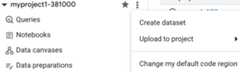
On theCreate dataset page, do the following:
ForDataset ID, enter
vector_search.ForLocation type, selectMulti-region, and then selectUS (multiple regions in United States).
The public datasets are stored in the
USmulti-region. For simplicity,store your dataset in the same location.Leave the remaining default settings as they are, and clickCreate dataset.
Create test tables
Create the
patentstable that contains patents embeddings, based on asubset of theGoogle Patentspublic dataset:CREATETABLEvector_search.patentsASSELECT*FROM`patents-public-data.google_patents_research.publications`WHEREARRAY_LENGTH(embedding_v1)>0ANDpublication_numberNOTIN('KR-20180122872-A')LIMIT1000000;
Create the
patents2table that contains a patent embedding to findnearest neighbors for:CREATETABLEvector_search.patents2ASSELECT*FROM`patents-public-data.google_patents_research.publications`WHEREpublication_number='KR-20180122872-A';
Create a vector index
Create the
my_indexvector index on theembeddings_v1column of thepatentstable:CREATEORREPLACEVECTORINDEXmy_indexONvector_search.patents(embedding_v1)STORING(publication_number,title)OPTIONS(distance_type='COSINE',index_type='IVF');
Wait several minutes for the vector index to be created, then run thefollowing query and confirm that the
coverage_percentagevalue is100:SELECT*FROMvector_search.INFORMATION_SCHEMA.VECTOR_INDEXES;
Use theVECTOR_SEARCH function with an index
After the vector index is created and populated, use theVECTOR_SEARCHfunction to find the nearest neighbor for the embedding in theembedding_v1column in thepatents2 table. This query uses the vector index in the search,soVECTOR_SEARCH uses anApproximate Nearest Neighbormethod to find the embedding's nearest neighbor.
vector_search.patents tablewithout theLIMIT 1000000 clause,recreate the vector index,and then run the following query.Use theVECTOR_SEARCH function with an index:
SELECTquery.publication_numberASquery_publication_number,query.titleASquery_title,base.publication_numberASbase_publication_number,base.titleASbase_title,distanceFROMVECTOR_SEARCH(TABLEvector_search.patents,'embedding_v1',TABLEvector_search.patents2,top_k=>5,distance_type=>'COSINE',options=>'{"fraction_lists_to_search": 0.005}');
The results look similar to the following:
+--------------------------+-------------------------------------------------------------+-------------------------+--------------------------------------------------------------------------------------------------------------------------+---------------------+| query_publication_number | query_title | base_publication_number | base_title | distance |+--------------------------+-------------------------------------------------------------+-------------------------+--------------------------------------------------------------------------------------------------------------------------+---------------------+| KR-20180122872-A | Rainwater management system based on rainwater keeping unit | CN-106599080-B | A kind of rapid generation for keeping away big vast transfer figure based on GIS | 0.14471956347590609 || KR-20180122872-A | Rainwater management system based on rainwater keeping unit | CN-114118544-A | Urban waterlogging detection method and device | 0.17472108931171348 || KR-20180122872-A | Rainwater management system based on rainwater keeping unit | KR-20200048143-A | Method and system for mornitoring dry stream using unmanned aerial vehicle | 0.17561990745619782 || KR-20180122872-A | Rainwater management system based on rainwater keeping unit | KR-101721695-B1 | Urban Climate Impact Assessment method of Reflecting Urban Planning Scenarios and Analysis System using the same | 0.17696129365559843 || KR-20180122872-A | Rainwater management system based on rainwater keeping unit | CN-109000731-B | The experimental rig and method that research inlet for stom water chocking-up degree influences water discharged amount | 0.17902723269642917 |+--------------------------+-------------------------------------------------------------+-------------------------+--------------------------------------------------------------------------------------------------------------------------+---------------------+
Use theVECTOR_SEARCH function with brute force
Use theVECTOR_SEARCHfunction to find the nearest neighbor for the embedding in theembedding_v1column in thepatents2 table. This query doesn't use the vector index in thesearch, soVECTOR_SEARCH finds the embedding's exact nearest neighbor.
SELECTquery.publication_numberASquery_publication_number,query.titleASquery_title,base.publication_numberASbase_publication_number,base.titleASbase_title,distanceFROMVECTOR_SEARCH(TABLEvector_search.patents,'embedding_v1',TABLEvector_search.patents2,top_k=>5,distance_type=>'COSINE',options=>'{"use_brute_force":true}');
The results look similar to the following:
+--------------------------+-------------------------------------------------------------+-------------------------+--------------------------------------------------------------------------------------------------------------------------+---------------------+| query_publication_number | query_title | base_publication_number | base_title | distance |+--------------------------+-------------------------------------------------------------+-------------------------+--------------------------------------------------------------------------------------------------------------------------+---------------------+| KR-20180122872-A | Rainwater management system based on rainwater keeping unit | CN-106599080-B | A kind of rapid generation for keeping away big vast transfer figure based on GIS | 0.1447195634759062 || KR-20180122872-A | Rainwater management system based on rainwater keeping unit | CN-114118544-A | Urban waterlogging detection method and device | 0.1747210893117136 || KR-20180122872-A | Rainwater management system based on rainwater keeping unit | KR-20200048143-A | Method and system for mornitoring dry stream using unmanned aerial vehicle | 0.17561990745619782 || KR-20180122872-A | Rainwater management system based on rainwater keeping unit | KR-101721695-B1 | Urban Climate Impact Assessment method of Reflecting Urban Planning Scenarios and Analysis System using the same | 0.17696129365559843 || KR-20180122872-A | Rainwater management system based on rainwater keeping unit | CN-109000731-B | The experimental rig and method that research inlet for stom water chocking-up degree influences water discharged amount | 0.17902723269642928 |+--------------------------+-------------------------------------------------------------+-------------------------+--------------------------------------------------------------------------------------------------------------------------+---------------------+
Evaluate recall
When you perform a vector search with an index, it returns approximate results,with the trade-off of reducingrecall. You can compute recall bycomparing the results returned by vector search with an index and by vectorsearch with brute force. In this dataset, thepublication_number valueuniquely identifies a patent, so it is used for comparison.
WITHapprox_resultsAS(SELECTquery.publication_numberASquery_publication_number,base.publication_numberASbase_publication_numberFROMVECTOR_SEARCH(TABLEvector_search.patents,'embedding_v1',TABLEvector_search.patents2,top_k=>5,distance_type=>'COSINE',options=>'{"fraction_lists_to_search": 0.005}')),exact_resultsAS(SELECTquery.publication_numberASquery_publication_number,base.publication_numberASbase_publication_numberFROMVECTOR_SEARCH(TABLEvector_search.patents,'embedding_v1',TABLEvector_search.patents2,top_k=>5,distance_type=>'COSINE',options=>'{"use_brute_force":true}'))SELECTa.query_publication_number,SUM(CASEWHENa.base_publication_number=e.base_publication_numberTHEN1ELSE0END)/5ASrecallFROMexact_resultseLEFTJOINapprox_resultsaONe.query_publication_number=a.query_publication_numberGROUPBYa.query_publication_number
If the recall is lower than you would like, you can increase thefraction_lists_to_search value, with the downside of potentially higherlatency and resource usage. To tune your vector search, you can try multipleruns ofVECTOR_SEARCH with different argument values, save the results totables, and then compare the results.
Clean up
Except as otherwise noted, the content of this page is licensed under theCreative Commons Attribution 4.0 License, and code samples are licensed under theApache 2.0 License. For details, see theGoogle Developers Site Policies. Java is a registered trademark of Oracle and/or its affiliates.
Last updated 2026-02-19 UTC.