

Manage logical views
This document describes how to manage views in BigQuery. You canmanage your BigQuery views in the following ways:
Before you begin
Grant Identity and Access Management (IAM) roles that give users the necessary permissions to perform each task in this document. The permissions required to perform a task (if any) are listed in the "Required permissions" section of the task.
Update a view
After creating a view, you can update the following view properties:
Required permissions
To update a view, you need the following IAM permissions:
bigquery.tables.updatebigquery.tables.get
Each of the following predefined IAM roles includes thepermissions that you need in order to update a view:
roles/bigquery.dataEditorroles/bigquery.dataOwnerroles/bigquery.admin
Additionally, if you have thebigquery.datasets.create permission, you canupdate tables and views in the datasets that you create.
To update the view's SQL query, you must also have permissions to query anytables referenced by the view's SQL query.
Note: To update the SQL of anauthorized view, or a view in anauthorized dataset, you need additionalpermissions. For more information, seerequired permissions for authorized views andrequired permissions for views in authorized datasets.For more information on IAM roles and permissions inBigQuery, seePredefined roles and permissions.
Updating a view's SQL query
You can update the SQL query used to define a view by:
- Using the Google Cloud console
- Using the bq command-line tool's
bq updatecommand - Calling the
tables.patchAPI method - Using the client libraries
You can change the SQL dialect from legacy SQL to GoogleSQL in the API orbq command-line tool. You cannot update a legacy SQL view to GoogleSQL in theGoogle Cloud console.
To update a view's SQL query:
Console
In the left pane, clickExplorer:

If you don't see the left pane, clickExpand left pane to open the pane.
In theExplorer pane, expand your project, clickDatasets, andthen click a dataset.
ClickOverview> Tables, and then select a view.
Click theDetails tab.
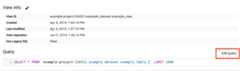
Above theQuery box, clickEdit query. This opens the query inthe query editor.
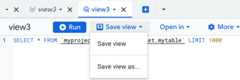
Edit the SQL query and then clickSave view> Save view:
bq
Issue thebq update command with the--view flag. To use GoogleSQL orto update the query dialect from legacy SQL to GoogleSQL, include the--use_legacy_sql flag and set it tofalse.
If your query references external user-defined function resourcesstored in Cloud Storage or in local files, use the--view_udf_resource flag to specify those resources. The--view_udf_resource flag is not demonstrated here. For more information onusing UDFs, seeGoogleSQL User-Defined Functions.
If you are updating a view in a project other than your default project, addthe project ID to the dataset name in the following format:project_id:dataset.
bqupdate\--use_legacy_sql=false\--view_udf_resource=path_to_file\--view='query'\project_id:dataset.view
Replace the following:
- path_to_file: the URI or local file system path to a code fileto be loaded and evaluated immediately as a user-defined function resourceused by the view. Repeat the flag to specify multiple files.
- query: a valid GoogleSQL query
- project_id: your project ID
- dataset: the name of the dataset containing the view you're updating
- view: the name of the view you're updating
Examples
Enter the following command to update the SQL query for a view namedmyview inmydataset.mydataset is in your default project. The examplequery used to update the view queries data from theUSA Name Datapublic dataset.
bq update \ --use_legacy_sql=false \ --view \ 'SELECT name, number FROM`bigquery-public-data.usa_names.usa_1910_current` WHERE gender = "M" ORDER BY number DESC;' \ mydataset.myviewEnter the following command to update the SQL query for a view namedmyview inmydataset.mydataset is inmyotherproject, not yourdefault project. The example query used to update the view queries data fromtheUSA Name Data public dataset.
bq update \ --use_legacy_sql=false \ --view \ 'SELECT name, number FROM`bigquery-public-data.usa_names.usa_1910_current` WHERE gender = "M" ORDER BY number DESC;' \ myotherproject:mydataset.myviewAPI
You can update a view by calling thetables.patchmethod with atable resourcethat contains an updatedview property. Because thetables.update methodreplaces the entire table resource, thetables.patch method is preferred.
Go
Before trying this sample, follow theGo setup instructions in theBigQuery quickstart using client libraries. For more information, see theBigQueryGo API reference documentation.
To authenticate to BigQuery, set up Application Default Credentials. For more information, seeSet up authentication for client libraries.
import("context""fmt""cloud.google.com/go/bigquery")// updateView demonstrates updating the query metadata that defines a logical view.funcupdateView(projectID,datasetID,viewIDstring)error{// projectID := "my-project-id"// datasetID := "mydataset"// viewID := "myview"ctx:=context.Background()client,err:=bigquery.NewClient(ctx,projectID)iferr!=nil{returnfmt.Errorf("bigquery.NewClient: %v",err)}deferclient.Close()view:=client.Dataset(datasetID).Table(viewID)meta,err:=view.Metadata(ctx)iferr!=nil{returnerr}newMeta:=bigquery.TableMetadataToUpdate{// This example updates a view into the shakespeare dataset to exclude works named after kings.ViewQuery:"SELECT word, word_count, corpus, corpus_date FROM `bigquery-public-data.samples.shakespeare` WHERE corpus NOT LIKE '%king%'",}if_,err:=view.Update(ctx,newMeta,meta.ETag);err!=nil{returnerr}returnnil}Java
Before trying this sample, follow theJava setup instructions in theBigQuery quickstart using client libraries. For more information, see theBigQueryJava API reference documentation.
To authenticate to BigQuery, set up Application Default Credentials. For more information, seeSet up authentication for client libraries.
importcom.google.cloud.bigquery.BigQuery;importcom.google.cloud.bigquery.BigQueryException;importcom.google.cloud.bigquery.BigQueryOptions;importcom.google.cloud.bigquery.TableId;importcom.google.cloud.bigquery.TableInfo;importcom.google.cloud.bigquery.ViewDefinition;// Sample to update query on a viewpublicclassUpdateViewQuery{publicstaticvoidrunUpdateViewQuery(){// TODO(developer): Replace these variables before running the sample.StringdatasetName="MY_DATASET_NAME";StringtableName="MY_TABLE_NAME";StringviewName="MY_VIEW_NAME";StringupdateQuery=String.format("SELECT TimestampField, StringField FROM %s.%s",datasetName,tableName);updateViewQuery(datasetName,viewName,updateQuery);}publicstaticvoidupdateViewQuery(StringdatasetName,StringviewName,Stringquery){try{// Initialize client that will be used to send requests. This client only needs to be created// once, and can be reused for multiple requests.BigQuerybigquery=BigQueryOptions.getDefaultInstance().getService();// Retrieve existing view metadataTableInfoviewMetadata=bigquery.getTable(TableId.of(datasetName,viewName));// Update view queryViewDefinitionviewDefinition=viewMetadata.getDefinition();viewDefinition.toBuilder().setQuery(query).build();// Set metadatabigquery.update(viewMetadata.toBuilder().setDefinition(viewDefinition).build());System.out.println("View query updated successfully");}catch(BigQueryExceptione){System.out.println("View query was not updated. \n"+e.toString());}}}Node.js
Before trying this sample, follow theNode.js setup instructions in theBigQuery quickstart using client libraries. For more information, see theBigQueryNode.js API reference documentation.
To authenticate to BigQuery, set up Application Default Credentials. For more information, seeSet up authentication for client libraries.
// Import the Google Cloud client library and create a clientconst{BigQuery}=require('@google-cloud/bigquery');constbigquery=newBigQuery();asyncfunctionupdateViewQuery(){// Updates a view named "my_existing_view" in "my_dataset"./** * TODO(developer): Uncomment the following lines before running the sample. */// const datasetId = "my_existing_dataset"// const tableId = "my_existing_table"constdataset=awaitbigquery.dataset(datasetId);// This example updates a view into the USA names dataset to include state.constnewViewQuery=`SELECT name, state FROM \`bigquery-public-data.usa_names.usa_1910_current\` LIMIT 10`;// Retrieve existing viewconst[view]=awaitdataset.table(tableId).get();// Retrieve existing view metadataconst[metadata]=awaitview.getMetadata();// Update view querymetadata.view=newViewQuery;// Set metadataawaitview.setMetadata(metadata);console.log(`View${tableId} updated.`);}Python
Before trying this sample, follow thePython setup instructions in theBigQuery quickstart using client libraries. For more information, see theBigQueryPython API reference documentation.
To authenticate to BigQuery, set up Application Default Credentials. For more information, seeSet up authentication for client libraries.
fromgoogle.cloudimportbigqueryclient=bigquery.Client()view_id="my-project.my_dataset.my_view"source_id="my-project.my_dataset.my_table"view=bigquery.Table(view_id)# The source table in this example is created from a CSV file in Google# Cloud Storage located at# `gs://cloud-samples-data/bigquery/us-states/us-states.csv`. It contains# 50 US states, while the view returns only those states with names# starting with the letter 'M'.view.view_query=f"SELECT name, post_abbr FROM `{source_id}` WHERE name LIKE 'M%'"# Make an API request to update the query property of the view.view=client.update_table(view,["view_query"])print(f"Updated{view.table_type}:{str(view.reference)}")Updating a view's expiration time
You can set a default table expiration time at the dataset level (which affectsboth tables and views), or you can set a view's expiration time when the view iscreated. If you set the expiration when the view is created, the dataset'sdefault table expiration is ignored. If you do not set a default tableexpiration at the dataset level, and you do not set an expiration when the viewis created, the view never expires and you must delete theview manually.
At any point after the view is created, you can update the view's expirationtime by:
- Using the Google Cloud console
- Using a Data definition language (DDL) statement written in GoogleSQL syntax
- Using the bq command-line tool's
bq updatecommand - Calling the
tables.patchAPI method - Using the client libraries
To update a view's expiration time:
Console
In the left pane, clickExplorer:
In theExplorer pane, expand your project, clickDatasets, andthen click a dataset.
ClickOverview> Tables, and then select the view.
Click theDetails tab and then clickEdit details.
In theEdit detail dialog, in theExpiration time menu, selectSpecify date.
In theExpiration time field, select a date and time using the datepicker tool.
ClickSave. The updated expiration time appears in theView expiration row of theView info section.
SQL
Use theALTER VIEW SET OPTIONS DDL statement:
In the Google Cloud console, go to theBigQuery page.
In the query editor, enter the following statement:
ALTERVIEWDATASET_ID.MY_VIEWSETOPTIONS(expiration_timestamp=TIMESTAMP('NEW_TIMESTAMP'));
Replace the following:
- DATASET_ID: the ID of the dataset containing your view
- MY_VIEW: the name of the view to be updated
- NEW_TIMESTAMP: aTIMESTAMP value
ClickRun.
For more information about how to run queries, seeRun an interactive query.
bq
Issue thebq update command with the--expiration flag. If you areupdating a view in a project other than your default project,add the project ID to the dataset name in the following format:project_id:dataset.
bqupdate\--expirationinteger\project_id:dataset.view
Replace the following::
- integer: the default lifetime (in seconds) for the table.The minimum value is 3600 seconds (one hour). The expiration timeevaluates to the current time plus the integer value.
- project_id: your project ID
- dataset: the name of the dataset containing the viewyou're updating
- view: the name of the view you're updating
Examples
Enter the following command to update the expiration time ofmyview inmydataset to 5 days (432000 seconds).mydataset is in your defaultproject.
bq update \ --expiration 432000 \ mydataset.myviewEnter the following command to update the expiration time ofmyview inmydataset to 5 days (432000 seconds).mydataset is inmyotherproject,not your default project.
bq update \ --expiration 432000 \ myotherproject:mydataset.myviewAPI
Call thetables.patchmethod and use theexpirationTime property in thetable resource. Because thetables.update method replaces the entire table resource, thetables.patch method is preferred. When you use the REST API, the view'sexpiration is expressed in milliseconds.
Go
Before trying this sample, follow theGo setup instructions in theBigQuery quickstart using client libraries. For more information, see theBigQueryGo API reference documentation.
To authenticate to BigQuery, set up Application Default Credentials. For more information, seeSet up authentication for client libraries.
import("context""fmt""time""cloud.google.com/go/bigquery")// updateTableExpiration demonstrates setting the table expiration of a table to a specific point in time// in the future, at which time it will be deleted.funcupdateTableExpiration(projectID,datasetID,tableIDstring)error{// projectID := "my-project-id"// datasetID := "mydataset"// tableID := "mytable"ctx:=context.Background()client,err:=bigquery.NewClient(ctx,projectID)iferr!=nil{returnfmt.Errorf("bigquery.NewClient: %v",err)}deferclient.Close()tableRef:=client.Dataset(datasetID).Table(tableID)meta,err:=tableRef.Metadata(ctx)iferr!=nil{returnerr}update:=bigquery.TableMetadataToUpdate{ExpirationTime:time.Now().Add(time.Duration(5*24)*time.Hour),// table expiration in 5 days.}if_,err=tableRef.Update(ctx,update,meta.ETag);err!=nil{returnerr}returnnil}Java
Before trying this sample, follow theJava setup instructions in theBigQuery quickstart using client libraries. For more information, see theBigQueryJava API reference documentation.
To authenticate to BigQuery, set up Application Default Credentials. For more information, seeSet up authentication for client libraries.
TablebeforeTable=bigquery.getTable(datasetName,tableName);// Set table to expire 5 days from now.longexpirationMillis=DateTime.now().plusDays(5).getMillis();TableInfotableInfo=beforeTable.toBuilder().setExpirationTime(expirationMillis).build();TableafterTable=bigquery.update(tableInfo);Node.js
Before trying this sample, follow theNode.js setup instructions in theBigQuery quickstart using client libraries. For more information, see theBigQueryNode.js API reference documentation.
To authenticate to BigQuery, set up Application Default Credentials. For more information, seeSet up authentication for client libraries.
// Import the Google Cloud client libraryconst{BigQuery}=require('@google-cloud/bigquery');constbigquery=newBigQuery();asyncfunctionupdateTableExpiration(){// Updates a table's expiration./** * TODO(developer): Uncomment the following lines before running the sample. */// const datasetId = 'my_dataset', // Existing dataset// const tableId = 'my_table', // Existing table// const expirationTime = Date.now() + 1000 * 60 * 60 * 24 * 5 // 5 days from current time in ms// Retreive current table metadataconsttable=bigquery.dataset(datasetId).table(tableId);const[metadata]=awaittable.getMetadata();// Set new table expiration to 5 days from current timemetadata.expirationTime=expirationTime.toString();const[apiResponse]=awaittable.setMetadata(metadata);constnewExpirationTime=apiResponse.expirationTime;console.log(`${tableId} expiration:${newExpirationTime}`);}Python
Updating a view's expiration is the same process as updating a table'sexpiration. Before trying this sample, follow thePython setup instructions in theBigQuery quickstart using client libraries. For more information, see theBigQueryPython API reference documentation. To authenticate to BigQuery, set up Application Default Credentials. For more information, seeSet up authentication for client libraries.fromgoogle.cloudimportbigqueryclient=bigquery.Client()# TODO(dev): Change table_id to the full name of the table you want to update.table_id="your-project.your_dataset.your_table_name"# TODO(dev): Set table to expire for desired days days from now.expiration=datetime.datetime.now(datetime.timezone.utc)+datetime.timedelta(days=5)table=client.get_table(table_id)# Make an API request.table.expires=expirationtable=client.update_table(table,["expires"])# API requestprint(f"Updated{table_id}, expires{table.expires}.")
Updating a view's description
You can update a view's description by:
- Using the Google Cloud console
- Using a Data definition language (DDL) statement written in GoogleSQL syntax
- Using the bq command-line tool's
bq updatecommand - Calling the
tables.patchAPI method - Using the client libraries
To update a view's description:
Console
You cannot add a description when you create a view using the Google Cloud console.After the view is created, you can add a description on theDetailspage.
In the left pane, clickExplorer:
In theExplorer pane, expand your project, clickDatasets, andthen click a dataset.
ClickOverview> Tables, and then select the view.
Click theDetails tab.
ClickEdit details in theView info section.
In theEdit detail dialog, in theDescription field, enter a newdescription or edit an existing description.
To save the new description, clickSave.
SQL
Use theALTER VIEW SET OPTIONS DDL statement:
In the Google Cloud console, go to theBigQuery page.
In the query editor, enter the following statement:
ALTERVIEWDATASET_ID.MY_VIEWSETOPTIONS(description='NEW_DESCRIPTION');
Replace the following:
- DATASET_ID: the ID of the dataset containing your view
- MY_VIEW: the name of the view to be updated
- NEW_DESCRIPTION: the new view description
ClickRun.
For more information about how to run queries, seeRun an interactive query.
bq
Issue thebq update command with the--description flag. If you areupdating a view in a project other than your default project, add theproject ID to the dataset name in the following format:[PROJECT_ID]:[DATASET].
bqupdate\--description"description"\project_id:dataset.view
Replace the following:
- description: the text describing the view in quotes
- project_id: your project ID.
- dataset: the name of the dataset containing the viewyou're updating
- view: the name of the view you're updating
Examples
Enter the following command to change the description ofmyview inmydatasetto "Description of myview."mydataset is in your defaultproject.
bq update \ --description "Description of myview" \ mydataset.myviewEnter the following command to change the description ofmyview inmydataset to "Description of myview."mydataset is inmyotherproject,not your default project.
bq update \ --description "Description of myview" \ myotherproject:mydataset.myviewAPI
Call thetables.patchmethod and use thedescription property to update the view's descriptionin thetable resource. Becausethetables.update method replaces the entire table resource, thetables.patch method is preferred.
Go
Before trying this sample, follow theGo setup instructions in theBigQuery quickstart using client libraries. For more information, see theBigQueryGo API reference documentation.
To authenticate to BigQuery, set up Application Default Credentials. For more information, seeSet up authentication for client libraries.
import("context""fmt""cloud.google.com/go/bigquery")// updateTableDescription demonstrates how to fetch a table's metadata and updates the Description metadata.funcupdateTableDescription(projectID,datasetID,tableIDstring)error{// projectID := "my-project-id"// datasetID := "mydataset"// tableID := "mytable"ctx:=context.Background()client,err:=bigquery.NewClient(ctx,projectID)iferr!=nil{returnfmt.Errorf("bigquery.NewClient: %v",err)}deferclient.Close()tableRef:=client.Dataset(datasetID).Table(tableID)meta,err:=tableRef.Metadata(ctx)iferr!=nil{returnerr}update:=bigquery.TableMetadataToUpdate{Description:"Updated description.",}if_,err=tableRef.Update(ctx,update,meta.ETag);err!=nil{returnerr}returnnil}Java
Updating a view's description is the same process as updating a table'sdescription. Before trying this sample, follow theJava setup instructions in theBigQuery quickstart using client libraries. For more information, see theBigQueryJava API reference documentation. To authenticate to BigQuery, set up Application Default Credentials. For more information, seeSet up authentication for client libraries.// String datasetName = "my_dataset_name";// String tableName = "my_table_name";// String newDescription = "new_description";TablebeforeTable=bigquery.getTable(datasetName,tableName);TableInfotableInfo=beforeTable.toBuilder().setDescription(newDescription).build();TableafterTable=bigquery.update(tableInfo);
Node.js
Before trying this sample, follow theNode.js setup instructions in theBigQuery quickstart using client libraries. For more information, see theBigQueryNode.js API reference documentation.
To authenticate to BigQuery, set up Application Default Credentials. For more information, seeSet up authentication for client libraries.
// Import the Google Cloud client libraryconst{BigQuery}=require('@google-cloud/bigquery');constbigquery=newBigQuery();asyncfunctionupdateTableDescription(){// Updates a table's description.// Retreive current table metadataconsttable=bigquery.dataset(datasetId).table(tableId);const[metadata]=awaittable.getMetadata();// Set new table descriptionconstdescription='New table description.';metadata.description=description;const[apiResponse]=awaittable.setMetadata(metadata);constnewDescription=apiResponse.description;console.log(`${tableId} description:${newDescription}`);}Python
Updating a view's description is the same process as updating a table'sdescription. Before trying this sample, follow thePython setup instructions in theBigQuery quickstart using client libraries. For more information, see theBigQueryPython API reference documentation. To authenticate to BigQuery, set up Application Default Credentials. For more information, seeSet up authentication for client libraries.# from google.cloud import bigquery# client = bigquery.Client()# project = client.project# dataset_ref = bigquery.DatasetReference(project, dataset_id)# table_ref = dataset_ref.table('my_table')# table = client.get_table(table_ref) # API requestasserttable.description=="Original description."table.description="Updated description."table=client.update_table(table,["description"])# API requestasserttable.description=="Updated description."
Copy views
You can copy a view using the Google Cloud console.
You cannot copy a view by using the bq command-line tool, the REST API, or the clientlibraries, but you cancopy a view in the target dataset.
Required permissions
To copy a view in the Google Cloud console, you need IAM permissions on thesource and destination datasets.
On the source dataset, you need the following:
bigquery.tables.getbigquery.tables.getData(required to access the tables referenced by the view's SQL query)
On the destination dataset, you need the following:
bigquery.tables.create(lets you create a copy of the view in the destination dataset)
Each of the following predefined IAM roles includes thepermissions that you need in order to copy a view:
roles/bigquery.dataEditorroles/bigquery.dataOwnerroles/bigquery.admin
Additionally, if you have thebigquery.datasets.create permission, you can copy views in the datasets that you create. You also need access to the destination dataset unless you created it.
bigquery.jobs.create permissions are not required to copy a view. TheGoogle Cloud console does not generate a copy job when you copy a view.For more information on IAM roles and permissions inBigQuery, seePredefined roles and permissions.
Copy a view
To copy a view, follow these steps:
In the left pane, clickExplorer:
In theExplorer pane, expand your project, clickDatasets, andthen click a dataset.
ClickOverview> Tables, and then select the view.
In the details pane, clickCopy.
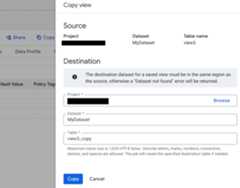
In theCopy view dialog, do the following:
- In theSource section, verify that your project name, dataset name,and table name are correct.
In theDestination section, do the following:
- ForProject, choose the project to which you are copying theview.
- ForDataset, choose the dataset that will contain the copiedview.
- ForTable, enter the name of the view. You can rename theview by entering a new view name in the box. If you enter a new name,it must follow theview namingrules.
ClickCopy:
Limits for copy jobs apply. For more information, seeQuotas and limits.
Rename a view
You can rename a view only when you use the Google Cloud console tocopy the view. For instructions on renaming a view when you copy it, seeCopying a view.
You cannot change the name of an existing view by using the bq command-line tool, the API,or the client libraries. Instead, you mustrecreate the view with the new name.
Delete views
You can delete a view by:
- Using the Google Cloud console
- Using the bq command-line tool's
bq rmcommand - Calling the
tables.deleteAPImethod
Using any available method, you can only delete one view at a time.
To automatically delete views after a specified period of time, set the defaultexpiration timeat the dataset level or set the expiration time when youcreate the view.
When you delete anauthorized view, itmight take up to 24 hours to remove the deleted view from theauthorized viewslist of the source dataset.
Caution: Deleting a view cannot be undone. If you recreate an authorized viewwith the same name as the deleted view, you must add the new view to theauthorized views list of the source dataset.Deleting a view also deletes any permissions associated with this view. Whenyou recreate a deleted view, you must also manuallyreconfigure any access permissionspreviously associated with it.
Note: You cannot recover views directly,but you can recover the view creation statement by searching for thecorrespondingaudit log activity.- For information about using the log explorer to query the activity log by audit log name, see theaudit logs overview.
- For information about using
projects/PROJECT_ID/logs/cloudaudit.googleapis.com%2Factivity, seeBigQuery Data Policy audit logging.
Required permissions
To delete a view, you need the following IAM permissions:
bigquery.tables.delete
Each of the following predefined IAM roles includes the permissions that you need in order to delete a view:
roles/bigquery.dataOwnerroles/bigquery.dataEditorroles/bigquery.admin
Additionally, if you have thebigquery.datasets.create permission, you can delete views in the datasets that you create.
For more information on IAM roles and permissions inBigQuery, seePredefined roles and permissions.
Delete a view
To delete a view:
Console
In the Google Cloud console, go to the BigQuery page.
In the left pane, clickExplorer:
In theExplorer pane, expand your project, clickDatasets, andthen click a dataset.
ClickOverview> Tables, and then click the view.
In the details pane, clickDelete.
Type
"delete"in the dialog, and clickDelete to confirm.
SQL
Use theDROP VIEW DDL statement:
In the Google Cloud console, go to theBigQuery page.
In the query editor, enter the following statement:
DROPVIEWmydataset.myview;
Replace the following:
- DATASET_ID: the ID of the dataset containing your view
- MY_VIEW: the name of the view to be updated
- NEW_DESCRIPTION: the new view description
ClickRun.
For more information about how to run queries, seeRun an interactive query.
bq
Use thebq rm command with the--table flag (or-t shortcut) to deletea view. When you use the bq command-line tool to remove a view, you must confirm the action.You can use the--force flag (or-f shortcut) to skip confirmation.
If the view is in a dataset in a project other than your defaultproject, add the project ID to the dataset name in the following format:project_id:dataset.
bqrm\-f\-t\project_id:dataset.view
Where:
- project_id is your project ID.
- dataset is the name of the dataset that contains the table.
- view is the name of the view you're deleting.
Examples:
You can use the bq command-line tool to runbq commands.
In the Google Cloud console, activateCloud Shell.
Enter the following command to deletemyview frommydataset.mydatasetis in your default project.
bq rm -t mydataset.myviewEnter the following command to deletemyview frommydataset.mydatasetis inmyotherproject, not your default project.
bq rm -t myotherproject:mydataset.myviewEnter the following command to deletemyview frommydataset.mydatasetis in your default project. The command uses the-f shortcut to bypassconfirmation.
bq rm -f -t mydataset.myviewbq lsdatasetcommand to confirm that a view was removed from a dataset.API
Call thetables.deleteAPI method and specify the view to delete using thetableId parameter.
C#
Before trying this sample, follow theC# setup instructions in theBigQuery quickstart using client libraries. For more information, see theBigQueryC# API reference documentation.
To authenticate to BigQuery, set up Application Default Credentials. For more information, seeSet up authentication for client libraries.
usingGoogle.Cloud.BigQuery.V2;usingSystem;publicclassBigQueryDeleteTable{publicvoidDeleteTable(stringprojectId="your-project-id",stringdatasetId="your_dataset_id",stringtableId="your_table_id"){BigQueryClientclient=BigQueryClient.Create(projectId);client.DeleteTable(datasetId,tableId);Console.WriteLine($"Table {tableId} deleted.");}}Go
Before trying this sample, follow theGo setup instructions in theBigQuery quickstart using client libraries. For more information, see theBigQueryGo API reference documentation.
To authenticate to BigQuery, set up Application Default Credentials. For more information, seeSet up authentication for client libraries.
import("context""fmt""cloud.google.com/go/bigquery")// deleteTable demonstrates deletion of a BigQuery table.funcdeleteTable(projectID,datasetID,tableIDstring)error{// projectID := "my-project-id"// datasetID := "mydataset"// tableID := "mytable"ctx:=context.Background()client,err:=bigquery.NewClient(ctx,projectID)iferr!=nil{returnfmt.Errorf("bigquery.NewClient: %v",err)}deferclient.Close()table:=client.Dataset(datasetID).Table(tableID)iferr:=table.Delete(ctx);err!=nil{returnerr}returnnil}Java
Before trying this sample, follow theJava setup instructions in theBigQuery quickstart using client libraries. For more information, see theBigQueryJava API reference documentation.
To authenticate to BigQuery, set up Application Default Credentials. For more information, seeSet up authentication for client libraries.
TableIdtableId=TableId.of(projectId,datasetName,tableName);booleandeleted=bigquery.delete(tableId);if(deleted){// the table was deleted}else{// the table was not found}Node.js
Before trying this sample, follow theNode.js setup instructions in theBigQuery quickstart using client libraries. For more information, see theBigQueryNode.js API reference documentation.
To authenticate to BigQuery, set up Application Default Credentials. For more information, seeSet up authentication for client libraries.
// Import the Google Cloud client libraryconst{BigQuery}=require('@google-cloud/bigquery');constbigquery=newBigQuery();asyncfunctiondeleteTable(){// Deletes "my_table" from "my_dataset"./** * TODO(developer): Uncomment the following lines before running the sample. */// const datasetId = "my_dataset";// const tableId = "my_table";// Delete the tableawaitbigquery.dataset(datasetId).table(tableId).delete();console.log(`Table${tableId} deleted.`);}PHP
Before trying this sample, follow thePHP setup instructions in theBigQuery quickstart using client libraries. For more information, see theBigQueryPHP API reference documentation.
To authenticate to BigQuery, set up Application Default Credentials. For more information, seeSet up authentication for client libraries.
use Google\Cloud\BigQuery\BigQueryClient;/** Uncomment and populate these variables in your code */// $projectId = 'The Google project ID';// $datasetId = 'The BigQuery dataset ID';// $tableId = 'The BigQuery table ID';$bigQuery = new BigQueryClient([ 'projectId' => $projectId,]);$dataset = $bigQuery->dataset($datasetId);$table = $dataset->table($tableId);$table->delete();printf('Deleted table %s.%s' . PHP_EOL, $datasetId, $tableId);Python
Before trying this sample, follow thePython setup instructions in theBigQuery quickstart using client libraries. For more information, see theBigQueryPython API reference documentation.
To authenticate to BigQuery, set up Application Default Credentials. For more information, seeSet up authentication for client libraries.
fromgoogle.cloudimportbigquery# Construct a BigQuery client object.client=bigquery.Client()# TODO(developer): Set table_id to the ID of the table to fetch.# table_id = 'your-project.your_dataset.your_table'# If the table does not exist, delete_table raises# google.api_core.exceptions.NotFound unless not_found_ok is True.client.delete_table(table_id,not_found_ok=True)# Make an API request.print("Deleted table '{}'.".format(table_id))Ruby
Before trying this sample, follow theRuby setup instructions in theBigQuery quickstart using client libraries. For more information, see theBigQueryRuby API reference documentation.
To authenticate to BigQuery, set up Application Default Credentials. For more information, seeSet up authentication for client libraries.
Restore a view
You can't restore a deleted view directly, but there are workarounds for certainscenarios:
- If a view is deleted because the parent dataset was deleted, then you canundelete the dataset toretrieve the view.
- If a view is deleted explicitly, then you canrecreate the viewby using the last query that was used to create or update the view. You canfind the query definition of the view creation or update operation inlogs.
View security
To control access to views in BigQuery, seeAuthorized views.
What's next
- For information on creating views, seeCreate views.
- For information on creating an authorized view, seeCreating authorized views.
- For information on getting view metadata, seeGet information about views.
Except as otherwise noted, the content of this page is licensed under theCreative Commons Attribution 4.0 License, and code samples are licensed under theApache 2.0 License. For details, see theGoogle Developers Site Policies. Java is a registered trademark of Oracle and/or its affiliates.
Last updated 2025-12-15 UTC.