

Create and use tables
This document describes how to create and usestandard (built-in) tables inBigQuery. Forinformation about creating other table types, see the following:
After creating a table, you can do the following:
- Control access to your table data.
- Get information about your tables.
- List the tables in a dataset.
- Get table metadata.
For more information about managing tables including updating table properties,copying a table, and deleting a table, seeManaging tables.
Before you begin
Grant Identity and Access Management (IAM) roles that give users the necessary permissions toperform each task in this document.
Required roles
To get the permissions that you need to create a table, ask your administrator to grant you the following IAM roles:
- BigQuery Job User (
roles/bigquery.jobUser) on the project if you're creating a table by loading data or by saving query results to a table. - BigQuery Data Editor (
roles/bigquery.dataEditor) on the dataset where you're creating the table.
For more information about granting roles, seeManage access to projects, folders, and organizations.
These predefined roles contain the permissions required to create a table. To see the exact permissions that are required, expand theRequired permissions section:
Required permissions
The following permissions are required to create a table:
bigquery.tables.createon the dataset where you're creating the table.bigquery.tables.getDataon all tables and views that your query references if you're saving query results as a table.bigquery.jobs.createon the project if you're creating the table by loading data or by saving query results to a table.bigquery.tables.updateDataon the table if you're appending to or overwriting a table with query results.
You might also be able to get these permissions withcustom roles or otherpredefined roles.
Note: If you have thebigquery.datasets.create permission, you can createtables in the datasets that you create.Table naming
When you create a table in BigQuery, the table name mustbe unique per dataset. The table name can:
- Contain characters with a total of up to 1,024 UTF-8 bytes.
- Contain Unicode characters in category L (letter), M (mark), N (number),Pc (connector, including underscore), Pd (dash), Zs (space). For moreinformation, seeGeneral Category.
The following are all examples of valid table names:table 01,ग्राहक,00_お客様,étudiant-01.
Caveats:
- Table names are case-sensitive by default.
mytableandMyTablecancoexist in the same dataset, unless they are part of adataset withcase-sensitivity turned off. - Some table names and table name prefixes are reserved. Ifyou receive an error saying that your table name or prefix isreserved, then select a different name and try again.
If you include multiple dot operators (
.) in a sequence, the duplicateoperators are implicitly stripped.For example, this:
project_name....dataset_name..table_nameBecomes this:
project_name.dataset_name.table_name
Create tables
You can create a table in BigQuery in the following ways:
- Manually by using the Google Cloud console or the bq command-line tool
bq mkcommand. - Programmatically by calling the
tables.insertAPI method. - By using the client libraries.
- From query results.
- By defining a table that references an external data source.
- When you load data.
- By using a
CREATE TABLEdata definition language (DDL) statement.
Create an empty table with a schema definition
You can create an empty table with a schema definition in the following ways:
- Enter the schema using the Google Cloud console.
- Provide the schema inline using the bq command-line tool.
- Submit a JSON schema file using the bq command-line tool.
- Provide the schema in atable resourcewhen calling the APIs
tables.insertmethod.
For more information about specifying a table schema, seeSpecifying a schema.
After the table is created, you canload datainto it or populate it bywriting query resultsto it.
To create an empty table with a schema definition:
Console
In the Google Cloud console, go to theBigQuery page.
- In the left pane, clickExplorer.
- In theExplorer pane, expand your project, clickDatasets, and then select a dataset.
- In theDataset info section, clickCreate table.
- In theCreate table pane, specify the following details:
- In theSource section, selectEmpty table in theCreate table from list.
- In theDestination section, specify the following details:
- ForDataset, select the dataset in which you want to create the table.
- In theTable field, enter the name of the table that you want to create.
- Verify that theTable type field is set toNative table.
- In theSchema section, enter theschema definition. You can enter schema information manually by using one of the following methods:
- Option 1: ClickEdit as text and paste the schema in the form of a JSON array. When you use a JSON array, you generate the schema using the same process ascreating a JSON schema file. You can view the schema of an existing table in JSON format by entering the following command:
bqshow--format=prettyjsondataset.table
- Option 2: ClickAdd field and enter the table schema. Specify each field'sName,Type, andMode.
- Option 1: ClickEdit as text and paste the schema in the form of a JSON array. When you use a JSON array, you generate the schema using the same process ascreating a JSON schema file. You can view the schema of an existing table in JSON format by entering the following command:
- Optional: SpecifyPartition and cluster settings. For more information, seeCreating partitioned tables andCreating and using clustered tables.
- Optional: In theAdvanced options section, if you want to use a customer-managed encryption key, then select theUse a customer-managed encryption key (CMEK) option. By default, BigQueryencrypts customer content stored at rest by using a Google-owned and Google-managed encryption key.
- ClickCreate table.
SQL
The following example creates a table namednewtable that expires onJanuary 1, 2023:
In the Google Cloud console, go to theBigQuery page.
In the query editor, enter the following statement:
CREATETABLEmydataset.newtable(xINT64OPTIONS(description='An optional INTEGER field'),ySTRUCT<aARRAY<STRING>OPTIONS(description='A repeated STRING field'),bBOOL>)OPTIONS(expiration_timestamp=TIMESTAMP'2023-01-01 00:00:00 UTC',description='a table that expires in 2023',labels=[('org_unit','development')]);
ClickRun.
For more information about how to run queries, seeRun an interactive query.
bq
In the Google Cloud console, activate Cloud Shell.
At the bottom of the Google Cloud console, aCloud Shell session starts and displays a command-line prompt. Cloud Shell is a shell environment with the Google Cloud CLI already installed and with values already set for your current project. It can take a few seconds for the session to initialize.
Use the
bq mkcommandwith the--tableor-tflag. You can supply tableschema information inline or with a JSON schema file. For a full list ofparameters, see thebq mk --tablereference.Some optional parameters include:--expiration--description--time_partitioning_field--time_partitioning_type--range_partitioning--clustering_fields--destination_kms_key--label
--time_partitioning_field,--time_partitioning_type,--range_partitioning,--clustering_fields, and--destination_kms_keyare not demonstrated here. Refer to the following links for more informationon these optional parameters:- For more information about
--time_partitioning_field,--time_partitioning_type, and--range_partitioningseepartitioned tables. - For more information about
--clustering_fields, seeclustered tables. - For more information about
--destination_kms_key, seecustomer-managed encryption keys.
If you are creating a table in a project other than your default project,add the project ID to the dataset in the following format:
project_id:dataset.To create an empty table in an existing dataset with a schema definition,enter the following:
bqmk\--table\--expiration=integer\--description=description\--label=key_1:value_1\--label=key_2:value_2\--add_tags=key_3:value_3[,...]\project_id:dataset.table\schema
Replace the following:
- integer is the default lifetime (in seconds) for the table. Theminimum value is 3600 seconds (one hour). The expiration timeevaluates to the current UTC time plus the integer value. If you set theexpiration time when you create a table, the dataset's default tableexpiration setting is ignored.
- description is a description of the table in quotes.
- key_1:value_1 andkey_2:value_2 are key-value pairsthat specifylabels.
- key_3:value_3 are key-value pairsthat specifytags. Add multiple tags under thesame flag with commas between key:value pairs.
- project_id is your project ID.
- dataset is a dataset in your project.
- table is the name of the table you're creating.
- schema is an inline schema definition in the formatfield:data_type,field:data_type or the path to the JSON schemafile on your local machine.
When you specify the schema on the command line, you cannot include a
RECORD(STRUCT)type, you cannot include a column description, and you cannot specify thecolumn mode. All modes default toNULLABLE. To include descriptions,modes, andRECORDtypes,supply a JSON schema fileinstead.Examples:
Enter the following command to create a table using an inline schemadefinition. This command creates a table named
mytableinmydatasetinyour default project. The table expiration is set to 3600 seconds (1 hour),the description is set toThis is my table, and the label is set toorganization:development. The command uses the-tshortcut instead of--table. The schema is specified inline as:qtr:STRING,sales:FLOAT,year:STRING.bqmk\-t\--expiration3600\--description"This is my table"\--labelorganization:development\mydataset.mytable\qtr:STRING,sales:FLOAT,year:STRING
Enter the following command to create a table using a JSON schema file. Thiscommand creates a table named
mytableinmydatasetin your defaultproject. The table expiration is set to 3600 seconds (1 hour), thedescription is set toThis is my table, and the label is set toorganization:development. The path to the schema file is/tmp/myschema.json.bqmk\--table\--expiration3600\--description"This is my table"\--labelorganization:development\mydataset.mytable\/tmp/myschema.json
Enter the following command to create a table using an JSON schema file.This command creates a table named
mytableinmydatasetinmyotherproject. The table expiration is set to 3600 seconds (1 hour), thedescription is set toThis is my table, and the label is set toorganization:development. The path to the schema file is/tmp/myschema.json.bqmk\--table\--expiration3600\--description"This is my table"\--labelorganization:development\myotherproject:mydataset.mytable\/tmp/myschema.json
After the table is created, you canupdatethe table's expiration, description, and labels. You can alsomodify the schema definition.
Terraform
Use thegoogle_bigquery_tableresource.
To authenticate to BigQuery, set up Application DefaultCredentials. For more information, seeSet up authentication for client libraries.
Create a table
The following example creates a table namedmytable:
resource "google_bigquery_dataset" "default" { dataset_id = "mydataset" default_partition_expiration_ms = 2592000000 # 30 days default_table_expiration_ms = 31536000000 # 365 days description = "dataset description" location = "US" max_time_travel_hours = 96 # 4 days labels = { billing_group = "accounting", pii = "sensitive" }}resource "google_bigquery_table" "default" { dataset_id = google_bigquery_dataset.default.dataset_id table_id = "mytable" deletion_protection = false # set to "true" in production schema = <<EOF[ { "name": "ID", "type": "INT64", "mode": "NULLABLE", "description": "Item ID" }, { "name": "Item", "type": "STRING", "mode": "NULLABLE" }]EOF}Create a table and grant access to it
The following example creates a table namedmytable, then uses thegoogle_bigquery_table_iam_policy resource to grantaccess to it. Take this step only if you want to grant accessto the table to principals who don't have access to the dataset in whichthe table resides.
resource "google_bigquery_dataset" "default" { dataset_id = "mydataset" default_partition_expiration_ms = 2592000000 # 30 days default_table_expiration_ms = 31536000000 # 365 days description = "dataset description" location = "US" max_time_travel_hours = 96 # 4 days labels = { billing_group = "accounting", pii = "sensitive" }}resource "google_bigquery_table" "default" { dataset_id = google_bigquery_dataset.default.dataset_id table_id = "mytable" deletion_protection = false # set to "true" in production schema = <<EOF[ { "name": "ID", "type": "INT64", "mode": "NULLABLE", "description": "Item ID" }, { "name": "Item", "type": "STRING", "mode": "NULLABLE" }]EOF}data "google_iam_policy" "default" { binding { role = "roles/bigquery.dataOwner" members = [ "user:raha@altostrat.com", ] }}resource "google_bigquery_table_iam_policy" "policy" { dataset_id = google_bigquery_table.default.dataset_id table_id = google_bigquery_table.default.table_id policy_data = data.google_iam_policy.default.policy_data}Create a table with a customer-managed encryption key
The following example creates a table namedmytable, and also uses thegoogle_kms_crypto_keyandgoogle_kms_key_ringresources to specify aCloud Key Management Service key for thetable. You mustenable the Cloud Key Management Service API before running this example.
resource "google_bigquery_dataset" "default" { dataset_id = "mydataset" default_partition_expiration_ms = 2592000000 # 30 days default_table_expiration_ms = 31536000000 # 365 days description = "dataset description" location = "US" max_time_travel_hours = 96 # 4 days labels = { billing_group = "accounting", pii = "sensitive" }}resource "google_bigquery_table" "default" { dataset_id = google_bigquery_dataset.default.dataset_id table_id = "mytable" deletion_protection = false # set to "true" in production schema = <<EOF[ { "name": "ID", "type": "INT64", "mode": "NULLABLE", "description": "Item ID" }, { "name": "Item", "type": "STRING", "mode": "NULLABLE" }]EOF encryption_configuration { kms_key_name = google_kms_crypto_key.crypto_key.id } depends_on = [google_project_iam_member.service_account_access]}resource "google_kms_crypto_key" "crypto_key" { name = "example-key" key_ring = google_kms_key_ring.key_ring.id}resource "random_id" "default" { byte_length = 8}resource "google_kms_key_ring" "key_ring" { name = "${random_id.default.hex}-example-keyring" location = "us"}# Enable the BigQuery service account to encrypt/decrypt Cloud KMS keysdata "google_project" "project" {}resource "google_project_iam_member" "service_account_access" { project = data.google_project.project.project_id role = "roles/cloudkms.cryptoKeyEncrypterDecrypter" member = "serviceAccount:bq-${data.google_project.project.number}@bigquery-encryption.iam.gserviceaccount.com"}To apply your Terraform configuration in a Google Cloud project, complete the steps in the following sections.
Prepare Cloud Shell
- LaunchCloud Shell.
Set the default Google Cloud project where you want to apply your Terraform configurations.
You only need to run this command once per project, and you can run it in any directory.
export GOOGLE_CLOUD_PROJECT=PROJECT_ID
Environment variables are overridden if you set explicit values in the Terraform configuration file.
Prepare the directory
Each Terraform configuration file must have its own directory (alsocalled aroot module).
- InCloud Shell, create a directory and a new file within that directory. The filename must have the
.tfextension—for examplemain.tf. In this tutorial, the file is referred to asmain.tf.mkdirDIRECTORY && cdDIRECTORY && touch main.tf
If you are following a tutorial, you can copy the sample code in each section or step.
Copy the sample code into the newly created
main.tf.Optionally, copy the code from GitHub. This is recommended when the Terraform snippet is part of an end-to-end solution.
- Review and modify the sample parameters to apply to your environment.
- Save your changes.
- Initialize Terraform. You only need to do this once per directory.
terraform init
Optionally, to use the latest Google provider version, include the
-upgradeoption:terraform init -upgrade
Apply the changes
- Review the configuration and verify that the resources that Terraform is going to create or update match your expectations:
terraform plan
Make corrections to the configuration as necessary.
- Apply the Terraform configuration by running the following command and entering
yesat the prompt:terraform apply
Wait until Terraform displays the "Apply complete!" message.
- Open your Google Cloud project to view the results. In the Google Cloud console, navigate to your resources in the UI to make sure that Terraform has created or updated them.
API
Call thetables.insertmethod with a definedtable resource.
C#
Before trying this sample, follow theC# setup instructions in theBigQuery quickstart using client libraries. For more information, see theBigQueryC# API reference documentation.
To authenticate to BigQuery, set up Application Default Credentials. For more information, seeSet up authentication for client libraries.
usingGoogle.Cloud.BigQuery.V2;publicclassBigQueryCreateTable{publicBigQueryTableCreateTable(stringprojectId="your-project-id",stringdatasetId="your_dataset_id"){BigQueryClientclient=BigQueryClient.Create(projectId);vardataset=client.GetDataset(datasetId);// Create schema for new table.varschema=newTableSchemaBuilder{{"full_name",BigQueryDbType.String},{"age",BigQueryDbType.Int64}}.Build();// Create the tablereturndataset.CreateTable(tableId:"your_table_id",schema:schema);}}Go
Before trying this sample, follow theGo setup instructions in theBigQuery quickstart using client libraries. For more information, see theBigQueryGo API reference documentation.
To authenticate to BigQuery, set up Application Default Credentials. For more information, seeSet up authentication for client libraries.
import("context""fmt""time""cloud.google.com/go/bigquery")// createTableExplicitSchema demonstrates creating a new BigQuery table and specifying a schema.funccreateTableExplicitSchema(projectID,datasetID,tableIDstring)error{// projectID := "my-project-id"// datasetID := "mydatasetid"// tableID := "mytableid"ctx:=context.Background()client,err:=bigquery.NewClient(ctx,projectID)iferr!=nil{returnfmt.Errorf("bigquery.NewClient: %v",err)}deferclient.Close()sampleSchema:=bigquery.Schema{{Name:"full_name",Type:bigquery.StringFieldType},{Name:"age",Type:bigquery.IntegerFieldType},}metaData:=&bigquery.TableMetadata{Schema:sampleSchema,ExpirationTime:time.Now().AddDate(1,0,0),// Table will be automatically deleted in 1 year.}tableRef:=client.Dataset(datasetID).Table(tableID)iferr:=tableRef.Create(ctx,metaData);err!=nil{returnerr}returnnil}Java
Before trying this sample, follow theJava setup instructions in theBigQuery quickstart using client libraries. For more information, see theBigQueryJava API reference documentation.
To authenticate to BigQuery, set up Application Default Credentials. For more information, seeSet up authentication for client libraries.
importcom.google.cloud.bigquery.BigQuery;importcom.google.cloud.bigquery.BigQueryException;importcom.google.cloud.bigquery.BigQueryOptions;importcom.google.cloud.bigquery.Field;importcom.google.cloud.bigquery.Schema;importcom.google.cloud.bigquery.StandardSQLTypeName;importcom.google.cloud.bigquery.StandardTableDefinition;importcom.google.cloud.bigquery.TableDefinition;importcom.google.cloud.bigquery.TableId;importcom.google.cloud.bigquery.TableInfo;publicclassCreateTable{publicstaticvoidrunCreateTable(){// TODO(developer): Replace these variables before running the sample.StringdatasetName="MY_DATASET_NAME";StringtableName="MY_TABLE_NAME";Schemaschema=Schema.of(Field.of("stringField",StandardSQLTypeName.STRING),Field.of("booleanField",StandardSQLTypeName.BOOL));createTable(datasetName,tableName,schema);}publicstaticvoidcreateTable(StringdatasetName,StringtableName,Schemaschema){try{// Initialize client that will be used to send requests. This client only needs to be created// once, and can be reused for multiple requests.BigQuerybigquery=BigQueryOptions.getDefaultInstance().getService();TableIdtableId=TableId.of(datasetName,tableName);TableDefinitiontableDefinition=StandardTableDefinition.of(schema);TableInfotableInfo=TableInfo.newBuilder(tableId,tableDefinition).build();bigquery.create(tableInfo);System.out.println("Table created successfully");}catch(BigQueryExceptione){System.out.println("Table was not created. \n"+e.toString());}}}Node.js
Before trying this sample, follow theNode.js setup instructions in theBigQuery quickstart using client libraries. For more information, see theBigQueryNode.js API reference documentation.
To authenticate to BigQuery, set up Application Default Credentials. For more information, seeSet up authentication for client libraries.
// Import the Google Cloud client library and create a clientconst{BigQuery}=require('@google-cloud/bigquery');constbigquery=newBigQuery();asyncfunctioncreateTable(){// Creates a new table named "my_table" in "my_dataset"./** * TODO(developer): Uncomment the following lines before running the sample. */// const datasetId = "my_dataset";// const tableId = "my_table";// const schema = 'Name:string, Age:integer, Weight:float, IsMagic:boolean';// For all options, see https://cloud.google.com/bigquery/docs/reference/v2/tables#resourceconstoptions={schema:schema,location:'US',};// Create a new table in the datasetconst[table]=awaitbigquery.dataset(datasetId).createTable(tableId,options);console.log(`Table${table.id} created.`);}PHP
Before trying this sample, follow thePHP setup instructions in theBigQuery quickstart using client libraries. For more information, see theBigQueryPHP API reference documentation.
To authenticate to BigQuery, set up Application Default Credentials. For more information, seeSet up authentication for client libraries.
use Google\Cloud\BigQuery\BigQueryClient;/** Uncomment and populate these variables in your code */// $projectId = 'The Google project ID';// $datasetId = 'The BigQuery dataset ID';// $tableId = 'The BigQuery table ID';// $fields = [// [// 'name' => 'field1',// 'type' => 'string',// 'mode' => 'required'// ],// [// 'name' => 'field2',// 'type' => 'integer'// ],//];$bigQuery = new BigQueryClient([ 'projectId' => $projectId,]);$dataset = $bigQuery->dataset($datasetId);$schema = ['fields' => $fields];$table = $dataset->createTable($tableId, ['schema' => $schema]);printf('Created table %s' . PHP_EOL, $tableId);Python
Before trying this sample, follow thePython setup instructions in theBigQuery quickstart using client libraries. For more information, see theBigQueryPython API reference documentation.
To authenticate to BigQuery, set up Application Default Credentials. For more information, seeSet up authentication for client libraries.
fromgoogle.cloudimportbigquery# Construct a BigQuery client object.client=bigquery.Client()# TODO(developer): Set table_id to the ID of the table to create.# table_id = "your-project.your_dataset.your_table_name"schema=[bigquery.SchemaField("full_name","STRING",mode="REQUIRED"),bigquery.SchemaField("age","INTEGER",mode="REQUIRED"),]table=bigquery.Table(table_id,schema=schema)table=client.create_table(table)# Make an API request.print("Created table{}.{}.{}".format(table.project,table.dataset_id,table.table_id))Ruby
Before trying this sample, follow theRuby setup instructions in theBigQuery quickstart using client libraries. For more information, see theBigQueryRuby API reference documentation.
To authenticate to BigQuery, set up Application Default Credentials. For more information, seeSet up authentication for client libraries.
require"google/cloud/bigquery"defcreate_tabledataset_id="my_dataset"bigquery=Google::Cloud::Bigquery.newdataset=bigquery.datasetdataset_idtable_id="my_table"table=dataset.create_tabletable_iddo|updater|updater.string"full_name",mode::requiredupdater.integer"age",mode::requiredendputs"Created table:#{table_id}"endCreate an empty table without a schema definition
Java
Before trying this sample, follow theJava setup instructions in theBigQuery quickstart using client libraries. For more information, see theBigQueryJava API reference documentation.
To authenticate to BigQuery, set up Application Default Credentials. For more information, seeSet up authentication for client libraries.
importcom.google.cloud.bigquery.BigQuery;importcom.google.cloud.bigquery.BigQueryException;importcom.google.cloud.bigquery.BigQueryOptions;importcom.google.cloud.bigquery.Schema;importcom.google.cloud.bigquery.StandardTableDefinition;importcom.google.cloud.bigquery.TableDefinition;importcom.google.cloud.bigquery.TableId;importcom.google.cloud.bigquery.TableInfo;// Sample to create a table without schemapublicclassCreateTableWithoutSchema{publicstaticvoidmain(String[]args){// TODO(developer): Replace these variables before running the sample.StringdatasetName="MY_DATASET_NAME";StringtableName="MY_TABLE_NAME";createTableWithoutSchema(datasetName,tableName);}publicstaticvoidcreateTableWithoutSchema(StringdatasetName,StringtableName){try{// Initialize client that will be used to send requests. This client only needs to be created// once, and can be reused for multiple requests.BigQuerybigquery=BigQueryOptions.getDefaultInstance().getService();TableIdtableId=TableId.of(datasetName,tableName);TableDefinitiontableDefinition=StandardTableDefinition.of(Schema.of());TableInfotableInfo=TableInfo.newBuilder(tableId,tableDefinition).build();bigquery.create(tableInfo);System.out.println("Table created successfully");}catch(BigQueryExceptione){System.out.println("Table was not created. \n"+e.toString());}}}Create a table from a query result
To create a table from a query result, write the results to a destination table.
Console
Open the BigQuery page in the Google Cloud console.
In the left pane, clickExplorer:

If you don't see the left pane, clickExpand left pane to open the pane.
In theExplorer pane, expand your project, clickDatasets, andthen select a dataset.
In the query editor, enter a valid SQL query.
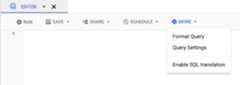
ClickMore and then selectQuery settings.
Select theSet a destination table for query results option.
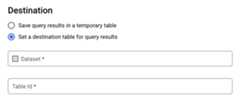
In theDestination section, select theDataset in which you wantto create the table, and then choose aTable Id.
In theDestination table write preference section, choose one ofthe following:
- Write if empty — Writes the query results to the table onlyif the table is empty.
- Append to table — Appends the query results to an existingtable.
- Overwrite table — Overwrites an existing table with the samename using the query results.
Optional: ForData location, chooseyourlocation.
To update the query settings, clickSave.
ClickRun. This creates a query job that writes thequery results to the table you specified.
Alternatively, if you forget to specify a destination table before runningyour query, you can copy the cached results table to a permanent table byclicking theSave Resultsbutton above the editor.
SQL
The following example uses theCREATE TABLE statementto create thetrips table from data in the publicbikeshare_trips table:
In the Google Cloud console, go to theBigQuery page.
In the query editor, enter the following statement:
CREATETABLEmydataset.tripsAS(SELECTbike_id,start_time,duration_minutesFROMbigquery-public-data.austin_bikeshare.bikeshare_trips);
ClickRun.
For more information about how to run queries, seeRun an interactive query.
For more information, seeCreating a new table from an existing table.
bq
In the Google Cloud console, activate Cloud Shell.
At the bottom of the Google Cloud console, aCloud Shell session starts and displays a command-line prompt. Cloud Shell is a shell environment with the Google Cloud CLI already installed and with values already set for your current project. It can take a few seconds for the session to initialize.
Enter the
bq querycommand and specify the--destination_tableflag tocreate a permanent table based on the query results. Specify theuse_legacy_sql=falseflag to use GoogleSQL syntax. To write the queryresults to a table that is not in your default project, add the project IDto the dataset name in the following format:project_id:dataset.Optional: Supply the
--locationflag and set the value to yourlocation.To control the write disposition for an existing destination table, specify one of the following optional flags:
--append_table: If the destination table exists, the query results areappended to it.--replace: If the destination table exists, it is overwritten with thequery results.bq--location=locationquery\--destination_tableproject_id:dataset.table\--use_legacy_sql=false'query'
Replace the following:
locationis the name of the location used toprocess the query. The--locationflag is optional. For example, if youare using BigQuery in the Tokyo region, you can set the flag'svalue toasia-northeast1. You can set a default value for the location byusing the.bigqueryrcfile.project_idis your project ID.datasetis the name of the dataset that containsthe table to which you are writing the query results.tableis the name of the table to which you'rewriting the query results.queryis a query in GoogleSQL syntax.If no write disposition flag is specified, the default behavior is towrite the results to the table only if it is empty. If the table existsand it is not empty, the following error is returned:
BigQuery error in query operation: Error processing jobproject_id:bqjob_123abc456789_00000e1234f_1: AlreadyExists: Tableproject_id:dataset.table.Examples:
Note: These examples query a US-based public dataset. Because the publicdataset is stored in the US multi-region location, the dataset that containsyour destination table must also be in the US. You cannot query a datasetin one location and write the results to a destination table in anotherlocation.Enter the following command to write query results to a destination tablenamed
mytableinmydataset. The dataset is in your default project.Since no write disposition flag is specified in the command, the table mustbe new or empty. Otherwise, anAlready existserror is returned. The queryretrieves data from theUSA Name Data public dataset.bqquery\--destination_tablemydataset.mytable\--use_legacy_sql=false\'SELECTname,numberFROM`bigquery-public-data`.usa_names.usa_1910_currentWHEREgender = "M"ORDER BYnumber DESC'
Enter the following command to use query results to overwrite a destinationtable named
mytableinmydataset. The dataset is in your defaultproject. The command uses the--replaceflag to overwrite the destinationtable.bqquery\--destination_tablemydataset.mytable\--replace\--use_legacy_sql=false\'SELECTname,numberFROM`bigquery-public-data`.usa_names.usa_1910_currentWHEREgender = "M"ORDER BYnumber DESC'
Enter the following command to append query results to a destination tablenamed
mytableinmydataset. The dataset is inmy-other-project, notyour default project. The command uses the--append_tableflag to appendthe query results to the destination table.bqquery\--append_table\--use_legacy_sql=false\--destination_tablemy-other-project:mydataset.mytable\'SELECTname,numberFROM`bigquery-public-data`.usa_names.usa_1910_currentWHEREgender = "M"ORDER BYnumber DESC'
The output for each of these examples looks like the following. Forreadability, some output is truncated.
Waiting on bqjob_r123abc456_000001234567_1 ... (2s) Current status: DONE+---------+--------+| name | number |+---------+--------+| Robert | 10021 || John | 9636 || Robert | 9297 || ... |+---------+--------+
API
To save query results to a permanent table, call thejobs.insert method,configure aquery job, and include a value for thedestinationTableproperty. To control the write disposition for an existing destinationtable, configure thewriteDisposition property.
To control the processing location for the query job, specify thelocationproperty in thejobReference section of thejob resource.
Go
Before trying this sample, follow theGo setup instructions in theBigQuery quickstart using client libraries. For more information, see theBigQueryGo API reference documentation.
To authenticate to BigQuery, set up Application Default Credentials. For more information, seeSet up authentication for client libraries.
import("context""fmt""io""cloud.google.com/go/bigquery""google.golang.org/api/iterator")// queryWithDestination demonstrates saving the results of a query to a specific table by setting the destination// via the API properties.funcqueryWithDestination(wio.Writer,projectID,destDatasetID,destTableIDstring)error{// projectID := "my-project-id"// datasetID := "mydataset"// tableID := "mytable"ctx:=context.Background()client,err:=bigquery.NewClient(ctx,projectID)iferr!=nil{returnfmt.Errorf("bigquery.NewClient: %v",err)}deferclient.Close()q:=client.Query("SELECT 17 as my_col")q.Location="US"// Location must match the dataset(s) referenced in query.q.QueryConfig.Dst=client.Dataset(destDatasetID).Table(destTableID)// Run the query and print results when the query job is completed.job,err:=q.Run(ctx)iferr!=nil{returnerr}status,err:=job.Wait(ctx)iferr!=nil{returnerr}iferr:=status.Err();err!=nil{returnerr}it,err:=job.Read(ctx)for{varrow[]bigquery.Valueerr:=it.Next(&row)iferr==iterator.Done{break}iferr!=nil{returnerr}fmt.Fprintln(w,row)}returnnil}Java
Before trying this sample, follow theJava setup instructions in theBigQuery quickstart using client libraries. For more information, see theBigQueryJava API reference documentation.
To authenticate to BigQuery, set up Application Default Credentials. For more information, seeSet up authentication for client libraries.
To save query results to a permanent table, set thedestinationtableto the desiredTableIdin aQueryJobConfiguration.
importcom.google.cloud.bigquery.BigQuery;importcom.google.cloud.bigquery.BigQueryException;importcom.google.cloud.bigquery.BigQueryOptions;importcom.google.cloud.bigquery.QueryJobConfiguration;importcom.google.cloud.bigquery.TableId;publicclassSaveQueryToTable{publicstaticvoidrunSaveQueryToTable(){// TODO(developer): Replace these variables before running the sample.Stringquery="SELECT corpus FROM `bigquery-public-data.samples.shakespeare` GROUP BY corpus;";StringdestinationTable="MY_TABLE";StringdestinationDataset="MY_DATASET";saveQueryToTable(destinationDataset,destinationTable,query);}publicstaticvoidsaveQueryToTable(StringdestinationDataset,StringdestinationTableId,Stringquery){try{// Initialize client that will be used to send requests. This client only needs to be created// once, and can be reused for multiple requests.BigQuerybigquery=BigQueryOptions.getDefaultInstance().getService();// Identify the destination tableTableIddestinationTable=TableId.of(destinationDataset,destinationTableId);// Build the query jobQueryJobConfigurationqueryConfig=QueryJobConfiguration.newBuilder(query).setDestinationTable(destinationTable).build();// Execute the query.bigquery.query(queryConfig);// The results are now saved in the destination table.System.out.println("Saved query ran successfully");}catch(BigQueryException|InterruptedExceptione){System.out.println("Saved query did not run \n"+e.toString());}}}Node.js
Before trying this sample, follow theNode.js setup instructions in theBigQuery quickstart using client libraries. For more information, see theBigQueryNode.js API reference documentation.
To authenticate to BigQuery, set up Application Default Credentials. For more information, seeSet up authentication for client libraries.
// Import the Google Cloud client libraryconst{BigQuery}=require('@google-cloud/bigquery');constbigquery=newBigQuery();asyncfunctionqueryDestinationTable(){// Queries the U.S. given names dataset for the state of Texas// and saves results to permanent table./** * TODO(developer): Uncomment the following lines before running the sample. */// const datasetId = 'my_dataset';// const tableId = 'my_table';// Create destination table referenceconstdataset=bigquery.dataset(datasetId);constdestinationTable=dataset.table(tableId);constquery=`SELECT name FROM \`bigquery-public-data.usa_names.usa_1910_2013\` WHERE state = 'TX' LIMIT 100`;// For all options, see https://cloud.google.com/bigquery/docs/reference/v2/tables#resourceconstoptions={query:query,// Location must match that of the dataset(s) referenced in the query.location:'US',destination:destinationTable,};// Run the query as a jobconst[job]=awaitbigquery.createQueryJob(options);console.log(`Job${job.id} started.`);console.log(`Query results loaded to table${destinationTable.id}`);}Python
Before trying this sample, follow thePython setup instructions in theBigQuery quickstart using client libraries. For more information, see theBigQueryPython API reference documentation. To authenticate to BigQuery, set up Application Default Credentials. For more information, seeSet up authentication for client libraries.fromgoogle.cloudimportbigquery# Construct a BigQuery client object.client=bigquery.Client()# TODO(developer): Set table_id to the ID of the destination table.# table_id = "your-project.your_dataset.your_table_name"job_config=bigquery.QueryJobConfig(destination=table_id)sql=""" SELECT corpus FROM `bigquery-public-data.samples.shakespeare` GROUP BY corpus;"""# Start the query, passing in the extra configuration.query_job=client.query(sql,job_config=job_config)# Make an API request.query_job.result()# Wait for the job to complete.print("Query results loaded to the table{}".format(table_id))
Create a table that references an external data source
An external data source is a data source that you can query directly fromBigQuery, even though the data is not stored inBigQuery storage. For example, you might have data in adifferent Google Cloud database, in files in Cloud Storage, or in adifferent cloud product altogether that you would like to analyze inBigQuery, but that you aren't prepared to migrate.
For more information, seeIntroduction to external data sources.
Create a table when you load data
When you load data into BigQuery, you can load data into a newtable or partition, you can append data to an existing table or partition, oryou can overwrite a table or partition. You don't need to create an emptytable before loading data into it. You can create the new table and load yourdata at the same time.
When you load data into BigQuery, you can supply the tableor partition schema, or for supported data formats, you can use schemaauto-detection.
For more information about loading data, seeIntroduction to loading data into BigQuery.
Create a multimodal table
Preview
This product or feature is subject to the "Pre-GA Offerings Terms" in the General Service Terms section of theService Specific Terms. Pre-GA products and features are available "as is" and might have limited support. For more information, see thelaunch stage descriptions.
Note: To provide feedback or request support for this feature, send an email tobq-objectref-feedback@google.com.You can create a table with one or moreObjectRef columns in order to store metadataabout unstructured data that is related to the other structured data in thetable. For example, in a products table, you could create anObjectRef columnto store product image information along with the other product data. Theunstructured data itself is stored in Cloud Storage, and is made availablein BigQuery by using anobject table.
To learn how to create a multimodal table, seeAnalyze multimodal data with SQL and Python UDFs.
Control access to tables
To configure access to tables and views, you can grant anIAM role to an entity at the following levels, listed inorder of range of resources allowed (largest to smallest):
- a high level in theGoogle Cloud resource hierarchysuch as the project, folder, or organization level
- the dataset level
- the table or view level
You can also restrict data access within tables, by using the followingmethods:
Access with any resource protected by IAM is additive. Forexample, if an entity does not have access at the high level such as a project,you could grant the entity access at the dataset level, and then the entity willhave access to the tables and views in the dataset. Similarly, if the entitydoes not have access at the high level or the dataset level, you could grant theentity access at the table or view level.
Granting IAM roles at a higher level in theGoogle Cloudresource hierarchysuch as the project, folder, or organization level gives the entity access to abroad set of resources. For example, granting a role to an entity at the projectlevel gives that entity permissions that apply to all datasets throughout theproject.
Granting a role at the dataset level specifies the operations an entity isallowed to perform on tables and views in that specific dataset, even if theentity does not have access at a higher level. For information on configuringdataset-level access controls, seeControlling access to datasets.
Granting a role at the table or view level specifies the operations an entity isallowed to perform on specific tables and views, even if the entity does nothave access at a higher level. For information on configuring table-level accesscontrols, seeControlling access to tables and views.
You can also createIAM custom roles.If you create a custom role, the permissions you grant depend on the specificoperations you want the entity to be able to perform.
You can't set a "deny" permission on any resource protected byIAM.
For more information about roles and permissions, seeUnderstanding rolesin the IAM documentation and the BigQueryIAM roles and permissions.
Get information about tables
You can get information or metadata about tables in the following ways:
- Using the Google Cloud console.
- Using the bq command-line tool
bq showcommand. - Calling the
tables.getAPI method. - Using the client libraries.
- Querying the
INFORMATION_SCHEMA.VIEWSview.
Required permissions
At a minimum, to get information about tables, you must be grantedbigquery.tables.get permissions. The following predefined IAMroles includebigquery.tables.get permissions:
bigquery.metadataViewerbigquery.dataViewerbigquery.dataOwnerbigquery.dataEditorbigquery.admin
In addition, if a user hasbigquery.datasets.create permissions, when thatuser creates a dataset, they are grantedbigquery.dataOwner access to it.bigquery.dataOwner access gives the user the ability to retrieve tablemetadata.
For more information on IAM roles and permissions inBigQuery, seeAccess control.
Get table information
To get information about tables:
Console
In the navigation panel, in theResources section, expand yourproject, and then select a dataset.
Click the dataset name to expand it. The tables and views in the datasetappear.
Click the table name.
In theDetails panel, clickDetails to display the table'sdescription and table information.
Optionally, switch to theSchema tab to view the table's schemadefinition.
bq
In the Google Cloud console, activate Cloud Shell.
At the bottom of the Google Cloud console, aCloud Shell session starts and displays a command-line prompt. Cloud Shell is a shell environment with the Google Cloud CLI already installed and with values already set for your current project. It can take a few seconds for the session to initialize.
Issue the
bq showcommand to display all table information. Use the--schemaflag to display only table schema information. The--formatflag can be used to control the output.If you are getting information about a table in a project other thanyour default project, add the project ID to the dataset in the followingformat:
project_id:dataset.bqshow\--schema\--format=prettyjson\project_id:dataset.table
Where:
- project_id is your project ID.
- dataset is the name of the dataset.
- table is the name of the table.
Examples:
Enter the following command to display all information about
mytableinmydataset.mydatasetis in your default project.bqshow--format=prettyjsonmydataset.mytable
Enter the following command to display all information about
mytableinmydataset.mydatasetis inmyotherproject, not your default project.bqshow--format=prettyjsonmyotherproject:mydataset.mytable
Enter the following command to display only schema information about
mytableinmydataset.mydatasetis inmyotherproject, not yourdefault project.bqshow--schema--format=prettyjsonmyotherproject:mydataset.mytable
API
Call thetables.getmethod and provide any relevant parameters.
Go
Before trying this sample, follow theGo setup instructions in theBigQuery quickstart using client libraries. For more information, see theBigQueryGo API reference documentation.
To authenticate to BigQuery, set up Application Default Credentials. For more information, seeSet up authentication for client libraries.
import("context""fmt""io""cloud.google.com/go/bigquery")// printTableInfo demonstrates fetching metadata from a table and printing some basic information// to an io.Writer.funcprintTableInfo(wio.Writer,projectID,datasetID,tableIDstring)error{// projectID := "my-project-id"// datasetID := "mydataset"// tableID := "mytable"ctx:=context.Background()client,err:=bigquery.NewClient(ctx,projectID)iferr!=nil{returnfmt.Errorf("bigquery.NewClient: %v",err)}deferclient.Close()meta,err:=client.Dataset(datasetID).Table(tableID).Metadata(ctx)iferr!=nil{returnerr}// Print basic information about the table.fmt.Fprintf(w,"Schema has %d top-level fields\n",len(meta.Schema))fmt.Fprintf(w,"Description: %s\n",meta.Description)fmt.Fprintf(w,"Rows in managed storage: %d\n",meta.NumRows)returnnil}Java
Before trying this sample, follow theJava setup instructions in theBigQuery quickstart using client libraries. For more information, see theBigQueryJava API reference documentation.
To authenticate to BigQuery, set up Application Default Credentials. For more information, seeSet up authentication for client libraries.
importcom.google.cloud.bigquery.BigQuery;importcom.google.cloud.bigquery.BigQueryException;importcom.google.cloud.bigquery.BigQueryOptions;importcom.google.cloud.bigquery.Table;importcom.google.cloud.bigquery.TableId;publicclassGetTable{publicstaticvoidrunGetTable(){// TODO(developer): Replace these variables before running the sample.StringprojectId="bigquery_public_data";StringdatasetName="samples";StringtableName="shakespeare";getTable(projectId,datasetName,tableName);}publicstaticvoidgetTable(StringprojectId,StringdatasetName,StringtableName){try{// Initialize client that will be used to send requests. This client only needs to be created// once, and can be reused for multiple requests.BigQuerybigquery=BigQueryOptions.getDefaultInstance().getService();TableIdtableId=TableId.of(projectId,datasetName,tableName);Tabletable=bigquery.getTable(tableId);System.out.println("Table info: "+table.getDescription());}catch(BigQueryExceptione){System.out.println("Table not retrieved. \n"+e.toString());}}}Node.js
Before trying this sample, follow theNode.js setup instructions in theBigQuery quickstart using client libraries. For more information, see theBigQueryNode.js API reference documentation.
To authenticate to BigQuery, set up Application Default Credentials. For more information, seeSet up authentication for client libraries.
// Import the Google Cloud client libraryconst{BigQuery}=require('@google-cloud/bigquery');constbigquery=newBigQuery();asyncfunctiongetTable(){// Retrieves table named "my_table" in "my_dataset"./** * TODO(developer): Uncomment the following lines before running the sample */// const datasetId = "my_dataset";// const tableId = "my_table";// Retrieve table referenceconstdataset=bigquery.dataset(datasetId);const[table]=awaitdataset.table(tableId).get();console.log('Table:');console.log(table.metadata.tableReference);}getTable();PHP
Before trying this sample, follow thePHP setup instructions in theBigQuery quickstart using client libraries. For more information, see theBigQueryPHP API reference documentation.
To authenticate to BigQuery, set up Application Default Credentials. For more information, seeSet up authentication for client libraries.
use Google\Cloud\BigQuery\BigQueryClient;/** Uncomment and populate these variables in your code *///$projectId = 'The Google project ID';//$datasetId = 'The BigQuery dataset ID';//$tableId = 'The BigQuery table ID';$bigQuery = new BigQueryClient([ 'projectId' => $projectId,]);$dataset = $bigQuery->dataset($datasetId);$table = $dataset->table($tableId);Python
Before trying this sample, follow thePython setup instructions in theBigQuery quickstart using client libraries. For more information, see theBigQueryPython API reference documentation.
To authenticate to BigQuery, set up Application Default Credentials. For more information, seeSet up authentication for client libraries.
fromgoogle.cloudimportbigquery# Construct a BigQuery client object.client=bigquery.Client()# TODO(developer): Set table_id to the ID of the model to fetch.# table_id = 'your-project.your_dataset.your_table'table=client.get_table(table_id)# Make an API request.# View table propertiesprint("Got table '{}.{}.{}'.".format(table.project,table.dataset_id,table.table_id))print("Table schema:{}".format(table.schema))print("Table description:{}".format(table.description))print("Table has{} rows".format(table.num_rows))Get table information usingINFORMATION_SCHEMA
INFORMATION_SCHEMA is a series of views that provide access to metadataabout datasets, routines, tables, views, jobs, reservations, and streaming data.
You can query the following views to get table information:
- Use the
INFORMATION_SCHEMA.TABLESandINFORMATION_SCHEMA.TABLE_OPTIONSviews to retrieve metadata about tables and views in a project. - Use the
INFORMATION_SCHEMA.COLUMNSandINFORMATION_SCHEMA.COLUMN_FIELD_PATHSviews to retrieve metadata about thecolumns (fields) in a table. - Use the
INFORMATION_SCHEMA.TABLE_STORAGEviews to retrieve metadataabout current and historical storage usage by a table.
TheTABLES andTABLE_OPTIONS views also contain high-levelinformation about views. For detailed information, query theINFORMATION_SCHEMA.VIEWS viewinstead.
TABLES view
When you query theINFORMATION_SCHEMA.TABLES view, the query results containone row for each table or view in a dataset. For detailed information aboutviews, query theINFORMATION_SCHEMA.VIEWSview instead.
TheINFORMATION_SCHEMA.TABLES view has the following schema:
| Column name | Data type | Value |
|---|---|---|
table_catalog | STRING | The project ID of the project that contains the dataset. |
table_schema | STRING | The name of the dataset that contains the table or view. Also referred to as thedatasetId. |
table_name | STRING | The name of the table or view. Also referred to as thetableId. |
table_type | STRING | The table type; one of the following:
|
managed_table_type | STRING | This column is in Preview. The managed table type; one of the following:
|
is_insertable_into | STRING | YES orNO depending on whether the table supportsDML INSERT statements |
is_fine_grained_mutations_enabled | STRING | YES orNO depending on whetherfine-grained DML mutations are enabled on the table |
is_typed | STRING | The value is alwaysNO |
is_change_history_enabled | STRING | YES orNO depending on whetherchange history is enabled |
creation_time | TIMESTAMP | The table's creation time |
base_table_catalog | STRING | Fortable clones andtable snapshots, the base table's project. Applicable only to tables withtable_type set toCLONE orSNAPSHOT. |
base_table_schema | STRING | Fortable clones andtable snapshots, the base table's dataset. Applicable only to tables withtable_type set toCLONE orSNAPSHOT. |
base_table_name | STRING | Fortable clones andtable snapshots, the base table's name. Applicable only to tables withtable_type set toCLONE orSNAPSHOT. |
snapshot_time_ms | TIMESTAMP | Fortable clones andtable snapshots, the time when theclone orsnapshot operation was run on the base table to create this table. Iftime travel was used, then this field contains the time travel timestamp. Otherwise, thesnapshot_time_ms field is the same as thecreation_time field. Applicable only to tables withtable_type set toCLONE orSNAPSHOT. |
replica_source_catalog | STRING | Formaterialized view replicas, the base materialized view's project. |
replica_source_schema | STRING | Formaterialized view replicas, the base materialized view's dataset. |
replica_source_name | STRING | Formaterialized view replicas, the base materialized view's name. |
replication_status | STRING | Formaterialized view replicas, the status of the replication from the base materialized view to the materialized view replica; one of the following:
|
replication_error | STRING | Ifreplication_status indicates a replication issue for amaterialized view replica,replication_error provides further details about the issue. |
ddl | STRING | TheDDL statement that can be used to recreate the table, such asCREATE TABLE orCREATE VIEW |
default_collation_name | STRING | The name of the defaultcollation specification if it exists; otherwise,NULL. |
sync_status | JSON | The status of the sync between the primary and secondary replicas forcross-region replication anddisaster recovery datasets. ReturnsNULL if the replica is a primary replica or the dataset doesn't use replication. |
upsert_stream_apply_watermark | TIMESTAMP | For tables that use change data capture (CDC), the time when row modifications were last applied. For more information, seeMonitor table upsert operation progress. |
Examples
Example 1:
The following example retrieves table metadata for all of the tables in thedataset namedmydataset. The metadata that'sreturned is for all types of tables inmydataset in your default project.
mydataset contains the following tables:
mytable1: a standard BigQuery tablemyview1: a BigQuery view
To run the query against a project other than your default project, add theproject ID to the dataset in the following format:`project_id`.dataset.INFORMATION_SCHEMA.view;for example,`myproject`.mydataset.INFORMATION_SCHEMA.TABLES.
INFORMATION_SCHEMA view names are case-sensitive.SELECTtable_catalog,table_schema,table_name,table_type,is_insertable_into,creation_time,ddlFROMmydataset.INFORMATION_SCHEMA.TABLES;
The result is similar to the following. For readability, some columnsare excluded from the result.
+----------------+---------------+----------------+------------+--------------------+---------------------+---------------------------------------------+| table_catalog | table_schema | table_name | table_type | is_insertable_into | creation_time | ddl |+----------------+---------------+----------------+------------+--------------------+---------------------+---------------------------------------------+| myproject | mydataset | mytable1 | BASE TABLE | YES | 2018-10-29 20:34:44 | CREATE TABLE `myproject.mydataset.mytable1` || | | | | | | ( || | | | | | | id INT64 || | | | | | | ); || myproject | mydataset | myview1 | VIEW | NO | 2018-12-29 00:19:20 | CREATE VIEW `myproject.mydataset.myview1` || | | | | | | AS SELECT 100 as id; |+----------------+---------------+----------------+------------+--------------------+---------------------+---------------------------------------------+
Example 2:
The following example retrieves table metadata for all tables of typeCLONEorSNAPSHOT from theINFORMATION_SCHEMA.TABLES view. The metadata returnedis for tables inmydataset in your default project.
To run the query against a project other than your default project, add theproject ID to the dataset in the following format:`project_id`.dataset.INFORMATION_SCHEMA.view;for example,`myproject`.mydataset.INFORMATION_SCHEMA.TABLES.
SELECTtable_name,table_type,base_table_catalog,base_table_schema,base_table_name,snapshot_time_msFROMmydataset.INFORMATION_SCHEMA.TABLESWHEREtable_type='CLONE'ORtable_type='SNAPSHOT';
The result is similar to the following. For readability, some columnsare excluded from the result.
+--------------+------------+--------------------+-------------------+-----------------+---------------------+ | table_name | table_type | base_table_catalog | base_table_schema | base_table_name | snapshot_time_ms | +--------------+------------+--------------------+-------------------+-----------------+---------------------+ | items_clone | CLONE | myproject | mydataset | items | 2018-10-31 22:40:05 | | orders_bk | SNAPSHOT | myproject | mydataset | orders | 2018-11-01 08:22:39 | +--------------+------------+--------------------+-------------------+-----------------+---------------------+
Example 3:
The following example retrievestable_name andddl columns from theINFORMATION_SCHEMA.TABLESview for thepopulation_by_zip_2010 table in thecensus_bureau_usadataset. This dataset is part of the BigQuerypublic dataset program.
Because the table you're querying is in another project, you add the project ID to the dataset inthe following format:`project_id`.dataset.INFORMATION_SCHEMA.view.In this example, the value is`bigquery-public-data`.census_bureau_usa.INFORMATION_SCHEMA.TABLES.
SELECTtable_name,ddlFROM`bigquery-public-data`.census_bureau_usa.INFORMATION_SCHEMA.TABLESWHEREtable_name='population_by_zip_2010';
The result is similar to the following:
+------------------------+----------------------------------------------------------------------------------------------------------------------------------------------------------------------------------------------------------------------------+| table_name | ddl |+------------------------+----------------------------------------------------------------------------------------------------------------------------------------------------------------------------------------------------------------------------+| population_by_zip_2010 | CREATE TABLE `bigquery-public-data.census_bureau_usa.population_by_zip_2010` || | ( || | geo_id STRING OPTIONS(description="Geo code"), || | zipcode STRING NOT NULL OPTIONS(description="Five digit ZIP Code Tabulation Area Census Code"), || | population INT64 OPTIONS(description="The total count of the population for this segment."), || | minimum_age INT64 OPTIONS(description="The minimum age in the age range. If null, this indicates the row as a total for male, female, or overall population."), || | maximum_age INT64 OPTIONS(description="The maximum age in the age range. If null, this indicates the row as having no maximum (such as 85 and over) or the row is a total of the male, female, or overall population."), || | gender STRING OPTIONS(description="male or female. If empty, the row is a total population summary.") || | ) || | OPTIONS( || | labels=[("freebqcovid", "")] || | ); |+------------------------+----------------------------------------------------------------------------------------------------------------------------------------------------------------------------------------------------------------------------+TABLE_OPTIONS view
When you query theINFORMATION_SCHEMA.TABLE_OPTIONS view, the query resultscontain one row for each option, for each table or view in a dataset. Fordetailed information aboutviews, query theINFORMATION_SCHEMA.VIEWS viewinstead.
TheINFORMATION_SCHEMA.TABLE_OPTIONS view has the following schema:
| Column name | Data type | Value |
|---|---|---|
table_catalog | STRING | The project ID of the project that contains the dataset |
table_schema | STRING | The name of the dataset that contains the table or view also referred to as thedatasetId |
table_name | STRING | The name of the table or view also referred to as thetableId |
option_name | STRING | One of the name values in theoptions table |
option_type | STRING | One of the data type values in theoptions table |
option_value | STRING | One of the value options in theoptions table |
Options table
|
|
|
|---|---|---|
|
| A description of the table |
|
| Whether automatic refresh is enabled for a materialized view |
|
| The time when this table expires |
|
| The table's descriptive name |
|
| The name of the Cloud KMS key used to encrypt the table |
|
| An array ofSTRUCT's that represent the labels on the table |
|
| The configured table's maximum staleness forBigQuery change data capture (CDC) upserts |
|
| The default lifetime, in days, of all partitions in a partitioned table |
|
| How frequently a materialized view is refreshed |
|
| Whether queries over the table require a partition filter |
|
| Tags attached to a table in a namespaced <key, value> syntax. For more information, seeTags and conditional access. |
For external tables, the following options are possible:
| Options | |
|---|---|
allow_jagged_rows |
If Applies to CSV data. |
allow_quoted_newlines |
If Applies to CSV data. |
bigtable_options |
Only required when creating a Bigtable external table. Specifies the schema of the Bigtable external table in JSON format. For a list of Bigtable table definition options, see |
column_name_character_map |
Defines the scope of supported column name characters and the handling behavior of unsupported characters. The default setting is Supported values include:
Applies to CSV and Parquet data. |
compression |
The compression type of the data source. Supported values include: Applies to CSV and JSON data. |
decimal_target_types |
Determines how to convert a Example: |
description |
A description of this table. |
enable_list_inference |
If Applies to Parquet data. |
enable_logical_types |
If Applies to Avro data. |
encoding |
The character encoding of the data. Supported values include: Applies to CSV data. |
enum_as_string |
If Applies to Parquet data. |
expiration_timestamp |
The time when this table expires. If not specified, the table does not expire. Example: |
field_delimiter |
The separator for fields in a CSV file. Applies to CSV data. |
format |
The format of the external data. Supported values for Supported values for The value |
hive_partition_uri_prefix |
A common prefix for all source URIs before the partition key encoding begins. Applies only to hive-partitioned external tables. Applies to Avro, CSV, JSON, Parquet, and ORC data. Example: |
file_set_spec_type |
Specifies how to interpret source URIs for load jobs and external tables. Supported values include:
For example, if you have a source URI of |
ignore_unknown_values |
If Applies to CSV and JSON data. |
json_extension |
For JSON data, indicates a particular JSON interchange format. If not specified, BigQuery reads the data as generic JSON records. Supported values include: |
max_bad_records |
The maximum number of bad records to ignore when reading the data. Applies to: CSV, JSON, and Google Sheets data. |
max_staleness |
Applicable forBigLake tables andobject tables. Specifies whether cached metadata is used by operations against the table, and how fresh the cached metadata must be in order for the operation to use it. To disable metadata caching, specify 0. This is the default. To enable metadata caching, specify aninterval literal value between 30 minutes and 7 days. For example, specify |
null_marker |
The string that represents Applies to CSV data. |
null_markers |
(Preview) The list of strings that represent This option cannot be used with Applies to CSV data. |
object_metadata |
Only required when creating anobject table. Set the value of this option to |
preserve_ascii_control_characters |
If Applies to CSV data. |
projection_fields |
A list of entity properties to load. Applies to Datastore data. |
quote |
The string used to quote data sections in a CSV file. If your data contains quoted newline characters, also set the Applies to CSV data. |
reference_file_schema_uri |
User provided reference file with the table schema. Applies to Parquet/ORC/AVRO data. Example: |
require_hive_partition_filter |
If Applies to Avro, CSV, JSON, Parquet, and ORC data. |
sheet_range |
Range of a Google Sheets spreadsheet to query from. Applies to Google Sheets data. Example: |
skip_leading_rows |
The number of rows at the top of a file to skip when reading the data. Applies to CSV and Google Sheets data. |
source_column_match |
(Preview) This controls the strategy used to match loaded columns to the schema. If this value is unspecified, then the default is based on how the schema is provided. If autodetect is enabled, then the default behavior is to match columns by name. Otherwise, the default is to match columns by position. This is done to keep the behavior backward-compatible. Supported values include:
|
tags | <ARRAY<STRUCT<STRING, STRING>>>An array of IAM tags for the table, expressed as key-value pairs. The key should be thenamespaced key name, and the value should be theshort name. |
time_zone |
(Preview) Default time zone that will apply when parsing timestamp values that have no specific time zone. Checkvalid time zone names. If this value is not present, the timestamp values without specific time zone is parsed using default time zone UTC. Applies to CSV and JSON data. |
date_format |
(Preview) Format elements that define how the DATE values are formatted in the input files (for example, If this value is present, this format is the only compatible DATE format.Schema autodetection will also decide DATE column type based on this format instead of the existing format. If this value is not present, the DATE field is parsed with thedefault formats. Applies to CSV and JSON data. |
datetime_format |
(Preview) Format elements that define how the DATETIME values are formatted in the input files (for example, If this value is present, this format is the only compatible DATETIME format.Schema autodetection will also decide DATETIME column type based on this format instead of the existing format. If this value is not present, the DATETIME field is parsed with thedefault formats. Applies to CSV and JSON data. |
time_format |
(Preview) Format elements that define how the TIME values are formatted in the input files (for example, If this value is present, this format is the only compatible TIME format.Schema autodetection will also decide TIME column type based on this format instead of the existing format. If this value is not present, the TIME field is parsed with thedefault formats. Applies to CSV and JSON data. |
timestamp_format |
(Preview) Format elements that define how the TIMESTAMP values are formatted in the input files (for example, If this value is present, this format is the only compatible TIMESTAMP format.Schema autodetection will also decide TIMESTAMP column type based on this format instead of the existing format. If this value is not present, the TIMESTAMP field is parsed with thedefault formats. Applies to CSV and JSON data. |
uris | For external tables, including object tables, that aren't Bigtable tables:
An array of fully qualified URIs for the external data locations. Each URI can contain one asterisk ( The following examples show valid
For Bigtable tables:
The URI identifying the Bigtable table to use as a data source. You can only specify one Bigtable URI. Example: For more information on constructing a Bigtable URI, seeRetrieve the Bigtable URI. |
Examples
Example 1:
The following example retrieves the default table expiration times for alltables inmydataset in your default project (myproject) by querying theINFORMATION_SCHEMA.TABLE_OPTIONS view.
To run the query against a project other than your default project, add theproject ID to the dataset in the following format:`project_id`.dataset.INFORMATION_SCHEMA.view;for example,`myproject`.mydataset.INFORMATION_SCHEMA.TABLE_OPTIONS.
INFORMATION_SCHEMA view names are case-sensitive.SELECT*FROMmydataset.INFORMATION_SCHEMA.TABLE_OPTIONSWHEREoption_name='expiration_timestamp';
The result is similar to the following:
+----------------+---------------+------------+----------------------+-------------+--------------------------------------+ | table_catalog | table_schema | table_name | option_name | option_type | option_value | +----------------+---------------+------------+----------------------+-------------+--------------------------------------+ | myproject | mydataset | mytable1 | expiration_timestamp | TIMESTAMP | TIMESTAMP "2020-01-16T21:12:28.000Z" | | myproject | mydataset | mytable2 | expiration_timestamp | TIMESTAMP | TIMESTAMP "2021-01-01T21:12:28.000Z" | +----------------+---------------+------------+----------------------+-------------+--------------------------------------+
Example 2:
The following example retrieves metadata about all tables inmydataset thatcontain test data. The query uses the values in thedescription option to findtables that contain "test" anywhere in the description.mydataset is in yourdefault project —myproject.
To run the query against a project other than your default project, add theproject ID to the dataset in the following format:`project_id`.dataset.INFORMATION_SCHEMA.view;for example,`myproject`.mydataset.INFORMATION_SCHEMA.TABLE_OPTIONS.
SELECT*FROMmydataset.INFORMATION_SCHEMA.TABLE_OPTIONSWHEREoption_name='description'ANDoption_valueLIKE'%test%';
The result is similar to the following:
+----------------+---------------+------------+-------------+-------------+--------------+ | table_catalog | table_schema | table_name | option_name | option_type | option_value | +----------------+---------------+------------+-------------+-------------+--------------+ | myproject | mydataset | mytable1 | description | STRING | "test data" | | myproject | mydataset | mytable2 | description | STRING | "test data" | +----------------+---------------+------------+-------------+-------------+--------------+
COLUMNS view
When you query theINFORMATION_SCHEMA.COLUMNS view, the query results containone row for each column (field) in a table.
TheINFORMATION_SCHEMA.COLUMNS view has the following schema:
| Column name | Data type | Value |
|---|---|---|
table_catalog | STRING | The project ID of the project that contains the dataset. |
table_schema | STRING | The name of the dataset that contains the table also referred to as thedatasetId. |
table_name | STRING | The name of the table or view also referred to as thetableId. |
column_name | STRING | The name of the column. |
ordinal_position | INT64 | The 1-indexed offset of the column within the table; if it's a pseudo column such as _PARTITIONTIME or _PARTITIONDATE, the value isNULL. |
is_nullable | STRING | YES orNO depending on whether the column's mode allowsNULL values. |
data_type | STRING | The column's GoogleSQLdata type. |
is_generated | STRING | The value isALWAYS if the column is anautomatically generated embedding column; otherwise, the value isNEVER. |
generation_expression | STRING | The value is the generation expression used to define the column if the column is an automatically generated embedding column; otherwise the value isNULL. |
is_stored | STRING | The value isYES if the column is an automatically generated embedding column; otherwise, the value isNULL. |
is_hidden | STRING | YES orNO depending on whether the column is a pseudo column such as _PARTITIONTIME or _PARTITIONDATE. |
is_updatable | STRING | The value is alwaysNULL. |
is_system_defined | STRING | YES orNO depending on whether the column is a pseudo column such as _PARTITIONTIME or _PARTITIONDATE. |
is_partitioning_column | STRING | YES orNO depending on whether the column is apartitioning column. |
clustering_ordinal_position | INT64 | The 1-indexed offset of the column within the table's clustering columns; the value isNULL if the table is not a clustered table. |
collation_name | STRING | The name of thecollation specification if it exists; otherwise,NULL.If a STRING orARRAY<STRING> is passed in, the collation specification is returned if it exists; otherwiseNULL is returned. |
column_default | STRING | Thedefault value of the column if it exists; otherwise, the value isNULL. |
rounding_mode | STRING | The mode of rounding that's used for values written to the field if its type is a parameterizedNUMERIC orBIGNUMERIC; otherwise, the value isNULL. |
data_policies.name | STRING | The list of data policies that are attached to the column to control access and masking. This field is in (Preview). |
policy_tags | ARRAY<STRING> | The list of policy tags that are attached to the column. |
Examples
The following example retrieves metadata from theINFORMATION_SCHEMA.COLUMNSview for thepopulation_by_zip_2010 table in thecensus_bureau_usadataset. This dataset is part of the BigQuerypublic dataset program.
Because the table you're querying is in another project, thebigquery-public-data project, you add the project ID to the dataset in thefollowing format:`project_id`.dataset.INFORMATION_SCHEMA.view;for example,`bigquery-public-data`.census_bureau_usa.INFORMATION_SCHEMA.TABLES.
The following column is excluded from the query results:
IS_UPDATABLE
INFORMATION_SCHEMA view names are case-sensitive.SELECT*EXCEPT(is_updatable)FROM`bigquery-public-data`.census_bureau_usa.INFORMATION_SCHEMA.COLUMNSWHEREtable_name='population_by_zip_2010';
The result is similar to the following. For readability, some columnsare excluded from the result.
+------------------------+-------------+------------------+-------------+-----------+-----------+-------------------+------------------------+-----------------------------+-------------+| table_name | column_name | ordinal_position | is_nullable | data_type | is_hidden | is_system_defined | is_partitioning_column | clustering_ordinal_position | policy_tags |+------------------------+-------------+------------------+-------------+-----------+-----------+-------------------+------------------------+-----------------------------+-------------+| population_by_zip_2010 | zipcode | 1 | NO | STRING | NO | NO | NO | NULL | 0 rows || population_by_zip_2010 | geo_id | 2 | YES | STRING | NO | NO | NO | NULL | 0 rows || population_by_zip_2010 | minimum_age | 3 | YES | INT64 | NO | NO | NO | NULL | 0 rows || population_by_zip_2010 | maximum_age | 4 | YES | INT64 | NO | NO | NO | NULL | 0 rows || population_by_zip_2010 | gender | 5 | YES | STRING | NO | NO | NO | NULL | 0 rows || population_by_zip_2010 | population | 6 | YES | INT64 | NO | NO | NO | NULL | 0 rows |+------------------------+-------------+------------------+-------------+-----------+-----------+-------------------+------------------------+-----------------------------+-------------+
COLUMN_FIELD_PATHS view
When you query theINFORMATION_SCHEMA.COLUMN_FIELD_PATHS view, the queryresults contain one row for each columnnested within aRECORD(orSTRUCT) column.
TheINFORMATION_SCHEMA.COLUMN_FIELD_PATHS view has the following schema:
| Column name | Data type | Value |
|---|---|---|
table_catalog | STRING | The project ID of the project that contains the dataset. |
table_schema | STRING | The name of the dataset that contains the table also referred to as thedatasetId. |
table_name | STRING | The name of the table or view also referred to as thetableId. |
column_name | STRING | The name of the column. |
field_path | STRING | The path to a columnnested within a `RECORD` or `STRUCT` column. |
data_type | STRING | The column's GoogleSQLdata type. |
description | STRING | The column's description. |
collation_name | STRING | The name of thecollation specification if it exists; otherwise,NULL.If a STRING,ARRAY<STRING>, orSTRING field in aSTRUCT is passed in, the collation specification is returned if it exists; otherwise,NULL is returned. |
rounding_mode | STRING | The mode of rounding that's used when applying precision and scale to+ parameterizedNUMERIC orBIGNUMERIC values; otherwise, the value isNULL. |
data_policies.name | STRING | The list of data policies that are attached to the column to control access and masking. This field is in (Preview). |
policy_tags | ARRAY<STRING> | The list of policy tags that are attached to the column. |
Examples
The following example retrieves metadata from theINFORMATION_SCHEMA.COLUMN_FIELD_PATHS view for thecommits table in thegithub_repos dataset.This dataset is part of the BigQuerypublic dataset program.
Because the table you're querying is in another project, thebigquery-public-data project, you add the project ID to the dataset in thefollowing format:`project_id`.dataset.INFORMATION_SCHEMA.view;for example,`bigquery-public-data`.github_repos.INFORMATION_SCHEMA.COLUMN_FIELD_PATHS.
Thecommits table contains the following nested and nested and repeatedcolumns:
author: nestedRECORDcolumncommitter: nestedRECORDcolumntrailer: nested and repeatedRECORDcolumndifference: nested and repeatedRECORDcolumn
To view metadata about theauthor anddifference columns, run the following query.
INFORMATION_SCHEMA view names are case-sensitive.SELECT*FROM`bigquery-public-data`.github_repos.INFORMATION_SCHEMA.COLUMN_FIELD_PATHSWHEREtable_name='commits'AND(column_name='author'ORcolumn_name='difference');
The result is similar to the following. For readability, some columnsare excluded from the result.
+------------+-------------+---------------------+-----------------------------------------------------------------------------------------------------------------------------------------------------+-------------+-------------+ | table_name | column_name | field_path | data_type | description | policy_tags | +------------+-------------+---------------------+-----------------------------------------------------------------------------------------------------------------------------------------------------+-------------+-------------+ | commits | author | author | STRUCT<name STRING, email STRING, time_sec INT64, tz_offset INT64, date TIMESTAMP> | NULL | 0 rows | | commits | author | author.name | STRING | NULL | 0 rows | | commits | author | author.email | STRING | NULL | 0 rows | | commits | author | author.time_sec | INT64 | NULL | 0 rows | | commits | author | author.tz_offset | INT64 | NULL | 0 rows | | commits | author | author.date | TIMESTAMP | NULL | 0 rows | | commits | difference | difference | ARRAY<STRUCT<old_mode INT64, new_mode INT64, old_path STRING, new_path STRING, old_sha1 STRING, new_sha1 STRING, old_repo STRING, new_repo STRING>> | NULL | 0 rows | | commits | difference | difference.old_mode | INT64 | NULL | 0 rows | | commits | difference | difference.new_mode | INT64 | NULL | 0 rows | | commits | difference | difference.old_path | STRING | NULL | 0 rows | | commits | difference | difference.new_path | STRING | NULL | 0 rows | | commits | difference | difference.old_sha1 | STRING | NULL | 0 rows | | commits | difference | difference.new_sha1 | STRING | NULL | 0 rows | | commits | difference | difference.old_repo | STRING | NULL | 0 rows | | commits | difference | difference.new_repo | STRING | NULL | 0 rows | +------------+-------------+---------------------+-----------------------------------------------------------------------------------------------------------------------------------------------------+-------------+-------------+
TABLE_STORAGE view
TheTABLE_STORAGE andTABLE_STORAGE_BY_ORGANIZATION views have the followingschema:
| Column name | Data type | Value |
|---|---|---|
project_id | STRING | The project ID of the project that contains the dataset. |
project_number | INT64 | The project number of the project that contains the dataset. |
table_catalog | STRING | The project ID of the project that contains the dataset. |
table_schema | STRING | The name of the dataset that contains the table or materialized view, also referred to as thedatasetId. |
table_name | STRING | The name of the table or materialized view, also referred to as thetableId. |
creation_time | TIMESTAMP | The creation time of the table. |
total_rows | INT64 | The total number of rows in the table or materialized view. |
total_partitions | INT64 | The number of partitions present in the table or materialized view. Unpartitioned tables return 0. |
total_logical_bytes | INT64 | Total number of logical (uncompressed) bytes in the table or materialized view. |
active_logical_bytes | INT64 | Number of logical (uncompressed) bytes that are younger than 90 days. |
long_term_logical_bytes | INT64 | Number of logical (uncompressed) bytes that are older than 90 days. |
current_physical_bytes | INT64 | Total number of physical bytes for the current storage of the table across all partitions. |
total_physical_bytes | INT64 | Total number of physical (compressed) bytes used for storage, including active, long-term, and time travel (deleted or changed data) bytes. Fail-safe (deleted or changed data retained after the time-travel window) bytes aren't included. |
active_physical_bytes | INT64 | Number of physical (compressed) bytes younger than 90 days, including time travel (deleted or changed data) bytes. |
long_term_physical_bytes | INT64 | Number of physical (compressed) bytes older than 90 days. |
time_travel_physical_bytes | INT64 | Number of physical (compressed) bytes used by time travel storage (deleted or changed data). |
storage_last_modified_time | TIMESTAMP | The most recent time that data was written to the table. ReturnsNULL if no data exists. |
deleted | BOOLEAN | Indicates whether or not the table is deleted. |
table_type | STRING | The type of table. For example,BASE TABLE. |
managed_table_type | STRING | This column is in Preview. The managed type of the table. For example,NATIVE orBIGLAKE. |
fail_safe_physical_bytes | INT64 | Number of physical (compressed) bytes used by the fail-safe storage (deleted or changed data). |
last_metadata_index_refresh_time | TIMESTAMP | The last metadata index refresh time of the table. |
table_deletion_reason | STRING | Table deletion reason if thedeleted field is true. The possible values are as follows:
|
table_deletion_time | TIMESTAMP | The deletion time of the table. |
Examples
Example 1:
The following example shows you the total logical bytes billed for thecurrent project.
SELECTSUM(total_logical_bytes)AStotal_logical_bytesFROM`region-REGION`.INFORMATION_SCHEMA.TABLE_STORAGE;
The result is similar to the following:
+---------------------+| total_logical_bytes |+---------------------+| 971329178274633 |+---------------------+
Example 2:
The following example shows different storage bytes in GiB at the dataset(s) level for current project.
SELECTtable_schemaASdataset_name,-- LogicalSUM(total_logical_bytes)/power(1024,3)AStotal_logical_gib,SUM(active_logical_bytes)/power(1024,3)ASactive_logical_gib,SUM(long_term_logical_bytes)/power(1024,3)ASlong_term_logical_gib,-- PhysicalSUM(total_physical_bytes)/power(1024,3)AStotal_physical_gib,SUM(active_physical_bytes)/power(1024,3)ASactive_physical_gib,SUM(active_physical_bytes-time_travel_physical_bytes)/power(1024,3)ASactive_no_tt_physical_gib,SUM(long_term_physical_bytes)/power(1024,3)ASlong_term_physical_gib,SUM(time_travel_physical_bytes)/power(1024,3)AStime_travel_physical_gib,SUM(fail_safe_physical_bytes)/power(1024,3)ASfail_safe_physical_gibFROM`region-REGION`.INFORMATION_SCHEMA.TABLE_STORAGEWHEREtable_type='BASE TABLE'GROUPBYtable_schemaORDERBYdataset_name
Example 3:
The following example shows you how to forecast the price difference perdataset between logical and physical billing models for the next 30 days.This example assumes that future storage usage is constant over the next30 days from the moment the query was run. Note that the forecast is limited tobase tables, it excludes all other types of tables within a dataset.
The prices used in the pricing variables for this query are fortheus-central1 region. If you want to run this query for a different region,update the pricing variables appropriately. SeeStorage pricing for pricing information.
Open the BigQuery page in the Google Cloud console.
Enter the following GoogleSQL query in theQuery editor box.
INFORMATION_SCHEMArequires GoogleSQL syntax. GoogleSQLis the default syntax in the Google Cloud console.DECLAREactive_logical_gib_priceFLOAT64DEFAULT0.02;DECLARElong_term_logical_gib_priceFLOAT64DEFAULT0.01;DECLAREactive_physical_gib_priceFLOAT64DEFAULT0.04;DECLARElong_term_physical_gib_priceFLOAT64DEFAULT0.02;WITHstorage_sizesAS(SELECTtable_schemaASdataset_name,-- LogicalSUM(IF(deleted=false,active_logical_bytes,0))/power(1024,3)ASactive_logical_gib,SUM(IF(deleted=false,long_term_logical_bytes,0))/power(1024,3)ASlong_term_logical_gib,-- PhysicalSUM(active_physical_bytes)/power(1024,3)ASactive_physical_gib,SUM(active_physical_bytes-time_travel_physical_bytes)/power(1024,3)ASactive_no_tt_physical_gib,SUM(long_term_physical_bytes)/power(1024,3)ASlong_term_physical_gib,-- Restorable previously deleted physicalSUM(time_travel_physical_bytes)/power(1024,3)AStime_travel_physical_gib,SUM(fail_safe_physical_bytes)/power(1024,3)ASfail_safe_physical_gib,FROM`region-REGION`.INFORMATION_SCHEMA.TABLE_STORAGE_BY_PROJECTWHEREtotal_physical_bytes+fail_safe_physical_bytes>0-- Base the forecast on base tables only for highest precision resultsANDtable_type='BASE TABLE'GROUPBY1)SELECTdataset_name,-- LogicalROUND(active_logical_gib,2)ASactive_logical_gib,ROUND(long_term_logical_gib,2)ASlong_term_logical_gib,-- PhysicalROUND(active_physical_gib,2)ASactive_physical_gib,ROUND(long_term_physical_gib,2)ASlong_term_physical_gib,ROUND(time_travel_physical_gib,2)AStime_travel_physical_gib,ROUND(fail_safe_physical_gib,2)ASfail_safe_physical_gib,-- Compression ratioROUND(SAFE_DIVIDE(active_logical_gib,active_no_tt_physical_gib),2)ASactive_compression_ratio,ROUND(SAFE_DIVIDE(long_term_logical_gib,long_term_physical_gib),2)ASlong_term_compression_ratio,-- Forecast costs logicalROUND(active_logical_gib*active_logical_gib_price,2)ASforecast_active_logical_cost,ROUND(long_term_logical_gib*long_term_logical_gib_price,2)ASforecast_long_term_logical_cost,-- Forecast costs physicalROUND((active_no_tt_physical_gib+time_travel_physical_gib+fail_safe_physical_gib)*active_physical_gib_price,2)ASforecast_active_physical_cost,ROUND(long_term_physical_gib*long_term_physical_gib_price,2)ASforecast_long_term_physical_cost,-- Forecast costs totalROUND(((active_logical_gib*active_logical_gib_price)+(long_term_logical_gib*long_term_logical_gib_price))-(((active_no_tt_physical_gib+time_travel_physical_gib+fail_safe_physical_gib)*active_physical_gib_price)+(long_term_physical_gib*long_term_physical_gib_price)),2)ASforecast_total_cost_differenceFROMstorage_sizesORDERBY(forecast_active_logical_cost+forecast_active_physical_cost)DESC;
INFORMATION_SCHEMAview names are case-sensitive.ClickRun.
The result is similar to following:
+--------------+--------------------+-----------------------+---------------------+------------------------+--------------------------+-----------------------------+------------------------------+----------------------------------+-------------------------------+----------------------------------+--------------------------------+| dataset_name | active_logical_gib | long_term_logical_gib | active_physical_gib | long_term_physical_gib | active_compression_ratio | long_term_compression_ratio | forecast_active_logical_cost | forecaset_long_term_logical_cost | forecast_active_physical_cost | forecast_long_term_physical_cost | forecast_total_cost_difference |+--------------+--------------------+-----------------------+---------------------+------------------------+--------------------------+-----------------------------+------------------------------+----------------------------------+-------------------------------+----------------------------------+--------------------------------+| dataset1 | 10.0 | 10.0 | 1.0 | 1.0 | 10.0 | 10.0 | 0.2 | 0.1 | 0.04 | 0.02 | 0.24 |
List tables in a dataset
You can list tables in datasets in the following ways:
- Using the Google Cloud console.
- Using the bq command-line tool
bq lscommand. - Calling the
tables.listAPI method. - Using the client libraries.
Required permissions
At a minimum, to list tables in a dataset, you must be grantedbigquery.tables.list permissions. The following predefined IAMroles includebigquery.tables.list permissions:
bigquery.userbigquery.metadataViewerbigquery.dataViewerbigquery.dataEditorbigquery.dataOwnerbigquery.admin
For more information on IAM roles and permissions inBigQuery, seeAccess control.
List tables
To list the tables in a dataset:
Console
In the Google Cloud console, in the navigation pane, click your datasetto expand it. This displays the tables and views in the dataset.
Scroll through the list to see the tables in the dataset. Tables andviews are identified by different icons.
bq
In the Google Cloud console, activate Cloud Shell.
At the bottom of the Google Cloud console, aCloud Shell session starts and displays a command-line prompt. Cloud Shell is a shell environment with the Google Cloud CLI already installed and with values already set for your current project. It can take a few seconds for the session to initialize.
Issue the
bq lscommand. The--formatflag can be used to control theoutput. If you are listing tables in a project other than your defaultproject, add the project ID to the dataset in the following format:project_id:dataset.Additional flags include:
--max_resultsor-n: An integer indicating the maximum number ofresults. The default value is50.
bqls\--format=pretty\--max_resultsinteger\project_id:dataset
Where:
- integer is an integer representing the number of tables tolist.
- project_id is your project ID.
- dataset is the name of the dataset.
When you run the command, the
Typefield displays eitherTABLEorVIEW. For example:+-------------------------+-------+----------------------+-------------------+| tableId | Type | Labels | Time Partitioning |+-------------------------+-------+----------------------+-------------------+| mytable | TABLE | department:shipping | || myview | VIEW | | |+-------------------------+-------+----------------------+-------------------+
Examples:
Enter the following command to list tables in dataset
mydatasetin yourdefault project.bqls--format=prettymydataset
Enter the following command to return more than the default output of 50tables from
mydataset.mydatasetis in your default project.bqls--format=pretty--max_results60mydataset
Enter the following command to list tables in dataset
mydatasetinmyotherproject.bqls--format=prettymyotherproject:mydataset
API
To list tables using the API, call thetables.listmethod.
C#
Before trying this sample, follow theC# setup instructions in theBigQuery quickstart using client libraries. For more information, see theBigQueryC# API reference documentation.
To authenticate to BigQuery, set up Application Default Credentials. For more information, seeSet up authentication for client libraries.
usingGoogle.Cloud.BigQuery.V2;usingSystem;usingSystem.Collections.Generic;usingSystem.Linq;publicclassBigQueryListTables{publicvoidListTables(stringprojectId="your-project-id",stringdatasetId="your_dataset_id"){BigQueryClientclient=BigQueryClient.Create(projectId);// Retrieve list of tables in the datasetList<BigQueryTable>tables=client.ListTables(datasetId).ToList();// Display the resultsif(tables.Count >0){Console.WriteLine($"Tables in dataset {datasetId}:");foreach(vartableintables){Console.WriteLine($"\t{table.Reference.TableId}");}}else{Console.WriteLine($"{datasetId} does not contain any tables.");}}}Go
Before trying this sample, follow theGo setup instructions in theBigQuery quickstart using client libraries. For more information, see theBigQueryGo API reference documentation.
To authenticate to BigQuery, set up Application Default Credentials. For more information, seeSet up authentication for client libraries.
import("context""fmt""io""cloud.google.com/go/bigquery""google.golang.org/api/iterator")// listTables demonstrates iterating through the collection of tables in a given dataset.funclistTables(wio.Writer,projectID,datasetIDstring)error{// projectID := "my-project-id"// datasetID := "mydataset"ctx:=context.Background()client,err:=bigquery.NewClient(ctx,projectID)iferr!=nil{returnfmt.Errorf("bigquery.NewClient: %v",err)}deferclient.Close()ts:=client.Dataset(datasetID).Tables(ctx)for{t,err:=ts.Next()iferr==iterator.Done{break}iferr!=nil{returnerr}fmt.Fprintf(w,"Table: %q\n",t.TableID)}returnnil}Java
Before trying this sample, follow theJava setup instructions in theBigQuery quickstart using client libraries. For more information, see theBigQueryJava API reference documentation.
To authenticate to BigQuery, set up Application Default Credentials. For more information, seeSet up authentication for client libraries.
importcom.google.api.gax.paging.Page;importcom.google.cloud.bigquery.BigQuery;importcom.google.cloud.bigquery.BigQuery.TableListOption;importcom.google.cloud.bigquery.BigQueryException;importcom.google.cloud.bigquery.BigQueryOptions;importcom.google.cloud.bigquery.DatasetId;importcom.google.cloud.bigquery.Table;publicclassListTables{publicstaticvoidrunListTables(){// TODO(developer): Replace these variables before running the sample.StringprojectId="bigquery-public-data";StringdatasetName="samples";listTables(projectId,datasetName);}publicstaticvoidlistTables(StringprojectId,StringdatasetName){try{// Initialize client that will be used to send requests. This client only needs to be created// once, and can be reused for multiple requests.BigQuerybigquery=BigQueryOptions.getDefaultInstance().getService();DatasetIddatasetId=DatasetId.of(projectId,datasetName);Page<Table>tables=bigquery.listTables(datasetId,TableListOption.pageSize(100));tables.iterateAll().forEach(table->System.out.print(table.getTableId().getTable()+"\n"));System.out.println("Tables listed successfully.");}catch(BigQueryExceptione){System.out.println("Tables were not listed. Error occurred: "+e.toString());}}}Node.js
Before trying this sample, follow theNode.js setup instructions in theBigQuery quickstart using client libraries. For more information, see theBigQueryNode.js API reference documentation.
To authenticate to BigQuery, set up Application Default Credentials. For more information, seeSet up authentication for client libraries.
// Import the Google Cloud client libraryconst{BigQuery}=require('@google-cloud/bigquery');constbigquery=newBigQuery();asyncfunctionlistTables(){// Lists tables in 'my_dataset'./** * TODO(developer): Uncomment the following lines before running the sample. */// const datasetId = 'my_dataset';// List all tables in the datasetconst[tables]=awaitbigquery.dataset(datasetId).getTables();console.log('Tables:');tables.forEach(table=>console.log(table.id));}PHP
Before trying this sample, follow thePHP setup instructions in theBigQuery quickstart using client libraries. For more information, see theBigQueryPHP API reference documentation.
To authenticate to BigQuery, set up Application Default Credentials. For more information, seeSet up authentication for client libraries.
use Google\Cloud\BigQuery\BigQueryClient;/** Uncomment and populate these variables in your code */// $projectId = 'The Google project ID';// $datasetId = 'The BigQuery dataset ID';$bigQuery = new BigQueryClient([ 'projectId' => $projectId,]);$dataset = $bigQuery->dataset($datasetId);$tables = $dataset->tables();foreach ($tables as $table) { print($table->id() . PHP_EOL);}Python
Before trying this sample, follow thePython setup instructions in theBigQuery quickstart using client libraries. For more information, see theBigQueryPython API reference documentation.
To authenticate to BigQuery, set up Application Default Credentials. For more information, seeSet up authentication for client libraries.
fromgoogle.cloudimportbigquery# Construct a BigQuery client object.client=bigquery.Client()# TODO(developer): Set dataset_id to the ID of the dataset that contains# the tables you are listing.# dataset_id = 'your-project.your_dataset'tables=client.list_tables(dataset_id)# Make an API request.print("Tables contained in '{}':".format(dataset_id))fortableintables:print("{}.{}.{}".format(table.project,table.dataset_id,table.table_id))Ruby
Before trying this sample, follow theRuby setup instructions in theBigQuery quickstart using client libraries. For more information, see theBigQueryRuby API reference documentation.
To authenticate to BigQuery, set up Application Default Credentials. For more information, seeSet up authentication for client libraries.
Audit table history
You can audit the history of BigQuery tables by queryingCloud Audit Logs in Logs Explorer. These logs help you track when tables werecreated, updated, or deleted, and identify the user or service account that madethe changes.
Required permissions
To browse audit logs, you need theroles/logging.privateLogViewerrole. For more information on IAM roles and permissions inCloud Logging, seeAccess control with IAM.
Get audit data
You can access audit information from the Google Cloud console,gcloud commandline, REST API, and all supported languages using client libraries. The loggingfilter shown in the following example can be used regardless of method used.
In the Google Cloud console, go to theLogging page.
Use the following query to access the audit data:
logName = "projects/PROJECT_ID/logs/cloudaudit.googleapis.com%2Factivity"AND resource.type = "bigquery_dataset"AND timestamp >= "STARTING_TIMESTAMP"AND protoPayload.@type = "type.googleapis.com/google.cloud.audit.AuditLog"AND ( protoPayload.metadata.tableCreation :* OR protoPayload.metadata.tableChange :* OR protoPayload.metadata.tableDeletion :*)AND protoPayload.resourceName : "projects/PROJECT_ID/datasets/DATASET_ID/tables/"
Replace the following:
PROJECT_ID: the project that contains datasets and tablesyou are interested in.STARTING_TIMESTAMP: the oldest logs that you want to see.Use ISO 8601 format, such as2025-01-01or2025-02-03T04:05:06Z.DATASET_ID: the dataset that you want to filter by.
Interpret the results
In the Logs Explorer result pane, expand the entry you're interested in,and then clickExpand nested fields to show the whole message.
The logging entry contains only one of the following objects to indicatethe operation performed:
protoPayload.metadata.tableCreation: a table was created.protoPayload.metadata.tableChange: table metadata was changed, such asschema update, description change, or table replacement.protoPayload.metadata.tableDeletion: a table was deleted.
The content of these objects describes the requested action.For a detailed description, seeBigQueryAuditMetadata.
Explanation of the query
logName = "projects/PROJECT_ID/logs/cloudaudit.googleapis.com%2Factivity":This line filters for Admin Activity audit logs within your Google Cloudproject. These logs record API calls and actions that modify theconfiguration or metadata of your resources.resource.type = "bigquery_dataset": This narrows the search to eventsrelated to BigQuery datasets, where table operations arelogged.timestamp >= "STARTING_TIMESTAMP": Filters log entries toonly show those created on or after the specified timestamp.protoPayload.@type = "type.googleapis.com/google.cloud.audit.AuditLog":Ensures the log message conforms to the standard Cloud Audit Log structure.( ... ): This block groups conditions to find different types of tableevents, as outlined in the previous section. The:*operator indicatesthat the key must be present. If you are interested in only one event,such as table creation, remove unnecessary conditions from this block.protoPayload.resourceName : "projects/PROJECT_ID/datasets/DATASET_ID/tables/":Selects log entries matching tables contained in the specified dataset. Thecolon (:) operator performs a substring search.- To filter entries for a single table, replace the condition with thefollowing one:
protoPayload.resourceName = "projects/PROJECT_ID/datasets/DATASET_ID/tables/TABLE_NAME". - To include all tables in all datasets in the specific project, remove thiscondition.
- To filter entries for a single table, replace the condition with thefollowing one:
For more information on log filtering, seelogging query language.
Table security
To control access to tables in BigQuery, seeControl access to resources with IAM.
What's next
- For more information about datasets, seeIntroduction to datasets.
- For more information about handling table data, seeManaging table data.
- For more information about specifying table schemas, seeSpecifying a schema.
- For more information about modifying table schemas, seeModifying table schemas.
- For more information about managing tables, seeManaging tables.
- To see an overview of
INFORMATION_SCHEMA, go toIntroduction to BigQueryINFORMATION_SCHEMA.
Try it for yourself
If you're new to Google Cloud, create an account to evaluate how BigQuery performs in real-world scenarios. New customers also get $300 in free credits to run, test, and deploy workloads.
Try BigQuery freeExcept as otherwise noted, the content of this page is licensed under theCreative Commons Attribution 4.0 License, and code samples are licensed under theApache 2.0 License. For details, see theGoogle Developers Site Policies. Java is a registered trademark of Oracle and/or its affiliates.
Last updated 2025-12-15 UTC.