

Introduction to table snapshots
This document is an introduction to BigQuery table snapshots.It is the first of a set of documents that describes how to work withBigQuery table snapshots, includinghow to create, restore, update, get information about, and query tablesnapshots. This document set is intended for users who are familiar withBigQueryand BigQuerytables.
Table snapshots
A BigQuery table snapshot preserves the contents of a table(called thebase table) at a particulartime. You can save a snapshot of a current table, or create a snapshot of atable as it was at any time in the past seven days. A table snapshot can have anexpiration; when the configured amount of time has passed since the tablesnapshot was created,BigQuerydeletes the table snapshot. You can query a table snapshot as you would astandardtable. Table snapshots are read-only, but you can create (restore) a standardtable from a table snapshot, and then you can modify the restored table.
Benefits of using table snapshots include the following:
Keep a record for longer than seven days. With BigQuerytime travel, you can only access a table's datafrom seven days ago or more recently. With table snapshots, you canpreserve a table's data from a specified point in time for as long as you want.
Minimize storage cost. BigQuery only stores bytes that aredifferent between asnapshot and its base table, so a table snapshot typically uses less storagethan a full copy of the table.
If you need mutable, lightweight copies of your tables, consider usingtable clones.
Access control for table snapshots
Access control for table snapshots is similar to access control for tables.For more information, seeControl access to resources with IAM.
Querying table snapshots
You query a table snapshot's data in the same way as you query other typesof BigQuery tables. For more information, seeQuerying BigQuery data.
Storage costs
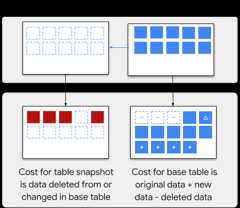
Storage costs apply for table snapshots,but BigQuery only charges for the data in a tablesnapshot that is not already charged to another table:
When a table snapshot is created, there is initially no storage cost for thetable snapshot.
If new data is added to the base table after the table snapshot wascreated, then you don't pay for storage of that data in the table snapshot.
If data is changed or deleted in the base table that also exists in a tablesnapshot, the following charges occur:
You are charged for the table snapshot storage of the changedor deleted data.
If the base table is billed as physical storage, time traveland failsafe charges aren't charged to the base table. When the snapshotis deleted, you are charged for time travel and failsafe.
If there are multiple snapshots that contain the changed ordeleted data, you are only charged for the storage used by the oldestsnapshot.
When you copy a table snapshot or clone within a same region or from oneregion or multi-region to another, a full copy of the table is created. Thisincurs additionalstorage costs.
The difference between base table and table snapshot storage charges is shownin the following image:
- Because BigQuery storage is column-based, small changes to the datain a base table can result in large increases in storage cost for its tablesnapshot.
- Some changes to a base table can result in you being charged the fullstorage amount for a table snapshot of the table. For example, if you modify abase table withclustering,that can lead to automatic re-clustering. Because re-clustering can rewrite thebase table's storage blocks, the base table's storage is no longer the same asthe storage of its snapshots. This might cause the oldest of the base table'ssnapshots to be charged up to the full storage amount of the modified partition.
- Partitions can help reduce storage costs for table snapshots. In general,BigQuery only makes a copy of modified data within a partition, insteadof the entire table snapshot.
For more information, seeBigQuery storage pricing.
Limitations
A table snapshot must be in the sameregion, andunder the sameorganization,as its base table. If you select a dataset in a different region,BigQuery creates a copy of the table in the target dataset inthat region.
Table snapshots are read-only; you can't update the data in a table snapshotunless you create a standard table from the snapshot and then update the data.You can only update a table snapshot's metadata; for example, its description,expiration date, and access policy.
You can only take a snapshot of a table's data as it was seven days ago ormore recently, due to the seven-day limit fortime travel.
You can't take a snapshot of a view or a materialized view.
You can't take a snapshot of anexternal table.
You can't overwrite an existing table or table snapshot when you create atable snapshot.
If you snapshot a table that has data inwrite-optimized storage (streaming buffer),the data in the write-optimized storage is not included in the table snapshot.
If you snapshot a table that has data intime travel,the data in time travel is not included in the table snapshot.
If you snapshot a partitioned table that has apartition expirationset, the partition expiration information isn't retained in the snapshot.The snapshotted table uses the destination dataset's default partitionexpiration instead.To retain the partition expiration information,copy the table instead.
Quotas and limits
For information about the quotas and limits that apply for table snapshots, seeTable snapshots quotas and limits.
What's next
- Create a table snapshot.
- Restore a table snapshot.
- Update a table snapshot's description, expiration date, oraccess policy.
- Create monthly snapshots of a table by using a service account that runs a scheduled query.
- Automate snapshots at the dataset level.
Except as otherwise noted, the content of this page is licensed under theCreative Commons Attribution 4.0 License, and code samples are licensed under theApache 2.0 License. For details, see theGoogle Developers Site Policies. Java is a registered trademark of Oracle and/or its affiliates.
Last updated 2025-12-15 UTC.