

Overview of BigQuery storage
This page describes the storage component of BigQuery.
BigQuery storage is optimized for running analytic queries overlarge datasets. It also supports high-throughput streaming ingestion andhigh-throughput reads. Understanding BigQuery storage can helpyou to optimize your workloads.
Overview
One of the key features of BigQuery's architecture is theseparation of storage and compute. This allows BigQuery to scaleboth storage and compute independently, based on demand.
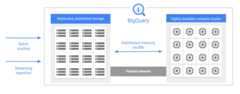
When you run a query, the query engine distributes the work in parallel acrossmultiple workers, which scan the relevant tables in storage, process the query,and then gather the results. BigQuery executes queries completelyin memory, using a petabit network to ensure that data moves extremely quicklyto the worker nodes.
Here are some key features of BigQuery storage:
Managed. BigQuery storage is a completely managed service.You don't need to provision storage resources or reserve units of storage.BigQuery automatically allocates storage for you when you loaddata into the system. You only pay for the amount of storage that you use. TheBigQuery pricing model charges for compute and storageseparately. For pricing details, seeBigQuery pricing.
Durable. BigQuery storage is designed for 99.999999999%(11 9's) annual durability. BigQuery replicates your dataacross multiple availability zones to protect from data loss due to machine-levelfailures orzonal failures.For more information, seeReliability: Disasterplanning.
Encrypted. BigQuery automatically encrypts all data beforeit is written to disk. You can provide your own encryption key or let Googlemanage the encryption key. For more information, seeEncryption at rest.
Efficient. BigQuery storage uses an efficient encodingformat that is optimized for analytic workloads. If you want to learn moreabout BigQuery's storage format, see the blog postInside Capacitor, BigQuery's next-generation columnar storage format.
Table data
The majority of the data that you store in BigQuery is tabledata. Table data includes standard tables, table clones, table snapshots, andmaterialized views. You are billed for the storage that you use for theseresources. For more information, seeStorage pricing.
Standard tables contain structured data. Everytable has a schema, and every column in the schema has a data type.BigQuery stores data in columnar format. SeeStorage layout in this document.
Table clones are lightweight, writablecopies of standard tables. BigQuery only stores the deltabetween a table clone and its base table.
Table snapshots are point-in-timecopies of tables. Table snapshots are read-only, but you can restore a tablefrom a table snapshot. BigQuery only stores the delta between atable snapshot and its base table.
Materialized views are precomputedviews that periodically cache the results of the view query. The cachedresults are stored in BigQuery storage.
In addition,cached query results are stored astemporary tables. You aren't charged for cached query results stored intemporary tables.
External tables are a special type of table,where the data resides in a data store that is external toBigQuery, such as Cloud Storage. An external table has a tableschema, just like a standard table, but the table definition points to theexternal data store. In this case, only the table metadata is kept inBigQuery storage. BigQuery does not charge forexternal table storage, although the external data store might charge forstorage.
BigQuery organizes tables and other resources into logicalcontainers calleddatasets. How you group your BigQueryresources affects permissions, quotas, billing, and other aspects of yourBigQuery workloads. For more information and best practices, seeOrganizing BigQuery resources.
The data retention policy that is used for a table is determined by theconfiguration of the dataset that contains the table. For more information,seeData retention with time travel and fail-safe.
Metadata
BigQuery storage also holds metadata about yourBigQuery resources. You aren't charged for metadata storage.
When you create any persistent entity in BigQuery, such as atable, view, or user-defined function (UDF), BigQuery storesmetadata about the entity. This is true even for resources that don't containany table data, such as UDFs and logical views.
Metadata includes information such as the table schema, partitioning andclustering specifications, table expiration times, and other information. Thistype of metadata is visible to the user and can be configured when you createthe resource. In addition, BigQuery stores metadata that it usesinternally to optimize queries. This metadata is not directly visible to users.
Storage layout
Many traditional database systems store their data in row-oriented format,meaning rows are stored together, with the fields in each row appearingsequentially on disk. Row-oriented databases are efficient at looking upindividual records. However, they can be less efficient at performing analyticalfunctions across many records, because the system has to read every field whenaccessing a record.
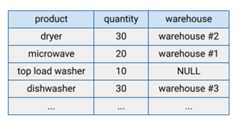
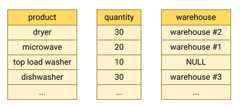
BigQuery stores table data incolumnar format, meaning itstores each column separately. Column-oriented databases are particularlyefficient at scanning individual columns over an entire dataset.
Column-oriented databases are optimized for analytic workloads that aggregatedata over a very large number of records. Often, an analytic query only needs toread a few columns from a table. For example, if you want to compute the sum ofa column over millions of rows, BigQuery can read that columndata without reading every field of every row.
Another advantage of column-oriented databases is that data within a columntypically has more redundancy than data across a row. This characteristic allowsfor greater data compression by using techniques such as run-length encoding,which can improve read performance.
Storage billing models
You can be billed for BigQuery data storage in either logical orphysical (compressed) bytes, or a combination of both.The storage billing model you choose determines yourstorage pricing. The storage billing model youchoose doesn't impact BigQuery performance. Whichever billingmodel you choose, your data is stored as physical bytes.
You set the storage billing model at the dataset level.If you don't specify a storage billing model when you create a dataset, itdefaults to using logical storage billing. However, you canchange a dataset's storage billing modelafter you create it. If you change a dataset's storagebilling model, you must wait 14 days before you can change the storage billingmodel again.
When you change a dataset's billing model, it takes 24 hours for thechange to take effect. Any tables or table partitions in long-term storageare not reset to active storage when you change a dataset's billing model.Query performance and query latency are not affected by changing a dataset'sbilling model.
Datasets usetime travel andfail-safe storage for data retention.Time travel and fail-safe storage are charged separately at active storage rateswhen you use physical storage billing, but are included in the base rate you arecharged when you use logical storage billing. You can modify the time travelwindow you use for a dataset in order to balance physical storage costs withdata retention. You can't modify the fail-safe window. For more informationabout dataset data retention, seeData retention with time travel and fail-safe.For more information on forecasting your storage costs, seeForecast storage billing.
You can't enroll a dataset in physical storage billing if your organization hasany existing legacyflat-rate slot commitmentslocated in the same region as the dataset. This doesn't apply to commitmentspurchased with aBigQuery edition.
Optimize storage
Optimizing BigQuery storage improves query performance andcontrols cost. To view the table storage metadata, query the followingINFORMATION_SCHEMA views:
For information about optimizing storage, seeOptimize storage in BigQuery.
Load data
There are several basic patterns for ingesting data intoBigQuery.
Batch load: Load your source data into a BigQuery table ina single batch operation. This can be a one-time operation or you can automateit to occur on a schedule. A batch load operation can create a new table orappend data into an existing table.
Streaming: Continually stream smaller batches of data, so that the data isavailable for querying in near-real-time.
Generated data: Use SQL statements to insert rows into an existing tableor write the results of a query to a table.
For more information about when to choose each of these ingestion methods, seeIntroduction to loading data.For pricing information, seeData ingestion pricing.
Read data from BigQuery storage
Most of the time, you store data in BigQuery in order to runanalyticalqueries on that data. However,sometimes you might want to read records directly from a table.BigQuery provides several ways to read table data:
BigQuery API:Synchronous paginated access with the
tabledata.listmethod. Data is read in a serial fashion, one page per invocation.For more information, seeBrowsing table data.BigQuery Storage API:Streaming high-throughput access that also supports server-side columnprojection and filtering. Reads can be parallelized across many readers bysegmenting them into multiple disjoint streams.
Export:Asynchronous high-throughput copying to Google Cloud Storage, either withextract jobs or the
EXPORT DATAstatement. If you need to copy data inCloud Storage, export the data either with an extract job or anEXPORT DATAstatement.Copy:Asynchronous copying of datasets within BigQuery. The copyis done logically when the source and destination location is the same.
For pricing information, seeData extraction pricing.
Based on the application requirements, you can read the table data:
- Read and copy: If you need an at-rest copy inCloud Storage, export the data either with an extract job or an
EXPORT DATAstatement. If you only want to read the data, use theBigQuery Storage API. If you want to make a copywithin BigQuery, then use a copy job. - Scale: The BigQuery API is the least efficient method and shouldn'tbe used for high volume reads. If you need to export more than 50 TB ofdata per day, use the
EXPORT DATAstatement or the BigQuery Storage API. - Time to return the first row: The BigQuery API is the fastest method toreturn the first row, but should only be used to read small amounts ofdata. The BigQuery Storage API is slower to return the firstrow, but has much higher-throughput. Exports and copies must finish beforeany rows can be read, so the time to the first row for these types of jobscan be on the order of minutes.
Deletion
When you delete a table, the data persists for at least the duration of yourtime travel window. After this, data is cleanedup from disk within theGoogle Cloud deletion timeline.Some deletion operations, such as theDROP COLUMN statement,are metadata-only operations. In this case, storage is freed up the next timeyou modify the affected rows. If you do not modify the table, there is noguaranteed time within which the storage is freed up. For more information, seeData deletion on Google Cloud.
What's next
- Learn aboutworking with tables.
- Learn how tooptimize storage.
- Learn how toquery data in BigQuery.
- Learn aboutdata security and governance.
Except as otherwise noted, the content of this page is licensed under theCreative Commons Attribution 4.0 License, and code samples are licensed under theApache 2.0 License. For details, see theGoogle Developers Site Policies. Java is a registered trademark of Oracle and/or its affiliates.
Last updated 2025-12-15 UTC.