

Understand slots
A BigQuery slot is avirtual compute unit used by BigQueryto execute SQL queries, Python code, or otherjob types.During the execution of a query, BigQuery automatically determineshow many slots are used by the query. The number of slots used depends on theamount of data being processed, the complexity of the query, and the number ofslots available. In general, access to more slots lets you run more concurrentqueries, and your complex queries can run faster.
On-demand and capacity-based pricing
While all queries use slots, you have two options for how you are charged for usage,theon-demand pricing modelor thecapacity-based pricing model.
By default, you are charged using theon-demand model. With this model,you are charged for the amount of data processed (measured in TiB) byeach query. Projects using the on-demand model are subject toper-project and per-organization slot limits with transient burstcapability. Most users on the on-demand model find the slot capacity limitsmore than sufficient. However, depending on your workload, access to more slotsmight improve query performance. To check your account's slot usage, seeMonitor health, resource utilization, and jobs.
With thecapacity-based model, you pay for the slot capacity allocated for yourqueries over time. This model gives you explicit control over total slot capacity.You explicitly choose the amount ofslots to use through areservation.You can specify the number of slots in a reservation as a baseline amountwhich is always allocated, or as an autoscaled amount, which isallocated when needed. Reservations with autoscaling slots scale their capacityto accommodate your workload demands. BigQuery allocates slotsas workloads change. This lets youconfigure the number of slots in a reservation based on the performance orcritical nature of the workload that uses the reservation.
Query execution using slots
When BigQuery executes a query job, it converts theSQL statement into an execution plan, comprised of a series of querystages. Stages are in turn comprised of sets of executionsteps.BigQuery uses a distributed parallelarchitecture to run queries. Stages model the units of workthat can be executed in parallel. Data is passed betweenstages by using adistributed shuffle architecture,which is discussed in more detail in thisGoogle Cloud blog post.
BigQuery query execution is dynamic. A query plan can be modifiedwhile the query is being processed. Work distribution can be optimized for datadistribution as stages are added. In addition, capacity for a query's executioncan change as other queries start or finish, or as the autoscaler adds slotsto a reservation.
BigQuery can run multiple stagesconcurrently, can usespeculative execution to accelerate a query, and candynamically repartition a stage to achieve optimal parallelization.
Slot resource economy
If a query requests more slots than are available, BigQueryqueues up individual units of work and waits for slots to become available.As progress on query execution is made, and as slots free up, thesequeued up units of work get dynamically picked up for execution.
BigQuery can request any number of slots for a particular stageof a query. The number of slots requested is not related to the amount ofcapacity you purchase, but rather an indication of the most optimalparallelization factor chosen by BigQuery for that stage. Unitsof work queue up and get executed as slots become available.
When query demands exceed slots you committed to, you are not charged foradditional slots, and you are not charged for additional on-demand rates. Yourindividual units of work queue up.
For example,
- A query stage requests 2,000 slots, but only 1,000 are available.
- BigQuery consumes all 1,000 slots and queues up the other1,000 slots.
- Thereafter, if 100 slots finish their work, they dynamically pickup 100 units of work from the 1,000 queued up units of work. 900 units ofqueued up work remain.
- Thereafter, if 500 slots finish their work, they dynamically pickup 500 units of work from the 900 queued up units of work. 400 units ofqueued up work remain.

If the workload requires more slots than are available to the reservation, thejob runtime can increase as the jobs wait for slots to become available. This isknown asslot contention. Slot contention can increase if the workload demandis much greater than the slots available to the reservation.
Capacity prioritization
When BigQuery experiences high demand for slot resources in aspecific region, it manages contention by prioritizing capacity. Thisprioritization ensures that customers with higher-tier capacity models areaffected less. The system prioritizes capacity in the following order:
- Enterprise Plus and Enterprise edition baselines andcommitted capacity.
- Enterprise Plus autoscaled capacity.
- Enterprise edition autoscaled capacity.
- Standard edition and on-demand capacity.
In the event of contention in a region, Standard edition and on-demandcapacity requests are more likely to experience access delays because the systemallocates resources to higher-tier editions first.
Fair scheduling in BigQuery
BigQuery allocates slot capacity within a single reservationusing an algorithm calledfair scheduling.
The BigQuery scheduler enforces the equal sharing of slots amongprojects with running queries within a reservation, and then within jobs of agiven project. The scheduler provides eventual fairness. During shortperiods, some jobs might get a disproportionate share of slots, but the schedulereventually corrects this. The goal of the scheduler is to find a balancebetween aggressively evicting running tasks (which results inwasting slot time) and being too lenient (which results in jobs with longrunning tasks getting a disproportionate share of the slot time).
Fair scheduling ensures that every query has access to all available slots at anytime, and capacity is dynamically and automatically re-allocated among activequeries as each query's capacity demands change. Queries complete and newqueries get submitted for execution under the following conditions:
- Whenever a new query is submitted, capacity is automaticallyre-allocated across executing queries. Individual units of work can begracefully paused, resumed, and queued up as more capacity becomesavailable to each query.
- Whenever a query completes, capacity consumed by that queryautomatically becomes immediately available for all other queries to use.
- Whenever a query's capacity demands change due to changes in query'sdynamic DAG, BigQuery automatically re-evaluates capacityavailability for this and all other queries, re-allocating and pausingslots as necessary.

Depending on complexity and size, a query might not require all the slots it hasthe right to, or it might require more. BigQuery dynamicallyensures that, given fair scheduling, all slots can be fully used at anypoint in time.
If an important job consistently needs more slots than it receives from thescheduler, consider creating an additional reservation with the required numberslots and assigning the job to that reservation.
As an example of fair scheduling, suppose you have the following reservationconfiguration:
- Reservation
A, which has 1,000 baseline slots with no autoscaling - Project
Aand projectB, which are assigned to your reservation
Scenario 1: In projectA, you run queryA (one concurrent query) that requires high slot usage, and in projectB yourun 20 concurrent queries. Even though there are a total of 21 queries that areusing reservationA, the slot distribution is the following:
- Project
Areceives 500 slots, and queryAruns with 500 slots. - Project
Breceives 500 slots that are shared among its 20 queries.
Scenario 2: In projectA, you run queryA (one concurrent query) thatrequires 100 slots to run, and in projectB you run 20 concurrent queries.Since queryA doesn't require 50% of the reservation, then the slotdistribution is the following:
- Project
Areceives 100 slots, and queryAruns with 100 slots. - Project
Breceives 900 slots that are shared among its 20 queries.
Inversely, consider the following reservation configuration:
- Reservation
B, which has 1,000 baseline slots with no autoscaling. - 10 projects, which are all assigned to reservation
B.
Assume the 10 projects are running queries that have sufficient slot demand, then each project receives 1/10 of the totalreservation slots (or 100 slots), regardless of how many queries are running on each project.
Slot quotas and limits
Slot quotas and limits provide a safeguard for BigQuery. Different pricing models use different slot quota types, as follows:
On-demand pricing model: You are subject to aper-project and organization slot limitwith transient burst capability. Depending on your workloads, access to more slots can improve query performance.
Capacity-based pricing model:Reservations quotas and limitsdefine the maximum number of slots you can allocate across all reservations in a location.If you use autoscaling, the sum of your maximum reservation sizes cannotexceed this limit. You areonly billed for your reservations and commitments, not for the quotas.For information about increasing your slot quota, seeRequesting a quota increase.
To check how many slots you are using, seeBigQuery monitoring.
Idle slots
At any given time, some slots might be idle. This can include:
- Slot commitments that are not allocated to any reservation baseline.
- Slots that are allocated to a reservation baseline but aren't in use.
Idle slots are not applicable when using the on-demand pricing model.
By default, queries running in a reservation automatically use idle slots fromother reservations within the same region and administration project.BigQuery immediately allocates idle slots to an assignedreservation when they are needed. Idle slots that were in use by anotherreservation are quickly preempted if required by the original reservation. Theremight be a short time when you see total slot consumption exceed the maximum youspecified across all reservations, but you aren't charged for this additionalslot usage.
For example, suppose you have the following reservation setup:
project_ais assigned toreservation_a, which has 500 baseline slots withno autoscaling.project_bis assigned toreservation_b, which has 100 baseline slots withno autoscaling.- Both reservations are in the same region and administrative project and thereare no other projects assigned to these reservations.
You runquery_b inproject_b. If no query is running inproject_a, thenquery_b has access to the 500 idle slots fromreservation_a. Whilequery_bis still running, it might use up to 600 slots: 100 baseline slots plus 500 idleslots.
Whilequery_b is running, suppose you runquery_a inproject_a that canuse 500 slots.
- Since you have 500 baseline slots reserved for
project_a,query_aimmediately starts and is allocated 500 slots. - The number of slots allocated to
query_bquickly decreases to100 baseline slots. - Additional queries run in
project_bshare those 100 slots.If subsequent queries don't have enough slots to start, then they queue upuntil running queries complete and slots become available.
In this example, ifproject_b was assigned to a reservation with no baselineslots or autoscaling, thenquery_b would have no slots afterquery_a startsrunning. BigQuery would pausequery_b until idle slots areavailable or the query times out. Additional queries inproject_b would queueup until idle slots are available.
To ensure a reservation only uses its provisionedslots, setignore_idle_slots totrue. Reservations withignore_idle_slotsset totrue can, however, share their idle slots with other reservations.
You cannot share idle slots between reservations of differenteditions. You can share only the baseline slotsor committed slots. Autoscaled slotsmight be temporarily available but are not shareable as idle slots for other reservations because they might scaledown.
As long asignore_idle_slots is false, a reservation can have a slot count of0 and still have access to unused slots. If you use only thedefaultreservation, toggle offignore_idle_slots as a best practice. You canthenassign a project orfolderto that reservation and it will only use idle slots.
Assignments of typeML_EXTERNAL are an exception in that slots used byBigQuery ML external model creation jobs are not preemptible. Theslots in a reservation with bothML_EXTERNAL andQUERY assignment typesare only available for other query jobs when the slots are not occupied by theML_EXTERNAL jobs. Moreover, these jobs cannot use idle slots from otherreservations.
Reservation-based fairness
Note: You mustenable reservation-based fairness before you cancreate a predictable reservation.With reservation-based fairness, BigQuery prioritizes and allocates idle slots equally across allreservations within the sameadminproject,regardless of the number of projects running jobs in each reservation. Eachreservation receives a similar share of available capacity in theidle slot pool, and then its slots are distributed fairly within itsprojects. This feature is only supported with the Enterprise or Enterprise Plus editions.
The following chart shows how idle slots are distributed without reservation-based fairness enabled:

In this chart, idle slots are shared equally across projects.
Without reservation-based fairness enabled, the available idle slots aredistributed evenly across the projects within the reservations.
The following chart shows how idle slots are distributed with reservation-basedfairness enabled:

In this chart, idle slots are shared equally across reservations, not projects.
With reservation-based fairness enabled, the available idle slots are equallydistributed across the reservations.
When you enable reservation-based fairness, review your resource consumption tomanage your slot availability and query performance.
Avoid relying solely on idle slots for production workloads with strict timerequirements - these jobs must use baseline or autoscaled slots. We recommendusing idle slots for lower priority jobs because the slots can be preemptedat any time.
Slot autoscaling
The following section discusses autoscaling slots and how they work withreservations.
Use autoscaling reservations
You don't need to purchase slot commitments before creating autoscalingreservations. Slot commitments provide a discounted rate for consistently usedslots but are optional with autoscaling reservations. To create an autoscalingreservation, you assign a reservation a maximum number of slots (the maxreservation size). You can identify the maximum number of autoscaling slots bysubtracting the max reservation size by any optional baseline slots assigned tothe reservation.
When you create autoscaling reservations, consider the following:
- BigQuery scales reservations almost instantly until it hasreached the number of slots needed to execute the jobs, or it reaches themaximum number of slots available to the reservation. Slots always autoscaleto a multiple of 50.
- Scaling up is based on actual usage, and is rounded up to the nearest 50slot increment.
- Your autoscaled slots are charged atcapacity compute pricingfor your associated edition while scaling up. You are charged for the numberof scaled slots, not the number of slots used. This charge applies even ifthe job that causes BigQuery to scale up fails.For this reason, don'tuse thejobs information schemato match the billing. Instead, seeMonitorautoscaling with information schema.
- While the number of slots always scales by multiples of 50, it might scalemore than 50 slots within one step. For example, if your workload requiresan additional 450 slots, BigQuery can attempt to scale by 450slots at once to meet the capacity requirement.
- BigQuery scales down when the jobs associated with thereservation no longer need the capacity (subject to a 1 minute minimum).
Any autoscaled capacity is retained for at least 60 seconds. This 60-secondperiod is called the scale-down window. Any new peak in capacity resets thescale-down window, treating the entire capacity level as a new grant. However,if 60 seconds or more have passed since the last capacity increase and there isless demand, the system reduces the capacity without resetting the scale-downwindow, enabling consecutive decreases without an imposed delay.
For example, if your initial workload capacity scales to 100 slots, the peak isretained for at least 60 seconds. If, during that scale-down window, yourworkload scales to a new peak of 200 slots, a new scale-down window begins for60 seconds. If there is no new peak during this scale-down window, your workloadbegins to scale down at the end of the 60 seconds.
Consider the following detailed example: At 12:00:00, your initial capacityscales to 100 slots and the usage lasts for one second. That peak is retainedfor at least 60 seconds, beginning at 12:00:00. After the 60 seconds haveelapsed (at 12:01:01), if the new usage is 50 slots, BigQuery scalesdown to 50 slots. If, at 12:01:02, the new usage is 0 slots,BigQuery again scales down immediately to 0 slots. After thescale-down window has ended, BigQuery can scale down multipletimes consecutively without requiring a new scale-down window.
To learn how to work with autoscaling, seeWork with autoscaling slots.
Using reservations with baseline and autoscaling slots
In addition to specifying the maximum reservation size, you canoptionallyspecify a baseline number of slots per reservation. The baseline is the minimumnumber of slots that will always be allocated to the reservation, and you willalways be charged for them. Autoscaling slots are only added after all of thebaseline slots (and idle slots if applicable) are consumed. You can share idlebaseline slots in one reservation with other reservations that need capacity.
You can increase the number of baseline slots in a reservation every fewminutes. If you want to decrease your baseline slots, you are limited to once anhour if you have recently changed your baseline slot capacity and your baselineslots exceed your committed slots. Otherwise, you can decrease your baselineslots every few minutes.
Baseline and autoscaling slots are intended to provide capacity based on yourrecent workload. If you anticipate a large workload that is very different fromyour workloads in the recent past, we recommend increasing your baselinecapacity ahead of the event rather than rely on autoscaling slots to cover theworkload capacity. If you encounter an issue with increasing your baselinecapacity, retry the request after waiting 15 minutes.
If the reservation doesn't have baseline slots or is not configured to borrowidle slots from otherreservations, then BigQuery attempts to scale.Otherwise, baseline slots must be fully utilized before scaling.
Reservations use and add slots in the following priority:
- Baseline slots.
- Idle slot sharing (if enabled). Reservations can only share idle baseline orcommitted slots from other reservations that were created with the sameedition and the same region.
- Autoscale slots.
In the following example, slots scale from a specified baseline amount. Theetl anddashboard reservations have a baseline size of 700 and 300 slotsrespectively.
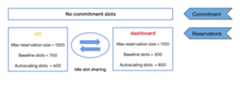
In this example, theetl reservation can scale to 1300 slots (700 baselineslots plus 600 autoscale slots). If thedashboard reservation is not in use,theetl reservation can use the 300 slots from thedashboard reservationif no job is running there, leading to a maximum of 1600 possible slots.
Thedashboard reservation can scale to 1100 slots (300 baseline slots plus800 autoscale slots). If theetl reservation is totally idle, thedashboard reservation can scale to a maximum of 1800 slots (300 baselineslots plus 800 autoscale slots plus 700 idle slots in theetl reservation).
If theetl reservation requires more than 700 baseline slots, which arealways available, it attempts to add slots by using the following methods inorder:
- 700 baseline slots.
- Idle slot sharing with the 300 baseline slots in the
dashboardreservation. Your reservation only shares idle baseline slotswith other reservations that are created with the same edition. - Scaling up 600 additional slots to the maximum reservation size.
Using slot commitments
The following example shows autoscaling slots using capacity commitments.
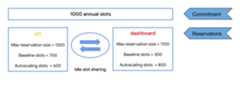
Like reservation baselines, slot commitments allow you to allocate a fixednumber of slots that are available to all reservations. Unlike baseline slots, acommitment cannot be reduced during the term. Slot commitments areoptionalbut can save costs if baseline slots are required for long periods of time. Slotcommitments are used to cover baseline slots for your reservations. Any unusedslot capacity is then shared as idle slots across other reservations. Slotcommitments don't apply to autoscaling slots. To ensure that youreceive the discounted rate for your committed slots, make sure that yourslot commitments are sufficient to cover your baseline slots.
In this example, you are charged a predefined rate for the capacity commitmentslots. You are charged at the autoscaling rate for the number of autoscalingslots after autoscaling activates and reservations are in an upscaled state.For autoscaling rate, you are charged for the number of scaled slots,not the number of slots used.
The following example shows reservations when the number of baseline slotsexceeds the number of committed slots.

In this example, there is a total of 1000 baseline slots between the tworeservations, 500 from theetl reservation and 500 from thedashboardreservation. However, the commitment only covers 800 slots. In this scenario,the excess slots are charged at the pay as you go (PAYG) rate.
Maximum available slots
You can calculate the maximum number of slots a reservation can use by addingthe baseline slots, the maximum number of autoscale slots, and any slots incommitments that were created with the same edition and are not covered by thebaseline slots. The example in the previous image is set up as follows:
- A capacity commitment of 1000 annual slots. Those slots are assigned asbaseline slots in the
etlreservation and thedashboardreservation. - 700 baseline slots assigned to the
etlreservation. - 300 baseline slots assigned to the
dashboardreservation. - Autoscale slots of 600 for the
etlreservation. - Autoscale slots of 800 for the
dashboardreservation.
For theetl reservation, the maximum number of slots possible is equal totheetl baseline slots (700) plus thedashboard baseline slots (300, ifall slots are idle) plus the maximum number of autoscale slots (600). So themaximum number of slots theetl reservation could use in this example is1600. This number exceeds the number in the capacity commitment.
In the following example, the annual commitment exceeds the assigned baseline slots.
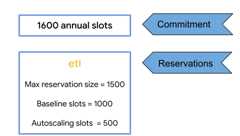
In this example, we have:
- A capacity commitment of 1600 annual slots.
- A maximum reservation size of 1500 (including 500 autoscaling slots).
- 1000 baseline slots assigned to the
etlreservation.
The maximum number of slots available to the reservation is equal to thebaseline slots (1000) plus any committed idle slots not dedicated to thebaseline slots (1600 annual slots - 1000 baseline slots = 600) plus the numberof autoscaling slots (500). So the maximum potential slots in this reservationis 2100. The autoscaled slots are additional slots above the capacitycommitment.
Autoscaling best practices
When first using autoscaler, set the number of autoscaling slots to ameaningful number based on past and expected performance. Once thereservation is created, actively monitor the failure rate, performance, andbill and adjust the number of autoscaling slots as needed.
Autoscaler has a 1 minute minimum before scaling down so it is important toset the maximum number of autoscaled slots to balance between performance andcost. If the maximum number of autoscale slots is too large and your job canuse all the slots to complete a job in seconds, you still incur costs for themaximum slots for the full minute. If you lower your max slots to half thecurrent amount, your reservation is scaled to a lower number and the job canuse more
slot_secondsduring that minute, reducing waste. For helpdetermining your slot requirements, seeMonitor jobperformance. As an alternative approach todetermine your slot requirements, seeView edition slotrecommendations.Slot usage can occasionally exceed the sum of your baseline plus scaledslots. You are not billed for slot usage that is greater than your baselineplus scaled slots.
Autoscaler is most efficient for heavy, long-running workloads, such asworkloads with multiple concurrent queries. Avoid sending queries one at atime, since each query scales the reservation where it willremain scaled for a 1 minute minimum. If you continuously send queries,causing a constant workload, setting a baseline and buying a commitmentprovides constant capacity at a discounted price.
BigQuery autoscaling is subject to capacity availability.BigQuery attempts to meet customer capacity demandbased on historical usage.To achieve capacity guarantees, you can set an optional slotbaseline, which is the number of guaranteed slots in a reservation.With baselines, slots are immediately available and you pay for themwhether you use them or not. To ensure capacity is available for large,inorganic demands, such as high-traffic holidays, contactthe BigQuery teamseveral weeks in advance.
Baseline slots are always charged. If acapacitycommitment expires, you might needto manually adjust the amount of baseline slots in your reservations to avoidany unwanted charges. For example, consider that you have a 1-year commitmentwith 100 slots and a reservation with 100 baseline slots. The commitmentexpires and doesn't have a renewal plan. Once the commitment expires, you payfor 100 baseline slots at thepay as you gorate.
Monitor autoscaling
For information about monitoring slot usage and job performance with autoscaling, seeMonitor autoscaling.
Excess slot usage
When a job holds onto slots for too long, it can receive an unfair share of slots.To prevent delays, BigQuery allows other jobs toborrow additionalslots, resulting in periods of total slot use above your specified slot capacity.Any excess slot usage is attributed only to the jobs that receive more than their fair share.
The excess slots are not billed directly to you. Instead, jobs continue torun and accrue slot usage at their fair share until all of their excessusage is covered by your allocated capacity. Excess slots are excluded fromreported slot usage with the exception of certain detailedexecution statistics.
Note that some preemptive borrowing of slots can occur to reduce futuredelays and to provide other benefits such as reduced slot cost variabilityand reduced tail latency. Slot borrowing is limited to a small fraction ofyour total slot capacity.
Except as otherwise noted, the content of this page is licensed under theCreative Commons Attribution 4.0 License, and code samples are licensed under theApache 2.0 License. For details, see theGoogle Developers Site Policies. Java is a registered trademark of Oracle and/or its affiliates.
Last updated 2025-12-15 UTC.