

Estimate slot capacity requirements
When you purchase reserved slots in BigQuery, you must estimate theright number of slots for your particular workload. The BigQueryslot estimator helps you to manage slot capacity based on historical performancemetrics.
You can use the slot estimator for your edition, reservation and on-demandworkloads to perform the following tasks:
For the selectededition workloads:
- View slot capacity and utilization data for the past 30 days and identifyperiods of peak utilization when the most slots are used.
- View cost-optimal recommendations for commitment and autoscaling slots withsimilar performance.
- View your current reservation settings for a specific edition.
For specific reservation workloads:
- View slot capacity and utilization data for the past 30 days and identifyperiods of peak utilization when the most slots are used.
- View job latency percentiles (P90, P95, etc.) to understand queryperformance.
- Model how increasing or reducing max reservation slots might affectperformance.
For on-demand billing workloads:
- View on-demand slot usage data of the entire organization or an individualproject for the past 30 days.
- View cost-optimal recommendations for commitment and autoscaling slots withsimilar performance if you move to the Enterprise edition.
Customers who use Enterprise edition, Enterprise Plus edition,or on-demand billing can use BigQuery slot recommender to viewslot usage, optimize commitments, and improve performance. For moreinformation, seeView edition slotrecommendations.
Limitations
- Data is limited to the past 30 days.
- The models do not include
ML_EXTERNALassignments.If a large percentage of your slots are used forML_EXTERNALassignments,then the modeled results are less accurate.
Before you begin
Grant Identity and Access Management (IAM) roles that give users the necessary permissionsto perform each task in this document.
Required permissions
To use the slot estimator for reservations data, you need the followingIAM permissions on the administration project:
bigquery.reservations.listbigquery.reservationAssignments.listbigquery.capacityCommitments.list
Each of the following predefined IAM roles includes thepermissions that you need in order to use the slot estimator:
roles/bigquery.adminroles/bigquery.resourceAdminroles/bigquery.resourceEditorroles/bigquery.resourceViewerroles/bigquery.user
To use the slot estimator for on-demand usage data, you need toenable theReservationsAPI on aproject you intend to use as the administration project to manage reservations.Other than the permissions above, you also need one of the followingIAM permissions on your organization to see organization-leveldata or the project to see project-level data:
bigquery.jobs.listExecutionMetadata(can only be applied on organizationlevel)bigquery.jobs.listAll(can be applied on both organization or projectlevel)
Each of the following predefined IAM roles includes thepermissions that you need in order to use the slot estimator:
roles/bigquery.adminroles/bigquery.resourceAdminroles/bigquery.resourceEditorroles/bigquery.resourceViewer
To view the commitment slots recommendations, you also need the permissionsdescribed inView edition slotrecommendations.
For more information about IAM roles in BigQuery,seePredefined roles and permissions.
View slot capacity and utilization
To view slot capacity and utilization over time, navigate to the slot estimator:
In the Google Cloud console, open the BigQuery page.
Select your administration project.
- Click theSelect from drop-down list at the top of the page.
- In theSelect from window that appears, select your project.
In the navigation menu, clickCapacity management.
Click theSlot estimator tab.
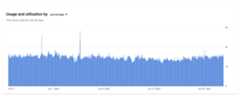
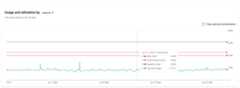
The utilization chart shows slot capacity and utilization over the past 30 days,calculated using hourly granularity.
TheUsage and utilization by percentage tab shows slot utilization as apercentage of slot usage by max slots.
TheUsage and utilization by capacity tab shows max slots and usage asabsolute values.
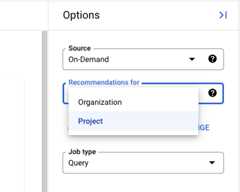
You can choose an edition or on-demand option from theSource drop-down toview statistics for different scopes. Selecting an edition populates theReservation drop-down with relevant reservations.
For on-demand options, you can choose either an individual project or the entireorganization from theRecommendations for drop-down if you have organization level permissions.The Slot Estimator page only shows the project-level information if you onlyhave project level permissions.
The statistics forUsage and utilization by capacity tab may vary slightlybased on different scope:
- For edition source, it shows max slots available for the entire edition,commitment slots, sum of baseline slots, average slot usage, P99 slot usageand P50 slot usage.
- For specific reservation, it shows max reservation slots, baseline slots,average slot usage, P99 slot usage and P50 slot usage.
- For on-demand source, it shows average slot usage, P99 slot usage and P50slot usage.
Model slot performance
When a reservation is selected, you can use the slot estimator to view jobperformance data and to model the effect of changing the number of max slots.The slot estimator lets you model how performance might change at differentcapacity levels, ranging from 80% of the minimum value of max slots size in theobservation period to 150% of the current max slots. In other words, thedecrease in options cannot exceed 20% of minimum capacity of the 30-day timeframe,while the increase in options cannot exceed 50% of current capacity.
The models assume a replay of the previous 30 days' usage pattern, whereeverything remains the same except for a change in slots.
The estimated performance improvement is based on several factors. The mostimportant factors are the number of slots in the model, and the proportion ofjobs in each percentile bucket that ran during peak periods versus regularperiods. Peak periods are defined as durations in which almost all slots wereused. Jobs running during these times are most impacted by slot contention, andtherefore see the most performance gain from additional slots. As a result,different buckets of jobs can see different effects from the same capacityincrease, depending on when they are run.
Caution: The actual impact on job performance can vary based on future usage.The estimated performance information is only for guidance.To model slot performance, perform the following steps:
In the Google Cloud console, open the BigQuery page.
Select your administration project.
- Click theSelect from drop-down list at the top of the page.
- In theSelect from window that appears, select your project.
In the navigation menu, clickCapacity management.
Click theSlot estimator tab.
In theReservation drop-down, select a particular reservation. The modelincludes the number of idle slots that the reservation was able to borrow atany given time.
In theModel with additional slots on max slots drop-down, select one ormore values of slots to model and clickOK.
The table underChanges in job performance with additional slots shows jobperformance data from the past 30 days, along with the estimated change inperformance from increasing or decreasing max slots. The data is grouped intopercentages by job duration for all jobs that ran in the selected timeframe.The column denoted by the light bulb icon corresponds to the performance-enhancingrecommendation for the selected reservation.
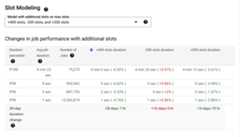
The performance data is broken down by percentile. The table splits the datainto at most 12 buckets: P10 through P90, plus P95, P99, and P100. The P100bucket represents the top 1% of jobs that took the longest time to run; P99includes the top 96% to 99%; P95 includes the top 91% to 95%; P90 includes 81%to 90%; and so forth. Depending on the data, the table may group the data intofewer buckets. In that case, the table contains fewer rows.
For each percentile bucket, the table shows the following information:
- Job duration percentile: The percentile bucket for this row.
- Average job duration: The average time that jobs in that percentile buckettook to run.
- Number of jobs: The number of jobs in that percentile bucket.
- For each model, the estimated average duration for jobs in that percentile.
The table also lists an estimated "30-day change" statistic for each model. Thisvalue is the estimated change in total hours spent processing the jobs in the30-day history at different slot capacities.
Understand the modeling results with slot usage
For fixed-capacity reservations, if idle slot sharing is enabled, then jobs inthat reservation can borrow idle slots from other reservations. As a result,utilization can exceed 100% of allocated slots. If a reservation consistentlyutilizes idle slots from other reservations, it suggests that the reservationsize might need to be increased. This is important because the workload'sperformance could degrade if idle slot availability decreases in the future. Onthe other hand, if a reservation seldom uses its full capacity, the reservationmight be too large.
Reservations that useautoscaling useand add slots in the following priority:
- Baseline slots.
- Idle slot sharing (if enabled).
- Autoscale slots.
If an autoscaling reservation is consistently maxing out autoscaling slots, thismight be a signal to increase the max reservation slots. For information aboutviewing your slot usage, seeView administrative resourcecharts.
Pricing
You can use the slot estimator at no charge.
Except as otherwise noted, the content of this page is licensed under theCreative Commons Attribution 4.0 License, and code samples are licensed under theApache 2.0 License. For details, see theGoogle Developers Site Policies. Java is a registered trademark of Oracle and/or its affiliates.
Last updated 2026-02-18 UTC.