

Search indexed data
This page provides examples of searching for table data in BigQuery.When you index your data, BigQuery can optimize some queriesthat use theSEARCH functionor otherfunctions and operators,such as=,IN,LIKE, andSTARTS_WITH.
SQL queries return correct resultsfrom all ingested data, even if someof the data isn't indexed yet. However, query performance can be greatlyimproved with an index. Savings inbytes processedandslot millisecondsare maximized when the number of searchresults make up a relatively small fraction of the total rows in your tablebecause less data is scanned. To determinewhether an index was used for a query, seesearch index usage.
Create a search index
The following table calledLogs is used to show differentways of using theSEARCH function. This example table is quite small, but inpractice the performance gains you get withSEARCH improve with the size ofthe table.
CREATETABLEmy_dataset.Logs(LevelSTRING,SourceSTRING,MessageSTRING)AS(SELECT'INFO'asLevel,'65.177.8.234'asSource,'Entry Foo-Bar created'asMessageUNIONALLSELECT'WARNING','132.249.240.10','Entry Foo-Bar already exists, created by 65.177.8.234'UNIONALLSELECT'INFO','94.60.64.181','Entry Foo-Bar deleted'UNIONALLSELECT'SEVERE','4.113.82.10','Entry Foo-Bar does not exist, deleted by 94.60.64.181'UNIONALLSELECT'INFO','181.94.60.64','Entry Foo-Baz created');
The table looks like the following:
+---------+----------------+-------------------------------------------------------+| Level | Source | Message |+---------+----------------+-------------------------------------------------------+| INFO | 65.177.8.234 | Entry Foo-Bar created || WARNING | 132.249.240.10 | Entry Foo-Bar already exists, created by 65.177.8.234 || INFO | 94.60.64.181 | Entry Foo-Bar deleted || SEVERE | 4.113.82.10 | Entry Foo-Bar does not exist, deleted by 94.60.64.181 || INFO | 181.94.60.64 | Entry Foo-Baz created |+---------+----------------+-------------------------------------------------------+
Create a search index on theLogs table using the default text analyzer:
CREATESEARCHINDEXmy_indexONmy_dataset.Logs(ALLCOLUMNS);
For more information about search indexes, seeManage search indexes.
Use theSEARCH function
TheSEARCH function provides tokenized search on data.SEARCH is designed to be used with anindex tooptimize lookups.You can use theSEARCH function to search an entire table or restrict yoursearch to specific columns.
Search an entire table
The following query searches across all columns of theLogs table for thevaluebar and returns the rows that contain this value, regardless ofcapitalization. Since the search index uses the default text analyzer, you don'tneed to specify it in theSEARCH function.
SELECT*FROMmy_dataset.LogsWHERESEARCH(Logs,'bar');
+---------+----------------+-------------------------------------------------------+| Level | Source | Message |+---------+----------------+-------------------------------------------------------+| INFO | 65.177.8.234 | Entry Foo-Bar created || WARNING | 132.249.240.10 | Entry Foo-Bar already exists, created by 65.177.8.234 || INFO | 94.60.64.181 | Entry Foo-Bar deleted || SEVERE | 4.113.82.10 | Entry Foo-Bar does not exist, deleted by 94.60.64.181 |+---------+----------------+-------------------------------------------------------+
The following query searches across all columns of theLogs table for thevalue`94.60.64.181` and returns the rows that contain this value. Thebackticks allow for an exact search, which is why the last row of theLogstable which contains181.94.60.64 is omitted.
SELECT*FROMmy_dataset.LogsWHERESEARCH(Logs,'`94.60.64.181`');
+---------+----------------+-------------------------------------------------------+| Level | Source | Message |+---------+----------------+-------------------------------------------------------+| INFO | 94.60.64.181 | Entry Foo-Bar deleted || SEVERE | 4.113.82.10 | Entry Foo-Bar does not exist, deleted by 94.60.64.181 |+---------+----------------+-------------------------------------------------------+
Search a subset of columns
SEARCH makes it easy to specify a subset of columns within which to search fordata. The following query searches theMessage column of theLogs table forthe value94.60.64.181 and returns the rows that contain this value.
SELECT*FROMmy_dataset.LogsWHERESEARCH(Message,'`94.60.64.181`');
+---------+----------------+-------------------------------------------------------+| Level | Source | Message |+---------+----------------+-------------------------------------------------------+| SEVERE | 4.113.82.10 | Entry Foo-Bar does not exist, deleted by 94.60.64.181 |+---------+----------------+-------------------------------------------------------+
The following query searches both theSource andMessage columns of theLogs table. It returns the rows that contain the value94.60.64.181 fromeither column.
SELECT*FROMmy_dataset.LogsWHERESEARCH((Source,Message),'`94.60.64.181`');
+---------+----------------+-------------------------------------------------------+| Level | Source | Message |+---------+----------------+-------------------------------------------------------+| INFO | 94.60.64.181 | Entry Foo-Bar deleted || SEVERE | 4.113.82.10 | Entry Foo-Bar does not exist, deleted by 94.60.64.181 |+---------+----------------+-------------------------------------------------------+
Exclude columns from a search
If a table table has many columns and you want to search most of them, it may beeasier to specify only the columns to exclude from the search. The followingquery searches across all columns of theLogs table except fortheMessage column. It returns the rows of any columns other thanMessagethat contains the value94.60.64.181.
SELECT*FROMmy_dataset.LogsWHERESEARCH((SELECTASSTRUCTLogs.*EXCEPT(Message)),'`94.60.64.181`');
+---------+----------------+---------------------------------------------------+| Level | Source | Message |+---------+----------------+---------------------------------------------------+| INFO | 94.60.64.181 | Entry Foo-Bar deleted |+---------+----------------+---------------------------------------------------+
Use a different text analyzer
The following example creates a table calledcontact_info with an index thatuses theNO_OP_ANALYZERtext analyzer:
CREATETABLEmy_dataset.contact_info(nameSTRING,emailSTRING)AS(SELECT'Kim Lee'ASname,'kim.lee@example.com'ASemailUNIONALLSELECT'Kim'ASname,'kim@example.com'ASemailUNIONALLSELECT'Sasha'ASname,'sasha@example.com'ASemail);CREATESEARCHINDEXnoop_indexONmy_dataset.contact_info(ALLCOLUMNS)OPTIONS(analyzer='NO_OP_ANALYZER');
+---------+---------------------+| name | email |+---------+---------------------+| Kim Lee | kim.lee@example.com || Kim | kim@example.com || Sasha | sasha@example.com |+---------+---------------------+
The following query searches forKim in thename column andkimin theemail column.Since the search index doesn't use the default text analyzer, you must pass thename of the analyzer to theSEARCH function.
SELECTname,SEARCH(name,'Kim',analyzer=>'NO_OP_ANALYZER')ASname_Kim,email,SEARCH(email,'kim',analyzer=>'NO_OP_ANALYZER')ASemail_kimFROMmy_dataset.contact_info;
TheNO_OP_ANALYZER doesn't modify the text, so theSEARCH function onlyreturnsTRUE for exact matches:
+---------+----------+---------------------+-----------+| name | name_Kim | email | email_kim |+---------+----------+---------------------+-----------+| Kim Lee | FALSE | kim.lee@example.com | FALSE || Kim | TRUE | kim@example.com | FALSE || Sasha | FALSE | sasha@example.com | FALSE |+---------+----------+---------------------+-----------+
Configure text analyzer options
TheLOG_ANALYZER andPATTERN_ANALYZERtextanalyzers can becustomized by adding a JSON-formatted string to the configuration options. Youcan configure text analyzers in theSEARCHfunction, theCREATESEARCH INDEX DDLstatement,and theTEXT_ANALYZEfunction.
The following example creates a table calledcomplex_table with an index thatuses theLOG_ANALYZER text analyzer. It uses a JSON-formatted string toconfigure the analyzer options:
CREATETABLEdataset.complex_table(aSTRING,my_structSTRUCT<string_fieldSTRING,int_fieldINT64>,bARRAY<STRING>);CREATESEARCHINDEXmy_indexONdataset.complex_table(a,my_struct,b)OPTIONS(analyzer='LOG_ANALYZER',analyzer_options='''{ "token_filters": [ { "normalization": {"mode": "NONE"} } ]}''');
The following tables shows examples of calls to theSEARCH function withdifferent text analyzers and their results. The first table calls theSEARCHfunction using the default text analyzer, theLOG_ANALYZER:
| Function call | Returns | Reason |
|---|---|---|
| SEARCH('foobarexample', NULL) | ERROR | The search_terms is `NULL`. |
| SEARCH('foobarexample', '') | ERROR | The search_terms contains no tokens. |
| SEARCH('foobar-example', 'foobar example') | TRUE | '-' and ' ' are delimiters. |
| SEARCH('foobar-example', 'foobarexample') | FALSE | The search_terms isn't split. |
| SEARCH('foobar-example', 'foobar\\&example') | TRUE | The double backslash escapes the ampersand which is a delimiter. |
| SEARCH('foobar-example', R'foobar\&example') | TRUE | The single backslash escapes the ampersand in a raw string. |
| SEARCH('foobar-example', '`foobar&example`') | FALSE | The backticks require an exact match for foobar&example. |
| SEARCH('foobar&example', '`foobar&example`') | TRUE | An exact match is found. |
| SEARCH('foobar-example', 'example foobar') | TRUE | The order of terms doesn't matter. |
| SEARCH('foobar-example', 'foobar example') | TRUE | Tokens are made lower-case. |
| SEARCH('foobar-example', '`foobar-example`') | TRUE | An exact match is found. |
| SEARCH('foobar-example', '`foobar`') | FALSE | Backticks preserve capitalization. |
| SEARCH('`foobar-example`', '`foobar-example`') | FALSE | Backticks don't have special meaning for data_to_search and |
| SEARCH('foobar@example.com', '`example.com`') | TRUE | An exact match is found after the delimiter in data_to_search. |
| SEARCH('a foobar-example b', '`foobar-example`') | TRUE | An exact match is found between the space delimiters. |
| SEARCH(['foobar', 'example'], 'foobar example') | FALSE | No single array entry matches all search terms. |
| SEARCH('foobar=', '`foobar\\=`') | FALSE | The search_terms is equivalent to foobar\=. |
| SEARCH('foobar=', R'`foobar\=`') | FALSE | This is equivalent to the previous example. |
| SEARCH('foobar=', 'foobar\\=') | TRUE | The equals sign is a delimiter in the data and query. |
| SEARCH('foobar=', R'foobar\=') | TRUE | This is equivalent to the previous example. |
| SEARCH('foobar.example', '`foobar`') | TRUE | An exact match is found. |
| SEARCH('foobar.example', '`foobar.`') | FALSE | `foobar.` isn't analyzed because of backticks; it isn't |
| SEARCH('foobar..example', '`foobar.`') | TRUE | `foobar.` isn't analyzed because of backticks; it is followed |
The following table shows examples of calls to theSEARCH function using theNO_OP_ANALYZER text analyzer and reasons for various return values:
| Function call | Returns | Reason |
|---|---|---|
| SEARCH('foobar', 'foobar', analyzer=>'NO_OP_ANALYZER') | TRUE | An exact match is found. |
| SEARCH('foobar', '`foobar`', analyzer=>'NO_OP_ANALYZER') | FALSE | Backticks aren't special characters for NO_OP_ANALYZER. |
| SEARCH('Foobar', 'foobar', analyzer=>'NO_OP_ANALYZER') | FALSE | The capitalization doesn't match. |
| SEARCH('foobar example', 'foobar', analyzer=>'NO_OP_ANALYZER') | FALSE | There are no delimiters for NO_OP_ANALYZER. |
| SEARCH('', '', analyzer=>'NO_OP_ANALYZER') | TRUE | There are no delimiters for NO_OP_ANALYZER. |
Other operators and functions
You can perform search index optimizations with several operators,functions, and predicates.
Optimize with operators and comparison functions
BigQuery can optimize some queries that use theequal operator(=),IN operator,LIKE operator,orSTARTS_WITH functionto compare string literals with indexed data.
Optimize with string predicates
The following predicates are eligible for search index optimization:
column_name = 'string_literal''string_literal' = column_namestruct_column.nested_field = 'string_literal'string_array_column[OFFSET(0)] = 'string_literal'string_array_column[ORDINAL(1)] = 'string_literal'column_name IN ('string_literal1', 'string_literal2', ...)STARTS_WITH(column_name, 'prefix')column_name LIKE 'prefix%'
Optimize with numeric predicates
If the search index was created with numeric data types, BigQuerycan optimize some queries that use the equal operator (=) orIN operatorwith indexed data. The following predicates are eligible for search indexoptimization:
INT64(json_column.int64_field) = 1int64_column = 1int64_array_column[OFFSET(0)] = 1int64_column IN (1, 2)struct_column.nested_int64_field = 1struct_column.nested_timestamp_field = TIMESTAMP "2024-02-15 21:31:40"timestamp_column = "2024-02-15 21:31:40"timestamp_column IN ("2024-02-15 21:31:40", "2024-02-16 21:31:40")
Optimize functions that produce indexed data
BigQuery supports search index optimization when certainfunctions are applied to indexed data.If the search index uses the defaultLOG_ANALYZER text analyzer then you canapply theUPPERorLOWERfunctions to the column, such asUPPER(column_name) = 'STRING_LITERAL'.
ForJSON scalar string data extracted from an indexedJSON column, you canapply theSTRINGfunction or its safe version,SAFE.STRING.If the extractedJSON value is not a string, then theSTRING functionproduces an error and theSAFE.STRING function returnsNULL.
For indexedJSON-formattedSTRING (notJSON) data, you can apply the followingfunctions:
For example, suppose you have the following indexed table calleddataset.person_data with aJSON and aSTRING column:
+----------------------------------------------------------------+-----------------------------------------+| json_column | string_column |+----------------------------------------------------------------+-----------------------------------------+| { "name" : "Ariel", "email" : "cloudysanfrancisco@gmail.com" } | { "name" : "Ariel", "job" : "doctor" } |+----------------------------------------------------------------+-----------------------------------------+The following queries are eligible for optimization:
SELECT*FROMdataset.person_dataWHERESAFE.STRING(json_column.email)='cloudysanfrancisco@gmail.com';
SELECT*FROMdataset.person_dataWHEREJSON_VALUE(string_column,'$.job')IN('doctor','lawyer','teacher');
Combinations of these functions are also optimized, such asUPPER(JSON_VALUE(json_string_expression)) = 'FOO'.
Search index usage
To determine whether a search index was used for a query, you can view thejob details or query one of theINFORMATION_SCHEMA.JOBS* views.
View job details
InJob Information of theQuery results, theIndex Usage Mode andIndex Unused Reasonsfields provide detailed information on search indexusage.
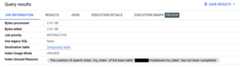
Information on search index usage is also available through thesearchStatistics fieldin theJobs.Get API method. TheindexUsageMode field insearchStatistics indicates whether a search indexwas used with the following values:
UNUSED: no search index was used.PARTIALLY_USED: part of the query used search indexes and part did not.FULLY_USED: everySEARCHfunction in the query used a search index.
WhenindexUsageMode isUNUSED orPARTIALLY_USED, theindexUnusuedReasonsfield contains information about why search indexes were not used in the query.
To viewsearchStatistics for a query, run thebq show command.
bq show --format=prettyjson -jJOB_ID
Example
Suppose you run a query that calls theSEARCH function on data in a table. Youcan view thejob details of the query tofind the job ID, then run thebq show command to see more information:
bq show --format=prettyjson --j my_project:US.bquijob_123x456_789y123z456cThe output contains many fields, includingsearchStatistics, which lookssimilar to the following. In this example,indexUsageMode indicates that theindex was not used. The reason is that the table doesn't have a search index. Tosolve this problem,create a search index on thetable. See theindexUnusedReasoncode fieldfor a list of all reasons a search index might not be used in a query.
"searchStatistics": { "indexUnusedReasons": [ { "baseTable": { "datasetId": "my_dataset", "projectId": "my_project", "tableId": "my_table" }, "code": "INDEX_CONFIG_NOT_AVAILABLE", "message": "There is no search index configuration for the base table `my_project:my_dataset.my_table`." } ], "indexUsageMode": "UNUSED"},Query INFORMATION_SCHEMA views
You can also see search index usage for multiple jobs in a region in thefollowing views:
INFORMATION_SCHEMA.JOBSINFORMATION_SCHEMA.JOBS_BY_USERINFORMATION_SCHEMA.JOBS_BY_FOLDERINFORMATION_SCHEMA.JOBS_BY_ORGANIZATION
The following query shows information about index usage for all search indexoptimizable queries in the past 7 days:
SELECTjob_id,search_statistics.index_usage_mode,index_unused_reason.code,index_unused_reason.base_table.table_id,index_unused_reason.index_nameFROM`region-REGION_NAME`.INFORMATION_SCHEMA.JOBS,UNNEST(search_statistics.index_unused_reasons)ASindex_unused_reasonWHEREend_timeBETWEENTIMESTAMP_SUB(CURRENT_TIMESTAMP(),INTERVAL7DAY)ANDCURRENT_TIMESTAMP();
The result is similar to the following:
+-----------+----------------------------------------+-----------------------+| job_id | index_usage_mode | code | table_id | index_name |+-----------+------------------+---------------------+-----------------------+| bquxjob_1 | UNUSED | BASE_TABLE_TOO_SMALL| my_table | my_index || bquxjob_2 | FULLY_USED | NULL | my_table | my_index |+-----------+----------------------------------------+-----------------------+
Best practices
The following sections describe best practices for searching.
Search selectively
Searching works best when your search has few results. Make your searches asspecific as possible.
ORDER BY LIMIT optimization
Queries that useSEARCH,=,IN,LIKE orSTARTS_WITH on a very largepartitioned table can be optimizedwhen you use anORDER BY clause on the partitioned field and aLIMIT clause.For queries that don't contain theSEARCH function, you can use theother operators and functions to takeadvantage of the optimization. The optimization is applied whether or not thetable is indexed. This works well if you're searching for a common term.For example, suppose theLogs table created earlieris partitioned on an additionalDATE type columncalledday. The following query is optimized:
SELECTLevel,Source,MessageFROMmy_dataset.LogsWHERESEARCH(Message,"foo")ORDERBYdayLIMIT10;
Scope your search
When you use theSEARCH function, only search the columns of the table thatyou expect to contain your search terms. This improves performance andreduces the number of bytes that need to be scanned.
Use backticks
When you use theSEARCH function with theLOG_ANALYZER text analyzer,enclosing your search query in backticksforces an exact match. This is helpfulif your search is case-sensitive or contains characters that shouldn't beinterpreted as delimiters. For example, to search for the IP address192.0.2.1, use`192.0.2.1`. Without the backticks, the search returnsany row that contains the individual tokens192,0,2, and1, in anyorder.
Except as otherwise noted, the content of this page is licensed under theCreative Commons Attribution 4.0 License, and code samples are licensed under theApache 2.0 License. For details, see theGoogle Developers Site Policies. Java is a registered trademark of Oracle and/or its affiliates.
Last updated 2025-12-15 UTC.