

Introduction to saved queries
This document provides an introduction to saved queries in BigQuery.You can use saved queries to create and manage SQL scripts. Changes to a savedquery are automatically saved so that you don't lose your work when you closethe query editor.Saved queries improve collaboration and query management with the followingoptions:
- Share saved querieswith specific users and groups by usingIdentity and Access Management (IAM).
- Review the query version history.
- Revert to or branch from previous versions of the query.
Saved queries areBigQuery Studiocode assets powered byDataform.Notebooks are also code assets. Allcode assets are stored in a defaultregion. Updating the default region changesthe region for all code assets created after that point.
Saved query capabilities are available only in the Google Cloud console.
Saved query security
You control access to saved queries by using Identity and Access Management (IAM) roles.For more information, seeShare saved queries.
Supported regions
BigQuery Studio lets you save, share, and manage saved queries. Thefollowing table lists the regions where BigQuery Studio is available:
| Region description | Region name | Details | |
|---|---|---|---|
| Africa | |||
| Johannesburg | africa-south1 | ||
| Americas | |||
| Columbus | us-east5 | ||
| Dallas | us-south1 |  Low CO2 Low CO2 | |
| Iowa | us-central1 | Low CO2 | |
| Los Angeles | us-west2 | ||
| Las Vegas | us-west4 | ||
| Montréal | northamerica-northeast1 | Low CO2 | |
| N. Virginia | us-east4 | ||
| Oregon | us-west1 | Low CO2 | |
| São Paulo | southamerica-east1 | Low CO2 | |
| South Carolina | us-east1 | ||
| Asia Pacific | |||
| Hong Kong | asia-east2 | ||
| Jakarta | asia-southeast2 | ||
| Mumbai | asia-south1 | ||
| Seoul | asia-northeast3 | ||
| Singapore | asia-southeast1 | ||
| Sydney | australia-southeast1 | ||
| Taiwan | asia-east1 | ||
| Tokyo | asia-northeast1 | ||
| Europe | |||
| Belgium | europe-west1 | Low CO2 | |
| Frankfurt | europe-west3 | ||
| London | europe-west2 | Low CO2 | |
| Madrid | europe-southwest1 | Low CO2 | |
| Netherlands | europe-west4 | Low CO2 | |
| Turin | europe-west12 | ||
| Zürich | europe-west6 | Low CO2 | |
| Middle East | |||
| Doha | me-central1 | ||
| Dammam | me-central2 | ||
Quotas and limits
For more information, seeSaved query quotas and limits.
Limitations
Saved queries have the following limitations:
- You cangrant public access to saved queriesonly to the
allAuthenticatedUsersprincipal.You can't grant access to saved queries to theallUsersprincipal. - If your Google Cloud project contains more than 2500 classic saved queries,you can't usebatch migrationto migrate classic saved queries to saved queries.
Classic saved queries
Deprecated: Saved queries, available inBigQuery Studio,will fully replace classic saved queries in the future. The deprecation timeline is being reviewed.For more information, seeDeprecation of classic saved queries.To learn how to migrate to saved queries, seeMigrate classic saved queries.Classic saved queries are an earlier way of saving and sharing SQL queries.Classic saved queries provide the query text, and the only query settingretained by a classic saved query is the SQL version. This settinggoverns whether the query uses legacy SQL or GoogleSQL. Toquery the data, users must have access to the data that the saved queryaccesses.
You can see classic saved queries in the(Classic) Queries folder in theClassic Explorer pane:
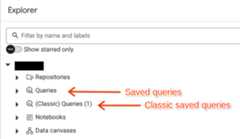
There are 3 types of classic saved queries:
- Personal. Personal classic saved queries are visible only to the user whocreates them. They are identified with the icon.
- Project-level. Project-level saved queries are visible toprincipals that have the requiredpermissions.They are identified with the icon.
- Public. Public classic saved queries are visible to anyone with a link tothe query. They are identified with the icon.
You canmigrateclassic saved queries to saved queries to take advantage of the newcapabilities, orcontinue to maintain themas classic saved queries until deprecation. The timeline for deprecation is being reviewed.
The classic saved query feature is available only in theGoogle Cloud console.
Deprecation of classic saved queries
The saved queries feature ofBigQuery Studiowill replace classic saved queries. The deprecation timeline is being reviewed. To edit existing classic saved queriesafter deprecation, you mustmigrate classic queriesto BigQuery Studio saved queries.
If users, including yourself, have personal queries withinformation that shouldn't be made available to others with access to data inthe project, then the query's owner must delete the queries or the informationbefore completing the migration.
To support this transition, the following BigQuery IAMroles were updated in February 2024:
BigQuery Admin (
roles/bigquery.admin)will getDataform Admin (roles/dataform.admin)permissions.BigQuery Job User (
roles/bigquery.jobUser)will get the following permissions:dataform.locations.getdataform.locations.listdataform.repositories.createdataform.repositories.list
BigQuery User (
roles/bigquery.user)will get the following permissions:dataform.locations.getdataform.locations.listdataform.repositories.createdataform.repositories.list
To let users without the BigQuery Admin, BigQuery Job User, or BigQuery Userroles use saved queries, grant themtherequired permissionsin IAM.
Custom roles won't be automatically updated.To update a custom role with therequired permissions,seeEdit an existing custom role.
What's next
- To learn how to create saved queries, seeCreate saved queries.
- To learn how to manage saved queries, seeManage saved queries.
Except as otherwise noted, the content of this page is licensed under theCreative Commons Attribution 4.0 License, and code samples are licensed under theApache 2.0 License. For details, see theGoogle Developers Site Policies. Java is a registered trademark of Oracle and/or its affiliates.
Last updated 2025-12-15 UTC.