

BigQuery overview
BigQuery is a fully managed, AI-ready data platform that helpsyou manage and analyze your data with built-in features like machine learning,search, geospatial analysis, and business intelligence.BigQuery's serverless architecture lets you use languages likeSQL and Python to answer your organization's biggest questions with zeroinfrastructure management.
BigQuery provides a uniform way to work with both structured andunstructured data and supports open table formats like Apache Iceberg, Delta,and Hudi. BigQuery streaming supports continuous data ingestionand analysis while BigQuery's scalable, distributed analysisengine lets you query terabytes in seconds and petabytes in minutes.
BigQuery offers built-in governance capabilities that let you discover andcurate data, and manage metadata and data quality. Through features likesemantic search and data lineage, you can find and validate relevant data foranalysis. You can share data and AI assets across your organization with thebenefits of access control. These features are powered byDataplex Universal Catalog, which is a unified, intelligent governance solution for dataand AI assets in Google Cloud.BigQuery's architecture consists of two parts: a storage layer thatingests, stores, and optimizes data and a compute layer that provides analyticscapabilities. These compute and storage layers efficiently operateindependently of each other thanks to Google's petabit-scale network thatenables the necessary communication between them.
Legacy databases usually have to share resources between read and writeoperations and analytical operations. This can result in resource conflicts andcan slow queries while data is written to or read from storage.Shared resource pools can become further strained when resources arerequired for database management tasks such as assigning or revokingpermissions. BigQuery's separation of compute and storage layerslets each layer dynamically allocate resources without impacting the performanceor availability of the other.
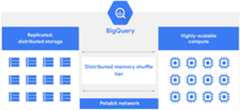
This separation principle lets BigQuery innovate faster becausestorage and compute improvements can be deployed independently, without downtimeor negative impact on system performance. It is also essential to offering afully managed serverless data warehouse in which the BigQueryengineering team handles updates and maintenance. The result is that you don'tneed to provision or manually scale resources, leaving you free to focus ondelivering value instead of traditional database management tasks.
BigQuery interfaces include Google Cloud consoleinterface and the BigQuery command-line tool. Developers anddata scientists can use client libraries with familiar programming includingPython, Java, JavaScript, and Go, as well as BigQuery'sREST API and RPC API to transform and manage data. ODBCand JDBC drivers provide interaction with existing applications includingthird-party tools and utilities.
As a data analyst, data engineer, data warehouse administrator, or datascientist, BigQuery helps you load, process, and analyze data to informcritical business decisions.
Get started with BigQuery
You can start exploring BigQuery in minutes.Take advantage of BigQuery's free usage tier or no-cost sandboxto start loading and querying data.
- BigQuery sandbox: Get started in the BigQuery sandbox, risk-free and at no cost.
- Public datasets: Experience BigQuery's performance by exploring large, real-world data from the Public Datasets Program.
- Google Cloud console quickstart: Familiarize yourself with the power of the BigQuery Studio.
Explore BigQuery
BigQuery's serverless infrastructure lets you focus on your datainstead of resource management. BigQuery combines a cloud-baseddata warehouse and powerful analytic tools.
BigQuery storage
BigQuery stores data using a columnar storage format that isoptimized for analytical queries. BigQuery presents data intables, rows, and columns and provides full support for database transactionsemantics (ACID). BigQuerystorage is automatically replicated across multiple locations to provide highavailability.
- Learn about common patterns to organize BigQueryresourcesin the data warehouse and data marts.
- Learn about datasets,BigQuery's top-level container of tables and views.
- BigQuery Data Transfer Service automates data ingestion.
- Load data into BigQuery using:
- Stream data with theStorage Write API.
- Batch-load data from local files orCloud Storage using formats that include:Avro,Parquet,ORC,CSV,JSON,Datastore,andFirestoreformats.
For more information, seeOverview of BigQuery storage.
BigQuery analytics
Descriptive and prescriptive analysis uses include business intelligence, ad hocanalysis, geospatial analytics, and machine learning.You can query data stored in BigQuery or run queries on datawhere it lives using external tables or federated queries includingCloud Storage, Bigtable, Spanner, orGoogle Sheets stored in Google Drive.
- ANSI-standard SQL queries (SQL:2011 support)including support for joins, nested and repeated fields, analytic andaggregation functions, multi-statement queries, and a variety ofspatial functions withgeospatial analytics - Geographic Information Systems.
- Create views to share your analysis.
- Business intelligence tool support includingBI Engine withLooker Studio,Looker,Google Sheets,and 3rd party tools like Tableau and Power BI.
- BigQuery ML provides machinelearning and predictive analytics.
- BigQuery Studiooffers features such as Python notebooks, and version control for bothnotebooks and saved queries. These features make it easier for you tocomplete your data analysis and machine learning (ML) workflows inBigQuery.
- Query data outside of BigQuerywithfederated queries andexternal tables.
For more information, seeOverview of BigQuery analytics.
BigQuery administration
BigQuery provides centralized management of data and computeresources whileIdentity and Access Management (IAM) helps you secure those resources withthe access model that's used throughout Google Cloud.Google Cloud security best practicesprovide a solid yet flexible approach that can include perimeter security ormore complex and granulardefense-in-depth approach.
- Intro to data security and governancehelps you understand data governance, and what controls you might need tosecure BigQuery resources.
- Jobs are actions thatBigQuery runs on your behalf to load, export, query, or copydata.
- Reservations let you switch betweenon-demand pricing and capacity-based pricing.
For more information, seeIntroduction to BigQuery administration.
BigQuery resources
Explore BigQuery resources:
- Release notes provide change logs offeatures, changes, and deprecations.
- Pricing for analysis andstorage. See also:BigQuery ML,BI Engine, andData Transfer Servicepricing.
- Locations define where you create and storedatasets (regional and multi-region locations).
- StackOverflow hostsan engaged community of developers and analysts working withBigQuery.
- BigQuery Support provides help withBigQuery.
- Google BigQuery: The Definitive Guide: Data Warehousing, Analytics, andMachine Learning at Scaleby Valliappa Lakshmanan and Jordan Tigani, explains howBigQuery works and provides an end-to-end walkthrough on howto use the service.
APIs, tools, and references
Reference materials for BigQuery developers and analysts:
- BigQuery APIandclient libraries present overviews ofBigQuery's features and their use.
- SQL query syntax fordetails about using GoogleSQL.
- BigQuery code samples providehundreds of snippets for client libraries inC#,Go,Java,Node.js,Python,Ruby.Or view thesample browser.
- DML,DDL,anduser-defined functions (UDF)syntax lets you manage and transform your BigQuery data.
- bq command-line tool referencedocuments the syntax, commands, flags, and arguments for the
bqCLI interface. - ODBC / JDBC integrationconnect BigQuery to your existing tooling and infrastructure.
Gemini in BigQuery features
Gemini in BigQuery is partof theGemini for Google Cloud product suitewhich provides AI-powered assistance to help you work with yourdata.
Gemini in BigQuery provides AI assistance to helpyou do the following:
- Explore and understand your data with data insights. Data insights offers an automated, intuitive way to uncover patterns and perform statistical analysis by using insightful queries that are generated from the metadata of your tables. This feature is especially helpful in addressing the cold-start challenges of early data exploration. For more information, seeGenerate data insights in BigQuery.
- Discover, transform, query, and visualize data with BigQuery data canvas. You can use natural language with Gemini in BigQuery, to find, join, and query table assets, visualize results, and seamlessly collaborate with others throughout the entire process. For more information, seeAnalyze with data canvas.
- Get assisted SQL and Python data analysis. You can use Gemini in BigQuery to generate or suggest code in either SQL or Python, and to explain an existing SQL query. You can also use natural language queries to begin data analysis. To learn how to generate, complete, and summarize code, see the following documentation:
- SQL code assist
- Python code assist
- Prepare data for analysis. Data preparation in BigQuery gives you context aware, AI-generated transformation recommendations to cleanse data for analysis. For more information, seePrepare data with Gemini.
- Customize your SQL translations with translation rules. (Preview) Create Gemini-enhanced translation rules to customize your SQL translations when using theinteractive SQL translator. You can describe changes to the SQL translation output using natural language prompts or specify SQL patterns to find and replace. For more information, seeCreate a translation rule.
To learn how to set up Gemini in BigQuery,seeSet up Gemini in BigQuery.
BigQuery roles and resources
BigQuery addresses the needs of data professionals across thefollowing roles and responsibilities.
Data Analyst
Task guidance to help if you need to do the following:
- Query BigQuery datausing interactive or batch queries usingSQL query syntax
- Reference SQLfunctions,operators, andconditional expressionsto query data
- Use tools to analyze and visualize BigQuery dataincluding:Looker,Looker Studio,andGoogle Sheets.
Use geospatial analytics to analyze andvisualize geospatial data with BigQuery'sGeographic Information Systems
Optimize query performanceusing:
- Partitioned tables: Prunelarge tables based on time or integer ranges.
- Materialized views:Define cached views to optimize queries or provide persistentresults.
- BI Engine:BigQuery's fast, in-memory analysis service.
To take a tour of BigQuery's data analytics features directlyin the Google Cloud console, clickTake the tour.
Data Administrator
Task guidance to help if you need to do the following:
- Managecosts withreservations to balance on-demandand capacity-based pricing.
- Understand data security and governanceto help secure data bydataset,table,column,row,orview
- Backup data with table snapshotsto preserve the contents of a table at a particular time.
- View BigQuery INFORMATION_SCHEMAto understand the metadata ofdatasets,jobs,access control,reservations,tables and more.
- Use Jobs to have BigQueryload, export, query, or copy data are actions on your behalf.
- Monitor logs and resources to understandBigQuery and workloads.
For more information, seeIntroduction to BigQueryadministration.
To take a tour of BigQuery data administration featuresdirectly in the Google Cloud console, clickTake the tour.
Data Scientist
Task guidance to help if you need to useBigQuery ML's machinelearning to do thefollowing:
- Understand the end-to-end user journey for machine learning models
- Manage access control forBigQuery ML
- Create and train a BigQuery ML modelsincluding:
- Linear regressionforecasting
- Binary logisticandmulticlass logisticregression classifications
- K-means clusteringfor data segmentation
- Time seriesforecasting with Arima+ models
Data Developer
Task guidance to help if you need to do the following:
- Load data into BigQuerywith:
Use code samplelibrary including:
Google Cloud sample browser(scoped for BigQuery)
BigQuery video tutorials
The following series of video tutorials get you started withBigQuery:
Title | Description |
|---|---|
| How to get started with BigQuery (17:18) | An overview that summarizes what is BigQuery and how to use it. Segments include: ETL pipelines, pricing and optimization, BigQuery ML and BI Engine, and wrapping up with a demo of BigQuery in Google Cloud console. |
| What is BigQuery? (4:39) | An overview of BigQuery of how BigQuery is designed to ingest and store large amounts of data to help analysts and developers alike |
| Using the BigQuery sandbox (3:05) | How to set up a BigQuery sandbox, letting you run queries without needing a credit card |
| Asking questions,running queries (5:11) | How to write and run SQL queries in the BigQuery UI - pluspicking a winning jersey number |
| Loading data into BigQuery (5:31) | How to ingest and analyze data in real time, or just a one-time batch analysis of data - plus cats v. dogs |
| Visualizing query results (5:38) | How data visualization is useful for making complex datasets easier tounderstand and internalize |
| Managing access with IAM (5:23) | How to allow other users to query your datasets in BigQuery with IAM permissions and access control |
| Saving and sharing queries (6:17) | How to save and share your queries in BigQuery hassle-free |
| Protecting sensitive data with authorized views (7:12) | How to share datasets with different users by setting customized access controls |
| Querying external data with BigQuery (5:49) | How to set up an external data source in BigQuery and query data from Cloud Storage, Cloud SQL, Google Drive, and more |
| What are user-defined functions? (4:59) | How to create user-defined functions (UDFs) for analyzing datasets in BigQuery |
What's next
- For an overview of BigQuery storage, seeOverview of BigQuery storage.
- For an overview of BigQuery queries, seeOverview of BigQuery analytics.
- For an overview of BigQuery administration, seeIntroduction to BigQuery administration.
- For an overview of BigQuery security, seeOverview of data security and governance.
Except as otherwise noted, the content of this page is licensed under theCreative Commons Attribution 4.0 License, and code samples are licensed under theApache 2.0 License. For details, see theGoogle Developers Site Policies. Java is a registered trademark of Oracle and/or its affiliates.
Last updated 2025-12-15 UTC.