

Get query performance insights
Theexecution graph for a query is a visual representation of the steps thatBigQuery takes to execute the query. This document describes howto use the query execution graph to diagnose queryperformance issues, and to see query performance insights.
BigQuery offers strong query performance, but it is also a complexdistributed system with many internal and external factors that can affectquery speed. The declarative nature of SQL can alsohide the complexity of query execution. This means that when your queries arerunning slower than anticipated, or slower than prior runs, understanding whathappened can be a challenge.
The query execution graph provides a dynamic graphical interface for inspectingthe query plan and query performance details. You can review thequery execution graph for any running or completed query.
You can also use the query execution graph to get performance insights forqueries. Performance insights provide best-effort suggestions to help youimprove query performance. Since query performance is multi-faceted,performance insights might only provide a partial picture of the overallquery performance.
Required permissions
To use the query execution graph, you must have the following permissions:
bigquery.jobs.getbigquery.jobs.listAll
These permissions are available through the following BigQuerypredefined Identity and Access Management (IAM) roles:
roles/bigquery.adminroles/bigquery.resourceAdminroles/bigquery.resourceEditorroles/bigquery.resourceViewer
Execution graph structure
The query execution graph provides a graphical view of the queryplan in the console. Each box represents astage in the query plansuch as the following:
- Input: Reading data from a table or selecting specific columns
- Join: Merging data from two tables based on the
JOINcondition - Aggregate: Performing calculations such as
SUM - Sort: Ordering the results
Stages are made up ofstepsthat describe the individual operations that each worker within a stageexecutes. You can click a stage to open it and view itssteps. Stages also includerelative and absolute timing information.Stage names summarize the steps they perform. For example, a stage withjoin in its name means that the principal step in the stage is aJOINoperation. Stage names that have+ at the end mean thatthey perform additional important steps. For example, a stage withJOIN+ inits name means that thestage performs a join operation and other important steps.
The lines that connect stages represent the exchange of intermediary databetween stages.BigQuery stores the intermediary data in shuffle memory whilestages are executing.Numbers on the edges indicate the estimated number of rows exchanged betweenstages. Shuffle memory quota is correlated with the number of slots allocatedto the account. If theshuffle quota is exceeded, shuffle memory can spill to disk and cause queryperformance to slow dramatically.
View query performance insights
Console
Follow these steps to see query performance insights:
Open the BigQuery page in the Google Cloud console.
In the left pane, clickExplorer:

If you don't see the left pane, clickExpand left pane to open the pane.
In theExplorer pane, clickJob history.
Click eitherPersonal History orProject History.
In the list of jobs, identify the query job that interests you. ClickActions, and chooseView job in editor.
Select theExecution graph tab to see a graphical representation ofeach stage of the query:
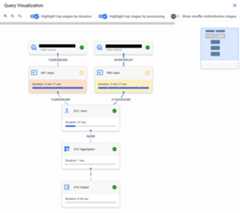
To determine if a query stage has performance insights, look at the iconit displays. Stages that have aninformation icon have performance insights. Stages that have a check icondon't.
Click a stage to open the stage details pane, where you can see thefollowing information:
- Query plan informationfor the stage.
- Thestepsexecuted in the stage.
- Any applicable performance insights.
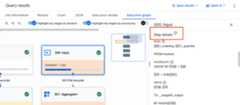
Optional: If you are inspecting a running query, clickSyncto update the execution graph so that it reflects the query's current status.

Optional: To highlight the top stages by stage duration on thegraph, clickHighlight top stages by duration.

Optional: To highlight the top stages by slot time used on thegraph, clickHighlight top stages by processing.

Optional: To include shuffle redistribution stages on thegraph, clickShow shuffle redistribution stages.

Use this option to show the repartition and coalesce stages that are hiddenin the default execution graph.
Repartition and coalesce stages are introduced while the query isrunning, and are used to improve data distribution across the workersprocessing the query. Since these stages are not related to your query text,they are hidden to simplify the query plan that is displayed.
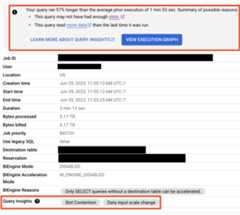
For any query that has performance regression issues, performance insights arealso displayed on theJob Information tab for the query:
SQL
In the Google Cloud console, go to theBigQuery page.
In the query editor, enter the following statement:
SELECT`bigquery-public-data`.persistent_udfs.job_url(project_id||':us.'||job_id)ASjob_url,query_info.performance_insightsFROM`region-REGION_NAME`.INFORMATION_SCHEMA.JOBS_BY_PROJECTWHEREDATE(creation_time)>=CURRENT_DATE-30-- scan 30 days of query historyANDjob_type='QUERY'ANDstate='DONE'ANDerror_resultISNULLANDstatement_type!='SCRIPT'ANDEXISTS(-- Only include queries which had performance insightsSELECT1FROMUNNEST(query_info.performance_insights.stage_performance_standalone_insights)WHEREslot_contentionORinsufficient_shuffle_quotaORbi_engine_reasonsISNOTNULLORhigh_cardinality_joinsISNOTNULLORpartition_skewISNOTNULLUNIONALLSELECT1FROMUNNEST(query_info.performance_insights.stage_performance_change_insights)WHEREinput_data_change.records_read_diff_percentageISNOTNULL);
ClickRun.
For more information about how to run queries, seeRun an interactive query.
API
You can get query performance insights in a non-graphical format bycalling thejobs.listAPI method and inspecting theJobStatistics2information that is returned.
Interpret query performance insights
Use this section to learn more about what performance insights mean and how toaddress them.
Performance insights are intended for two audiences:
Analysts: you run queries in a project. You areinterested in finding out why a query you have run before is unexpectedlyrunning slower, and in getting tips on how to improve a query's performance.You have the permissions described inRequired permissions.
Data lake or data warehouse administrators: you manage your organization'sBigQuery resources and reservations. You have the permissionsassociated with theBigQuery Admin role.
Each of the following sections provides guidance on what you can do to addressa performance insight you receive, based on which of these roles you occupy.
Slot contention
When you run a query, BigQuery attempts to break up the workneeded by your query intotasks. A task is a single slice of data that isinput into and output from a stage. A single slot picks up a task and executesthat slice of data for the stage. Ideally, BigQueryslots execute these tasksin parallel to achieve high performance. Slot contention occurs when yourquery has many tasks ready to start executing, but BigQuerycan't get enough available slots to execute them.
What to do if you're an analyst
Reduce the data you are processing in your query by following the guidance inReduce data processed in queries.
What to do if you're an administrator
Increase slot availability or decrease slot usage by taking thefollowing actions:
- If you use BigQuery'son-demand pricing, your queries use ashared pool of slots. Consider switching tocapacity-based analysis pricingby purchasingreservations instead.Reservations let you reserve dedicated slots for your organization'squeries.
If you are using BigQuery reservations, ensure that thereare enough slots in the reservation that is assigned to the project thatwas running the query. The reservation might not have enough slots in thesescenarios:
- There are other jobs that are consuming reservation slots.You can useAdmin Resource Charts tosee how your organization is using the reservation.
- The reservation does not have enough assigned slots to runqueries fast enough. You can use theslot estimator to get an estimateof how large your reservations should be to efficientlyprocess your queries' tasks.
To address this, you can try one of the following solutions:
- Add more slots (either baseline slots or max reservation slots) to thatreservation.
- Create an additional reservation and assign it to the projectrunning the query.
- Spread out resource-intensive queries, either over time within areservation or over different reservations.
Ensure that the tables you are querying areclustered. Clustering helpsto ensure that BigQuery can quickly read columns withcorrelated data.
Ensure that the tables you are querying arepartitioned. Forunpartitioned tables, BigQuery reads the entire table.Partitioning your tables helps ensure that you query only the subset ofyour tables that you are interested in.
Insufficient shuffle quota
Before running your query, BigQuerybreaks up your query's logic intostages.BigQuery slots execute the tasks for each stage. When a slotcompletes the execution of a stage's tasks, it stores the intermediate resultsinshuffle.Subsequent stages in your query read data from shuffle to continueyour query's execution. Insufficient shuffle quota occurs when you have moredata that needs to get written to shuffle than you have shuffle capacity.
What to do if you're an analyst
Similarly to slot contention, reducing the amount of data that your queryprocesses might reduce shuffle usage. To do this, follow the guidance inReduce data processed in queries.
Certain operations in SQL tend to make more extensive usage of shuffle,particularlyJOIN operationsandGROUP BY clauses.Where possible, reducing the amount of data in these operations might reduce shuffle usage.
What to do if you're an administrator
Reduce shuffle quota contention by taking the following actions:
- Similarly to slot contention, if you use BigQuery'son-demand pricing, your queries use ashared pool of slots. Consider switching tocapacity-based analysis pricingby purchasingreservations instead.Reservations give you dedicated slots and shuffle capacityfor your projects' queries.
If you are using BigQuery reservations, slots come withdedicated shuffle capacity. If your reservation is running some queries thatmake extensive use of shuffle, this might cause other queries running inparallel to not get enough shuffle capacity. You can identify which jobs useshuffle capacity extensively by querying the
period_shuffle_ram_usage_ratiocolumn in theINFORMATION_SCHEMA.JOBS_TIMELINEview.To address this, you can try one or more of the following solutions:
- Add more slots to that reservation.
- Create an additional reservation and assign it to the projectrunning the query.
- Spread out shuffle-intensive queries, either over time within areservation or over different reservations.
For additional troubleshooting information, seeShuffle size limit errors on the BigQueryTroubleshooting page.
Data input scale change
Getting this performance insight indicates that your query is reading at least50% more data for a given input table than the last time you ran the query.You can usetable change history to see if thesize of any of the tables used in the query has recently increased.
What to do if you're an analyst
Reduce the data you are processing in your query by following the guidance inReduce data processed in queries.
High cardinality join
When a query contains a join with non-unique keys on both sides of the join,the size of the output table can be considerably larger than the size of eitherof the input tables. This insight indicates that the ratio of output rows toinput rows is high and offers information about these row counts.
What to do if you're an analyst
Check your join conditions to confirm that the increase in the size of theoutput table is expected. Avoid usingcross joins.If you must use a cross join, try using aGROUP BY clause to pre-aggregateresults, or use a window function. For more information, seeReduce data before using aJOIN.
Partition skew
Preview
This feature is subject to the "Pre-GA Offerings Terms" in the General Service Terms section of theService Specific Terms. Pre-GA features are available "as is" and might have limited support. For more information, see thelaunch stage descriptions.
To provide feedback or request support with this feature, send email tobq-query-inspector-feedback@google.com.
Skewed data distribution can cause queries to run slowly. When a query isexecuting, BigQuery splits data into small partitions for parallelprocessing. Skew occurs when data is unevenly distributed across thesepartitions, often due to frequently occurring values in join or grouping keys,making some partitions significantly larger than others. Since a single slotprocesses an entire partition and cannot share the work, an oversized partitioncan slow down processing, cause "resource exceeded" errors, and in extreme casescrash the slot.
While you run aJOIN operation, BigQuery partitions the dataon the left and right sides of the join based on the join keys. If a partitionis too large, BigQuery attempts to rebalance the data. If theskew is too severe to be fully rebalanced, a partition skew insight is added totheJOIN stage in the execution graph.
Identify partition skew
Use theExecution graph tab in BigQuery Studio to find which stage of thequery is experiencing the partition skew. The insight is flagged on thestage. From the stage details, you can determine the relevant part of the querytext and the tables being processed. For more information, see[Understand steps with query text](/bigquery/docs/query-plan-explanation#query_text_heatmap.
Example
The following query joins repository information with file information. Skew canoccur if some repositories have vastly more files than others.
SELECTr.repo_name,COUNT(f.path)ASfile_countFROM`bigquery-public-data.github_repos.sample_repos`ASrJOIN`bigquery-public-data.github_repos.sample_files`ASfONr.repo_name=f.repo_nameWHEREr.watch_count >10GROUPBYr.repo_nameThe join key isrepo_name. In thesample_repos table,repo_name isexpected to be unique. However, in thesample_files table,repo_name canappear many times. If a fewrepo_name values appear disproportionatelyfrequently insample_files, this creates data skew.
To confirm if data skew exists, analyze the distribution of the join key in thelarger table (sample_files in this case). Run the following query to assessthe distribution ofrepo_name:
SELECTrepo_name,COUNT(*)ASoccurrencesFROM`bigquery-public-data.github_repos.sample_files`GROUPBYrepo_nameORDERBYoccurrencesDESCFor very large tables, use theAPPROX_TOP_COUNTfunction to efficiently estimate the most frequent values.
SELECTAPPROX_TOP_COUNT(repo_name,100)FROM`bigquery-public-data.github_repos.sample_files`If the counts for the top values are orders of magnitude larger than others,data skew is present.
Mitigate partition skew
You can use the following strategies to address partition skew:
- Filter your data early. Reduce the amount of data being processed byapplying filters as early as possible in your query. This can decrease thenumber of rows associated with skewed keys before they reach operations like
JOINorGROUP BY. Split the query to isolate skewed keys. If skew is caused by a fewspecific key values, similar to the
repo_namefield in the precedingexample, consider splitting the query. Process the data for the skewed keysseparately from the rest of the data, then combine the results usingUNION ALL.Example: Isolating a frequently used key.
-- Query for the skewed keySELECTr.repo_name,COUNT(f.path)ASfile_countFROM`bigquery-public-data.github_repos.sample_repos`ASrJOIN`bigquery-public-data.github_repos.sample_files`ASfONr.repo_name=f.repo_nameWHEREr.watch_count >10ANDr.repo_name='popular_repo'GROUPBYr.repo_nameUNIONALL-- Query for all other keysSELECTr.repo_name,COUNT(f.path)ASfile_countFROM`bigquery-public-data.github_repos.sample_repos`ASrJOIN`bigquery-public-data.github_repos.sample_files`ASfONr.repo_name=f.repo_nameWHEREr.watch_count >10ANDr.repo_name!='popular_repo'GROUPBYr.repo_nameHandle
NULLand default values: A common cause of skew is a large numberof rows withNULLor empty string values in key columns. If you don't needthese rows for analysis, filter them out using aWHEREclause before theJOINorGROUP BY.Reorder operations: In queries with multiple joins, the order can matter.If possible, perform joins that significantly reduce row counts earlier in thequery.
Use approximate functions: For aggregations on skewed data, consider if anapproximate result is acceptable. Functions like
APPROX_COUNT_DISTINCTaremore tolerant of data skew than exact functions likeCOUNT(DISTINCT).
Interpret query stage information
In addition to usingquery performance insights, youcan also use the following guidelines when you are reviewing query stagedetails to help determine if there is an issue with a query:
- If theWait ms value for one or more stages is high compared to previousruns of the query:
- See if you have enoughslotsavailable to accommodate your workload. If not, load-balance when yourun resource-intensive queries so they don't compete with each other.
- If theWait ms value is higher than it has been for just one stage,look at the stage prior to it to see if a bottleneck has been introducedthere. Things like substantial changes to the data or schema of the tablesinvolved in the query might affect the query performance.
- If theShuffle output bytes value for a stage is high compared toprevious runs of the query, or compared to a previous stage, evaluate thesteps processed in that stage to see if any create unexpectedly large amountsof data. One common cause for this is when a step processes an
INNER JOINwhere there are duplicate keys on both sides of the join. This can returnan unexpectedly large amount of data. - Use the execution graph to look at the top stages by duration andprocessing. Consider the amount of data they produce and whether it iscommensurate with the size of the tables referenced in the query. If itisn't, review the steps in those stages to see if any of them might producean unexpected amount of interim data.
What's next
- Review thequery optimization guidelinesfor tips on improving query performance.
Except as otherwise noted, the content of this page is licensed under theCreative Commons Attribution 4.0 License, and code samples are licensed under theApache 2.0 License. For details, see theGoogle Developers Site Policies. Java is a registered trademark of Oracle and/or its affiliates.
Last updated 2026-02-19 UTC.