

Introduction to partitioned tables
A partitioned table is divided into segments, called partitions, that make iteasier to manage and query your data. By dividing a large table into smallerpartitions, you can improve query performance and control costs by reducing thenumber of bytes read by a query. You partition tables by specifying a partitioncolumn which is used to segment the table.
If a query uses a qualifying filter on the value of the partitioning column,BigQuery can scan the partitions that match the filter and skipthe remaining partitions. This process is calledpruning.
In a partitioned table, data is stored in physical blocks, each of which holdsone partition of data. Each partitioned table maintains various metadata aboutthe sort properties across all operations that modify it. The metadata lets BigQuerymore accurately estimate a query cost before the query is run.
Note: The information inManaging table data also applies topartitioned tables.When to use partitioning
Consider partitioning a table in the following scenarios:
- You want to improve the query performance by only scanning a portion of atable.
- Your table operation exceeds astandard table quota and you can scope the table operationsto specific partition column values allowing higherpartitioned table quotas.
- You want to determine query costs before a query runs. BigQueryprovides query cost estimates before the query is run on a partitioned table.Calculate a query cost estimate bypruninga partitioned table, then issuing a query dry run to estimate query costs.
- You want any of the following partition-level management features:
- Set a partition expiration time to automatically delete entire partitionsafter a specified period of time.
- Write data to a specific partition using load jobs without affecting other partitions in the table.
- Delete specific partitions without scanning the entire table.
Considerclustering a table instead ofpartitioning a table in the following circumstances:
- You need more granularity than partitioning allows.
- Your queries commonly use filters or aggregation against multiple columns.
- The cardinality of the number of values in a column or group of columns islarge.
- You don't need strict cost estimates before query execution.
- Partitioning results in a small amount of data per partition(approximately less than 10 GB). Creating many small partitions increases thetable's metadata, and can affect metadata access times when querying thetable.
- Partitioning results in a large number of partitions, exceeding thelimits on partitioned tables.
- Your DML operations frequently modify (for example, every few minutes) mostpartitions in the table.
In such cases, table clustering lets you accelerate queries by clusteringdata in specific columns based on user-defined sort properties.
You can also combine clustering and table partitioning to achieve finer-grainedsorting. For more information about this approach, seeCombining clustered and partitioning tables.
Types of partitioning
This section describes the different ways to partition a table.
Integer range partitioning
You can partition a table based on ranges of values in a specificINTEGERcolumn. To create an integer-range partitioned table, you provide:
- The partitioning column.
- The starting value for range partitioning (inclusive).
- The ending value for range partitioning (exclusive).
- The interval of each range within the partition.
For example, suppose you create an integer range partition with the followingspecification:
| Argument | Value |
|---|---|
| column name | customer_id |
| start | 0 |
| end | 100 |
| interval | 10 |
The table is partitioned on thecustomer_id column into ranges of interval 10.The values 0 to 9 go into one partition, values 10 to 19 go into the nextpartition, etc., up to 99. Values outside this range go into a partitionnamed__UNPARTITIONED__. Any rows wherecustomer_id isNULL go into apartition named__NULL__.
For information about integer-range partitioned tables, seeCreate an integer-range partitioned table.
Time-unit column partitioning
You can partition a table on aDATE,TIMESTAMP, orDATETIME column in thetable. When you write data to the table, BigQuery automaticallyputs the data into the correct partition, based on the values in the column.
ForTIMESTAMP andDATETIME columns, the partitions can have either hourly,daily, monthly, or yearly granularity. ForDATE columns, the partitions canhave daily, monthly, or yearly granularity. Partitions boundaries are based onUTC time.
For example, suppose that you partition a table on aDATETIME column withmonthly partitioning. If you insert the following values into the table, therows are written to the following partitions:
| Column value | Partition (monthly) |
|---|---|
DATETIME("2019-01-01") | 201901 |
DATETIME("2019-01-15") | 201901 |
DATETIME("2019-04-30") | 201904 |
In addition, two special partitions are created:
__NULL__: Contains rows withNULLvalues in the partitioning column.__UNPARTITIONED__: Contains rows where the value of the partitioningcolumn is earlier than 1960-01-01 or later than 2159-12-31.
For information about time-unit column-partitioned tables, seeCreate a time-unit column-partitioned table.
Ingestion time partitioning
When you create a table partitioned by ingestion time, BigQueryautomatically assigns rows to partitions based on the time whenBigQuery ingests the data. You can choose hourly, daily, monthly,or yearly granularity for the partitions. Partitions boundaries are based on UTCtime.
If your data might reach the maximum number of partitions per table when using afiner time granularity, use a coarser granularity instead. For example, youcan partition by month instead of day to reduce the number of partitions.You can alsoclusterthe partition column to further improve performance.
An ingestion-time partitioned table has a pseudocolumn named_PARTITIONTIME.The value of this column is the ingestion time for each row, truncated to thepartition boundary (such as hourly or daily). For example, suppose that youcreate an ingestion-time partitioned table with hourly partitioning and senddata at the following times:
| Ingestion time | _PARTITIONTIME | Partition (hourly) |
|---|---|---|
| 2021-05-07 17:22:00 | 2021-05-07 17:00:00 | 2021050717 |
| 2021-05-07 17:40:00 | 2021-05-07 17:00:00 | 2021050717 |
| 2021-05-07 18:31:00 | 2021-05-07 18:00:00 | 2021050718 |
Because the table in this example uses hourly partitioning, the value of_PARTITIONTIME is truncated to an hour boundary. BigQueryuses this value to determine the correct partition for the data.
You can also write data to a specific partition. For example, you might want toload historical data or adjust for time zones. You can use any valid datebetween 0001-01-01 and 9999-12-31. However,DML statementscannot reference dates prior to 1970-01-01 or after 2159-12-31. For moreinformation, seeWrite data to a specific partition.
Instead of using_PARTITIONTIME, you can also use_PARTITIONDATE.The_PARTITIONDATE pseudocolumn contains the UTC date corresponding to the valuein the_PARTITIONTIME pseudocolumn.
Select daily, hourly, monthly, or yearly partitioning
When you partition a table by time-unit column or ingestion time, you choosewhether the partitions have daily, hourly, monthly, or yearly granularity.
Daily partitioning is the default partitioning type. Daily partitioning isa good choice when your data is spread out over a wide range of dates, or ifdata is continuously added over time.
Choosehourly partitioning if your tables have a high volume of datathat spans a short date range — typically less than six months oftimestamp values. If you choose hourly partitioning, make sure the partitioncount stays within thepartition limits.
Choosemonthly or yearly partitioning if your tables have a relativelysmall amount of data for each day, but span a wide date range. Thisoption is also recommended if your workflow requires frequently updating oradding rows that span a wide date range (for example, more than 500 dates).In these scenarios, use monthly or yearly partitioning along with clusteringon the partitioning column to achieve the best performance. For moreinformation, seeCombining clustered and partitioning tablesin this document.
Combining clustered and partitioned tables
You can combine table partitioning withtable clusteringto achieve finely grained sorting for further query optimization.
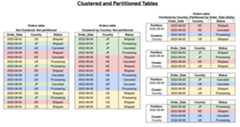
A clustered table contains clustered columns that sort data based onuser-defined sort properties. Data within these clustered columns are sortedinto storage blocks which are adaptively sized based on the size of the table.When you run a query that filters by the clustered column, BigQueryonly scans the relevant blocks based on the clustered columns instead of theentire table or table partition. In a combined approach using both tablepartitioning and clustering, you first segment table data into partitions,then you cluster the data within each partition by the clustering columns.
When you create a table that is clustered and partitioned, you can achieve morefinely grained sorting, as the following diagram shows:
Partitioning versus sharding
Table sharding is the practice of storing data in multiple tables, using anaming prefix such as[PREFIX]_YYYYMMDD.
Partitioning is recommended over table sharding, because partitioned tablesperform better. With sharded tables, BigQuery must maintain acopy of the schema and metadata for each table. BigQuery mightalso need to verify permissions for each queried table. This practice also addsto query overhead and affects query performance.
If you previously created date-sharded tables, you can convert them into aningestion-time partitioned table. For more information, seeConvert date-sharded tables into ingestion-time partitioned tables.
Partition decorators
Partition decorators enable you to reference a partition in a table. Forexample, you can use them towrite datato a specific partition.
A partition decorator has the formtable_name$partition_id where the formatof thepartition_id segment depends on the type of partitioning:
| Partitioning type | Format | Example |
|---|---|---|
| Hourly | yyyymmddhh | my_table$2021071205 |
| Daily | yyyymmdd | my_table$20210712 |
| Monthly | yyyymm | my_table$202107 |
| Yearly | yyyy | my_table$2021 |
| Integer range | range_start | my_table$40 |
Browse the data in a partition
To browse the data in a specified partition, use thebq head command with apartition decorator.
For example, the following command lists all fields in the first 10 rows ofmy_dataset.my_table in the2018-02-24 partition:
bq head --max_rows=10 'my_dataset.my_table$20180224'Export table data
Exporting all data from a partitioned table is the same process as exportingdata from a non-partitioned table. For more information, seeExporting table data.
To export data from an individual partition, use thebq extract command andappend the partition decorator tothe table name. For example,my_table$20160201. You can also export data fromthe__NULL__ and__UNPARTITIONED__partitions by appending the partition names to the table name. For example,my_table$__NULL__ ormy_table$__UNPARTITIONED__.
Limitations
Partitioned tables have the following limitations:
You cannot use legacy SQL to query partitioned tables or to write queryresults to partitioned tables.
BigQuery does not support partitioning by multiple columns.Only one column can be used to partition a table.
You cannot directly convert an existing non-partitioned table to apartitioned table. The partitioning strategy is defined when the table iscreated. Instead, use the
CREATE TABLEstatement to create a new partitioned table by querying the data in theexisting table.Time-unit column-partitioned tables are subject to the followinglimitations:
- The partitioning column must be either a scalar
DATE,TIMESTAMP, orDATETIMEcolumn. While the mode of the column can beREQUIREDorNULLABLE, it cannot beREPEATED(array-based). - The partitioning column must be a top-level field. You cannot use a leaffield from a
RECORD(STRUCT) as the partitioning column.
For information about time-unit column-partitioned tables, seeCreate a time-unit column-partitioned table.
- The partitioning column must be either a scalar
Integer-range partitioned tables are subject to the following limitations:
- The partitioning column must be an
INTEGERcolumn. While the mode ofthe column may beREQUIREDorNULLABLE, it cannot beREPEATED(array-based). - The partitioning column must be a top-level field. You cannot use a leaffield from a
RECORD(STRUCT) as the partitioning column.
For information about integer-range partitioned tables, seeCreate an integer-range partitioned table.
- The partitioning column must be an
Quotas and limits
Partitioned tables have definedlimits in BigQuery.For more information on all quotas and limits, seeQuotas and limits.
Quotas and limits for jobs against partitioned tables
Quotas and limits also apply to the different types of jobs you can run againstpartitioned tables, including:
- Loading data (load jobs)
- Exporting data (extract jobs)
- Querying data (query jobs)
- Copying tables (copy jobs)
Number of partition modifications for column-partitioned tables quota errors
BigQuery returns this error when your column-partitioned tablereaches thequota of the number of partition modifications permitted per day.Partition modifications include the total of allload jobs,copy jobs, andquery jobsthat append or overwrite a destination partition.
To see the value of theNumber of partitionmodifications per column-partitioned table per day limit, seePartitionedtables.
Error message
Quota exceeded: Your table exceeded quota forNumber of partition modifications to a column partitioned table
Resolution
This quota cannot be increased. To resolve this quota error, do the following:
- Change the partitioning on the table to have more data in each partition, inorder to decrease the total number of partitions. For example, change frompartitioning by day to partitioning by monthor changehow you partition the table.
- Useclusteringinstead of partitioning.
- If you frequently load data from multiple small files stored in Cloud Storage that uses a job per file, then combine multiple load jobs into a single job. You can load from multiple Cloud Storage URIs with a comma-separated list (for example,
gs://my_path/file_1,gs://my_path/file_2), or by using wildcards (for example,gs://my_path/*).For more information, seeBatch loading data.
- If you use load, select or copy jobs to append single rows of data to a table, for example, then you should consider batching multiple jobs into one job. BigQuery doesn't perform well when used as a relational database. As a best practice, avoid running frequent, single-row append actions.
- To append data at a high rate, consider usingBigQuery Storage Write API. It is a recommended solution for high-performance data ingestion. The BigQuery Storage Write API has robust features, including exactly-once delivery semantics. To learn about limits and quotas, seeStorage Write API and to see costs of using this API, seeBigQuery data ingestion pricing.
- To monitor the number of modified partitions on a table, use the
INFORMATION_SCHEMAview. - For information about optimizing table load jobs to avoid reaching quota limits, seeOptimize load jobs.
Table pricing
When you create and use partitioned tables in BigQuery, yourcharges are based on how much data is stored in the partitions and on thequeries you run against the data:
- For information on storage pricing, seeStorage pricing.
- For information on query pricing, seeQuery pricing.
Many partitioned table operations are free, including loading data intopartitions, copying partitions, and exporting data from partitions. Though free,these operations are subject to BigQuery'sQuotas and limits. For information on all free operations,seeFree operations on the pricing page.
For best practices for controlling costs in BigQuery, seeControlling costs in BigQuery
Table security
Access control for partitioned tables is the same as access control forstandard tables. For more information, seeIntroduction to table access controls.
What's next
- To learn how to create partitioned tables, seeCreating partitioned tables.
- To learn how to manage and update partitioned tables, seeManaging partitioned tables.
- For information on querying partitioned tables, seeQuerying partitioned tables.
Except as otherwise noted, the content of this page is licensed under theCreative Commons Attribution 4.0 License, and code samples are licensed under theApache 2.0 License. For details, see theGoogle Developers Site Policies. Java is a registered trademark of Oracle and/or its affiliates.
Last updated 2025-12-16 UTC.