

Introduction to BigQuery Omni
Note: This feature may not be available when using reservations that are created with certain BigQuery editions. For more information about which features are enabled in each edition, seeIntroduction to BigQuery editions.Important: The term "BigLake" on this page refers to an accessdelegation functionality for external tables in BigQuery. Forinformation about BigLake, the stand-alone Google Cloudproduct that includes BigLake metastore, the Apache Iceberg REST catalog,and BigLake tables for Apache Iceberg seeBigLake overview.With BigQuery Omni, you can run BigQuery analytics ondata stored in Amazon Simple Storage Service (Amazon S3) or Azure Blob Storage using BigLaketables.
Many organizations store data in multiple public clouds. Often, this data endsup being siloed, because it's hard to get insights across all of the data. Youwant to be able to analyze the data with a multi-cloud data tool thatis inexpensive, fast, and does not create additional overhead of decentralizeddata governance. By using BigQuery Omni, we reduce thesefrictions with a unified interface.
To run BigQuery analytics on your external data, youfirst need toconnect to Amazon S3orBlob Storage. If youwant to query external data, you would need to create aBigLaketable that references Amazon S3 orBlob Storage data.
BigQuery Omni tools
You can use the following BigQuery Omni tools to run BigQuery analyticson your external data:
- Cross-cloud joins: Run aquery directly from a BigQuery region that can join data from aBigQuery Omni region.
- Cross-cloud materializedviews: Usematerializedviewreplicasto continuously replicate data from BigQuery Omni regions.Supports data filtering.
- Cross-cloud transfer using
SELECT: Run a queryusing either theCREATE TABLE AS SELECTorINSERT INTO SELECTstatement ina BigQuery Omni region and move the result to aBigQuery region. - Cross-cloud transfer using
LOAD:UseLOAD DATAstatements to load data directlyfrom Amazon Simple Storage Service (Amazon S3) or Azure Blob Storage into BigQuery
The following table outlines the key features and capabilities of each cross-cloud tool:
| Cross-cloud joins | Cross-cloud materialized view | Cross-cloud transfer usingSELECT | Cross-cloud transfer usingLOAD | |
|---|---|---|---|---|
| Suggested usage | Query external data for one-time use, where you can join with local tables or join data between two different BigQuery Omni regions—for example, between AWS and Azure Blob Storage regions. Use cross-cloud joins if the data isn't large, and if caching is not a key requirement | Set up repeated or scheduled queries to continuously transfer external data incrementally, where caching is a key requirement. For example, to maintain a dashboard | Query external data for one-time use, from a BigQuery Omni region to a BigQuery region, where manual controls like caching and query optimization is a key requirement, and if you're using complex queries that aren't supported by cross-cloud joins or cross-cloud materialized views | Migrate large datasets as-is without the need for filtering, using scheduled queries to move raw data |
| Supports filtering before moving data | Yes. Limits apply on certain query operators. For more information, seeCross-cloud join limitations | Yes. Limits apply on certain query operators, such as aggregate functions and theUNION operator | Yes. No limits on query operators | No |
| Transfer size limitations | 60 GB per transfer (each subquery to a remote region produces one transfer) | No limit | 60 GB per transfer (each subquery to a remote region produces one transfer) | No limit |
| Data transfer compression | Wire compression | Columnar | Wire compression | Wire Compression |
| Caching | Not supported | Supported withcache-enabled tables with materialized views | Not supported | Not supported |
| Egress pricing | AWS egress and inter-continental cost | AWS egress and inter-continental cost | AWS egress and inter-continental cost | AWS egress and inter-continental cost |
| Compute usage for data transfer | Uses slots in the source AWS or Azure Blob Storage region (Reservation or On-demand) | Not used | Uses slots in the source AWS or Azure Blob Storage region (Reservation or On-demand) | Not used |
| Compute usage for filtering | Uses slots in the source AWS or Azure Blob Storage region (Reservation or On-demand) | Uses slots in the source AWS or Azure Blob Storage region (Reservation or On-demand) for computing local materialized views and metadata | Uses slots in the source AWS or Azure Blob Storage region (Reservation or On-demand) | Not used |
| Incremental transfer | Not supported | Supported for non-aggregate materialized views | Not supported | Not supported |
You can also consider the following alternatives to transfer data from Amazon Simple Storage Service (Amazon S3)or Azure Blob Storage to Google Cloud:
- Storage Transfer Service: Transfer data between objectand file storage across Google Cloud and Amazon Simple Storage Service (Amazon S3) orAzure Blob Storage.
- BigQuery Data Transfer Service: Set up automated datatransfer into BigQuery on a scheduled, managed basis. Supportsavariety of sourcesand is suitable for data migration. BigQuery Data Transfer Service doesn't supportfiltering.
Architecture
BigQuery's architecture separates compute from storage, allowingBigQuery to scale out as needed to handle very large workloads.BigQuery Omni extends this architecture by running theBigQuery query engine in other clouds. As a result, you don'thave to physically move data into BigQuery storage. Processinghappens where that data already sits.
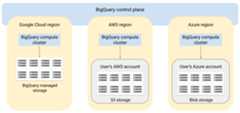
Query results can be returned to Google Cloud over a secure connection —for example, to be displayed in the Google Cloud console. Alternatively, you canwrite the results directly to Amazon S3 buckets or Blob Storage.In that case, there is no cross-cloud movement of the query results.
BigQuery Omni uses standard AWS IAM roles or Azure Active Directoryprincipals to access the data in your subscription. You delegate read or writeaccess to BigQuery Omni, and you can revoke access at any time.
Note: Write access is only required if you want to write query results back toyour Amazon S3 bucket or Blob Storage container.Data flow when querying data
The following image describes how the data moves between Google Cloud and AWS orAzure for the following queries:
SELECTstatementCREATE EXTERNAL TABLEstatement

- BigQuery control plane receive query jobs from you throughGoogle Cloud console, bq command-line tool, an API method, or a client library.
- BigQuery control plane sends query jobs for processing toBigQuery data plane on AWS or Azure.
- BigQuery data plane receives the query from the control planethrough a VPN connection.
- BigQuery data plane reads table data from yourAmazon S3 bucket or Blob Storage.
- BigQuery data plane runs the query job on table data.The processing of table data occurs in the specified AWS or Azure region.
- The query result is transmitted from data planeto the control plane through the VPN connection.
- The BigQuery control plane receives the query job results for displayto you in response to the query job. This data is stored for upto 24 hours.
- The query result is returned to you.
For more information, seeQuery Amazon S3 dataandBlob Storage data.
Data flow when exporting data
The following image describes how data moves between Google Cloud and AWSor Azure during anEXPORT DATA statement.

- BigQuery control plane receives export query jobs from you through Google Cloud console, bq command-line tool, an API method, or a client library. Thequery contains the destination path for the query result in yourAmazon S3 bucket or Blob Storage.
- BigQuery control plane sends export query jobs for processingto BigQuery data plane (on AWS or Azure).
- BigQuery data plane receives the export query from the controlplane through the VPN connection.
- BigQuery data plane reads table data from yourAmazon S3 bucket or Blob Storage.
- BigQuery data plane runs the query job on table data.Processing of table data occurs in the specified AWS or Azure region.
- BigQuery writes the query result to the specified destinationpath in your Amazon S3 bucket or Blob Storage.
For more information, seeExport query results to Amazon S3andBlob Storage.
Benefits
Performance. You can get insights faster, because data is not copied acrossclouds, and queries run in the same region where your data resides.
Cost. You save on outbound data transfer costs because the data doesn'tmove. There are no additional charges to your AWS or Azure account related toBigQuery Omni analytics, because the queries run on clustersmanaged by Google. You are only billed for running the queries, using theBigQuery pricing model.
Security and data governance. You manage the data in your own AWS or Azuresubscription. You don't need to move or copy the raw data out of your publiccloud. All computation happens in the BigQuery multi-tenantservice which runs within the same region as your data.
Serverless architecture. Like the rest of BigQuery,BigQuery Omni is a serverless offering. Google deploys and manages theclusters that run BigQuery Omni. You don't need to provision any resources ormanage any clusters.
Ease of management. BigQuery Omni provides a unifiedmanagement interface through Google Cloud. BigQuery Omni can useyour existing Google Cloud account and BigQuery projects. Youcan write a GoogleSQL query in the Google Cloud console to query data inAWS or Azure, and see the results displayed in the Google Cloud console.
Cross-cloud transfer. You can load data into standard BigQuerytables from S3 buckets and Blob Storage. For more information, seeTransfer Amazon S3 data andBlob Storage data to BigQuery.
Metadata caching for performance
You can use cached metadata to improve query performance onBigLake tables that reference Amazon S3 data. It isespecially helpful in cases where you are working with large numbers of files orif the data is Apache Hive partitioned.
BigQuery uses CMETA as a distributed metadata system to handlelarge tables efficiently. CMETA provides fine-grained metadata at the column andblock level, accessible through system tables. This system helps improve queryperformance by optimizing data access and processing. To further acceleratequery performance on large tables, BigQuery maintains a metadatacache. CMETA refresh jobs keep this cache up-to-date.The metadata includes file names, partitioning information, and physicalmetadata from files such as row counts. You can choose whether or not to enablemetadata caching on a table. Queries with a large number of files and withApache Hive partition filters benefit the most from metadata caching.
If you don't enable metadata caching, queries on the table must read theexternal data source to get object metadata. Reading this data increases thequery latency; listing millions of files from the external data source can takeseveral minutes. If you enable metadata caching, queries can avoid listing filesfrom the external data source and can partition and prune files more quickly.
Metadata caching also integrates with Cloud Storage object versioning. When the cache is populated or refreshed, it captures metadata based on the live version of the Cloud Storage objects at that time. As a result, metadata caching-enabled queries read data corresponding to the specific cached object version, even if newer versions become live in Cloud Storage. Accessing data from any subsequently updated object versions in Cloud Storage necessitates a metadata cache refresh.
There are two properties that control this feature:
- Maximum staleness specifies when queries use cached metadata.
- Metadata cache mode specifies how the metadata is collected.
When you have metadata caching enabled, you specify the maximum interval ofmetadata staleness that is acceptable for operations against the table. Forexample, if you specify an interval of 1 hour, then operations against the tableuse cached metadata if it has been refreshed within the past hour. If the cachedmetadata is older than that, the operation falls back to retrieving metadatafromAmazon S3 instead.You can specify a staleness interval between 30 minutes and 7 days.
When you enable metadata caching for BigLake or object tables, BigQuery triggers metadata generation refresh jobs. You can choose to refresh the cache either automatically or manually:
- For automatic refreshes, the cache is refreshed at a system definedinterval, usually somewhere between 30 and 60 minutes. Refreshing thecache automatically is a good approach if the files inAmazon S3are added, deleted, or modified at randomintervals. If you need to control the timing of the refresh, for example totrigger the refresh at the end of an extract-transform-load job, usemanual refresh.
For manual refreshes, you run the
BQ.REFRESH_EXTERNAL_METADATA_CACHEsystemprocedureto refresh the metadata cache on a schedule that meets your requirements.Refreshing the cache manually is a good approach if the files inAmazon S3are added, deleted, or modified at known intervals,for example as the output of a pipeline.If you issue multiple concurrent manual refreshes, only one will succeed.
The metadata cache expires after 7 days if it isn't refreshed.
Both manual and automatic cache refreshes are executed withINTERACTIVE query priority.
UseBACKGROUND reservations
If you choose to use automatic refreshes, we recommend that you create areservation, and then create anassignment with aBACKGROUND job typefor the project that runs the metadata cache refresh jobs. WithBACKGROUND reservations, refresh jobs use a dedicated resource pool which prevents the refresh jobs from competing with user queries, and prevents the jobs from potentially failing if there aren't sufficient resources available for them.
While using a shared slot pool incurs no extra cost, usingBACKGROUND reservations instead provides more consistent performance by allocating a dedicated resource pool, and improves the reliability of refresh jobs and overall query efficiency in BigQuery.
You should consider how the staleness interval and metadata caching modevalues will interact before you set them. Consider the following examples:
- If you are manually refreshing the metadata cache for a table, and you setthe staleness interval to 2 days, you must run the
BQ.REFRESH_EXTERNAL_METADATA_CACHEsystem procedure every 2 days or lessif you want operations against the table to use cached metadata. - If you are automatically refreshing the metadata cache for a table, and youset the staleness interval to 30 minutes, it is possible that some of youroperations against the table might read fromAmazon S3if the metadata cache refresh takes on the longer side of the usual30 to 60 minute window.
To find information about metadata refresh jobs, query theINFORMATION_SCHEMA.JOBS view,as shown in the following example:
SELECT*FROM`region-us.INFORMATION_SCHEMA.JOBS_BY_PROJECT`WHEREjob_idLIKE'%metadata_cache_refresh%'ANDcreation_time>TIMESTAMP_SUB(CURRENT_TIMESTAMP(),INTERVAL6HOUR)ORDERBYstart_timeDESCLIMIT10;
For more information, seeMetadata caching.
Cache-enabled tables with materialized views
You can usematerialized views over Amazon Simple Storage Service (Amazon S3) metadata cache-enabledtables to improveperformance and efficiency when querying structured data stored inAmazon S3. These materialized views function like materialized viewsover BigQuery-managed storage tables, including the benefits ofautomatic refreshandsmart tuning.
To make Amazon S3 data in a materialized view available in asupported BigQuery region for joins,create a replica of the materialized view.You can only create materialized view replicas overauthorized material views.
Limitations
In addition to thelimitations for BigLake tables, the following limitations apply toBigQuery Omni, which includes BigLake tables basedon Amazon S3 and Blob Storage data:
- Working with data in any of theBigQuery Omniregions is not supported by the Standard andEnterprise Plus editions. For more information about editions, seeIntroductiontoBigQuery editions.
- The
OBJECT_PRIVILEGES,STREAMING_TIMELINE_BY_*,TABLE_SNAPSHOTS,TABLE_STORAGE,TABLE_CONSTRAINTS,KEY_COLUMN_USAGE,CONSTRAINT_COLUMN_USAGE, andPARTITIONSINFORMATION_SCHEMAviewsare not available for BigLake tables based onAmazon S3 and Blob Storage data. - Materialized views are not supported for Blob Storage.
- JavaScript UDFs are not supported.
The following SQL statements are not supported:
- BigQuery ML statements.
- Data definition language (DDL) statementsthat require data managed in BigQuery. Forexample,
CREATE EXTERNAL TABLE,CREATE SCHEMA, orCREATE RESERVATIONare supported, butCREATE TABLEis not. - Data manipulation language (DML) statements.
The following limitations apply on querying and reading destination temporarytables:
- Querying destination temporary tables with the
SELECTstatement is notsupported.
- Querying destination temporary tables with the
Scheduled queriesare only supported through the API or CLI method. Thedestination tableoption is disabled for queries. Only
EXPORT DATAqueries are allowed.BigQuery Storage API is notavailable in theBigQuery Omni regions.
If your query uses the
ORDER BYclause and has a result size larger than256 MB, then your query fails. To resolve this, either reduce the resultsize or remove theORDER BYclause from the query. For more informationabout BigQuery Omni quotas, seeQuotas and limits.Using customer-managed encryption keys (CMEK) with datasets and externaltables is not supported.
Pricing
For information about pricing and limited-time offers inBigQuery Omni, seeBigQuery Omni pricing.
Quotas and limits
For information about BigQuery Omni quotas, seeQuotas and limits.
If your query result is largerthan 20 GiB, consider exporting the results toAmazon S3 orBlob Storage.To learn about quotas for BigQuery Connection API, seeBigQuery Connection API.
Locations
BigQuery Omni processesqueries in the same location as the dataset that contains the tables you'requerying. After you create the dataset, the location cannot be changed. Yourdata resides within your AWS or Azure account. BigQuery Omni regionssupport Enterprise edition reservations and on-demand compute (analysis)pricing. For more information about editions, seeIntroduction to BigQuery editions.
| Region description | Region name | Colocated BigQuery region | |
|---|---|---|---|
| AWS | |||
| AWS - US East (N. Virginia) | aws-us-east-1 | us-east4 | |
| AWS - US West (Oregon) | aws-us-west-2 | us-west1 | |
| AWS - Asia Pacific (Seoul) | aws-ap-northeast-2 | asia-northeast3 | |
| AWS - Asia Pacific (Sydney) | aws-ap-southeast-2 | australia-southeast1 | |
| AWS - Europe (Ireland) | aws-eu-west-1 | europe-west1 | |
| AWS - Europe (Frankfurt) | aws-eu-central-1 | europe-west3 | |
| Azure | |||
| Azure - East US 2 | azure-eastus2 | us-east4 | |
What's next
- Learn how toconnect to Amazon S3andBlob Storage.
- Learn how to createAmazon S3andBlob StorageBigLake tables.
- Learn how to queryAmazon S3andBlob StorageBigLake tables.
- Learn how to joinAmazon S3andBlob StorageBigLake tables with Google Cloud tables usingcross-cloud joins.
- Learn how toexport query results to Amazon S3andBlob Storage.
- Learn how totransfer data from Amazon S3andBlob Storage to BigQuery.
- Learn aboutsetting up VPC Service Controls perimeter.
- Learn how tospecify your location
Except as otherwise noted, the content of this page is licensed under theCreative Commons Attribution 4.0 License, and code samples are licensed under theApache 2.0 License. For details, see theGoogle Developers Site Policies. Java is a registered trademark of Oracle and/or its affiliates.
Last updated 2025-12-15 UTC.