

Migrating Amazon Redshift data with a VPC network
This document explains how to migrate data from Amazon Redshift toBigQuery by using a VPC.
If you have a private Amazon Redshift instance in AWS, you can migrate that data toBigQuery by creating avirtual private cloud (VPC) network and connecting itwith the Amazon Redshift VPC network. The data migration process works as follows:
- You create a VPC network in the project you want to use for the transfer.The VPC network can't be aShared VPC network.
- You set up avirtual private network (VPN)and connect your project VPC network and theAmazon Redshift VPC network.
- You specify your project VPC network and a reserved IP range when setting upthe transfer.
- The BigQuery Data Transfer Service creates a tenant project and attaches it to theproject you are using for the transfer.
- The BigQuery Data Transfer Service creates a VPC network with onesubnet in the tenant project, using the reserved IP range you specified.
- The BigQuery Data Transfer Service createsVPC peeringbetween your project VPC network and the tenant project VPC network.
- The BigQuery Data Transfer Service migration runs in the tenant project.It triggers an unload operation from Amazon Redshift to a staging area inan Amazon S3 bucket. Unload speed is determined by your clusterconfiguration.
- The BigQuery Data Transfer Service migration transfers your data fromthe Amazon S3 bucket to BigQuery.
If you'd like to transfer data from your Amazon Redshift instance through public IPs,you canmigrate your Amazon Redshift data to BigQuery with these instructions.
Before you begin
- Sign in to your Google Cloud account. If you're new to Google Cloud, create an account to evaluate how our products perform in real-world scenarios. New customers also get $300 in free credits to run, test, and deploy workloads.
In the Google Cloud console, on the project selector page, select or create a Google Cloud project.
Roles required to select or create a project
- Select a project: Selecting a project doesn't require a specific IAM role—you can select any project that you've been granted a role on.
- Create a project: To create a project, you need the Project Creator role (
roles/resourcemanager.projectCreator), which contains theresourcemanager.projects.createpermission.Learn how to grant roles.
Verify that billing is enabled for your Google Cloud project.
Enable the BigQuery and BigQuery Data Transfer Service APIs.
Roles required to enable APIs
To enable APIs, you need the Service Usage Admin IAM role (
roles/serviceusage.serviceUsageAdmin), which contains theserviceusage.services.enablepermission.Learn how to grant roles.In the Google Cloud console, on the project selector page, select or create a Google Cloud project.
Roles required to select or create a project
- Select a project: Selecting a project doesn't require a specific IAM role—you can select any project that you've been granted a role on.
- Create a project: To create a project, you need the Project Creator role (
roles/resourcemanager.projectCreator), which contains theresourcemanager.projects.createpermission.Learn how to grant roles.
Verify that billing is enabled for your Google Cloud project.
Enable the BigQuery and BigQuery Data Transfer Service APIs.
Roles required to enable APIs
To enable APIs, you need the Service Usage Admin IAM role (
roles/serviceusage.serviceUsageAdmin), which contains theserviceusage.services.enablepermission.Learn how to grant roles.
Set required permissions
Before creating an Amazon Redshift transfer, follow these steps:
Ensure that the person creating the transfer has the following requiredIdentity and Access Management (IAM) permissions in BigQuery:
bigquery.transfers.updatepermissions tocreate the transferbigquery.datasets.updatepermissions on thetarget dataset
The
role/bigquery.adminpredefined IAM roleincludesbigquery.transfers.updateandbigquery.datasets.updatepermissions. For more information on IAM roles inBigQuery Data Transfer Service, seeAccess control.Consult the documentation for Amazon S3 to ensure you haveconfigured any permissions necessary to enable the transfer. At a minimum,the Amazon S3 source data must have the AWS managed policy
AmazonS3ReadOnlyAccessapplied to it.Grant the appropriateIAM permissionsfor creating and deleting VPC Network Peering to the individual setting up thetransfer. The service uses the individual's Google Cloud user credentials tocreate the VPC peering connection.
- Permissions to create VPC peering:
compute.networks.addPeering - Permissions to delete VPC peering:
compute.networks.removePeering
The
roles/project.owner,roles/project.editor, androles/compute.networkAdminpredefinedIAM roles include thecompute.networks.addPeeringandcompute.networks.removePeeringpermissions by default.- Permissions to create VPC peering:
Create a dataset
Create a BigQuery datasetto store your data. You do not need to create any tables.
Grant access to your Amazon Redshift cluster
Add the following IP ranges of your private Amazon Redshift cluster to an allowlistbyconfiguring the security group rules.In a later step, you define the private IP range in this VPC network when youset up the transfer.
Grant access to your Amazon S3 bucket
You must have an Amazon S3 bucket to use as a staging area to transfer theAmazon Redshift data to BigQuery. For detailed instructions, see theAmazon documentation.
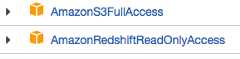
We recommended that you create a dedicated Amazon IAM user, and grant thatuser only Read access to Amazon Redshift and Read and Write access to Amazon S3.To achieve this step, you can apply the following policies:
Create an AmazonIAM user access key pair.
Configure workload control with a separate migration queue
Optionally, you candefine an Amazon Redshift queue for migration purposesto limit and separate the resources used for migration. You can configure thismigration queue with a maximum concurrency query count. You can then associate acertainmigration user groupwith the queue and use those credentials when setting up the migration totransfer data to BigQuery. The transfer service only hasaccess to the migration queue.
Gather transfer information
Gather the information that you need to set up the migration withthe BigQuery Data Transfer Service:
- Get the VPC and reserved IP range in Amazon Redshift.
- Followthese instructions to get the JDBC URL.
- Get the username and password of a user with appropriate permissions toyour Amazon Redshift database.
- Follow the instructions atGrant access to your Amazon S3 bucket toget an AWS access key pair.
- Get the URI of the Amazon S3 bucket you want to use for the transfer.We recommend that you set up aLifecycle policy for this bucket to avoid unnecessary charges. The recommendedexpiration time is 24 hours to allow sufficient time to transfer all datato BigQuery.
Assess your data
As part of the data transfer, BigQuery Data Transfer Service writes data fromAmazon Redshift to Cloud Storage as CSV files. If these files containthe ASCII 0 character, they can't be loaded into BigQuery. Wesuggest you assess your data to determine if this could be an issue for you. Ifit is, you can work around this by exporting your data to Amazon S3 as Parquetfiles, and then importing those files by using BigQuery Data Transfer Service.For more information, seeOverview of Amazon S3 transfers.
Set up the VPC network and the VPN
Ensure you have permissions to enable VPC peering. For more information, seeSet required permissions.
Follow theinstructions in this guideto set up a Google Cloud VPC network, set up a VPN between yourGoogle Cloud project's VPC network and the Amazon Redshift VPC network, and enableVPC peering.
Caution: The service uses your VPC network's name as the VPCpeering connection name, so ensure there aren't any existing VPC peeringconnections already using that name.Configure Amazon Redshift to allow connection to your VPN. For more information,seeAmazon Redshift cluster security groups.
In the Google Cloud console, go to theVPC networks page to verify that yourGoogle Cloud VPC network exists in your Google Cloud project is connected toAmazon Redshift through the VPN.
The console page lists all of your VPC networks.
Set up an Amazon Redshift transfer
Use the following instructions to set up an Amazon Redshift transfer:
In the Google Cloud console, go to theBigQuery page.
ClickData transfers.
ClickCreate transfer.
In theSource type section, selectMigration: Amazon Redshiftfrom theSource list.
In theTransfer config name section, enter a name for the transfer,such as
My migration, in theDisplay name field. The display namecan be any value that allows you to easily identify the transfer ifyou need to modify it later.In theDestination settings section, choosethe dataset you created from theDataset list.
In theData source details section, do the following:
- ForJDBC connection url for Amazon Redshift, provide theJDBC URL to access your Amazon Redshift cluster.
- ForUsername of your database, enter the username for theAmazon Redshift database that you want to migrate.
ForPassword of your database, enter the database password.
Note: By providing your Amazon credentials you acknowledgethat the BigQuery Data Transfer Service is your agent solely for the limitedpurpose of accessing your data for transfers.ForAccess key ID andSecret access key, enter the accesskey pair you obtained fromGrant access to your S3 bucket.
ForAmazon S3 URI, enter theURI of the S3 bucket you'lluse as a staging area.
ForAmazon Redshift Schema, enter the Amazon Redshift schema you'remigrating.
ForTable name patterns, specify a name or a pattern for matching thetable names in the schema. You can use regular expressions tospecify the pattern in the form:
<table1Regex>;<table2Regex>. Thepattern should follow Java regular expression syntax. For example:lineitem;ordertbmatches tables that are namedlineitemandordertb..*matches all tables.
Leave this field empty to migrate all tables from the specified schema.
Caution: For very large tables, we recommend transferringone table at a time.BigQuery has a load quota of 15 TBper load job.ForVPC and the reserved IP range, specify your VPC network nameand the private IP address range to use in the tenant project VPC network.Specify the IP address range as a CIDR block.

- The form is
VPC_network_name:CIDR, for example:my_vpc:10.251.1.0/24. - Use standard private VPC network address ranges in the CIDR notation,starting with
10.x.x.x. - The IP range must have more than 10 IP addresses.
- The IP range must not overlap with any subnet in your projectVPC network or the Amazon Redshift VPC network.
- If you have multiple transfers configured for the same Amazon Redshiftinstance, make sure to use the same
VPC_network_name:CIDRvalue ineach, so that multiple transfers can reuse the same migrationinfrastructure.
- The form is
Optional: In theNotification options section, do the following:
- Click the toggle to enable email notifications. When you enable thisoption, the transfer administrator receives an email notificationwhen a transfer run fails.
- ForSelect a Pub/Sub topic, choose yourtopicname or clickCreate a topic. This optionconfigures Pub/Sub runnotificationsfor your transfer.
ClickSave.
The Google Cloud console displays all the transfer setup details,including aResource name for this transfer.
Quotas and limits
Migrating an Amazon Redshift private instance with a VPC network runs the migrationagent on a single tenant infrastructure. Due to computation resource limits,at most 5 concurrent transfer runs are allowed.
BigQuery has a load quota of 15 TB for each load job for eachtable.Internally, Amazon Redshift compresses the table data, so the exported table sizewill be larger than the table size reported by Amazon Redshift. If you planto migrate a table larger than 15 TB, please contactCloud Customer Care first.
Costs can be incurred outside of Google by using this service. Review theAmazon Redshift andAmazon S3 pricing pages for details.
Because ofAmazon S3's consistency model,it's possible that some files will not be included in the transfer toBigQuery.
What's next
- Learn about standardAmazon Redshift migrations.
- Learn more about theBigQuery Data Transfer Service.
- Migrate SQL code with theBatch SQL translation.
Except as otherwise noted, the content of this page is licensed under theCreative Commons Attribution 4.0 License, and code samples are licensed under theApache 2.0 License. For details, see theGoogle Developers Site Policies. Java is a registered trademark of Oracle and/or its affiliates.
Last updated 2025-12-15 UTC.