

Oracle to BigQuery migration
This document provides high-level guidance on how to migrate from Oracleto BigQuery. It describes the fundamentalarchitectural differences and suggesting ways of migration from data warehousesand data marts running on Oracle RDBMS (including Exadata) toBigQuery. This document provides details that can apply toExadata, ExaCC, and Oracle Autonomous Data Warehouse also, as they use compatibleOracle software.
This document is for enterprise architects, DBAs, application developers, and ITsecurity professionals who want to migrate from Oracle toBigQuery and solve technical challenges in the migration process.
You can also usebatch SQL translationto migrate your SQL scripts in bulk, orinteractive SQL translationto translate ad hoc queries. Oracle SQL, PL/SQL, and Exadata are supported byboth tools inpreview.
Pre-migration
To ensure a successful data warehouse migration, start planning your migrationstrategy early in your project timeline. For information about how tosystematically plan your migration work, seeWhat and how to migrate: The migration framework.
BigQuery capacity planning
Under the hood, analytics throughput in BigQuery is measured inslots. A BigQuery slot is Google's proprietary unit ofcomputational capacity required to execute SQL queries.
BigQuery continuously calculates how many slots are required byqueries as they execute, but it allocates slots to queries based on afairscheduler.
You can choose between the following pricing models when capacity planning forBigQuery slots:
On-demand pricing: Under on-demandpricing, BigQuery charges for the number of bytes processed(data size), so you pay only for the queries that you run. For moreinformation about how BigQuery determines data size, seeData size calculation. Because slots determine theunderlying computational capacity, you can pay for BigQueryusage depending on the number of slots you need (instead of bytesprocessed). By default, Google Cloud projects are limited to a maximum of2,000 slots.
Capacity-based pricing:With capacity-based pricing, you purchase BigQuery slotreservations(a minimum of 100) instead of paying forthe bytes processed by queries that you run. We recommend capacity-based pricingfor enterprise data warehouse workloads, which commonly see many concurrentreporting and extract-load-transform (ELT) queries that have predictableconsumption.
To help with slot estimation, we recommend setting upBigQuerymonitoring using Cloud Monitoringandanalyzing your audit logs using BigQuery.Many customers useLooker Studio(for example, see anopen source example of aLooker Studio dashboard),Looker, orTableau as frontends to visualizeBigQuery audit log data, specifically for slot usage acrossqueries and projects. You can also leverage BigQuery systemtables data for monitoring slot utilization across jobs and reservations. Foran example, see anopen source exampleof aLooker Studio dashboard.
Regularly monitoring and analyzing your slot utilization helps you estimate howmany total slots your organization needs as you grow on Google Cloud.
For example, suppose you initially reserve4,000 BigQuery slotsto run 100 medium-complexity queries simultaneously. If you notice high waittimes in the execution plans of your queries, and your dashboards show high slotutilization, this could indicate that you need additionalBigQuery slots to help support your workloads. If you want topurchase slots yourself through yearly or three-year commitments, you canget started with BigQuery reservationsusing the Google Cloud console or the bq command-line tool.
For any questions related to your current plan and the preceding options, contactyoursales representative.
Security in Google Cloud
The following sections describe common Oracle security controls and how youcan ensure that your data warehouse stays protected in a Google Cloudenvironment.
Identity and Access Management (IAM)
Oracle providesusers, privileges, roles, and profiles to manage access to resources.
BigQuery usesIAM to manageaccess to resources and provides centralizedaccess managementto resources and actions. The types of resources available inBigQuery include organizations, projects, datasets, tables, andviews. In the IAM policy hierarchy, datasets are child resourcesof projects. A table inherits permissions from the dataset that contains it.
To grant access to a resource, assign one or more roles to a user, group, orservice account. Organization and project roles affect the ability to run jobsor manage the project, whereas dataset roles affect the ability to access ormodify the data inside a project.
IAM provides these types of roles:
- Predefined roles are meant to supportcommon use cases and access control patterns. Predefined roles providegranular access for a specific service and are managed by Google Cloud.
Basic roles include theOwner, Editor, and Viewer roles.
Caution: BigQuery's dataset-level basic roles existed prior to theintroduction of IAM. We recommend that you minimize the useof basic roles. In production environments, don't grant basic roles unlessthere is no alternative. Instead, usepredefinedIAM roles.Custom roles provide granular accessaccording to a user-specified list of permissions.
When you assign both predefined and basic roles to a user, the permissionsgranted are a union of the permissions of each individual role.
Row-level security
Oracle Label Security (OLS) allows the restriction of data access on a row-by-row basis. Atypical use case for row-level security is restricting a sales person's accessto the accounts they manage. By implementing row-level security, you gainfine-grained access control.
To achieve row-level security in BigQuery, you can useauthorized views androw-level access policies. Formore information about how to design and implement these policies, seeIntroduction to BigQuery row-level security.
Full-disk encryption
Oracle offersTransparent Data Encryption (TDE) andnetwork encryptionfor data-at-rest and in-transit encryption. TDE requires the Advanced Securityoption, which is licensed separately.
BigQuery encrypts all dataat restandin transit by default regardless of thesource or any other condition, and this cannot be turned off.BigQuery also supportscustomer-managed encryptionkeys (CMEK) for users who want tocontrol and manage key encryption keys inCloud Key Management Service.For more information about encryption at Google Cloud, seeDefault encryption at rest andEncryption in transit.
Data masking and redaction
Oracle usesdata maskingin Real Application Testing anddata redaction, which lets you mask (redact) data that is returned from queriesissued by applications.
BigQuery supportsdynamic data masking at the columnlevel. You can use data masking to selectively obscure column data forgroups of users, while still allowing access to the column.
You can use theSensitive Data Protection to identify and redact sensitivepersonally identifiable information (PII) on BigQuery.
BigQuery and Oracle comparison
This section describes the key differences between BigQuery andOracle. These highlights help you identify migration hurdles and planfor the changes required.
System architecture
One of the main differences between Oracle and BigQueryis that BigQuery is a serverless cloud EDW with separate storageand compute layers that can scale based on the needs of the query. Given thenature of the BigQuery serverless offering, you are not limited byhardware decisions; instead you can request more resources for your queriesand users through reservations. BigQuery also does not requireconfiguration of the underlying software and infrastructure such as operatingsystem (OS), network systems, and storage systems including scaling and high-availability.BigQuery takes care of scalability, management, andadministrative operations. The following diagram illustrates theBigQuery storage hierarchy.
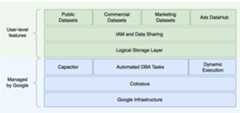
Knowledge of the underlying storage and query processing architecture such asseparation between storage (Colossus) and query execution (Dremel) and howGoogle Cloud allocates resources (Borg) can be good for understanding behavioraldifferences and optimizing query performance and cost effectiveness. Fordetails, see the reference system architectures forBigQuery,Oracle, andExadata.
Data and storage architecture
The data and storage structure is an important part of any data analytics systembecause it affects query performance, cost, scalability, and efficiency.
BigQuerydecouples data storage and computeand stores data in Colossus, in which data is compressed and stored in acolumnar format calledCapacitor.
BigQuery operates directly on compressed data withoutdecompressing by using Capacitor. BigQuery providesdatasets as the highest-level abstraction to organize access to tablesas shown in the preceding diagram.Schemas andlabelscan be used for further organization of tables. BigQuery offerspartitioning to improve query performanceand costs and to manage information lifecycle. Storage resources are allocatedas you consume them and deallocated as you remove data or drop tables.
Oracle stores data in row format usingOracle block format organized in segments. Schemas (owned by users) areused to organize tables and other database objects. As of Oracle 12c,multitenantis used to create pluggable databases within one database instance for furtherisolation.Partitioning can be used to improve query performance and information lifecycleoperations. Oracle offers severalstorage options for standalone andReal Application Clusters (RAC) databases such as ASM, an OS file system, and acluster file system.
Exadata provides optimized storage infrastructure in storage cell serversand allows Oracle servers to access this data transparently byutilizingASM.Exadata offersHybrid Columnar Compression (HCC) options so that users can compress tables and partitions.
Oracle requires pre-provisioned storage capacity, careful sizing, andautoincrement configurations on segments, datafiles, and tablespaces.
Query execution and performance
BigQuery manages performance and scales on the query level tomaximize performance for the cost. BigQuery uses manyoptimizations, for example:
- In-memory query execution
- Multilevel tree architecture based onDremel execution engine
- Automatic storage optimization within Capacitor
- 1 petabit per second total bisection bandwidth withJupiter
- Autoscaling resource managementto provide fast petabyte-scale queries
BigQuery gathers column statistics while loading the data andincludes diagnosticquery planand timing information. Query resources are allocated according to query type andcomplexity. Each query uses some number ofslots, whichare units of computation that includes certain amount of CPU and RAM.
Oracle provides datastatisticsgathering jobs. The databaseoptimizeruses statistics to provide optimalexecution plans.Indexesmight be needed for fast row lookups and join operations. Oracle also providesanin-memory column storefor in-memory analytics. Exadata provides several performance improvements suchas cell smart scan, storage indexes, flash cache, and InfiniBand connectionsbetween storage servers and database servers.Real Application Clusters(RAC)can be used for achieving server high availability and scaling databaseCPU-intensive applications using the same underlying storage.
Optimizing query performance with Oracle requires careful considerationof these options and database parameters. Oracle provides several tools such asActive Session History (ASH), Automatic Database Diagnostic Monitor (ADDM),Automatic Workload Repository (AWR) reports, SQL monitoring and Tuning Advisor,and Undo and Memory TuningAdvisors for performance tuning.
Agile analytics
In BigQuery you can enable different projects, users, and groups to query datasets in different projects. Separation of query execution lets autonomous teams work within their projectswithout affecting other users and projects by separating slot quotas and querying billing from other projects and the projects that host the datasets.
High availability, backups, and disaster recovery
Oracle providesData Guardas a disaster recovery and database replication solution.Real Application Clusters (RAC)can be configured for server availability.Recovery Manager (RMAN)backups can be configured for database and archivelog backups and also used forrestore and recovery operations. TheFlashback databasefeature can be used for database flashbacks to rewind the database to a specificpoint in time. Undo tablespace holds table snapshots. It is possible to queryold snapshots with the flashback query and "as of" query clauses depending on the DML/DDLoperations done previously and theundo retention settings. In Oracle, the whole integrity of the database should be managedwithin tablespaces that depend on the system metadata, undo, and correspondingtablespaces, because strong consistency is important for Oracle backup, andrecovery procedures should include full primary data. You can schedule exportson the table schema level if point-in-time recovery is not needed in Oracle.
BigQuery is fully managed and different from traditional databasesystems in its complete backup functionality. You don't need to consider server,storage failures, system bugs, and physical data corruptions.BigQuery replicates data across different data centers dependingon thedataset location to maximize reliability andavailability. BigQuery multi-region functionality replicates dataacross different regions and protects against unavailability of a single zonewithin the region.BigQuery single-region functionality replicates data acrossdifferent zones within the same region.
BigQuery lets you query historical snapshots of tables up toseven days and restore deleted tables within two days by usingtime travel.You can copy a deleted table (in orderto restore it) by using thesnapshotsyntax (dataset.table@timestamp).You canexport data fromBigQuery tables for additional backup needs such as to recoverfrom accidental user operations. Proven backup strategy and schedules used forexisting data warehouse (DWH) systems can be used for backups.
Batch operations and the snapshotting technique allow different backupstrategies for BigQuery, so you don't need to export unchangedtables and partitions frequently. One export backup of the partition or table isenough after the load or ETL operation finishes. To reduce backup cost, you canstore export files in Cloud StorageNearline Storage or Coldline Storageand define alifecycle policy to delete files after acertain amount of time, depending on the data retention requirements.
Caching
BigQuery offers per-usercache,and if data doesn't change, results of queries are cached for approximately 24hours. If the results are retrieved from the cache, the query costs nothing.
Oracle offers several caches for data and query results such asbuffer cache,result cache,Exadata Flash Cache, and in-memory column store.
Connections
BigQuery handles connection management and does not require youto do any server-side configuration. BigQuery providesJDBC andODBC drivers. You can use theGoogle Cloud console or thebq command-line tool for interactivequerying. You can useREST APIs andclientlibraries toprogrammatically interact with BigQuery You canconnectGoogle Sheetsdirectly with BigQuery and useODBC and JDBC driversto connect to Excel. If you are looking for a desktop client, there are freetools likeDBeaver.
Oracle provideslisteners,services, service handlers, several configuration and tuningparameters, andshared and dedicated servers to handle databaseconnections. Oracle providesJDBC,JDBC Thin,ODBCdrivers,Oracle Client, andTNSconnections. Scan listeners, scan IP addresses, and scan-name are needed forRAC configurations.
Pricing and licensing
Oracle requireslicenseand support fees based on the core counts for Database editions andDatabaseoptions such as RAC, multitenant, ActiveData Guard, partitioning, in-memory, Real Application Testing, GoldenGate, andSpatial and Graph.
BigQuery offers flexiblepricing optionsbased on storage, query, and streaming inserts usage. BigQueryofferscapacity-based pricing for customerswho need predictable cost and slot capacity in specific regions. Slots that areused for streaming inserts and loads are not counted on project slot capacity.To decide how many slots you want to purchase for your data warehouse, seeBigQuery capacity planning.
BigQuery also automaticallycutsstorage costs in half for unmodified data stored for more than 90 days.
Labeling
BigQuery datasets, tables, and views can belabeled with key-value pairs. Labels canbe used for differentiating storage costs and internal chargebacks.
Monitoring and audit logging
Oracle provides different levels and kinds ofdatabaseauditingoptions andaudit vaultanddatabase firewall features,which are licensed separately. Oracle providesEnterpriseManagerfor database monitoring.
For BigQuery,Cloud Audit Logs is used forboth data access logs and audit logs, which are enabled by default. The dataaccess logs are available for 30 days, and the other system events and adminactivity logs are available for 400 days. If you need longer retention, you canexport logs toBigQuery, Cloud Storage, or Pub/Sub as describedinSecurity log analytics in Google Cloud. Ifintegration with an existing incident monitoring tool is needed,Pub/Sub can be used for exports, and custom development should bedone on the existing tool to read logs from Pub/Sub.
Audit logs include all the API calls, query statements, and job statuses. Youcan useCloud Monitoring to monitor slotallocation, bytes scanned in queries and stored, and otherBigQuerymetrics.BigQueryquery plan and timelinecan be used to analyze query stages and performance.
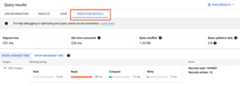
You can use theerror messages table fortroubleshooting query job and API errors. To distinguish slot allocations perquery or job, you can use thisutility, which is beneficial forcustomers that use capacity-based pricing and have many projects distributed acrossseveral teams.
Maintenance, upgrades, and versions
BigQuery is a fully managed service and does not require you todo any maintenance or upgrades. BigQuery does not offer differentversions. Upgrades are continuous and don't require downtime or hinder systemperformance. For more information, seeRelease notes.
Oracle and Exadata require you to do database and underlyinginfrastructure-level patching, upgrades, and maintenance. There are manyversions of Oracle and a new major version is planned to be releasedevery year. Although new versions are backward-compatible, query performance,context, and features can change.
There can be applications that require specific versions such as 10g,11g,or12c.Careful planning and testing are needed for major database upgrades. Migrationfrom different versions might include different technical conversion needs onquery clauses and database objects.
Workloads
Oracle Exadata supports mixed workloads including OLTP workloads.BigQuery is designed for analytics and is not designed to handleOLTP workloads. OLTP workloads that use the same Oracle should bemigrated into Cloud SQL, Spanner, or Firestore inGoogle Cloud. Oracle offers additional options such as AdvancedAnalytics and Spatial and Graph. These workloads might need to be rewritten formigration to BigQuery. For more information, seeMigratingOracle options.
Parameters and settings
Oracle offers and requires many parameters to be configured and tuned on theOS,Database,RAC,ASM, andListenerlevels for different workloads and applications. BigQuery is afully managed service and does not require you to configure any initializationparameters.
Limits and quotas
Oracle has hard and soft limits based on infrastructure, hardwarecapacity, parameters, software versions, and licensing. BigQueryhasquotas and limits on specific actions and objects.
BigQuery provisioning
BigQuery is a platform as a service (PaaS) and a Cloud massivelyparallel processing data warehouse. Its capacity scales up and down without anyintervention from the user as Google manages the backend. As a result, unlikemany RDBMS systems, BigQuery doesn't need you to provisionresources before use. BigQuery allocates storage and queryresources dynamically based on your usage patterns. Storage resources areallocated as you consume them and deallocated as you remove data or drop tables.Query resources are allocated according to query type and complexity. Each queryuses slots. An eventual fairness scheduler is used, so there might be shortperiods where some queries get a higher share of slots, but the schedulereventually corrects this.
In traditional VM terms, BigQuery gives you the equivalent ofboth:
- Per-second billing
- Per-second scaling
To accomplish this task, BigQuery does the following:
- Keeps vast resources deployed to avoid having to rapidlyscale.
- Uses multitenant resources to instantly allocate large chunks for seconds ata time.
- Efficiently allocates resources across users with economies of scale.
- Charges you only for the jobs you run, rather than for deployed resources,so you pay for resources you use.
For more information about pricing, seeUnderstanding BigQueryrapid scaling and simple pricing.
Schema migration
To migrate data from Oracle to BigQuery, you must know theOracle data types and BigQuery mappings.
Oracle data types and BigQuery mappings
Oracle data types differ from BigQuery data types. For moreinformation about BigQuery data types, refer to the officialdocumentation.
For a detailed comparison between Oracle and BigQuery data types,see theOracle SQL translation guide.
Indexes
In many analytical workloads, columnar tables are used instead of row stores.This greatly increases the column-based operations and eliminates the use ofindexes for batch analytics. BigQuery also stores data in acolumnar format, so indexes are not needed in BigQuery. If theanalytics workload requires a single, small set of row-based access,Bigtable can be a betteralternative. If a workload requires transaction processing with strongrelational consistencies,Spanner orCloud SQL can be better alternatives.
To summarize, no indexes are needed and offered in BigQuery forbatch analytics.Partitioning orclustering can be used. For more informationabout how to tune andimprove query performance in BigQuery, seeIntroduction to optimizing query performance.
Views
Similar to Oracle, BigQuery allows creating custom views.However,views in BigQuery don'tsupport DML statements.
Materialized views
Materialized views are commonly used to improve report rendering time inwrite-once, read-many types of reports and workloads.
Materialized views are offered in Oracle to increase view performances by simplycreating and maintaining a table to hold the query result dataset. There are twoways to refresh materialized views in Oracle: on-commit and on-demand.
Materialized view functionality isalso available in BigQuery.BigQuery leverages precomputed results from materialized viewsand whenever possible reads only delta changes from the base table to computeup-to-date results.
Caching functionalities in Looker Studio or other modern BI tools canalso improve performance and eliminate the need to rerun the same query, savingcosts.
Table partitioning
Table partitioning is widely used in Oracle data warehouses. In contrast toOracle, BigQuery does not support hierarchical partitioning.
BigQuery implements three types oftable partitioningthat allow queries to specify predicate filters based on the partitioning columnto reduce the amount of data scanned.
- Tables partitioned by ingestion time: Tables are partitioned based on the data's ingestion time.
- Tables partitioned by column: Tables are partitioned based on a
TIMESTAMPorDATEcolumn. - Tables partitioned by integer range: Tables are partitioned based on an integer column.
For more information about limits and quotas applied to partitioned tables inBigQuery, seeIntroduction to partitioned tables.
If the BigQuery restrictions affect the functionality ofthe migrated database, consider usingshardinginstead of partitioning.
Further, BigQuery does not supportEXCHANGE PARTITION,SPLIT PARTITION, or converting a nonpartitioned table to a partitioned one.
Clustering
Clustering helps efficiently organize and retrieve data stored in multiplecolumns that is often accessed together. However, Oracle andBigQuery have different circumstances in which clustering worksbest. In BigQuery, if a table is commonly filtered and aggregatedwith specific columns, useclustering.Clustering can beconsidered for migratinglist-partitionedorindex-organizedtables from Oracle.
Temporary tables
Temporary tables are often used in Oracle ETL pipelines. A temporary table holdsdata during a user session. This data is automatically deleted at the end of thesession.
BigQuery uses temporary tables to cache query results that aren'twritten to a permanent table. After a query finishes, the temporary tables existfor up to 24 hours. The tables are created in a special dataset and namedrandomly. You can also create temporary tables for your own use. For moreinformation, seeTemporary tables.
External tables
Similar to Oracle, BigQuery lets you queryexternal datasources. BigQuery supportsquerying data directly from the external data sources including:
- Amazon Simple Storage Service (Amazon S3)
- Azure Blob Storage
- Bigtable
- Spanner
- Cloud SQL
- Cloud Storage
- Google Drive
Data modeling
Star or snowflake data models can be efficient for analytics storage and arecommonly used for data warehouses on Oracle Exadata.
Denormalized tables eliminate expensive join operations and in most casesprovide better performance for analytics in BigQuery. Star andsnowflake data models are also supported by BigQuery. For more data warehouse design details on BigQuery,seeDesigning schema.
Row format versus column format and server limits versus serverless
Oracle uses a row format in which the table row is stored in data blocks, sounneeded columns are fetched within the block for the analytic queries, based onfiltering and aggregation of specific columns.
Oracle has a shared-everything architecture, with fixed hardware resourcedependencies, such as memory and storage, assigned to the server. These are thetwo main forces underlying many data modeling techniques that evolved to improveefficiency of storage and performance of analytic queries. Star and snowflakeschemas and data vault modeling are some of these.
BigQuery uses a columnar format to store data and does not have fixedstorage and memory limits. This architecturelets you further denormalize and design schemas based on reads andbusiness needs, reducing complexity and improving flexibility, scalability, andperformance.
Denormalization
One of the main goals of relational database normalization is to reduce dataredundancy. While this model is best suited for a relational database that usesa row format, data denormalization is preferable for columnar databases. For moreinformation about advantages of denormalizing data and other query optimizationstrategies in BigQuery, seeDenormalization.
Techniques to flatten your existing schema
BigQuery technology leverages a combination of columnar dataaccess and processing, in-memory storage, and distributed processing to providequality query performance.
When designing a BigQuery DWH schema, creating a fact table in aflat table structure (consolidating all the dimension tables into a singlerecord in the fact table) is better for storage utilization than using multipleDWH dimensions tables. On top of less storage utilization, having a flat tablein BigQuery leads to lessJOIN usage. The following diagramillustrates an example of flattening your schema.
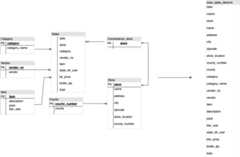
Example of flattening a star schema
Figure 1 shows a fictional sales management database that includes four tables:
- Orders/sales table (fact table)
- Employee table
- Location table
- Customer table
The primary key for the sales table is theOrderNum, which also containsforeign keys to the other three tables.
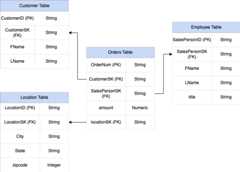
Figure 1: Sample sales data in a star schema
Sample data
Orders/fact table content
| OrderNum | CustomerID | SalesPersonID | amount | Location |
|---|---|---|---|---|
| O-1 | 1234 | 12 | 234.22 | 18 |
| O-2 | 4567 | 1 | 192.10 | 27 |
| O-3 | 12 | 14.66 | 18 | |
| O-4 | 4567 | 4 | 182.00 | 26 |
Employee table content
| SalesPersonID | FName | LName | title |
|---|---|---|---|
| 1 | Alex | Smith | Sales Associate |
| 4 | Lisa | Doe | Sales Associate |
| 12 | John | Doe | Sales Associate |
Customer table content
| CustomerID | FName | LName |
|---|---|---|
| 1234 | Amanda | Lee |
| 4567 | Matt | Ryan |
Location table content
| Location | city | state | zipcode |
|---|---|---|---|
| 18 | Bronx | NY | 10452 |
| 26 | Mountain View | CA | 90210 |
| 27 | Chicago | IL | 60613 |
Query to flatten the data usingLEFT OUTER JOIN
#standardSQLINSERT INTO flattenedSELECT orders.ordernum, orders.customerID, customer.fname, customer.lname, orders.salespersonID, employee.fname, employee.lname, employee.title, orders.amount, orders.location, location.city, location.state, location.zipcodeFROM ordersLEFT OUTER JOIN customer ON customer.customerID = orders.customerIDLEFT OUTER JOIN employee ON employee.salespersonID = orders.salespersonIDLEFT OUTER JOIN location ON location.locationID = orders.locationID
JOINs from left to right (top tobottom). PlacingJOINs that reduce the number of records as early aspossible in the chain increases query efficiency by reducing response time.Output of the flattened data
| OrderNum | CustomerID | FName | LName | SalesPersonID | FName | LName | amount | Location | city | state | zipcode |
|---|---|---|---|---|---|---|---|---|---|---|---|
| O-1 | 1234 | Amanda | Lee | 12 | John | Doe | 234.22 | 18 | Bronx | NY | 10452 |
| O-2 | 4567 | Matt | Ryan | 1 | Alex | Smith | 192.10 | 27 | Chicago | IL | 60613 |
| O-3 | 12 | John | Doe | 14.66 | 18 | Bronx | NY | 10452 | |||
| O-4 | 4567 | Matt | Ryan | 4 | Lisa | Doe | 182.00 | 26 | Mountain View | CA | 90210 |
Nested and repeated fields
In order to design and create a DWH schema from a relational schema (forexample, star and snowflake schemas holding dimension and fact tables),BigQuery presents the nested and repeated fields functionality.Therefore, relationships can be preserved in a similar way as a relationalnormalized (or partial normalized) DWH schema without affecting the performance.For more information, seeperformance best practices.
To better understand the implementation of nested and repeated fields, look at asimple relational schema of aCUSTOMERS table andORDER/SALES table. Theyare two different tables, one for each entity, and the relationships are definedusing a key such as a primary key and a foreign key as the link between thetables while querying usingJOINs. BigQuery nested and repeatedfields let you preserve the same relationship between the entities in one singletable. This can be implemented by having all the customer data, while the ordersdata is nested for each of the customers. For more information, seeSpecifyingnested and repeated columns.
To convert the flat structure into a nested or repeated schema, nest the fieldsas follows:
CustomerID,FName,LNamenested into a new field calledCustomer.SalesPersonID,FName,LNamenested into a new field calledSalesperson.LocationID,city,state,zip codenested into a new field calledLocation.
FieldsOrderNum andamount are not nested, as they represent uniqueelements.
You want to make your schema flexible enough to allow for every order to havemore than one customer: a primary and a secondary. The customer field ismarked as repeated. The resulting schema is shown in Figure 2,which illustrates nested and repeated fields.
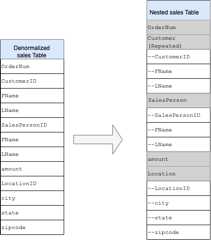
Figure 2: Logical representation of a nested structure
In some cases, denormalization using nested and repeated fields doesnot lead to performance improvements. For more information about limitations andrestrictions, seeSpecify nested and repeated columns in table schemas.
Surrogate keys
It is common to identify rows with unique keys within the tables. Sequences arecommonly used at Oracle to create these keys. InBigQuery you can create surrogate keys by usingrow_number andpartition by functions. For more information, seeBigQuery andsurrogate keys: a practicalapproach.
Keeping track of changes and history
When planning a BigQuery DWH migration, consider the concept ofslowly changing dimensions (SCD). In general, the term SCD describes theprocess of making changes (DML operations) in the dimension tables.
For several reasons, traditional data warehouses usedifferenttypes for handlingdata changes and keeping historical data in slowly changing dimensions. Thesetype usages are needed by the hardware limitations and efficiency requirementsdiscussed earlier. Because the storage is much cheaper than compute andinfinitely scalable, data redundancy and duplication is encouraged if it resultsin faster queries in BigQuery. You can usedata snapshottingtechniquesin which the whole data is loaded into new daily partitions.
Role-specific and user-specific views
Use role-specific and user-specific views when users belong todifferent teams and should see only records and results that they need.
BigQuery supportscolumn-androw-level security. Column-levelsecurity provides fine-grained access to sensitive columns using policy tags,or type-based classification of data. Row-level security which lets you filterdata and enables access to specific rows in a table based on qualifying userconditions.
Data migration
This section provides information about data migration fromOracle to BigQuery, including initial load, change data capture(CDC), and ETL/ELT tools and approaches.
Migration activities
It is recommended to perform migration in phases by identifying appropriate usecases for migration. There are multiple tools and services available tomigrate data from Oracle to Google Cloud. While this list is not exhaustive, itdoes provide a sense of the size and scope of the migration effort.
Exporting data out of Oracle: For more information, seeInitialload andCDC and streaming ingestion from Oracle toBigQuery.ETLtools can be used for the initial load.
Data staging (in Cloud Storage): Cloud Storage is therecommended landing place (staging area) for data exported from Oracle.Cloud Storage is designed for fast, flexible ingestion ofstructured or unstructured data.
ETL process: For more information, seeETL/ELT migration.
Loading data directly into BigQuery: You can load datainto BigQuery directly from Cloud Storage, throughDataflow, or through real-time streaming. Use Dataflowwhen data transformation is required.
Initial load
Migration of the initial data from the existing Oracle data warehouse toBigQuery might be different from the incremental ETL/ELTpipelines depending on the data size and the network bandwidth. The same ETL/ELTpipelines, can be used if the data size is a couple of terabytes.
If the data is up to a few terabytes, dumping the data and usinggcloud storagefor the transfer can be much more efficient than usingJdbcIO-like programmatic databaseextraction methodology, because programmatic approaches might need much moregranular performance tuning. If the data size is more than a few terabytes andthe data is stored in cloud or online storage (such as Amazon Simple Storage Service (Amazon S3)), considerusingBigQuery Data Transfer Service. For large-scale transfers(especially transfers with limited network bandwidth),TransferAppliance is a useful option.
Constraints for initial load
When planning for data migration, consider the following:
- Oracle DWH data size: The source size of your schema carries a significantweight on the chosen data transfer method, especially when the data size islarge (terabytes and above). When the data size is relatively small, thedata transfer process can be completed in fewer steps. Dealing withlarge-scale data sizes makes the overall process more complex.
Downtime: Deciding whether downtime is an option for your migration toBigQuery is important. To reduce downtime, you can bulk loadthe steady historical data and have a CDC solution to catch up with changesthat happen during the transfer process.
Pricing: In some scenarios, you might need third-party integration tools(for example, ETL or replication tools) that require additional licenses.
Initial data transfer (batch)
Data transfer using a batch method indicates that the data would be exportedconsistently in a single process (for example, exporting the Oracle DWH schemadata into CSV, Avro, or Parquet files or importing to Cloud Storage tocreate datasets on BigQuery. All the ETL tools andconcepts explained inETL/ELT migration can be used forthe initial load.
If you do not want to use an ETL/ELT tool for the initial load, you can writecustom scripts to export data to files (CSV, Avro, or Parquet) and upload thatdata to Cloud Storage usinggcloud storage, BigQuery Data Transfer Service, orTransfer Appliance. For more information about performance tuning large datatransfers and transfer options, seeTransferring your large datasets. Then load data fromCloud Storage toBigQuery.
Cloud Storage is ideal for handling the initial landing for data.Cloud Storage is a highly available and durable object storage servicewith no limitations on the number of files, and you pay only for the storage youuse. The service is optimized to work with other Google Cloud services such asBigQuery and Dataflow.
CDC and streaming ingestion from Oracle to BigQuery
There are several ways to capture the changed data from Oracle. Each option hastrade-offs, mainly in the performance impact on the source system, developmentand configuration requirements, and pricing and licensing.
Log-based CDC
Oracle GoldenGate is Oracle's recommended tool for extracting redo logs, and youcan useGoldenGate for Big Data forstreaming logs into BigQuery. GoldenGate requiresper-CPU licensing. For information about the price, seeOracle Technology Global Price List. If Oracle GoldenGate for Big Data is available (in case licenses have alreadybeen acquired), using GoldenGate can be a good choice to create data pipelinesto transfer data (initial load) and then sync all data modification.
Oracle XStream
Oracle stores every commit in redo log files, and these redo files canbe used for CDC.Oracle XStream Out is built on top of LogMiner and provided by third-party tools such asDebezium (as of version 0.8) orcommercially using tools such asStriim.Using XStream APIs requires purchasing a license for Oracle GoldenGate even ifGoldenGate is not installed and used. XStream enables you to propagate Streamsmessages between Oracle and other software efficiently.
Oracle LogMiner
No special license is required forLogMiner. You canuse the LogMiner option in the Debeziumcommunity connector.It is also available commercially using tools such as Attunity, Striim,orStreamSets. LogMinermight have some performance impact on a very active source database and shouldbe used carefully in cases when the volume of changes (the size of the redo) ismore than 10 GB per hour depending on the server's CPU, memory, and I/O capacityand utilization.
SQL-based CDC
This is the incremental ETL approach in which SQL queries continuously poll thesource tables for any changes depending on a monotonically increasing key and atimestamp column that holds the last modified or inserted date. If there is nomonotonically increasing key, using the timestamp column (modified date) with asmall precision (seconds) can cause duplicate records or missed data dependingon the volume and comparison operator, such as> or>=.
To overcome such issues, you can use higher precision in timestamp columns suchas six fractional digits (microseconds, which is the maximum supported precisionin BigQuery, or you can add deduplication tasks in your ETL/ELTpipeline, depending on the business keys and data characteristics.
There should be an index on the key or timestamp column for better extractperformance and less impact on the source database. Delete operations are achallenge for this methodology because they should be handled in the sourceapplication in a soft delete way, such as puttint a deleted flag and updatinglast_modified_date. An alternative solution can be logging these operations inanother table using a trigger.
Triggers
Database triggers can be created on source tables to log changes into shadowjournal tables. Journal tables can hold entire rows to keep track of everycolumn change, or they can only keep the primary key with the operation type(insert, update, or delete). Then changed data can be captured with an SQL-basedapproach described inSQL-based CDC. Using triggers canaffect the transaction performance and double the single-row DML operationlatency if a full row is stored. Storing only the primary key can reduce thisoverhead, but in that case, aJOIN operation with the original table isrequired in the SQL-based extraction, which misses the intermediate change.
ETL/ELT migration
There are many possibilities for handling ETL/ELT on Google Cloud. Technicalguidance on specific ETL workload conversions is not in the scope of thisdocument. You can consider a lift and shift approach or rearchitect your dataintegration platform depending on constraints such as cost and time. For moreinformation about how to migrate your data pipelines to Google Cloud and manyother migration concepts, seeMigrate data pipelines.
Lift and shift approach
If your existing platform supports BigQuery and you want tocontinue using your existing data integration tool:
- You can keep the ETL/ELT platform as it is and change the necessary storagestages with BigQuery in your ETL/ELT jobs.
- If you want to migrate the ETL/ELT platform to Google Cloud as well, you canask your vendor whether their tool is licensed on Google Cloud, and if itis, you can install it on Compute Engine or check the Google Cloud Marketplace.
For information about the data integration solution providers, seeBigQuery partners.
Rearchitecting ETL/ELT platform
If you want to rearchitect your data pipelines, we recommend that you stronglyconsider using Google Cloud services.
Cloud Data Fusion
Cloud Data Fusion is a managedCDAPon Google Cloud offering a visual interface with many plugins for tasks such asdrag-and-drop and pipeline developments. Cloud Data Fusion can be usedfor capturing data from many different kinds of source systems and offers batchand streaming replication capabilities. Cloud Data Fusion or Oracleplugins can be used to capture data from an Oracle. ABigQuery plugin can be used to load the data toBigQuery and handle schema updates.
No output schema is defined both on source and sink plugins, andselect * from is used in the source plugin to replicate new columns as well.
You can use the Cloud Data Fusion Wrangle feature for data cleaning andpreparing.
Dataflow
Dataflow is a serverless data processing platform that canautoscale as well as do batch and streaming data processing.Dataflow can be a good choice for Python and Java developers whowant to code their data pipelines and use the same code for both streaming andbatch workloads. Use theJDBC to BigQuerytemplate toextract data from your Oracle or other relational databases and load itinto BigQuery.
Cloud Composer
Cloud Composer is Google Cloud fully managed workfloworchestration service built onApache Airflow. Itlets you author, schedule, and monitor pipelines that span across cloudenvironments and on-premises data centers. Cloud Composer providesoperatorsandcontributionsthat can run multi-cloud technologies for use cases includingextract and loads, transformations of ELT, and REST API calls.
Cloud Composer uses directed acyclic graphs (DAGs) for scheduling andorchestrating workflows. To understand the general airflowconcepts, seeAirflow Apache concepts.For more information about DAGs, seeWriting DAGs (workflows). For sampleETL best practices with Apache Airflow, seeETL best practices with Airflow documentation site¶. You can replace the Hiveoperator in that example with theBigQueryoperator,and the same concepts would be applicable.
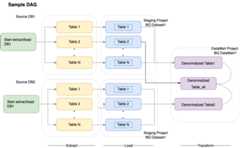
The following sample code is a high-level part of a sampleDAG for the preceding diagram:
default_args = { 'owner': 'airflow', 'depends_on_past': False, 'start_date': airflow.utils.dates.days_ago(2), 'email': ['airflow@example.com'], 'email_on_failure': False, 'email_on_retry': False, 'retries': 2, 'retry_delay': timedelta(minutes=10), } schedule_interval = "00 01 * * *" dag = DAG('load_db1_db2',catchup=False, default_args=default_args, schedule_interval=schedule_interval) tables = { 'DB1_TABLE1': {'database':'DB1', 'table_name':'TABLE1'}, 'DB1_TABLE2': {'database':'DB1', 'table_name':'TABLE2'}, 'DB1_TABLEN': {'database':'DB1', 'table_name':'TABLEN'}, 'DB2_TABLE1': {'database':'DB2', 'table_name':'TABLE1'}, 'DB2_TABLE2': {'database':'DB2', 'table_name':'TABLE2'}, 'DB2_TABLEN': {'database':'DB2', 'table_name':'TABLEN'}, } start_db1_daily_incremental_load = DummyOperator( task_id='start_db1_daily_incremental_load', dag=dag) start_db2_daily_incremental_load = DummyOperator( task_id='start_db2_daily_incremental_load', dag=dag) load_denormalized_table1 = BigQueryOperator( task_id='load_denormalized_table1', use_legacy_sql=False, write_disposition='WRITE_TRUNCATE', allow_large_results=True, trigger_rule='all_done', bql=''' #standardSQL select t1.*,tN.* except (ID) from `ingest-project.ingest_db1.TABLE1` as t1 left join `ingest-project.ingest_db1.TABLEN` as tN on t1.ID = tN.ID ''', destination_dataset_table='datamart-project.dm1.dt1', dag=dag) load_denormalized_table2 = BigQueryOperator( task_id='load_denormalized_table2', use_legacy_sql=False, write_disposition='WRITE_TRUNCATE', allow_large_results=True, trigger_rule='all_done', bql=''' #standardSQL select t1.*,t2.* except (ID),tN.* except (ID) from `ingest-project.ingest_db1.TABLE1` as t1 left join `ingest-project.ingest_db2.TABLE2` as t2 on t1.ID = t2.ID left join `ingest-project.ingest_db2.TABLEN` as tN on t2.ID = tN.ID ''', destination_dataset_table='datamart-project.dm1.dt2', dag=dag) load_denormalized_table_all = BigQueryOperator( task_id='load_denormalized_table_all', use_legacy_sql=False, write_disposition='WRITE_TRUNCATE', allow_large_results=True, trigger_rule='all_done', bql=''' #standardSQL select t1.*,t2.* except (ID),t3.* except (ID) from `datamart-project.dm1.dt1` as t1 left join `ingest-project.ingest_db1.TABLE2` as t2 on t1.ID = t2.ID left join `datamart-project.dm1.dt2` as t3 on t2.ID = t3.ID ''', destination_dataset_table='datamart-project.dm1.dt_all', dag=dag) def start_pipeline(database,table,...): #start initial or incremental load job here #you can write your custom operator to integrate ingestion tool #or you can use operators available in composer instead for table,table_attr in tables.items(): tbl=table_attr['table_name'] db=table_attr['database']) load_start = PythonOperator( task_id='start_load_{db}_{tbl}'.format(tbl=tbl,db=db), python_callable=start_pipeline, op_kwargs={'database': db, 'table':tbl}, dag=dag ) load_monitor = HttpSensor( task_id='load_monitor_{db}_{tbl}'.format(tbl=tbl,db=db), http_conn_id='ingestion-tool', endpoint='restapi-endpoint/', request_params={}, response_check=lambda response: """{"status":"STOPPED"}""" in response.text, poke_interval=1, dag=dag, ) load_start.set_downstream(load_monitor) if table_attr['database']=='db1': load_start.set_upstream(start_db1_daily_incremental_load) else: load_start.set_upstream(start_db2_daily_incremental_load) if table_attr['database']=='db1': load_monitor.set_downstream(load_denormalized_table1) else: load_monitor.set_downstream(load_denormalized_table2) load_denormalized_table1.set_downstream(load_denormalized_table_all) load_denormalized_table2.set_downstream(load_denormalized_table_all)The preceding code is provided for demonstration purposes and cannotbe used as it is.
Dataprep by Trifacta
Dataprep is a data service for visuallyexploring, cleaning, and preparing structured and unstructured data for analysis,reporting, and machine learning. You export the source data into JSON or CSVfiles, transform the data using Dataprep, and load the data using Dataflow. Foran example, seeOracle data (ETL) to BigQuery using Dataflowand Dataprep.
Dataproc
Dataproc is a Google managed Hadoop service. Youcan use Sqoop to export data from Oracle and many relational databases intoCloud Storage as Avro files, and then you can load Avro files intoBigQuery using thebq tool. Itis very common to install ETL tools like CDAP on Hadoop that use JDBC to extractdata and Apache Spark or MapReduce for transformations of the data.
Partner tools for data migration
There are several vendors in the extraction, transformation, and load (ETL)space. ETL market leaders such as Informatica, Talend, Matillion,Infoworks, Stitch, Fivetran, and Striim have deeply integrated with bothBigQuery and Oracle and can help extract, transform, loaddata, and manage processing workflows.
ETL tools have been around for many years. Some organizations might find itconvenient to leverage an existing investment in trusted ETL scripts. Some ofour key partner solutions are included onBigQuerypartner website. Knowing when to choose partner tools overGoogle Cloud built-in utilities depends on your current infrastructure and yourIT team's comfort with developing data pipelines in Java or Python code.
Business intelligence (BI) tool migration
BigQuery supports aflexible suiteof business intelligence (BI) solutionsfor Reporting and analysis that you can leverage. For more information about BItool migration and BigQuery integration, seeOverview ofBigQuery analytics.
Query (SQL) translation
BigQuery'sGoogleSQLsupports compliance with the SQL 2011 standard and has extensions that supportquerying nested and repeated data. All ANSI-compliant SQL functions andoperators can be used with minimal modifications. For a detailed comparisonbetween Oracle and BigQuery SQL syntax and functions, see theOracle to BigQuery SQL translationreference.
Usebatch SQL translation tomigrate your SQL code in bulk, orinteractive SQL translationto translate ad hoc queries.
Migrating Oracle options
This section presents architectural recommendations and references forconverting applications that use Oracle Data Mining, R, and Spatial and Graphfunctionalities.
Oracle Advanced Analytics option
Oracle offers advanced analytics options for data mining, fundamental machinelearning (ML) algorithms, and R usage. The Advanced Analytics option requireslicensing. You can choose from a comprehensive list of Google AI/ML productsdepending on your needs from development to production at scale.
Oracle R Enterprise
Oracle R Enterprise (ORE), a component of the Oracle Advanced Analytics option,makes the open source R statistical programming language integrate with OracleDatabase. In standard ORE deployments, R is installed on an Oracleserver.
For very large scales of data or approaches to warehousing, integrating R withBigQuery is an ideal choice. You can use the open sourcebigrqueryR library to integrate R with BigQuery.
Google has partnered withRStudioto make the field's cutting-edge tools available to users. RStudio can be usedto access terabytes of data in BigQuery fit models inTensorFlow, and run machine learning models at scale with AI Platform.In Google Cloud,R can be installed onCompute Engine at scale.
Oracle Data Mining
Oracle Data Mining (ODM), a component of the Oracle Advanced Analytics option,lets developers build machine learning models using Oracle PL/SQL Developer onOracle.
BigQuery ML enables developers to run many different types of models,such as linear regression, binary logisticregression, multiclass logistic regression, k-means clustering, andTensorFlow model imports. For more information, seeIntroductionto BigQuery ML.
Converting ODM jobs might require rewriting the code. You can choose fromcomprehensiveGoogle AI product offerings such asBigQuery ML, AI APIs(Speech-to-Text,Text-to-Speech,Dialogflow,Cloud Translation,Cloud Natural Language API,Cloud Vision,Timeseries Insights API, and more), orVertex AI.
Vertex AI Workbench can be used as adevelopment environment for data scientists, andVertex AI Training can be used to runtraining and scoring workloads at scale.
Spatial and Graph option
Oracle offers the Spatial and Graph option for querying geometry and graphs andrequires licensing for this option. You can use the geometry functions inBigQuery without additional costs or licenses and use other graphdatabases in Google Cloud.
Spatial
BigQuery offersgeospatial analytics functions and data types. For moreinformation, seeWorking withgeospatial analytics data. Oracle Spatial data typesand functions can be converted togeographyfunctions in BigQuery standardSQL. Geographyfunctions don't add cost on top of standard BigQuery pricing.
Graph
JanusGraph is an open source graph databasesolution that can useBigtable as a storagebackend. For more information, seeRunning JanusGraph on GKE with Bigtable.
Neo4j is another graph databasesolution delivered as a Google Cloud service that runs onGoogle Kubernetes Engine (GKE).
Oracle Application Express
Oracle Application Express (APEX) applications are unique to Oracle andneed to be rewritten. Reporting and data visualization functionalities can bedeveloped usingLooker Studioor BI engine, whereas application-level functionalities such as creating andediting rows can be developed without coding onAppSheet usingCloud SQL.
What's next
- Learn how toOptimize workloadsfor overall performance optimization and cost reduction.
- Learn about how toOptimize storage in BigQuery.
- For BigQuery updates, seerelease notes.
- Reference theOracle SQL translation guide.
Except as otherwise noted, the content of this page is licensed under theCreative Commons Attribution 4.0 License, and code samples are licensed under theApache 2.0 License. For details, see theGoogle Developers Site Policies. Java is a registered trademark of Oracle and/or its affiliates.
Last updated 2025-12-15 UTC.