

Overview: Migrate data warehouses to BigQuery
This document discusses the general concepts that apply to anydata warehousing technology, and it describes a framework that youcan use to organize and structure your migration toBigQuery.
Terminology
We use the following terminology when discussing data warehouse migration:
- Use case
- Ause case consists of all the datasets, data processing, and system and user interactions required in order to achieve business value, such as tracking sales volumes for a product over time. In data warehousing, the use case often consists of:
- Data pipelines that ingest raw data from various data sources, such as customer relationship management (CRM) database.
- The data stored in the data warehouse.
- Scripts and procedures to manipulate and further process and analyze the data.
- A business application that reads or interacts with the data.
- Workload
- A set of use cases that are connected and have shared dependencies. For example, a use case might have the following relationships and dependencies:
- Purchase reporting can stand alone and is useful for understanding spendings and requesting discounts.
- Sales reporting can stand alone and is useful for planning marketing campaigns.
- Profit and loss reporting, however, is dependent on both purchases and sales, and is useful for determining the company's value.
- Business application
- A system that end users interact with—for example, a visual report or dashboard. A business application can also take the form of an operational data pipeline or feedback loop. For example, after product price changes have been calculated or predicted, an operational data pipeline might update the new product prices in a transactional database.
- Upstream process
- The source systems and the data pipelines that load data into the data warehouse.
- Downstream process
- The scripts, procedures, and business applications that are used to process, query, and visualize the data in the data warehouse.
- Offload migration
- A migration strategy that aims either to get the use case working for the end user in the new environment as quickly as possible, or to take advantage of extra capacity available in the new environment. Use cases are offloaded by doing the following:
- Copying and then synchronizing the schema and data from the legacy data warehouse.
- Migrating the downstream scripts, procedures, and business applications.
Migration offloading can increase the complexity and work involved in migrating data pipelines.
- Full migration
- A migration approach similar to an offload migration, but instead of copying and then synchronizing the schema and data, you configure the migration to ingest data directly into the new cloud data warehouse from the upstream source systems. In other words, the data pipelines required for the use case are also migrated.
- Enterprise data warehouse (EDW)
- A data warehouse that consists not only of an analytical database, but multiple critical analytical components and procedures. These include data pipelines, queries, and business applications that are required in order to fulfill the organization's workloads.
- Cloud data warehouse (CDW)
- A data warehouse that has the same characteristics as an EDW, but runs on a fully managed service in the cloud—in this case, BigQuery.
- Data pipeline
- A process that connects data systems through a series of functions and tasks that perform various types of data transformation. For details, seeWhat is a data pipeline? in this series.
Why migrate to BigQuery?
Over the past few decades, organizations have mastered the science of datawarehousing. They have increasingly applied descriptive analytics to largequantities of stored data, gaining insight into their core business operations.Conventional Business Intelligence (BI), which focuses on querying, reporting,andOnline Analytical Processing,might have been a differentiating factor in the past, either making or breakinga company, but it's no longer sufficient.
Today, not only do organizations need to understand past events using descriptiveanalytics, they needpredictive analytics,which often uses machine learning (ML) to extract data patterns and makeprobabilistic claims about the future. The ultimate goal is to developprescriptive analytics that combine lessons from the past with predictions about the future toautomatically guide real-time actions.
Traditional data warehouse practices capture raw data from various sources,which are oftenOnline Transactional Processing (OLTP) systems. Then, a subset of data is extracted in batches, transformed based on adefined schema, and loaded into the data warehouse. Because traditional datawarehouses capture a subset of data in batches and store data based onrigid schemas, they are unsuitable for handling real-time analysis orresponding to spontaneous queries. Google designed BigQueryin part in response to these inherent limitations.
Innovative ideas are often slowed by the size and complexity of the ITorganization that implements and maintains these traditional datawarehouses. It can take years and substantial investment to build a scalable,highly available, and secure data warehouse architecture.BigQuery offers sophisticatedsoftware as a service (SaaS) technology that can be used for serverless data warehouse operations. Thislets you focus on advancing your core business while delegatinginfrastructure maintenance and platform development to Google Cloud.
BigQuery offers access to structured data storage, processing,and analytics that's scalable, flexible, and cost effective. Thesecharacteristics are essential when your data volumes are growingexponentially—to make storage and processing resources available asneeded, as well as to get value from that data. Furthermore, for organizationsthat are just starting with big data analytics and machine learning, and thatwant to avoid the potential complexities of on-premises big data systems,BigQuery offers a pay-as-you-go way to experiment with managedservices.
With BigQuery, you can find answers to previously intractableproblems, apply machine learning to discover emerging data patterns, and testnew hypotheses. As a result, you have timely insight into how your business isperforming, which enables you to modify processes for better results. Inaddition, the end user's experience is often enriched with relevant insightsgleaned from big data analysis, as we explain later in this series.
What and how to migrate: The migration framework
Undertaking a migration can be a complex and lengthy endeavor. Therefore, werecommend adhering to a framework to organize and structure the migration workin phases:
- Prepare and discover: Prepare for your migration withworkload anduse case discovery.
- Plan: Prioritize use cases, define measures ofsuccess, and plan your migration.
- Execute: Iterate through the steps for migration, from assessment to validation.
Prepare and discover
In the initial phase, the focus is on preparation and discovery. It's aboutaffording yourself and your stakeholders an early opportunity to discover theexisting use cases and raise initial concerns. Importantly, you also conductan initial analysis around the expected benefits. These include performancegains (for example, improved concurrency) and reductions intotal cost of ownership (TCO). This phase is crucial in helping you establish the value of themigration.
A data warehouse typically supports a wide range of use cases and has a largenumber of stakeholders, from data analysts to business decision-makers. Werecommend that you involve representatives from these groups to get a goodunderstanding of which use cases exist, whether these use cases perform well,and whether stakeholders are planning new use cases.
The discovery phase process consists of the following tasks:
- Examine the value proposition of BigQuery and compare itto that of your legacy data warehouse.
- Perform an initial TCO analysis.
- Establish which use cases are affected by the migration.
- Model the characteristics of the underlying datasets and data pipelinesyou want to migrate in order to identify dependencies.
To get insights into the use cases, you can develop a questionnaire to gatherinformation from your subject matter experts (SMEs), end users, andstakeholders. The questionnaire should gather the following information:
- What is the use case's objective? What is the business value?
- What are the non-functional requirements? Data freshness, concurrentusage, and so on.
- Is the use case part of a bigger workload? Is it dependent on other usecases?
- Which datasets, tables, and schemas underpin the use case?
- What do you know about the data pipelines feeding into those datasets?
- Which BI tooling, reports, and dashboards are currently used?
- What are the current technical requirements around operational needs,performance, authentication, and network bandwidth?
The following diagram shows a high-level legacy architecture before themigration. It illustrates the catalog of available data sources, legacy datapipelines, legacy operational pipelines and feedback loops, and legacy BIreports and dashboards that are accessed by your end users.

Plan
The planning phase is about taking the input from thepreparation and discovery phase, assessing that input, and then using it toplan for the migration. This phase can be broken down into the followingtasks:
Catalog and prioritize use cases
We recommend that you break your migration process into iterations.You catalog both existing and new use cases and assign them a priority. Fordetails, see theMigrate using an iterative approach andPrioritize use cases sections of this document.
Define measures of success
It's helpful to define clear measures of success such askey performance indicators (KPIs),ahead of the migration. Your measures will allow you to assess themigration's success at each iteration. This in turn lets you makeimprovements to the migration process in later iterations.
Create a definition of "done"
With complex migrations, it isn't necessarily obvious when you'vefinished migrating a given use case. Therefore, you should outline a formaldefinition of your intended end state. This definition should be genericenough so that it can be applied to all use cases that you want to migrate.The definition should act as a set of minimum criteria for you to considerthe use case to be fully migrated. This definition typically includescheckpoints to make sure that the use case has been integrated, tested,and documented.
Design and propose a proof-of-concept (POC), short-term state, andideal end state
After you've prioritized your use cases, you can start to think of themover the entire period of the migration. Consider the first use-casemigration as a proof of concept (PoC) to validate the initial migrationapproach. Consider what is achievable within the first few weeks to monthsas the short-term state. How will your migration plans affect your users?Will they have a hybrid solution, or can you migrate an entireworkload for a subset of users first?
Create time and cost estimates
To ensure a successful migration project, it's important to producerealistic time estimates. To achieve this, engage with all the relevantstakeholders to discuss their availability and agree on their level ofengagement throughout the project. This will help you estimate labor costsmore accurately. To estimate costs relating to projected cloud resourceconsumption, seeEstimating storage and query costs andIntroduction to controlling BigQuery costs in the BigQuery documentation.
Identify and engage a migration partner
The BigQuery documentation describes many tools and resourcesyou can use to conduct the migration. However, it can be challenging toperform a large, complex migration on your own if you do not have any priorexperience or do not have all the required technical expertise inside yourorganization. Therefore we recommend that from the outset you identify andengage a migration partner. For more details, see ourglobal partnerandconsulting serviceprograms.
Migrate using an iterative approach
When migrating a large data warehousing operation to the cloud, it's a goodidea to take an iterative approach. Therefore we recommend that you make thetransition to BigQuery in iterations. Dividing the migrationeffort into iterations makes the overall process easier, reduces risk, andprovides opportunities for learning and for improving after each iteration.
Aniteration consists of all thework required to offload or fully migrate one or more relateduse cases within a bound period of time. You can think of an iteration as asprint cyclein the agile methodology, consisting of one or moreuser stories.
For convenience and ease of tracking, you might consider associating anindividual use case with one or more user stories. For example, consider thefollowing user story: "As a pricing analyst, I want to analyze product pricechanges over the last year so that I can calculate future prices."
The corresponding use case might be:
- Ingesting the data from a transactional database which stores productsand prices.
- Transforming the data into a single time series for each product andinputing any missing values.
- Storing the results in one or more tables in the data warehouse.
- Making the results available through a Python notebook (thebusiness application).
The business value of this use case is to support pricing analysis.
As with most use cases, this use case probably will support multiple userstories.
An offloaded use case will likely be followed by a subsequent iteration tofully migrate the use case. Otherwise, you might still have a dependency on theexisting, legacy data warehouse, because the data is copied from there. Thesubsequent full migration is the delta between the offload and a full migrationthat hasn't been preceded by an offload—in other words, the migration of thedata pipeline(s) to extract, transform, and load the data into the datawarehouse.
Prioritize use cases
Where you start and end your migration depends on your specific business needs.Deciding the order in which you migrate use cases is important because earlysuccess during a migration is crucial to continuing on your cloud adoption path.Experiencing failure at an early stage can become a serious setback to theoverall migration effort. You might be on board with the benefits ofGoogle Cloud and BigQuery, but processing all of thedatasets and data pipelines that have been created or managed in your legacydata warehouse for different use cases can be complicated and time-consuming.
Although there's no one-size-fits-all answer, there are best practices you canuse as you're evaluating your on-premises use cases and business applications.This kind of up-front planning can make the migration process easier andthe entire transition to BigQuery smoother.
The following sections explore possible approaches for prioritizing usecases.
Approach: Exploit current opportunities
Look at current opportunities that could help you maximize the return oninvestment of a specific use case. This approach is especially useful if you'reunder pressure to justify the business value of migrating to the cloud. It alsoprovides an opportunity to gather additional datapoints to help assess the totalmigration cost.
Here are some example questions to ask to help you identify which use cases toprioritize:
- Does the use case consist of datasets or data pipelines that arecurrently limited by the legacy enterprise data warehouse?
- Does your existing enterprise data warehouse require a hardware refresh,or are you anticipating a need to expand your hardware? If so, it can beattractive to offload use cases to BigQuery sooner ratherthan later.
Identifying opportunities to migrate can create some quick wins that yieldtangible, immediate benefits for users and the business.
Approach: Migrate analytical workloads first
Migrate Online Analytical Processing(OLAP)workloads before Online Transaction Processing(OLTP) workloads. A data warehouse is often the only place in the organization whereyou have all the data to create a single, global view of the organization'soperations. Therefore, it's common for organizations to have some data pipelinesthat feed back into the transactional systems to update status or triggerprocesses—for example, to buy more stock when a product's inventory is low. OLTPworkloads tend to be more complex and have more stringent operationalrequirements andservice-level agreements (SLAs) than OLAP workloads, so it also tends to be easier to migrate OLAP workloadsfirst.
Approach: Focus on the user experience
Identify opportunities for enhancing the user experience by migrating specificdatasets and enabling new types of advanced analytics. For example, one way toenhance the user experience is with real-time analytics. You can buildsophisticated user experiences around areal-time stream of data when it's fused with historical data. For example:
- A back-office employee who's alerted on their mobile app about low stock.
- An online customer who might benefit from knowing that spending anotherdollar would put them on the next reward tier.
- A nurse who is alerted about a patient's vital signs on theirsmartwatch, enabling them to take the best course of action by pulling upthe patient's treatment history on their tablet.
You can also enhance the user experience with predictive and prescriptiveanalytics. For that, you can useBigQuery ML,Vertex AI AutoML tabular,or Google's pre-trained models forimage analysis,video analysis,speech recognition,natural language,andtranslation.Or you can serve your custom-trained model usingVertex AI for use cases tailored to your business needs. This might involve the following:
- Recommending a product based on market trends and user purchase behavior.
- Predicting a flight delay.
- Detecting fraudulent activities.
- Flagging inappropriate content.
- Other innovative ideas that could differentiate your app from thecompetition.
Approach: Prioritize least-risky use cases
There are a number of questions IT can ask to help evaluate which use cases arethe least risky to migrate, which makes them the most attractive to migrate inthe early phases of the migration. For example:
- What is the business criticality of this use case?
- Do large numbers of employees or customers depend on the use case?
- What is the target environment (for example, development or production)for the use case?
- What is our IT team's understanding of the use case?
- How many dependencies and integrations does the use case have?
- Does our IT team have proper, up-to-date, thorough documentation for theuse case?
- What are the operational requirements (SLAs) for the use case?
- What are the legal or governmental compliance requirements for the use case?
- What are the downtime and latency sensitivities for accessing theunderlying dataset?
- Are there line-of-business owners eager and willing to migrate their usecase early?
Going through this list of questions can help you rank datasets and datapipelines from lowest to highest risk. Low-risk assets should be migrated first,and higher-risk ones should come later.
Execute
After you've gathered information about your legacy systems, and created aprioritized backlog of use cases, you can group the use cases into workloads andproceed with the migration in iterations.
An iteration can consist of a single use case, a few separate use cases, or anumber of use cases pertaining to a single workload. Which of these options youchoose for the iteration depends on the interconnectivity of the use cases, anyshared dependencies, and the resources you have available to undertake thework.
A migration typically contains the following steps:
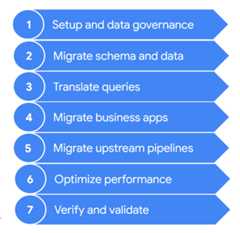
These steps are described in more detail in the following sections.You might not need to go through all of these steps in each iteration. Forexample, in one iteration you might decide to focus on copying some data fromyour legacy data warehouse to BigQuery. In contrast, in asubsequent iteration you might focus on modifying the ingestion pipeline from anoriginal data source directly to BigQuery.
1. Setup and data governance
Setup is the foundational work that's required in order to enable the use casesto run on Google Cloud. Setup can include configuration of yourGoogle Cloud projects, network, virtual private cloud (VPC), and datagovernance. It also includes developing a good understanding of where you aretoday—what works and what doesn't. This helps you understand the requirementsfor your migration effort. You can use theBigQuery migration assessment featureto assist you with this step.
Data governance is a principled approach to manage data during its lifecycle,from acquisition to use to disposal. Your data governance program clearlyoutlines policies, procedures, responsibilities, and controls surrounding dataactivities. This program helps to ensure that information is collected,maintained, used, and disseminated in way that both meets your organization'sdata integrity and its security needs. It also helps empower your employees todiscover and use the data to its fullest potential.
Thedata governance documention helps youunderstand data governance and the controls that you need when migrating youron-premises data warehouse to BigQuery.
2. Migrate schema and data
The data warehouse schema defines how your data is structured and defines therelationships between your data entities. The schema is at the core ofyour datadesign, and it influences many processes, both upstream and downstream.
Theschema and data transfer documentation provides extensive information on how you can move your data toBigQuery and recommendations for updating your schema to takefull advantage of BigQuery's features.
3. Translate queries
Usebatch SQL translation tomigrate your SQL code in bulk, orinteractive SQL translationto translate ad hoc queries.
Some legacy data warehouses include extensions to the SQL standardto enable functionality for their product. BigQuery does notsupport these proprietary extensions; instead, it conforms to theANSI/ISO SQL:2011 standard. This means that some of your queries might still need manualrefactoring if the SQL translators can't interpret them.
4. Migrate business applications
Business applications can take many forms—from dashboards to customapplications to operational data pipelines that provide feedback loops totransactional systems.
To learn more about the analytics options when working withBigQuery, seeOverview of BigQuery analytics.This topic provides an overview of the reporting and analysis toolsthat you can use to get compelling insights from your data.
The section onfeedback loops in the data pipeline documention describes how you can use adata pipeline to create a feedback loop to provision upstream systems.
5. Migrate data pipelines
Thedata pipelines documention presents procedures, patterns, and technologies to migrate your legacydata pipelines to Google Cloud. It helps you understand whata data pipeline is, what procedures and patterns it can employ, and whichmigration options and technologies are available in relation to the largerdata warehouse migration.
6. Optimize performance
BigQuery processes data efficiently for both small andpetabyte-scale datasets. With the help of BigQuery, your dataanalytics jobs should perform well without modification in your newly migrateddata warehouse. If you find that under certain circumstances query performancedoesn't match your expectations, seeIntroduction to optimizing query performancefor guidance.
7. Verify and validate
At the end of each iteration, validate that the use-case migration wassuccessful by verifying that:
- The data and schema have been fully migrated.
- Data governance concerns have been fully met and tested.
- Maintenance and monitoring procedures and automation have been established.
- Queries have been correctly translated.
- Migrated data pipelines function as expected.
- Business applications are correctly configured to access the migrateddata and queries.
You can get started with theData validation tool, an open sourcePython CLI tool that compares data from source and target environments toensure they match. It supports multiple connection types along with multi-levelvalidation functionality.
It's also a good idea to measure the impact of the use-case migration—forexample, in terms of improving performance, reducing cost, or enabling newtechnical or business opportunities. Then you can more accurately quantify thevalue of the return on investment and compare the value against your successcriteria for the iteration.
After the iteration is validated, you can release the migrated use case toproduction and give your users access to migrated datasets and businessapplications.
Finally, take notes and document lessons learned from this iteration, so youcan apply these lessons in the next iteration and accelerate the migration.
Summarizing the migration effort
During migration, you run both your legacy data warehouse andBigQuery, as detailed in this document. The referencearchitecture in the following diagram highlights that both data warehousesoffer similar functionality and paths—both can ingest from the source systems,integrate with the business applications, and provide the required user access.Importantly, the diagram also highlights that data is synchronized from yourdata warehouse to BigQuery. This allows use cases to beoffloaded during the entire duration of the migration effort.

Assuming that your intent is to fully migrate from your data warehouse toBigQuery, the end state of the migration looks like thefollowing:

What's next
Perform a BigQuery migration with the following tools:
- Run amigration assessment to assess the feasibility and potential benefits of migrating your data warehouse to BigQuery.
- Use the SQL translation tools, such as theinteractive SQL translator, thetranslation API, and thebatch SQL translator to automate the conversion of your SQL queries into GoogleSQL, including Gemini-enhanced SQL customization.
- Once you have migrated your data warehouse to BigQuery, run thedata validation tool to validate your newly migrated data.
Learn more about a data warehouse migration with the following resources:
- The Cloud Architecture Center providesmigration resources to plan and execute your migration to Google Cloud
- Learnhow to migrate schema and data from your data warehouse
- Learnhow to migrate data pipelines from your data warehouse
- Learn aboutdata governance in BigQuery
Work with the Professional Services team to help plan and deploy your Google Cloud migration. For more information, seeGoogle Cloud Professional Services
Learn about migrating from specific data warehouses to BigQuery:
Except as otherwise noted, the content of this page is licensed under theCreative Commons Attribution 4.0 License, and code samples are licensed under theApache 2.0 License. For details, see theGoogle Developers Site Policies. Java is a registered trademark of Oracle and/or its affiliates.
Last updated 2025-12-15 UTC.