

Create materialized views
Note: This feature may not be available when using reservations that are created with certain BigQuery editions. For more information about which features are enabled in each edition, seeIntroduction to BigQuery editions.This document describes how to create materialized views inBigQuery. Before you read this document, familiarize yourselfwithIntroduction to materialized views.
Before you begin
Grant Identity and Access Management (IAM) roles that give users the necessary permissionsto perform each task in this document.
Required permissions
To create materialized views, you need thebigquery.tables.createIAM permission.
Each of the following predefined IAM roles includes thepermissions that you need in order to create a materialized view:
bigquery.dataEditorbigquery.dataOwnerbigquery.admin
For more information aboutBigQuery Identity and Access Management (IAM), seeAccess control with IAM.
Create materialized views
To create a materialized view, select one of the following options:
SQL
Use theCREATE MATERIALIZED VIEW statement.The following example creates a materialized view for the number of clicksfor each product ID:
In the Google Cloud console, go to theBigQuery page.
In the query editor, enter the following statement:
CREATEMATERIALIZEDVIEWPROJECT_ID.DATASET.MATERIALIZED_VIEW_NAMEAS(QUERY_EXPRESSION);
Replace the following:
PROJECT_ID: the name of your project in which you want to create the materialized view—for example,myproject.DATASET: the name of the BigQuery dataset that you want to create the materialized view in—for example,mydataset. If you are creating a materialized view over an Amazon Simple Storage Service (Amazon S3) BigLake table (preview), make sure the dataset is in asupported region.MATERIALIZED_VIEW_NAME: the name of the materialized view that you want to create—for example,my_mv.QUERY_EXPRESSION: the GoogleSQL query expression that defines the materialized view—for example,SELECT product_id, SUM(clicks) AS sum_clicks FROM mydataset.my_source_table.
ClickRun.
For more information about how to run queries, seeRun an interactive query.
Example
The following example creates a materialized view for the number of clicksfor each product ID:
CREATEMATERIALIZEDVIEWmyproject.mydataset.my_mv_tableAS(SELECTproduct_id,SUM(clicks)ASsum_clicksFROMmyproject.mydataset.my_base_tableGROUPBYproduct_id);
Terraform
Use thegoogle_bigquery_tableresource.
To authenticate to BigQuery, set up Application DefaultCredentials. For more information, seeSet up authentication for client libraries.
The following example creates a view namedmy_materialized_view:
resource "google_bigquery_dataset" "default" { dataset_id = "mydataset" default_partition_expiration_ms = 2592000000 # 30 days default_table_expiration_ms = 31536000000 # 365 days description = "dataset description" location = "US" max_time_travel_hours = 96 # 4 days labels = { billing_group = "accounting", pii = "sensitive" }}resource "google_bigquery_table" "default" { dataset_id = google_bigquery_dataset.default.dataset_id table_id = "my_materialized_view" deletion_protection = false # set to "true" in production materialized_view { query = "SELECT ID, description, date_created FROM `myproject.orders.items`" enable_refresh = "true" refresh_interval_ms = 172800000 # 2 days allow_non_incremental_definition = "false" }}To apply your Terraform configuration in a Google Cloud project, complete the steps in the following sections.
Prepare Cloud Shell
- LaunchCloud Shell.
Set the default Google Cloud project where you want to apply your Terraform configurations.
You only need to run this command once per project, and you can run it in any directory.
export GOOGLE_CLOUD_PROJECT=PROJECT_ID
Environment variables are overridden if you set explicit values in the Terraform configuration file.
Prepare the directory
Each Terraform configuration file must have its own directory (alsocalled aroot module).
- InCloud Shell, create a directory and a new file within that directory. The filename must have the
.tfextension—for examplemain.tf. In this tutorial, the file is referred to asmain.tf.mkdirDIRECTORY && cdDIRECTORY && touch main.tf
If you are following a tutorial, you can copy the sample code in each section or step.
Copy the sample code into the newly created
main.tf.Optionally, copy the code from GitHub. This is recommended when the Terraform snippet is part of an end-to-end solution.
- Review and modify the sample parameters to apply to your environment.
- Save your changes.
- Initialize Terraform. You only need to do this once per directory.
terraform init
Optionally, to use the latest Google provider version, include the
-upgradeoption:terraform init -upgrade
Apply the changes
- Review the configuration and verify that the resources that Terraform is going to create or update match your expectations:
terraform plan
Make corrections to the configuration as necessary.
- Apply the Terraform configuration by running the following command and entering
yesat the prompt:terraform apply
Wait until Terraform displays the "Apply complete!" message.
- Open your Google Cloud project to view the results. In the Google Cloud console, navigate to your resources in the UI to make sure that Terraform has created or updated them.
API
Call thetables.insert methodand pass in aTableresourcewith a definedmaterializedView field:
{"kind":"bigquery#table","tableReference":{"projectId":"PROJECT_ID","datasetId":"DATASET","tableId":"MATERIALIZED_VIEW_NAME"},"materializedView":{"query":"QUERY_EXPRESSION"}}
Replace the following:
PROJECT_ID: the name of your project in which you want to create the materialized view—for example,myproject.DATASET: the name of the BigQuery dataset that you want to create the materialized view in—for example,mydataset. If you are creating a materialized view over an Amazon Simple Storage Service (Amazon S3) BigLake table (preview), make sure the dataset is in asupported region.MATERIALIZED_VIEW_NAME: the name of the materialized view that you want to create—for example,my_mv.QUERY_EXPRESSION: the GoogleSQL query expression that defines the materialized view—for example,SELECT product_id, SUM(clicks) AS sum_clicks FROM mydataset.my_source_table.
Example
The following example creates a materialized view for the number of clicksfor each product ID:
{"kind":"bigquery#table","tableReference":{"projectId":"myproject","datasetId":"mydataset","tableId":"my_mv"},"materializedView":{"query":"select product_id,sum(clicks) as sum_clicks from myproject.mydataset.my_source_table group by 1"}}
Java
Before trying this sample, follow theJava setup instructions in theBigQuery quickstart using client libraries. For more information, see theBigQueryJava API reference documentation.
To authenticate to BigQuery, set up Application Default Credentials. For more information, seeSet up authentication for client libraries.
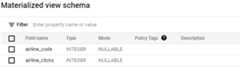
importcom.google.cloud.bigquery.BigQuery;importcom.google.cloud.bigquery.BigQueryException;importcom.google.cloud.bigquery.BigQueryOptions;importcom.google.cloud.bigquery.MaterializedViewDefinition;importcom.google.cloud.bigquery.TableId;importcom.google.cloud.bigquery.TableInfo;// Sample to create materialized viewpublicclassCreateMaterializedView{publicstaticvoidmain(String[]args){// TODO(developer): Replace these variables before running the sample.StringdatasetName="MY_DATASET_NAME";StringtableName="MY_TABLE_NAME";StringmaterializedViewName="MY_MATERIALIZED_VIEW_NAME";Stringquery=String.format("SELECT MAX(TimestampField) AS TimestampField, StringField, "+"MAX(BooleanField) AS BooleanField "+"FROM %s.%s GROUP BY StringField",datasetName,tableName);createMaterializedView(datasetName,materializedViewName,query);}publicstaticvoidcreateMaterializedView(StringdatasetName,StringmaterializedViewName,Stringquery){try{// Initialize client that will be used to send requests. This client only needs to be created// once, and can be reused for multiple requests.BigQuerybigquery=BigQueryOptions.getDefaultInstance().getService();TableIdtableId=TableId.of(datasetName,materializedViewName);MaterializedViewDefinitionmaterializedViewDefinition=MaterializedViewDefinition.newBuilder(query).build();bigquery.create(TableInfo.of(tableId,materializedViewDefinition));System.out.println("Materialized view created successfully");}catch(BigQueryExceptione){System.out.println("Materialized view was not created. \n"+e.toString());}}}After the materialized view is successfully created, it appearsin theExplorer pane of BigQuery in the Google Cloud console.The following example shows a materialized view schema:
Unless you disableautomatic refresh,BigQuery starts an asynchronous full refresh for the materializedview. The query finishes quickly, but the initial refresh might continue torun.
Note: Each base table is limited to 100 materialized views within the same project,and 500 materialized views within the same organization.Access control
You can grant access to a materialized view at thedataset level, theview level, or thecolumn level. You can also set access at ahigher level in theIAM resource hierarchy.
Querying a materialized view requires access to the view as well as its basetables. To share a materialized view, you can grant permissions to thebase tables or configure a materialized view as an authorized view. For moreinformation, seeAuthorized views.
To control access to views in BigQuery, seeAuthorized views.
Materialized views query support
Materialized views use a restricted SQL syntax.Queries must use the following pattern:
[WITHcte[,…]]SELECT[{ALL|DISTINCT}]expression[[AS]alias][,...]FROMfrom_item[,...][WHEREbool_expression][GROUPBYexpression[,...]]from_item:{table_name[as_alias]|{join_operation|(join_operation)}|field_path|unnest_operator|cte_name[as_alias]}as_alias:[AS]alias
Query limitations
Materialized views have the following limitations.
Aggregate requirements
Aggregates in the materialized view query must be outputs. Computing, filtering,or joining based on an aggregated value is not supported. For example, creatinga view from the following query is not supported because it produces a valuecomputed from an aggregate,COUNT(*) / 10 as cnt.
SELECTTIMESTAMP_TRUNC(ts,HOUR)ASts_hour,COUNT(*)/10AScntFROMmydataset.mytableGROUPBYts_hour;
Only the following aggregation functions are supported:
ANY_VALUE(but not overSTRUCT)APPROX_COUNT_DISTINCTARRAY_AGG(but not overARRAYorSTRUCT)AVGBIT_ANDBIT_ORBIT_XORCOUNTCOUNTIFHLL_COUNT.INITLOGICAL_ANDLOGICAL_ORMAXMINMAX_BY(but not overSTRUCT)MIN_BY(but not overSTRUCT)SUM
Unsupported SQL features
The following SQL features are not supported in materialized views:
UNION ALL. (Support in Preview)LEFT OUTER JOIN(Support in Preview)RIGHT/FULL OUTER JOIN.- Self-joins, also known as using a
JOINon the same table more than once. - Window functions.
ARRAYsubqueries.- Non-deterministic functions such as
RAND(),CURRENT_DATE(),SESSION_USER(), orCURRENT_TIME(). - User-defined functions (UDFs).
TABLESAMPLE.FOR SYSTEM_TIME AS OF.
LEFT OUTER JOIN andUNION ALL support
Preview
This feature is subject to the "Pre-GA Offerings Terms" in the General Service Terms section of theService Specific Terms. Pre-GA features are available "as is" and might have limited support. For more information, see thelaunch stage descriptions.
To request feedback or support for this feature, send an email tobq-mv-help @google.com.
Incremental materialized views supportLEFT OUTER JOIN andUNION ALL.Materialized views withLEFT OUTER JOIN andUNION ALL statements share thelimitations of other incremental materialized views. In addition,smarttuning is not supported formaterialized views with union all or left outer join.
Examples
The following example creates an aggregate incremental materialized view withaLEFT JOIN. This view is incrementally updated when data appends to the lefttable.
CREATEMATERIALIZEDVIEWdataset.mvAS(SELECTs_store_sk,s_country,s_zip,SUM(ss_net_paid)ASsum_sales,FROMdataset.store_salesLEFTJOINdataset.storeONss_store_sk=s_store_skGROUPBY1,2,3);
The following example creates an aggregate incremental materialized view withaUNION ALL. This view is incrementally updated when data appends to either orboth tables. For more information about incremental updates, seeIncremental Updates.
CREATEMATERIALIZEDVIEWdataset.mvPARTITIONBYDATE(ts_hour)AS(SELECTSELECTTIMESTAMP_TRUNC(ts,HOUR)ASts_hour,SUM(sales)sum_salesFROM(SELECTts,salesfromdataset.table1UNIONALLSELECTts,salesfromdataset.table2)GROUPBY1);
Access control restrictions
- If a user's query of a materialized view includes base table columnsthat they cannot access due to column-level security, then the query failswith the message
Access Denied. - If a user queries a materialized view but doesn't have full access to all rows in the materialized views' base tables, then BigQuery runs the query against the basetables instead of reading materialized view data. This ensures the queryrespects all access control constraints. This limitation also applies whenquerying tables with data-masked columns.
WITH clause and common table expressions (CTEs)
Materialized views supportWITH clauses and common table expressions.Materialized views withWITH clauses must still follow the pattern andlimitations of materialized views withoutWITH clauses.
Examples
The following example shows a materialized view using aWITH clause:
WITHtmpAS(SELECTTIMESTAMP_TRUNC(ts,HOUR)ASts_hour,*FROMmydataset.mytable)SELECTts_hour,COUNT(*)AScntFROMtmpGROUPBYts_hour;
The following example shows a materialized view using aWITH clause that isnot supported because it contains twoGROUP BY clauses:
WITHtmpAS(SELECTcity,COUNT(*)ASpopulationFROMmydataset.mytableGROUPBYcity)SELECTpopulation,COUNT(*)AScntGROUPBYpopulation;
Materialized views over BigLake tables
Important: The term "BigLake" on this page refers to an accessdelegation functionality for external tables in BigQuery. Forinformation about BigLake, the stand-alone Google Cloudproduct that includes BigLake metastore, the Apache Iceberg REST catalog,and BigLake tables for Apache Iceberg seeBigLake overview.To creatematerialized views over BigLaketables, theBigLake table must havemetadata cachingenabled overCloud Storage data and the materialized view must have amax_staleness option value greater than the base table.Materialized views over BigLake tables support thesame set ofqueries as othermaterialized views.
Example
Creation of a simple aggregate view using a BigLake base table:
CREATEMATERIALIZEDVIEWsample_dataset.sample_mvOPTIONS(max_staleness=INTERVAL"0:30:0"HOURTOSECOND)ASSELECTCOUNT(*)cntFROMdataset.biglake_base_table;
For details about the limitations of materialized views overBigLake tables, seematerialized views overBigLake tables.
Materialized views over Apache Iceberg external tables
You can reference large Iceberg tables in materializedviews instead of migrating that data to BigQuery-managed storage.
Create a materialized view over an Iceberg table
The following example creates a partition-aligned materialized view over apartitioned base Iceberg table:
CREATEMATERIALIZEDVIEWmydataset.myicebergmvPARTITIONBYDATE_TRUNC(birth_month,MONTH)ASSELECT*FROMmydataset.myicebergtable;
The underlying base Iceberg tablemyicebergtable musthave apartition speclike the following:
"partition-specs":[{"spec-id":0,"fields":[{"name":"birth_month","transform":"month","source-id":3,"field-id":1000}]}]Limitations
In addition to thelimitationsof standard Iceberg tables, materialized views overIceberg tables have the following limitations:
- You can create a materialized view that is partition aligned with the basetable. However, the materialized view only supports time-basedpartition transformation,for example,
YEAR,MONTH,DAY, andHOUR. - The granularity of the materialized view's partition cannot be finer than thegranularity of the base table's partition. For example, if you partition thebase table yearly using the
birth_datecolumn, creating a materialized viewwithPARTITION BY DATE_TRUNC(birth_date, MONTH)isn't supported. - If the base Iceberg tables have changes across more than4000 partitions, the materialized view is fully invalidated upon refresh,even if it's partitioned.
- Partition evolutionsare supported. However, changing the partitioning columns of a base tablewithout recreating the materialized view might result in full invalidationthat cannot be fixed by refreshing the materialized view.
- There must be at least one snapshot in the base table.
- The Iceberg table must be a BigLaketable, for example, an authorized external table.
- The query over the materialized view might fail if the
metadata.jsonfile ofyour Iceberg table is corrupted. - IfVPC Service Controls is enabled,service accounts of the authorized external table must be added to youringress rules, otherwise, VPC Service Controls blocks automatic backgroundrefresh for the materialized view.
Themetadata.json file of your Iceberg table must havethe following specifications. Without these specifications, your queries scanthe base table, failing to use the materialized result.
current-snapshot-idcurrent-schema-idsnapshotssnapshot-log
Insnapshots:
parent-snapshot-id(if available)schema-idoperation(in thesummaryfield)
Partitioning (for thepartitioned materialized view)
Partitioned materialized views
Materialized views on partitioned tables can be partitioned. Partitioning amaterialized view is similar to partitioning a normal table, in that it providesbenefit when queries often access a subset of the partitions. In addition,partitioning a materialized view can improve the view's behavior when data inthe base table or tables is modified or deleted. For more information, seePartition alignment.
If the base table is partitioned, then you can partition a materialized view onthe same partitioning column. For time-based partitions, the granularity mustmatch (hourly, daily, monthly, or yearly). For integer-range partitions, therange specification must exactly match. You cannot partition a materialized viewover a non-partitioned base table.
If the base table is partitioned by ingestion time, then a materialized view cangroup by the_PARTITIONDATE column of the base table, and also partition by it.If you don't explicitly specify partitioning when you create the materializedview, then the materialized view is unpartitioned.
If the base table is partitioned, consider partitioning your materialized viewas well to reducerefresh job maintenancecost and query cost.
Partition expiration
Partition expiration can't be set on materialized views. A materialized viewimplicitly inherits the partition expiration time from the base table.Materialized view partitions are aligned with the base table partitions, so theyexpire synchronously.
Caution: A non-partitioned materialized view based on a table with partitionexpiration is invalidated and must be fully refreshed when a partition expires.Therefore, you should partition the materialized view to avoid additionalrefresh and query cost.Example 1
In this example, the base table is partitioned on thetransaction_time columnwith daily partitions. The materialized view is partitioned on the same columnand clustered on theemployee_id column.
CREATETABLEmy_project.my_dataset.my_base_table(employee_idINT64,transaction_timeTIMESTAMP)PARTITIONBYDATE(transaction_time)OPTIONS(partition_expiration_days=2);CREATEMATERIALIZEDVIEWmy_project.my_dataset.my_mv_tablePARTITIONBYDATE(transaction_time)CLUSTERBYemployee_idAS(SELECTemployee_id,transaction_time,COUNT(employee_id)AScntFROMmy_dataset.my_base_tableGROUPBYemployee_id,transaction_time);
Example 2
In this example, the base table is partitioned by ingestion time with dailypartitions. The materialized view selects the ingestion time as a column nameddate. The materialized view is grouped by thedate column and partitioned bythe same column.
CREATEMATERIALIZEDVIEWmy_project.my_dataset.my_mv_tablePARTITIONBYdateCLUSTERBYemployee_idAS(SELECTemployee_id,_PARTITIONDATEASdate,COUNT(1)AScountFROMmy_dataset.my_base_tableGROUPBYemployee_id,date);
Example 3
In this example, the base table is partitioned on aTIMESTAMP column namedtransaction_time, with daily partitions. The materialized view defines acolumn namedtransaction_hour, using theTIMESTAMP_TRUNCfunction to truncate the value to the nearest hour. The materialized view isgrouped bytransaction_hour and also partitioned by it.
Note the following:
The truncation function that is applied to the partitioning column must beat least as granular as the partitioning of the base table. For example, ifthe base table uses daily partitions, the truncation function cannot use
MONTHorYEARgranularity.In the materialized view's partition specification, the granularity has tomatch the base table.
CREATETABLEmy_project.my_dataset.my_base_table(employee_idINT64,transaction_timeTIMESTAMP)PARTITIONBYDATE(transaction_time);CREATEMATERIALIZEDVIEWmy_project.my_dataset.my_mv_tablePARTITIONBYDATE(transaction_hour)AS(SELECTemployee_id,TIMESTAMP_TRUNC(transaction_time,HOUR)AStransaction_hour,COUNT(employee_id)AScntFROMmy_dataset.my_base_tableGROUPBYemployee_id,transaction_hour);
Cluster materialized views
You can cluster materialized views by their output columns, subject to theBigQueryclustered tablelimitations.Aggregate output columns cannot be used as clustering columns. Adding clusteringcolumns to materialized views can improve the performance of queries thatinclude filters on those columns.
Reference logical views
Preview
This feature is subject to the "Pre-GA Offerings Terms" in the General Service Terms section of theService Specific Terms. Pre-GA features are available "as is" and might have limited support. For more information, see thelaunch stage descriptions.
To request feedback or support for this feature, send email tobq-mv-help@google.com.
Materialized view queries can reference logical views but are subject to thefollowing limitations:
- Materialized view limitations apply.
- If the logical view changes, then the materialized view becomes invalid andmust be fully refreshed.
- Smart tuning is notsupported.
Considerations when creating materialized views
Which materialized views to create
When creating a materialized view, ensure your materialized view definitionreflects query patterns against the base tables. Materialized views are moreeffective when they serve a broad set of queries rather than just one specificquery pattern.
For example, consider a query on a table where users often filter by the columnsuser_id ordepartment. You can group by these columns and optionally clusterby them, instead of adding filters likeuser_id = 123 into the materializedview.
As another example, you can use deterministic date filters, either byspecific date, such asWHERE order_date = '2019-10-01', or date range, such asWHERE order_date BETWEEN '2019-10-01' AND '2019-10-31'. Add a date rangefilter in the materialized view that covers expected date ranges in the query:
CREATEMATERIALIZEDVIEW......WHEREdate>'2019-01-01'GROUPBYdate
Joins
The following recommendations apply to materialized views with JOINs.
Put the most frequently changing table first
Ensure that the largest or most frequently changing table is the first/leftmosttable referenced in the view query. Materialized views with joins supportincremental queries and refresh when the first or left-most table in the queryis appended, but changes to other tables fully invalidate the view cache. Instar or snowflake schemas the first or leftmost table should generally be thefact table.
Avoid joining on clustering keys
Materialized views with joins work best in cases where the data is heavilyaggregated or the original join query is expensive. For selective queries,BigQuery is often already able to perform the join efficientlyand no materialized view is needed. For example consider the followingmaterialized view definitions.
CREATEMATERIALIZEDVIEWdataset.mvCLUSTERBYs_market_idAS(SELECTs_market_id,s_country,SUM(ss_net_paid)ASsum_sales,COUNT(*)AScnt_salesFROMdataset.store_salesINNERJOINdataset.storeONss_store_sk=s_store_skGROUPBYs_market_id,s_country);
Supposestore_sales is clustered onss_store_sk and you often run querieslike the following:
SELECTSUM(ss_net_paid)FROMdataset.store_salesINNERJOINdataset.storeONss_store_sk=s_store_skWHEREs_country='Germany';
The materialized view might not be as efficient as the original query. Forbest results, experiment with a representative set of queries, with and withoutthe materialized view.
Use materialized views withmax_staleness option
Themax_staleness materialized view option helps you achieve consistently highquery performance with controlled costs when processing large, frequentlychanging datasets. With themax_staleness parameter, you can reduce cost andlatency on your queries by setting an interval of time where data staleness ofquery results is acceptable. This behavior can be useful for dashboards andreports for which fully up-to-date query results aren't essential.
Data staleness
When you query a materialized view with themax_staleness option set,BigQuery returns the result based on themax_staleness valueand the time at which the last refresh occurred.
If the last refresh occurred within themax_staleness interval, thenBigQuery returns data directly from the materialized viewwithout reading the base tables. For example, this applies if yourmax_staleness interval is 4 hours, and the last refresh occurred 2 hours ago.
If the last refresh occurred outside themax_staleness interval, thenBigQuery reads the data from the materialized view, combines itwith changes to the base table since the last refresh, and returns the combinedresult. This combined result might still be stale, up to yourmax_stalenessinterval. For example, this applies if yourmax_staleness interval is 4 hours,and the last refresh occurred 7 hours ago.
Create withmax_staleness option
Select one of the following options:
SQL
To create a materialized view with themax_staleness option, add anOPTIONS clause to the DDL statement when you create the materialized view:
In the Google Cloud console, go to theBigQuery page.
In the query editor, enter the following statement:
CREATEMATERIALIZEDVIEW
project-id.my_dataset.my_mv_tableOPTIONS(enable_refresh=true,refresh_interval_minutes=60,max_staleness=INTERVAL"4:0:0"HOURTOSECOND)ASSELECTemployee_id,DATE(transaction_time),COUNT(1)AScountFROMmy_dataset.my_base_tableGROUPBY1,2;Replace the following:
- project-id is your project ID.
- my_dataset is the ID of a dataset in your project.
- my_mv_table is the ID of the materialized viewthat you're creating.
- my_base_table is the ID of a table in your datasetthat serves as the base table for your materialized view.
ClickRun.
For more information about how to run queries, seeRun an interactive query.
API
Call thetables.insertmethod with a definedmaterializedView resource as part of your APIrequest. ThematerializedView resource contains aquery field. Forexample:
{"kind":"bigquery#table","tableReference":{"projectId":"project-id","datasetId":"my_dataset","tableId":"my_mv_table"},"materializedView":{"query":"select product_id,sum(clicks) as sum_clicks fromproject-id.my_dataset.my_base_table group by 1"}"maxStaleness":"4:0:0"}
Replace the following:
- project-id is your project ID.
- my_dataset is the ID of a dataset in your project.
- my_mv_table is the ID of the materialized viewthat you're creating.
- my_base_table is the ID of a table in your datasetthat serves as the base table for your materialized view.
product_idis a column from the base table.clicksis a column from the base table.sum_clicksis a column in the materialized view that you are creating.
Applymax_staleness option
You can apply this parameter to existing materialized views by using theALTERMATERIALIZED VIEW statement. For example:
ALTERMATERIALIZEDVIEWproject-id.my_dataset.my_mv_tableSETOPTIONS(enable_refresh=true,refresh_interval_minutes=120,max_staleness=INTERVAL"8:0:0"HOURTOSECOND);
Query withmax_staleness
You can query materialized views with themax_staleness option as you wouldquery any other materialized view, logical view, or table.
For example:
SELECT*FROMproject-id.my_dataset.my_mv_table
This query returns data from the last refresh if the data is not older than themax_staleness parameter. If the materialized view has not been refreshedwithin themax_staleness interval, BigQuery merges the results of thelatest available refresh with the base table changes to return results withinthemax_staleness interval.
Data streaming andmax_staleness results
If you stream data into the base tables of a materialized view with themax_staleness option, then the query of the materialized view might excluderecords that were streamed into its tables before the beginning of the stalenessinterval. As a result, a materialized view that includes data from multipletables andmax_staleness option might not represent a point-in-time snapshotof those tables.
Smart tuning and themax_staleness option
Smart tuning automatically rewrites queries to use materialized views wheneverpossible regardless of themax_staleness option, even if the query does notreference a materialized view. Themax_staleness option on a materialized viewdoes not affect the results of the rewritten query. Themax_staleness optiononly affects queries that directly query the materialized view.
Manage staleness and refresh frequency
You should setmax_staleness based on your requirements. To avoid readingdata from base tables, configure the refresh interval so that the refresh takesplace within the staleness interval. You can account for the average refreshruntime plus a margin for growth.
For example, if one hour is required to refresh your materialized view and youwant a one-hour buffer for growth, then you should set the refresh interval totwo hours. This configuration ensures that the refresh occurs within yourreport's four-hour maximum for staleness.
CREATEMATERIALIZEDVIEWproject-id.my_dataset.my_mv_tableOPTIONS(enable_refresh=true,refresh_interval_minutes=120,max_staleness=INTERVAL"4:0:0"HOURTOSECOND)ASSELECTemployee_id,DATE(transaction_time),COUNT(1)AScntFROMmy_dataset.my_base_tableGROUPBY1,2;
Non-incremental materialized views
Non-incremental materialized views support most SQL queries, includingOUTERJOIN,UNION, andHAVING clauses, and analytic functions. To determinewhether a materialized view was used in your query, check the cost estimatesby using adry run.In scenarios wheredata staleness is acceptable, for example for batch data processing orreporting, non-incremental materialized views can improve query performance andreduce cost. By using themax_staleness option, you can build arbitrary,complex materialized views that are automatically maintained and have built-instaleness guarantees.
Use non-incremental materialized views
You can create non-incremental materialized views by using theallow_non_incremental_definition option. This option must be accompanied bythemax_staleness option. To ensure a periodic refresh of the materializedview, you should also configure arefreshpolicy.Without a refresh policy, you must manually refresh the materialized view.
The materialized view always represents the state of the base tables within themax_staleness interval. If the last refresh is too stale and doesn't representthe base tables within themax_staleness interval, then the query reads thebase tables. To learn more about possible performance implications, seeDatastaleness.
Create withallow_non_incremental_definition
To create a materialized view with theallow_non_incremental_definitionoption, follow these steps. After you create the materialized view, you cannotmodify theallow_non_incremental_definition option. For example, you cannotchange the valuetrue tofalse, or remove theallow_non_incremental_definition option from the materialized view.
SQL
Add anOPTIONS clause to the DDL statement when you create thematerialized view:
In the Google Cloud console, go to theBigQuery page.
In the query editor, enter the following statement:
CREATEMATERIALIZEDVIEWmy_project.my_dataset.my_mv_tableOPTIONS(enable_refresh=true,refresh_interval_minutes=60,max_staleness=INTERVAL"4"HOUR,allow_non_incremental_definition=true)AS
SELECTs_store_sk,SUM(ss_net_paid)ASsum_sales,APPROX_QUANTILES(ss_net_paid,2)[safe_offset(1)]medianFROMmy_project.my_dataset.storeLEFTOUTERJOINmy_project.my_dataset.store_salesONss_store_sk=s_store_skGROUPBYs_store_skHAVINGmedian <40ORmedianisNULL;Replace the following:
- my_project is your project ID.
- my_dataset is the ID of a dataset in your project.
- my_mv_table is the ID of the materialized view that you're creating.
- my_dataset.store andmy_dataset.store_sales are the IDs of the tables in your dataset that serve as the base tables for your materialized view.
ClickRun.
For more information about how to run queries, seeRun an interactive query.
API
Call thetables.insertmethod with a definedmaterializedView resource as part of your APIrequest. ThematerializedView resource contains aquery field. Forexample:
{"kind":"bigquery#table","tableReference":{"projectId":"my_project","datasetId":"my_dataset","tableId":"my_mv_table"},"materializedView":{"query":"`SELECT` s_store_sk, SUM(ss_net_paid) AS sum_sales, APPROX_QUANTILES(ss_net_paid, 2)[safe_offset(1)] median FROM my_project.my_dataset.store LEFT OUTER JOIN my_project.my_dataset.store_sales ON ss_store_sk = s_store_sk GROUP BY s_store_sk HAVING median< 40 OR median is NULL`","allowNonIncrementalDefinition":true}"maxStaleness":"4:0:0"}
Replace the following:
- my_project is your project ID.
- my_dataset is the ID of a dataset in your project.
- my_mv_table is the ID of the materialized viewthat you're creating.
- my_dataset.store andmy_dataset.store_sales are the IDs of the tables inyour dataset that serve as the base tables for your materialized view.
Create materialized views over Spanner external datasets
Preview
This feature is subject to the "Pre-GA Offerings Terms" in the General Service Terms section of theService Specific Terms. Pre-GA features are available "as is" and might have limited support. For more information, see thelaunch stage descriptions.
Before you proceed, you must create the underlying Spanner external dataset using aCLOUD_RESOURCE connection.
You can create non-incremental materialized views that referenceSpanner external dataset tables.The following example uses a base Spanner externaldataset table:
/* You must create the spanner_external_dataset with a CLOUD_RESOURCE connection.*/CREATEMATERIALIZEDVIEWsample_dataset.sample_spanner_mvOPTIONS(enable_refresh=true,refresh_interval_minutes=60,max_staleness=INTERVAL"24"HOUR,allow_non_incremental_definition=true)ASSELECTCOUNT(*)cntFROMspanner_external_dataset.spanner_table;
Query withallow_non_incremental_definition
You can query non-incremental materialized views as you would query any othermaterialized view, logical view, or table.
For example:
SELECT*FROMmy_project.my_dataset.my_mv_table
If the data is not older than themax_staleness parameter, then this queryreturns data from the last refresh. For details about the staleness andfreshness of data, seedata staleness.
Limitations specific to non-incremental materialized views
The following limitations only apply to materialized views with theallow_non_incremental_definition option. With the exception of limitations onsupported query syntax, allmaterialized viewlimitations still apply.
- Smart-tuning is not applied to the materialized views that include the
allow_non_incremental_definitionoption. The only way to benefit frommaterialized views with theallow_non_incremental_definitionoption is toquery them directly. - Materialized views without the
allow_non_incremental_definitionoptioncan incrementally refresh a subset of their data. Materialized views withtheallow_non_incremental_definitionoption must be refreshed in theirentirety. - Materialized views with max_staleness option validates presence of thecolumn-level security constraints during query execution. See more detailsabout this incolumn-level access control
- For materialized views over Spanner external dataset tables,if the last refresh of a non-incremental materialized view occurred outsidethe
max_stalenessinterval, then queries read the baseSpanner external dataset tables, even if the base table hasn'tchanged. For example, if yourmax_stalenessinterval is 4 hours and thelast refresh occurred 7 hours ago, then the query will read the baseSpanner external dataset tables.
What's next
Except as otherwise noted, the content of this page is licensed under theCreative Commons Attribution 4.0 License, and code samples are licensed under theApache 2.0 License. For details, see theGoogle Developers Site Policies. Java is a registered trademark of Oracle and/or its affiliates.
Last updated 2025-12-15 UTC.